
















How to Build AI Agents with LangChain: A Practical Python Guide

KEY TAKEAWAYS:
- Set one pass/fail outcome before adding tools; see these AI agent fundamentals for the model-tool loop.
- Use
create_agentfor a standard tool loop; add a custom graph only when explicit workflow control is needed. - Add a checkpointer and stable thread ID only when follow-up turns need saved state.
- Authorize access in the tool or service, and test denials before exposing write actions.
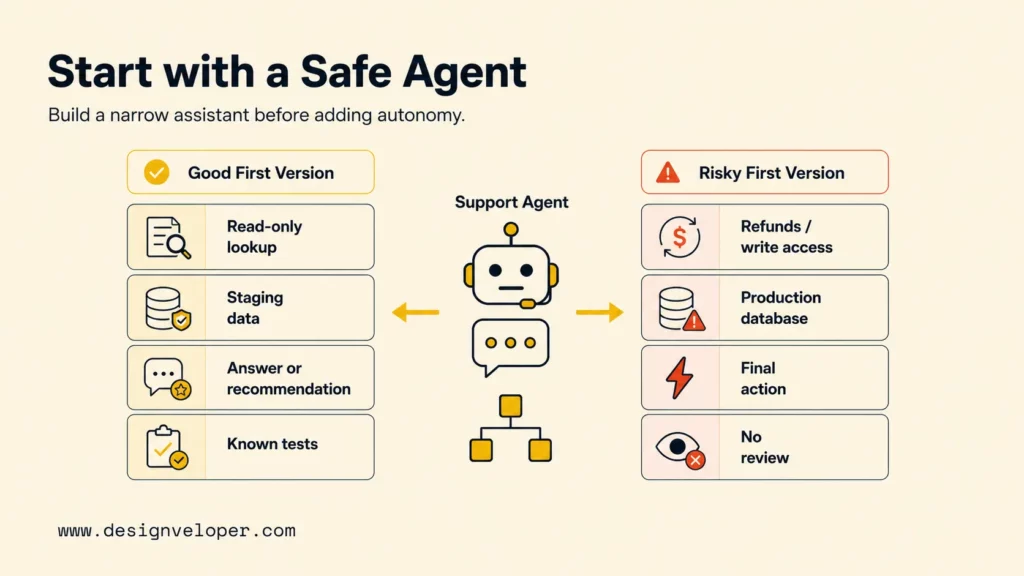
An order-status assistant may need to read private records, but the first version can stay small: choose one task, a tool-capable model, and a read-only lookup. To build AI agents with LangChain, use the current create_agent API to connect the model and tools. This tutorial walks through that Python example, then adds optional thread state, human review, and tests. It also shows when a fixed chain or custom LangGraph workflow is a better fit.
What Does a LangChain Agent Do?
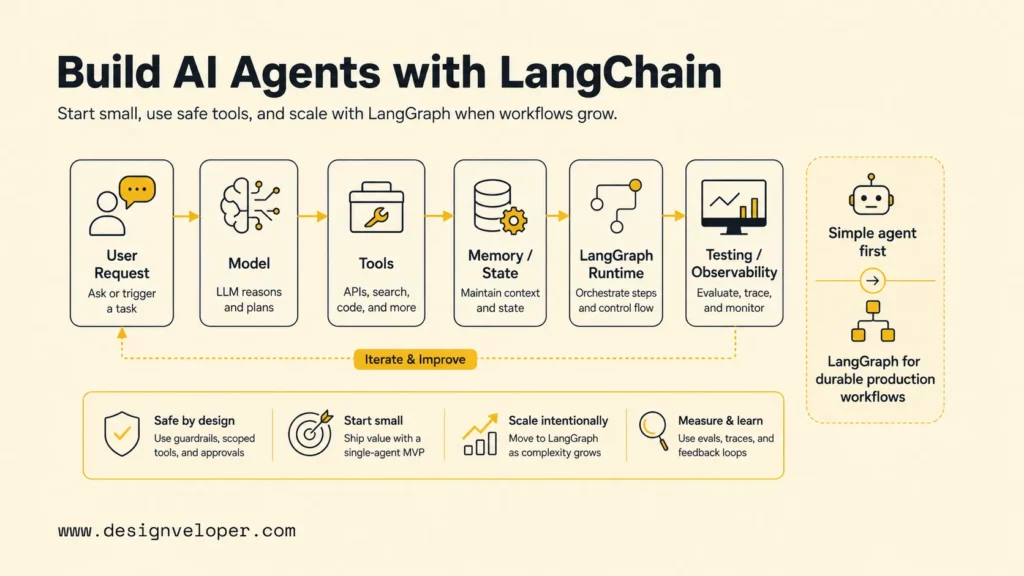
A LangChain agent uses a chat model to decide whether a request needs a tool, runs an allowed tool, and uses the result to continue or answer. The LangChain framework provides common interfaces for models, tools, prompts, and agent execution; it does not supply your business rules or grant access to your systems.
For example, a customer asks, “Where is order ORD-1042?” The model can select an order-lookup tool, but Python code performs the lookup. The application supplies the signed-in customer identity, checks ownership, and returns only the approved status fields. The model then turns that result into a reply. A prompt can guide the reply, but it is not an access-control check.
The loop helps when the next step depends on the request or a tool result. A fixed sequence is often easier to maintain as a chain or ordinary code. Retrieval-augmented generation (RAG) fetches relevant documents; an agent may call a RAG tool, but the patterns serve different roles. This agent architecture and workflow overview can help map the model’s decision separately from tool execution.
Xem thêm:
- AI Agent Architecture Diagrams: Components, Patterns, and Design Steps
- AI Agent Orchestration: How Multi-Agent Workflows Work In Practice
- Best AI Agent Frameworks For Building Smarter AI Systems
What You Need Before Building
A first LangChain agent needs a supported Python environment, a chat model that can call tools, the matching provider integration, and a narrowly scoped task. You do not need a vector database, several agents, or persistent memory to test a read-only lookup.
- Python and a virtual environment: use a Python release supported by the current LangChain and provider packages, and keep this project’s dependencies isolated.
- A model provider: choose a model with tool-calling support. The code below uses LangChain’s OpenAI provider string; another supported provider needs its own integration package and model identifier.
- Credentials outside source control: store API keys in environment variables or a secrets manager. Do not place a key in the script, repository, prompt, or trace metadata.
- A testable data source: start with a small fixture or a read-only service endpoint. Decide which fields the agent needs and how user access will be checked.
Install the core package and the selected provider integration in a virtual environment. Package versions and model identifiers change, so use the current provider instructions when setting up a new project rather than copying a pinned version from an older tutorial.
python -m venv .venv
source .venv/bin/activate
python -m pip install -U langchain langchain-openai

export OPENAI_API_KEY="your-key"
export LANGCHAIN_MODEL="openai:gpt-5.5"
The model identifier matches the current LangChain agent documentation. Replace it with a tool-capable model enabled for your account. On Windows, use the activation command for your shell; keep the API key in the environment or a secrets manager.
Build AI Agents With LangChain Step by Step
Build the agent in a short sequence: confirm model access, define a tool with a clear contract, pass trusted user context from the application, and inspect the returned messages. The example uses a local order fixture, so it demonstrates the control flow without contacting a real customer system.
Step 1: Define the task and model
Keep the first task narrow enough to judge as correct or incorrect. This example answers order-status questions only. It does not change an address, issue a refund, send an email, or write to a database. A small tool surface also makes it easier to decide whether the agent chose the right operation.
Choose a model that supports tool calling through its provider integration. Keep its name in configuration, not in the tool function; a prompt cannot add a missing model capability.
Step 2: Define a tool with an authorization check
Define the tool as a Python function with a precise name, typed input, and useful docstring. The example receives the customer identity through LangChain’s runtime context; the model does not receive that injected value as a tool argument. In a web app, the backend should build this context from the authenticated session, not from text supplied by the user or generated by the model.
import os
from dataclasses import dataclass

from langchain.agents import create_agent
from langchain.tools import ToolRuntime, tool


@dataclass
class RequestContext:
    customer_id: str


# Fixture data for this tutorial only.
ORDERS = {
    "ORD-1042": {
        "customer_id": "cust-17",
        "status": "in transit",
        "estimated_delivery": "2026-10-18",
    }
}


def get_order_for_customer(order_id: str, customer_id: str):
    order = ORDERS.get(order_id)
    if order is None or order["customer_id"] != customer_id:
        return None
    return {
        "status": order["status"],
        "estimated_delivery": order["estimated_delivery"],
    }


@tool
def lookup_order(order_id: str, runtime: ToolRuntime) -> str:
    """Return the status of an order owned by the signed-in customer."""
    order = get_order_for_customer(
        order_id=order_id,
        customer_id=runtime.context.customer_id,
    )
    if order is None:
        return "No order is available for this account."
    return (
        f"Status: {order['status']}. "
        f"Estimated delivery: {order['estimated_delivery']}."
    )


agent = create_agent(
    model=os.environ["LANGCHAIN_MODEL"],
    tools=[lookup_order],
    system_prompt=(
        "You answer order-status questions using lookup_order. "
        "Do not guess missing status or delivery information. "
        "You cannot change orders, issue refunds, or send messages. "
        "If the tool cannot find an order, say that it is unavailable."
    ),
    context_schema=RequestContext,
)

result = agent.invoke(
    {"messages": [{"role": "user", "content": "Where is order ORD-1042?"}]},
    context=RequestContext(customer_id="cust-17"),
)

print(result["messages"][-1].content)
For this fixture, a successful tool call returns the order status and the example delivery date. Calling the helper for the same order as another customer returns no record, and the tool sends the same generic response used for an unknown order. The fixture date is sample data, not a delivery promise.
Replace the dictionary with a repository method that filters by order ID and authenticated customer ID. Keep the check in the data-access layer; never let the model choose a customer ID, SQL predicate, or permission scope.
LangChain’s tools documentation explains how tools receive runtime state and context without exposing injected runtime fields as model arguments. Add prompt instructions for clear responses, but keep authorization and validation deterministic.
Step 3: Create the agent with the current API
create_agent accepts the model, tools, a system prompt, and an optional context schema. It assembles the loop that lets a model call a tool and then respond to the tool result. A concise prompt should state the task, the available tool, what to do when data is missing, and which actions are outside scope.
The application must derive runtime identity from its own session or identity layer. A CLI demo may use a fixture ID; a production endpoint must not trust a customer ID copied from the request.
Use the current LangChain agents documentation as the reference for model, tool, prompt, and middleware arguments. Older examples may use legacy agent constructors; check imports and signatures against the current package documentation before adapting them.
Step 4: Run one request and inspect the result
Read the last message as the answer, then try the known order with cust-99 and confirm that the tool reveals no record. During debugging, inspect the tool name, arguments, result, and errors. Avoid logging hidden reasoning or raw personal data.
How to Keep Conversation State Between Calls
A LangChain agent does not need persistent memory for every task. Add short-term state when a user’s follow-up depends on an earlier turn, such as “What about the other order?” LangChain agents can use a checkpointer and a thread ID to save conversation state; you do not need to leave create_agent just to add this form of persistence.
For a local prototype, add an in-memory checkpointer and pass the same thread ID to each call for that conversation:
from langgraph.checkpoint.memory import InMemorySaver

agent = create_agent(
    model=os.environ["LANGCHAIN_MODEL"],
    tools=[lookup_order],
    system_prompt="Answer order-status questions using lookup_order.",
    context_schema=RequestContext,
    checkpointer=InMemorySaver(),
)

thread_config = {"configurable": {"thread_id": "support-demo-17"}}
result = agent.invoke(
    {"messages": [{"role": "user", "content": "Where is order ORD-1042?"}]},
    config=thread_config,
    context=RequestContext(customer_id="cust-17"),
)
InMemorySaver is useful for a short local test, but it does not provide durable storage across process restarts. Use a persistent checkpointer for a deployed workflow, protect saved state as customer data, and define retention and deletion rules. LangChain’s short-term memory guide covers thread-scoped state and checkpointers.
Thread history is not long-term memory. Information shared across conversations needs a separate store and its own consent, access, update, and deletion rules. Do not place secrets in chat history just because a checkpointer is available.
Protect Tool Access and Gate Sensitive Actions
Tool access defines what the agent can do, so permission checks belong at the tool and service boundary. Give each tool only the data and operations required for the task; a read-only lookup is a safer first step than a tool that can update customer records or move money.
Use these controls before adding tools with side effects:
- Authenticate outside the model: derive the user identity from the application’s session, then pass it as trusted runtime context.
- Authorize every request: check ownership and role permissions inside the service or repository that reads or changes data.
- Validate inputs and outputs: reject malformed identifiers, restrict returned fields, and return a controlled error when a dependency fails.
- Require approval for consequential actions: pause before refunds, account changes, external messages, or destructive writes. The reviewer should see the exact operation and arguments.
- Limit and record execution: set application-level timeouts and retry limits, correlate tool calls with a request ID, and redact sensitive values from logs.
LangChain provides human-in-the-loop middleware that can pause configured tool calls and resume after a decision. Interrupts require checkpointing; a production workflow needs persistent state and an authenticated review path. Human approval supplements authorization rather than replacing it: the service must still reject an action the reviewer or user is not allowed to perform. See the official human-in-the-loop guide for approval, edit, reject, and resume behavior.
Agent security controls should cover the system around the model, including identity, data access, tool scope, audit logs, and recovery. Prompt rules alone cannot prevent a caller from invoking an exposed endpoint or bypassing a missing server-side permission check.
Xem thêm:
- Enterprise AI Agents: Use Cases, Platforms, And Safe Deployment
- How To Build A RAG Chatbot: Steps, Code & Best Practices
- LangChain Vs MCP: What’s The Difference And When To Use Each?
Test the Agent With Explicit Expected Outcomes
Test the full path from request to tool result, not only whether the final answer sounds clear. A test case should identify the input, the expected tool call or denial, the expected data boundary, and the owner of the check. The current code demonstrates the fixture and ownership check; the external timeout and approval cases below are proposed tests, not behaviors executed by that sample.
| Test case | Setup or input | Expected outcome | Where to enforce |
|---|---|---|---|
| Authorized order | Ask for ORD-1042 as cust-17. | The tool returns the fixture status and date; the answer contains no extra order details. | Fixture and tool output. This path is represented in the code. |
| Cross-account request | Ask for the same order as cust-99. | Return the generic unavailable response; reveal no record fields. | Deterministic ownership helper and service query. Add an assertion for both allowed and denied identities. |
| Missing order | Use an unknown order ID. | Return the same safe response as an inaccessible order. | Tool and data-access layer. |
| Service timeout | Mock the repository to raise a timeout. | Stop or retry within a set limit, then explain that lookup is unavailable; do not invent a status. | Proposed integration test. The tutorial’s local fixture does not simulate a network timeout. |
| Refund request | Ask the order agent to issue a refund. | No refund executes because no refund tool is registered; route the user to the approved process. | Tool allowlist. A later refund tool needs server-side checks and a human approval gate. |
For deterministic checks, test the authorization helper directly for a known owner and a different customer. Then run agent-level cases that verify the selected tool, its arguments, and the final answer. Keep expected tool calls and reference answers in a small evaluation dataset; a starter set of 20–30 labelled prompts can cover normal requests, missing details, denied access, ambiguous questions, timeouts, and requests outside scope. That is a team-selected starting size, not a LangChain requirement or a benchmark.
Set release rules before a pilot. For example, block release on any unauthorized data return, define acceptable latency and cost from your own baseline, and require human review for every consequential operation. Track the metric, owner, review period, and pass/fail decision; do not treat one successful demo run as evidence of production reliability.
LangSmith supports offline datasets, unit and regression checks, and online evaluation of production traces. Its evaluation types guide distinguishes pre-deployment tests from production monitoring. Whichever tools you use, keep representative failures in the test set and re-run them after changing the model, prompt, tools, or permission rules.
Choose Between a Chain, a LangChain Agent, and LangGraph
Choose the simplest pattern that gives you the control your workflow needs. An agent is useful when a model must choose among allowed tools; it is unnecessary when application code already knows the exact next step.
| Pattern | Who chooses the next step? | Use it when | Main boundary |
|---|---|---|---|
| Chain or fixed application flow | Your code | The steps are known and should run in the same order. | Less flexible when the model must select a tool from several valid options. |
LangChain create_agent |
The model selects from the tools you expose; the application executes them. | A bounded task needs a standard model-and-tool loop. | The model’s choice is not a permission grant; validate each tool call. |
| Custom LangGraph workflow | Explicit graph nodes and routing rules, with model decisions where needed. | You need a custom state machine, explicit branching, durable pauses, or a larger workflow that combines fixed steps and agents. | More control also means more graph logic to design, test, and operate. |
| RAG retrieval | The retriever returns relevant source material. | An answer must use approved documents or indexed knowledge. | Retrieval alone does not decide whether to take an external action; an agent can call retrieval as one tool. |
Short-term state or a checkpointer is not, by itself, a reason to replace create_agent with a hand-built graph. Start with the high-level agent and move to explicit graph orchestration only when the workflow needs that additional control. RAG can complement either pattern; for example, a support agent can search an approved policy collection before drafting an answer. A LangChain RAG agent still needs source filtering and access checks that match the user’s permissions.
Where LangChain Agents Fit in Real Workflows
LangChain agents fit tasks where a model can safely choose among a small set of useful tools, while the surrounding application owns data access and high-impact decisions. Two examples show how to keep that boundary clear.
- Example 1: Internal policy assistant. An employee asks whether a travel expense meets policy. The agent searches only the policy documents that employee may read, returns the relevant passage and source, and explains when the text does not answer the question. The system should avoid approving or rejecting an expense unless a separate, authorized workflow performs that decision.
- Example 2: IT service-desk triage. An employee reports that a VPN client fails after a laptop update. The agent collects the operating system and error code, searches approved troubleshooting steps, and drafts a ticket with the relevant details. A support technician reviews the ticket before an account reset or permission change; the model cannot grant itself administrator access.
For each workflow, list its input, approved tools, protected data, failure path, and actions that need a person. Keep fixed paths in application code; add an agent only where model-based tool selection has a testable benefit.
FAQs About Building AI Agents With LangChain
These follow-up answers cover provider choice, memory, and the boundary between model behavior and application permissions.
Can I build a LangChain agent without OpenAI?
Yes. LangChain supports integrations for multiple model providers and local-model setups. Install the package for the provider you choose, use its supported model identifier, and confirm that the model can make the tool calls your agent needs.
Does a LangChain agent automatically keep memory?
No. To keep thread-level conversation state between calls, configure a checkpointer and reuse the same thread ID. An in-memory checkpointer is for local testing; deployed systems need a persistent backend and a clear data-retention policy.
Does the model decide whether a user is allowed to access a tool?
No. The model may select an exposed tool, but the application must authenticate the user and authorize the requested data or operation. Enforce those rules in the tool or the underlying service, then test that denied calls return no protected data.
Build the first version around one task, scoped tools, and tests with explicit expected outcomes. Planning an agent for private data or business systems? Contact us about the integration, access rules, and evaluation plan through our AI development services.
Also published on

Share post on










Related Articles


Is Vibe Coding Legal? Ownership, Copyright, and Release Risks
Is Vibe Coding Legal? Ownership, Copyright, and Release Risks Published October 16, 2026
How Will AI Affect Software Development? Complete Guide
How Will AI Affect Software Development? Complete Guide Published October 16, 2026
How to Build AI Agents with LangChain: A Practical Python Guide
How to Build AI Agents with LangChain: A Practical Python Guide Published October 16, 2026


















