
















What Is The Model Context Protocol (MCP)? How Does It Work?

KEY TAKEAWAYS:
- MCP is a connection standard for AI applications, helping assistants access tools, data sources, prompts, and workflows through a consistent client-server interface.
- MCP separates model reasoning from system access, so teams can design clearer boundaries around what an assistant can read or do.
- MCP servers expose focused capabilities such as tools, resources, prompts, schemas, authentication rules, and permission checks.
- MCP and RAG solve different problems: RAG retrieves useful knowledge, while MCP standardizes how an AI app connects to tools and external systems.
- Production MCP adoption still needs security design, including least privilege, validation, logging, approval flows, and monitoring.
What is MCP? The Model Context Protocol (MCP) is an open standard that lets AI applications connect to external tools, data sources, and workflows through a consistent client-server interface. MCP matters because modern AI assistants need more than a prompt and a model. Useful assistants often need live files, APIs, databases, calendars, code repositories, customer systems, and permission-aware actions.
In practical terms, MCP gives AI products a reusable way to expose tools and context without rebuilding a separate custom integration for every model, every assistant, and every business system. Anthropic introduced MCP on November 25, 2024 as a standard for connecting AI assistants to systems where data lives, including content repositories, business tools, and development environments. Since then, MCP has become a core part of the agentic AI stack because it helps teams separate model reasoning from external system access.
This guide explains what MCP means in AI, how MCP clients and servers work, what an MCP server does, where MCP helps AI products, and when MCP solves a different problem than retrieval-augmented generation (RAG). It also includes a simple Python tutorial path and a production-focused view for teams building real AI assistants.
What Is MCP In AI?
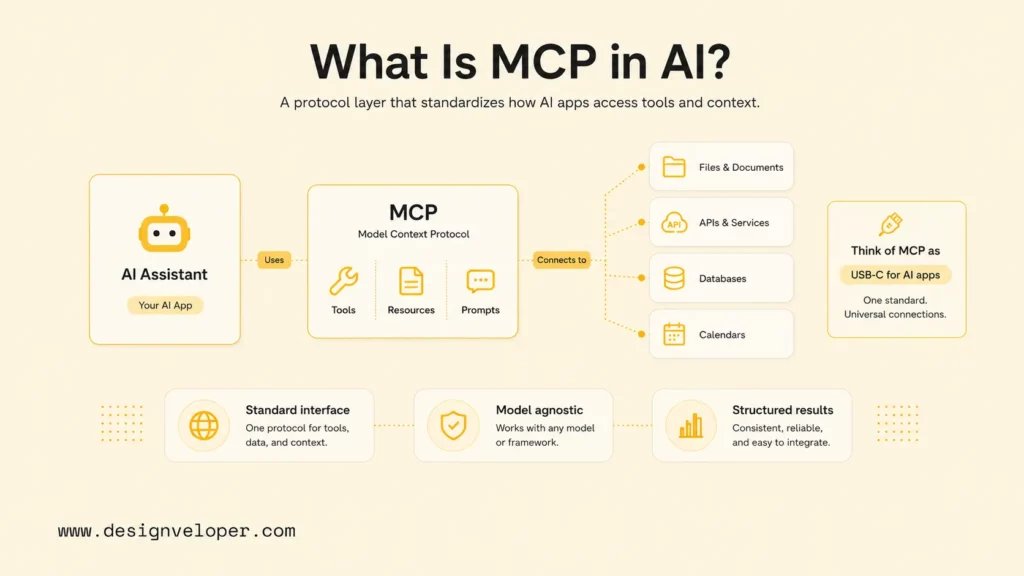
MCP in AI is a protocol layer that standardizes how an AI application asks external systems for context or actions. The AI model can reason about a user’s request, while MCP defines how the surrounding application discovers tools, requests resources, calls server capabilities, and receives structured results.
Google Cloud describes MCP as an open standard that provides a secure and standardized language for LLMs to communicate with external data, applications, and services. That definition is useful because MCP is not a model and not a chatbot. MCP is the connection standard around the model.
The easiest analogy is USB-C for AI tools. USB-C does not decide what a laptop should do. USB-C gives devices a predictable way to connect. MCP has a similar role for AI applications: the host application can connect to many MCP servers, and each server exposes a focused set of tools, resources, or prompts.
The key distinction is that MCP does not make an AI system autonomous by itself. An agent may decide what step to take next, which is why teams should separate the role of an AI agent vs AI assistant from the protocol layer that connects tools. An MCP server provides the safe interface that lets the agent read context or invoke an external capability. A strong AI product usually needs both: good reasoning in the assistant and good boundaries in the integration layer.
See more:
- Conversational AI Vs Chatbot
- AI Chatbot Development: When a Custom Build Makes More Sense
- What Is Artificial Intelligence?
Why Modern AI Applications Need MCP
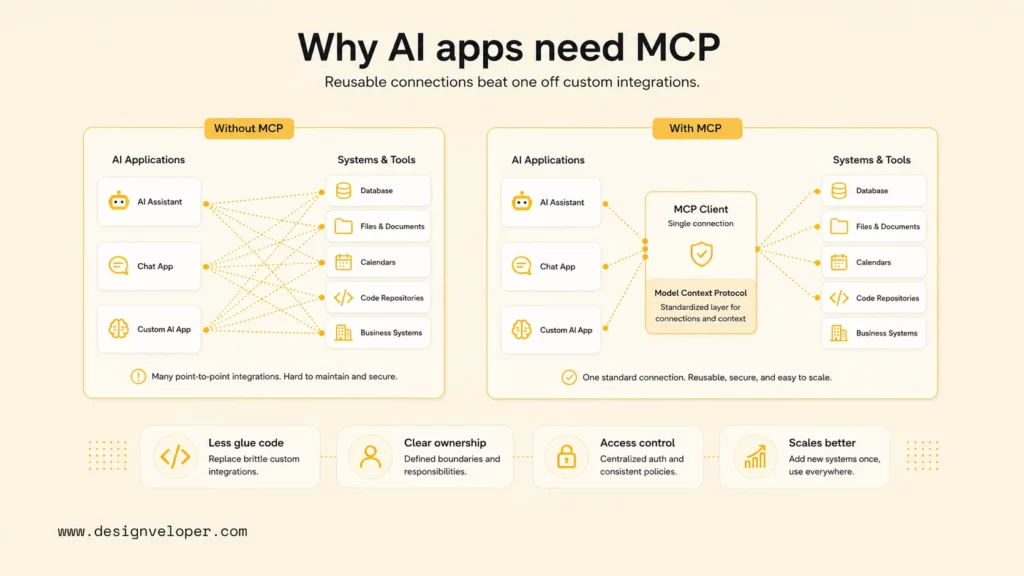
Modern AI applications need MCP because useful assistants often depend on live business context and external actions. A model trained months ago cannot know the current state of a company’s support queue, project backlog, finance records, customer profile, product inventory, deployment logs, or internal policy documents unless the application connects the model to those systems.
Without MCP, teams usually build custom integrations for every pair of AI client and external system. One assistant may need a GitHub integration. Another may need a Slack integration. A third may need the same data but from a different chat interface or IDE. That point-to-point pattern creates repeated glue code, duplicated permission logic, uneven audit trails, and inconsistent tool descriptions, especially in AI chatbot integration work.
MCP gives teams a more reusable pattern. A server can expose a capability once, and multiple MCP-compatible clients can use that capability. The official MCP architecture describes a host creating clients that connect to servers, with servers exposing resources, tools, and prompts as protocol primitives. That structure helps teams design integrations with clearer ownership.
MCP also matters for governance. When business systems are exposed through a protocol boundary, teams can review what each server provides, what permissions it needs, what data it can see, and what actions it can perform. Cisco frames MCP as a shift from prompt-centric integration to a protocol-centric architecture, where the model focuses on reasoning and the protocol handles secure task execution.
- AI assistants often need access to files, APIs, databases, calendars, repositories, and business tools.
- Custom integrations become expensive when each tool and each AI client needs separate wiring.
- MCP makes connections more reusable, maintainable, inspectable, and scalable.
See more:
- Best Chatbot Platforms for Teams That Need More Than a Website Widget
- How To Build Agentic AI Around Real Workflow Logic
- Best AI Chatbot Options to Consider by Business Need
How MCP Works
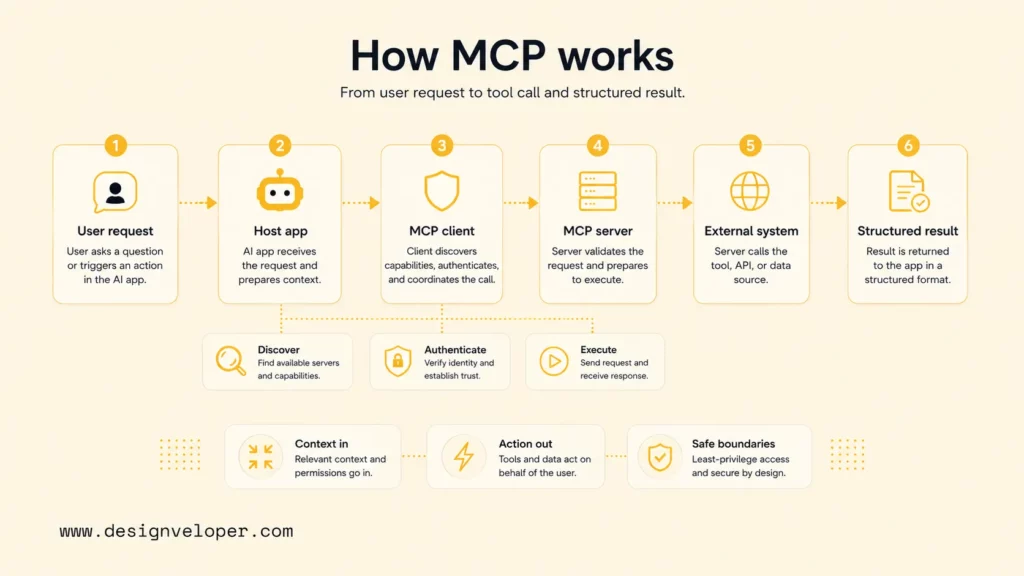
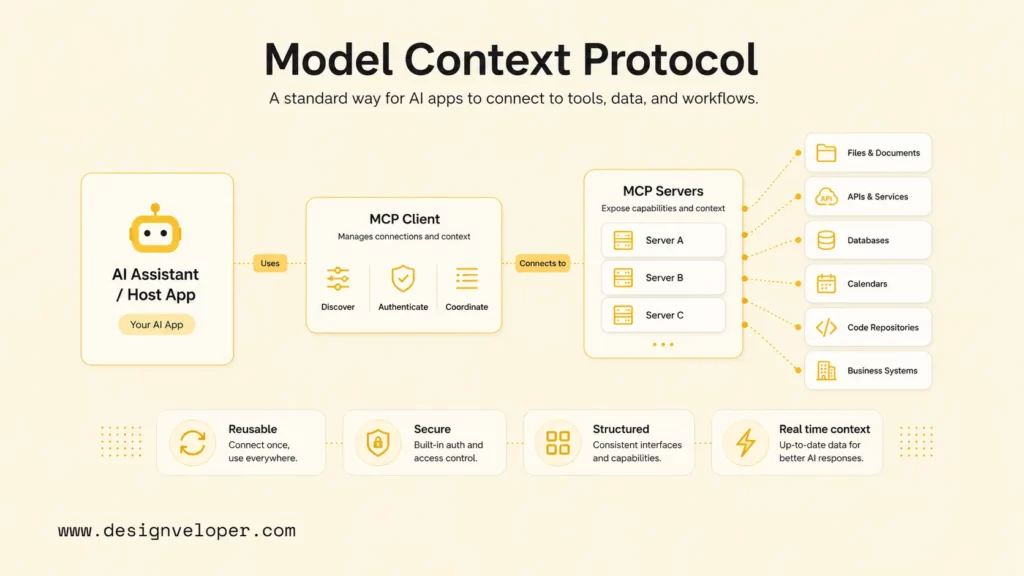
MCP works through a host, one or more clients, and one or more servers. The host is the AI application the user interacts with. The client is the connection component inside the host. The server exposes tools, resources, prompts, or other capabilities from an external system.
The official specification describes MCP as a client-host-server architecture where each host can run multiple client instances, and each client maintains a one-to-one relationship with a particular server. This separation is important because it prevents one giant integration from having uncontrolled access to everything.
MCP Clients
An MCP client lives inside the host application and manages a connection to one MCP server. The client handles protocol negotiation, routes messages, and maintains the session with that server. If an AI application connects to five MCP servers, the host usually manages five client connections.
The client is not the user-facing product by itself. The client is the communication layer that lets the host application ask a server what tools or resources are available, send tool-call requests, receive results, and surface those results back to the model or application flow.
MCP Servers
An MCP server exposes a focused set of external capabilities. A server might expose files from a local folder, issues from GitHub, rows from a database, events from a calendar, documents from Google Drive, or actions from an internal business system.
The server should be narrow and intentional. A good MCP server does not simply hand an AI model broad access to a system. A good MCP server defines specific tools, resources, prompts, input schemas, output formats, permission checks, and error behavior.
The official MCP SDK page lists Python, TypeScript, C#, and Go as Tier 1 SDKs, and notes that SDKs support creating servers that expose tools, resources, and prompts, plus clients that connect to MCP servers. That SDK ecosystem is one reason MCP is easier to adopt than a custom protocol.
The Client-Server Connection Model
The MCP client-server connection model keeps responsibilities separated. The host coordinates the AI experience. The client manages the protocol connection. The server owns the external capability. The external system remains behind the server rather than being directly exposed to the model.
This model also supports capability negotiation. During initialization, clients and servers declare supported capabilities, such as tool support, resource subscriptions, prompt templates, sampling support, or notification handling. Capability negotiation lets the application understand what is available before it tries to use it.
How Context And Tool Requests Move Through The System
A typical MCP flow starts with a user request. The host application decides that the model needs outside context or an external action. The host uses an MCP client to contact a relevant server. The server returns available resources, tool results, or prompt content. The host then gives the model the result, asks the model to continue, or asks the user for confirmation.
For example, a developer asks an AI coding assistant to summarize recent errors. The host may connect to a repository server, a log server, and an issue tracker server. The model reasons about which data matters, while MCP provides the structured path for requesting that data. If the assistant wants to create a ticket, the tool call should pass through permission checks and confirmation rules before anything changes.
What Is An MCP Server?
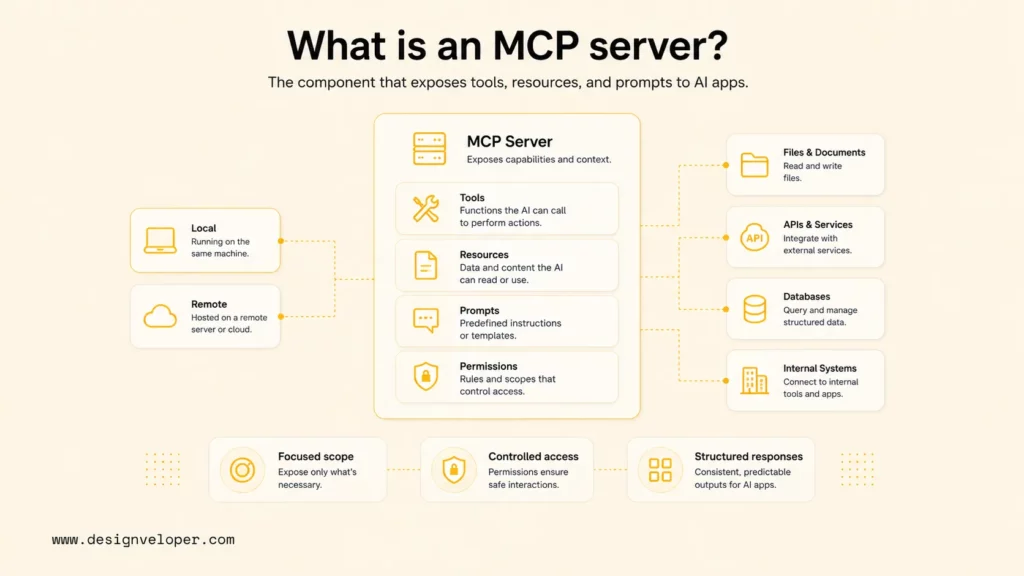
An MCP server is the component that exposes a tool, resource, prompt, or data source to an MCP-compatible AI application. The server translates an external system into a protocol interface the host can inspect and use.
A server can be local or remote. A local server might expose a filesystem or a development tool on a user’s machine. A remote server might expose a SaaS application, cloud database, internal API, or enterprise knowledge system. In both cases, the server should define exactly what the AI application can do.
An MCP server usually includes:
- Tools: callable functions that perform actions or compute results, such as searching tickets, creating a task, or fetching a weather forecast.
- Resources: data objects the client can read, such as documents, records, files, logs, or structured content.
- Prompts: reusable prompt templates or interaction patterns exposed by the server.
- Authentication and authorization: controls that verify who can access the server and which actions are allowed.
- Input and output schemas: definitions that help the model and host understand what the server expects and returns.
The official Python SDK documentation shows FastMCP examples with typed tools and structured results, including validation through Pydantic models and authentication through token-verifier patterns. Those implementation details matter because production MCP servers need predictable contracts, not only working demos.
What MCP Makes Possible For AI Products
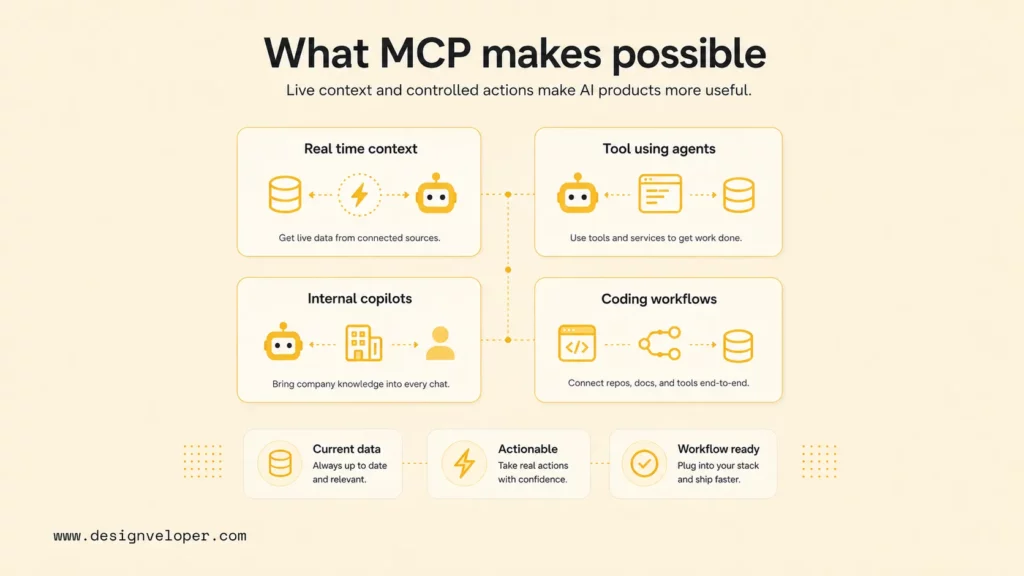
MCP makes AI products more useful by letting assistants work with live context and controlled external actions. The protocol does not replace product design, security design, or workflow ownership, but it gives developers a clearer integration layer.
AI Assistants With Real-Time Context
AI assistants can use MCP to retrieve current context from calendars, documents, tickets, repositories, support systems, or databases. Real-time context helps the assistant answer with the current state of the business rather than relying only on training data or pasted text.
This is important for operations. A sales assistant needs current CRM data. A support assistant needs the latest ticket history. A project assistant needs current task status. MCP gives these assistants a repeatable way to ask the right system for the right context.
AI Agents That Can Use Tools And Take Actions
AI agents can use MCP tools to do work beyond producing text. An agent may search an internal knowledge base, create a pull request, update a ticket, generate a report, or notify a team. The agent decides why and when to use a tool, while MCP defines how the tool is exposed.
Tool use should be treated as a controlled execution path. Every write-capable MCP tool should have clear input validation, permission boundaries, logging, and human approval where risk is high. The protocol makes tool access more structured, but teams still need to design safe workflows.
Internal Copilots Connected To Business Systems
Internal copilots become more useful when they connect to company systems. A finance copilot may read invoices and policies. An HR copilot may answer employee questions. An engineering copilot may inspect logs and repositories. A customer-success copilot may summarize account history.
MCP helps these copilots avoid a brittle “paste everything into the prompt” workflow. Instead, the copilot can discover available tools and resources through MCP servers and request only the context needed for the task.
Coding Assistants And Workflow Automation
Coding assistants are one of the clearest MCP use cases because developers already work across repositories, terminals, issue trackers, package docs, logs, and deployment systems. Anthropic’s launch post listed prebuilt MCP servers for systems such as Google Drive, Slack, GitHub, Git, Postgres, and Puppeteer, which shows the early developer-tooling direction of the ecosystem.
Workflow automation can use the same pattern. A support workflow, QA workflow, or marketing operations workflow can expose approved tools through MCP servers while keeping sensitive systems behind controlled interfaces.
See more:
- AI Agent Orchestration: Coordinating Systems Safely
- Document Intelligence: What It Solves in Real Product Workflows
Model Context Protocol Use Cases
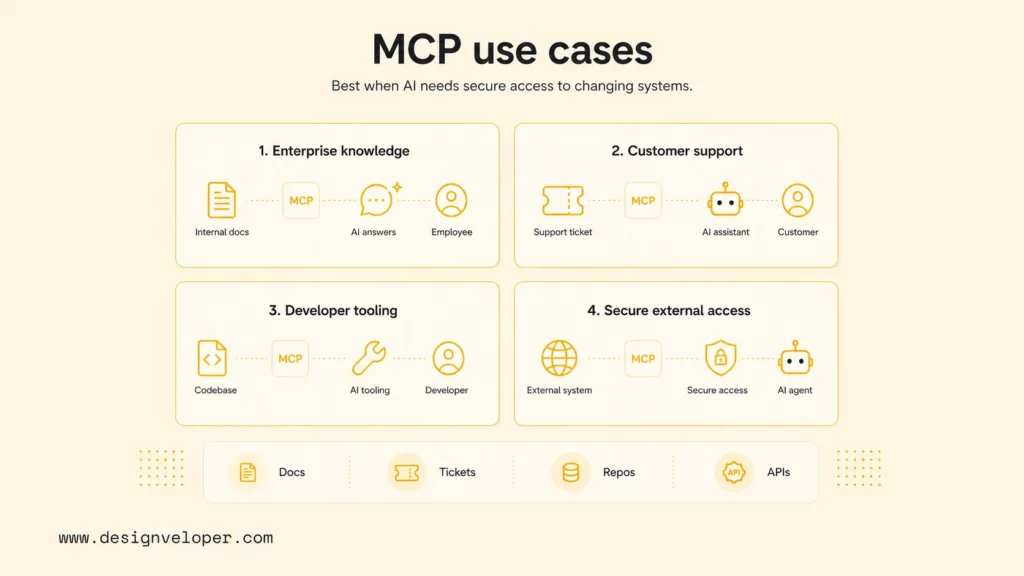
Model Context Protocol use cases are strongest when an AI product needs secure, reusable access to external context or actions. MCP is less useful for a static chatbot that only answers from a fixed prompt, but it becomes valuable when the assistant must work with changing systems.
Enterprise Assistants Connected To Internal Knowledge
Enterprise assistants can use MCP servers to connect to document repositories, knowledge bases, calendars, project tools, and internal APIs. The assistant can retrieve current policy details, project status, customer records, or operational documents without requiring a user to paste information manually.
The architecture should still enforce least privilege. A finance assistant should not automatically see HR records. A sales assistant should not receive admin-level database access. MCP helps expose narrow capabilities, but access design remains a product and security responsibility.
Customer Support And Workflow Automation
Customer support teams can use MCP-connected assistants to retrieve order status, summarize account history, suggest policy-based responses, or create escalation tickets. The assistant becomes more useful when it can read the right systems and take approved workflow actions.
The strongest support workflows keep humans in control for sensitive cases. Refunds, account closures, legal questions, health-related issues, or angry customer escalations should usually pass through human review before the assistant takes action.
Coding And Developer Tooling
Developer tools can use MCP to expose repositories, documentation, databases, logs, local files, package metadata, test commands, and deployment information. A coding assistant can use those capabilities to understand a codebase, propose changes, or explain a failure.
Security boundaries are especially important in developer tooling. A server that can read files is different from a server that can write files, run shell commands, or deploy code. MCP server design should separate read-only inspection from write-capable execution.
AI Applications That Need Secure Access To External Systems
AI applications in finance, healthcare, education, legal operations, and enterprise software often need secure access to external systems. MCP can help standardize the connection layer, but regulated or sensitive workflows still need authentication, authorization, audit logs, data minimization, and human oversight.
Recent security discussion around MCP has reinforced a practical point: protocol adoption does not remove security engineering. Teams should review MCP server permissions, dependency risk, remote access, secrets handling, and tool descriptions before connecting servers to production assistants.
MCP Vs Other Ways Of Extending AI Systems
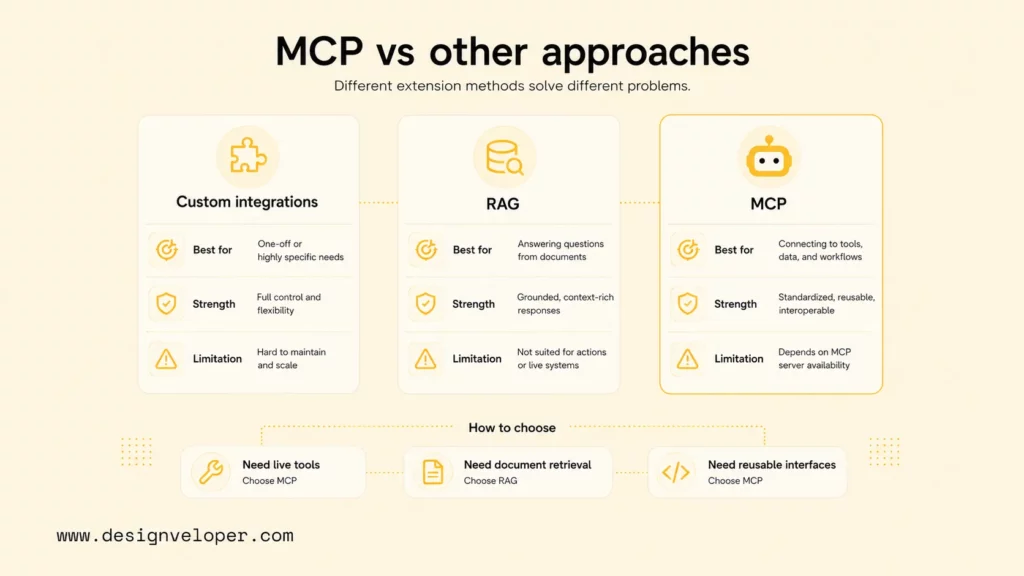
MCP is one way to extend AI systems, but it should be compared with custom integrations, RAG, native function calling, plugins, and internal workflow APIs. The right choice depends on whether the team needs reusable protocol-based access or a narrower application-specific integration.
MCP Vs Custom Tool Integrations
Custom tool integrations are often faster for one narrow prototype. A developer can write one function call for one chatbot and one API. That approach is fine when the system is small and unlikely to be reused.
MCP becomes more attractive when the same external capability should work across several AI clients, models, or workflows. A reusable MCP server can define the tool contract once, then serve different MCP-compatible hosts. The tradeoff is that the team must design, deploy, secure, and maintain the server as its own integration component.
MCP Vs RAG
RAG retrieves information and gives the model relevant context for an answer. MCP connects an AI application to tools, resources, prompts, and external systems. The two approaches often work together, but they solve different problems.
A RAG pipeline may retrieve policy documents from a vector database. An MCP server may expose that retrieval capability to an AI assistant. RAG answers “which knowledge should the model see?” MCP answers “how does the AI application connect to this capability in a standard way?”
When MCP Solves A Different Problem Than Retrieval Alone
MCP solves a different problem than retrieval alone when the AI application needs action, tool discovery, structured input, server-side permissions, or reusable integrations. Retrieval alone is usually read-oriented. MCP can expose both read-oriented resources and action-oriented tools.
For example, a support assistant may retrieve a return policy through RAG. MCP becomes useful when the same assistant must also check the order system, create an escalation ticket, update a customer record, or trigger a refund workflow after human approval.
How To Build An MCP Server
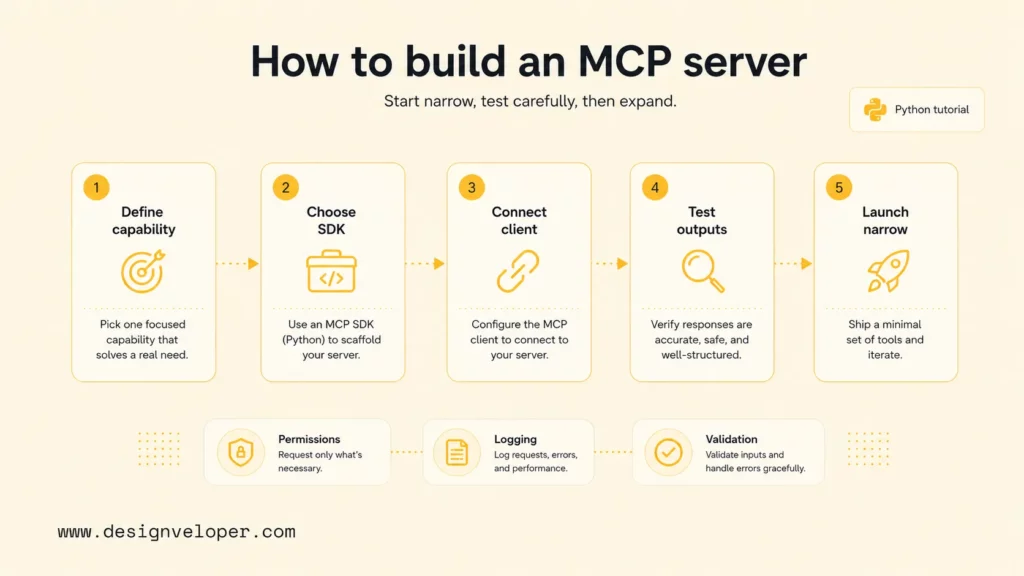
Building an MCP server starts with a narrow capability and a clear trust boundary. The server should expose one useful tool or data source first, then expand only after the interface is tested with a real client.
Define The Tool Or Data Source You Want To Expose
Start by defining the exact tool or data source. A good first server might expose “search approved product docs,” “list today’s support tickets,” “fetch a project status record,” or “calculate shipping options.” Avoid broad servers that expose an entire database or filesystem without constraints.
Write the expected inputs, output shape, error cases, permission requirements, and audit needs before writing code. This design step helps the model use the tool correctly and helps security reviewers understand the risk.
Choose A Language And SDK
Choose a language your team can maintain. The MCP ecosystem provides official SDKs across several languages, including Tier 1 SDKs for Python, TypeScript, C#, and Go. Python is a practical starting point for many AI teams because it fits existing LLM, data, and automation workflows.
FastMCP in the Python SDK is a useful starting abstraction because it lets developers define tools with decorators and type hints. The exact SDK matters less than the contract quality: clear names, narrow permissions, typed inputs, useful docstrings, and predictable outputs.
Connect The Server To An MCP Client
After the server exposes a tool or resource, connect the server to an MCP-compatible client such as a desktop assistant, IDE assistant, local inspector, or internal AI application. The client should be able to discover the server’s capabilities and call the tool with valid inputs.
Use a test client before integrating with production workflows. The test client helps confirm that the server starts reliably, the tool schema is understandable, the output format is stable, and error messages help the model recover.
Test Permissions, Requests, And Outputs
Testing should cover more than the happy path. Test invalid inputs, missing authentication, unauthorized actions, empty results, long-running requests, rate limits, and confusing tool names. The server should fail safely and explain what went wrong without leaking secrets.
Production tests should also inspect logs and traces. A team should know who invoked a tool, what input was used, what system was touched, what result was returned, and whether the user approved the action.
A Simple MCP Server Tutorial In Python
A simple MCP server tutorial in Python can start with FastMCP, one tool, and one resource. The goal is not to build a complete enterprise integration. The goal is to understand the server shape and the local testing loop.
The official MCP build-server documentation shows a Python path using the MCP SDK and FastMCP for a weather-style server. A simplified learning flow looks like this:
- Create a Python project with a package manager such as
uv. - Add the MCP CLI package and any client library the server needs.
- Create a
server.pyfile. - Initialize a
FastMCPserver with a clear name. - Add one
@mcp.tool()function with type hints and a useful docstring. - Add one
@mcp.resource()endpoint for read-only context if the example needs it. - Run the server locally and inspect available tools with an MCP client or inspector.
A minimal example can expose a safe read-only utility before moving to write-capable tools:
from mcp.server.fastmcp import FastMCP mcp = FastMCP("company-docs") @mcp.tool()def search_policy(query: str) -> str: """Search approved company policy snippets by keyword.""" return f"Search results for: {query}" @mcp.resource("company://handbook/overview")def handbook_overview() -> str: return "Approved employee handbook overview." if __name__ == "__main__": mcp.run(transport="stdio")That code is intentionally small. A production server would add real retrieval, authentication, structured outputs, error handling, logging, rate limits, and permission checks. The early tutorial should teach the server contract before it teaches complex automation.
What MCP Means For Real AI Product Development
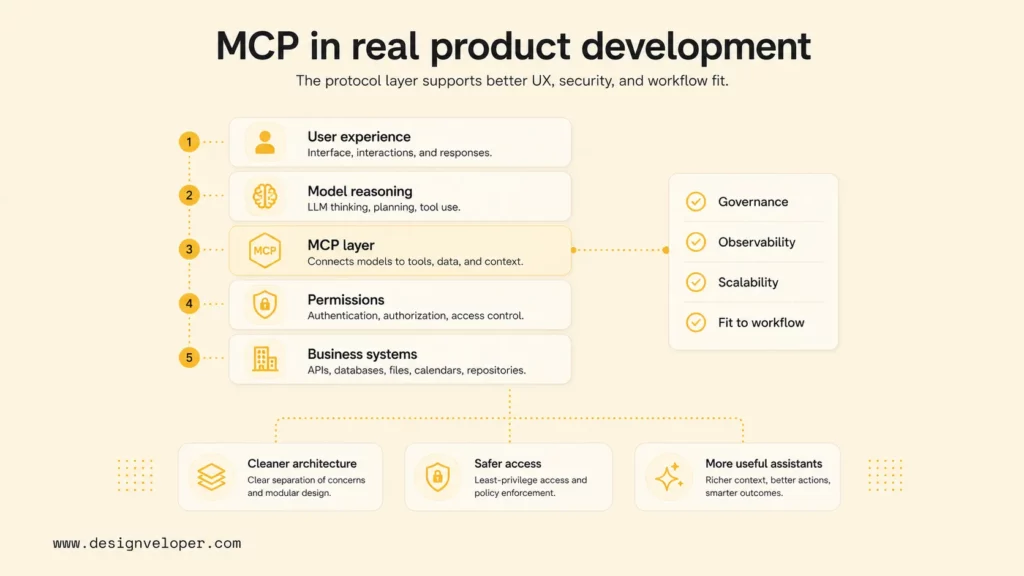
MCP matters for real AI product development because it helps teams design assistants and workflow-connected products with reusable, secure access to live context and external actions. The protocol gives engineering teams a cleaner way to separate user experience, model reasoning, tool exposure, permissions, and system integration.
The product lesson is simple: an AI assistant becomes more valuable when it can work inside the user’s real workflow. A finance assistant should understand finance context. A coding assistant should understand the repository. A support assistant should understand the customer record. MCP gives teams one standardized path for exposing that context to AI applications.
Designveloper’s public Song Nhi virtual assistant project is a useful proof point for assistant-style product thinking because the assistant helps users manage personal finance through conversational interactions. The public page should not be read as proof that MCP was used. The safer connection is that future enterprise AI agents with similar workflow needs can benefit from standards that expose context and actions through controlled interfaces.
For teams building AI products, MCP should be evaluated alongside product discovery, workflow mapping, security review, integration design, and post-launch monitoring. Designveloper’s public AI development services show the broader delivery context: AI software succeeds when model capability is paired with practical product engineering, UX, testing, maintenance, and integration work.
A production MCP strategy should include a short readiness checklist:
- Define which user role can access each MCP server.
- Separate read-only resources from write-capable tools.
- Use narrow tool names, typed inputs, and clear output schemas.
- Add authentication, authorization, logging, and secret management before production use.
- Require human approval for high-impact actions.
- Test server behavior with real prompts, invalid inputs, and tool failures.
- Monitor tool usage, errors, latency, and user outcomes after launch.
MCP is not a magic layer that makes every AI agent safe or useful. MCP is a practical connection standard. The business value comes from combining that standard with careful workflow design, permission boundaries, useful context, and continuous evaluation.
FAQs About MCP
How Does MCP Help AI Agents And Assistants?
MCP helps AI agents and assistants by giving them a standard way to access external tools, resources, prompts, and business systems. The agent can focus on interpreting the goal and deciding the next step, while MCP servers expose controlled capabilities for reading context or taking action.
Can You Build An MCP Server In Python?
Yes, teams can build an MCP server in Python with the official MCP Python SDK. FastMCP is a practical starting point because developers can define tools and resources with decorators, type hints, and docstrings. A production Python MCP server should also include authentication, structured outputs, validation, logging, and permission checks.
What Are The Most Common Model Context Protocol Use Cases?
The most common Model Context Protocol use cases include enterprise assistants connected to internal knowledge, coding assistants connected to repositories and developer tools, customer support workflows connected to tickets and customer data, and AI applications that need secure access to external systems. MCP is most valuable when the assistant needs live context, reusable tool access, or controlled workflow actions.
Also published on

Share post on










Related Articles


Top Agentic AI Companies: 18 Vendors By Product Layer And Fit
Top Agentic AI Companies: 18 Vendors By Product Layer And Fit Published October 07, 2026
Agentic AI Architecture: Components, Patterns, And Workflows
Agentic AI Architecture: Components, Patterns, And Workflows Published October 07, 2026
AI Advantages and Disadvantages for Businesses: 5 of Each Explained
AI Advantages and Disadvantages for Businesses: 5 of Each Explained Published October 05, 2026



















