
















Enterprise AI Agents: Use Cases, Platforms, And Safe Deployment

KEY TAKEAWAYS:
- Enterprise AI agents are governed systems that plan, use tools, access business data, and complete workflows under security, audit, and human-approval controls.
- The strongest implementations start with one high-value workflow, clear owners, data boundaries, escalation paths, and measurable success criteria before adding more autonomy.
- Architecture matters more than a single model choice: orchestration, permissions, retrieval, tool calling, monitoring, evaluation, and rollback controls determine whether agents are production-ready.
- Enterprise risks include hallucination, prompt injection, data leakage, tool misuse, runaway costs, and unclear accountability, so governance must be built into the workflow.
- A practical rollout moves from pilot to production through guardrails, testing, observability, human review, business KPIs, and continuous improvement.
A purchase request looks like a small task until supplier data conflicts with policy, an API times out, or an approval would commit company funds. Enterprise AI agents can gather context and draft the next step, but the business still owns permissions, exceptions, and the final commitment. The useful question is which bounded workflow deserves an agent and how the team proves it works before granting more authority. This article compares agents with fixed automation and chatbots, maps business use cases and platform selection, and follows a procurement pilot through denied access, human approval, failure recovery, and measurable outcomes.
Recommended for you:
- A Practical Guide To AI Agent Architecture With Diagrams
- AI Agent Pricing Framework: Cost Models, Hidden Fees, And ROI Tips
- How To Build And Use AI Business Process Automation Effectively
What Are Enterprise AI Agents?
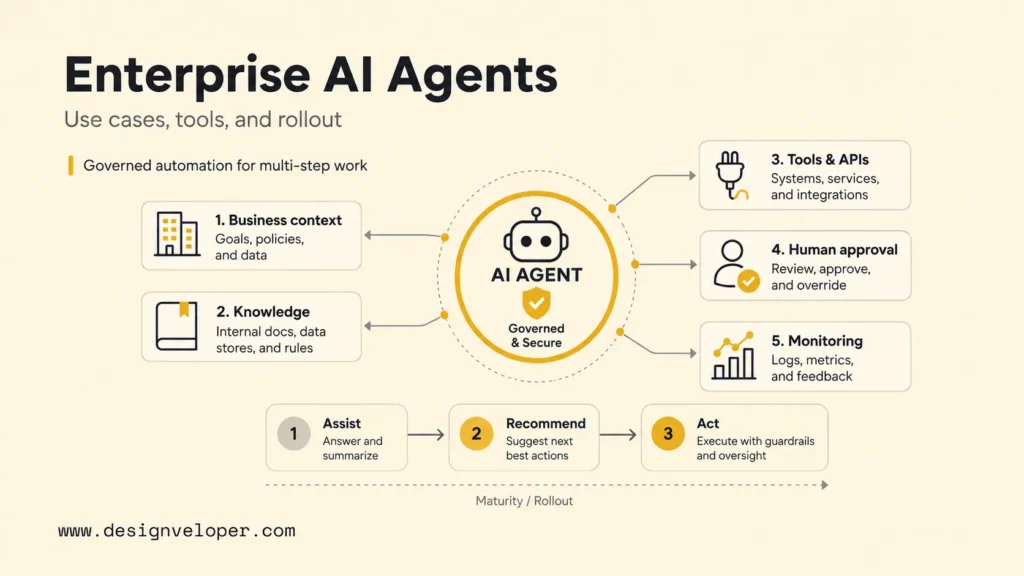
Enterprise AI agents are AI systems that can understand business context, plan bounded work, retrieve enterprise knowledge, call approved tools, and complete or support workflows under governance and human oversight. They combine a language model with instructions, knowledge sources, memory or session state, business applications, APIs, identity, policy controls, evaluation, and monitoring.
An agent becomes enterprise-ready because of the operating system around the model. The model may decide that a purchase request needs a budget check, supplier lookup, policy comparison, and manager approval. Identity controls determine what the requester and agent may see. Tool schemas constrain available actions. Business rules define limits. Logs preserve the sequence. A human approves the commitment. Monitoring detects failures and cost drift.
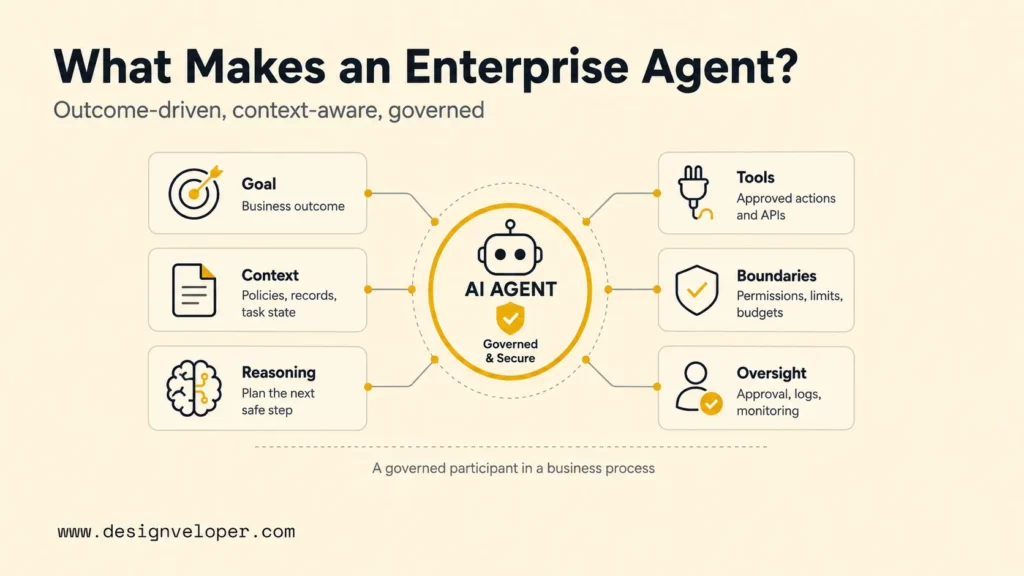
- Goal: a defined business outcome, not an open-ended instruction to be helpful.
- Context: policies, records, documents, conversations, and task state needed for the decision.
- Reasoning: decomposition of the request into steps and selection of the next safe action.
- Tools: narrow APIs for search, calculation, ticketing, messaging, updates, or transactions.
- Boundaries: permissions, budgets, data rules, rate limits, and prohibited actions.
- Oversight: approval, escalation, audit history, evaluation, monitoring, and incident ownership.
Enterprise agents can be conversational, event-driven, scheduled, or embedded inside an existing application. A support agent may interact with an employee in Microsoft Teams. A finance agent may wake when an invoice fails validation. A sales agent may prepare a daily opportunity briefing. The interface matters less than whether the workflow is bounded, observable, and accountable.
A conversational interface alone does not make an agent. An AI chatbot may answer questions or call a tool, while an enterprise agent is designed around a bounded goal, task state, permitted actions, and accountable outcomes. The two can share a front end; the difference is in the operating contract, not the confidence of the reply.
Further reading:
- What Is AI Automation? How It Works, Benefits, Tools, and Use Cases
- What Is Agentic AI? Benefits, Architecture and How It Works
- 10 Must-Have AI Apps And How They Work
Enterprise AI Agents Vs Traditional Automation And Chatbots
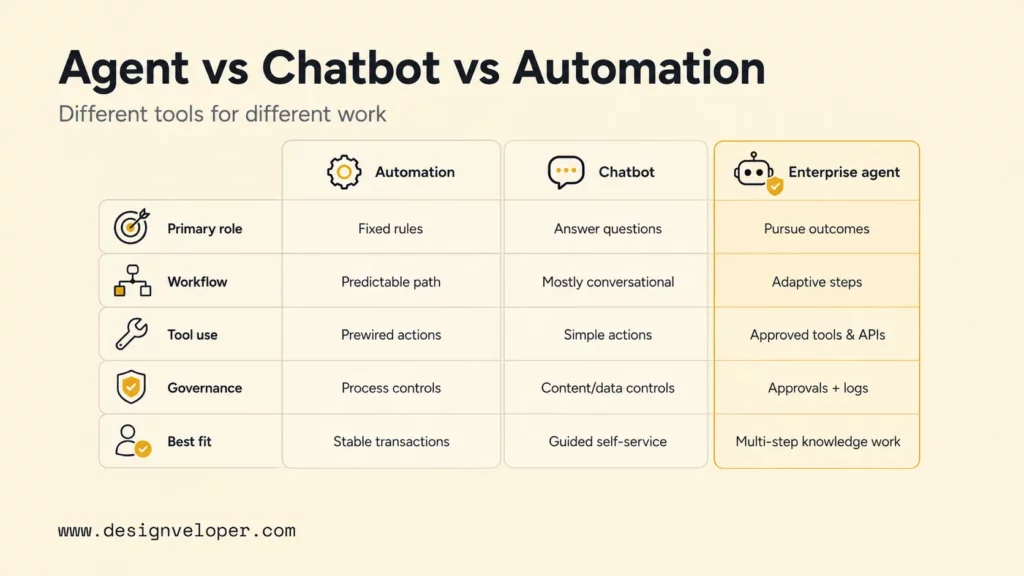
Traditional automation, chatbots, and enterprise AI agents solve different classes of work. Deterministic automation is best when rules and inputs are stable. Chatbots are useful for conversation and retrieval. Enterprise agents fit cases where the system must interpret a goal, gather context, choose tools, and adapt the path while remaining inside business controls.
| Capability | Traditional Automation | AI Chatbot | Enterprise AI Agent |
|---|---|---|---|
| Primary role | Execute predefined rules | Answer or route questions | Pursue a bounded business outcome |
| Workflow path | Fixed and predictable | Mostly conversational | Dynamic within approved constraints |
| Context | Structured fields and rules | Prompt, conversation, and knowledge | User, task, systems, history, policy, and state |
| Tool use | Prewired actions | Often retrieval or simple actions | Selects among approved tools and APIs |
| Uncertainty | Routes exceptions to humans | May ask clarifying questions | Can clarify, retry, escalate, or request approval |
| Governance | Process controls and access roles | Content safety and data controls | Identity, tool policy, approvals, logs, evaluation, and monitoring |
| Best fit | Stable, high-volume transactions | Information and guided self-service | Variable, multi-step knowledge work |
The categories can work together. An enterprise agent can interpret a request while a workflow engine enforces a deterministic approval sequence. Robotic process automation can interact with a legacy interface that has no reliable API. Put variability where reasoning helps, and keep critical rules deterministic where predictability matters.
Do not use an agent merely because the workflow has a text field. A password reset with known identity checks and a mature automation path may need no model. A complex access request may benefit from an agent that gathers intent, policy exceptions, affected resources, manager approval, and evidence while deterministic systems execute the authorized change.
Related reading:
- What Are AI Hallucinations? How To Reduce The Risk
- AI Chatbot Development: A Step-By-Step Guide
- AI Voice Agent For Customer Service: How Businesses Use And Build It
Key Capabilities Of Enterprise AI Agents
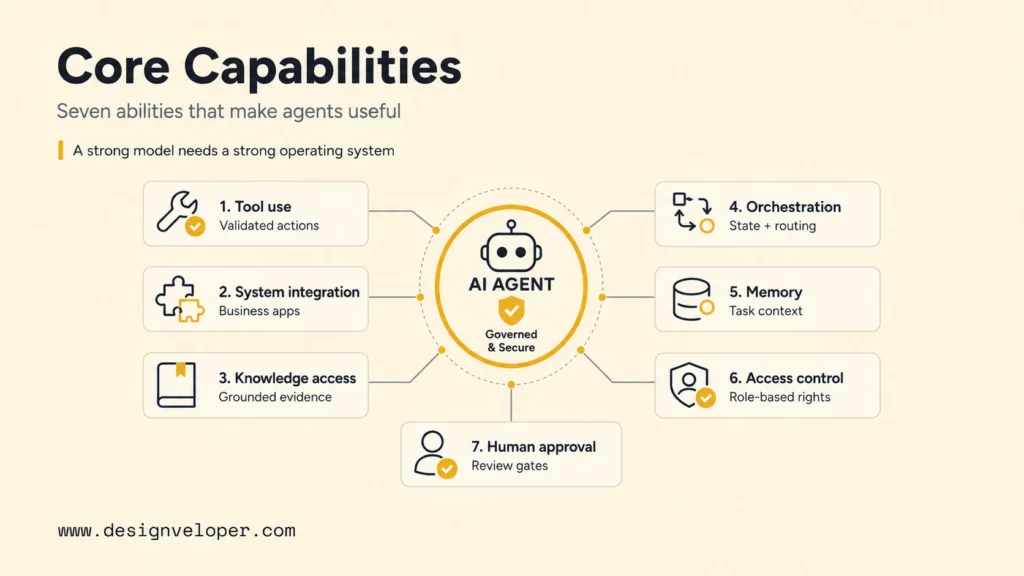
Enterprise AI agents need seven connected capabilities: governed tool use, business-system integration, grounded knowledge access, workflow orchestration, controlled context, identity-aware authorization, and human approval. A strong language model cannot compensate for a missing permission model, unreliable API, or absent owner.
- Tool and API usage: call narrow functions with validated inputs and explicit success or failure responses.
- Business-system integration: connect CRM, ERP, HRIS, ITSM, document, messaging, and data platforms without copying unnecessary data.
- RAG and knowledge access: retrieve current, permission-aware evidence and attach sources to material answers.
- Workflow orchestration: plan steps, preserve state, coordinate deterministic flows, and route exceptions.
- Memory and context: retain only the task and user context needed, with clear expiry and correction paths.
- Role-based access and audit: apply the requesting user’s rights, agent service rights, and tool-level policy while recording actions.
- Human-in-the-loop approval: pause before high-impact actions and present the evidence, proposed change, uncertainty, and rollback path.
Tool design deserves special attention. A broad database tool such as “run any SQL” gives a model excessive freedom. Safer tools express business intent: “get open invoices for this supplier,” “draft a ticket update,” or “submit this approved refund up to the assigned limit.” Each tool should validate fields, enforce authorization outside the model, handle retries safely, and return a machine-readable result.
Knowledge grounding is equally operational. Retrieval should respect source permissions, document status, jurisdiction, version, and effective date. The agent should distinguish evidence from inference and expose citations when a user must verify the basis of a decision. Stale or conflicting policy content needs an owner and resolution workflow rather than a larger prompt.
Governed agent architecture
Reasoning stays inside a controlled business loop
01 Intake
User request, event, identity, consent, and task goal.
02 Orchestrate
Instructions, plan, policy, state, limits, and escalation.
03 Ground
Permission-aware records, documents, and cited knowledge.
04 Act
Allowlisted APIs, workflows, apps, and reversible actions.
05 Control
Approval, evaluation, logs, monitoring, feedback, and incident response.
Boundary rule: the model proposes; identity, policy, tools, and accountable people constrain what becomes real.
Enterprise AI Agent Use Cases Across Business Functions
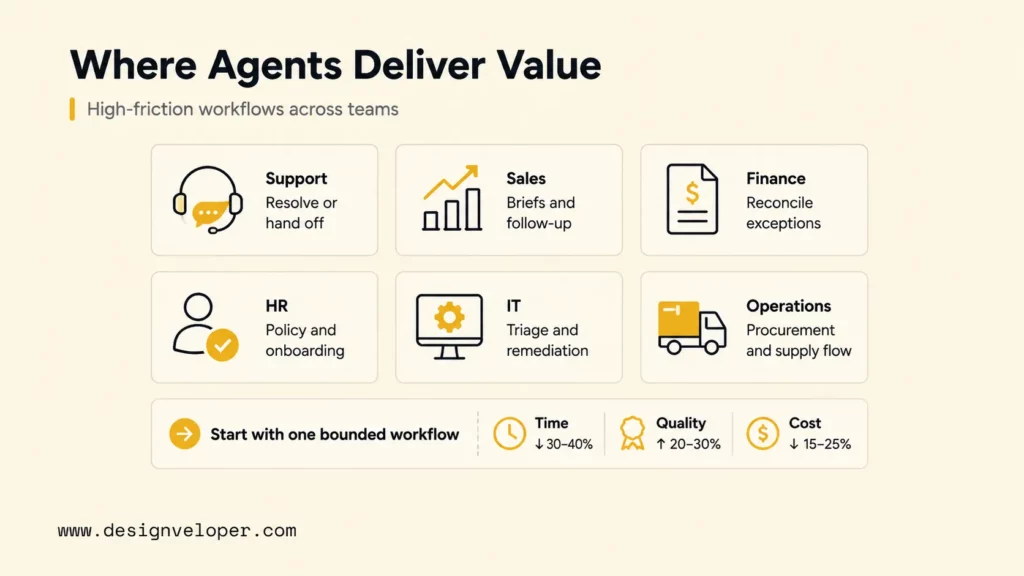
Enterprise AI agents create the most value in workflows that combine high coordination cost with repeatable decisions and accessible evidence. The following use cases are starting points, not promises of full autonomy. Each should begin with a baseline, representative evaluation cases, and a defined human escalation path.
Customer Support And Service Operations
A customer-service agent can identify intent, retrieve account and product context, search approved knowledge, diagnose a common issue, draft a response, update a case, and route an exception. A safe initial scope is “resolve known low-risk issues or prepare a complete handoff,” not “make any commitment needed to satisfy the customer.”
Measure first-contact resolution, time to resolution, reopen rate, escalation quality, policy compliance, customer satisfaction, and cost per resolved case. Require approval for refunds above a threshold, contractual changes, account closure, identity disputes, or any response without sufficient evidence.
Sales, CRM, And Revenue Operations
A sales agent can assemble an account brief, summarize activity, enrich a lead from approved sources, identify missing CRM fields, recommend the next action, draft outreach, and create follow-up tasks. The brief should show where each fact came from (its provenance) and avoid inventing company facts or customer intent.
Start with preparation and data hygiene before allowing external communication. Track seller time saved, accepted recommendations, CRM completeness, reply quality, opportunity progression, opt-outs, and inaccurate claims. Pricing, discounts, legal terms, and commitments remain controlled actions.
Finance And Accounting
A finance agent can extract invoice fields, match purchase orders, explain discrepancies, categorize transactions, collect missing evidence, prepare reconciliations, and route exceptions. A strong design separates probabilistic interpretation from deterministic calculation and ledger posting.
Use human approval for payments, write-offs, bank-detail changes, tax judgments, financial close, and material reporting. Monitor extraction accuracy by field, exception rate, duplicate detection, processing time, correction cost, and downstream reconciliation differences.
Human Resources And Employee Support
An HR agent can answer permission-aware policy questions, collect onboarding information, guide leave requests, schedule interviews, prepare case summaries, and route employees to the right service. The system must respect regional policy, employee role, confidentiality, and the difference between information and employment decisions.
Do not let an agent make unsupervised hiring, promotion, discipline, compensation, or termination decisions. Measure response accuracy, case deflection, resolution time, employee satisfaction, escalation quality, access violations, and whether answers cite the current policy version.
IT Support And Internal Helpdesk
An IT agent can classify incidents, search runbooks, collect diagnostics, propose fixes, create or update tickets, check service status, and execute low-risk remediation. The best first automations are reversible and well logged, such as restarting a user-scoped service or guiding an approved software installation.
Privileged access, production infrastructure, security incidents, destructive commands, and identity changes need stronger gates. Track mean time to acknowledge, resolution time, recurrence, successful self-service, failed actions, privilege use, and tickets reopened after an agent resolution.
Supply Chain, Procurement, And Operations
A procurement agent can collect requirements, compare approved suppliers, check contract and policy data, draft a request for quotation, summarize bids, monitor delivery exceptions, and prepare an approval package. The agent should distinguish vendor-provided claims from verified internal records.
Purchase commitments, supplier onboarding, bank changes, sole-source justification, and contract acceptance require accountable approval. Useful measures include cycle time, exception rate, policy compliance, price variance, supplier response time, and the percentage of cases with complete evidence.
Legal, Compliance, And Risk
A legal or compliance agent can search controlled knowledge, extract clauses, compare a document with a playbook, prepare a review checklist, gather audit evidence, monitor obligations, and route unusual terms. The agent can accelerate preparation but should not disguise uncertainty as legal judgment.
Require citations, document versions, jurisdiction, privilege boundaries, and review by the appropriate professional. Measure issue recall, false positives, review time, evidence completeness, missed obligations, and the percentage of recommendations accepted or corrected by experts.
Enterprise AI Agent Platforms And Tools To Know
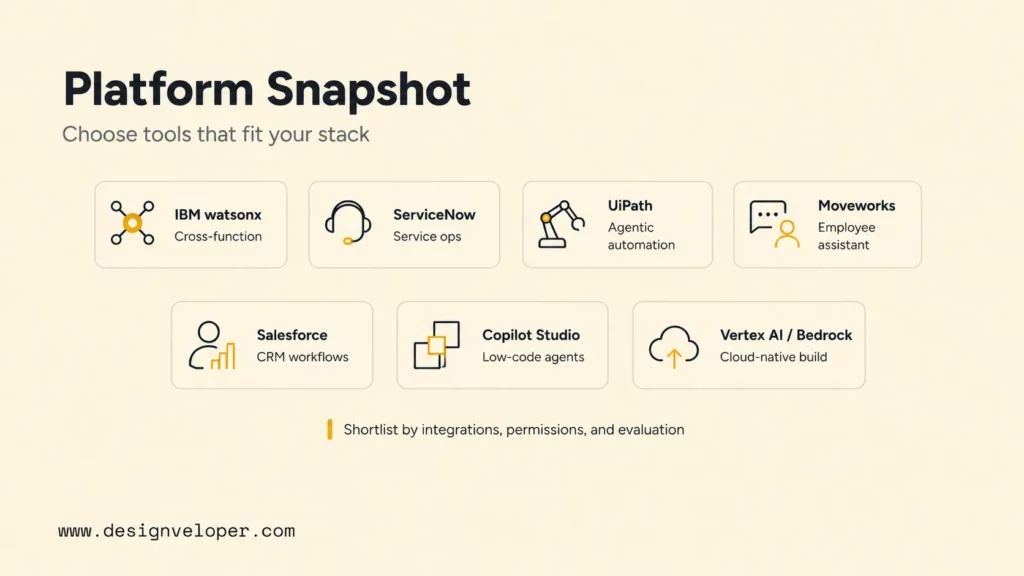
Enterprise AI agent platforms offer different starting points, from CRM and employee service to automation and developer-led cloud agents. The list below is a shortlist, not a ranking or a guarantee that a feature is included in every plan. For each candidate, verify the current product name, deployment, identity model, data boundaries, approval controls, trace export, pricing unit, and integration limits in official documentation and your own pilot.
| Platform / official starting point | Why shortlist it | Validate in the same pilot |
|---|---|---|
| IBM watsonx Orchestrate | Existing IBM enterprise workflow or orchestration investment | Actual connector access, role boundaries, approval pause, trace export, and licensing |
| ServiceNow AI Agents | Existing ServiceNow service workflows | Verify current product documentation and entitlement directly; test requester-versus-agent identity, denied actions, and audit export |
| UiPath Maestro | Processes already mixing human work and automation | Test human pause, robot/agent handoff, duplicate prevention, and exception ownership |
| Moveworks platform | Employee-facing search and service workflows | Test document permissions, identity propagation, connector depth, and support fallback |
| Salesforce Agentforce | CRM-centered customer or sales workflow | Test CRM record access, approval for writes, traceability, and channel pricing |
| Microsoft Copilot Studio | Microsoft-oriented low-code agent development | Test connectors, authentication, tenant data boundary, approval, and telemetry export |
| Gemini Enterprise Agent Platform | Developer-led agent workload on Google Cloud | Test runtime permissions, deployment region, evaluation, tracing, and scaling cost |
| Amazon Bedrock AgentCore | Developer-led agent workload on AWS | Test runtime identity, tool authorization, observability, integration, and usage billing |
AWS product-state check (24 September 2026): AWS documentation for action groups identifies Bedrock Agents as Agents Classic and says it is no longer open to new customers. The AWS row above therefore points to AgentCore for a new evaluation; existing customers should check their own migration and support path. This is a time-sensitive vendor statement, not a feature comparison between the two services.
Run the same procurement scenario across finalists: a restricted-data query, denied supplier lookup, conflicting policy versions, manager approval pause, supplier API timeout, retry without duplicate order, trace export, and cost at base and peak volume. Record each result as pass, fail, or custom build required, plus source URL, documentation date, plan entitlement, and owner. The ServiceNow public page was access-protected during this review, so its current claims remain a pilot verification item rather than a confirmed comparison.
How To Choose The Right Enterprise AI Agent Use Case
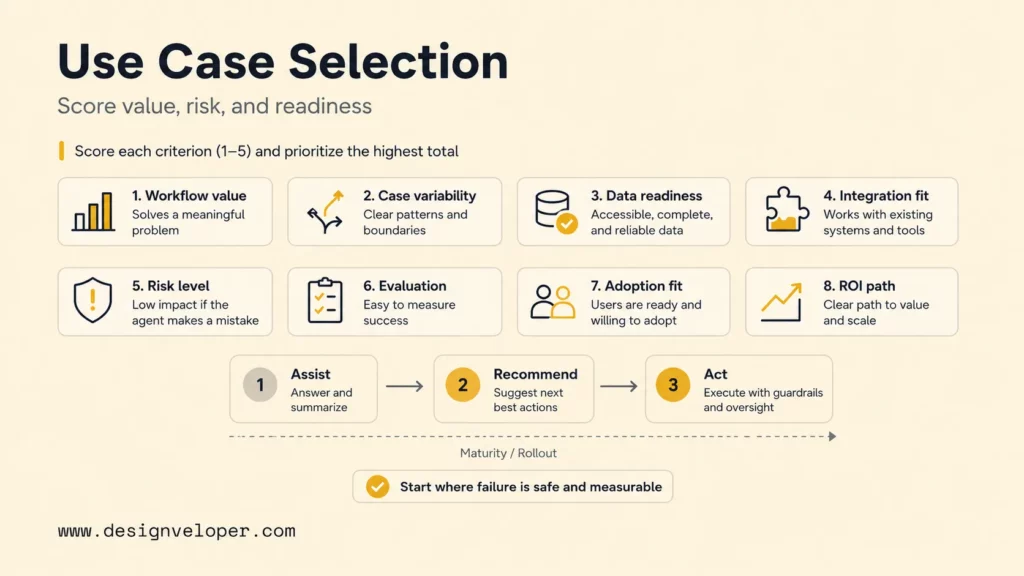
Choose an enterprise AI agent use case by workflow value, data readiness, integration complexity, risk, approval needs, measurable return, and the appropriate autonomy level. A high-value workflow is not automatically a good first pilot if it lacks reliable data, stable ownership, or a safe way to fail.
| Decision | Practical starting point | Evidence before expansion |
|---|---|---|
| Workflow | One high-volume task with a named owner | Baseline time, error, cost, and user outcome |
| Autonomy | Assist, then recommend, then act within limits | Reliable evaluation and controlled failure behavior |
| Data | Approved sources with permission-aware retrieval | Source quality, freshness, access, and auditability |
| Tools | Small allowlist of narrow business actions | Schema validation, idempotency, rollback, and logs |
| Scale | Pilot with representative users and cases | Quality, adoption, security, cost, and ROI trends |
The table narrows the choice, but one additional question decides whether an agent is needed at all: does the task require interpretation across varying cases, or can fixed rules complete it reliably? If a stable API or a reversible failure path is missing, keep the pilot in evidence-gathering mode until the owner can test the exception safely.
Define autonomy explicitly. In assist mode, the agent gathers evidence or drafts work. In recommend mode, it proposes a decision and explains why. In act mode, it executes approved operations within limits. A workflow can use all three: the agent may autonomously retrieve records, recommend a supplier, and wait for a manager before submitting the purchase.
Illustrative procurement pilot: a staff member requests a purchase. The agent verifies the requester’s role, reads the current purchasing policy, checks an approved supplier, and drafts a purchase record. If the requester lacks access to supplier pricing, the lookup is denied and logged; the model cannot override that decision. If two policy versions conflict, the agent pauses for the policy owner rather than selecting the convenient one. The manager sees the source, proposed amount, uncertainty, and affected system before approving a commitment. If the supplier API times out, the integration checks whether the first attempt succeeded before any retry; it never submits a second order blindly. An operator can pause the workflow, reconcile state, and roll back a draft before commitment. This is a hypothetical test flow, not a deployed Designveloper project.
Before launch, the procurement owner records the existing time to complete an approved request and selects that as the primary outcome. Guardrails include policy errors, unauthorized reads, duplicate actions, human corrections, and cost per completed request. Set the review window and pass/fail thresholds with the owner before seeing pilot results; keep the agent in assist mode until normal, denied, stale-policy, and API-failure cases pass. Expand one action at a time only when the owner signs off. Otherwise narrow the scope, fix the failing path, and rerun the same tests.
Challenges Of Deploying Enterprise AI Agents
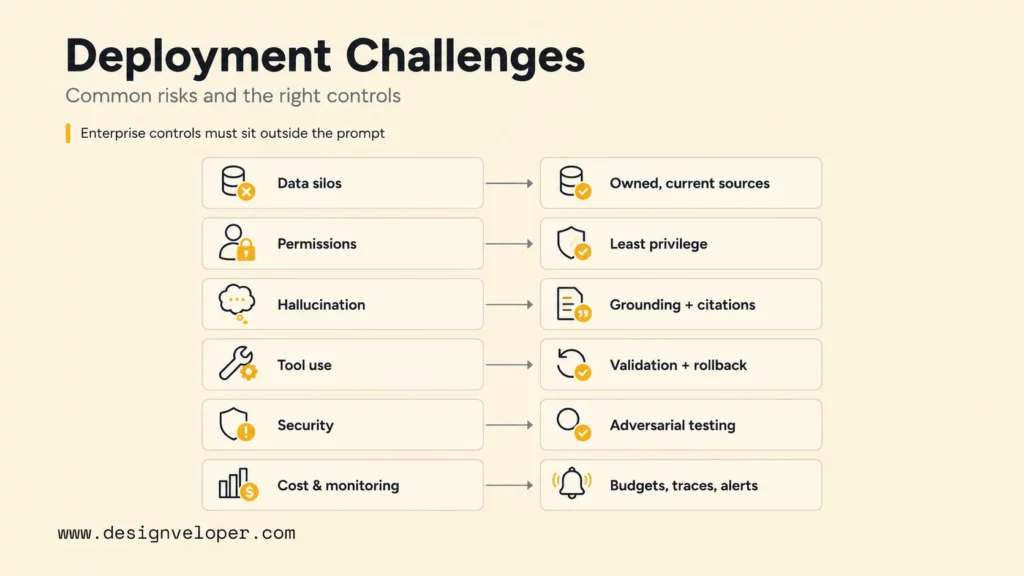
The hardest enterprise agent challenges are organizational and architectural: fragmented data, weak identity boundaries, unreliable tool use, integration complexity, unclear ownership, uncontrolled cost, and inadequate monitoring. Model hallucination is important, but an accurate answer can still cause harm if the agent has excessive permission or acts on stale business data.
| Challenge | Failure Pattern | Control |
|---|---|---|
| Data silos | Incomplete context produces inconsistent decisions | Source inventory, ownership, permission-aware retrieval, and freshness checks |
| Weak permissions | Agent sees or changes more than the requester should | Identity propagation, least privilege, separate service roles, and denial tests |
| Hallucination | Invented fact, policy, record, or tool parameter | Grounding, citations, structured outputs, validation, and escalation |
| Unreliable tool use | Duplicate, partial, or wrong action | Narrow schemas, idempotency, confirmation, rollback, and reconciliation |
| Integration complexity | Brittle connectors and hidden system dependencies | Stable contracts, queues, timeouts, retries, and ownership |
| Security risk | Prompt injection or untrusted content changes behavior | Input isolation, tool policy, output validation, and adversarial testing |
| Unclear ownership | No team resolves failures or policy questions | Business owner, technical owner, risk owner, and incident path |
| Cost control | Long loops, repeated retrieval, or tool retries grow spend | Budgets, step limits, caching, routing, alerts, and unit economics |
| Lack of monitoring | Quality degrades without detection | Traces, outcome metrics, evaluations, feedback, and change records |
The OWASP guidance for LLM applications highlights prompt injection and excessive agency among critical risks. Enterprise controls must sit outside the prompt: a malicious document should not grant access, alter tool policy, or authorize a transaction. Treat retrieved content as untrusted data, validate tool inputs and outputs, and make authorization deterministic.
The NIST AI Risk Management Framework and its generative AI profile provide a broader governance structure for mapping, measuring, managing, and governing risk across the lifecycle. Apply that lifecycle view to agents: assess the workflow before development, evaluate before release, monitor real use, document changes, and retain a way to suspend or narrow the system.
Agent safety is the product of constrained authority, observable actions, and recoverable failure – not a perfect prompt.
Moving AI Agents From Pilot To Governed Workflow
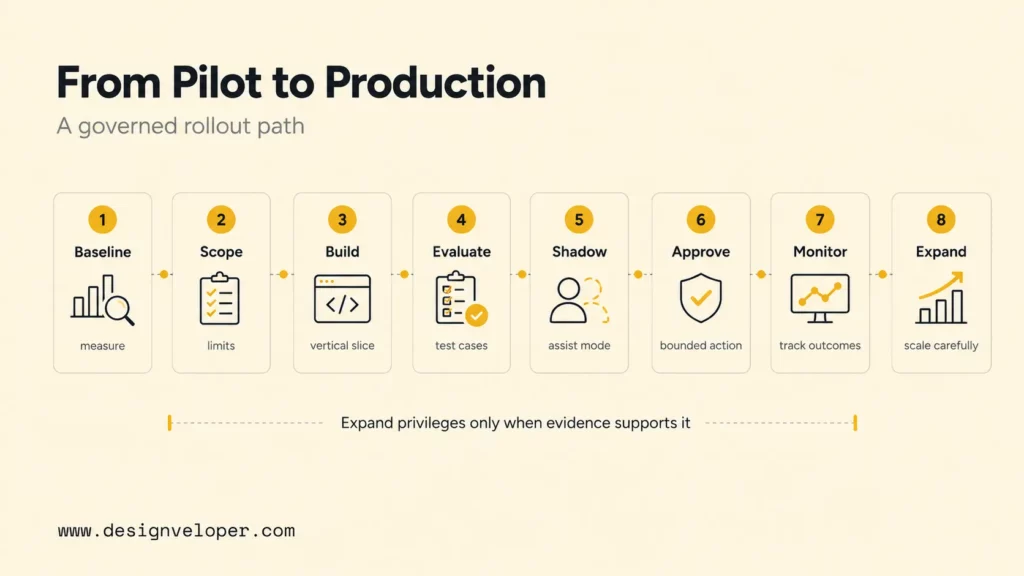
Move an enterprise agent through controlled stages. Select one workflow, define scope and authority, and connect only required systems. Build evaluation cases, add approval points, launch to a limited cohort, and expand privileges only when quality and operations remain stable.
- Baseline the workflow: record volume, time, error, cost, handoffs, exceptions, and user outcome.
- Write the operating contract: state goals, allowed data, tools, limits, approvals, escalation, and owner.
- Build one complete task: carry a request through identity, evidence, approval, logging, and failure recovery.
- Create an evaluation set: include normal, ambiguous, adversarial, stale-data, permission, integration-failure, and high-risk cases.
- Launch in shadow or assist mode: compare agent output with the real process without granting unnecessary action rights.
- Add approvals and bounded action: expose evidence and require confirmation before consequential changes.
- Monitor production outcomes: track quality, adoption, overrides, cost, latency, security, and incidents.
- Promote or narrow deliberately: expand only the actions and user groups supported by evidence.
Production evaluation needs more than answer accuracy. Test tool choice, parameter validity, permissions, approval gates, timeout handling, duplicate-action prevention, source citations, and state recovery. Re-run the evaluation when models, prompts, knowledge, tools, permissions, or workflows change.
At Designveloper, we help teams move from an agent idea to a working enterprise workflow by defining scope, data access, integrations, approval logic, evaluation, monitoring, and rollout. Our AI development services combine agent engineering with the product, software, security, and operational work needed for reliable business use. We can start with an assistive workflow, prove its value and controls, then build toward carefully bounded automation.
FAQs About Enterprise AI Agents
Are Enterprise AI Agents Safe To Use With Sensitive Business Data?
Enterprise AI agents can use sensitive data safely only when the architecture enforces data classification, approved providers, encryption, retention rules, identity-aware access, least privilege, logging, and incident response. Do not rely on the model to decide access. Test whether users and agents are denied records and tools they should not reach, and verify contractual and regional requirements before deployment.
Do Enterprise AI Agents Need Human Approval Before Taking Action?
Human approval should match risk. Low-risk, reversible actions may run automatically within strict limits. Money movement, access changes, external commitments, regulated decisions, destructive operations, and uncertain cases should pause for an accountable person. The approval view should show the proposed action, evidence, uncertainty, affected systems, and recovery plan.
Can Enterprise AI Agents Work Across Multiple Business Systems?
Yes. Enterprise agents can coordinate CRM, ERP, HRIS, ITSM, document, messaging, data, and custom systems through connectors, APIs, events, workflow engines, RPA, and protocols such as MCP or A2A. Cross-system work increases identity, consistency, failure, and reconciliation risk, so integrations need stable contracts, narrow permissions, explicit ownership, and end-to-end traces.
How Do Companies Measure ROI From Enterprise AI Agents?
Measure ROI against the same workflow before the agent. For a purchase request, the procurement owner records baseline completion time, defines a review window, and compares completed approved requests after including platform, integration, manager review, correction, and support costs. Track policy errors, duplicate orders, and unauthorized access as stop signals. Do not claim a saving if faster drafts create more correction work; generated messages and tool calls are activity, not business value.
Should A Business Build Custom AI Agents Or Use An Enterprise AI Agent Platform?
Use a platform when its data, workflows, controls, and channels already match the business environment and speed matters more than deep differentiation. Build custom agents when the workflow is proprietary, integrations are unusual, experience or performance needs are specific, or the organization needs stronger control over models, hosting, logic, and portability. Many enterprises use a hybrid: a platform for common workflows and custom services for differentiating capabilities.
The core decision is not whether an enterprise should have agents. It is which workflow deserves an agent, what authority the agent should receive, and what evidence is required before that authority grows. Enterprise AI agents become durable business systems when value, identity, tools, approvals, monitoring, and ownership are designed together.
Also published on

Share post on










Related Articles


13 Best Vibe Coding Tools for Building Apps and Editing Codebases
13 Best Vibe Coding Tools for Building Apps and Editing Codebases Published September 30, 2026
Can ChatGPT Create an App? What It Can Build and What to Check
Can ChatGPT Create an App? What It Can Build and What to Check Published September 30, 2026
Is LangChain Bad? Developer Complaints, Pros, And When To Use It
Is LangChain Bad? Developer Complaints, Pros, And When To Use It Published September 30, 2026



















