
















iOS and Android App Development: A Practical Decision Guide

The core challenge in iOS and Android app development is not simply building two identical apps. Product and engineering teams can share the product goal, backend services, business rules, analytics plan, and selected code. They still need to make platform-specific decisions about navigation, device behavior, permissions, accessibility, testing, privacy, release, and maintenance.
This guide explains which parts of a mobile product teams can keep consistent and which they should adapt for iOS and Android. There are two main ways to build for both platforms: develop separate native apps or share selected code through a cross-platform approach. The right choice depends on the product’s platform-specific requirements, launch strategy, team skills, and long-term ownership.
The guide also explains how to scope the build, prepare for release, and assign ownership after launch. For background, see our guide to mobile app development.
iOS And Android App Development In Practice
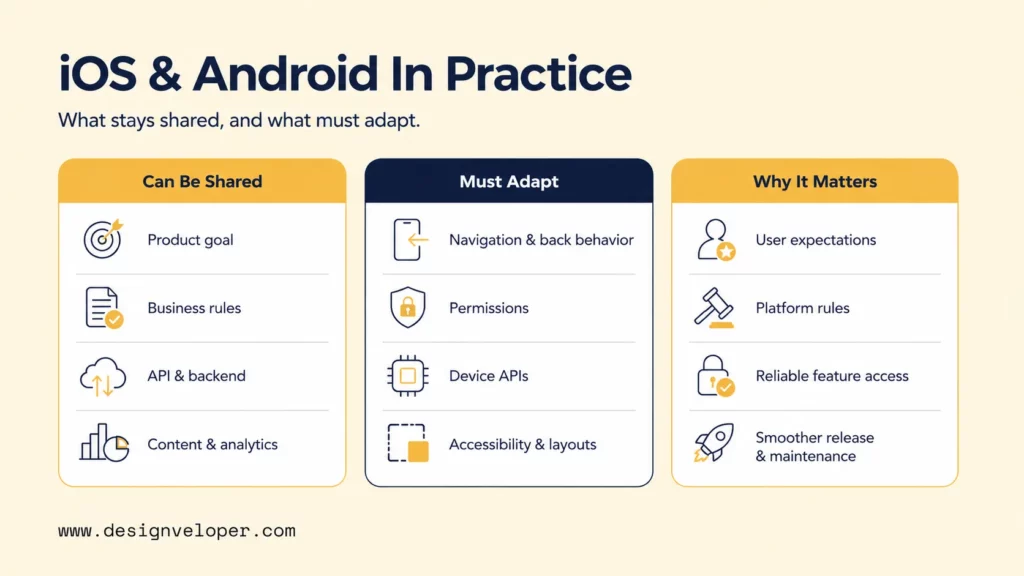
A mobile product should be planned as two connected layers:
- Shared product layer: Defines what the product must achieve.
- Platform delivery layer: Defines how those capabilities appear and behave on iOS and Android.
The key distinction is between product decisions that can remain shared and delivery decisions that require platform-specific adaptation.
| Shared product layer | Platform delivery layer | Why it matters |
|---|---|---|
| Product goals and core user outcomes | Navigation and back behavior | Users should achieve the same outcome through familiar platform patterns. |
| Business rules and validation logic | Permissions and system prompts | Permission models, timing, and wording vary across platforms. |
| API contracts and backend services | Device APIs and native SDKs | Camera, location, payments, and background work may require platform-specific integrations. |
| Content structure and analytics events | Accessibility behavior and device layouts | Screen readers, text scaling, system controls, and screen sizes behave differently. |
| Support policy | App signing, store metadata, review, and rollout | Apple and Google use different submission and release workflows. |
Mobile product teams can share product logic, but they should not assume that every interface or interaction will work the same way on both platforms. Shared code can reduce duplication, but it does not remove the need to adapt platform-specific behavior. The goal is to deliver the same product outcome through interactions that feel natural and reliable on each operating system.
Set Mobile Product Priorities Before Choosing A Platform Or Framework
The product team should start by identifying the target users and the product’s first complete workflow, then use that understanding to set the launch strategy before choosing a framework. The launch decision can be based on three factors:
- The need to support both platforms at launch.
- The audience that matters most.
- The amount of evidence needed before expanding to the second platform.
The table below compares three launch strategies and highlights the main trade-off of each approach.
| Launch strategy | Use it when | Main trade-off |
|---|---|---|
| Simultaneous launch | Both platforms are required within the same launch window, such as for a coordinated market or partner launch. | Broader reach on day one, but parallel QA, store preparation, and support increase delivery work. |
| One-platform MVP | One user group or market clearly dominates and the team needs to validate the complete workflow quickly. | Faster learning, but the second platform still needs a deliberate expansion plan. |
| Phased expansion | The product can launch where demand is strongest and expand after real usage provides evidence. | Less complexity at launch, but the shared rules and architecture must support the second platform later. |
After comparing the launch options, validate the delivery constraints that will determine whether the selected model is feasible:
- Identify the users who must be served in the first release.
- Define the smallest complete user outcome, not the smallest screen set.
- List the offline states, device capabilities, and background behavior that the workflow needs.
- Confirm the external systems, APIs, and SDKs the app must connect to.
- Confirm privacy, security, legal, and support requirements before architecture is fixed.
- Decide what evidence will justify launching on the second platform.
Offline use affects storage, conflict handling, retry logic, and recovery states. Device features may require native APIs even when most of the product is shared. Authentication, payments, maps, enterprise APIs, and vendor SDKs can also shape the architecture before UI work starts.
Once these constraints are clear, the framework choice can follow the product’s specific requirements rather than popularity.
Native And Cross-Platform Mobile Development Fit Different Product Needs
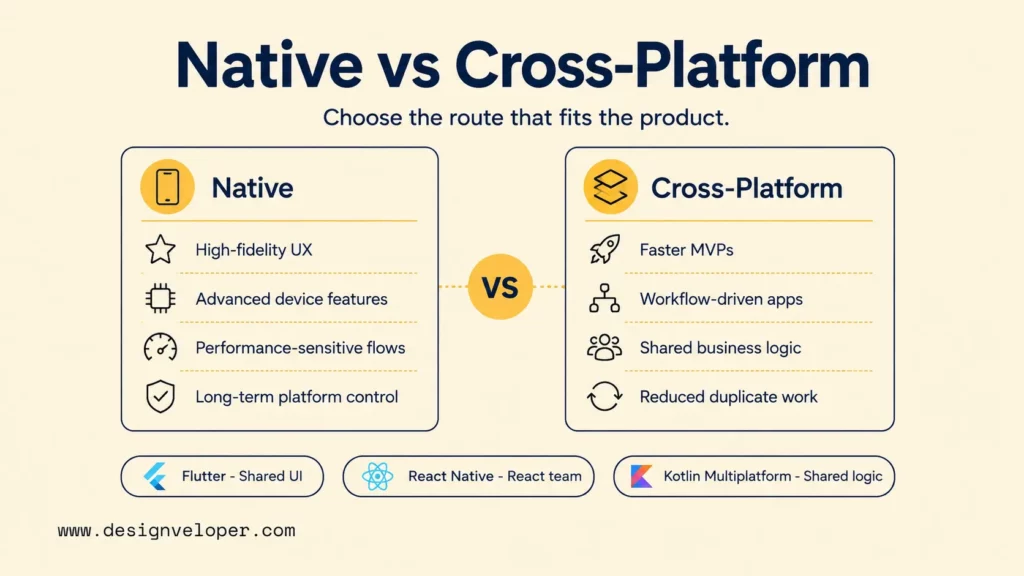
Native and cross-platform development offer different ways to balance platform control and code reuse. Native apps provide deeper control over each operating system, while cross-platform apps share selected code across iOS and Android. The right choice depends on the product’s requirements, device features, performance needs, team skills, and maintenance plan.
Native development builds a separate app for each operating system using its own languages, tools, and APIs. This approach gives the development team direct control over platform behavior, performance, accessibility APIs, and new device features.
Cross-platform development shares part of the codebase across iOS and Android. Teams can reuse business logic, data access, and sometimes UI code while retaining native integration points for platform-specific APIs and behavior. However, shared code does not mean that every file, interface, or release task will be identical.
Native iOS development commonly uses Swift and Xcode, while native Android development commonly uses Kotlin and Android Studio. Cross-platform frameworks can share selected product logic, but they still require platform-specific integration and testing.
For broader background, see our guides to native app development, cross-platform app development, and mobile app development frameworks.
Native Mobile App Development For Platform-Specific Control
Native mobile app development fits products that need platform-specific UX, advanced device features, performance-sensitive interactions, or long-term control over each platform implementation.
Direct access to platform frameworks can simplify work involving complex device features. Native development also gives the development team precise control over background tasks, platform accessibility APIs, system UI, and hardware-specific behavior. The trade-off is more platform-specific engineering and more duplicated work when both apps implement the same business rules.
Consider a field-service app that depends on camera capture, location, background uploads, and reliable recovery after a connection drops. Native development can make these platform interactions easier to isolate and test. It also gives the mobile team more direct control when device behavior is central to the product.
Cross-Platform Mobile Development For Shared Product Logic
Cross-platform mobile development fits workflow-driven products, MVPs, and apps with substantial shared business logic. Its main advantage is selective code reuse: teams can share business logic and common screens while retaining native integration points for platform-specific APIs.
If most screens are forms, dashboards, approvals, and shared account logic, a cross-platform approach can reduce duplicated work. Native modules may still handle notifications, device SDKs, or operating-system behavior that cannot be standardized safely.
Flutter, React Native, and Kotlin Multiplatform take different approaches to code sharing and native integration. The choice should follow the product requirements and the team’s skills.
Design A Consistent Mobile Product Without Making Both Interfaces Identical
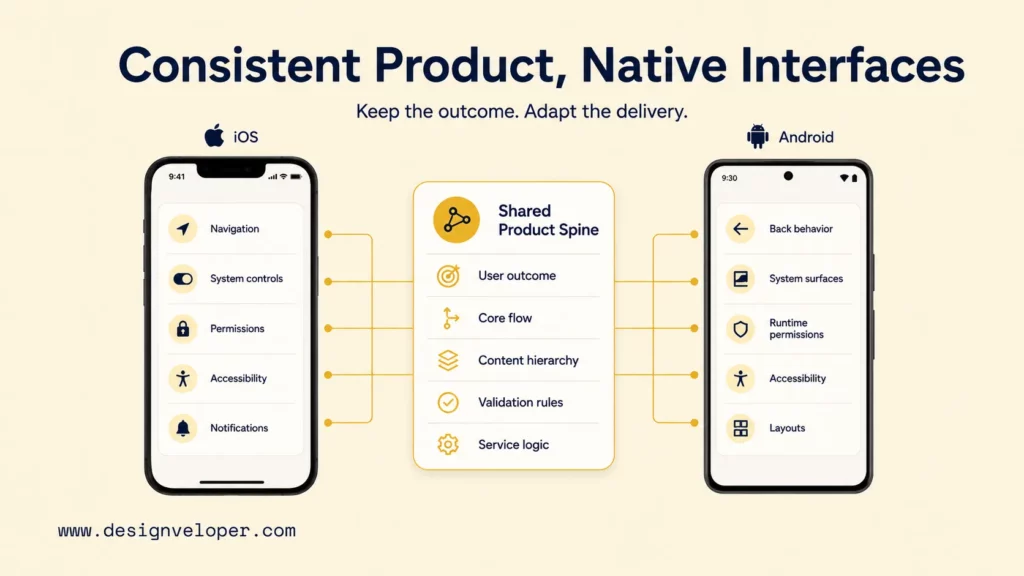
Consistency should preserve the user outcome, not force two pixel-identical interfaces. Keep the core flow, content hierarchy, validation rules, and service behavior aligned, while adapting controls and navigation to each platform.
Apple’s Human Interface Guidelines describe conventions for Apple platforms, while Android Developers’ navigation principles provide a separate baseline for Android. These conventions shape product behavior, not just visual details.
Permissions illustrate this distinction. Ask for access when users understand why it is needed, and provide a useful state if they decline. The product intent can stay consistent even when the system prompt and permission sequence differ.
Accessibility follows the same principle. A shared design system can define legible text, clear labels, logical focus order, and adequate touch targets. Each platform still needs testing with its own assistive technologies and system settings. Our mobile app development best practices treat accessibility as part of production quality, not a final polish step.
Scope The Mobile App Build Around Team, Time, And Budget
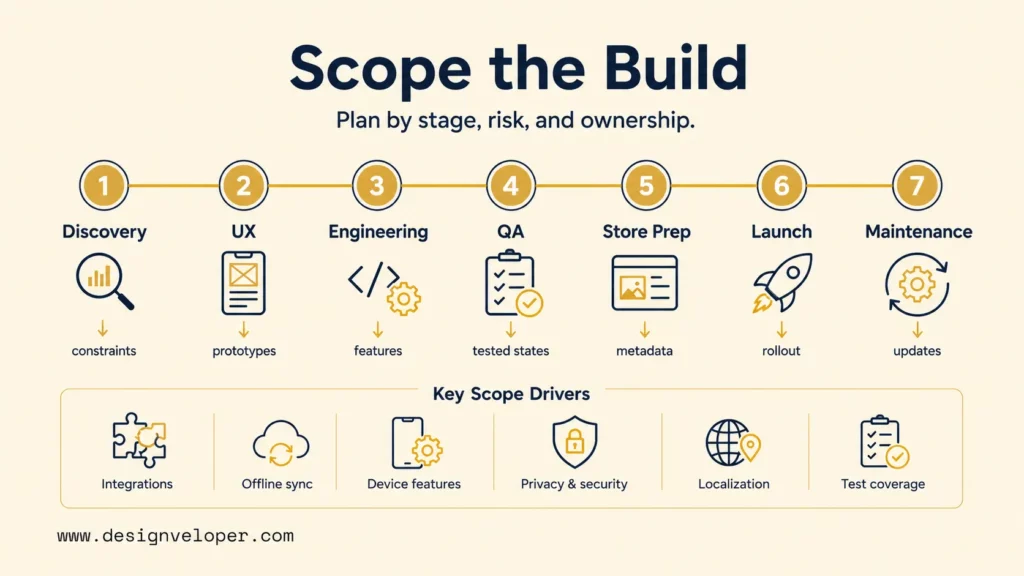
Scope the build by delivery stage and risk, not by screen count alone. A simple interface can hide complex integrations, offline rules, privacy work, or device behavior. These factors often affect the estimate more than the number of visible screens.
The stages below make outputs, cost drivers, timing risks, and ownership clear before estimates are finalized. Our detailed mobile app development process explains each stage in more depth.
Integrations expand scope because the app depends on systems the development team does not control. Offline sync adds conflict resolution, retry handling, and recovery states. Localization adds content and layout work, while privacy requirements may require consent flows and data-handling reviews.
Test coverage affects both time and budget. Supporting more device sizes, OS versions, languages, and interrupted network states increases the number of meaningful user flows and test cases. Define the support matrix before finalizing the estimate.
An MVP should deliver the smallest complete user outcome, not the fewest screens. A checkout MVP still needs validation, error handling, confirmation, and enough monitoring to show whether the transaction worked. Removing screens does not help if the remaining flow cannot be completed safely.
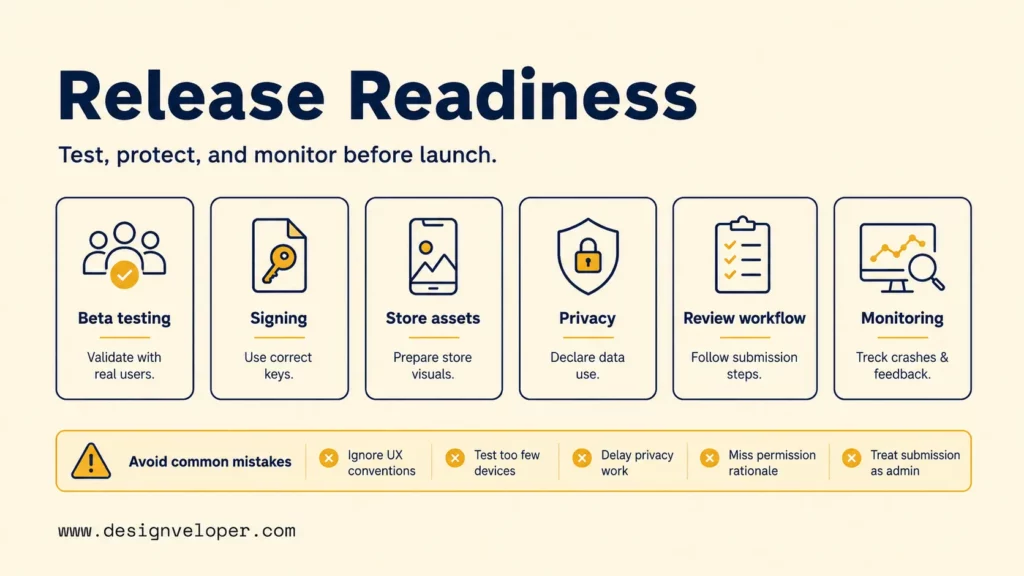
Test, Protect, And Prepare The App For App Store And Google Play Release
Release readiness starts before store submission. Test the app across supported devices, operating systems, network states, accessibility settings, and failure-recovery scenarios. Then verify security controls, analytics, privacy disclosures, signing, reviewer access, and rollback steps.
Security work should match the product’s risk. Teams handling sensitive data can use the OWASP Mobile Application Security Verification Standard as a structured reference for mobile security controls and testing. MASVS does not replace threat modeling, secure implementation, or project-specific verification.
Store requirements are part of engineering planning because they can block a release. Apple’s App Store submission guidance requires developers to provide app privacy details, including the practices of relevant third-party partners. Google Play’s Data safety requirements require developers to disclose how their apps collect, share, and protect user data, including data handled by third-party libraries and SDKs.
Privacy, data-safety, signing, and submission requirements change over time. Verify the current guidance before each release.
Common release mistakes include:
- Ignoring platform UX conventions.
- Testing too few devices or OS versions.
- Leaving privacy declarations until the end.
- Omitting permission rationale and useful fallback states.
- Treating store submission as administrative work.
Automated tests cannot prove that every real user can complete an important task. Test device behavior and accessibility, and prepare reviewer access and production monitoring alongside functional QA. Each can determine whether a release is usable and supportable.
Plan Mobile App Ownership Beyond The First Release
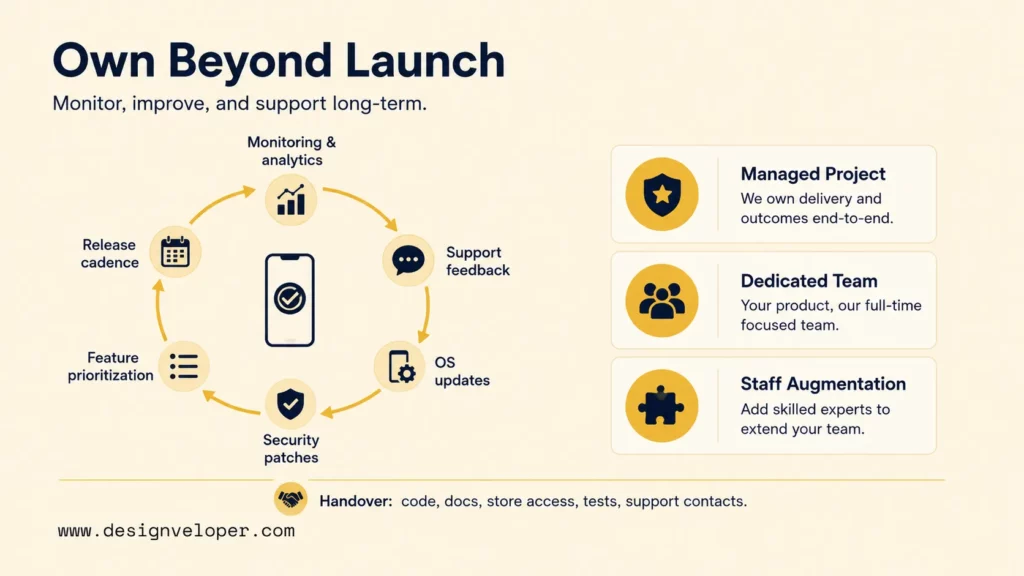
Plan ownership before launch because operating systems, store policies, and device capabilities continue to change. A live app needs monitoring, support feedback, OS compatibility work, security patches, feature decisions, and a repeatable release cadence.
Assign clear owners for crash monitoring, analytics validation, store access, signing assets, privacy declarations, and support escalation. Decide who approves production releases and who responds when an integration fails. Document these responsibilities so they remain clear when team members change.
Choose the delivery model based on the responsibilities the current team cannot cover, not on headcount alone:
- Managed project: Useful when one team must be accountable for a defined release or roadmap. Confirm what happens after acceptance and which maintenance tasks are excluded.
- Dedicated team: Useful when the product needs continuous delivery and stable product knowledge. Confirm who sets priorities, approves releases, and handles team changes.
- Staff augmentation: Useful when an internal team owns the architecture and product decisions but needs additional capacity or specialist skills. Confirm who reviews the work and owns cross-platform consistency.
A strong internal product team may need only a few additional mobile specialists. Without clear release governance, the product may need a partner to own QA coordination, store preparation, and post-launch response.
FAQs About iOS And Android App Development
Can iOS And Android Apps Use The Same Backend?
Yes. Most iOS and Android apps can share backend services, APIs, authentication rules, databases, business logic, analytics events, and content management systems. The mobile clients may still need platform-specific handling for navigation, permissions, device APIs, offline behavior, and native integrations. A shared backend should expose consistent contracts without forcing both apps to behave identically.
Do iOS And Android Apps Need Separate Development Teams?
Not always. A team can build both platforms with native specialists, a cross-platform team, or a combination of shared-code and platform-specific expertise. The right model depends on the framework, product complexity, required device features, testing scope, and long-term maintenance plan. Even when one team owns both apps, assign clear responsibility for shared logic, native modules, platform QA, store releases, and post-launch support.
How Do Teams Keep iOS And Android Experiences Consistent Without Making Them Identical?
Keep the same user outcome and core product rules across platforms, but adapt navigation, permissions, accessibility behavior, notifications, and layouts to each operating system. A shared design system should preserve product intent without forcing identical controls. During QA, compare whether users can complete the same task with similar clarity and confidence rather than checking for pixel equality.
Building for iOS and Android is not simply a choice between one codebase and two. The better approach is to keep product goals, business rules, and core user outcomes consistent while adapting navigation, device behavior, permissions, accessibility, and release processes to each platform. Native development offers deeper platform control, while cross-platform development can reduce duplication when shared logic is the priority. The right choice depends on your users, product risks, team capabilities, launch strategy, and long-term ownership plan.
Designveloper’s mobile app development services can help your team connect mobile UX, backend integrations, release governance, and long-term support. Got an idea? Realize it TODAY
Also published on

Share post on










Related Articles


Android App Development: Tools, Process, Cost, And Best Practices
Android App Development: Tools, Process, Cost, And Best Practices Published September 09, 2026
iOS and Android App Development: A Practical Decision Guide
iOS and Android App Development: A Practical Decision Guide Published August 19, 2026
How To Build An Android App: From MVP To Google Play
How To Build An Android App: From MVP To Google Play Published August 19, 2026



















