
















10 Real Progressive Web Apps (PWAs) Examples And Key Lessons

These examples of progressive web apps show a consistent pattern: a PWA works best when app-like web capabilities solve a specific access, speed, or repeat-use problem. The ten cases below describe documented deployments, but most are historical case studies rather than proof that each brand still uses the same PWA architecture in 2026.
That distinction matters because the durable lesson is not the brand name or an old conversion figure. It is the match between a user journey and a capability such as installability, resilient loading, offline access, push notifications, or a lightweight web experience. Our guide to progressive web apps explains the underlying model: web reach stays central while installable and app-like capabilities are added where they help.
Key Takeaways
- PWAs remain web applications that users can reach by URL. Installation support and the installed experience vary by browser and operating system.
- A web app manifest is central to PWA installability. Service workers are commonly used for caching, offline behavior, push, and background features, but a service worker is not required for installation itself.
- The strongest historical PWA cases solved a specific user problem, such as weak connectivity, high data cost, slow repeat access, or installation friction.
- Start with one critical journey and measure whether the PWA capability improves that journey. Historical conversion or engagement lifts are context, not benchmarks for a new product.
- Choose between a PWA, responsive website, and native app by checking browser support, offline needs, notification needs, background work, and required device APIs.
What Is A Progressive Web App?
A progressive web app, or PWA, is a web application that uses web technologies while offering selected app-like capabilities. It remains reachable through a URL and can run across platforms, but supporting browsers can also install it so users can launch it more like a platform app.
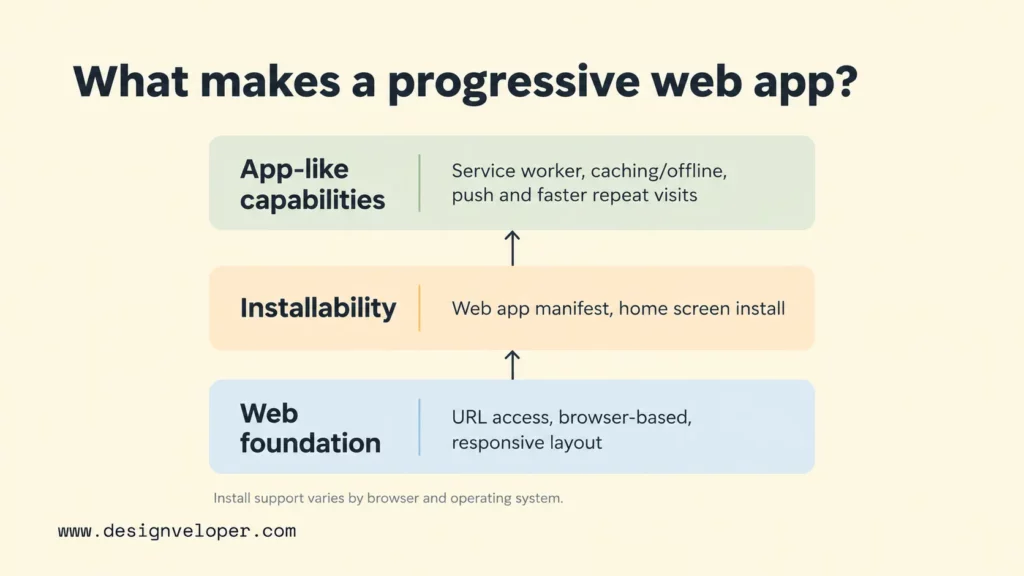
Installability starts with a web app manifest that describes information such as the app name, icons, and display behavior. According to MDN’s installability guide, a service worker is optional for installation, although service workers are often used for offline and background behavior. This is an important modern nuance: a service worker is common in PWA architecture, but it is not a universal test for whether a web app can be installed.
Caching and service workers become useful when the product must survive unreliable connectivity. A service worker can intercept network requests and return cached resources, so selected screens or assets remain available when the network is slow or unavailable. Our PWA tutorial for beginners covers the manifest, service worker, caching, testing, and deployment steps behind that behavior.
A responsive website is not automatically a PWA. Our responsive web design guide explains the layout side: responsive design adapts a site to different screen sizes. A PWA adds a product layer around the web experience, such as installation, offline resilience, background tasks, notifications, or deeper operating-system integration where the browser supports those features. The exact capability set still varies by browser and platform, so progressive enhancement and fallbacks remain important.
10 Real Progressive Web Apps (PWAs) Examples
The following examples are useful because each connects a documented PWA capability to a clear user or business problem. The status note under each example separates launch-era evidence from current implementation claims, so an older case study is not presented as proof of a brand’s 2026 technology stack.
1. Starbucks: PWA For Mobile Ordering
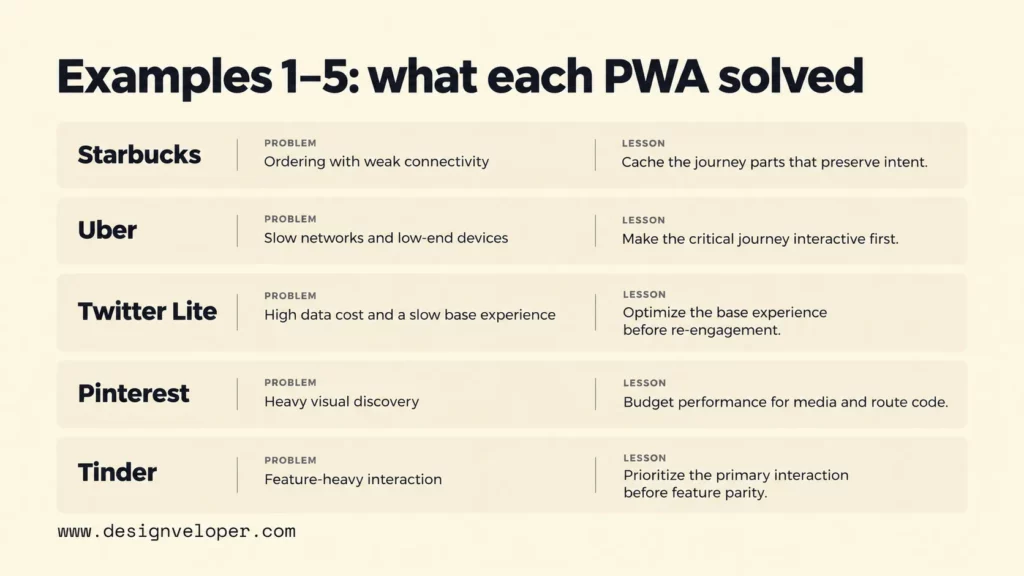
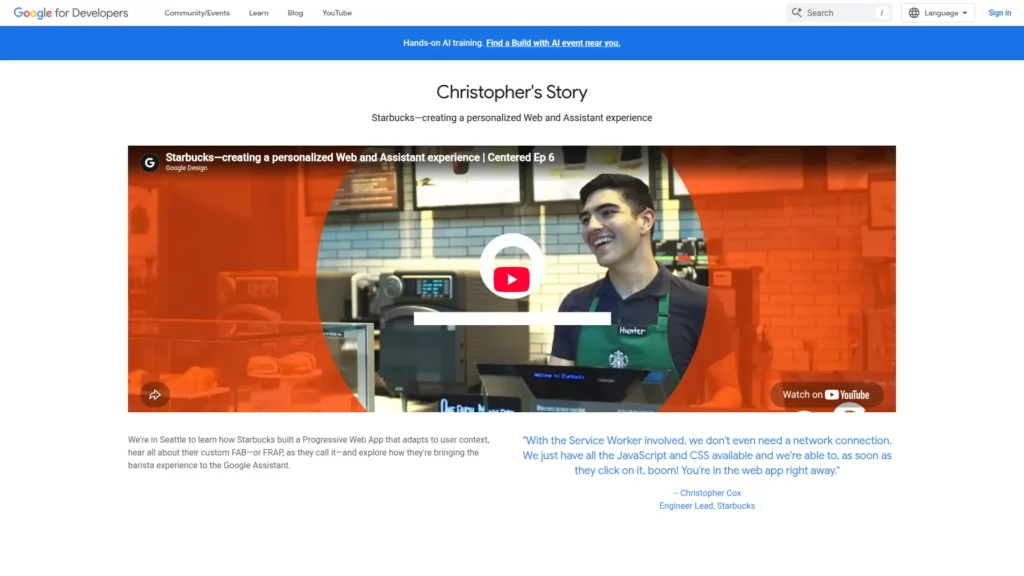
Starbucks used a PWA to make its ordering experience available through the web and more resilient when connectivity was weak. A Google Developers case story about Starbucks documents that the PWA used a service worker so core JavaScript and CSS could remain available without a network connection. That architecture supported a fast return to the ordering interface instead of making every visit depend on a fresh full download.
Status and lesson: Treat Starbucks as a historical PWA case study. The transferable lesson is to cache the parts of a journey that help users keep making progress, such as the interface and stable product information, while keeping network-dependent actions explicit. Offline support is most useful when it preserves intent rather than pretending every transaction can finish without a connection.
2. Uber: Lightweight Access In Low-Connectivity Contexts
Uber rebuilt its mobile web client so people on low-end devices or slow networks could still request a ride. In its June 2017 m.uber engineering article, Uber reported that the core ride-request experience was about 50 kB gzipped and minified. It was designed to become interactive quickly on a typical 2G connection. The team also loaded secondary features only when they were needed.
Status and lesson: This is a historical web-app case, not a statement about Uber’s current client architecture. Its lesson is still practical: define the smallest journey that must succeed first. If requesting a ride is the job, maps, settings, and less urgent code should not delay the moment when a user can start that job.
3. Twitter Lite: PWA For Low-Data Engagement
Twitter Lite, launched before Twitter became X, was designed to make the social network faster and less data-intensive on mobile web. The 2017 web.dev Twitter Lite case study says it became Twitter’s default mobile web experience globally in April 2017. It combined homescreen installation, web push, cached data, and lighter media delivery. The same 2017 study reported 65% more pages per session, 75% more Tweets sent, and a 20% lower bounce rate.
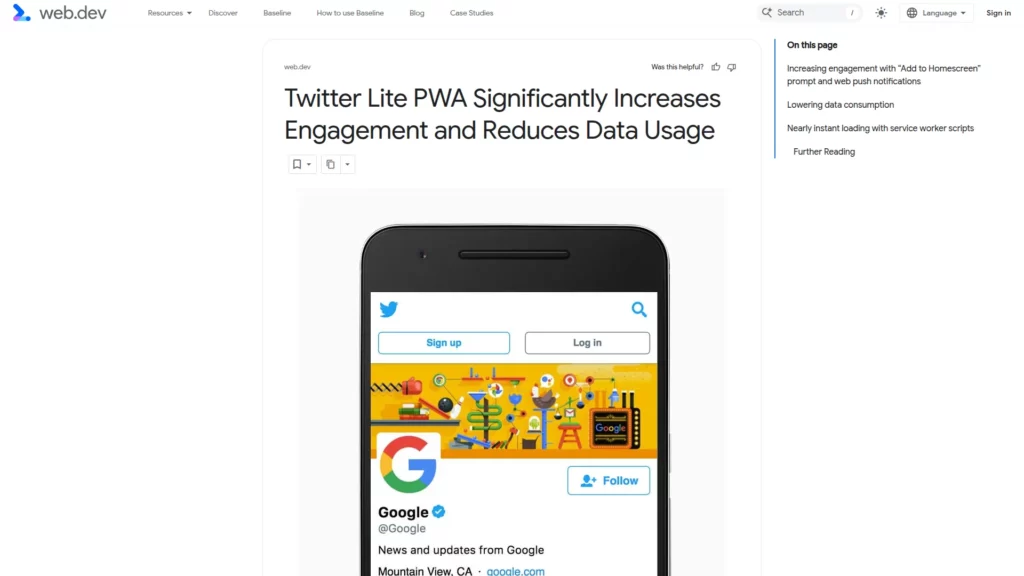
Status and lesson: Twitter Lite is a historical PWA deployment, so those numbers should not be treated as current X metrics or as a forecast for another product. The durable lesson is that re-engagement features work best when the base experience is already efficient. Push notifications and installation cannot compensate for a feed that is slow or expensive to load.
4. Pinterest: PWA For Visual Discovery
Pinterest rebuilt its mobile site as a PWA to improve a weak mobile-web funnel and serve people in bandwidth-constrained markets. In its 2018 PWA retrospective, Pinterest Engineering described an app shell, add-to-homescreen support, push notifications, asset caching, and route-level code splitting. The retrospective also reported that the home-page JavaScript payload had fallen from roughly 490 kB to 190 kB.
Status and lesson: The article documents Pinterest’s 2017-2018 PWA work, not its present implementation. The useful takeaway is that a visual product needs a performance budget as much as it needs polished media. Images, route code, and state management all affect whether discovery feels immediate enough for users to continue browsing.
5. Tinder: App-Like Web Interaction
Tinder Online brought the core matching experience to desktop and mobile web as a PWA. A 2017 Tinder PWA performance case study documents service workers for network resilience, push notifications for chat engagement, route-level code splitting, and long-term asset caching. It also says the initial PWA targeted the core Tinder experience rather than every possible feature.
Status and lesson: This is a historical case study. Its strongest lesson is not visual imitation of a native app; it is feature discipline. An interaction-heavy PWA should make the primary loop responsive first. It can then load secondary routes and features on demand instead of paying their full cost before the user needs them.
6. Flipkart Lite: PWA For Mobile Commerce
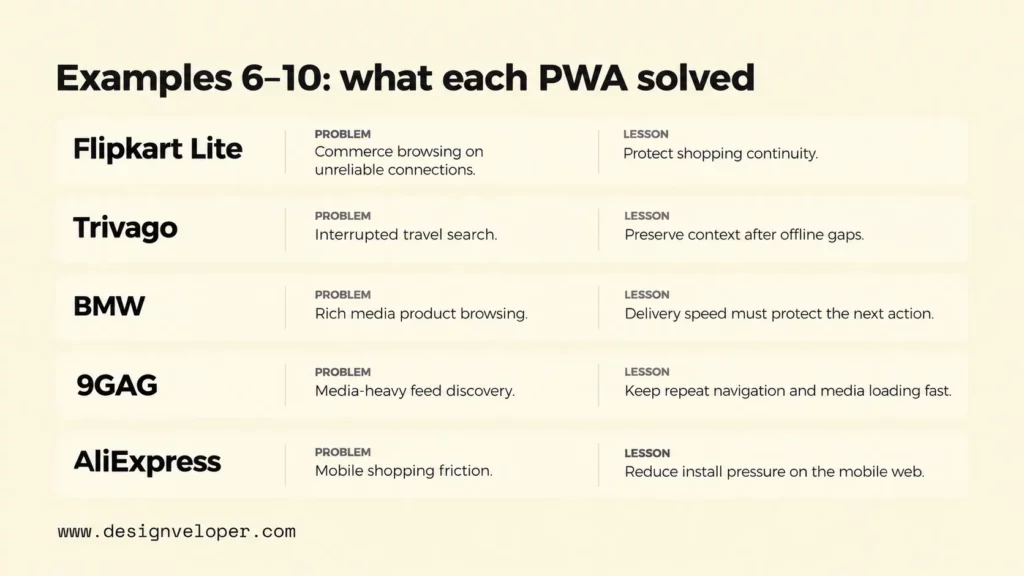
Flipkart Lite was built to combine the reach of the mobile web with app-like shopping behavior. The 2016 web.dev Flipkart case study reports that 63% of Flipkart Lite users were reaching the site over 2G. Service workers helped shoppers continue to browse categories, previous searches, and product pages offline, while homescreen installation reduced the effort needed to return.
Status and lesson: This is a historical case, not a current traffic profile. The transferable idea is to protect shopping continuity. A commerce PWA should reduce repeat downloads, preserve useful browse state, and make a weak connection a manageable condition rather than an abrupt end to the product journey.
7. Trivago: PWA For Travel Search And Re-Engagement
Trivago’s PWA work addressed a travel-search journey that could be interrupted by changing network conditions. A web.dev article last updated in 2020 cites the historical Trivago case. It reports that, among users whose sessions were interrupted by an offline period, 67% of those who came back online continued browsing.
Status and lesson: Treat Trivago as a historical PWA case study. Travel search contains high-intent comparison work, so a temporary connection loss should not force a user to restart. The broader lesson is to preserve context through an interruption and measure whether people can resume the journey, not merely whether an offline screen exists.
8. BMW: PWA For Rich Product Experiences
BMW used a PWA shell around rich editorial content on BMW.com, showing that progressive web techniques are not limited to transactional apps. An AMP project success story published in 2018 says the site combined a PWA shell with AMP content. It reports that the fall 2017 relaunch loaded three to four times faster than before and increased click-through from BMW.com to national sales-company sites from 8% to 30%.
Status and lesson: These are launch-era results from a 2017 implementation. The transferable point is that rich media does not excuse poor performance. If a product experience depends on photography, video, or editorial storytelling, the delivery architecture has to make that content fast enough to support the next user action.
9. 9GAG: PWA For Content Discovery And Retention
9GAG is often cited as a historical PWA example for image- and video-led discovery. A secondary Devathon case summary describes 9GAG developing a PWA around faster loading and offline capability. Because the available evidence is secondary rather than first-party, its reported engagement result should not be treated as a verified benchmark.
Status and lesson: Treat 9GAG as a secondary historical reference, not evidence of its current architecture. The useful lesson is narrower: feed products need fast repeat navigation, careful media loading, and a clear fallback when connectivity drops. That principle is useful without relying on the unverified performance figure.
10. AliExpress: PWA For Mobile Shopping
AliExpress used a cross-browser PWA to make mobile web a stronger shopping surface rather than only a path toward native-app installation. The 2016 web.dev AliExpress case study documents offline capability and re-engagement features. It reported a 104% increase in conversion for new users, twice as many pages viewed per session, and 74% more time per session across browsers after the PWA work.
Status and lesson: Those 2016 figures are historical and should not be generalized to a new store. The more durable lesson is that mobile web can be a product surface in its own right. If many customers arrive from search, links, or shared product pages, reducing the pressure to install before they can shop can remove a major source of friction.
Key Lessons From Successful PWA Examples
The successful PWA examples above do not point to one universal feature set. They show that the best progressive web app features are the ones tied to a repeated user problem, then measured against that problem.
- Match the capability to the behavior. Use installation when people have a reason to return often. Use caching or an offline fallback when unstable connectivity interrupts useful work. Use push only when timely, opted-in updates add value. A feature that has no clear user job adds complexity without proving product value.
- Build the critical journey before chasing native parity. Uber focused on requesting a ride, Tinder on the core matching flow, and Flipkart on product discovery and repeat shopping. A PWA does not need every native-app feature on day one. It needs the smallest complete journey that benefits from web reach and app-like behavior.
- Measure the journey, not the label. Track loading performance, task completion, repeat visits, installation where relevant, and the business event connected to the journey. Historical case-study lifts are context, not benchmarks. Your baseline, traffic sources, device mix, browser support, and product design determine whether the same capability helps.
These lessons also change how PWA development should be scoped. Instead of asking, “Which PWA features can we add?”, start with a user failure such as slow first access, lost progress after a disconnect, or excessive install friction. Then choose the smallest capability that addresses that failure and define how you will know it worked.
When A PWA Is The Right Choice
A PWA is a strong choice when the web is already an important access channel. It works especially well when you need broad device reach, low install friction, fast repeat access, or resilience on weak networks. It is less suitable when the product depends on deep platform integration, intensive background processing, or device features that target browsers do not expose reliably.
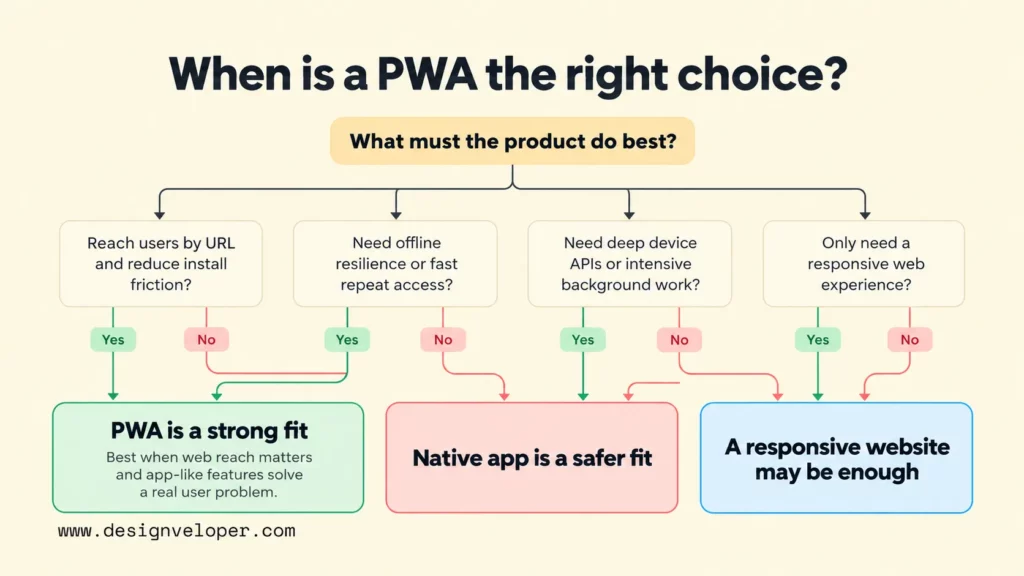
The decision should start with project requirements, not with the assumption that a PWA is a cheaper native app. Native development can provide tighter operating-system integration and more predictable access to platform capabilities. Our guide to native app development explains where that model is a better fit.
| Project requirement | Responsive website | PWA | Native app |
|---|---|---|---|
| Open instantly from a shared URL | Strong fit | Strong fit | Usually requires an installed app or a web fallback |
| Installable, app-like launch experience | Not a core requirement | Supported on compatible browsers and platforms | Core behavior |
| Offline or connection-resilient journeys | Possible with extra web engineering | Strong fit when designed with caching or offline fallbacks | Strong fit when the app is designed for it |
| Deep device APIs or intensive background work | Limited by web-platform support | Varies by browser and operating system | Usually the most direct platform access |
| One web codebase across many devices | Strong fit | Strong fit | Not the defining model; implementation varies by platform strategy |
Before choosing a PWA, check four project conditions:
- Test the required PWA features on the browsers and operating systems your audience actually uses.
- Decide what must still work when the network disappears.
- Confirm whether push notifications or background tasks are useful and supported.
- List any device APIs the product cannot compromise on. If web support is inconsistent, native development may be the safer option.
A practical way to choose is to write down the one journey that must improve and the platform capabilities it requires. If that journey is “open a link, browse quickly, return often, and keep useful context during a weak connection,” a PWA deserves serious consideration. If it is “run complex background processing and depend on platform-specific hardware behavior,” native development may be the safer technical direction.
Our Joyn’it project illustrates why the journey comes before the label. The public project page describes a community platform for creating events and keeping members informed about upcoming events. That kind of workflow may benefit from fast, frequent access across devices, but our public evidence does not identify Joyn’it as a PWA. The implementation lesson is to verify the required behavior first rather than assuming that every community web app needs progressive web app development.
FAQs About Progressive Web Apps Examples
Are Progressive Web Apps Still Relevant?
Yes. PWAs remain an active part of the web platform in 2026, with current MDN documentation covering installation, manifests, offline behavior, notifications, and operating-system integration. Relevance still depends on the product: a PWA is useful when those capabilities solve a real access or engagement problem, not simply because the technology exists.
Can Progressive Web Apps Work Offline?
Yes, but offline behavior has to be designed. A service worker can return cached pages and assets when the network is unavailable, and client-side storage can preserve selected data. That does not mean every action can finish offline. Payments, fresh server data, authentication checks, and other network-dependent operations may still need connectivity, so the interface should make those limits clear.
Are Progressive Web Apps Better Than Native Apps?
Neither model is universally better. A PWA can be a better fit when link-based access, cross-platform reach, low install friction, and a shared web codebase matter most. A native app can be a better fit when the product needs deeper device integration, intensive background work, or platform-specific behavior. The right comparison is the product’s required journey and capability set, not a feature-count contest.
How Can You Tell If A Website Is A PWA?
Start by checking whether the site exposes a valid web app manifest and whether a supporting browser offers an installation path. Developer tools can also show the manifest, registered service workers, caches, and related application data. Do not use responsiveness or the presence of a service worker as a single yes-or-no test. A responsive site is not automatically a PWA. Current MDN guidance also notes that a service worker is not required for installability.
Also published on

Share post on










Related Articles


10 Real Progressive Web Apps (PWAs) Examples And Key Lessons
10 Real Progressive Web Apps (PWAs) Examples And Key Lessons Published September 25, 2026
How Long Does It Take To Build A Web App? Timeline And AI Impact
How Long Does It Take To Build A Web App? Timeline And AI Impact Published June 30, 2026
Types of Apps: Native, Hybrid, Cross-Platform and PWAs
Types of Apps: Native, Hybrid, Cross-Platform and PWAs Published June 23, 2026



















