














Low Code Vs Pro Code: Choosing The Right Fit For Your Product

Low code vs pro code is a fit decision: low-code suits standard workflows that a platform can support, while pro-code fits products that need custom behavior or greater technical control. A hybrid approach can work when a simple interface connects to specialized software. To choose, check the hardest integration, security, growth, ownership, and operating-cost requirements. A fast first release is valuable only if the team can also maintain the application.
What Low-Code And Pro-Code Development Mean
Low-code development uses visual editors, ready-made components, and built-in workflows to reduce the amount of software code a team writes. Developers can add scripts or connect custom services when built-in features are not enough. An application programming interface (API) lets the app exchange requests with another system. Our low-code and no-code development guide explains an important distinction: no-code is designed to let users create applications without writing code, while low-code can still require programming skills.
Pro-code means developing software mainly through programming languages, frameworks, and code that engineers manage. Teams design application logic, choose supporting systems, write tests, and manage releases. They can use libraries and automated tools; pro-code does not mean building every feature from scratch. The distinction is who controls the implementation and how much the solution depends on a visual platform.
Pro-code and low-code are not mutually exclusive. SAP’s explanation of low-code and pro-code describes how a team can use visual tools for common tasks and custom code for advanced functions. Both approaches still need someone to own data access, failure handling, updates, and support.
The coding distinction affects who can maintain the app. A business analyst may assemble its screens, while an engineer handles a difficult accounting-system connection. Before selecting a platform, check whether the team can make these handoffs without giving everyone administrator access.
Low Code Vs Pro Code: Trade-Offs That Shape Your Build
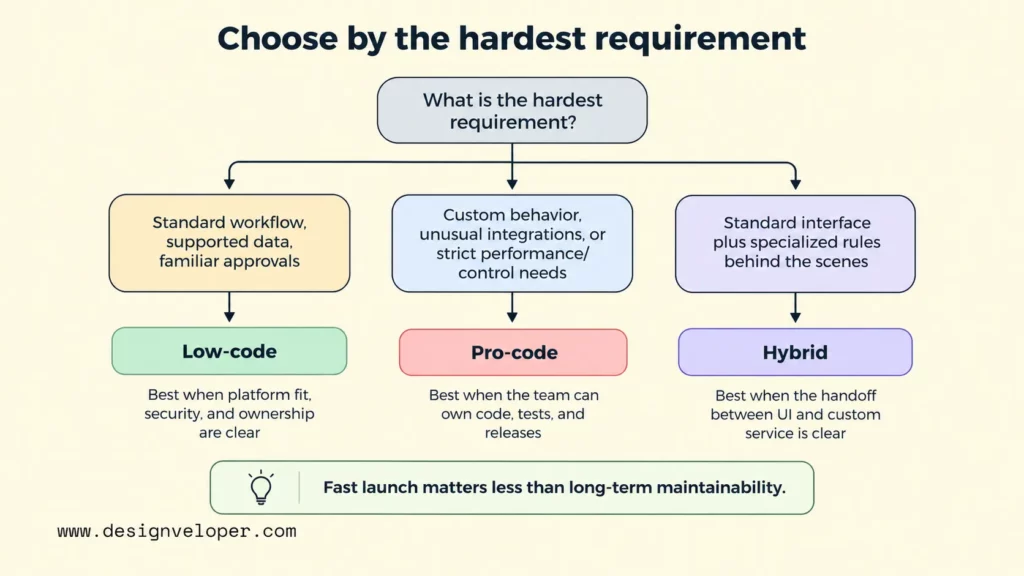
The main trade-off is faster assembly with platform limits versus more direct control with greater engineering responsibility. This table describes common starting points, not guaranteed outcomes. A well-designed low-code application can be secure and scale well, while a poorly built pro-code system can be slow, fragile, or hard to maintain.
| Decision factor | Low-code | Pro-code |
|---|---|---|
| Development skills | Visual tools reduce routine coding. Data and API work can still need developers. | Engineers write and maintain code, tests, and deployment tools. |
| Time to first release | Often quicker if templates and connectors fit. | May take longer when more features need custom engineering. |
| Customization | Depends on available components and code extensions. | Supports tailored logic and interfaces within project limits. |
| Integrations | Ready-made connectors help. Custom APIs may add cost and effort. | Custom integrations are possible. The team must maintain them. |
| Security and testing controls | Depend on the platform, configuration, and team review. | Can be designed in code but must be built and tested. |
| Scaling and maintenance | Managed services may help. Test workload and API limits. | Architecture can be tuned. Engineers maintain more systems. |
| Lifecycle cost | Budget for licenses, usage, connectors, and exit. | Budget for development, hosting, tests, and support. |
| Platform dependence | Check data export, code access, and deployment choices. | Greater tooling choice, but third-party dependencies remain. |
Development speed matters most when the main task is assembling familiar screens and processes. A low-code builder can save setup work for an employee form or dashboard. That benefit shrinks when the team must create many workarounds for a special workflow. Compare the effort to build one complete, realistic task rather than estimating from a product demo.
Low-code platforms differ widely. Some support custom code, self-hosting, and strong release controls. Others restrict deployment, connectors, or access to generated code. For a practical shortlist, our comparison of low-code development platforms focuses on use case, governance, integrations, and migration risk rather than treating every visual builder alike.
Integration fit can decide the choice before interface design begins. A connector may cover basic record updates but not a required approval state or an unusual authentication method. Low-code might still work through a custom API, but the team must check the connector’s permissions, pricing, response limits, and behavior when a request fails. Microsoft documents Dataverse API entitlement and service-protection limits, illustrating why platform capacity is a testable condition, not a general assumption.
Security and testing need an owner under either approach. A low-code platform may supply roles and managed environments, but the team must configure access and test sensitive actions. Pro-code allows customized controls, but writing code does not establish compliance. NIST’s Secure Software Development Framework outlines practices teams can apply to software delivery. Select specific checks based on the application’s risks and applicable requirements.
Maintenance changes the long-term calculation. A managed platform may handle some infrastructure updates, but app owners still deal with workflow changes and dependent systems. With pro-code, teams can change the underlying design, but they must maintain their code and deployment process. Microsoft, for instance, documents separate development, test, and production environments for Power Platform applications. Visual development does not remove release management.
Scaling is a workload question, not a label attached to either development approach. Run the same realistic usage scenario on each viable candidate. Check response times, failed requests, and the work needed to recover. That test gives the team stronger evidence than a general claim that a visual builder or custom code will scale.
Where Each Approach Fits In Practice
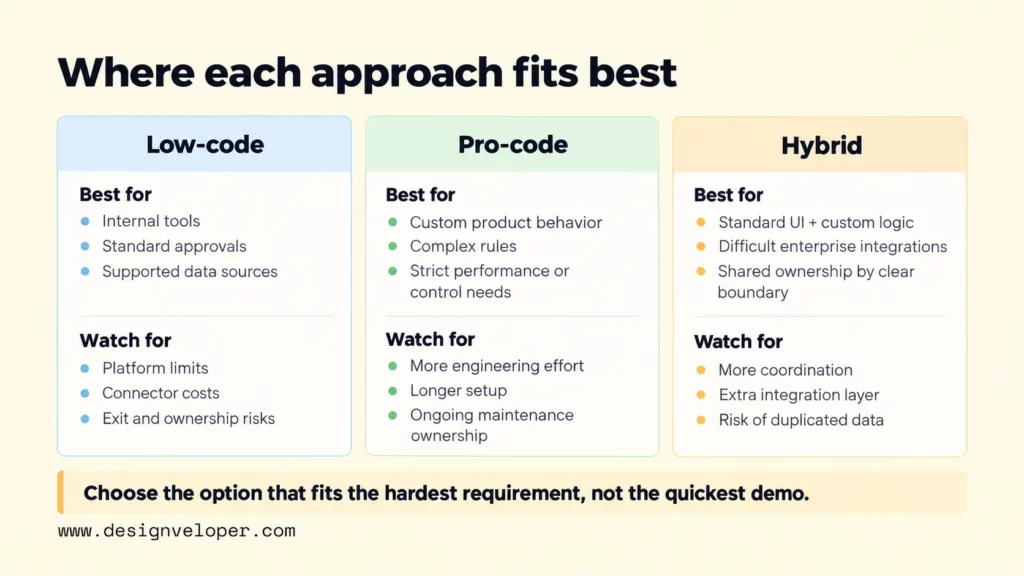
Choose an approach by the hardest requirement the application must meet. The following situations show where low-code, pro-code, or a combination tends to fit. The examples are illustrative, not measured project outcomes.
Use Low-Code For Standard Workflows And Internal Tools
Low-code is a strong starting point when a repeatable workflow fits the platform’s data and approval features. Typical candidates are:
- Staff forms and approval requests with familiar steps.
- Inventory views and operations dashboards using supported data sources.
- Small departmental tools whose access and ownership can be clearly defined.
Business users can help describe these tasks. Engineers or approved technical owners should confirm that permissions and connections are safe before production use.
Imagine an operations team replacing emailed purchase requests with an approval app. Staff submit requests, managers approve them, and finance checks the records. If the organization already uses a supported identity provider and data system, a low-code pilot could test the process without a large custom build. It should still check rejected requests, missing approvals, and who can change financial records.
A prototype is another suitable use when the immediate goal is learning rather than supporting every future requirement. Build one end-to-end workflow with sample or approved real data and observe where users struggle. Our low-code MVP development guide explains how to scope a test, validate it with users, and check ownership before scaling.
Keep the low-code option only if its limits remain acceptable after the pilot. Test realistic record volumes, concurrent users, external connections, and the time it takes to correct an error. A workflow that looks easy with ten records may behave differently with years of operational data.
Use Pro-Code For Differentiated Products And Complex Requirements
Pro-code fits when the product depends on behavior that a candidate platform cannot support on acceptable terms. Consider it for:
- Specialized scheduling or pricing rules that require custom tests.
- A distinctive customer interface with unusual interaction needs.
- Legacy integrations or performance targets that fail a realistic platform test.
These are reasons to investigate custom engineering, not guarantees that pro-code will perform better. Engineers still need to design, test, and operate the result.
Consider a subscription product whose pricing depends on complex contracts and real-time usage. If platform formulas cannot express those rules clearly, custom code can make them easier to test and update, provided the team writes and maintains those tests. Engineers can expose the logic through a documented API and measure response times. They also take responsibility for hosting, code reviews, and monitoring.
Growing requirements are another reason to assess architecture early. In our business management platform case study, we describe the challenge of preserving data accuracy while requirements changed and the database grew quickly. The case shows why adaptable design and data integrity matter. It does not document a low-code versus pro-code evaluation or prove that one approach would have performed better.
Pro-code is not necessary just because an application serves many people or processes sensitive data. Mature low-code platforms may support demanding applications when properly configured. The stronger reason to choose pro-code is a specific unmet need: required logic, performance, deployment control, testing access, or ownership that the candidate platform cannot provide on acceptable terms.
Combine Low-Code And Pro-Code At A Clear System Boundary
A hybrid design works when the interface is standard but the underlying rules are not. Keep forms, status views, and routine approvals in low-code. Put specialized calculations and access to difficult enterprise systems in a custom service. Connect the two through a documented API so both sides agree on requests and responses.
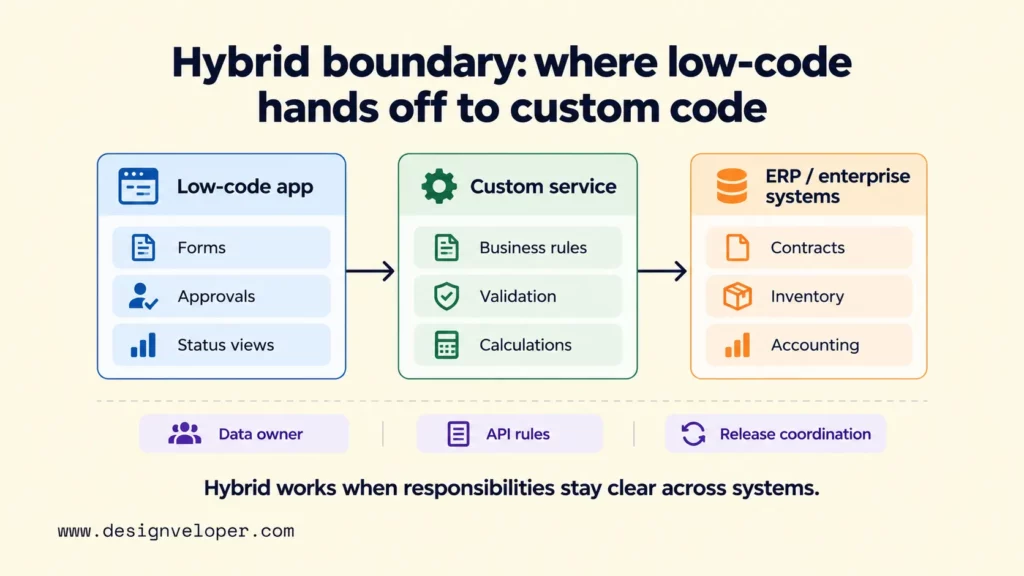
For example, staff could use a low-code screen to approve a supplier order. A custom service would check contract terms, enforce business rules, and communicate with the enterprise resource planning (ERP) system through its APIs. The interface would show the result without duplicating core rules in its own workflow. Microsoft’s architecture guidance documents this separation for Power Apps and REST APIs.
A hybrid application needs clear ownership so a visual screen cannot bypass critical rules. Our guide to API integration architecture explains why permissions and failure handling matter across connected systems. Agree on three responsibilities before building the connection:
- Data: identify the system that owns each record and who may change it.
- API: define authentication, error responses, retries, and version changes.
- Releases: test the low-code interface and custom service together when either changes.
Hybrid is not automatically cheaper or simpler. It introduces another interface to operate and can create duplicated data if ownership is unclear. Use it when the speed gained from visual workflows outweighs the cost of maintaining the connection. If almost every screen needs complex custom extensions, a fully coded interface may be easier to manage.
Choose An Approach With This Project Checklist
Choose an approach by checking the requirements that could block a release, then testing the hardest workflow. Evaluate candidates against the same acceptance criteria. A product manager and a technical owner should agree on those criteria before a team commits to a platform or codebase.
- Define the workflow and its criticality. Who uses it, what decision does it support, and what happens if it fails? Internal convenience tools may allow more shortcuts than revenue-critical services.
- Check platform and integration fit. List essential data sources, APIs, authentication methods, and any unsupported behavior. Demonstrate the hardest connection, including failure handling.
- Verify security and testing controls. Check user roles, data location, audit needs, test environments, release approval, and recovery. Assign an owner to confirm applicable legal requirements.
- Decide what the team must own. Ask who can change the workflow, access the source or configuration, support incidents, and transfer the system if a vendor relationship ends.
- Test expected growth. Use realistic data volumes, peak activity, and response-time targets. Include the impact of additional users, integrations, and workflow changes.
- Plan the exit route. Check whether data and rules can be exported in usable forms. Estimate what must be rebuilt if the platform or deployment model changes.
Lifecycle cost includes more than the first release. Compare the same expected users, workflow volume, support period, and growth assumptions for every option:
- Low-code: include subscriptions, premium connectors, storage, automation usage, training, support, and a possible migration.
- Pro-code: include engineering time, infrastructure, tests, monitoring, upgrades, and ongoing support.
Our low-code development cost guide shows how to budget for usage and dependencies. Neither approach has a guaranteed lower total cost. Compare a defined time horizon rather than a vendor demo or a first-year quote.
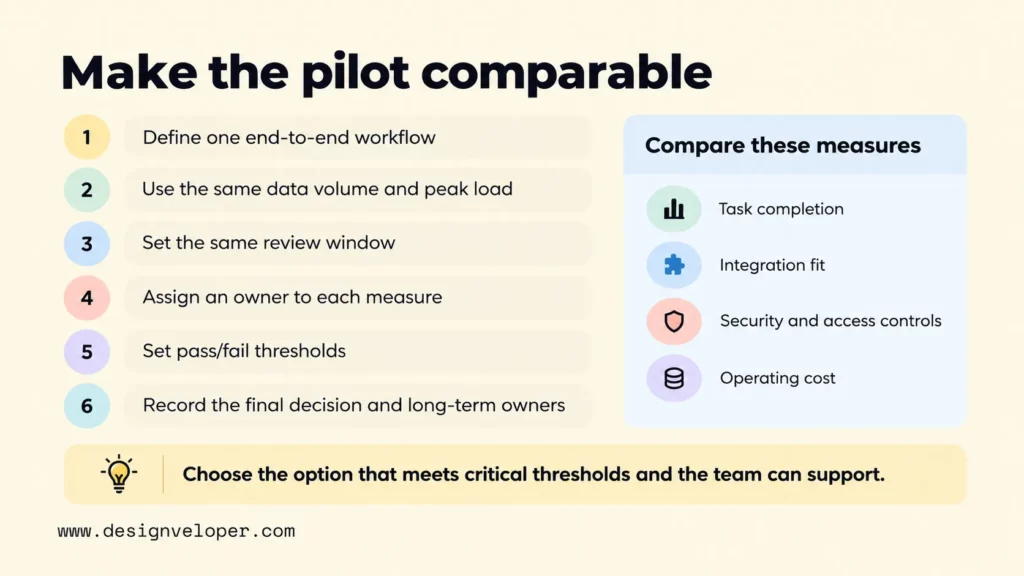
A final pilot should test the hardest workflow against agreed acceptance criteria. Before testing, name who will judge each measure and set its pass/fail threshold. For example, the product owner can assess task completion, while a technical lead checks integration, access controls, and response times. A budget owner should assess cost against the agreed operating period. Use the same end-to-end workflow, approved data volume, expected peak load, and review window for every viable approach. Record any differences in testing conditions.
If low-code passes every critical requirement, its shorter setup may justify using it. If it fails a requirement that cannot be fixed within the agreed limits, consider pro-code for that component or the whole product. Choose a hybrid design only when the connection and ongoing responsibility are clear.
After the pilot, record each option’s result against the agreed thresholds and explain the chosen approach. Name who owns each workflow, data source, and release. This decision record helps the team revisit the choice when requirements change rather than treating the fastest prototype as a permanent answer.
Also published on

Share post on










Related Articles



How To Modernize Legacy Systems Without Losing Business Momentum
How To Modernize Legacy Systems Without Losing Business Momentum Published November 19, 2026
CRM Integration: Types, Use Cases, And How To Connect Systems
CRM Integration: Types, Use Cases, And How To Connect Systems Published October 20, 2026
Integrating VoIP With CRM Systems: A Practical Integration Guide
Integrating VoIP With CRM Systems: A Practical Integration Guide Published October 16, 2026