
















10 Low Code Development Platforms for Business Apps in 2026

The right low code development platforms depend on the application, the systems that already hold business data, and the control the team needs after launch. A Microsoft-centric approval app, a regulated case workflow, and a public mobile product can require different platform choices even when all three use visual development.
This 2026 comparison helps teams shortlist ten options by use case, integration fit, governance, developer control, commercial model, and migration risk. Teams still deciding between low code vs no code platforms can first use our guide to low code vs no code development. That is a different decision from choosing a specific platform.
Compare Low Code Development Platforms Before You Shortlist
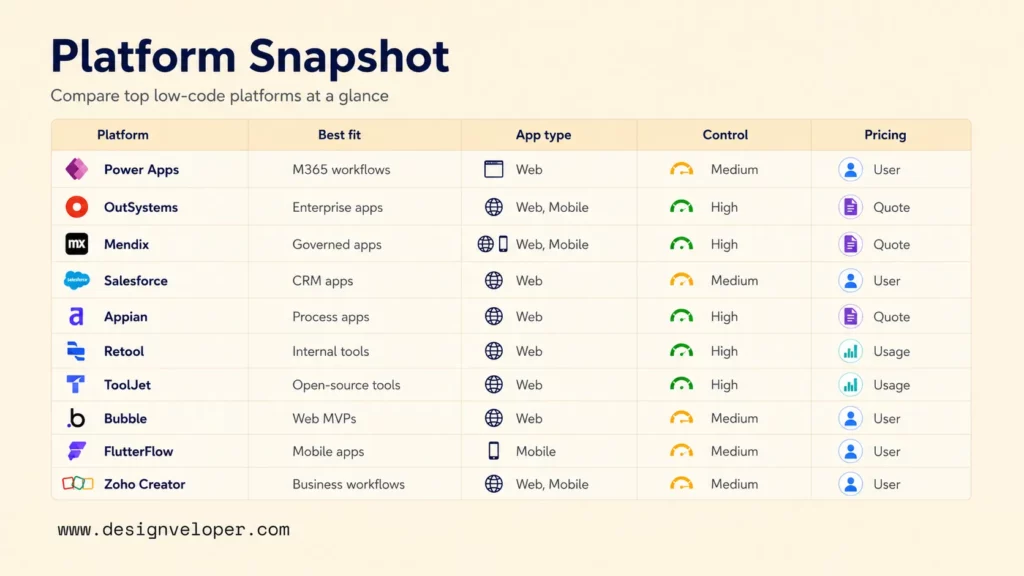
Use one framework throughout the shortlist. Define the app and users, remove platforms that fail a must-have integration or control, compare operating cost and ownership, then validate the remaining fit with a pilot. The table applies that framework to the ten low code development platforms reviewed in this article.
In the table, “Best for” means a suitable starting fit for the stated scenario, not a weighted ranking. Pricing models and feature packaging were reviewed on August 25, 2026. Vendors can change plans, limits, regional availability, and contract terms, so teams should verify the current commercial scope before purchase.
| Platform | Best for | App type | Integration ecosystem | Developer control | Governance and deployment | Pricing model to verify |
|---|---|---|---|---|---|---|
| Microsoft Power Apps | Microsoft 365 workflow apps | Internal forms, approvals, line-of-business apps, mobile-friendly business apps | Microsoft 365, Teams, SharePoint, Dataverse, Dynamics, Power Automate, and supported connectors | Medium; Power Fx, connectors, components, custom APIs, and pro-code extensions where licensed | Environments, roles, policies, solutions, and managed deployment options | Per-user, per-app, or pay-as-you-go options; verify premium connector and gateway scope |
| OutSystems | Complex enterprise applications | Web, mobile, workflow, customer, and employee applications | Enterprise APIs, databases, legacy systems, connectors, and custom integrations | High for a low-code platform; visual models plus extensibility | Lifecycle, DevSecOps, monitoring, governance, and deployment options depend on product and contract scope | Commercial subscription or quote; verify edition, deployment, capacity, and support |
| Mendix | Governed enterprise application portfolios | Web, mobile, process, and data-driven applications | Enterprise systems, APIs, cloud services, SAP ecosystem, and custom integrations | High; model-driven development with professional-developer extensibility | Central governance and several deployment models, with capabilities varying by package | One App or Unlimited Apps plus user and deployment factors; verify ISV terms separately |
| Salesforce Platform | CRM-centered business applications | Sales, service, partner, field, and employee apps | Salesforce data, Flow, AppExchange, APIs, CRM, and customer operations | Medium to high; declarative tools plus Apex and developer tooling | Roles, permissions, metadata, release tooling, and platform governance vary with edition and license | Per-user, login-based, and external-user models; verify SKU, entitlements, and contract |
| Appian | Process automation and case management | Approval workflows, case apps, operations portals, and mobile process apps | Enterprise data sources, APIs, data fabric, RPA, and process automation | Medium to high; visual development plus supported extensions | Governed development, deployment controls, and tier-dependent process and case capabilities | Per-user, per-month, per-app tiers; verify package, scale, portal, automation, and AI limits |
| Retool | Internal tools for technical teams | Admin panels, dashboards, CRUD tools, and operational apps | SQL databases, REST, GraphQL, SaaS APIs, and cloud services | High for internal tooling; SQL, JavaScript, APIs, and custom components | Cloud or self-hosted deployment, with permissions, audit logs, source control, and environments varying by plan | Builder, internal-user, and external-user models; verify cloud versus self-hosted plan |
| ToolJet | Self-hosted and internal applications | Internal tools, dashboards, admin panels, and workflow apps | Databases, APIs, SaaS tools, and ToolJet Database | High; queries, JavaScript, components, and edition-dependent platform controls | Cloud and self-hosted options; governance and deployment rights vary by edition | Cloud or self-hosted editions; verify builder, end-user, support, and deployment rights |
| Bubble | Web app MVPs and product validation | Customer-facing web apps, marketplaces, SaaS products, and prototypes | Built-in database, API connector, plugins, and third-party services | Medium inside Bubble; visual workflows and extensions, but no conventional application source-code export | Managed hosting, versioning, privacy rules, workload monitoring, and plan-dependent scaling options | Project and workload-based pricing; verify workload, overage, storage, and plan features |
| FlutterFlow | Low code mobile app development | iOS, Android, web, and cross-platform product apps | Firebase, Supabase, REST APIs, custom services, and the Flutter ecosystem | High after export; paid plans support downloading generated Flutter code | Visual development plus plan-dependent code export, GitHub, environments, and mobile deployment workflows | Seat-based plan tiers; verify code, collaboration, branching, and deployment features |
| Zoho Creator | Business workflow applications | Forms, approvals, reports, portals, and operational apps | Zoho suite, data sources, custom connectors, APIs, and add-ons | Medium; visual configuration plus Deluge scripting and connectors | Role-based sharing, mobile and web deployment, portals, and administration vary by plan | Per-user plan tiers; verify region, portal users, connector limits, records, and add-ons |
A useful classification is among three groups: enterprise application platforms, internal-tool builders, and product-focused visual builders. That split helps a team remove tools designed for a different job before comparing smaller feature differences. Among enterprise low code platforms, governance and deployment controls can matter more than visual editing speed.
10 Low Code Platforms for Different Business Use Cases
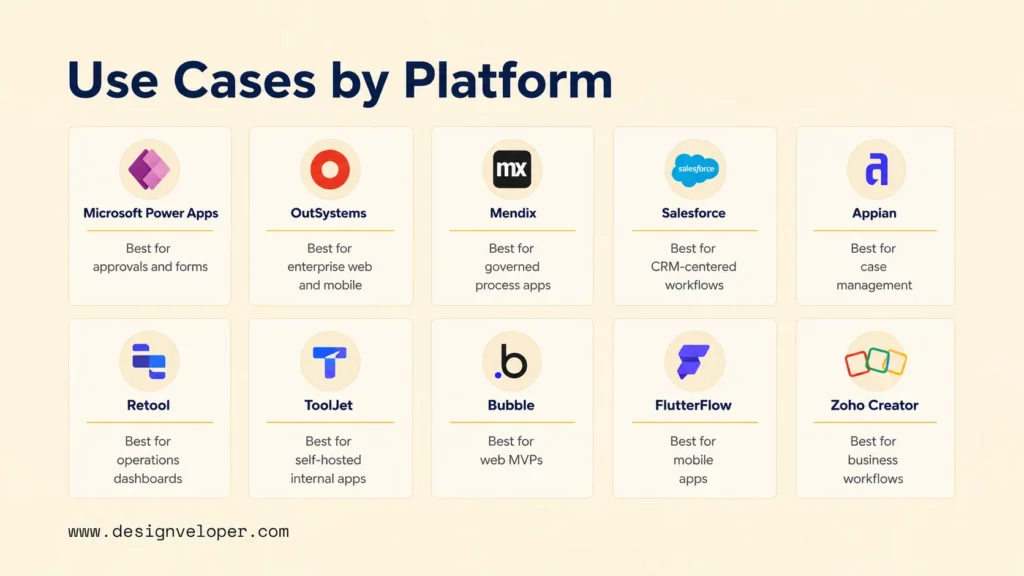
The ten low code tools below use the same review labels for consistency, but each profile focuses on the factor that changes the decision. Each “Best for” statement describes scenario fit rather than an overall market ranking.
Match the platform category to the job
- Enterprise application platforms
Power Apps, OutSystems, Mendix, Salesforce Platform, and Appian suit governed workflows and broader integration needs.
- Internal-tool platforms
Retool and ToolJet suit dashboards, admin panels, and operational apps that sit close to databases and APIs.
- Product and workflow builders
Bubble, FlutterFlow, and Zoho Creator can move quickly when their hosting, ownership, and scaling boundaries fit the roadmap.
Microsoft Power Apps for Microsoft 365 Workflow Apps
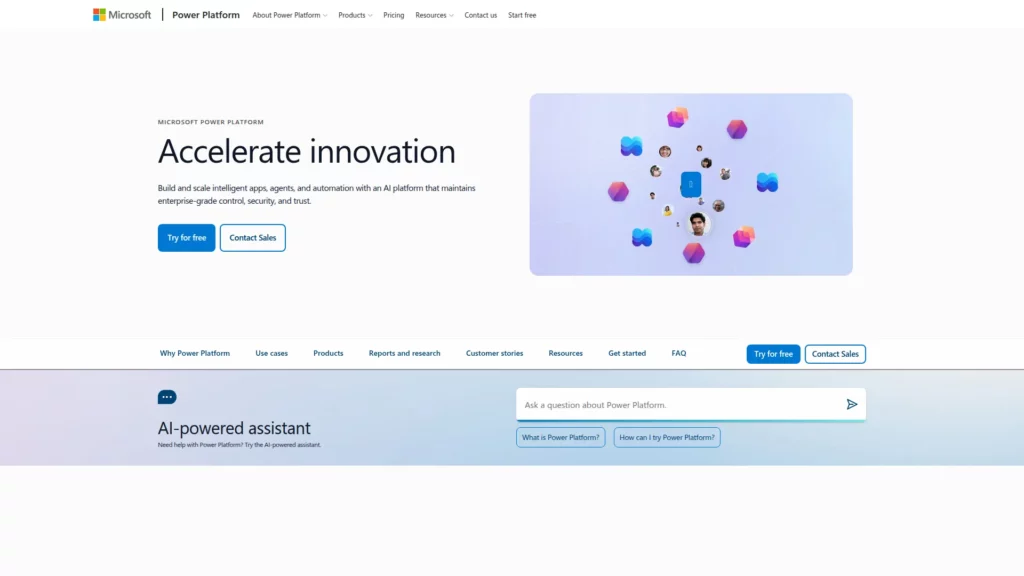
Best for: Organizations already using Microsoft 365 that need internal forms, approvals, and team workflows.
Why it fits: Power Apps works closely with Teams, SharePoint, Dataverse, and Power Automate. A practical scenario is an employee leave-request app that stores records in Dataverse and routes approval through Power Automate.
What to check: Map every connector and user type before estimating cost. Microsoft’s Power Apps licensing FAQ for premium features states that premium connectors, custom APIs, and on-premises gateways can require premium entitlements. Gateway access also depends on the supported connector, license, tenant configuration, and the gateway setup.
OutSystems for Enterprise Low Code Application Development
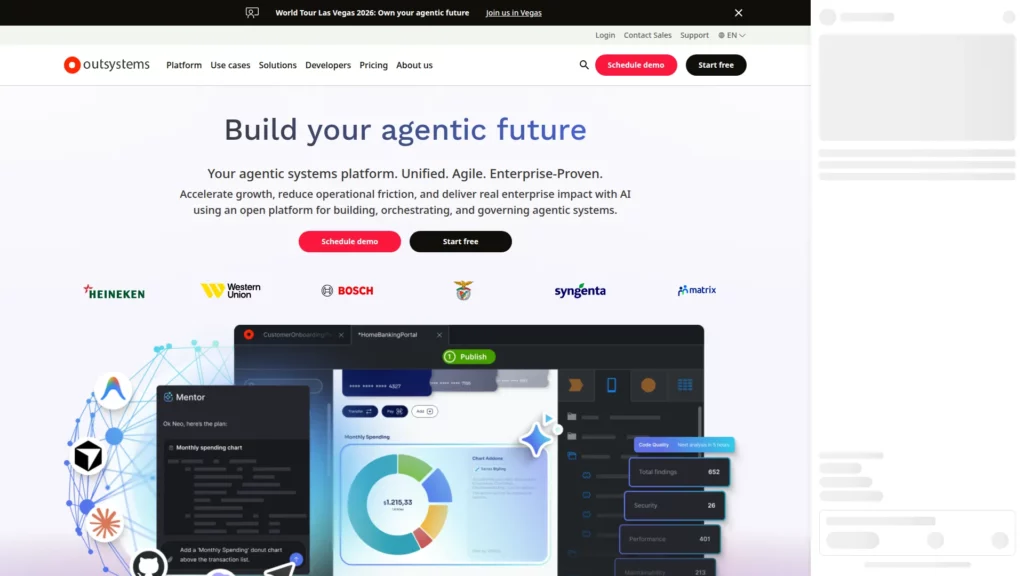
Best for: Complex enterprise web or mobile applications that need strong lifecycle controls and room for extensions.
Why it fits: OutSystems combines visual development with enterprise integrations, lifecycle tooling, governance, DevSecOps, and monitoring. It can suit a customer portal that must connect with legacy services and move through controlled releases.
What to check: Confirm which capabilities apply to the selected product, edition, deployment model, and contract. Do not assume every governance, observability, integration, or hosting option is included in the same commercial scope.
Mendix for Governed Enterprise Applications
Best for: Larger teams that want model-driven development, shared business-IT work, and centralized governance.
Why it fits: Mendix represents application logic, data, workflow, and interfaces through model-driven development. A supplier onboarding app can let procurement review the process while developers connect identity, ERP, and document services.
What to check: Decide whether the target is one application or a portfolio. Mendix’s current One App and Unlimited Apps pricing comparison says the two choices differ by commercial model rather than platform capability. “Unlimited Apps” does not mean unlimited users, infrastructure, or total cost, and Mendix lists a separate commercial model for ISVs.
Salesforce Platform for CRM-Centered Low Code Apps
Best for: Applications whose core records, permissions, and workflows already live in Salesforce.
Why it fits: Salesforce Platform combines Lightning App Builder, Flow, reports, APIs, AppExchange, and pro-code options such as Apex. A field-service exception app can reuse CRM records instead of copying customer data into another platform.
What to check: Model internal, occasional-login, and external users separately. Salesforce’s current platform pricing and license options show different user and login models. Available objects, API entitlements, features, and external-user terms can also vary by SKU, edition, and contract.
Appian for Business Process Automation and Case Management
Best for: Approval-heavy operations, case management, compliance work, and processes that span enterprise systems.
Why it fits: Appian combines low-code application development with process automation and a data fabric. A claims or exception process can move through intake, evidence review, approval, and audit steps in one governed workflow.
What to check: Match the required process and case features to the contracted tier. Appian’s current Standard, Advanced, and Premium capability matrix shows tier differences for data scale, portals, automation, case management, and AI features.
Retool for Internal Tools and Operations Dashboards
Best for: Developer-led teams that need internal tools directly on top of databases and APIs.
Why it fits: Retool centers on data connections, queries, components, and operational interfaces. A support dashboard can read customer records from PostgreSQL, call a billing API, and expose controlled actions to authorized staff.
What to check: Separate builder, internal-user, and external-user requirements. Features such as richer permissions, audit logs, source control, and self-hosting depend on the plan and deployment model, so the trial should use the controls required in production.
ToolJet for Open-Source Internal Applications
Best for: Teams that want internal-tool speed with a self-hosted option and a community edition.
Why it fits: ToolJet can connect databases and APIs to internal interfaces and can run in cloud or self-hosted environments. An inventory admin app can query an internal database and let operations staff update controlled fields.
What to check: Distinguish the community edition from commercial self-hosted editions before planning production. User models, governance features, deployment rights, support, and licensing terms can differ by edition and contract.
Bubble for Web App MVPs and Product Validation
Best for: Founders and product teams that want to validate a customer-facing web application without building a conventional backend first.
Why it fits: Bubble provides a visual editor, database, workflows, API connections, plugins, and managed hosting. A booking marketplace can test registration, listings, transactions, and admin operations before the product team commits to a custom architecture.
What to check: Test workload behavior and migration boundaries before traction grows. Bubble’s application and data ownership documentation says user-created data can be exported, while the application cannot be exported as a conventional codebase and must run on Bubble.
FlutterFlow for Low Code Mobile App Development
Best for: Cross-platform mobile products that need visual delivery and may later move into a standard Flutter development workflow.
Why it fits: FlutterFlow builds Flutter interfaces visually and supports common backends, APIs, custom code, and code download on paid plans. A startup can validate a membership app, then continue work on the generated Flutter project outside the visual builder.
What to check: Test code download, custom code, signing, and release ownership before committing. Publishing through FlutterFlow still requires the appropriate Apple or Google developer account, credentials, store configuration, and review. Deployment capability does not guarantee store approval. Our Flutter vs FlutterFlow comparison covers the trade-off between visual speed and direct code control.
Zoho Creator for Business Workflow Applications
Best for: Business teams that need forms, approvals, reports, and workflow apps, especially when Zoho products are already in use.
Why it fits: Zoho Creator supports web and mobile apps, workflows, reports, role-based access, connectors, and Deluge scripting. A purchase-request app can route approvals by role and show request status in operational reports.
What to check: Verify the pricing page for the region that applies to the buyer. Portal users, connectors, record or API limits, custom domains, and add-ons can vary by plan, region, rollout status, and review date.
A useful shortlist removes platforms built for a different kind of application before it compares smaller feature differences.
Choosing a Low Code Application Platform for Your Requirements
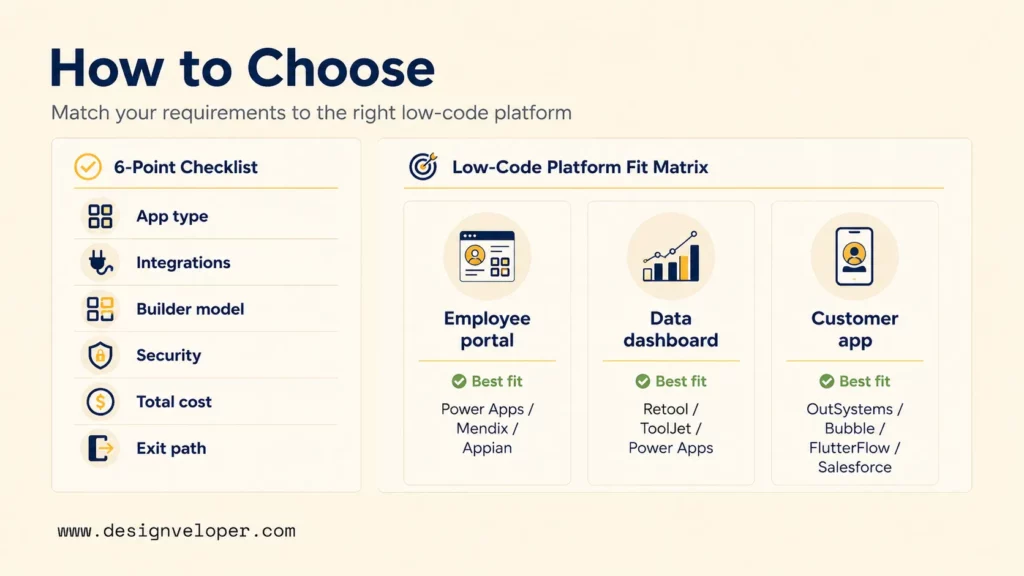
Across low code application platforms, the safest choice separates non-negotiable requirements from preferences, then tests one realistic workflow. Use the checklist below to decide what must be true before a platform reaches the pilot stage.
- Application type: Is the target an internal workflow, customer-facing product, web app, or mobile app?
- Integration scope: Which CRM, ERP, databases, payment services, identity providers, and APIs must work in production?
- Builder model: Which changes can business users make safely, and which changes still require engineers?
- Security: Which roles, audit trails, approval controls, data-residency rules, and retention rules are mandatory?
- Total cost: Include subscriptions, implementation, premium connectors, support, environments, external users, and scale-up usage.
- Exit path: Can the team export required data or code, replace constrained modules, and migrate critical records if the platform stops fitting?
Commercial fit can change after a tool passes the technical checklist. Our guide to low-code development cost explains why user growth, connectors, infrastructure, support, and migration work belong in total cost of ownership.
PMs, product owners, and founders can use the decision lens below before they spend time on a vendor trial. It converts broad budget and delivery concerns into observable choices without pretending there is one universal cost range.
Five planning signals before the pilot
- Team
Few builders, fusion team, or platform team?
- Budget
Capped spend, usage-sensitive spend, or enterprise contract?
- Timeline
Rapid validation, phased rollout, or long-lived product?
- Risk
Low-risk workflow, governed operations, or regulated data?
- Outcome
Automation, internal productivity, validation, or customer product?
The three scenarios below show how the same requirements produce different starting shortlists.
| Scenario | Best starting fits | Why | Pilot test | Exit signal |
|---|---|---|---|---|
| Employee self-service portal | Power Apps, Mendix, Appian, Zoho Creator | Forms, approvals, role-based access, and HR or identity integrations matter more than custom visual effects | Build leave requests, manager approval, policy rules, audit history, and employee status views | Complex payroll logic, strict regional data rules, or costly integrations exceed the platform model |
| Data-heavy internal dashboard | Retool, ToolJet, Power Apps | Fast database and API access matters more than public-product UX | Join two live data sources, enforce roles, write back safely, and measure query performance | Real-time workloads, high data volume, or specialized analytics need a custom service layer |
| Customer-facing app | OutSystems, Mendix, Bubble, FlutterFlow, Salesforce Platform in CRM-centered cases | Public UX, external-user licensing, performance, release control, and ownership become central | Test sign-up, a core transaction, support flow, analytics, failure recovery, and a production-like release | Product differentiation, scale, compliance, or code ownership becomes harder than extending a custom architecture |
The matrix is a starting point, not a final answer. Once a scenario has two or three credible options, the next job is to verify production controls rather than compare more marketing features.
Governance and Scalability for Low Code App Development
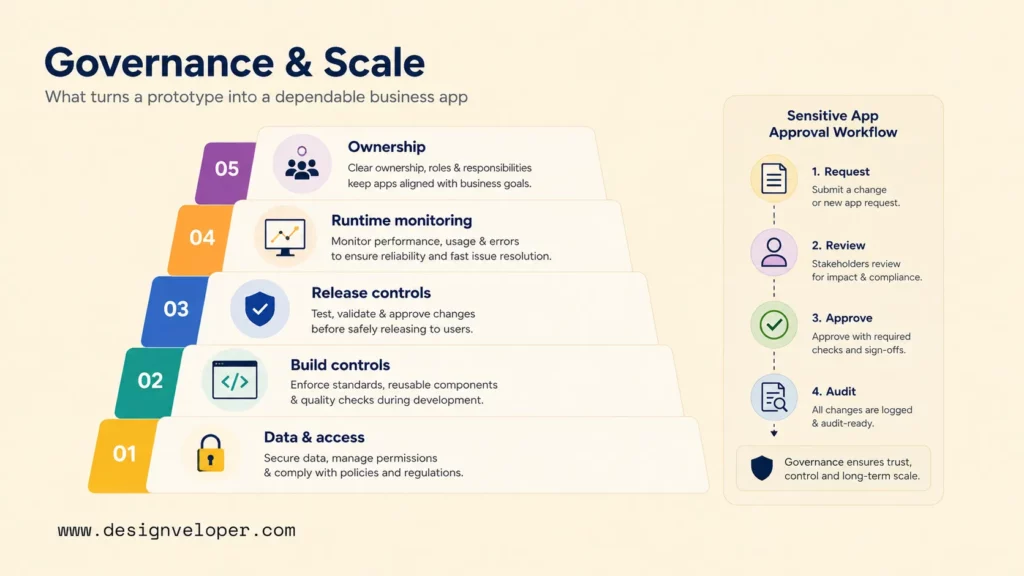
A prototype becomes a dependable business application only when the team controls access, changes, releases, and runtime behavior. AI-assisted generation can speed scaffolding, but it does not replace architecture, testing, security review, or production ownership.
Security review should start before business users connect live data. Define maker permissions, approved connectors, secrets handling, role boundaries, and data-loss controls so a fast build does not create unmanaged shadow IT.
Production governance stack
- 1. Data and access – Identity, roles, sensitive fields, residency, retention, and audit evidence.
- 2. Build controls – Approved connectors, reusable components, code review, maker permissions, and environment rules.
- 3. Release controls – Versioning, testing, release approval, rollback, and change records.
- 4. Runtime controls – Performance, API limits, data volume, errors, logs, monitoring, and capacity alerts.
- 5. Ownership – A named business owner, technical owner, support path, and release decision maker.
Consider an approval workflow that handles salary changes or customer identity documents. The visible form is only one layer. Production also needs least-privilege access, approval separation, audit history, protected integrations, release testing, incident monitoring, and a named response owner.
Scalability also means more than adding users. Test record growth, file volume, API quotas, background jobs, mobile latency, concurrent use, and the commercial effect of moving into higher plans. A platform can scale technically while becoming a poor commercial fit.
A low-code app is production-ready only when the team can control changes, detect failures, and name who owns the response.
Governance should preserve delivery speed rather than block it. Our analysis of developers in the low-code era explains why developers increasingly focus on architecture, integrations, guardrails, security, and quality while business teams handle more configuration.
Build a Plan for What Happens After the Pilot
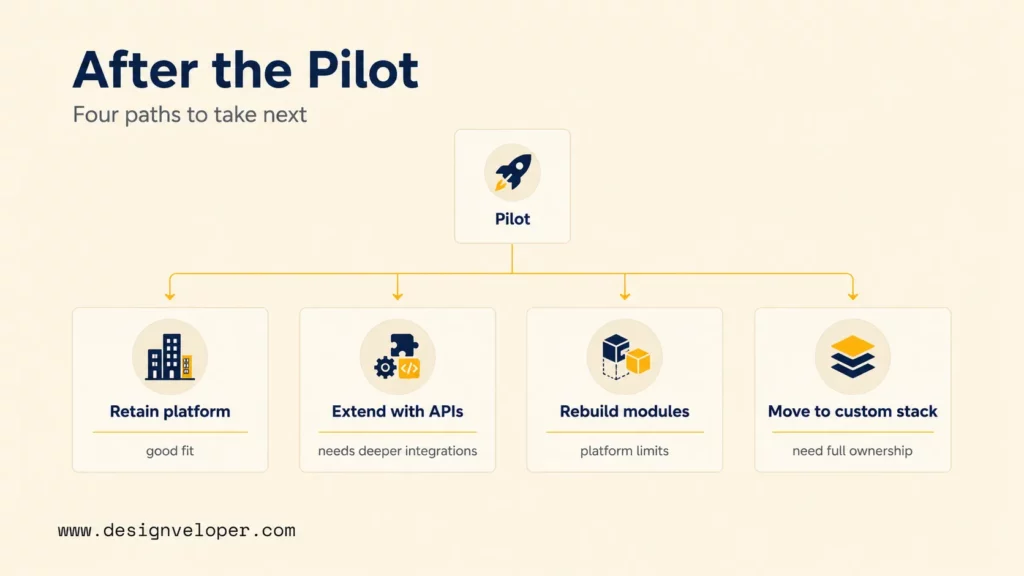
A pilot should end with a decision, not another open-ended trial. The team needs one sequence from test scope to measurable evidence, exit criteria, and the build path that follows. Our low-code MVP development guide is useful when the pilot is also testing product demand.
Pilot scope to build decision
- 1. Pilot scope
Choose one high-risk workflow, real integrations, real roles, and representative data.
- 2. Success metrics
Set pass or fail measures for cycle time, reliability, usability, support effort, and cost.
- 3. Exit criteria
Name the limits that trigger custom services, module replacement, or a different stack.
- 4. Decision paths
Retain the platform, extend it with custom services, rebuild constrained modules, or move core functionality to a custom stack.
The decision should change when the validated product needs differentiated customer experience, complex domain logic, real-time performance, high-volume data, deep legacy integrations, or strict audit controls. Full code ownership can also become decisive when the team needs to control architecture and long-term change without a platform dependency.
Long-term cost belongs in the same decision. A subscription can remain efficient for a stable internal workflow yet become less predictable when public users, premium integrations, storage, automation, or workload volume grow. Compare the planned operating model, not only the pilot invoice.
Teams that reach an exit criterion do not have to rebuild everything at once. Our low code vs traditional development comparison can help separate the modules that still fit low code from the parts that need direct engineering control.
FAQs About Low Code Development Platforms
Which Low Code Platforms Are Suitable for Customer-Facing Mobile Apps?
FlutterFlow, OutSystems, Mendix, and Appian can support customer-facing mobile scenarios, but they solve different problems. FlutterFlow is a strong starting fit when downloadable Flutter code matters. OutSystems and Mendix suit broader enterprise applications, while Appian is more process-centered.
Test store deployment, authentication, offline behavior, push notifications, API latency, accessibility, crash handling, and update ownership. A platform that produces screens quickly can still be a poor fit for a highly differentiated consumer experience.
How Do Low Code Platform Licensing Models Affect External Users?
External users can change the commercial model because platforms may meter employees, builders, logins, portal users, active users, or workload differently. The correct estimate starts with the audience model rather than the vendor’s headline plan.
Give each shortlisted vendor the same forecast for authenticated customers, occasional users, peak activity, integrations, storage, and automation. Then ask which meter rises in each scenario and which entitlements are contract-specific.
Can Large Organizations Standardize on More Than One Low Code Platform?
Yes. A large organization can standardize on a small platform portfolio when each tool has a clear lane. One platform might cover Microsoft 365 workflows, another enterprise process applications, and another developer-led internal tools.
Define approved use cases, data classes, identity rules, owners, and support responsibilities for each lane. Architecture review should catch overlapping projects before separate teams create incompatible solutions for the same process.
What Should a Team Validate During a Low Code Platform Pilot?
The pilot should validate the highest-risk assumptions that remain after shortlisting. Use the pilot workflow above, then record evidence for real integrations, representative permissions, expected data volume, error handling, release steps, monitoring, and support effort.
Keep the result as a pass-or-fail record against the success metrics set before testing. That prevents a polished demo from becoming approval evidence when production constraints were never exercised.
How Can Leaders Measure Whether a Low Code Project Delivered Business Value?
Leaders should measure the process outcome that justified the app, not only development speed. Useful measures include cycle time, error rate, completion rate, support demand, manual handoffs, adoption, and cost per completed transaction.
Compare those measures with the pre-project baseline and the agreed success threshold. A suitable choice among low code development platforms should improve the target process without creating a larger licensing, governance, or ownership problem.
Also published on

Share post on










Related Articles


10 Low Code Development Platforms for Business Apps in 2026
10 Low Code Development Platforms for Business Apps in 2026 Published August 25, 2026
Choosing Between Low Code and No Code Development
Choosing Between Low Code and No Code Development Published August 25, 2026
How To Develop A Low-Code MVP: Step-By-Step Guide
How To Develop A Low-Code MVP: Step-By-Step Guide Published July 23, 2026



















