
















How To Create A Financial App: Steps, Features, And Costs

If you are figuring out how to create a financial app, start by defining the financial job, the regulated activities, and one end-to-end workflow the first release must handle safely. Then design security, data, compliance, and third-party integrations around that workflow before you expand the feature list.
This order matters because a budgeting tool, a payment wallet, and an investment app may look similar on a phone while carrying very different data, identity, integration, and regulatory requirements. A useful financial app development plan therefore starts with product scope and risk, not with a generic list of screens.
What Type Of Financial App Are You Creating?
The app type determines what data you handle, which actions users can take, which external systems you need, and which rules may apply. If the category is vague, the MVP usually becomes vague too.
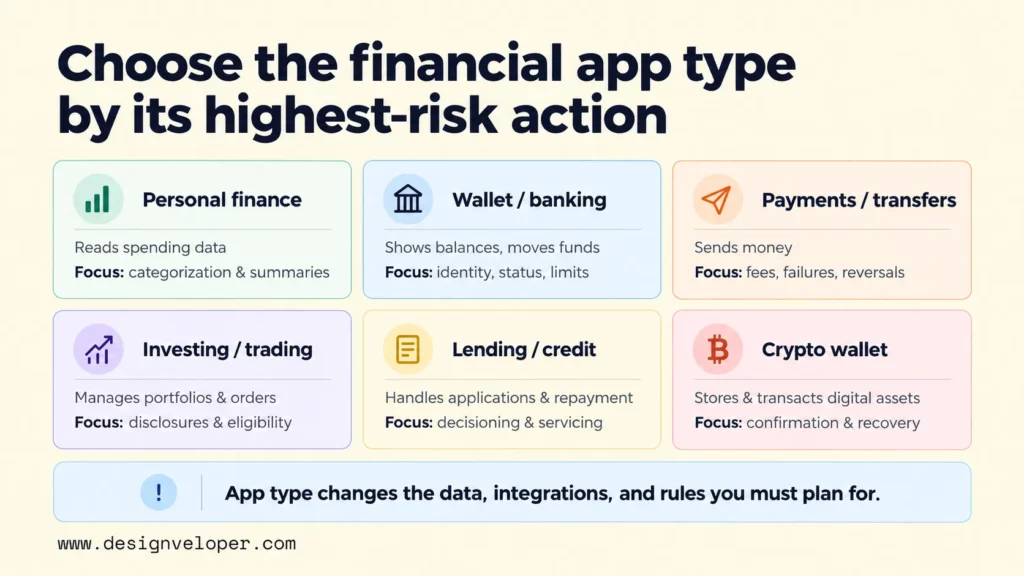
- Personal finance and budgeting apps: help users view balances or records, categorize transactions, manage budgets or goals, and understand spending. Some only read data, while others can initiate financial actions.
- Banking and digital wallet apps: center on identity, account access, balances, money movement, transaction states, limits, support, and operational controls.
- Payment and money-transfer apps: need clear payment states, recipients, fees, failures, reversals, disputes, and reliable callbacks from payment providers.
- Investment and trading apps: may add portfolios, orders, market information, disclosures, and suitability or eligibility controls where required.
- Lending and credit apps: often cover application, identity checks, decisioning, agreements, repayment, servicing, and delinquency workflows.
- Crypto wallet and digital-asset apps: need clear wallet access, custody assumptions, transaction confirmation, recovery paths, and risk communication.
Choose the category by the highest-risk action the product performs, not only by its marketing label. A budgeting app that only categorizes transactions has a different risk profile from an app that holds funds or initiates transfers. Our mobile app development guide can help you place that product decision inside the wider design, engineering, testing, release, and maintenance lifecycle.
Financial App Features To Plan For The MVP
A financial app MVP should contain the smallest complete workflow that proves user value without removing controls needed for safety, accuracy, or support. The exact feature set changes with the app type, but several foundations appear across many products.
| Area | MVP foundation | Add when the product requires it |
|---|---|---|
| Access | Registration, secure login, recovery, and consent | Identity verification, device checks, stronger transaction approval |
| Financial data | Balances or records, transaction history, dates, and amounts | Linked institutions, investment data, credit data, real-time refresh |
| Core action | One complete user job with confirmation and error handling | Transfers, payments, deposits, withdrawals, trades, or loan applications |
| Money management | Basic categorization or status views | Budgets, goals, alerts, forecasts, reports, and financial insights |
| Notifications | Important account, security, and workflow updates | Balance thresholds, bill reminders, market events |
| Operations | Support path, user management, admin visibility, and an audit trail | Disputes, manual review, risk review, fraud queues, case management, regulatory reporting |
If account aggregation is part of the product, Plaid Link is one example of a client-side flow for connecting financial accounts. Plaid Transactions can provide authorized transaction history and incremental updates through webhooks. These integrations affect consent, data refresh, error states, and support, so they belong in scope planning rather than being treated as a late plug-in.
Prioritize features by the evidence you need from the first release. A budgeting product may need categorization and recurring-spend insights before it needs payments. A transfer product cannot defer transaction status or recovery. Our guide to minimum viable products explains why an MVP should test one coherent value path rather than become a smaller copy of the final roadmap.
How To Create A Financial App Step By Step
The safest build sequence reduces product, regulatory, and technical uncertainty before the team commits to expensive implementation. Each step should close a specific risk before the next one adds more complexity.
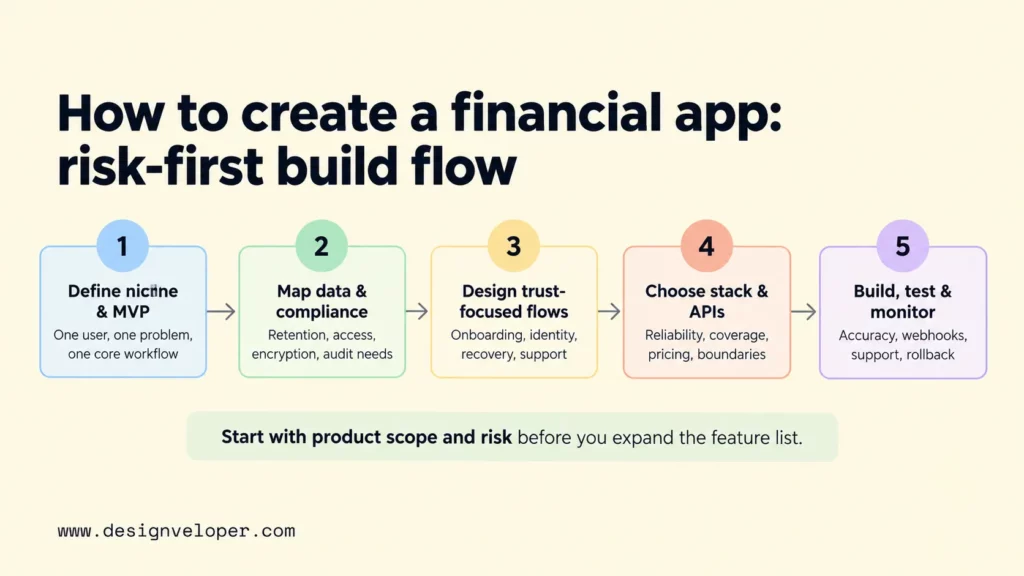
Step 1. Define The Niche, Users, And MVP Scope
Start with one user group, one financial problem, and one end-to-end workflow. For a budgeting app, that workflow might be connect an account, categorize spending, and review a monthly summary. For a transfer product, it might be verify identity, choose a recipient, send money, and confirm the outcome.
Set success criteria before development begins. Measure whether users can complete the core job, such as finishing onboarding, linking an account, completing a transfer, correcting a category, or returning to use the feature again. A smaller release is useful only when it produces evidence for the next product decision.
Step 2. Map Security, Compliance, And Data Requirements
Map obligations before architecture decisions are locked. Regulatory scope depends on the product’s activity, role, data, payment flow, and jurisdiction. Ask what personal and financial data the app collects, whether it stores or transmits cardholder data, whether it moves or holds money, and which regulated partners are involved. Define who owns each data set, how long it is retained, who can access it, how it is encrypted, and which audit records must be kept.
The PCI SSC document library lists PCI DSS v4.0.1 as the active standard for payment-card security. For anti-money-laundering controls, the FATF Recommendations provide an international framework that countries implement through local rules. Customer identification, verification, and other AML duties still depend on the activity and jurisdiction. Confirm the applicable requirements with qualified legal and compliance specialists before implementation is finalized.
Step 3. Design Trust-Focused Financial Workflows
Design the whole financial workflow, not only the successful transaction. Map onboarding, identity checks, account linking, payment or transaction review, support, and failure recovery together. Users should see the amount, fees, current status, confirmation, and next step when money or sensitive data is involved. They should also understand what happens after a rejected identity check, expired connection, delayed transaction, or failed payment.
Prototype retry, cancellation, reversal, dispute, and support states before coding. These states expose missing product rules while changes are still cheap. Our mobile app design process explains how research, flows, wireframes, prototypes, and usability checks reduce uncertainty before development.
Step 4. Choose The Tech Stack And Financial APIs
Choose technology after the workflow and constraints are clear. Decide whether the product needs native mobile apps, a cross-platform client, a web experience, or a combination. Then select the backend, database, authentication, hosting, analytics, observability, and admin tooling that support the required reliability and operating model.
Evaluate financial APIs for coverage, reliability, security, documentation, pricing, regional availability, failure behavior, and operational support. Plaid Link documentation illustrates an account-linking flow, while Stripe Payment Intents model a payment through lifecycle states. Stateful integrations like these help the app represent actions that may require authentication or complete asynchronously.
Keep the app layer separate from regulated or third-party financial services where appropriate. That boundary makes ownership of data, errors, uptime, and compliance responsibilities clearer.
Step 5. Build, Test, Launch, And Monitor
Build in vertical slices so each increment connects the user interface, business rules, data, integrations, and operational visibility for one workflow. This makes it easier to find gaps than building every screen first and integrating later.
Test authentication, permissions, transaction accuracy, rounding, retries, timeouts, webhooks, accessibility, performance, and recovery states. Add security and compliance checks that match the product’s scope. Launch with monitoring, support procedures, incident response, and rollback options, then expand only after the core workflow behaves reliably in production.
Financial App Security, Compliance, And API Integrations
Security and compliance are architecture and operating requirements, not a final checklist before launch. They affect what data the app collects, where it is stored, who can access it, how external services are connected, what gets logged, and what evidence is needed for release.
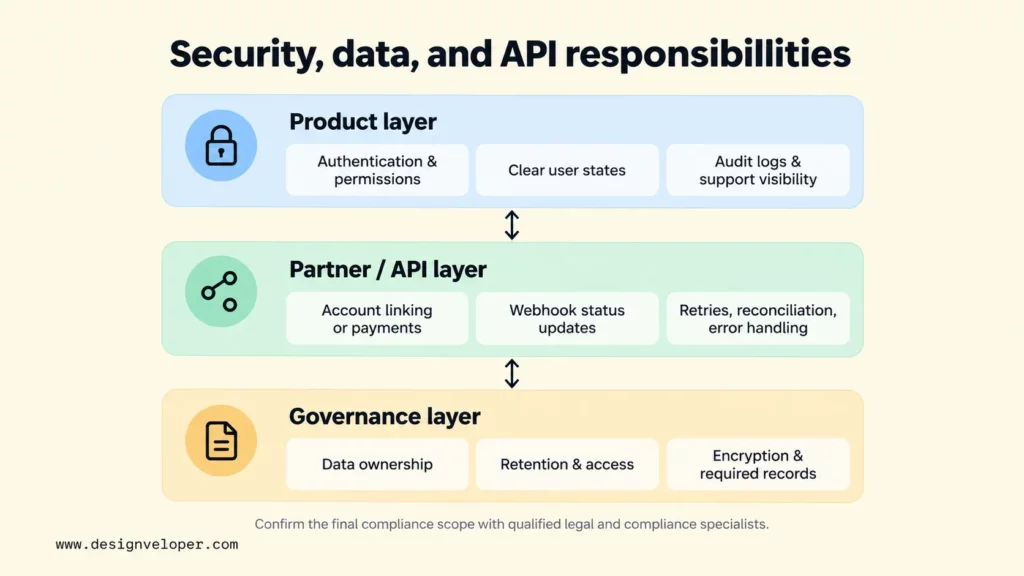
For mobile security, the OWASP Mobile Application Security Verification Standard groups controls around storage, cryptography, authentication, network communication, platform interaction, code quality, resilience, and privacy. Our fintech cybersecurity guide adds financial-app context around encryption, identity, API risk, testing, monitoring, and third-party dependencies.
Compliance scope follows the product and market. PCI DSS is intended for entities that store, process, or transmit cardholder data, or can affect the security of the cardholder data environment. KYC, AML, privacy, licensing, recordkeeping, and reporting obligations vary by activity and jurisdiction. For card payments, PCI SSC states that outsourcing payment processing can reduce requirements that apply directly to a merchant’s environment. It does not remove the merchant’s responsibility for third-party protection and shared responsibilities. Confirm the final scope with qualified legal, compliance, and regulated financial partners.
API security also needs operational controls. Use strong authentication and authorization, idempotency where repeated requests could create duplicate actions, bounded retries, rate limits, webhook verification, reconciliation, and audit logs. For payment methods with delayed outcomes, Stripe recommends using webhooks to track status changes instead of assuming a payment finished during the first request.
Financial App Development Cost And Timeline
For early planning, a focused personal-finance-app MVP can use a vendor-reported $40,000-$120,000+ build-cost band and about 4-6 months, while a more complex product can use $150,000-$300,000+ and about 9-12+ months. These are planning inputs, not universal prices or delivery promises. Product type, jurisdiction, integrations, security, compliance, team model, and production-readiness requirements can move them substantially.
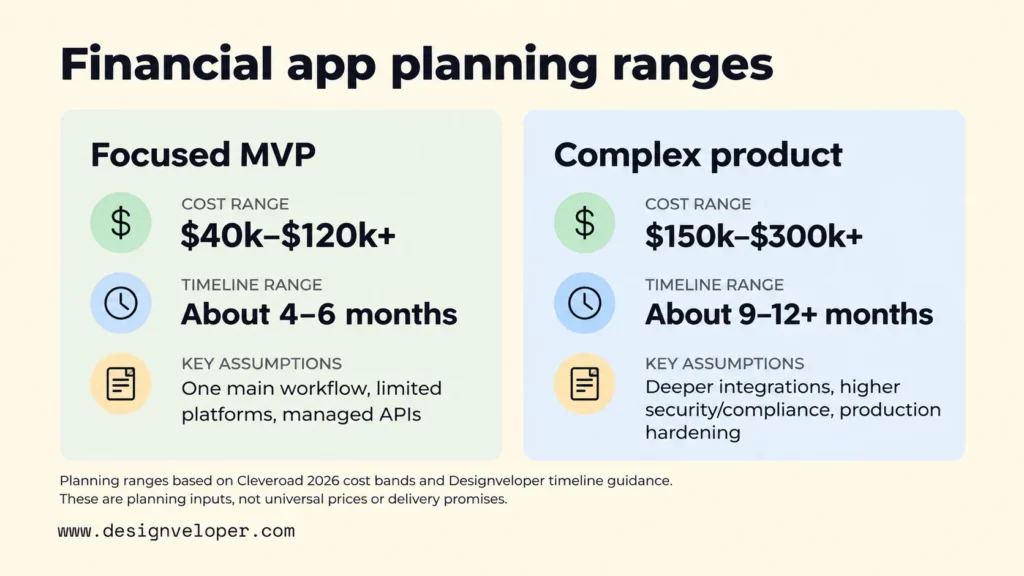
The table below combines Cleveroad’s 2026 vendor-reported cost bands for personal-finance-app development with our April 2026 app timeline guidance. For timing, the focused row uses our four-to-six-month medium-complexity range, while the complex row uses our nine-to-twelve-month-plus complex and fintech range. Use these assumptions as a discovery starting point, then replace them with a project estimate based on the actual workflow and regulatory boundary.
| Planning scope | Indicative vendor-reported build cost | Indicative timeline | Assumptions |
|---|---|---|---|
| Focused personal-finance-app MVP | $40,000-$120,000+ | About 4-6 months | One main workflow, limited platforms, managed financial APIs, defined compliance boundary |
| Complex personal-finance product | $150,000-$300,000+ | About 9-12+ months | Multiple roles or money flows, deeper integrations, higher security and compliance needs, production hardening |
Cleveroad’s 2026 financial-app guide reports those cost bands and says the final price changes with features, platforms, integrations, compliance, team composition, and vendor location. The estimates are useful for early planning, not as a market-wide quote.
For wider context, Clutch’s 2026 mobile-app pricing guide reports that most reviewed projects fall in a broader $10,000-$49,999 band. Its dataset also reports an average reviewed project cost of about $90,780 and an average timeline of about 11 months. Because the guide covers mobile apps generally, those figures should not replace a fintech-specific estimate.
For time planning, our app development timeline guide places medium-complexity applications around four to six months and complex or compliance-heavy applications around nine to twelve months or more. Our 2026 app cost breakdown also treats fintech as a higher-cost category because security, fraud controls, identity checks, integrations, and audit needs add effort.
Separate the initial product build from the costs of making and keeping the service production-ready. Legal and compliance work, security testing, identity verification, financial API usage, infrastructure, monitoring, customer support, and post-launch maintenance may be separate or recurring expenses. Ask every estimate to state which of these items it includes before you set a budget.
Financial App Examples And Product Lessons
A useful financial-app example should reveal a product decision, not just a famous brand name. The following examples focus on workflows that can be verified from public product or documentation pages.
Personal Finance And Expense Tracking
Our public Song Nhi project describes a virtual assistant for personal finance. Its project page shows that a user can log an expense through conversation and later ask about spending or financial reports. The product lesson is that expense capture should fit the user’s routine, while summaries make the captured data useful. Not every personal finance app needs a chatbot, but every input method should reduce friction without making the financial record ambiguous.
Banking, Payments, And Account Linking
Account linking and payment documentation show a different lesson: the product must represent state clearly. A linked account can require re-authentication. A payment can be pending, fail, or need another user action. Trust depends on explaining those states and giving the user a recovery path, not only on making the initial action fast.
Crypto Wallets And Digital Assets
Our public Bonux project page describes a crypto wallet for storing, managing, and transacting digital assets across web and mobile experiences. The product lesson is to make wallet access, asset state, transaction confirmation, and recovery assumptions explicit. The public page does not establish security performance, regulatory compliance, or business outcomes, so those claims should not be inferred from the project description.
Building A Financial App Users Can Trust
Users trust a financial app when they can predict what it will do with their data and money, understand abnormal states, and get help when something goes wrong. Reliability matters, but visible transparency is part of the product experience too.
- Validate the highest-risk workflow before expanding the feature set.
- Make security, fees, permissions, confirmations, errors, and support visible where users need them.
- Connect product, design, engineering, compliance, QA, and operations before launch so release decisions use the same evidence.
- Use post-launch data to find onboarding drop-off, failed recovery paths, and support friction before adding more feature breadth.
FAQs About How To Create A Financial App
How Much Does It Cost To Create A Financial App?
Cleveroad’s 2026 vendor-reported planning ranges put a focused personal-finance-app MVP at about $40,000-$120,000+ and a more complex personal-finance product at about $150,000-$300,000+. These are not universal market prices or a project quote. Product type, jurisdiction, integrations, security, compliance, team model, and production-readiness requirements can change them substantially.
How Long Does It Take To Build A Financial App?
A focused financial-app MVP often takes about four to six months, while a complex or compliance-heavy product can take nine to twelve months or more. These are planning ranges, not delivery promises. The schedule should include discovery, design, implementation, integration testing, security work, compliance review, release preparation, and early production stabilization.
What Features Should A Financial App MVP Include?
Start with secure access and the minimum financial data needed for the core job. Include one complete money or money-management workflow, clear confirmations and errors, essential notifications, support, and basic admin or audit visibility. Add account linking, payments, investments, lending, budgets, or other specialist features only when the selected app type requires them.
How Do You Secure A Financial App?
Use layered controls across the device, network, backend, data stores, APIs, identities, and operations. Protect sensitive data at rest and in transit. Enforce strong authentication and authorization, secure third-party integrations, log critical actions, test failure paths, monitor production, and apply the standards and regulations that match the product’s actual scope.
Can AI Be Used In Financial App Development?
Yes. AI can support transaction categorization, document processing, fraud or anomaly signals, customer support, search, and personalized explanations. The risk depends on how much the output influences a financial decision. A spending summary is different from an AI system that affects credit, trading, fraud blocking, or access to funds. Use human review, testing, monitoring, privacy controls, and documented risk management where the impact is high. The NIST AI Risk Management Framework is a voluntary cross-sector reference for structuring that work.
If you need delivery support, our mobile app development services cover mobile design and development, end-to-end testing, and ongoing support and maintenance after launch. For a financial app, we recommend defining the highest-risk user journey, its external dependencies, and the evidence required for release approval before estimating the full build.
Also published on

Share post on










Related Articles


How To Create A Financial App: Steps, Features, And Costs
How To Create A Financial App: Steps, Features, And Costs Published September 21, 2026
25 Fintech App Ideas for New Business to Consider in 2026
25 Fintech App Ideas for New Business to Consider in 2026 Published November 24, 2025
How to Build a Debt Management Software
How to Build a Debt Management Software Published April 16, 2025



















