
















Enterprise AI Architecture: Layers, Patterns, And Use Cases

Enterprise AI architecture turns an AI pilot into a production system by connecting models to trusted data, existing applications, and controls for access, quality, cost, and human review. It must make those relationships clear enough for teams to build, test, govern, and operate real business workflows without treating the model as the whole system.
What Is Enterprise AI Architecture?
Enterprise AI architecture is the structural plan for how AI capabilities connect to company data, software, people, and controls. It defines how teams get data into an AI workflow, choose and run models, coordinate steps, connect business systems, evaluate results, enforce permissions, and operate the service after launch.
This makes it broader than a model diagram. AWS’s enterprise AI overview describes enterprise AI as the policies, strategies, infrastructure, and technologies needed to use AI across a large organization. It also describes an enterprise AI platform as a technology foundation for developing, deploying, and operating AI at scale. The architecture is the design that connects those capabilities for a specific organization.
It also needs to fit the systems that already run the business. Our guide to enterprise applications and business operations explains why ERP, CRM, HR, and analytics systems matter. They hold the records, permissions, and process state that many AI workflows must read or update.
Enterprise AI architecture frameworks can help teams discuss common building blocks, but there is no single mandatory layer model. A company may combine or split components based on its platform, cloud, data estate, and risk profile. The better test is whether the design makes data flow, model access, integration boundaries, ownership, and controls explicit enough for teams to build and operate the workload.
Core Layers Of An Enterprise AI Architecture
A practical enterprise AI platform architecture can be understood through five functional areas: data and knowledge, models and inference, orchestration, applications and integrations, and governance and operations. These areas are an illustrative grouping, not a universal fixed stack. Governance, security, and observability should cut across the system rather than appear only at the end.
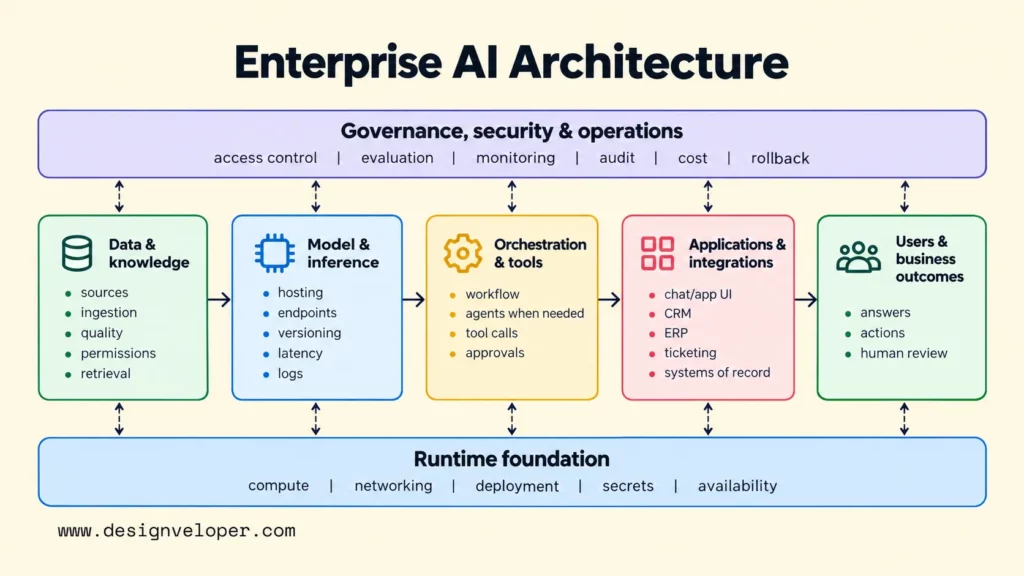
These components also need a runtime foundation. That foundation includes compute, networking, deployment, secrets management, and service availability. Teams should choose it around workload latency, data residency, expected demand, and operational constraints. Microsoft’s AI architecture guidance likewise starts with workload requirements rather than a single AI service.
Data And Knowledge Foundation
The data and knowledge foundation decides which information AI can use and who may see it. Source systems may include databases, document stores, and business applications. Ingestion pipelines collect and prepare that data. Quality checks, ownership rules, and retention policies help teams decide whether the information can be trusted and used.
Knowledge-heavy applications also need a way to find relevant content. Teams may parse documents, divide them into searchable passages, and build an index. Retrieval must respect the user’s access rights so a model does not receive documents the user is not allowed to see.
Retrieval-augmented generation, or RAG, is one way to use that foundation. AWS Prescriptive Guidance on RAG describes adding external information, such as internal documents, to the context an LLM uses for a response. Production RAG therefore depends on connectors, processing, indexing, retrieval, and access controls, not just a model call.
For teams building this pattern, our step-by-step RAG system guide explains source preparation, retrieval, evaluation, permissions, and deployment. The practical checkpoint is to test what an authorized user retrieves and what a restricted user cannot retrieve before relying on generated answers.
Model And Inference Layer
The model and inference layer gives applications controlled access to approved AI models. It manages model endpoints, hosting, deployment, and version changes. It also needs limits for request volume, response time, and model usage, so the team can see when the service becomes slow or expensive.
Some organizations use a shared gateway to manage model access across applications. Others let individual products connect through approved platform services. Either approach needs a way to monitor requests and handle a model failure without letting a business workflow fail silently.
Different workloads may justify different models. A larger model may suit complex language reasoning, a smaller model may handle frequent classification, and a predictive model may score transactions. Choose models and hosting based on task quality, latency, privacy, data residency, regional availability, and cost. Multiple models are useful only when those trade-offs justify extra routing and evaluation work.
Orchestration, Agents, And Tools
Orchestration coordinates the steps between a request and a business outcome. A fixed workflow may retrieve data, call a model, validate the result, and return it. A more adaptive workflow may choose among tools, revise a plan, or ask for more information. The architecture should show which steps follow fixed rules and which depend on model decisions.
Not every use case needs an agent. Use an agent when the workflow genuinely needs dynamic tool selection or changing paths. A stable process is often easier to test and operate as a fixed workflow. Our guide to AI agent architecture patterns explains why tool permissions, stopping conditions, failure routes, and approval points should be clear before an agent receives real authority.
Human approval belongs before actions with material consequences, not after them. Microsoft’s human-in-the-loop tool approval guidance shows how an agent can request approval before it executes a protected function. The threshold depends on the workflow, but the boundary must be explicit.
Applications And Enterprise Integrations
The application and integration area is where AI reaches users and connects with business systems. Users may interact through a chat interface, an embedded assistant, or an existing application. Behind that interface, integrations can connect AI to CRM, ERP, ticketing, order management, document repositories, and other systems of record.
Good integration design keeps business rules outside the model when those rules must be enforced every time. The surrounding application must check identity, permissions, valid inputs, and transaction limits. A model can propose an action, but an authorized business system must decide whether the action is allowed and carry it out.
Governance, Security, And Operations
Governance, security, and operations must work across the architecture, not sit at the end as an optional layer. First of all, governance identifies who owns an AI workflow and which decisions need oversight. Then, security controls who can access data and tools. And finally, operations tracks model quality, service reliability, incidents, and costs after deployment.
These responsibilities call for different controls along the same workflow. A request may need an identity check before retrieval, an approval before a write action, and an audit record after the action. Evaluation and monitoring should track what happened at each step, so the team can investigate errors and decide when to stop or roll back the service.
A reference architecture and a risk framework serve different purposes. Use a reference architecture to design component interactions and deployment boundaries. Use a framework such as the NIST AI Risk Management Framework to organize risk governance, assessment, measurement, and response. NIST describes the functions Govern, Map, Measure, and Manage. Neither framework replaces testing against a workload’s actual requirements.
Tool-using agents need special attention because their output may trigger changes in other systems. Our AI agent governance guide covers ownership, least-privilege tool access, approval rules, action logs, monitoring, and rollback. The key question is what the workflow can read, decide, and change, and who can stop it when something goes wrong.
An enterprise AI architecture diagram should show those controls across the data and execution paths. It should also show the runtime foundation below the components. The illustration must reflect the chosen workflow, not imply that every enterprise uses one fixed number of layers.
Enterprise AI Architecture Patterns In Practice
Three common enterprise AI architecture patterns are a RAG-based knowledge assistant, a tool-enabled customer-support workflow, and predictive fraud or risk scoring. Each has different data access, integration, evaluation, and human-review needs. The best pattern is the one that matches what the workflow must know and do.
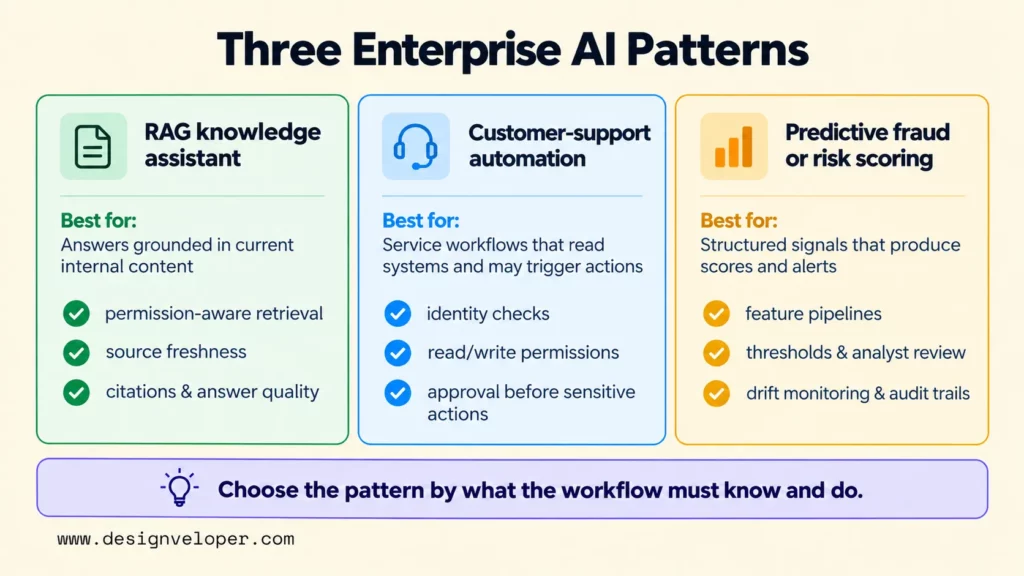
| Workflow | Architecture pattern | Key integration or control |
|---|---|---|
| Internal knowledge assistant | RAG over approved enterprise sources, followed by LLM generation | Permission-aware retrieval, source freshness, citations, and answer evaluation |
| Customer-support automation | LLM or agent workflow connected to CRM, ticketing, or order systems | Customer identity, read/write permissions, escalation rules, and approval before sensitive actions |
| Predictive fraud or risk scoring | Streaming or batch features sent to a predictive model, followed by rules or case workflow | Data integration, threshold management, analyst review, drift monitoring, and audit trails |
Consider an illustrative customer-support workflow. A customer asks about an order through the service application. The system retrieves approved policy content and checks the customer’s identity. A read-only tool then looks up the order, but only if the customer has permission to see it. The model uses the result to draft an answer.
The action boundary changes if the customer requests a refund. A separate permission check and human approval must happen before the application changes the order record. Before rollout, the team should test answer quality, unauthorized access, latency, and tool failures. If the order service fails or the available evidence is insufficient, the workflow should stop the action and hand the case to a person.
An internal knowledge assistant uses a similar data-to-model path but usually has a narrower action boundary. Approved documents are processed and indexed with their permissions. A user request triggers permission-aware retrieval, and the model uses that evidence to prepare an answer. Monitoring checks whether retrieval and answers remain useful as documents change. It also tracks latency, failures, and cost.
Predictive fraud or risk scoring uses a different model pattern. Microsoft’s fraud detection reference architecture combines streaming transactions, enterprise context, machine-learning scores, alerts, dashboards, and analyst workflows. In this pattern, structured signals lead to a risk score and a review or response rule. The example shows why enterprise AI includes predictive models, not just generative AI.
How To Move Enterprise AI From Pilot To Production
Moving an enterprise AI pilot into production requires more than deploying its model to more users. The team needs acceptance criteria, data ownership, approved integrations, evaluation, operating owners, fallback paths, and rollback criteria. The following steps turn those requirements into a release decision.
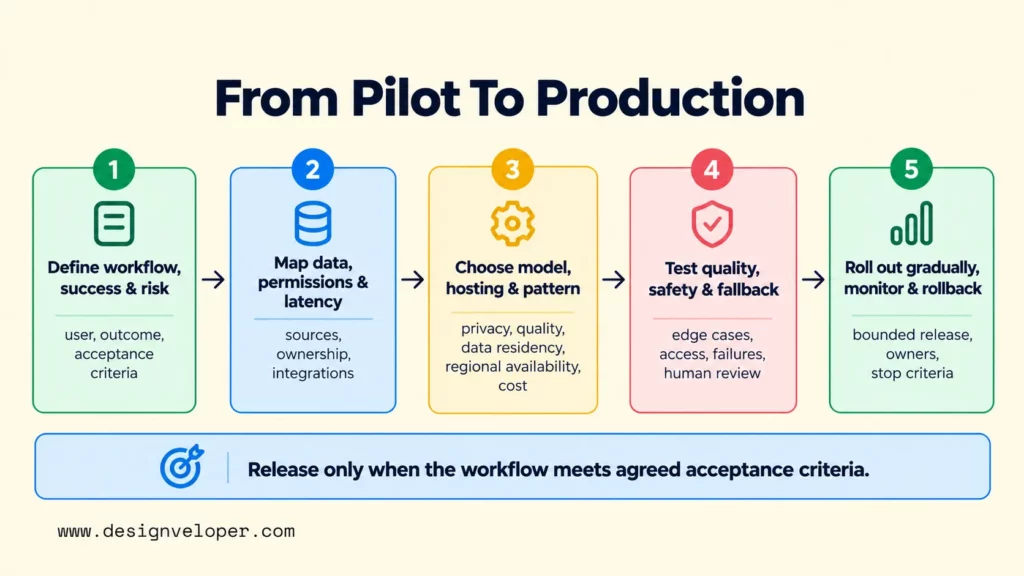
- Select one business workflow and define success and risk. Name the user, trigger, expected outcome, and measurable acceptance criteria before choosing technology. Then identify what could go wrong if the system is inaccurate, slow, unavailable, or allowed to take the wrong action. A drafting assistant needs different safeguards from a workflow that changes financial or customer records.
- Map data ownership, permissions, integrations, and latency. Identify every source and system the workflow must read or write. Record who owns the data, which users may access it, and how often it changes. Decide how quickly the workflow must respond. Those answers help the team choose between live APIs, retrieval indexes, event streams, and batch data.
- Choose the model, hosting approach, and workflow pattern. Decide whether the task needs a generative model, predictive model, retrieval, fixed steps, or an agent. Choose hosting and model access based on privacy, quality, latency, data residency, regional availability, operational needs, and cost. Use the simplest pattern that meets the requirements.
- Test quality, safety, access, latency, and cost with fallbacks. Use realistic cases, including failures and edge cases. Test model output, source permissions, tool calls, integrations, and human escalation together. Define when a person must review the result and what happens if data is missing, the model times out, or a tool fails.
- Roll out gradually with ownership, monitoring, and rollback criteria. Begin with a bounded user group or traffic slice. Assign owners for answer quality, access control, latency, cost, and incident response. Monitor outcomes and technical signals. Pause or reverse the rollout if agreed safety or reliability criteria are not met.
Treat rollout as a decision gate, not a calendar milestone. Release only when the selected workflow meets its agreed acceptance criteria. Review real usage after launch because new data, model versions, user behavior, and integration failures can change how the system performs.
FAQs About Enterprise AI Architecture
How Is Enterprise AI Architecture Different From Enterprise Architecture? Enterprise architecture is broader. The Open Group’s TOGAF Standard offers methods and guidance for enterprise architecture across an organization’s business and technology landscape. Enterprise AI architecture focuses on the systems needed to develop, run, and govern AI workloads within that wider landscape.
Is Enterprise AI The Same As Generative AI? No. Enterprise AI means using AI across business workflows. Generative AI is a subset of AI that creates or transforms content. Generative applications may use language models, RAG, agents, or multimodal systems. Enterprise AI can also include forecasting, computer vision, optimization, and predictive scoring.
Does Every Enterprise AI Use Case Need RAG? No. RAG is useful when a generative application must retrieve current or proprietary information that is not contained in the model. A fraud-scoring system can instead use structured transaction features without RAG. An internal policy assistant may need retrieval because its answer depends on approved documents and the user’s permission to access them.
If your team needs help connecting AI software to business systems, explore our AI development services for custom AI software and chatbot integration.
Also published on

Share post on










Related Articles


AI Development Cost: What Businesses Should Budget In 2026
AI Development Cost: What Businesses Should Budget In 2026 Published October 13, 2026
Enterprise AI Architecture: Layers, Patterns, And Use Cases
Enterprise AI Architecture: Layers, Patterns, And Use Cases Published October 13, 2026
Build An Enterprise RAG Architecture That Works In Production
Build An Enterprise RAG Architecture That Works In Production Published October 12, 2026


















