
















How To Make The Build Vs Buy Software Decision With Confidence

For a sound build vs buy software decision, buy when products meet your essential needs and build when they cannot support a critical workflow. Combine both when only part of the system needs custom work. Test all three choices against real tasks, long-term costs, and your ability to support the result.
The key is to compare ways of delivering the same business outcome, not a subscription price against a development quote. A cheaper tool that creates daily manual work may be the wrong choice. So may a custom platform that solves a standard problem but leaves your team responsible for years of maintenance.
Build, Buy, Or Hybrid: The Three Software Paths
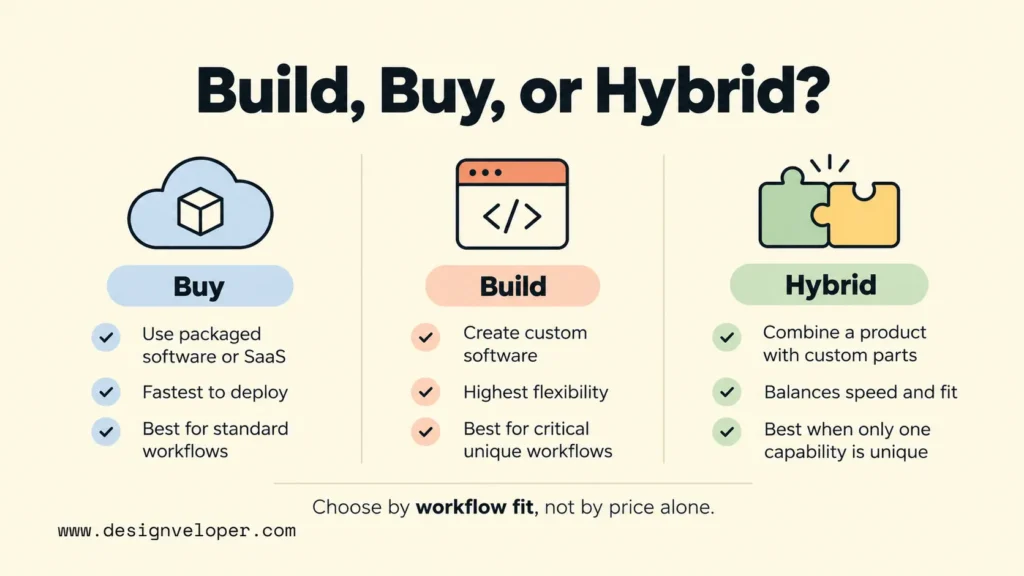
There are three practical paths: use a packaged product, commission custom software, or connect the two. Start by separating the work that makes your business different from routine tasks that established tools already handle. Our guide to custom software development explains the delivery and ownership duties of building, which can be easy to overlook in a feature comparison.
Buy Off-The-Shelf Software Or SaaS
Buy software when a mature product can support your essential tasks through standard features or reasonable configuration. Off-the-shelf software is a product built for many customers. Software as a service (SaaS) is usually accessed through a subscription, with the provider running the application. The categories overlap, but not every packaged product uses a SaaS model.
A packaged product often gets staff working sooner because its core features already exist. It may also include updates and support. Those benefits depend on the contract and the work needed to set it up. Data migration, access rules, staff training, and connections to other systems can still delay a rollout.
Consider a company replacing a basic leave-approval spreadsheet. If an HR platform already handles its approval rules, access permissions, and reporting needs, buying is a sensible starting point. Building the same features would add ownership duties without giving the company a meaningful advantage. The team should still confirm that it can export records and change providers later.
Build Custom Software
Build when the way your business works is central to the value it creates and available products cannot support that work without serious compromises. Custom software is designed for defined users, rules, and connections. Its value comes from meeting essential needs, not from being unique for its own sake.
Custom development gives you more influence over the product roadmap and how features work. It does not automatically give you full control of every part. Hosting platforms, third-party services, open-source dependencies, and your development contract can still affect access and ownership. Specify who controls the source code, data, deployment accounts, and technical documents before work begins.
The main trade-off is responsibility. A team must discover requirements, build and test the system, protect it, fix defects, and adapt it as the business changes. A custom platform may be justified for complex pricing or scheduling rules that create a real advantage. It is much harder to justify if users simply prefer a different screen layout in an otherwise suitable product.
Combine A Packaged Product With Custom Components
A hybrid approach buys reliable standard functions and builds only the missing business capability. For example, a company might keep its accounting platform but develop a customer portal that applies its own order rules. The portal would send approved records to the accounting system instead of replacing it.
This component-level view matches the approach described in Thoughtworks’ build-and-buy analysis. Yet hybrid does not mean effortless. The connection can fail when data fields do not match, an application changes its API, or one system is unavailable. Our API integration guide explains why permissions, field mapping, retries, and monitoring matter once systems share work.
Choose hybrid when you can draw a clear boundary around the custom part. Confirm that the packaged product exposes the data and functions you need, and that its terms allow the planned integration. If the key workflow depends on unsupported workarounds inside the vendor’s product, a hybrid design may be less stable than it first appears.
Custom Software Vs Off-The-Shelf Software: A Decision Matrix
A useful build vs buy software decision matrix connects each requirement to the conditions that favor buying, building, or using both. Treat the table as a starting point, not a score that picks a winner for every organization. Write down which factors are mandatory before comparing options.
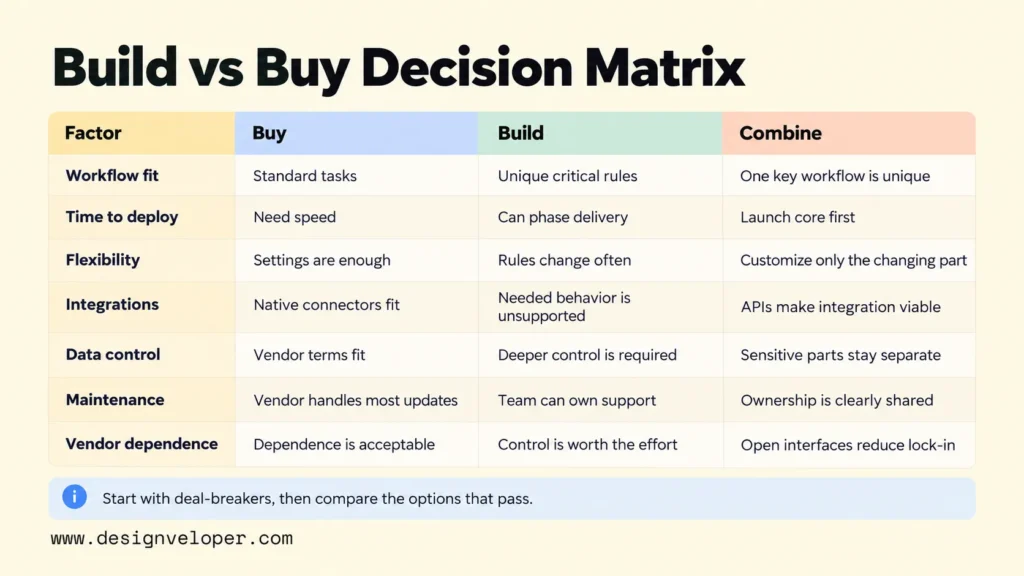
| Decision factor | Buy when… | Build when… | Combine when… |
|---|---|---|---|
| Workflow fit | Standard features or configuration cover critical tasks. | Essential rules or exceptions cannot be supported without harmful workarounds. | A package handles routine tasks but one important workflow is unique. |
| Time to deploy | The product can be configured, migrated, and tested within the deadline. | A phased first release can meet the real deadline; no suitable product can. | The package can launch first while a custom feature follows. |
| Flexibility | Vendor settings and updates support expected changes. | Frequent changes to distinctive rules require direct control. | Stable functions remain packaged while changing rules live in custom code. |
| Integrations | Supported connectors handle the full data exchange. | Required system behavior cannot be achieved through available interfaces. | Documented APIs allow a dependable custom connection. |
| Data control | Export, access, location, and retention terms meet requirements. | Required control cannot be met by a vendor and can be delivered by the team. | Sensitive rules or data stay in a controlled component where feasible. |
| Maintenance | Vendor support covers most product changes at acceptable terms. | A team has the budget and skills to operate the software over time. | Maintenance ownership is clear across the product and custom parts. |
| Vendor dependence | Contract terms and an exit plan make dependence acceptable. | Control over the product justifies taking on hosting and technology dependence. | Open interfaces and export rights limit reliance on one supplier. |
Apply the matrix to a specific workflow rather than to your entire company. Mark any deal-breakers first, such as a required audit trail or a data-location rule. Next, compare the options that pass those conditions. A low price or a high feature count cannot make a product suitable if it fails a mandatory requirement.
For an illustrative solar-services business, ordinary invoicing might fit existing software while installation scheduling needs unusual rules. That points toward buying the accounting function and assessing a custom scheduling component. The question is not whether the industry sounds specialized. It is whether tested products can carry out the actual work without costly exceptions.
Our Swell & Switchboard project provides a real example of a platform tailored to solar-industry operations. We describe a need to handle changing requirements, accurate records, and growing data. That demonstrates the kind of business problem a custom platform can address. It does not prove that building was cheaper or that a suitable packaged product did not exist.
Build Vs Buy Software Costs: Compare Total Cost Of Ownership
Compare software total cost of ownership over the same period, with the same expected users, workloads, and growth. Total cost of ownership (TCO) includes the money and staff time needed to introduce, run, change, and eventually replace a system. This is why a subscription quote and an initial build estimate are not yet a fair comparison.
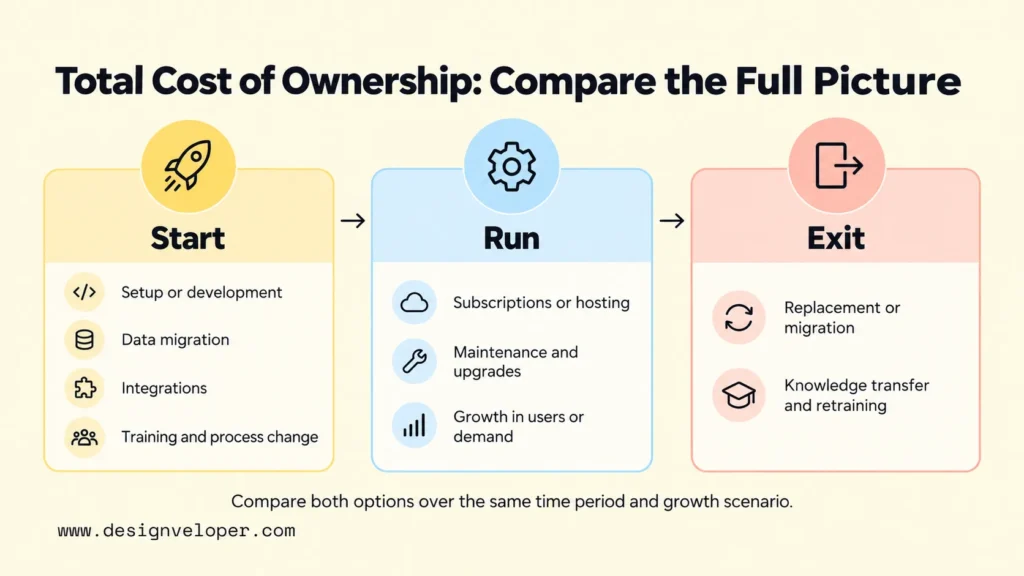
Microsoft’s cost-optimization principles call for models that account for implementation, support, staff, training, and expected growth. AWS guidance on component analysis also stresses operating and management costs. These cloud architecture sources support the costing method; they do not establish a universal cost winner between SaaS and custom software.
| Cost category | Buying packaged software or SaaS | Building custom software |
|---|---|---|
| Initial acquisition or delivery | Setup charges, initial licenses, and configuration. | Discovery, design, development, tests, and deployment. |
| Data migration | Cleaning, moving, and checking existing records. | Cleaning, moving, and checking existing records. |
| Integrations | Connectors, API plans, integration work, and monitoring. | Integration design, development, testing, and monitoring. |
| Training and process change | Staff training and workflow adjustments to fit the product. | Staff training and rollout of newly designed workflows. |
| Recurring use and operations | Subscriptions, seats, usage charges, and internal administration. | Hosting, infrastructure, monitoring, security, and support staff. |
| Maintenance and upgrades | Vendor plan changes plus testing and repair of configurations or connections. | Defect fixes, dependency updates, security patches, and feature changes. |
| Growth | More users, data, premium tiers, or additional transactions. | More capacity, engineering work, and operational support. |
| Exit or replacement | Data export, contract exit, retraining, and migration. | Knowledge transfer, data migration, retirement, and replacement. |
Use an agreed planning period, such as three years, for every option. This is an illustrative horizon, not a recommended universal payback period. Put one-time costs in the year they occur and recurring costs in each year they apply. If staffing is shared with other work, estimate the portion of time this system will consume rather than treating it as free.
Then run at least two realistic usage scenarios. For example, a SaaS product may look affordable with 20 users but require a higher tier if usage grows. A custom system may have more fixed costs early on, yet still need additional engineering and infrastructure at higher demand. Do not assume subscriptions always become more expensive than custom ownership. Compare actual contract terms and a scoped delivery estimate.
Uncertainty deserves its own line in the estimate. Mark unconfirmed API charges, migration complexity, or security work as assumptions, and record what would make them change. Our custom software cost guide breaks down how project complexity, features, technology, and timing affect an estimate. For a hybrid option, combine the purchased and custom costs, then add the cost of maintaining their connection.
Validate The Decision Before Committing
Validate the leading option with a small test of the hardest real requirement before signing a long contract or funding a full build. Start with a written list of mandatory workflows, acceptable response times, access rules, and data needs. Give each requirement an observable pass condition so a polished demo cannot stand in for evidence.
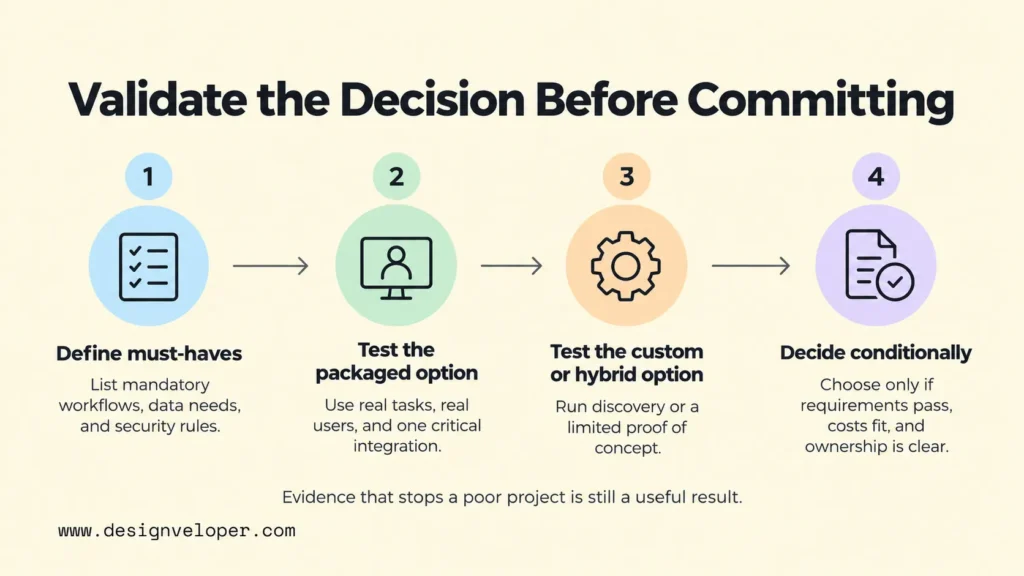
- Test the packaged candidate. Ask actual users to complete a typical task and an awkward exception in a trial environment. Import representative data, check role permissions, and test a critical integration. Record any manual workaround and ask the vendor to confirm contract or API limits in writing.
- Test the custom candidate. Define a limited discovery exercise or proof of concept (POC) around the main unknown: for example, whether a scheduling rule can work with your existing systems. Check technical feasibility before committing to a complete product. Our POC, prototype, and MVP comparison shows which kind of test fits each uncertainty.
- Test hybrid ownership. Confirm who fixes failed data transfers, how both systems handle duplicate records, and what happens if the vendor changes its interface. Include an end-to-end test that spans the purchased and custom parts.
- Make a conditional decision. Record the evidence, estimated TCO, unresolved risks, and the person responsible for operation. Approve the option only when its mandatory conditions pass and the remaining risks are acceptable.
A test should also establish an exit condition. If a packaged product cannot preserve a required approval history, the team should stop assessing cosmetic features and address that gap. If a custom POC cannot meet the response time without disproportionate effort, reduce the scope or reconsider the design. Evidence that stops a poor project is a useful result.
When custom development is justified, fund it in phases. Start with the smallest complete workflow that users can operate safely. Assign a product owner to approve requirements and a technical owner to maintain the system after release. That turns the build decision into a deliverable plan rather than an open-ended promise.
FAQs About Build Vs Buy Software
Is It Cheaper To Build Or Buy Software?
Neither option is always cheaper. Buying may have a lower initial cost for standard workflows, while custom development often requires more upfront work. Over time, subscriptions, integrations, internal labor, maintenance, and migration can change the comparison. Estimate both options over the same period and test how costs change with usage.
Can A Business Combine SaaS With Custom Software?
Yes. A business can keep SaaS for standard functions and build a custom portal, automation, or service around it. First check that the SaaS product offers suitable APIs and permits the required data access. Budget for integration tests, monitoring, and changes on both sides.
Can You Build Custom Software Without An In-House Development Team?
Yes. An external development partner can design and build the software, but your business still needs someone to own priorities, approve decisions, and accept the work. Set source-code and account access terms early. Decide who will handle support after launch. Our software development outsourcing guide compares delivery models and their responsibilities.
Does AI Change The Build Vs Buy Decision?
AI can change the effort needed to create a feature, but it does not remove the build versus buy trade-offs. A packaged AI feature may be enough for common tasks. A custom AI workflow may be warranted when it must use specific business data, permissions, or review steps. In either case, test real output quality, privacy controls, and ongoing oversight. NIST’s generative AI risk profile provides a framework for assessing these risks; it does not establish a guaranteed saving from AI-assisted development.
Also published on

Share post on










Related Articles


On-Device AI For Mobile Apps And When A Hybrid Setup Fits Best
On-Device AI For Mobile Apps And When A Hybrid Setup Fits Best Published October 23, 2026
How To Make The Build Vs Buy Software Decision With Confidence
How To Make The Build Vs Buy Software Decision With Confidence Published October 23, 2026
AI Implementation Roadmap For SMEs: From Pilot To Business Value
AI Implementation Roadmap For SMEs: From Pilot To Business Value Published October 23, 2026


















