
















Cloud Application Development: Architecture, Process, And Cost

KEY TAKEAWAYS:
- Cloud application development is a product and operations discipline, not only a hosting decision. It covers discovery, UX, code, data, infrastructure, security, deployment, monitoring, and maintenance.
- Cloud-based, cloud-native, migrated, and hybrid applications solve different problems. Choose the simplest model that meets the workload, data, reliability, team, and cost requirements.
- Architecture should follow a measurable workflow. Validate demand, data ownership, failure states, recovery, integrations, and unit cost before adding microservices, serverless, or multi-region complexity.
- A safe delivery process builds vertical slices and verifies APIs, identity, infrastructure, security, performance, resilience, cost, and user experience together.
- Cloud ownership continues after launch. Budgets, telemetry, backups, vulnerability fixes, incident response, capacity, and dependency changes need named owners and review cycles.
A document approval app can look simple until an upload fails, two reviewers act at once, or cloud storage costs rise with every tenant. Cloud application development involves building the product and the operating system around it: identity, data, deployment, recovery, monitoring, and a way to price actual usage. Whether you are creating SaaS, modernizing a legacy tool, or moving a workflow online, the useful starting point is the transaction users must complete. From there, this guide connects cloud models and architecture choices to a seven-stage delivery process, a document-workflow example, and a practical cost worksheet.
What Is Cloud Application Development?
Cloud application development is the full lifecycle of software that runs partly or entirely on cloud infrastructure. It turns a user workflow into an application supported by code, APIs, identity, data, deployment, security, backup, monitoring, and ongoing operations. Unlike simply renting a server, the team can use managed services and automation where they improve delivery or reliability.
A cloud application is more than software placed on a rented virtual machine. Teams may use elastic capacity for changing demand, managed services for routine infrastructure work, automation for repeatable environments, and telemetry for understanding behavior. They do not need every pattern at the start. A simple system that can be operated and recovered is often safer than a distributed system no one fully understands.
Cloud development also changes ownership. A provider operates parts of the underlying platform, but the product team remains responsible for code, identities, configuration, data, access policies, vendors, user experience, and business continuity. A managed database reduces infrastructure work, for example, but it does not decide who can read the data, how retention works, or whether a backup can be restored.
The strongest projects begin with users and outcomes. They define the core workflow, demand pattern, response-time target, availability need, acceptable data loss, recovery time, data location, compliance duties, and cost boundary. Provider and service selection follows those facts.
For adjacent planning questions:
- Custom Software Development Cost: 5 Factors to Consider
- Web App vs Website: Similarities, Differences and Misconceptions
- 20 Web App Ideas: Health, FinTech, AI, E-commerce
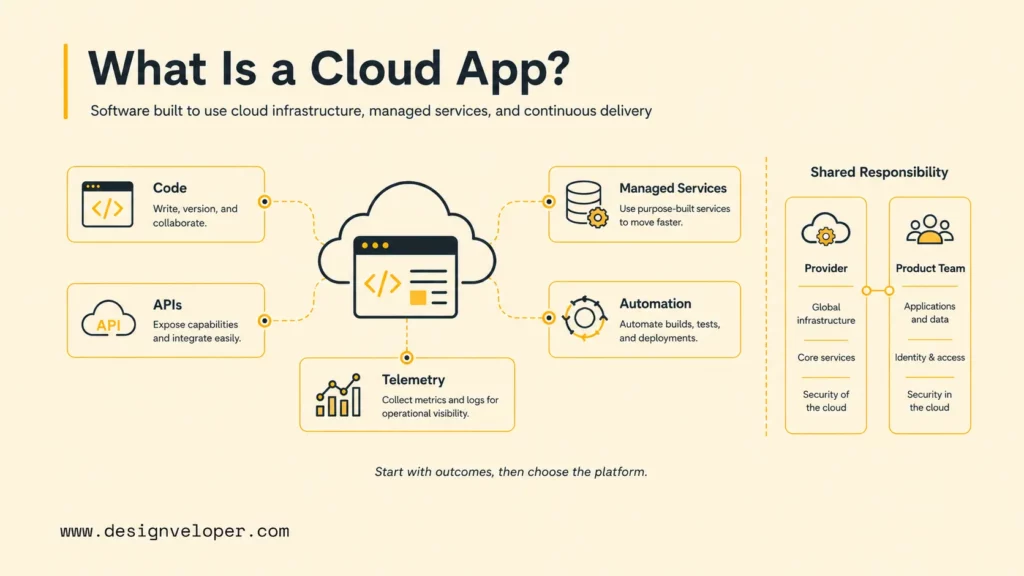
Cloud-Based Vs Cloud-Native Applications
Cloud-based is the broad category: the application uses cloud hosting or services. Cloud-native is a more specific approach in which the application is designed for automated delivery, elastic operation, managed services, resilience, and independent change where those qualities create value. Cloud-native does not automatically mean microservices.
A modular monolith released through an automated pipeline can be a sensible cloud-native starting point. Microservices become useful when domain boundaries, team ownership, scaling differences, deployment independence, or fault isolation clearly need them. Otherwise, they add network failure, data consistency, testing, observability, and operations work.
| Model | What It Means | Good Fit | Main Trade-Off |
|---|---|---|---|
| Cloud-based | Software hosted in the cloud, often with a familiar application structure | New products seeking controlled delivery or teams moving from conventional hosting | May not use automation, elasticity, or managed services fully |
| Cloud-native | Software designed around automated cloud operation, resilience, and scalable delivery | Products with changing demand, frequent releases, or independent service needs | Requires stronger platform, observability, and distributed-systems capability |
| Migrated legacy | An existing system rehosted, replatformed, or selectively refactored | Reducing data-center dependency or creating a staged modernization path | Old coupling, licensing, and operational habits can move with the workload |
| Hybrid cloud | Cloud components connected to on-premises or private infrastructure | Regulated data, local systems, latency needs, or gradual transitions | Identity, networking, monitoring, governance, and support span environments |
Modernization should be component-specific. A stable back-office module may be rehosted temporarily, an overloaded database may be replatformed, and a high-change customer workflow may be refactored behind APIs. The AWS cloud-native overview describes practices such as CI/CD, DevOps, containers, microservices, and serverless. Google’s Well-Architected Framework provides a broader review frame across operations, security, reliability, cost, performance, and sustainability.
Cloud Service And Deployment Models
Cloud service models describe how much infrastructure a team manages. Deployment models describe where the workload runs and which environments it must connect to. They answer different questions, so a project can combine them: a SaaS product may use a public cloud PaaS, while a regulated system may use managed services in a hybrid setup.
| Model | Team Manages | Good Fit | Trade-Off |
|---|---|---|---|
| IaaS | Virtual machines, operating systems, runtime, application, and data | Legacy software, custom networking, or workloads that need infrastructure control | More patching, capacity planning, security work, and platform ownership |
| PaaS | Application code, configuration, data, identity, and service settings | Teams that want faster delivery with managed runtime and scaling options | Provider limits, pricing changes, and portability constraints may be stronger |
| SaaS | Users, configuration, access, data use, and business process | Standard business capabilities that do not need a custom product | Workflow fit, integration depth, data location, and vendor dependency require review |
For deployment, public cloud usually offers broad managed services and elastic capacity. Private cloud can support tighter environment control when the organization already operates that platform. Hybrid cloud connects cloud components with local systems or data. Multi-cloud uses more than one provider, but it should solve a real concentration, residency, or capability constraint rather than duplicate the same platform without a funded operating model.
Validate the model against data location, identity, network latency, recovery, support, egress, skills, contract terms, and exit options. A team that cannot patch, monitor, back up, or restore a chosen service has not selected a complete architecture.
For a product-led example, a new SaaS product may start with a managed database and application platform, then introduce dedicated resources only when tenant isolation, compliance, or workload evidence requires them.
Related reading:
- Cloud Ecommerce Solutions: How To Choose The Right Platform
- How Long Does It Take To Build A Web App? Timeline And AI Impact
- How To Choose A Web Hosting Provider: Key Factors To Consider
Common Cloud Application Use Cases
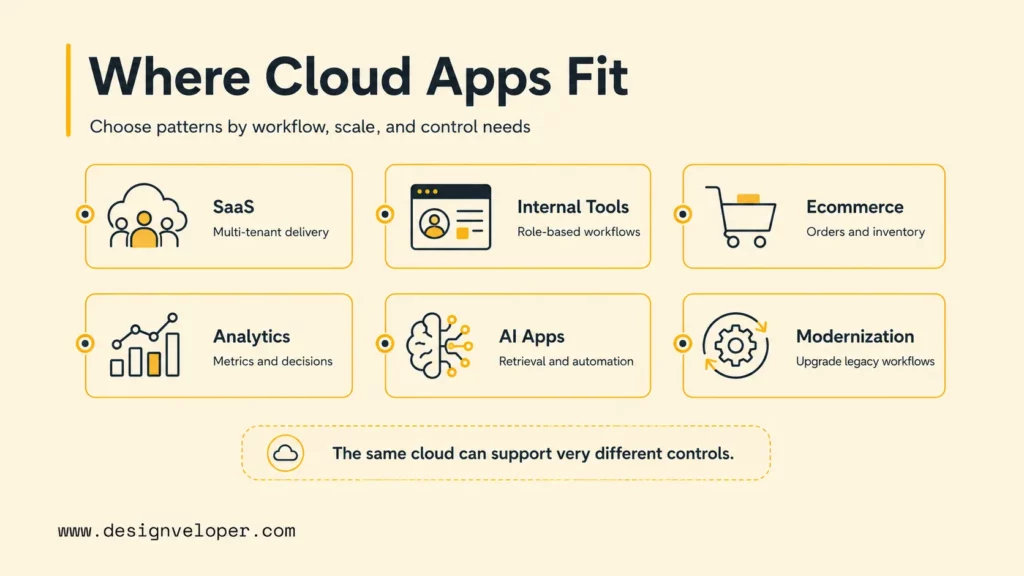
The same cloud services can support very different products. The use case determines which data, controls, integrations, and failure states deserve early design attention.
- SaaS platforms: Plan tenant isolation, subscription entitlements, configurable workflows, data residency, audit trails, metering, and safe upgrades. A B2B MVP may begin with shared infrastructure and strong logical isolation, then introduce dedicated resources only when customer or compliance needs justify them.
- Internal tools and customer portals: Replace spreadsheets, email handoffs, or disconnected systems with role-based workflows. The hard work is usually permission design, integration, exception handling, and adoption rather than the visible form screens.
- Ecommerce, marketplace, and booking products: Coordinate catalog, search, inventory or availability, cart, payment, order state, notifications, refunds, and support. Idempotent operations, webhook handling, reconciliation, and graceful degradation protect business correctness when dependencies fail.
- Dashboards and analytics: Collect events, transform data, compute metrics, and deliver role-specific decisions. Define data freshness, lineage, access, retention, and metric meaning before optimizing dashboard speed.
- AI applications and automation: Combine model APIs, retrieval, vector search, orchestration, and accelerated compute with permission-aware data, evaluation cases, fallback behavior, human review, abuse controls, and cost limits.
- Legacy modernization: Expose an older system through APIs, move selected workloads, replace a user interface, separate a high-change domain, or rebuild one workflow. Tie each change to a measurable outcome such as faster releases, lower outage risk, better customer access, or removal of an unsupported dependency.
A documented workflow product needs accurate state transitions and auditability. An ecommerce flow needs resilient inventory and order handling. A finance assistant needs strict data boundaries and explainable permission use. Similar infrastructure does not remove the need for product-specific controls.
Cloud Application Development Process
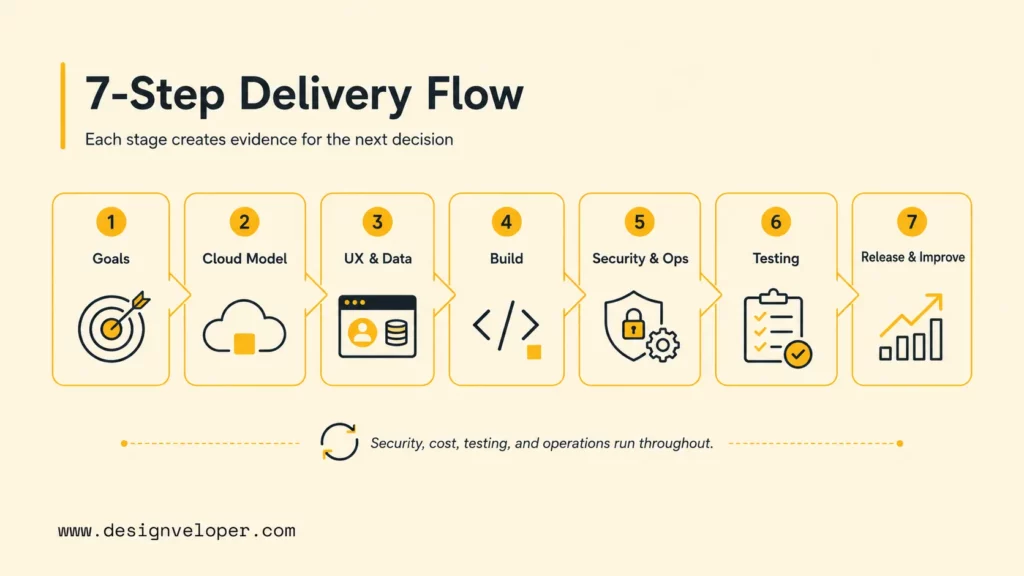
A seven-stage process reduces avoidable architecture rework. The stages overlap in iterative delivery, but each has a distinct decision. Security, cost, testing, and operations should move through the whole process instead of appearing only before launch.
Goals and requirements
Cloud and architecture
UX and data flow
Build and integrate
Secure and operate
Test the system
Deploy and improve
Each stage produces evidence for the next decision, while production telemetry feeds the cycle again.
Step 1. Define Goals, Users, And Cloud Requirements
Start with the product problem and the behavior that proves value. Identify primary users, administrators, support roles, connected partners, and data owners. Map the current workflow, costly failure points, required outcomes, and smallest release that changes behavior.
Translate expectations into testable requirements: concurrent users, peak events, regions, response time, availability, acceptable data loss, recovery time, privacy, accessibility, retention, and budget. Separate launch requirements from later scale scenarios. A tenfold traffic hypothesis does not justify tenfold complexity until probability and consequence support it.
Step 2. Choose The Cloud Model, Provider, And Architecture
Choose public cloud, private cloud, hybrid, or multi-cloud based on constraints rather than slogans. Evaluate region availability, managed-service maturity, team skills, compliance support, commercial terms, data egress, support, and exit options. Multi-cloud can reduce a particular concentration risk, but duplicating platforms often increases cost and reduces operational depth.
Define boundaries between interface, domain logic, data, integrations, and infrastructure. Decide where asynchronous events are needed, which operations require immediate consistency, and what can degrade safely. Record architecture decisions with context, alternatives, consequences, and a review trigger.
Step 3. Design UX, Data Flow, And Core Features
Prototype the complete user journey, including onboarding, empty states, loading, validation, permission requests, offline or interrupted behavior, errors, recovery, support, and account exit. Test it with representative users before building expensive integrations. For internal applications, observe the real work environment because shortcuts and exceptions often reveal requirements that interviews miss.
Create a data-flow model showing sources, transformations, storage, access, destinations, and deletion. Classify sensitive data and minimize collection. Define authoritative records and ownership. For AI functions, add retrieval sources, model boundaries, evaluation paths, feedback, and human escalation.
Step 4. Build Frontend, Backend, APIs, And Integrations
Build vertical slices that deliver an end-to-end outcome rather than isolated technical layers. A slice can include one interface flow, API, business rule, database change, integration, test, and telemetry. Keep domain logic separate from provider-specific adapters so core behavior remains testable.
Design APIs with versioning, validation, authorization, rate limits, and clear error contracts. Where retries are possible, make a repeated request produce the same result rather than a second payment or approval; this is called idempotency. Treat third-party integrations as fallible. Use timeouts, limited retries, queues, reconciliation, and alerts according to the transaction.
Step 5. Set Up Security, CI/CD, Monitoring, And Infrastructure
Represent infrastructure as reviewed, versioned definitions where practical. Create separate environments, least-privilege identities, managed secrets, encryption, network controls, backup policies, protected deployment roles, and application security controls. Automate build, test, security checks, artifact creation, and progressive deployment.
The NIST Secure Software Development Framework organizes practices around preparing the organization, protecting software, producing secure releases, and responding to vulnerabilities. It is useful as a requirements and evidence frame, not as a replacement for product-specific threat modeling.
Instrument meaningful user and system behavior. Logs explain discrete events, metrics show aggregated behavior, and traces follow work across components. The OpenTelemetry observability primer explains how traces, metrics, and logs help teams investigate unexpected behavior. Keep secrets and unnecessary sensitive content out of telemetry.
Step 6. Test Performance, Reliability, Cost, And UX
Use a repeatable quality assurance process across units, contracts, integrations, migrations, end-to-end workflows, accessibility, security, and recovery. Performance testing should model realistic traffic, payloads, cache behavior, database state, and downstream limits. Reliability tests should include dependency timeouts, duplicate events, partial failure, and restoration from backup.
Run cost experiments with expected and stress workloads. Measure cost per transaction, tenant, active user, workflow, or model task so spend connects to product value. Usability testing remains necessary because a technically resilient app still fails if users cannot complete the intended outcome.
Step 7. Deploy, Monitor, And Improve Continuously
Release through a controlled strategy such as rolling, blue-green, or canary deployment, depending on risk and platform. Verify database compatibility, feature flags, rollback or roll-forward steps, communication, and ownership. Connect technical signals with customer signals, including errors, latency, conversion, support contacts, and failed business transactions.
After launch, review incidents, slow traces, security findings, unused resources, capacity trends, feature adoption, and cost anomalies. Improve code, tests, alerts, documentation, and architecture from that evidence. Continuous improvement is part of cloud application development because real demand and failure behavior cannot be fully predicted in preproduction.
Further reading:
- What Is Web Application Security? OWASP 10 Web App Vulnerabilities
- Agile Vs DevOps: Key Differences And How Do They Interrelate
- What Is Quality Control? Short Guide About QC’s Responsibility
Cloud Application Architecture And Tech Stack
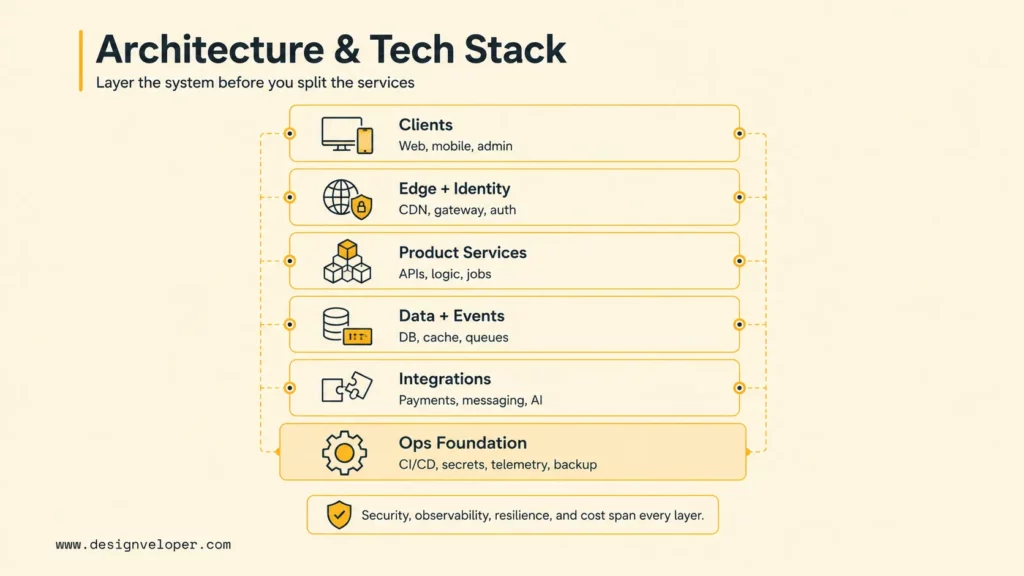
A practical reference architecture separates delivery concerns without assuming microservices. Clients connect through an edge and identity boundary. APIs coordinate product services. Data, events, and external systems support workflows. An operational foundation governs the complete stack. Security, observability, resilience, and cost are cross-cutting qualities.
- Clients: web, mobile, admin, partner, or desktop interfaces.
- Edge and identity: DNS, CDN, gateway, authentication, MFA, authorization, and rate limits.
- Product services: APIs, domain logic, background jobs, workflows, and notifications.
- Data and events: relational or document databases, objects, cache, queues, search, analytics, and vector indexes where justified.
- Integrations: payments, messaging, enterprise systems, identity providers, devices, and AI models.
- Operations foundation: infrastructure definitions, CI/CD, secrets, policy, telemetry, backup, recovery, cost allocation, and incident response.
| Layer | Common Choices | What To Decide |
|---|---|---|
| Frontend | Server-rendered web, single-page app, native mobile, cross-platform mobile | Accessibility, performance, offline behavior, release channel, and device capabilities |
| Backend and APIs | Modular monolith, microservices, REST, GraphQL, event consumers, workers | Domain boundaries, consistency, versioning, ownership, and failure handling |
| Database and storage | Relational, document, key-value, object, cache, search, warehouse, vector index | Access patterns, transactions, retention, residency, backup, recovery, and portability |
| Compute | Virtual machines, managed app platforms, containers, functions, edge compute | Workload duration, scaling, latency, operational control, and cost behavior |
| Identity and access | Managed identity, federation, MFA, roles, attributes, service identities | Trust boundary, least privilege, tenant isolation, lifecycle, audit, and emergency access |
| AI layer | Model APIs, hosted models, retrieval, vector search, safety filters, evaluation | Data permission, output quality, latency, fallback, model choice, and cost per task |
For the document approval MVP, start with one application, a managed relational database for approval state, object storage for files, and a worker for scanning and preview jobs. A queue fits file processing because those jobs can take longer than a web request or need a retry. Keep the approval decision in one authoritative data store. Add independently deployed services only when a team must release or scale a domain separately and can own its alerts, failures, and data contracts. Choose services the team can maintain; abstract a provider boundary only when the switching risk is real.
For security verification, the OWASP Application Security Verification Standard provides a basis for specifying and testing web application controls. Apply the relevant depth according to threat, data sensitivity, regulatory context, and the product’s actual trust boundaries.
For a deeper dive:
- What Is GraphQL? A Detailed Guide
- What Is DevOps? The DevOps Lifecycle And How It Works
- What Is A Web Application (Web App)? Is It the Same as Website?
Cloud Application Benefits, Challenges, And Cost
Cloud applications can shorten infrastructure lead time, support distributed access, automate delivery, scale with demand, and provide managed capabilities. Those benefits appear only when teams operate the system deliberately. Poor configuration, uncontrolled service growth, fragile integrations, and missing ownership can make a cloud product costly and unreliable.
| Area | What To Consider | Why It Matters |
|---|---|---|
| Benefits | Elastic capacity, global delivery, managed services, automation, experimentation, resilience options | Can reduce infrastructure lead time and focus effort on product work |
| Challenges | Distributed failure, identity sprawl, skills, vendor limits, migration, governance, quotas | Unmanaged complexity can erase speed and availability gains |
| Delivery cost | Discovery, design, engineering, migration, integrations, testing, security, platform work | Estimates need to include the release system, not screens alone |
| Operating cost | Compute, storage, network, observability, backup, support, licenses, AI inference, people | Recurring cost depends on architecture and usage behavior |
| Change cost | Features, compliance, dependencies, incidents, capacity, provider changes | The application needs a funded product and operations lifecycle |
Cloud application cost has two separate budgets: delivery work to reach a usable release and recurring spend to keep it running. The document approval workflow below gives a specific unit to estimate. This worksheet is a planning method, not a provider quote or a market price.
For the document approval MVP, delivery budget = sum of discovery, UX, engineering, file and identity integrations, testing, security review, and launch effort by role (person-days × agreed day rate) + one-time vendor fees + an approved contingency. Record what is excluded, such as historical file migration, e-signatures, or a second region. Do not fill in prices until the delivery team and buyer agree on rates, scope, and acceptance tests.
Monthly operating budget = baseline app and database capacity + file storage and operations + data transfer + queue and email use + monitoring, backup, vendor support, and maintenance. Record active tenants, documents per tenant, average file size, uploads at peak, retention, region, and recovery target. Price each line in the chosen provider’s current calculator, including free-tier expiry and taxes where relevant. Model a base month and a peak month; divide each total by completed approval workflows to see cost per completed task. Assign a finance owner to budget alerts and an engineering owner to usage measurement. Revisit both scenarios after the first month of real usage.
| Input for the document approval MVP | Unit and period to record | Where to get the figure |
|---|---|---|
| Delivery effort by role and one-time integration/security fees | Person-days × contracted day rate; one-time fee; contingency percentage | Scoped work packages, team quote, vendor proposal |
| Active tenants and completed approval workflows | Tenants/month; completed workflows/month in base and peak cases | Launch forecast, then product telemetry |
| Files, processing, and retention | Documents/tenant/month × average file size; storage GB-month, requests/month, transfer GB/month | Sample files, retention policy, provider calculator |
| Application and operational baseline | Compute hours, database capacity, monitoring, backup, support, and maintenance/month | Architecture sizing, recovery objective, provider quote |
| Variable workflow services | Queue jobs, scan/preview runs, notifications, and API calls per completed workflow | Load test and vendor usage rates |
Cloud bills mix baseline and usage-based charges. A quiet month can still incur database, monitoring, backup, support, and minimum-capacity costs. More documents can increase storage requests, processing, transfer, and messages even when tenant count stays flat. Incomplete migration, duplicated systems, manual cleanup, and incident labor belong in the ownership estimate too.
Schedule the same MVP as work packages: discovery and review, one complete approval flow, identity and tenant permissions, file handling, the riskiest integration, recovery testing, and controlled launch. Show engineering effort separately from elapsed time. Vendor API access, security review, migration, and stakeholder sign-off are dependencies; confirm the release date after discovery and revise it when the integration proof is complete. Generic month bands are not a delivery commitment.
For more on budgeting and data safeguards, see Web App Development Cost: Breakdown and The Ultimate Guide To Cloud Data Protection: Best Practices.
Practical Cloud Application Workflow Example
Consider a B2B document approval application. A user uploads a document, assigns reviewers, receives comments, approves or rejects a version, and gets an audit-ready result. This example is more useful than a generic architecture diagram because it connects product behavior to cloud decisions.
| Stage | Input | Output and owner | Failure state to test |
|---|---|---|---|
| Upload | Authenticated user, file, tenant, metadata, and retention policy | Versioned object and processing job; product service owns status | File is too large, invalid, duplicated, or uploaded by the wrong tenant |
| Process | Object event, parser, virus check, and document permissions | Readable preview and searchable metadata; operations owns queue health | Parser times out, malware check fails, event is duplicated, or data is incomplete |
| Review | Reviewer identity, version, comments, deadline, and policy | Decision with audit event; business owner controls escalation | Reviewer lacks access, two people update at once, or a notification is missed |
| Complete | Approved version, signatures where required, retention and export rules | Final record and user notification; compliance owner checks evidence | Storage is unavailable, export fails, retention conflicts, or recovery is needed |
The workflow suggests several implementation choices: object storage for files, a queue for asynchronous processing, an API for permissions and state, a database for authoritative metadata, an audit trail for decisions, and telemetry for queue age and completion time. It does not automatically justify microservices. A modular application with managed storage and a worker may meet the first release more safely.
Useful project documentation includes a state model, data-flow diagram, threat model, ownership matrix, API error contract, recovery runbook, cost assumptions, test scenarios, and launch checklist. The input-output-owner-failure pattern can be reused for ecommerce orders, patient portals, finance workflows, and AI-assisted review.
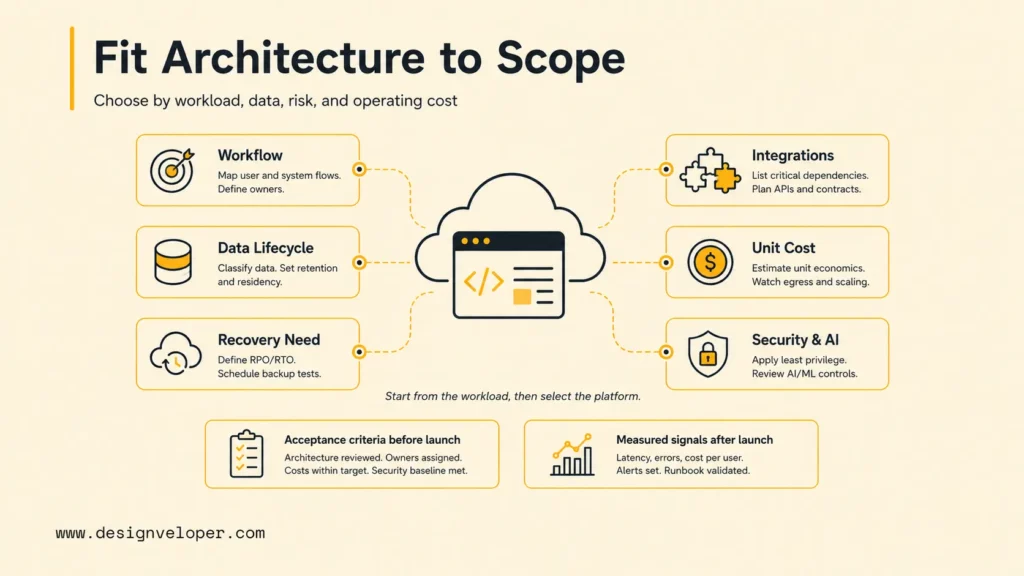
Align Cloud Architecture With Product Scope And Cost
Use the approval workflow and base/peak budget as a decision record. If the file-processing worker becomes a bottleneck, test separate scaling before dividing the whole application into services. If storage or transfer dominates cost, inspect retention and file access patterns before changing compute. Name one owner each for backup restoration, incident response, and monthly spend review.
For AI functionality, define data quality, permission filtering, evaluation, latency, and model usage cost before choosing a model. Record versions and test representative and adversarial cases. Define escalation for uncertain or harmful output. Track cost per successful user task rather than tokens alone, because a cheap answer that causes rework is not efficient.
In a different product context, Designveloper’s public ecommerce platform case study describes layered caching, Kubernetes resource tracking, reusable CMS components, and dynamic content conditions. These are documented design choices for that platform, not measured savings or proof that an approval product needs Kubernetes. The transferable lesson is to test runtime behavior and editor needs before paying for added infrastructure.
Designveloper’s web application development services can support teams aligning scope, cloud architecture, integrations, security, observability, AI capabilities, and expected operating cost. Contact Designveloper to discuss a reviewable workflow and decision record before committing to a provider checklist.
Conclusion
A cloud application is ready to plan when its team can describe one complete transaction, the owner of each failure, and the cost unit that rises as usage grows. For the document approval example, that means a successful reviewed file, recoverable processing, and a base/peak monthly estimate per completed approval.
Price the two usage scenarios with the chosen provider, test the highest-risk integration, and revise the scope after the first controlled release. Keep the decision record and operating owners current as usage changes.
FAQs About Cloud Application Development
These answers cover the planning questions that most often affect cloud application scope, delivery time, architecture, security, and operating cost.
What Skills Are Needed For Cloud Application Development?
A balanced team needs product discovery, UX and accessibility, frontend, backend, APIs, data modeling, cloud infrastructure, CI/CD, security, testing, observability, and operations. Data engineering or machine learning skills may be needed for analytics and AI-heavy products. Business domain knowledge is equally important because cloud expertise cannot determine the correct workflow or user value by itself.
How Long Does It Take To Build A Cloud Application?
Duration depends on the first release’s work packages and dependencies, not a universal month range. For the document approval MVP, estimate discovery, identity and permissions, one approval flow, file processing, integration, recovery testing, and launch against actual team capacity. Add vendor access, migration, security review, and stakeholder sign-off to the calendar, then update the date after the riskiest integration is tested.
What Costs Should Be Planned After Launch?
Plan baseline compute, database, monitoring, backup, support, and maintenance plus usage-based storage, transfer, processing, messaging, and third-party APIs. The worksheet above prices a base and peak month for the document workflow; divide each monthly total by completed approvals, then compare the model with actual cloud bills after launch.
Is Serverless Better Than Containers?
Neither is universally better. Serverless functions suit event-driven, intermittent, short-duration work when automatic scaling and low infrastructure management are valuable. Containers suit longer-running services, specialized runtimes, predictable workloads, portability needs, and teams that need more control. Many products use both, chosen per workload.
How Do You Secure A Cloud Application?
Begin with data classification, threat modeling, and a clear shared-responsibility boundary. Use strong identity, least privilege, multifactor authentication for privileged access, secure secrets, encryption, isolated environments, validated inputs, dependency controls, protected build pipelines, logging, vulnerability management, backup, tested recovery, and incident response. Review controls whenever architecture, data use, vendors, or threats change.
Also published on

Share post on










Related Articles


7 Best Open-Source RAG Frameworks For Production AI Projects
7 Best Open-Source RAG Frameworks For Production AI Projects Published September 28, 2026
Cloud Application Development: Architecture, Process, And Cost
Cloud Application Development: Architecture, Process, And Cost Published September 25, 2026
10 Best Mobile App Development Tools: Choose Your Stack In 2026
10 Best Mobile App Development Tools: Choose Your Stack In 2026 Published September 23, 2026


















