
















Cloud Ecommerce Solutions: How To Choose The Right Platform

KEY TAKEWAYS:
- Choose for operational fit, not brand recognition: the best platform supports the way the business sells, serves customers, and changes over time.
- SaaS, PaaS, composable, and custom stacks answer different ownership questions: each changes who manages releases, integrations, security, and infrastructure.
- Compare the full three-year commitment before comparing the first invoice: include implementation, extensions, usage, support, and internal capability.
- Scalability and faster delivery must be designed and managed: cloud services do not remove the need for governance, monitoring, or clear accountability.
- Validate the hardest real customer journey before committing: a proof of concept reveals constraints that a polished demo can hide.
Cloud ecommerce solutions put storefront software, integrations, and operations on cloud-based platforms. They can streamline growth and releases, but the right fit depends on the business model, the ecommerce infrastructure, and the ability to choose the right ecommerce platform for long-term cost and risk.
A small direct-to-consumer store can usually start with managed SaaS. A distributor with account pricing and approval workflows may need enterprise B2B capabilities, while a multi-brand retailer may need headless or composable commerce. A marketplace with unusual commissions, inventory, or fulfillment rules may need a custom cloud architecture.
Quick decision guide: Start with SaaS when speed and low operational effort matter most. Evaluate enterprise SaaS or PaaS when B2B, multi-store, or complex integrations are central. Choose headless or composable commerce when several frontends need one commerce backend. Choose custom development only when differentiating workflows cannot be supported safely through configuration, apps, or APIs.
| Business situation | Best starting point | Main decision test |
|---|---|---|
| Standard B2C store | Managed SaaS | Can native features cover catalog, checkout, promotions, payments, and shipping? |
| B2B or hybrid B2B/B2C | Enterprise SaaS or PaaS | Can it support company accounts, negotiated pricing, quotes, credit, roles, and approvals? |
| Many channels or branded experiences | Headless or composable | Can the team operate APIs, frontend releases, observability, and integration contracts? |
| Marketplace or workflow-heavy commerce | Custom cloud solution | Does the unique operating model justify higher build and ownership cost? |
Recommended for you:
- Ecommerce Business: How To Start, Grow, And Use Technology
- How The B2C Ecommerce Model Works For Businesses: Platforms & Examples
- eCommerce App Development Guide: Features, Process
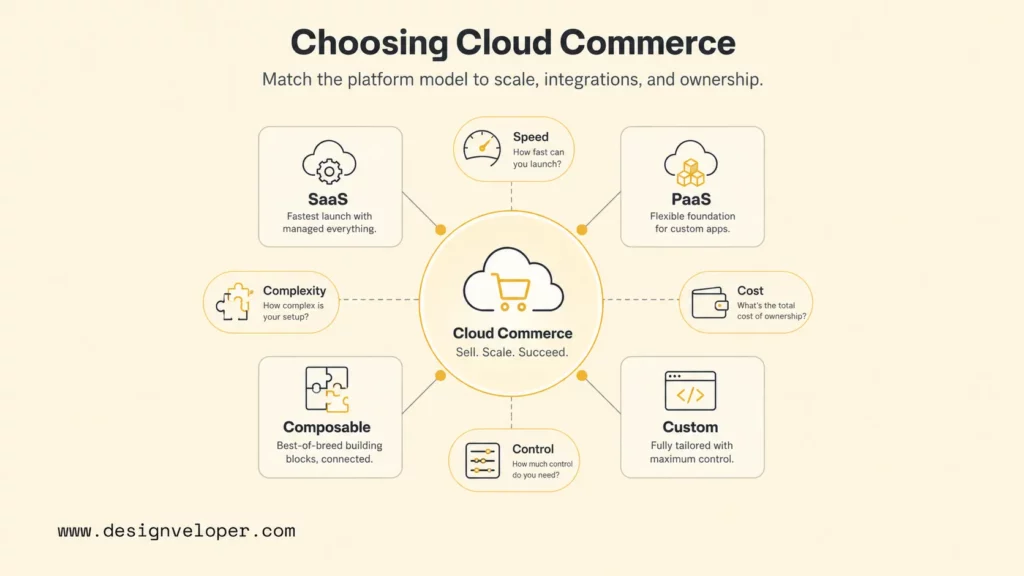
What Are Cloud Ecommerce Solutions?
Cloud ecommerce solutions are commerce systems delivered or hosted through cloud services instead of relying on servers that a merchant buys and operates at one physical location. When the storefront requires custom UX, integrations, or account logic, web application development services may become part of the delivery model. The model can include storefronts, product catalogs, checkout, payments, order management, search, customer accounts, analytics, databases, content delivery, monitoring, and integration services.
The NIST cloud computing definition describes cloud computing through on-demand access, shared configurable resources, rapid provisioning, and measured service. For ecommerce, those characteristics translate into faster environment setup, elastic capacity for traffic peaks, distributed delivery, usage visibility, and less hardware ownership.
Cloud does not mean that every responsibility moves to a vendor. A merchant still owns business data, identity decisions, product information, integrations, access policies, legal obligations, and many application-level controls. The responsibility split changes across SaaS, PaaS, and IaaS. Teams should document that split before signing a platform contract or starting a migration.
The commerce layer and cloud layer should also be separated conceptually. Shopify, BigCommerce, Adobe Commerce, and Salesforce provide commerce capabilities, while AWS, Microsoft Azure, and Google Cloud provide infrastructure and managed services. Some products package both layers. Others let a company assemble a storefront, commerce engine, search service, payment provider, ERP, CRM, and data platform.
A useful evaluation therefore starts with the operating model. Ask who will patch infrastructure, deploy storefront code, manage catalogs, own checkout, monitor integrations, respond to incidents, and control cost. Those answers reveal whether a managed platform, extensible platform, composable stack, or custom system is realistic.
Further reading:
- Guide about Web Application Development for Beginners
- 13 Different Types of Software Development Services
- 15 Best AI No-Code App Builders (No Coding Skills Required)
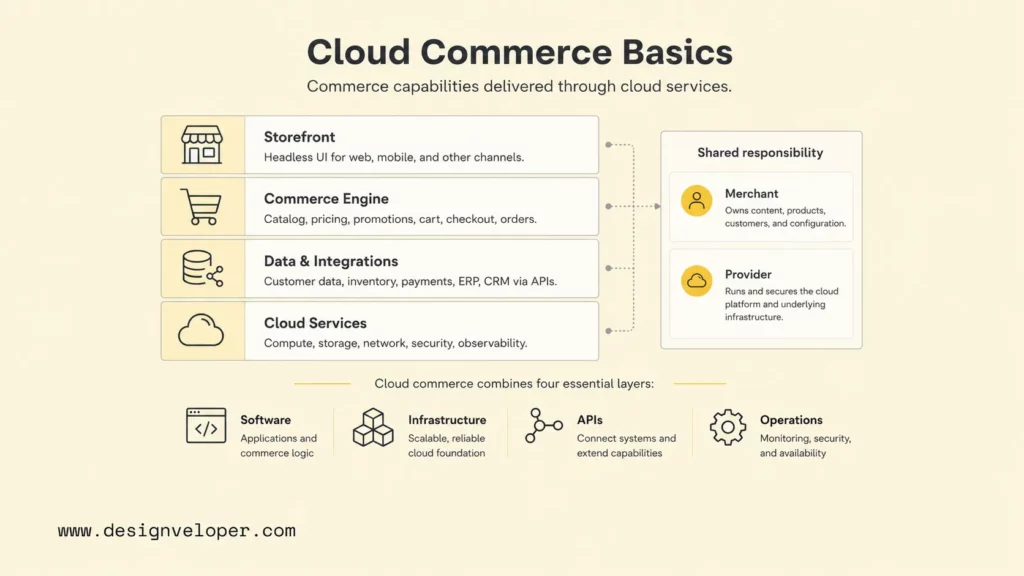
Types Of Cloud Ecommerce Solutions
The four practical categories are SaaS platforms, PaaS or cloud-native platforms, headless or composable stacks, and custom cloud systems. The categories overlap, but each assigns control and responsibility differently. A business should choose the least complex model that can support its real requirements for the next several years.
SaaS Ecommerce Platforms
SaaS ecommerce platforms provide a managed commerce application for a recurring fee. The vendor normally operates the core platform, hosting, security updates, and product releases. Merchants configure the storefront, catalog, payments, shipping, promotions, apps, themes, and integrations within the platform’s boundaries.
Shopify Plus pricing and capabilities position the product for online, retail, B2B, and headless commerce, while BigCommerce pricing shows tiered plans, multi-storefront options, support levels, and sales-volume rules. These pages also show why license price alone is not enough: transaction economics, storefront limits, payment-provider policies, apps, and implementation effort affect total cost.
SaaS is usually the best starting point for teams that value launch speed, predictable platform operations, a mature app ecosystem, and a standard checkout flow. The main tradeoffs are platform limits, dependency on vendor roadmaps, app sprawl, data-portability planning, and the cost of custom behavior outside supported extension points.
PaaS And Cloud-Native Ecommerce
PaaS and cloud-native commerce give engineering teams more control over application code, services, environments, and deployment while reducing some infrastructure management. This route fits organizations with developers, complex catalogs, regulated workflows, or integration requirements that exceed a typical theme-and-app model.
Adobe Commerce as a Cloud Service documentation describes a cloud-native product with a decoupled storefront, GraphQL APIs, merchandising services, payment services, and automatic resource adjustment. Adobe also documents scaled cloud architecture that separates web and service tiers so capacity can be adjusted around workload constraints.
PaaS or cloud-native commerce can support deeper customization, but it demands stronger engineering ownership. Teams need deployment pipelines, environment strategy, dependency management, performance testing, observability, incident response, and cost governance. The platform may manage infrastructure primitives, yet the merchant or implementation partner still owns application quality and integration behavior.
Headless And Composable Commerce
Headless commerce separates the customer-facing frontend from the commerce backend. Composable commerce goes further by assembling independent services for catalog, search, content, checkout, payments, customer data, promotions, and order management. The MACH technology principles summarize the model as microservices-based, API-first, cloud-native SaaS, and headless.
This model is valuable when a company needs web, mobile, kiosk, social, or partner experiences powered by the same commerce data. Frontend teams can release experiences independently, and businesses can replace selected components without rebuilding every layer. The cost is coordination: API versioning, distributed monitoring, identity, caching, content preview, search indexing, and failure handling become first-class architecture concerns.
Headless should not be selected only because it sounds modern. A standard store with one web frontend may gain little from extra services and release pipelines. The model pays off when channel diversity, experience differentiation, organizational scale, or vendor flexibility creates measurable value.
Custom Cloud Ecommerce Solutions
Custom cloud ecommerce solutions are purpose-built systems assembled around a specific business model. They may use managed cloud databases, serverless functions, containers, search services, queues, object storage, CDNs, observability tools, and third-party payment or tax APIs. The commerce rules and workflows remain under the company’s control.
Custom development makes sense for multi-vendor marketplaces, complex commissions, unusual subscription logic, regulated approvals, proprietary pricing, constrained inventory allocation, offline sales synchronization, or deep ERP orchestration. It rarely makes sense for recreating standard catalog, cart, and checkout features that a mature platform already handles well.
The best custom architecture uses managed services selectively and defines ownership clearly. It also needs a product roadmap, security model, test automation, disaster recovery, data migration strategy, support budget, and exit plan. Custom means freedom, but it also means responsibility for every undocumented edge case.
Related reading:
- SaaS Application Development: Process, Architecture, And Cost Guide
- What is a SaaS Product: Features, Trends and Examples
- Custom eCommerce Web Development: Benefits, Process, Cost
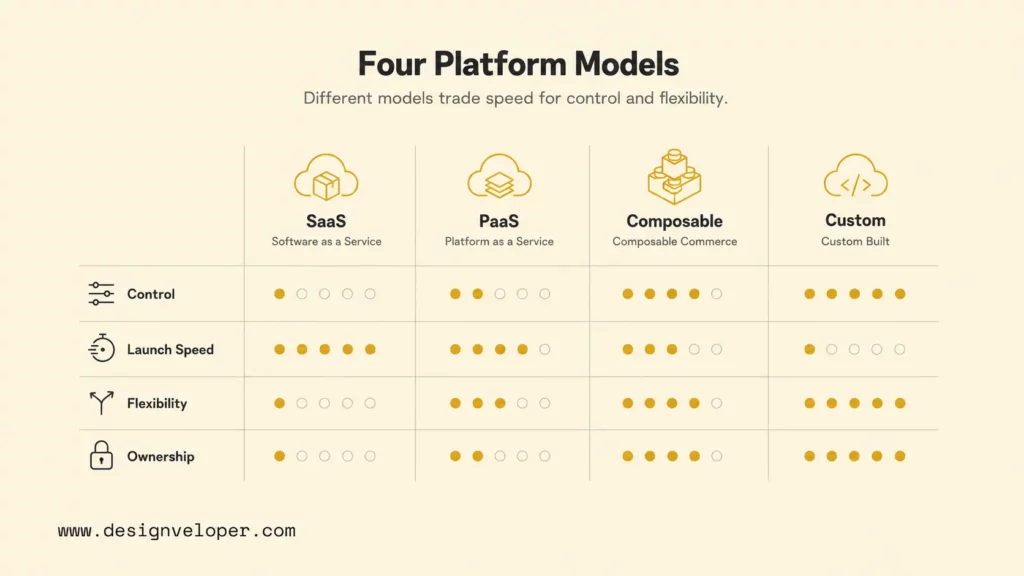
Cloud E-commerce Vs. On-Premise E-commerce
Cloud e-commerce shifts spending and operations from owned hardware toward subscriptions, managed services, and variable infrastructure. The broader cloud computing tradeoff is flexibility versus direct control: on-premise ecommerce gives an organization control over servers, network boundaries, and deployment timing, but it also requires capacity planning, patching, backups, physical resilience, and specialist operations.
| Decision factor | Cloud e-commerce | On-premise e-commerce |
|---|---|---|
| Capacity | Resources can be scaled or contracted through platform or cloud controls. | Capacity depends on purchased hardware and planned headroom. |
| Launch speed | Environments and managed services can be provisioned quickly. | Procurement, installation, networking, and configuration take longer. |
| Cost pattern | Subscription and usage-based operating expenses; bills can vary. | Higher capital expense plus facilities, hardware lifecycle, and staff. |
| Control | Control depends on SaaS, PaaS, or IaaS boundaries. | Direct control, paired with direct responsibility for the whole stack. |
| Resilience | Regions, availability zones, backups, and CDNs can be designed in. | Resilience requires duplicate equipment, sites, procedures, and testing. |
| Compliance | Shared responsibility must be mapped across provider and merchant. | The organization owns controls, evidence, and infrastructure operation. |
Cloud is not automatically cheaper. The 2026 Flexera State of the Cloud report estimates that 29% of IaaS and PaaS spend is wasted, which reinforces the need for budgets, ownership tags, alerts, architectural reviews, and regular rightsizing. On-premise spending can be wasteful too, but underused hardware is less visible as a variable monthly bill.
The better comparison is total cost of ownership. Include licenses, transaction fees, apps, implementation, migration, integrations, support, cloud usage, payment fees, security, monitoring, staff, downtime risk, and future change. A cheaper first-year option can become expensive if it blocks new markets or requires brittle workarounds.
The right commerce platform minimizes the cost of change, not only the cost of launch.
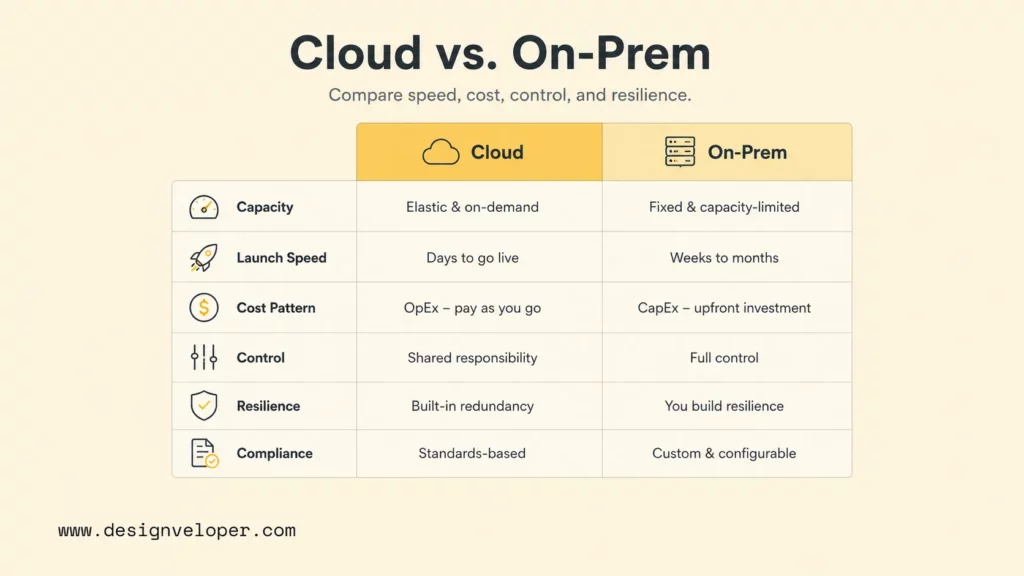
Core Components Of A Cloud Ecommerce Solution
A dependable cloud ecommerce solution has five connected layers: frontend, commerce backend, data, integrations, and cloud operations. A platform demo may emphasize storefront features, but production reliability depends on how all five layers behave during promotions, failures, migrations, and everyday updates.
- Frontend: web or mobile storefront, navigation, content, search interface, product detail, cart, checkout, account area, accessibility, and analytics events.
- Backend: catalog, pricing, promotions, inventory, customer accounts, cart, checkout, payments, orders, returns, taxes, and fulfillment rules.
- Database and storage: transactional data, product media, logs, backups, caches, search indexes, analytics events, retention, and data residency.
- Integrations: ERP, CRM, product information management, warehouse, shipping, payment, tax, fraud, marketing, customer support, and business intelligence.
- Cloud operations: CDN, DNS, identity, access control, secrets, deployment, monitoring, alerting, cost management, incident response, backups, and disaster recovery.
The architecture should define system-of-record ownership. Product descriptions may live in a product information management system, inventory in an ERP or warehouse system, customers in a CRM, and orders in the commerce platform. Without ownership rules, synchronization loops create conflicting prices, duplicate customers, overselling, and hard-to-reconcile reports.
Cloud commerce operating map
Each connection needs an owner, contract, timeout, retry policy, monitoring signal, and fallback behavior.
Architecture quality can be reviewed with the AWS Well-Architected Framework: operational excellence, security, reliability, performance efficiency, cost optimization, and sustainability. The principles apply even when the commerce platform is not hosted directly on AWS because they force teams to test the system beyond happy-path features.
Key Benefits And Challenges Of Cloud Ecommerce
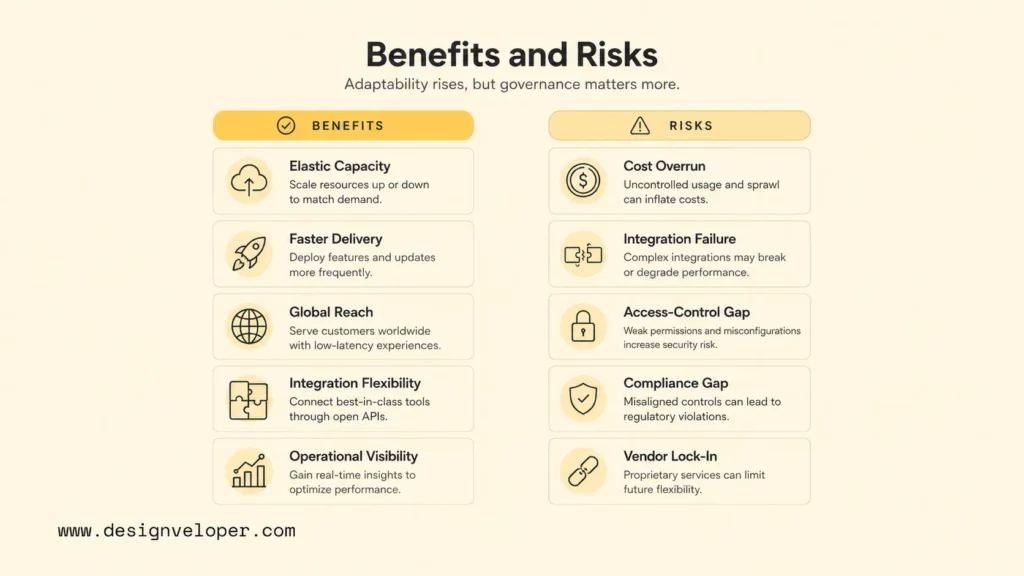
Cloud ecommerce can speed up launches, support traffic variation, improve global delivery, and connect specialized services. The same flexibility also creates cost, integration, security, governance, and vendor-management challenges. A balanced decision weighs both sides before migration begins.
Benefits Of Cloud Ecommerce Solutions
The main benefit is adaptability. Teams can add environments, deploy features, introduce channels, connect services, and scale selected resources without buying a new data center. Managed platforms also reduce the amount of commodity infrastructure work required from a product team.
- Elastic capacity: scale storefront or service tiers around seasonal events and campaign traffic.
- Faster delivery: use managed services, automated deployments, preview environments, and repeatable infrastructure.
- Global reach: combine CDNs, regional services, localized content, currencies, and storefronts.
- Integration flexibility: connect payment, tax, shipping, ERP, CRM, search, analytics, and AI services through supported APIs.
- Operational visibility: centralize logs, traces, metrics, alerts, security events, and cost data.
- Experimentation: test new channels, recommendations, promotions, and customer journeys without replacing the whole platform.
Benefits only appear when teams measure them. Track deployment frequency, lead time, checkout conversion, search success, order failure rate, page performance, incident recovery, cost per order, and support workload. A cloud migration that changes hosting but not delivery practice may produce little business value.
Common Challenges In Cloud Ecommerce Deployment
The most common failures are poorly scoped customization, uncontrolled cloud cost, fragile integrations, weak identity controls, and unclear data ownership. Cloud services make resources easier to create, so governance must become easier to apply as well.
| Risk | Early warning signal | Control |
|---|---|---|
| Cost overrun | Bills grow faster than orders or gross margin. | Assign owners, budgets, unit-cost metrics, alerts, and review cadence using FinOps Foundation guidance. |
| Integration failure | Orders, inventory, or customer records disagree across systems. | Define source of truth, idempotency, queues, retries, reconciliation, and alerts. |
| Access-control gap | Shared admin accounts or broad service permissions. | Apply least privilege and map the cloud shared-responsibility model. |
| API exposure | Sensitive endpoints lack authorization or rate limits. | Test against the OWASP API Security Top 10. |
| Payment compliance gap | Teams assume the provider owns all PCI duties. | Use the PCI SSC outsourcing guidance to map merchant and provider responsibilities. |
| Vendor lock-in | Critical workflows depend on undocumented extensions. | Maintain export paths, API contracts, architecture records, and replacement scenarios. |
Legacy migration adds another layer of risk. Historical orders, customer identities, tax records, loyalty points, product variants, redirects, and consent data must be mapped explicitly. A migration should include reconciliation totals, rollback criteria, search-engine redirect testing, and a period where old and new systems can be compared safely.
Explore more:
- 8 Breakthrough Cloud Industry Trends
- What Is Cloud Security and Cloud Computing Security Defined?
- The Role of PCI-Compliant Hosting in E-Commerce Security
Common Business Use Cases
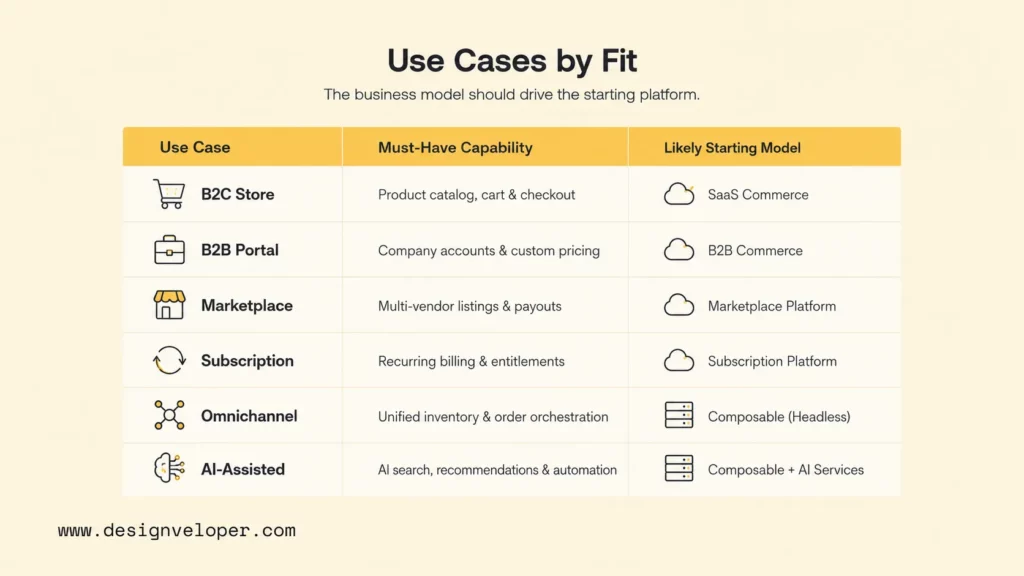
Cloud ecommerce supports B2C stores, B2B portals, marketplaces, subscriptions, omnichannel retail, AI-assisted shopping, and custom workflows. The business model should drive the platform model because each use case stresses different parts of the system.
| Use case | Capabilities that matter most | Likely starting model |
|---|---|---|
| B2C online store | Fast storefront, promotions, checkout, payments, returns, marketing apps. | Managed SaaS. |
| B2B portal | Company accounts, catalogs, negotiated pricing, quotes, roles, approvals, credit. | Enterprise SaaS or PaaS. |
| Multi-vendor marketplace | Seller onboarding, commissions, split payments, moderation, disputes. | Marketplace platform or custom cloud. |
| Subscription commerce | Recurring billing, plan changes, entitlements, churn and dunning. | SaaS plus subscription services or custom rules. |
| Omnichannel retail | Store inventory, pickup, returns, POS, order routing, customer identity. | Enterprise commerce with order management. |
| AI-assisted commerce | Recommendations, semantic search, support, content controls, evaluation. | Composable services connected to governed data. |
B2B fit requires detailed validation. Shopify B2B catalogs support company-specific products and prices, while BigCommerce B2B capabilities include buyer roles, quotes, invoices, approvals, and configurable buyer experiences. Platform names should not decide the outcome; test the actual quote-to-order and reorder workflows with representative accounts.
Omnichannel retail requires inventory and order logic beyond a website. Salesforce Order Management and Omnichannel Inventory documentation shows how availability, fulfillment, payment, and order-service constraints interact. Teams should test oversell prevention, pickup, split shipment, cancellation, return, and refund paths before launch.
Designveloper’s public Aha ecommerce project demonstrates experience with commerce product delivery. For a broader planning view, our ecommerce website development guide connects business goals, platform choices, design, development, testing, and ongoing operations.
Explore more:
- Top Software Development Trends Shaping the Future of eCommerce
- Top 12 Best eCommerce Website Builders For Free
- Ecommerce Website Development Cost: Breakdown
How To Choose The Right Cloud Ecommerce Solution
Choose the right cloud ecommerce solution by scoring business fit, technical fit, operating fit, risk, and total cost. A polished demo can hide hard constraints, so the evaluation should use real products, pricing rules, buyer roles, integrations, traffic assumptions, and support scenarios.
- Define the business model. Document B2C, B2B, marketplace, subscription, omnichannel, regions, brands, and revenue flows.
- Map critical workflows. Include product setup, pricing, checkout, payment, fulfillment, returns, service, finance, and reporting.
- Separate standard from differentiating needs. Configure standard commerce; build only the workflows that create defensible value.
- Test integration reality. Validate ERP, CRM, warehouse, payment, tax, shipping, identity, analytics, and data contracts.
- Model total cost. Include license, fees, apps, implementation, migration, cloud usage, support, and internal team time.
- Review security and compliance. Map identities, data, payments, retention, regions, vendors, evidence, and incident ownership.
- Run a proof of concept. Use the hardest workflow, not a homepage mockup, and define measurable pass criteria.
The scorecard below turns those questions into a go/no-go review. Score each criterion from 1 to 5 and require evidence for every high score. A platform should not pass because a salesperson says a feature is possible; the team should see configuration, API behavior, limits, and operating responsibilities.
Cloud ecommerce platform selection scorecard
| Criterion | Evidence required | Reject signal |
|---|---|---|
| Workflow fit | End-to-end demo using real roles, prices, orders, and exceptions. | Core flow depends on manual workarounds. |
| Integration fit | API limits, events, retries, sandbox, monitoring, and ownership. | No safe reconciliation or failure path. |
| Cost fit | Three-year model across license, fees, apps, build, support, and usage. | Cost cannot be related to order or revenue growth. |
| Operating fit | Named owners for releases, incidents, security, data, and vendor management. | The solution needs skills the organization cannot sustain. |
Shortlist official options only after the scorecard is ready. Compare Shopify Plus, BigCommerce Multi-Storefront, Adobe Commerce as a Cloud Service, and Salesforce Commerce against the same evidence package. The goal is not to name a universal winner. The goal is to expose fit and risk consistently.
Implementation Roadmap For Cloud Ecommerce
A reliable implementation moves from decisions to data, architecture, integration, migration, testing, launch, and continuous improvement. Each phase should have an owner, deliverables, acceptance criteria, and a rollback or escalation path.
- Define goals, requirements, and budget. Set revenue, market, experience, operational, reliability, and cost targets.
- Map data and dependencies. Inventory products, customers, orders, pricing, content, consent, redirects, ERP, CRM, warehouse, and payment flows.
- Select platform and architecture. Record why SaaS, PaaS, composable, or custom fits, including rejected alternatives.
- Build a full cost model. Estimate implementation, migration, recurring platform cost, cloud usage, apps, integrations, support, and internal ownership.
- Plan migration and SEO continuity. Map data transformations, redirects, canonical URLs, structured data, content, analytics, and reconciliation.
- Implement integrations. Add contracts, authentication, idempotency, queues, retries, monitoring, reconciliation, and manual recovery.
- Test production behavior. Cover performance, checkout, payments, security, accessibility, SEO, failure injection, backups, and incident response.
- Launch gradually and improve. Use feature flags or phased traffic, then monitor conversion, errors, cost per order, support demand, and customer behavior.
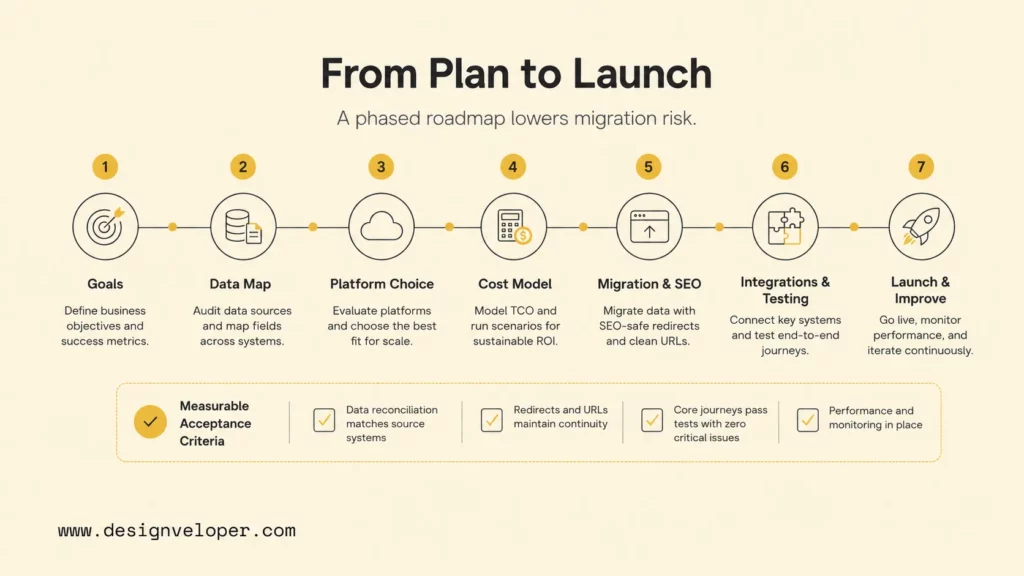
Migration acceptance criteria should be measurable. Product and customer counts should reconcile. Orders should reach fulfillment and finance systems exactly once. Redirects should preserve important URLs. Payment, refund, cancellation, tax, and return scenarios should pass. Monitoring should alert the right owner before customers report the problem.
Our cloud application development guidance and ecommerce website build guide provide useful starting points for scope and delivery. When standard platforms cannot cover custom pricing, B2B approvals, marketplace rules, subscription logic, complex inventory, or AI-assisted workflows, we can connect commerce architecture, cloud infrastructure, integrations, testing, and post-launch support through our software development services.
A successful cloud migration is complete only when orders, data, teams, controls, and recovery procedures work together.
FAQs About Cloud Ecommerce Solutions
How Much Do Cloud Ecommerce Solutions Cost?
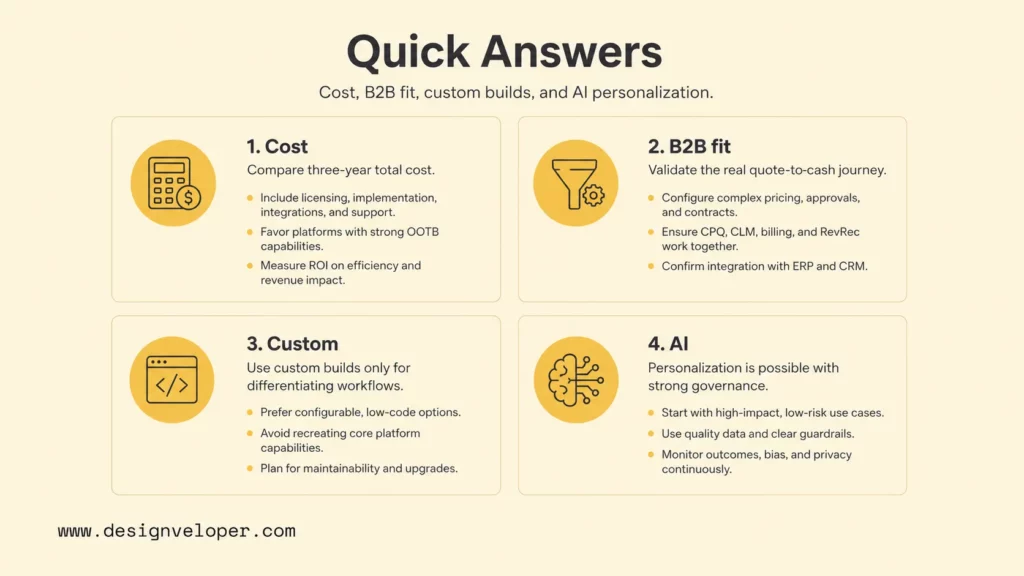
Cloud ecommerce cost ranges from a small monthly SaaS plan to a multi-year enterprise or custom program. Use current official pricing pages such as BigCommerce plans and Shopify Plus pricing for license baselines, then add implementation, themes, apps, transaction fees, integrations, migration, cloud usage, support, monitoring, and internal staff. Enterprise vendors often quote based on volume and scope, so compare three-year total cost instead of the first invoice.
Which Cloud Ecommerce Solution Is Best For B2B?
The best B2B solution is the one that supports the company’s actual account hierarchy, catalogs, negotiated pricing, quotes, purchase orders, credit terms, approvals, tax rules, reorders, sales-assisted buying, and ERP integration. Shopify Plus, BigCommerce B2B, Adobe Commerce, and Salesforce Commerce can all be candidates. Run a representative buyer journey and quote-to-cash proof of concept before selecting one.
When Should A Business Choose Custom Cloud Ecommerce Development?
Choose custom development when unique workflows create business value and cannot be supported safely through platform configuration, apps, or documented APIs. Strong signals include marketplace settlement, proprietary pricing, regulated approval chains, specialized inventory allocation, cross-system orchestration, or unusual subscription entitlements. Avoid custom development when the requirement is a standard catalog, cart, checkout, or promotion flow.
Can Cloud Ecommerce Solutions Support AI Personalization?
Yes. Cloud ecommerce solutions can connect recommendations, semantic search, customer-service assistants, product-content generation, fraud models, and next-best-action systems. Adobe documents AI-powered search and product recommendations in Adobe Commerce cloud services. Teams still need consent, data quality, evaluation, human review, access control, monitoring, and a fallback experience so personalization does not become an uncontrolled production dependency.
Cloud ecommerce solutions work best when the platform model matches the operating model. Start with managed SaaS for standard commerce, move toward PaaS or composable architecture only when complexity creates measurable value, and use custom development for genuinely differentiating workflows. Build the decision around real data, integrations, security, cost, and ownership, then test the hardest journey before committing.
For teams that need a partner across platform selection, custom integrations, cloud architecture, and long-term product delivery, our web application development services can help turn the scorecard into an implementation plan and a maintainable commerce system.
Also published on

Share post on










Related Articles


DevOps Managed Services: What They Include & How To Choose A Provider
DevOps Managed Services: What They Include & How To Choose A Provider Published September 21, 2026
10 Best Cloud Service Providers For Different Workloads
10 Best Cloud Service Providers For Different Workloads Published September 21, 2026
On-Premises Vs Cloud: Key Differences, Costs, And Use Cases
On-Premises Vs Cloud: Key Differences, Costs, And Use Cases Published September 18, 2026



















