
















10 Best Cloud Service Providers For Different Workloads

The best cloud service providers are not the same for every workload. AWS fits teams that need broad infrastructure, Azure suits Microsoft-centered environments, and Google Cloud is strong for data, AI, and cloud-native products. DigitalOcean, Vultr, Akamai Cloud, and OVHcloud can be better fits for narrower requirements.
The right choice depends on workload shape, required regions, managed services, team skills, security obligations, support, and total operating cost rather than brand size alone.
These ten providers were selected to represent broad hyperscalers, enterprise platforms, regional specialists, and simpler infrastructure options across different workload and operating needs. The list prioritizes distinct workload, regional, platform, or operating-model relevance rather than a single score. If you are still defining the architecture, read our cloud application development guide. It explains how workload behavior, data, security, reliability, and operations should shape the platform decision.
Cloud Service Providers Compared By Workload And Business Fit
A useful cloud service provider comparison starts with the job the platform must do. Service breadth matters for complex estates, but a smaller catalog can be an advantage when a team wants fewer operational choices. Data and AI services matter for analytics-heavy products, while hybrid support matters more when systems must stay connected to private infrastructure or existing enterprise platforms.
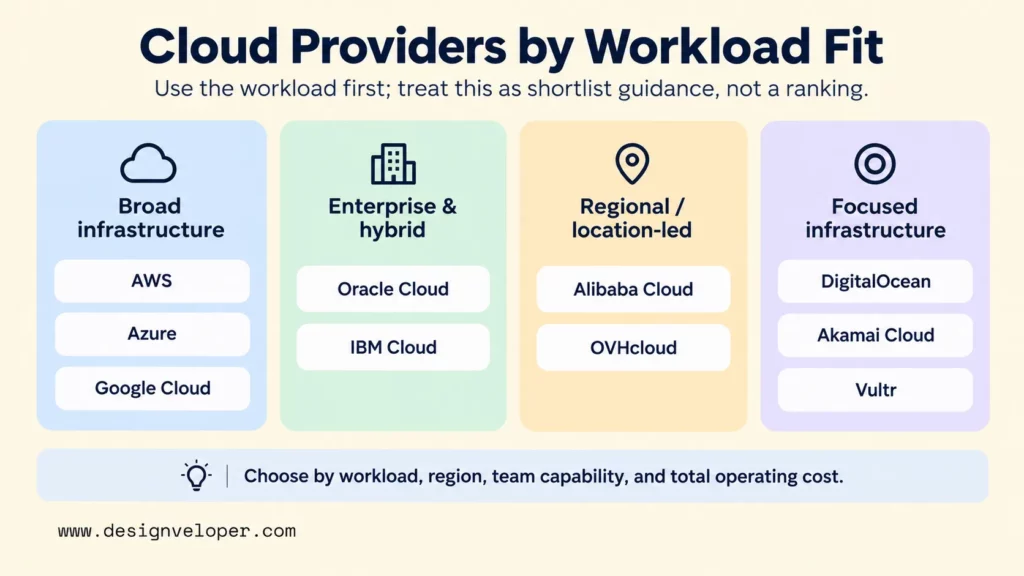
Regional availability also changes the answer. A provider may operate in a market without offering every required product in the exact region or service tier you need. Verify compute, databases, storage, AI, networking, backup, support, and other required services in the target location before procurement.
Pricing, regions, service availability, promotional free offers, and compliance programs change over time. They can also vary by account, region, service tier, and contract. A provider’s compliance programs show controls the provider may support, but they do not automatically make a customer workload compliant. Verify the specific service, region, configuration, contract, and customer obligations for the workload.
| Provider | Best fit | Core strength | Main trade-off to validate | Official product or pricing reference |
|---|---|---|---|---|
| Amazon Web Services | Broad infrastructure and managed-service needs | Wide catalog across compute, storage, databases, networking, security, AI, and operations | Architecture and cost management can become complex | AWS products |
| Microsoft Azure | Microsoft-centered organizations | Enterprise cloud services across identity, data, development, hybrid, and infrastructure | Validate service fit and operating cost across the existing Microsoft estate | Azure products |
| Google Cloud | Data, AI, analytics, and cloud-native workloads | Data platforms, AI services, containers, and managed application services | Confirm team skills, service availability, and support model | Google Cloud products |
| Oracle Cloud Infrastructure | Oracle-centered systems and enterprise modernization | OCI infrastructure combined with Oracle databases and applications | Compare migration effort and ecosystem fit with broader alternatives | Oracle Cloud Infrastructure |
| IBM Cloud | Hybrid and regulated enterprise workloads | Hybrid and multicloud operations with governance and enterprise infrastructure | Validate regional services, controls, support, and operational complexity | IBM Cloud products |
| Alibaba Cloud | Deployments with clear Asia-market requirements | Compute, storage, databases, networking, containers, and regional infrastructure | Check local services, data rules, support, and team familiarity country by country | Alibaba Cloud products |
| DigitalOcean | Startups and smaller teams seeking a focused developer platform | Virtual machines, Kubernetes, application platform, databases, and storage | Check whether the managed-service range will support later scale and complexity | DigitalOcean pricing |
| Akamai Cloud | Teams evaluating cloud compute with edge and application delivery | Distributed compute plus edge and application-delivery capabilities | Decide whether edge and delivery integration is central to the workload | Akamai Cloud pricing |
| Vultr | Teams comparing flexible compute across multiple locations | Cloud compute, optimized instances, GPU, bare metal, Kubernetes, and storage | Validate managed services, support depth, and operational tooling | Vultr compute documentation |
| OVHcloud | European hosting and data-residency-sensitive procurement | Public cloud infrastructure with a strong European presence | Confirm exact product availability by region and support requirement | OVHcloud Public Cloud pricing |
Use the table to form a shortlist, then validate the choice with a production-shaped workload test, regional service check, security review, and realistic cost model. Two teams can reasonably choose different providers for similar applications because their existing skills, contracts, network design, identity systems, and operating responsibilities differ.
10 Best Cloud Service Providers For Different Workloads
“Best” here means best fit for a defined workload and operating model, not a universal ranking of provider quality. Each profile therefore focuses on the situation where the provider is most useful, the capabilities that support that fit, and one constraint the team should test before committing.
Amazon Web Services For Broad Cloud Infrastructure Needs
AWS is a strong fit when a team needs broad cloud infrastructure and a large managed-service ecosystem. Its catalog spans compute, storage, databases, networking, security, analytics, AI, migration, operations, and hybrid services. That range can support both straightforward hosting and complex multi-service platforms.
That breadth is also the main constraint. More services create more decisions about architecture, permissions, networking, observability, purchasing models, and ownership. AWS makes most sense when the organization can standardize those choices instead of letting each workload evolve independently.
AWS Regions documentation advises teams to choose a Region that provides the services and features their workload needs. Pricing also changes by service, region, usage, and commitment model. Build an estimate from the actual components and target regions rather than relying on a generic per-server comparison.
In our Bonux project, we publicly document a web and mobile product using Node.js, MongoDB, React, React Native, and scalable deployment on AWS. That example shows AWS supporting a multi-client product, but it does not establish a particular internal architecture, cost saving, performance result, compliance result, or superiority over another provider.
Choose AWS when your workload benefits from a wide service catalog, your team can govern that complexity, and the required services are available in the regions you need.
Microsoft Azure For Microsoft-Centered Organizations
Azure is a practical first candidate for organizations whose identity, productivity, development, data, or governance environment already depends heavily on Microsoft technologies. Its catalog covers compute, containers, databases, developer tools, DevOps, identity, security, analytics, and hybrid or multicloud services.

The advantage is not that every Microsoft customer should automatically use Azure. The useful question is whether Azure reduces integration and operating friction across the existing environment. Test the target services, licensing assumptions, network design, identity model, and support plan before treating ecosystem alignment as a cost advantage.
Microsoft’s Azure regions list notes that region and availability-zone support can differ by service. Temporary or introductory offers should not be the production baseline. Budget from the paid services and realistic traffic pattern the application will need.
Choose Azure when the existing Microsoft estate creates a measurable integration or governance advantage. Confirm that advantage with a production-shaped pilot and a realistic operating-cost comparison.
Google Cloud For Data, AI, And Cloud-Native Workloads
Google Cloud is especially relevant when data platforms, analytics, AI, containers, or managed application services are central to the product. Its catalog includes BigQuery, Compute Engine, Google Kubernetes Engine, Cloud Run, Cloud SQL, Cloud Storage, AI services, developer tools, security, and hybrid or multicloud products.
The platform is a strong candidate for teams that already work with managed data pipelines, Kubernetes, serverless services, or AI-enabled applications. It does not remove operational responsibilities. Engineers still need to define identity, network boundaries, observability, cost controls, recovery, and the skills needed to support the selected services.
Google Cloud’s locations documentation says product availability by region continues to evolve. Its free program can help with evaluation, but production cost still depends on the actual compute, data, storage, network, and managed-service pattern.
Choose Google Cloud when data, AI, analytics, or cloud-native application requirements are major decision drivers and the team can operate the selected managed services effectively.
Oracle Cloud Infrastructure For Oracle-Centered Systems
Oracle Cloud Infrastructure is most compelling when important workloads already depend on Oracle databases, Oracle enterprise applications, or Oracle commercial relationships. OCI also provides general compute, storage, networking, Kubernetes, AI, and other infrastructure services, so it is not limited to database hosting.
The decision should focus on migration and ecosystem fit. If moving an Oracle-heavy estate to OCI reduces database or application friction, that can matter more than choosing a provider with a broader general-purpose catalog. If the workload is mostly provider-neutral, compare OCI with alternatives using the same architecture and operating assumptions.
Oracle’s OCI regions documentation explains that most resources are region-specific or availability-domain-specific. It also notes that some specialized or emerging services are available only in selected regions. Check the exact OCI service and target region rather than using a global region total as proof that a workload can run there.
Choose OCI when Oracle workloads are a major part of the system and the combined migration, licensing, performance, and operating model is stronger than a broader-cloud alternative.
IBM Cloud For Hybrid And Regulated Workloads
IBM Cloud fits organizations that need hybrid operations, enterprise controls, or support for regulated workloads more than a consumer-style developer experience. IBM positions the platform around infrastructure, platform services, AI, automation, governance, security, and hybrid or multicloud management.
This fit is strongest when cloud services must coexist with established enterprise systems and control requirements. IBM’s cloud compliance programs can support regulated workloads, but the customer must still validate the specific service, region, controls, configuration, and contractual requirements for its own obligations.
IBM’s service and infrastructure availability documentation distinguishes multiple region and data-center models. Check the target resource against the intended location, because service availability is not identical everywhere.
Choose IBM Cloud when hybrid integration, governance, or regulated enterprise operations are central requirements and the needed services, controls, and support are available in the target location.
Alibaba Cloud For Asia-Focused Deployments
Alibaba Cloud deserves a serious comparison when a business has a clear deployment requirement in Asian markets, especially when regional infrastructure and local market access influence architecture. Its portfolio includes compute, storage, managed databases, networking, Kubernetes, content delivery, security, and data services.
The important question is not simply whether Alibaba Cloud operates in a country. Product availability, regulations, account requirements, network design, support, and pricing can differ by location. Alibaba’s regions and zones guide recommends considering user proximity, connectivity requirements, and resource pricing when selecting a region.
The same guide warns that not all products support all regions and zones. Test the exact production service combination in the target country instead of assuming one regional policy applies to the whole platform.
Choose Alibaba Cloud when Asia-market deployment is a concrete requirement and regional service, support, data, and team constraints have been checked country by country.
DigitalOcean For Simple Developer Workloads
DigitalOcean is a strong fit for startups and smaller engineering teams that want a focused cloud platform without the full catalog depth of a hyperscaler. Its core platform includes virtual machines, managed Kubernetes, App Platform, managed databases, networking, and storage products.
A smaller service surface can make everyday decisions easier. Teams can deploy common web applications, APIs, containers, and databases without choosing among many overlapping product families. DigitalOcean also publishes straightforward product pricing that can make an initial cost model easier to build.
The constraint appears as requirements expand. A team should first identify which capabilities it may need later. These may include specialized enterprise data services, deeper hybrid integration, advanced controls, or managed products. Confirm each required capability in DigitalOcean’s regional availability documentation before committing. Changing providers later is possible, but migration has a cost.
Choose DigitalOcean when developer simplicity and a focused infrastructure stack matter more than maximum service breadth, and the expected growth path fits the platform’s managed services.
Akamai Cloud For Edge And Application Delivery Needs
Akamai Cloud is most interesting when a team is evaluating cloud compute together with application delivery and edge requirements. Its cloud portfolio includes compute, Kubernetes, application platform services, storage, databases, networking, serverless capabilities, and services from the wider Akamai delivery and security platform.
That combination can reduce separate platform decisions when distributed delivery is central to the workload. It can also add unnecessary complexity when the application only needs conventional regional compute and storage. Establish first whether edge placement or application delivery solves a measured latency, traffic, resilience, or distribution problem.
Akamai publishes a cloud region availability page for its compute footprint. Teams should still check the exact product and region, because a broad edge presence does not mean every cloud-compute or managed service is available at every edge location.
Choose Akamai Cloud when compute and application delivery are part of the same design problem and edge capabilities create a clear operational or user benefit.
Vultr For Flexible Compute And Regional Choice
Vultr fits teams that want straightforward compute choices across multiple deployment locations. Its platform includes cloud compute, optimized instances, GPU options, bare metal, Kubernetes, storage, networking, and other infrastructure services.
The provider is useful when virtual infrastructure is the main requirement and the team wants to compare CPU, GPU, dedicated, or Kubernetes options without adopting a much larger application-service catalog. Pricing still depends on the selected product, location, billing model, and supporting services.
The main check is operational depth. Before committing, confirm the required managed databases, observability, support, security tooling, and backup model. Use Vultr’s regional availability documentation to check which compute plans are available in the target region. Attractive compute pricing can still create more engineering work around the services that surround those machines.
Choose Vultr when flexible compute and location choice are the main needs and the surrounding managed-service requirements remain within the platform’s current scope.
OVHcloud For European Hosting And Data-Residency Needs
OVHcloud is a useful option when European hosting, procurement, or data-residency requirements materially affect the decision. Its Public Cloud catalog includes virtual machines, storage, networking, Kubernetes, databases, analytics, AI services, and other infrastructure products.
European presence alone does not establish compliance or workload fit. OVHcloud’s Public Cloud availability matrix shows that service coverage differs across locations. Map each required product to the exact region, then verify the legal, contractual, and customer-side controls that apply to the workload.
Its Public Cloud pricing is usage-based, with product-specific rates and savings options. Network and data-transfer costs can also depend on location and service, so a cost model should include traffic rather than only the hourly compute rate.
Choose OVHcloud when European location is a real procurement or data requirement and the exact services, support level, regions, and customer obligations match the workload.
How To Choose A Cloud Service Provider
Choose a cloud provider by turning the workload into testable requirements first. Define what must run, where it must run, how it should fail safely, and who will operate it. Also define how much cost variation the business can accept.
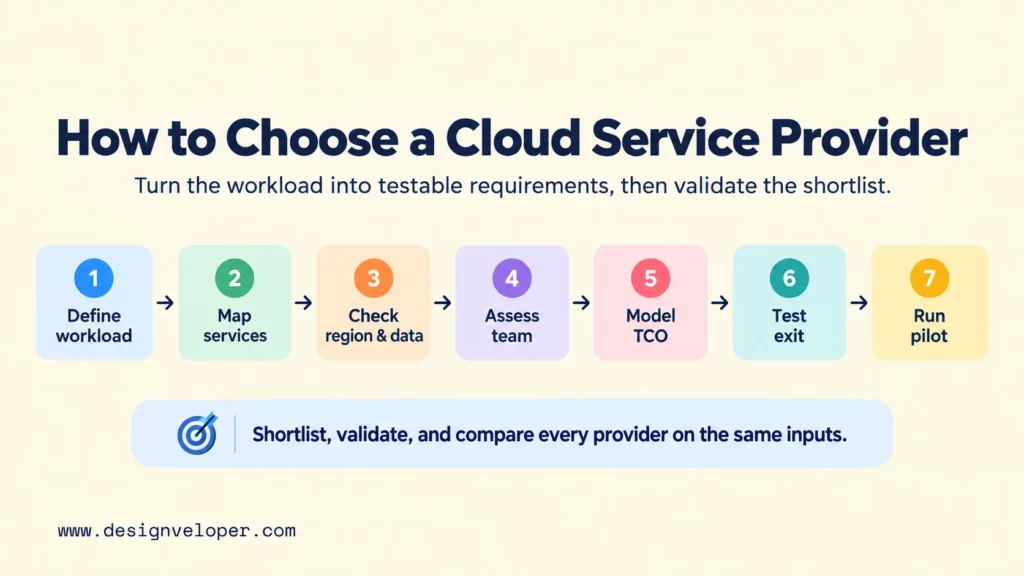
- Define the workload. Record application type, expected traffic, peak behavior, storage growth, data sensitivity, latency targets, integrations, availability goals, backup needs, and recovery targets.
- Map required managed services. Identify which databases, queues, object storage, containers, serverless runtimes, AI services, monitoring, identity, and security controls the architecture actually needs.
- Check regions and data rules. Verify every required service in the target geography. Include data residency, cross-border transfer, disaster recovery, and any sector-specific obligations.
- Assess the operating team. Compare current cloud skills, infrastructure-as-code maturity, monitoring, incident response, and support requirements. A powerful platform is a poor fit if the team cannot operate it safely.
- Model realistic cost. Use representative compute, storage, database, network egress, support, observability, backup, and engineering effort instead of a single introductory VM price.
- Test exit conditions. Review data export, container or VM portability, managed-service dependencies, contract terms, egress cost, and the work required to migrate or recover elsewhere.
- Run a production-shaped pilot. Use representative data and traffic, deployment automation, access controls, logging, monitoring, backup, and a real cost report. A demo proves that software starts; a pilot shows whether the operating model works.
Use the provider profiles to create a shortlist, then apply the checklist to validate it. Our cloud provider selection checklist goes deeper into workload profiling, support, recovery, pricing, and proof-of-concept testing. It is most useful after the field has been reduced to a few realistic candidates.
Hybrid or multi-cloud should solve a specific problem. It can be justified when one environment must stay on-premises, when legal or customer requirements force workload separation, or when an independently recoverable path is necessary. Our cloud trends overview discusses multi-cloud and resilience strategies. Using several providers only to avoid lock-in can instead create duplicated identity, networking, observability, deployment, and skills work.
Cloud Provider Pricing And Operating Costs
Cloud provider pricing should be compared as total cost of ownership, not as the cheapest entry-level instance. The monthly bill is shaped by architecture and usage, while the operating cost also includes the engineering work needed to secure, deploy, monitor, recover, and optimize the system.
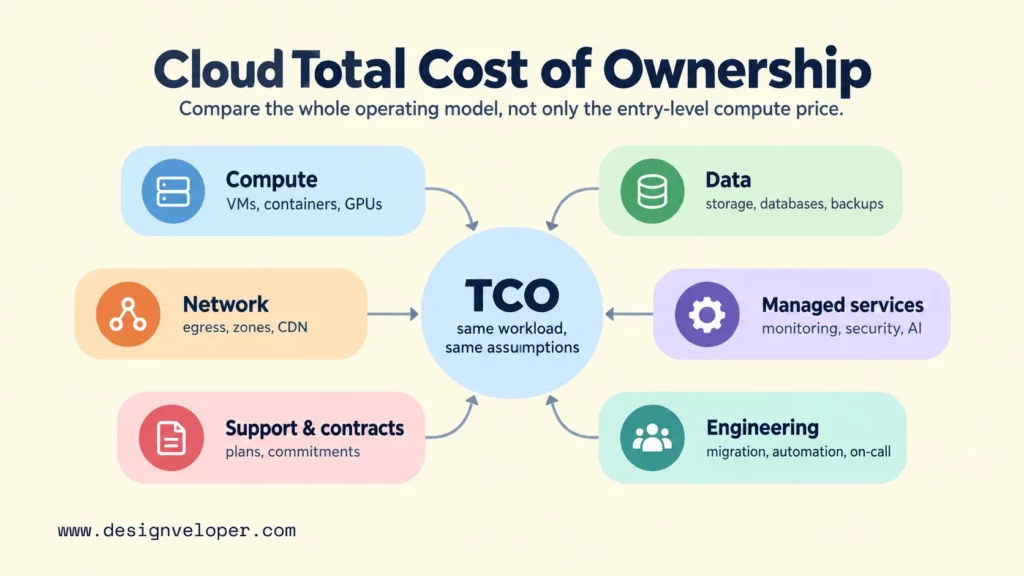
Compare every candidate with the same workload profile, traffic assumptions, availability target, data-retention period, support level, and engineering model. Otherwise, one provider can appear cheaper simply because the estimate assumes less traffic, weaker resilience, shorter retention, or more unpaid engineering effort.
| Cost area | What to model | Why it can change the decision |
|---|---|---|
| Compute | VMs, containers, serverless requests, GPUs, autoscaling, idle capacity | Steady workloads and bursty workloads benefit from different purchasing models |
| Storage and databases | Capacity, IOPS, backups, replicas, snapshots, managed database tiers | Data growth and high availability can cost more than application compute |
| Network | Internet egress, inter-zone traffic, inter-region traffic, CDN, load balancing | Data-heavy products can make transfer cost a major variable |
| Managed services | Queues, observability, security tools, AI APIs, search, analytics | Managed services can reduce engineering work but add usage-based charges |
| Support and contracts | Support plan, response targets, commitments, reservations, savings plans | Discounts can reduce unit cost but may reduce commercial flexibility |
| Migration and operations | Refactoring, data transfer, testing, infrastructure automation, on-call work | A cheaper runtime can still produce a higher total operating cost |
Architecture is one of the largest controllable variables. A steady service may benefit from a commitment or reserved model, while a short-lived batch workload may need a different purchasing approach. Managed databases can cost more than self-managed virtual machines, yet they can remove some patching, backup, replication, and recovery work. The relevant comparison is the complete operating model.
Cost control also depends on discipline after launch. Assign resource ownership, set budgets and alerts, remove idle environments, right-size compute, define retention, and review network paths. Pricing calculators help build the first estimate, but billing data from a representative pilot gives the team better evidence for the final comparison.
How To Plan Cloud Adoption Or Migration
Cloud adoption should be planned as an operating-model change, not only a hosting move. Start by assessing the current workload, dependencies, data, security controls, deployment process, monitoring, recovery, and team ownership. Then define the target architecture and decide what will be rehosted, replatformed, replaced, or redesigned.
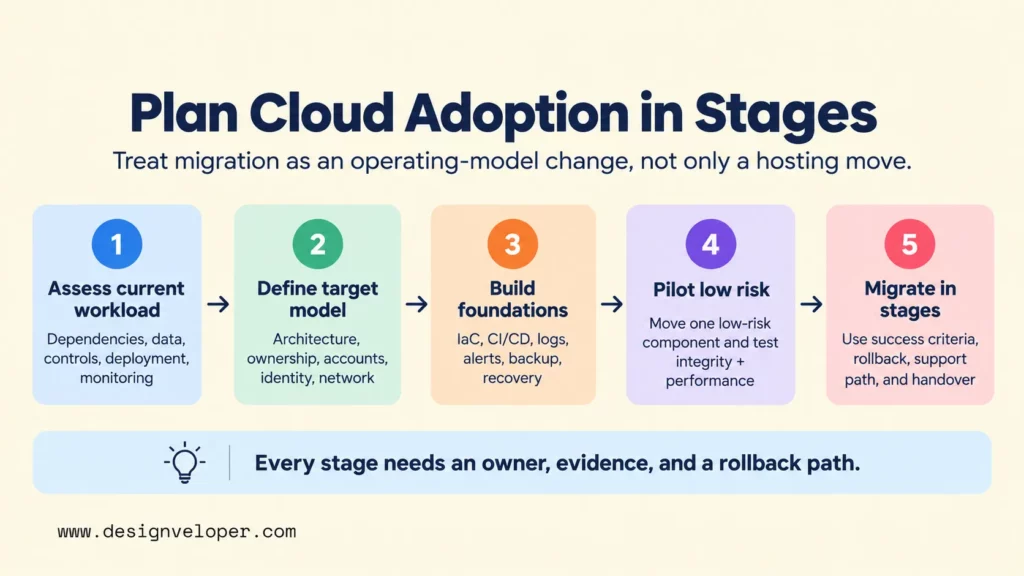
Build the target environment before moving production traffic. Define accounts or subscriptions, identity, network boundaries, secrets, infrastructure as code, CI/CD, logs, metrics, alerts, backup, and recovery. Our guide to DevOps tools across the delivery lifecycle explains how version control, CI/CD, infrastructure as code, containers, observability, and security fit together rather than acting as isolated tools.
Security responsibilities also need to be explicit. A cloud provider secures parts of the underlying platform, but the customer still owns important decisions around identities, application access, data configuration, secrets, network policy, logging, and secure software delivery. Our cloud security guide explains the shared responsibility behind cloud security and the need to plan access, data protection, retention, continuity, and recovery.
Migrate in stages when the workload allows it. Move a low-risk component first, test data integrity and performance, run operational drills, and define rollback before increasing scope. Each stage should have an owner, success criteria, monitoring, support path, and handover condition. This limits the effect of failures and gives the team evidence before it commits the next workload.
The final provider decision should stay connected to product architecture and delivery planning. A managed service is valuable only when it removes meaningful work or risk. A portable component is valuable only when portability justifies its extra abstraction. Optimize for the system the team can operate reliably, rather than the provider with the longest feature list.
FAQs About Best Cloud Service Providers
Is One Cloud Provider Enough For A Growing Business?
Yes, one provider is enough for many growing businesses. A single cloud often reduces identity, networking, monitoring, billing, and skills complexity. Add another provider only when a concrete requirement such as customer isolation, regulation, acquisition constraints, specialized services, or disaster-recovery design justifies the extra operating burden.
Which Cloud Service Provider Is Best For Startups?
There is no universal best provider for startups. DigitalOcean can fit small teams that value simplicity, while AWS, Azure, or Google Cloud can fit startups that need deeper managed services, enterprise integrations, AI, or large-scale infrastructure. Choose the smallest platform that meets the next realistic stage of the product without creating an expensive migration immediately afterward.
What Should A Team Test Before Signing A Cloud Contract?
Test the actual workload, not only a sample deployment. Verify peak traffic, database behavior, network latency, backup restoration, failure recovery, identity roles, logging, alerts, deployment automation, support response, regional service availability, and a representative bill. Also test how data and configuration would be exported if the contract ended.
Can A Small Business Use Enterprise Cloud Services Without A Dedicated DevOps Team?
Yes, but the architecture should minimize operational work. Prefer managed databases, managed application platforms, automated backups, simple networking, and a small number of well-understood services. If the business needs complex Kubernetes, multi-region recovery, advanced compliance controls, or 24/7 operations, it may need external platform support or dedicated cloud and DevOps capability.
How Can A Company Reduce Cloud Provider Lock-In?
Reduce lock-in selectively rather than trying to make every component portable. Keep data export paths, infrastructure definitions, deployment automation, and interfaces well documented. Use open formats and containers where they provide real value, and avoid unnecessary dependence on proprietary services. For critical components, rehearse recovery or migration so portability is demonstrated rather than assumed.
Also published on

Share post on










Related Articles


DevOps Managed Services: What They Include & How To Choose A Provider
DevOps Managed Services: What They Include & How To Choose A Provider Published September 21, 2026
10 Best Cloud Service Providers For Different Workloads
10 Best Cloud Service Providers For Different Workloads Published September 21, 2026
On-Premises Vs Cloud: Key Differences, Costs, And Use Cases
On-Premises Vs Cloud: Key Differences, Costs, And Use Cases Published September 18, 2026



















