











LangGraph Vs MCP: Key Differences, Use Cases, And When To Use Both

KEY TAKEAWAYS:
- LangGraph controls workflow state and routing; MCP gives compatible clients a standard way to access server-provided tools and context.
- Use AI agent orchestration when the workflow needs branches, persistence, or review; use MCP when tool access needs a reusable interface.
- A graph can call an MCP tool, then continue, pause for a decision, or stop without making the two components interchangeable.
- Before a sensitive write, check identity, business policy, server permissions, approval, and safe retry behavior.
A support assistant may need to look up an order, apply a refund rule, and wait for a manager before issuing money. A framework that controls the sequence and a protocol that exposes the refund tool can both appear in that design, but they solve separate jobs. Teams comparing LangGraph vs MCP should start with the boundary they need: control inside the AI workflow, a reusable interface to outside systems, or both. The sections below trace that decision from state and server capabilities through one request path, then show where product policy and recovery must remain explicit.
LangGraph Vs MCP: What Each Layer Does
LangGraph is an orchestration framework and runtime for stateful workflows; MCP is an open protocol for connecting AI clients to capabilities exposed by servers. LangGraph controls graph steps, transitions, and execution state. MCP standardizes how compatible clients discover and call tools or access context. They solve related but different problems, so a team can use either one or both.
| Decision point | LangGraph | MCP |
|---|---|---|
| Main job | Run a controlled, stateful agent workflow | Give clients a shared interface to server capabilities |
| Core units | State, nodes, and transitions | Clients, servers, tools, resources, and prompts |
| Controls | Routing, persistence, retries, and pause/resume points | Capability discovery and structured requests to a server |
| Does not define | A universal interface for every external system | The product’s complete workflow or business decision policy |
| Good starting point | The agent needs explicit branches, saved state, or human review | Several compatible clients need reusable access to the same tools or data |
LangGraph belongs to the LangChain ecosystem, but it is not the same as LangChain’s higher-level agent abstractions. LangGraph can run without LangChain, and the two frameworks serve different roles in an application. This LangChain vs LangGraph comparison explains that wider ecosystem. If the agent concept is new, first see what an LLM agent does before deciding how its workflow should run.
What LangGraph Controls In An AI Workflow
LangGraph is useful when an AI task needs a defined path through steps, shared state, and clear stop conditions. The LangGraph overview describes a low-level runtime for long-running, stateful agents. A graph can combine deterministic code with model-driven steps instead of asking a model to decide every transition.
State, Nodes, And Routing
A LangGraph workflow is built from nodes and transitions. A node can check an account, retrieve a policy, ask a model to summarize a request, or validate a proposed action. Edges define what runs next, while conditional edges can route the workflow based on state such as eligibility, missing information, or a required review.
For a support assistant, state might hold the request, order status, policy result, and approval status as separate fields. A rule-based node can block an ineligible refund, while a model drafts a response for an eligible one. This structure makes the path easier to inspect and test, but it does not guarantee that a model’s interpretation is correct.
Persistence, Interrupts, And Human Review
Persistence lets a graph keep useful state across steps and resume after a pause or failure. LangGraph uses checkpointers to save graph state; its persistence documentation distinguishes thread-level checkpoints from longer-term stores. Teams should decide which fields need to persist and how long each one may remain.
An interrupt can pause a graph at a defined point and wait for outside input, such as a person’s approval. The LangGraph interrupt guide explains how a saved run can resume with a response. A resumed node starts again from its beginning, so side effects before the pause must be safe to repeat or checked before retrying.
- Use explicit branches for known conditions, such as approved, denied, missing information, or manual review.
- Save only the state needed to continue the task, then set access and retention rules for it.
- Define when the graph must stop, and test that resumed runs do not repeat an external write.
What MCP Standardizes
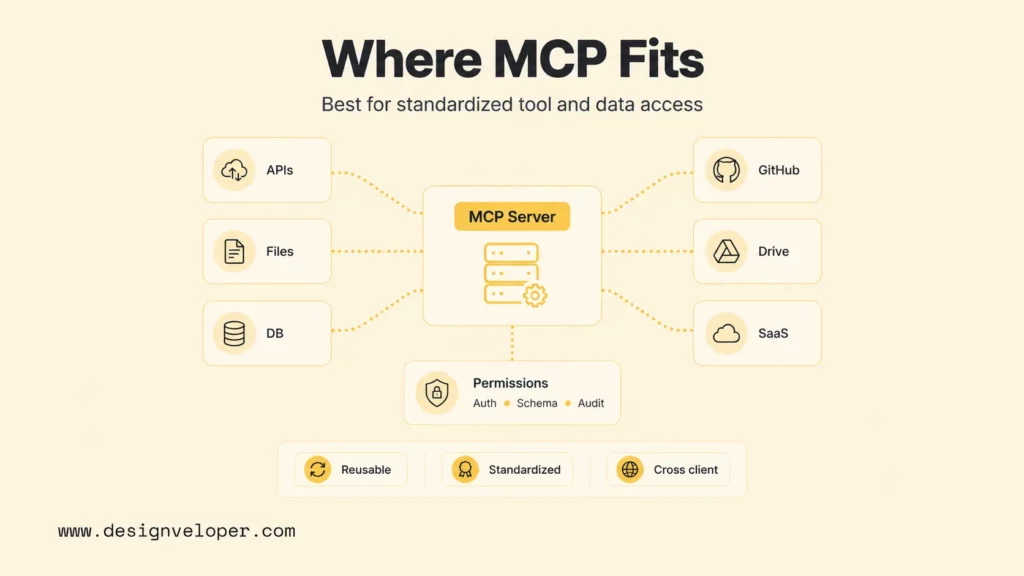
MCP defines a client-server protocol for AI applications to discover and use capabilities provided by external systems. An MCP server describes what it offers; a compatible client can request those capabilities and handle the results. MCP provides the connection contract, not the business logic that decides whether a request should be approved.
Tools, Resources, And Prompts
MCP servers can expose different kinds of capabilities, and those kinds should not be treated as interchangeable. MCP tools let a client request an operation, such as searching a ticket system or preparing a draft. A tool must describe its input schema; a server may also return a structured output schema.
MCP resources expose data for a client to read, such as a document or a record. MCP prompts provide reusable message templates that a client may present as a user-facing prompt. The exact behavior depends on what a server implements and what the client supports.
For example, an AI chatbot integration might expose a read-only order lookup and a separate tool for creating a refund request. Schemas describe the request and, when supplied, the result shape. They do not decide whether the signed-in user is allowed to make the request or whether the request follows company policy.
Reusing Integrations Across Clients
A shared MCP server can expose the same interface to more than one compatible client. A platform team might let an internal assistant and a support workspace call the same read-only customer lookup, while keeping credentials and API details on the server side. Each client still needs suitable user controls, and the server must enforce the access rules that apply to the underlying service.
This reuse can help when teams maintain several AI applications, but it adds a protocol boundary to operate. Someone must own server deployment, authentication, version updates, monitoring, and compatibility tests. One client calling one private API may be simpler with a direct function in the application.
What MCP Does Not Decide
MCP does not determine a product’s full state machine, user identity, tenant rules, refund limits, or approval policy. Its current tools guidance requires servers to validate inputs, enforce access controls, limit call rates, and sanitize outputs. It also recommends that clients show sensitive tool inputs and request user confirmation when needed. Those protocol controls are important, but teams must still connect them to the real permissions and policies of their product.
Each layer should enforce its own decisions. The application checks identity and business rules; the MCP server controls operation access; the graph decides whether the workflow can proceed. Never rely only on the model to authorize an action.
Related reading:
- Why AI Agents Need MCP: How AI Systems Connect To Tools And Data
- AI Agent Architecture Diagrams: Components, Patterns, and Design Steps
- Best AI Agent Frameworks For Building Smarter AI Systems
How LangGraph And MCP Work Together
LangGraph and MCP can work together when a product needs both controlled workflow execution and reusable access to external tools. A LangGraph node can call a compatible MCP client, receive a tool result, and pass that result into the next graph step.
Consider a support assistant preparing a refund. The following flow is an implementation example, not a tested product or measured case:
- Start with the caller. The application checks the signed-in user’s identity and tenant, then passes only the required request fields to the graph.
- Gather order facts. A graph node calls an MCP order-lookup tool. The result returns to the graph state; credentials remain under the application’s or server’s control.
- Apply the refund rule. Deterministic application logic checks the refund window and amount limit. The model may summarize the request, but it does not set policy.
- Pause before the write. If the request needs review, LangGraph interrupts the run and presents the proposed action to an authorized person. The application records who approved it and when.
- Submit only after approval. A later node calls an MCP refund tool. The application and server check authorization again before the underlying system changes the order.
- Recover without a duplicate. If the call times out, the application checks the operation status or idempotency key before retrying. A resumed graph may re-enter a node, so the write must not run twice.
The ownership split is the useful lesson: LangGraph manages workflow progress, the MCP server exposes a tool contract, and the application applies user and business policy. A practical AI chatbot development plan should test that handoff, not stop after a successful local tool call.
For Python, LangChain’s current MCP guide uses MCPAdapter to discover server tools and adapt them for LangChain agents. The langchain.mcp namespace requires langchain[mcp]>=1.4.0 and remains in beta; older projects should follow the migration guidance. This is one integration path, not a requirement for MCP or LangGraph. Pin the versions you use and test connection setup, authentication, tool errors, and graph state transitions.
When To Choose LangGraph, MCP, Or Both
Choose the component that addresses a real system requirement. A prototype with one predictable step may not need a graph runtime or a shared protocol at all.
Choose LangGraph When The Workflow Needs Control
LangGraph is a fit when the application needs explicit state and transitions, a task can pause and resume, or a human must review a proposed action before it continues. It is less useful for one prompt followed by one low-risk read-only call with no need to retain state.
Choose MCP When The Integration Needs Reuse
MCP is useful when more than one compatible client needs the same tools or context, or when a team needs a stable interface between AI applications and business systems. Before adding it, account for server hosting, access controls, versioning, and monitoring. A single private connector may be easier to maintain as application code.
Use Both When Each Boundary Solves A Separate Need
Use both when a stateful workflow must call tools that should also be available through a shared interface. Keep graph state and routing in LangGraph, capability definitions and server-side checks at the MCP boundary, and user identity and business policy in the application. Teams assessing enterprise AI agents should also name owners for each layer before expanding the number of tools or clients.
Do not add MCP just to standardize a diagram, or LangGraph because a product contains an LLM. If the workflow has one fixed path and one private API, a direct function may be the smaller design. Revisit the choice when reuse, failure recovery, or approval requirements change.
Production Checks Before Connecting Them
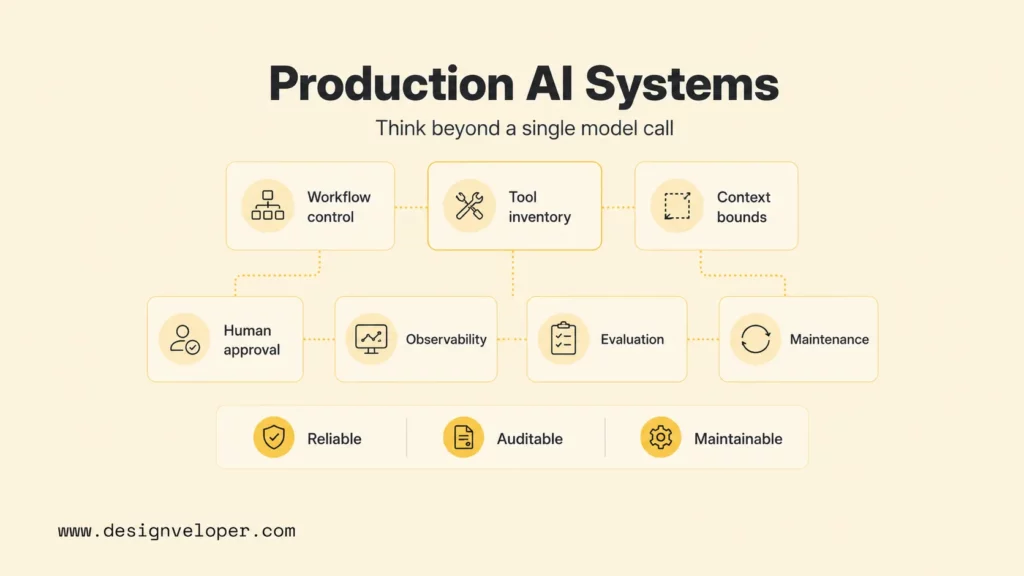
A local demo shows that the path can work once; production readiness depends on what happens when a user, model, server, or business API behaves differently than expected. Check the failure path at each boundary:
- Identity and access: test user, tenant, and operation permissions at the application and MCP server. Never use a model-selected tool as an authorization decision.
- Side effects: make sensitive inputs visible to the user, require confirmation when appropriate, and use operation IDs or idempotency controls for writes.
- Failure handling: test timeouts, invalid schemas, denied access, stale approvals, and unavailable servers. Define when the run stops, retries, or returns the work to a person.
- State and privacy: decide what graph checkpoints can contain, who can resume a run, and how long the data is kept.
- Operations and tests: assign owners for graph logic, servers, credentials, protocol changes, and regression tests. Log enough to trace a run without exposing secrets or unnecessary personal data.
Set a baseline and review a few guardrails during a pilot: correct routing, permission denials, duplicate writes, human overrides, and recovery after a tool failure. Decide the review window and pass threshold before the pilot begins; a faster response is not a success if policy violations increase.
For practical examples, check out:
- How to Build Agentic AI: Practical Guide with Examples
- Agentic AI Architecture: Components, Patterns, And Workflows
- How To Build An AI Agent: A Beginner’s Step-By-Step Python Example
FAQs About LangGraph Vs MCP
Does LangGraph Replace MCP?
No. LangGraph controls workflow execution and state, while MCP provides a shared way to access server capabilities. They answer different questions, so a product may use one, the other, or both.
How Is An MCP Tool Different From A LangGraph Node?
A LangGraph node is a step that reads or updates workflow state. An MCP tool is a capability a compatible client can discover and call on a server. A graph node may call an MCP tool, then use its result to choose the next transition.
When Is Direct API Integration Simpler Than MCP?
A direct function can be simpler when one application calls one stable internal API and no other client needs that integration. MCP adds value when reuse or a shared interface offsets the work of operating another server boundary.
Does LangGraph Require LangChain?
No. LangGraph can be used without LangChain. LangChain offers higher-level components and integrations, while LangGraph provides lower-level control of stateful workflows.
If a workflow spans business rules, review steps, and external systems, map those responsibilities before choosing the runtime or protocol. AI development services can help teams plan that application boundary and integration work.
Also published on

Share post on









Related Articles


AI-Driven Development: How AI Reshapes The Software Life Cycle
AI-Driven Development: How AI Reshapes The Software Life Cycle Published November 17, 2026
Best AI Chatbots For Businesses In 2026: Compare Tools By Use Case
Best AI Chatbots For Businesses In 2026: Compare Tools By Use Case Published November 17, 2026
Best ChatGPT Models in 2026: GPT-6 Astra and GPT-5.6 Guide
Best ChatGPT Models in 2026: GPT-6 Astra and GPT-5.6 Guide Published November 16, 2026