
















What Is DevSecOps? How Security Fits Into Every Release

Security problems are harder to fix when teams treat security as a final checkpoint. By then, architecture, dependencies, and release choices may already be in place. DevSecOps brings security into the delivery workflow and connects early checks with feedback from production.
What Is DevSecOps?
DevSecOps stands for development, security, and operations. It integrates security tasks throughout every phase of the software delivery lifecycle, rather than leaving security until the final review. It extends DevOps by making security a shared responsibility among the teams that build, release, and operate software.
The goal is not to make every security finding block every release. Teams assign clear owners, automate repeatable checks, and use risk to decide whether a control should inform, warn, or stop delivery. Shift-left security is one part of DevSecOps. Production controls, monitoring, incident feedback, and software supply chain integrity also matter.
How Does DevSecOps Work Across The Software Lifecycle?
Security has a role at every stage of delivery. Planning defines security requirements and threat assumptions. Coding uses secure libraries, code review, and secret detection. Builds and tests run automated checks. Release processes verify policies and artifact integrity. Production monitoring and incident response feed new risks back into the next development cycle.
NIST’s DevSecOps introduction describes this model through lifecycle integration, automation, collaboration, pipeline controls, monitoring, feedback, and vulnerability management. DevSecOps is therefore not a single product or tool. It is a way to organize security ownership, controls, and feedback throughout software delivery.
If DevOps is new to you, start with our guide to the DevOps lifecycle and working model. DevSecOps follows the same shared-ownership and automation principles while making security part of every delivery decision.
DevSecOps Vs DevOps: What Changes?
DevSecOps extends DevOps by making security an explicit part of the same collaboration, automation, and feedback loops. The main difference is not a new delivery lifecycle. It is who owns security, when security work happens, and how security evidence affects release decisions.
| Area | DevOps | DevSecOps |
|---|---|---|
| Team ownership | Development and operations share delivery and reliability responsibilities. | Development, security, and operations share security decisions. |
| Timing | Security may be included, but it is not always defined at every stage. | Security requirements and controls are planned from design through production. |
| Automation | Teams automate builds, tests, deployment, and infrastructure tasks. | Suitable security checks and policy controls join the delivery pipeline. |
| Release decisions | Quality, reliability, and operational readiness guide release gates. | Security risk and policy evidence also influence release decisions. |
| Monitoring | Teams monitor availability, performance, errors, and user impact. | Teams also monitor security signals, configuration drift, and vulnerable assets. |
| Feedback | Production feedback improves future releases. | Security findings and incidents also improve requirements, tests, and controls. |
A useful test is to ask what happens when a security finding appears. In a mature DevSecOps workflow, the team knows who owns it, how risk is assessed, when it should affect delivery, and how the lesson improves future controls. That matters more than simply adding another scanner to the pipeline.
Security Controls Across The DevSecOps Lifecycle
Security controls should follow the lifecycle and the risk they manage. NIST’s Secure Software Development Framework (SSDF) Version 1.1 defines a core set of high-level secure development practices that organizations can integrate into their own lifecycle. It does not prescribe one universal toolchain. That makes it a useful baseline for deciding what a DevSecOps pipeline should accomplish.
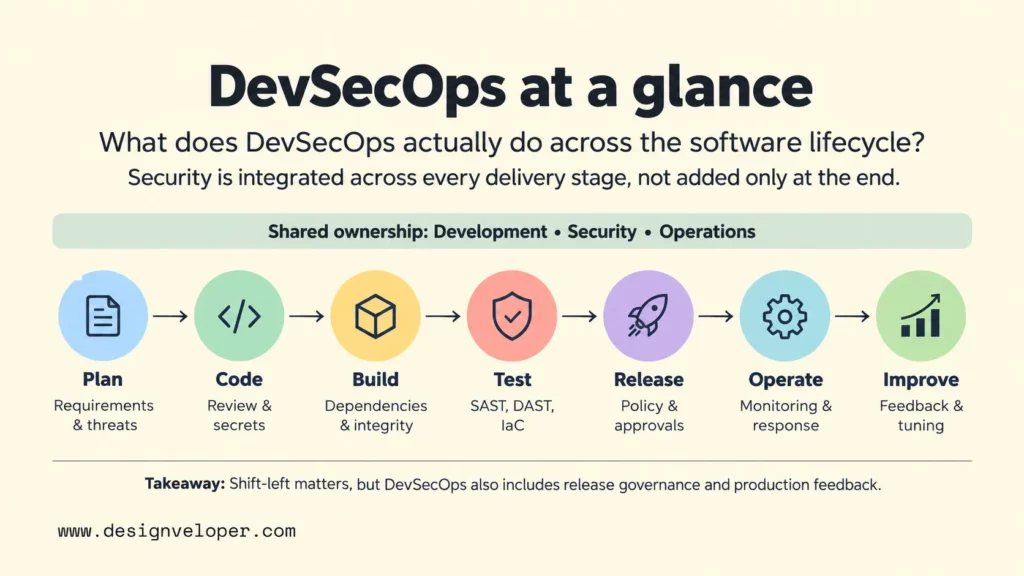
Plan And Design For Security
Planning is where teams decide what must be protected and what level of risk is acceptable. Security requirements can cover authentication, authorization, data handling, logging, regulatory obligations, and recovery needs. Data classification helps the team identify which information needs stronger controls, while architecture review checks whether trust boundaries and system dependencies support those requirements.
Threat modeling and abuse-case analysis add an attacker-focused view. The team asks how a feature could be misused, which assets matter most, and which design choices could reduce exposure before code exists. At this point, the team can still change assumptions before those choices are embedded in code and infrastructure.
Code, Build, And Test Securely
During coding and build work, security becomes more concrete. Peer review can catch unsafe logic or missing authorization. Secret scanning can detect credentials committed to source control. Static application security testing (SAST) examines source or compiled code for suspicious patterns. Software composition analysis (SCA) inventories third-party dependencies and helps identify known component risks.
The pipeline can also scan infrastructure-as-code files and container images before deployment. Dynamic application security testing (DAST) tests a running application from the outside, so it fits later than source-focused checks. These controls should not all behave as identical gates. A confirmed critical issue in an internet-facing path may justify a hard block, while a low-confidence or low-impact finding may create a warning and tracked remediation task.
CI/CD is the mechanism that makes many of these checks repeatable. If you need the delivery mechanics first, our CI/CD pipeline guide explains how code moves through build, test, release, deployment, and feedback stages.
Release, Operate, And Respond
Release security asks whether the tested artifact is the one that will reach production and whether the target environment meets policy. Access controls should limit who and what can change release systems. Environment configuration should be checked for unsafe settings. Release approvals should be tied to evidence, not to a vague sense that enough scans have run.
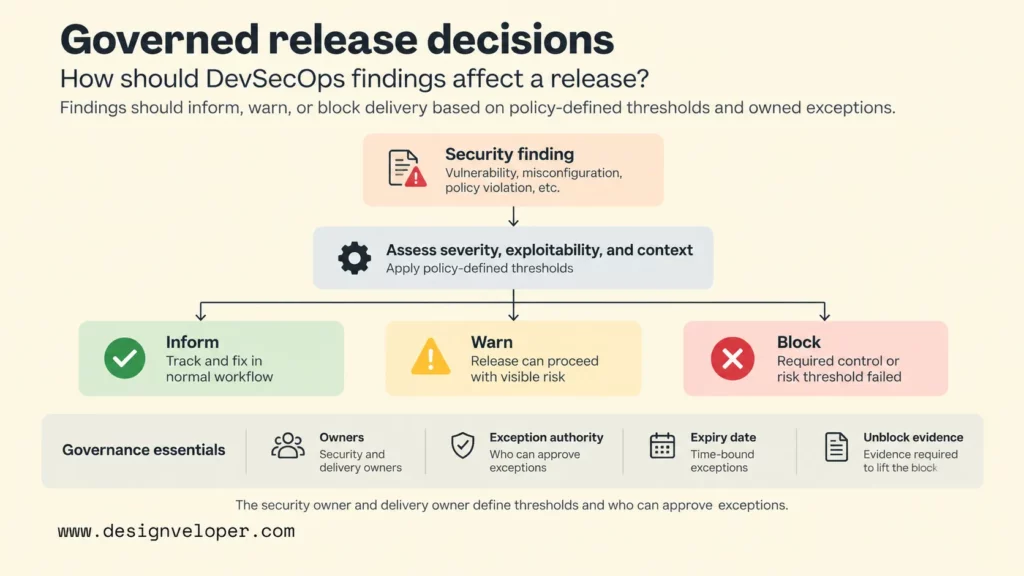
The security owner and delivery owner should agree on severity thresholds and who can approve exceptions. They should also define when an exception expires and what evidence is required before a blocked release can proceed. This turns an automated gate into a governed release decision instead of leaving the scanner to make policy by itself.
Security work continues after deployment. Logging and monitoring help teams detect suspicious behavior, exposed services, configuration drift, and newly relevant vulnerabilities. Vulnerability response defines how findings are triaged and fixed. Incident feedback then improves the next planning cycle, test set, or release policy.
As an illustrative example, consider a service that handles sensitive customer records. During design, the team classifies that data and defines least-privilege access rules. During build and test, automated checks validate relevant code, dependencies, and infrastructure policy. In production, monitoring looks for unusual access patterns. If an incident shows a missing control, the response should update both the live system and the earlier requirements or tests. That closed loop is DevSecOps in practice. This example illustrates the feedback loop; it is not a measured security or remediation benchmark.
DevSecOps Tools By Security Task
Choose DevSecOps tools by the security task they perform, not by vendor popularity. The important questions are what a tool can detect, where it runs, how reliable its signal is, and what action a finding should trigger. OWASP’s DevSecOps Guideline groups common pipeline activities around areas such as SAST, DAST, SCA, secrets, infrastructure, and container scanning.
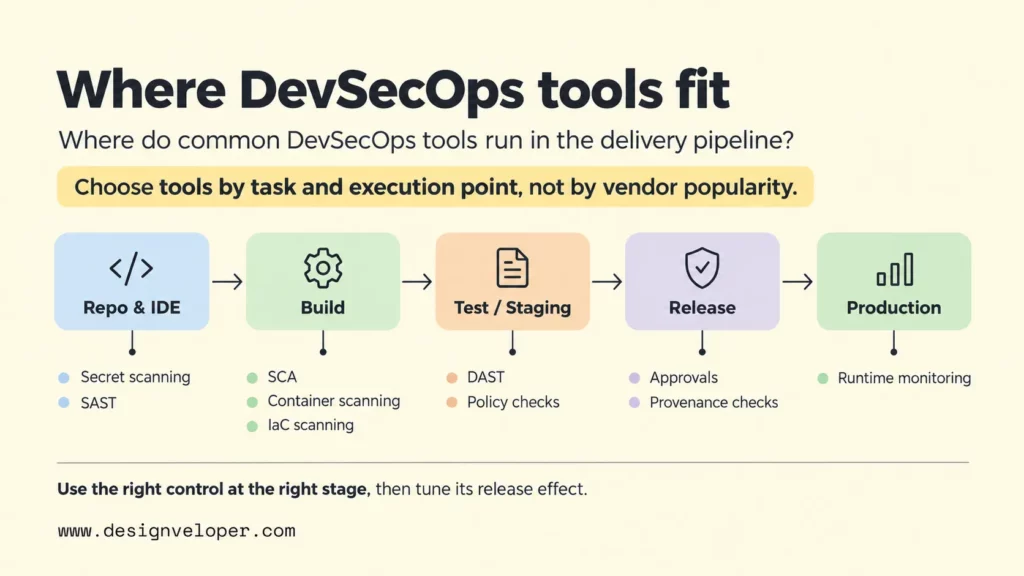
| Security task | What it checks | Where it commonly runs | Typical release effect |
|---|---|---|---|
| SAST | Source or compiled code for risky patterns and weaknesses. | IDE, pull request, or build stage. | Inform early; block only on trusted, policy-defined findings. |
| DAST | A running application’s external behavior and exposed weaknesses. | Test or staging environment. | Warn or block based on exploitability, severity, and release policy. |
| SCA | Open-source and third-party dependencies, versions, and known risks. | Repository, build, and artifact stages. | Warn on manageable risk; block on prohibited or critical components when policy requires it. |
| Secret scanning | Credentials, tokens, keys, and other sensitive values. | Pre-commit, repository, and CI stages. | Often block confirmed active secrets and require credential rotation. |
| Container and Kubernetes security | Image vulnerabilities, package risk, workload configuration, and cluster policy. | Build, registry, deployment, and runtime. | Block unsafe images or policies when confidence and impact are high. |
| Infrastructure-as-code scanning | Cloud and infrastructure definitions for insecure configuration. | Pull request and pre-deployment stages. | Prevent known unsafe infrastructure from being provisioned. |
| CI/CD policy enforcement | Required tests, approvals, signatures, branch rules, and release conditions. | Across build, release, and deployment workflows. | Block when a mandatory control or approval is missing. |
| Runtime monitoring | Production events, abnormal behavior, configuration drift, and active threats. | Production operations. | Create alerts, incidents, containment actions, and feedback for future releases. |
| Software supply-chain security and provenance | Where and how artifacts were built, plus integrity evidence about the build process. | Build, artifact, release, and verification stages. | Reject artifacts that cannot meet defined provenance or integrity requirements. |
Software supply-chain controls deserve separate attention because a clean source scan does not prove that a released artifact came from the expected build. SLSA provenance defines verifiable information about where, when, and how an artifact was produced. Teams can use that evidence to verify that a release came through an expected build process.
A practical toolchain is usually smaller than a product catalog. Start with the highest-risk gaps, prefer tools that fit the existing workflow, and tune their signal before adding more gates. Our DevOps tools guide is useful for understanding the wider toolchain that security controls must integrate with.
Why DevSecOps Matters For Software Teams
DevSecOps matters because it shortens the distance between a security decision and the team that can act on it. Earlier risk discovery gives developers feedback while the relevant code and design context are still fresh. That does not guarantee that every issue becomes cheap to fix, but it can prevent avoidable late-stage surprises.
Automation also makes selected controls more consistent. A pipeline can run the same dependency, secret, or infrastructure checks on each relevant change instead of relying on memory. The result is repeatable evidence that can support release review and audits, especially when teams retain test results, approvals, artifact records, and exception decisions.
DevSecOps can improve release decisions because teams can see security evidence beside quality and operational evidence. Instead of asking whether a release is simply “secure,” teams can compare known findings with the organization’s risk tolerance. They can also check whether exceptions have owners and deadlines, and whether the deployed artifact meets required controls.
The collaboration benefit comes from clearer responsibility. Developers get security feedback in their normal workflow. Security specialists can focus more attention on design, high-risk findings, policy, and complex testing. Operations can feed runtime evidence back into engineering. For broader context on building security into software from the start, see our secure software development guide.
Common DevSecOps Adoption Challenges
DevSecOps adoption becomes difficult when teams add controls faster than they can manage them. False positives can train developers to ignore alerts. Too many blocking checks can turn the pipeline into a queue for security approval. Unclear ownership leaves findings open because everyone can see them but nobody is accountable for closing them.
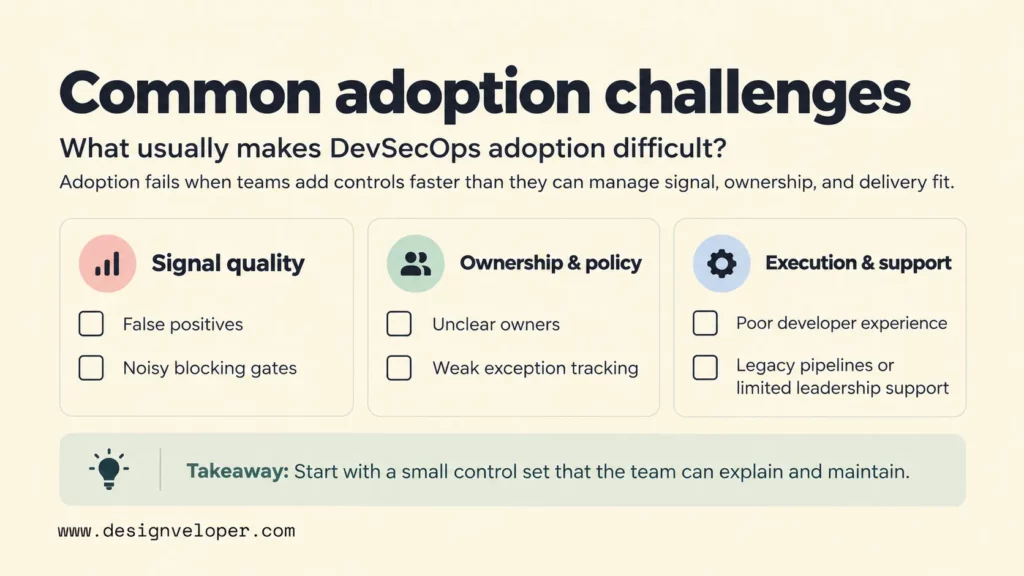
Exceptions create another risk. Some findings must be accepted temporarily because a fix is unsafe, unavailable, or lower priority than another business risk. An exception should therefore record who accepted it, why, what compensating control exists, and when the decision expires. OWASP SAMM’s defect management practice likewise treats security defects as items that need structured tracking, prioritization, and feedback rather than an unowned scan report.
Skill gaps and poor developer experience can make good controls fail in daily use. A scanner that produces cryptic output may technically run on every commit while still slowing remediation. Security feedback should explain the affected code or component, the risk, and the expected next action. Teams also need a route for developers to challenge a false positive or request an exception.
Legacy pipelines are harder because they may lack reliable automation, artifact tracking, or consistent environments. Limited leadership support makes the problem worse when teams are told to “add security” without time for integration, training, and remediation. Small teams should resist solving this with a large tool purchase. A focused control set with named owners and measurable remediation goals is more useful than broad coverage that nobody maintains.
How To Introduce DevSecOps Into A Working Pipeline
Introduce DevSecOps in a working pipeline by reducing the highest-risk gaps first, then expanding only after the controls produce useful signals. This keeps security improvement tied to delivery rather than turning adoption into a separate transformation program.
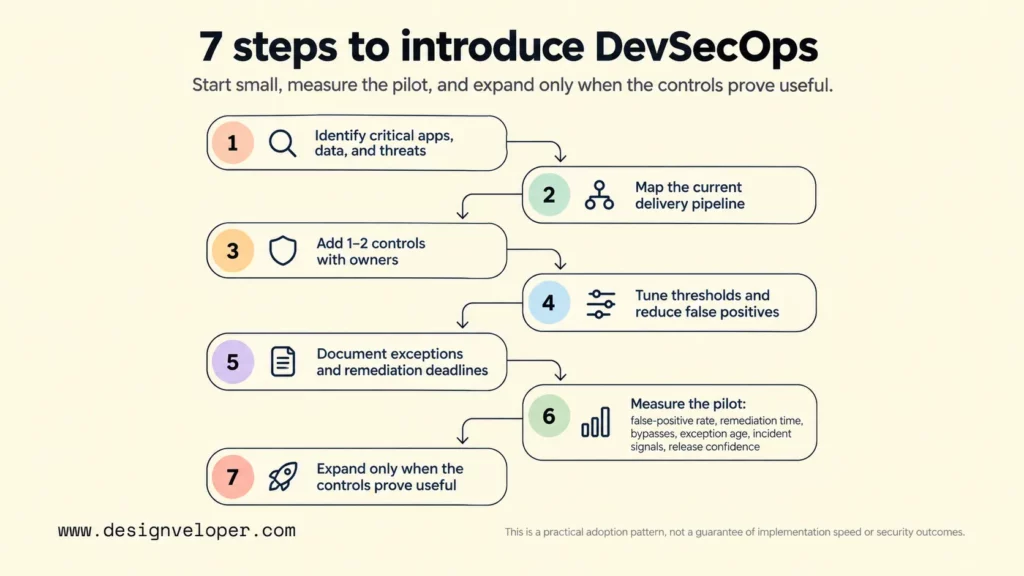
- Identify critical applications, data, threats, and compliance needs. Start with what would cause the most harm if exposed, changed, or unavailable. This defines where stronger controls are justified.
- Map the current delivery pipeline and highest-risk gaps. Trace how code moves from repository to production. Note manual steps, privileged systems, unscanned artifacts, weak approvals, and places where security evidence disappears.
- Add one or two controls with clear owners. Choose controls that address a real risk and fit the existing workflow. For example, start with secret scanning and dependency analysis if exposed credentials and third-party packages are the immediate concerns.
- Tune thresholds and reduce false positives. Run a control in warning mode first when practical. Review its findings, remove noisy rules, and define which conditions have enough confidence and impact to block delivery.
- Document exceptions and remediation deadlines. A blocked release needs an escalation path, while an accepted risk needs an owner, reason, compensating control when relevant, and an expiry or review date.
- Measure the pilot before deciding to expand. Review the false-positive rate, remediation time, bypasses, exception age, incident signals, and release confidence. These signals show whether the controls are producing useful feedback or mostly creating work.
- Expand controls after the pilot proves useful. Add another control only when the team can maintain the current ones, explain their outputs, and act on findings. If the metrics show persistent noise or bypasses, fix those problems before expanding.
This seven-step process is a practical adoption pattern, not a guarantee of implementation speed or security outcomes.
The implementation investment is wider than license price. Budget for integration work, training, remediation time, ongoing tuning, exception review, and ownership of the security platform itself. A tool that appears inexpensive can still be costly if it creates large amounts of manual triage or pipeline maintenance.
Teams that need to map these controls onto an existing delivery flow can use our DevOps pipeline guide. It identifies the build, test, deployment, and monitoring points where security controls can fit.
If your team needs specialist support while adding security controls to an existing pipeline, our cyber security consulting services can help with the security work around that change. The public service scope includes secure software development, security architecture, threat modeling, penetration testing, and remediation suggestions. Before implementation, define which controls belong in the workflow, which checks should be automated, who owns remediation, and who owns the pipeline after handover.
FAQs About DevSecOps
Is DevSecOps A Cybersecurity Practice?
Yes. DevSecOps is a cybersecurity practice focused on how software is designed, built, delivered, and operated. It does not replace broader cybersecurity functions such as network defense, identity governance, incident response, or enterprise risk management. Instead, it connects application and delivery security to the software lifecycle.
Can A Small Team Adopt DevSecOps Without A Security Department?
Yes, if the team keeps the scope realistic. A small team can assign security ownership within engineering, define a few non-negotiable controls, use external expertise for higher-risk work, and automate checks that give clear value. The team should avoid pretending that a scanner replaces security expertise. High-risk architecture, serious incidents, and complex vulnerabilities may still need specialist review.
Which DevSecOps Tools Should A Team Start With?
Start with tools that address the team’s most likely and most damaging risks. Common starting controls include secret scanning, dependency analysis, SAST, and infrastructure or container checks because these can fit existing repository and CI workflows. The correct starting set depends on the application, deployment model, data sensitivity, and current gaps. Do not add a tool unless someone owns its findings.
What Does A DevSecOps Engineer Do?
A DevSecOps engineer typically helps embed security into development and operations workflows. The exact role varies, but common work includes integrating security controls into CI/CD, supporting secure application and infrastructure changes, and improving remediation paths. Microsoft’s DevSecOps guidance describes those responsibilities across design, implementation, infrastructure automation, deployment, and operations. The role should reinforce shared security ownership rather than become a new security silo.
Is DevSecOps Difficult To Implement?
It can be difficult when a team tries to change culture, tooling, pipeline design, and governance at the same time. The difficulty can drop when adoption starts with one risk, one workflow, and clear ownership. A useful first milestone is not “complete DevSecOps.” It is a control that runs reliably, produces actionable findings, has a defined response, and improves the next release decision.
Also published on

Share post on










Related Articles


How Has Generative AI Affected Security? Key Risks And Defenses
How Has Generative AI Affected Security? Key Risks And Defenses Published September 28, 2026
What Is DevSecOps? How Security Fits Into Every Release
What Is DevSecOps? How Security Fits Into Every Release Published September 18, 2026
How to Become a Cyber Security Analyst for Beginners
How to Become a Cyber Security Analyst for Beginners Published May 04, 2026


















