
















How To Develop A Low-Code MVP: Step-By-Step Guide

KEY TAKEWAYS:
- A low-code MVP should validate one painful workflow with real users, real data, measurable success criteria, and the smallest useful feature set.
- Low-code works best when speed of learning matters more than deep technical differentiation and the workflow fits the platform’s data, integration, security, and performance limits.
- The development process should cover problem definition, workflow scope, platform testing, core build, launch, measurement, and iteration.
- Before scaling, teams need an ownership plan for data export, vendor lock-in, governance, quality assurance, security, and rebuild triggers.
- A validated low-code MVP can stay low-code, add custom services, or be rebuilt as a custom product depending on usage, risk, complexity, and roadmap fit.
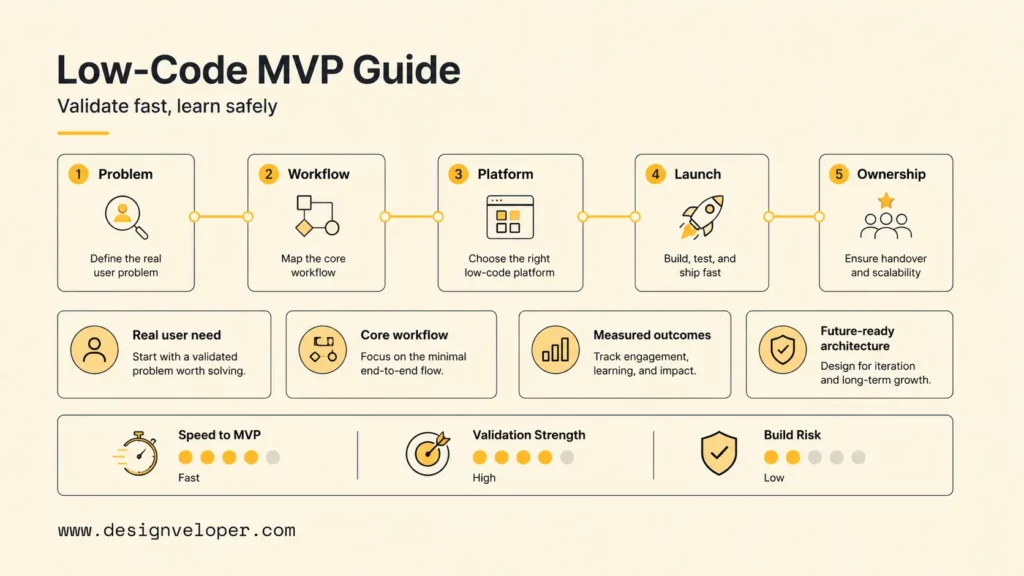
To learn how to develop a low-code MVP, define one valuable workflow, choose a platform against the product’s hardest requirement, build only the roles and features needed to test the idea, and launch to real users with measurable success criteria. Low-code can compress implementation time, but it does not remove the need for product discovery, data design, security, quality control, or a future ownership plan.
The most effective low-code minimum viable product is an evidence engine. It should answer whether a specific user has a painful problem, whether the proposed workflow solves it, whether people will adopt or pay for the solution, and what the team should build next. A visually complete app that cannot answer those questions is not a useful MVP.
Quick decision guide: Use low-code when speed of learning matters more than deep technical differentiation and the core workflow fits the platform’s data, integration, security, and performance model. Choose custom development sooner when proprietary logic, strict compliance, complex offline behavior, high concurrency, or complete source ownership is essential. Before building, write the migration trigger and data-export plan.
| Decision | Practical starting point | Proof to collect |
|---|---|---|
| Problem | One user, one painful job, one measurable outcome | Interviews, current workarounds, frequency, and cost of failure |
| Scope | One end-to-end workflow with only required roles | Task completion, time saved, errors, and activation |
| Platform | Test the hardest integration, data, or UX constraint first | Technical spike, exportability, limits, and operating cost |
| Launch | Small cohort in a controlled production environment | Retention, successful outcomes, support load, and willingness to pay |
| Ownership | Define keep, extend, or rebuild thresholds before scale | Usage, complexity, risk, vendor dependence, and roadmap fit |
Recommended for you:
- MVP Development Cost: Budget Guide And Timeline
- MVP Examples: What Founders Can Learn From 10 Cases
- How To Build An App For Your Business In 10 Steps?
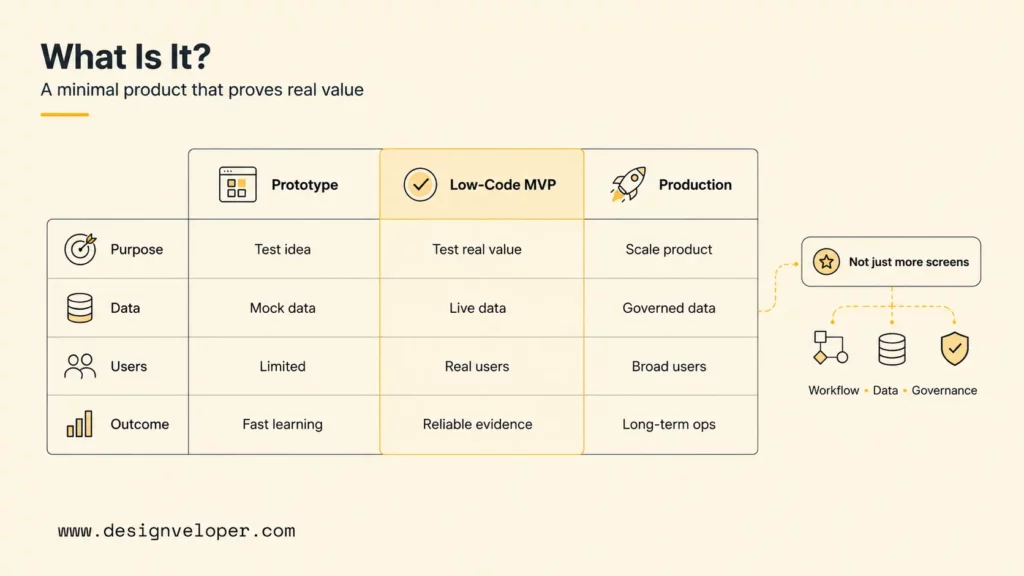
Low-code and no-code overlap, but the distinction is useful. No-code products favor configuration by non-developers. Low-code platforms expect technical decisions and allow extensions through APIs, formulas, scripts, components, or exported code. AI app builders add generated screens, workflows, data models, or code, but their outputs still need human review and production controls.
| Prototype | Low-code MVP | Production product |
|---|---|---|
| Tests desirability or interaction | Tests a real outcome with live users and data | Optimizes reliability, scale, governance, and economics |
| May use mock data and disconnected screens | Needs working identity, data, workflow, and feedback | Needs mature operations, monitoring, security, and support |
| Can be discarded after learning | May be kept, extended, integrated, or rebuilt | Requires deliberate long-term ownership |
What Is A Low-Code MVP?
A low-code MVP is a minimum viable product built with visual development tools, reusable components, managed services, and limited custom code to validate a core workflow, user need, or business idea faster before investing in full custom development. The word “minimum” describes the smallest testable value proposition, not low quality. The word “viable” means real users can complete the promised job reliably enough to provide meaningful evidence.
Explore more:
- 20 Web App Ideas: Health, FinTech, AI, E-commerce
- Web App Development Cost: Breakdown
- Top 20 Web App Development Companies (Ranked)
A low-code tool changes the implementation method, not the responsibility for the software. Teams still decide what data is collected, who can access it, which integrations can change records, how failures are recovered, and what users see when automation is uncertain. Microsoft explicitly warns teams not to treat low-code workloads as low complexity in its Power Platform lifecycle guidance.
A low-code MVP succeeds when it shortens the path to reliable evidence, not merely the path to more screens.
When Low-Code Is The Right Fit For An MVP
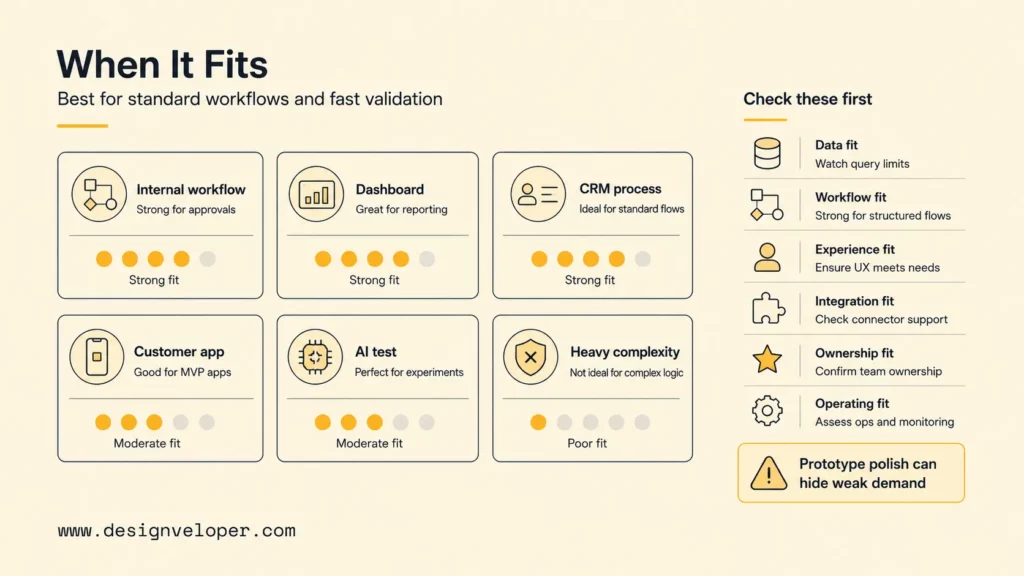
Low-code is the right fit when the product’s uncertain value lies in the workflow or market rather than a novel technical system. Internal approvals, portals, field data capture, dashboards, lightweight marketplaces, CRM-like processes, and early automation tests often match existing platform primitives. A team can assemble the experience, connect data, and observe use without first creating every infrastructure layer.
| MVP Need | Low-Code Fit | Risk To Check |
|---|---|---|
| Fast validation | Strong when the test is a standard workflow or user journey | Prototype polish may hide weak demand |
| Internal workflow | Strong for known users, identity, forms, and approvals | Licensing, governance, data permissions, and shadow IT |
| Dashboard or portal | Strong when connectors and components match the data | Query limits, row-level access, refresh behavior, and performance |
| Form, approval, or CRM-like process | Strong for structured records and status transitions | Complex exceptions and audit requirements |
| Simple customer-facing app | Moderate when branding and interaction are conventional | SEO, accessibility, app-store rules, custom UX, and peak traffic |
| Early AI or automation test | Strong for human-reviewed assistance and integrations | Data exposure, output quality, model cost, and failure handling |
Avoid low-code-only execution when the product depends on complex scalability, deep UI customization, hard real-time guarantees, strict data residency, unusual device capabilities, many heavy integrations, or long-term source ownership. The threshold is not whether a platform can demonstrate the feature. The question is whether the platform can support the expected volume, failure modes, governance, team workflow, and future roadmap at acceptable cost.
Platform behavior must be tested rather than assumed. Microsoft explains that a nondelegable Power Apps query processes only the first 500 records by default, with a configurable maximum of 2,000, which can produce incomplete results on larger sources. The Power Apps delegation documentation recommends using supported delegable operations and testing for warnings. Google AppSheet supports offline use, but its offline and sync guidance documents important tradeoffs around local data, formulas, security filters, and synchronization.
- Data fit: Can the platform model relationships, history, permissions, and expected volume?
- Workflow fit: Can it express exceptions, approvals, retries, and manual overrides?
- Experience fit: Can it meet accessibility, responsiveness, branding, and device needs?
- Integration fit: Are connectors reliable, observable, rate-aware, and replaceable?
- Ownership fit: Can the team export data, logic, configuration, and code in usable forms?
- Operating fit: Do pricing, environments, support, and governance work at expected scale?
Further reading:
- 7 Stages of Mobile App Development Process
- How Much Does It Cost to Build an App? Breakdown
- 120+ Best Mobile App Ideas to Make Money
How To Develop A Low-Code MVP Step By Step
Developing a low-code MVP takes five connected steps: define the evidence goal, narrow the workflow, prove the platform, build production-minded foundations, and learn from a controlled launch. Each step should produce a decision artifact that keeps the team focused on validation instead of expanding scope.
Low-code MVP decision path
Every stage must earn the next investment
01 Define
Name the user, painful job, outcome, and decision threshold.
02 Bound
Keep one complete workflow and only the roles needed to test it.
03 Prove
Spike the hardest data, integration, security, or UX constraint.
04 Build
Create safe data, access, release, and recovery foundations.
05 Learn
Launch narrowly, measure outcomes, and choose keep, extend, or rebuild.
Gate rule: if a stage cannot produce evidence, do not hide the uncertainty with more features.
Step 1. Define The Problem, Users, And Success Criteria
Start with a problem statement that names the user, current task, failure or friction, frequency, and desired result. “Small property managers need to approve maintenance requests” is too broad. A better statement is: “A regional manager needs to review complete repair evidence and approve routine spend from a phone within one working day, because requests currently stall across email and spreadsheets.”
Research the current workflow before designing the new one. Observe the trigger, inputs, decisions, handoffs, systems, exceptions, and final outcome. Ask users to demonstrate the last completed task. The workaround often reveals requirements that interviews miss, such as photo evidence, duplicated entry, informal approvals, delayed connectivity, or a manager who resolves exceptions outside the official process.
- Primary outcome: the real-world job completed successfully.
- Activation: the first moment a user reaches meaningful value.
- Quality: accuracy, error rate, rework, or approval reversal.
- Speed: completion time, waiting time, or time to first result.
- Adoption: eligible users who complete the workflow repeatedly.
- Guardrails: security incidents, support volume, automation failures, or unacceptable cost.
Define a decision threshold. For example, proceed when at least a target share of pilot users complete the core workflow without support and the median completion time improves materially over the old process. The exact target depends on the context, but choosing it before launch prevents the team from redefining success around whichever metric looks favorable.
Step 2. Choose The Core Workflow And Must-Have Features
Map one end-to-end path from trigger to verified outcome. List the actors, states, decisions, data, notifications, and exceptions. Then remove anything that does not help the team test the main value or safely operate the pilot. A must-have feature is required for the outcome, the experiment, compliance, or support; everything else belongs in a later release.
A useful scope for the maintenance example might include sign-in, request intake, photo upload, category, urgency, manager review, approve or return, status history, and notifications. Analytics must record when each stage begins and ends. A vendor marketplace, AI cost estimate, multilingual chat, advanced dashboard, and automated payment can wait unless one is the hypothesis being tested.
| Scope test | Keep now when… | Defer when… |
|---|---|---|
| Outcome | The workflow cannot deliver the promised result without it | It only improves convenience or appearance |
| Evidence | It measures the core hypothesis or a key guardrail | It produces a metric with no decision attached |
| Risk | It protects users, data, money, or operations | The pilot can control the risk manually |
| Learning | Manual execution would invalidate the test | A concierge process provides the same evidence |
Define roles and permissions before screens. A requester, reviewer, administrator, and integration service should not inherit the same access. Identify who can read, create, edit, approve, export, and delete each data type. Low-code UI visibility rules are not automatically a substitute for backend authorization.
Step 3. Select The Right Low-Code Platform
Select a low-code platform by scoring the actual workflow, not the longest feature list. Shortlist two or three options and build a technical spike around the hardest constraint: a large query, complex permission, unreliable network, critical API, unusual UI, background job, data export, or deployment pipeline. A one-day spike can reveal more than a week of vendor demonstrations.
Different platforms imply different ownership models. FlutterFlow provides documented project code export through its CLI, including branch and environment options, in its official project export guidance. Bubble states in its application ownership documentation that app data can be exported but Bubble application logic cannot be exported as code and must be rebuilt to move off the platform. Neither model is universally better; the right choice depends on the planned product life and the cost of migration.
- Required web, mobile, tablet, or internal-app surfaces.
- Database, file, search, offline, and synchronization behavior.
- Identity providers, roles, row-level access, and audit history.
- API, webhook, event, queue, and scheduled-job capabilities.
- Source control, environments, testing, deployment, and rollback.
- Data, configuration, design, and code export options.
- Pricing by maker, user, workload, environment, or usage.
- Vendor support, service commitments, region, and compliance evidence.
Calculate the expected operating model for 100, 1,000, and 10,000 users or transactions, even if the pilot is smaller. Include maker seats, end-user licenses, API calls, automation runs, storage, file bandwidth, authentication, email or SMS, AI inference, monitoring, and support. The exercise exposes nonlinear pricing and technical limits before the team embeds platform-specific logic everywhere.
Step 4. Build Features, Data, Roles, And Integrations
Build the workflow in vertical slices. The first slice should move one test record from creation through the final outcome with authentication, authorization, data persistence, and logging. Add exceptions and polish only after the complete path works. Vertical slices uncover integration and permission problems earlier than building every screen before the backend behavior.
Create separate development, test, and production environments when the platform supports them. Use named owners, versioned changes, reusable components, documented secrets, representative test data, and a rollback process. Microsoft’s Power Platform ALM documentation recommends purpose-specific environments and managed deployment practices rather than editing production directly.
Design the data model for migration as well as immediate use. Give records stable identifiers, store timestamps and status history, separate reference data from transactions, and avoid placing critical business logic only in UI expressions. Document entity definitions, relationships, validation, permissions, retention, and the source of truth. Export a sample early and prove that another tool can read it correctly.
Integrations need explicit failure behavior. Define timeouts, retries, duplicate prevention, error queues, reconciliation, and human recovery. Never assume a successful button press means the remote system accepted the transaction. Show pending and failed states honestly, and give authorized staff a way to retry or resolve them.
Apply secure-development practices even when the platform manages infrastructure. The NIST Secure Software Development Framework organizes work around preparing the organization, protecting software, producing well-secured releases, and responding to vulnerabilities. For a low-code MVP, that translates into access review, dependency and connector inventory, secret handling, threat cases, release checks, audit logs, incident ownership, and patch responsibilities.
The fastest MVP is the one that can change safely after users prove the original assumptions wrong.
Step 5. Launch, Measure, And Iterate With Real Users
Launch to a small cohort that represents the target user, not only friendly colleagues. Prepare onboarding, consent and privacy information, support ownership, incident escalation, backup, and rollback. Seed enough realistic data for the workflow while keeping personal or sensitive information minimized. Tell pilot users what is experimental and how to report problems.
Instrument the outcome, not merely page views. Record the workflow start, meaningful steps, successful result, abandonment, error, manual intervention, and time between events. Combine analytics with session observation, support themes, and follow-up interviews. Users may complete a task while still relying on an undocumented workaround, so quantitative completion is not the whole story.
- Daily: failures, blocked users, security signals, and integration backlog.
- Weekly: activation, completion, time-to-value, support themes, and cohort retention.
- Per release: regression tests, permission checks, data migration, and rollback readiness.
- At the decision gate: evidence for continuing, pivoting, pausing, extending, or rebuilding.
Change one important variable at a time when possible. If onboarding, workflow rules, pricing, and notifications all change together, the team cannot identify the cause of improved results. Keep a decision log that connects each experiment to a hypothesis, release, metric, finding, and next action.
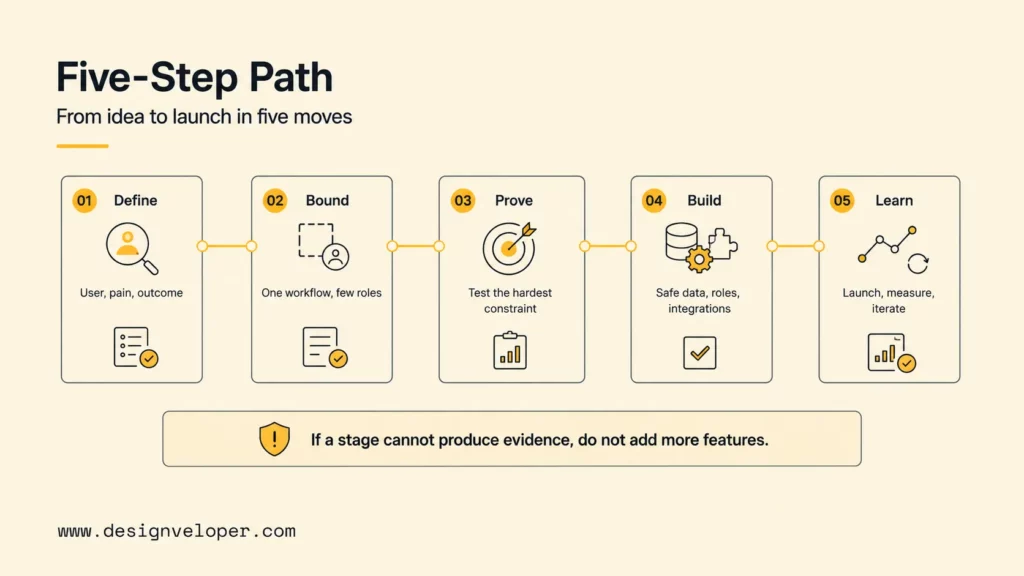
The five stages above turn a low-code idea into a measured product decision. The next section shows what the pilot may cost and which risks can change that estimate.
Low-Code MVP Cost And Risk Factors
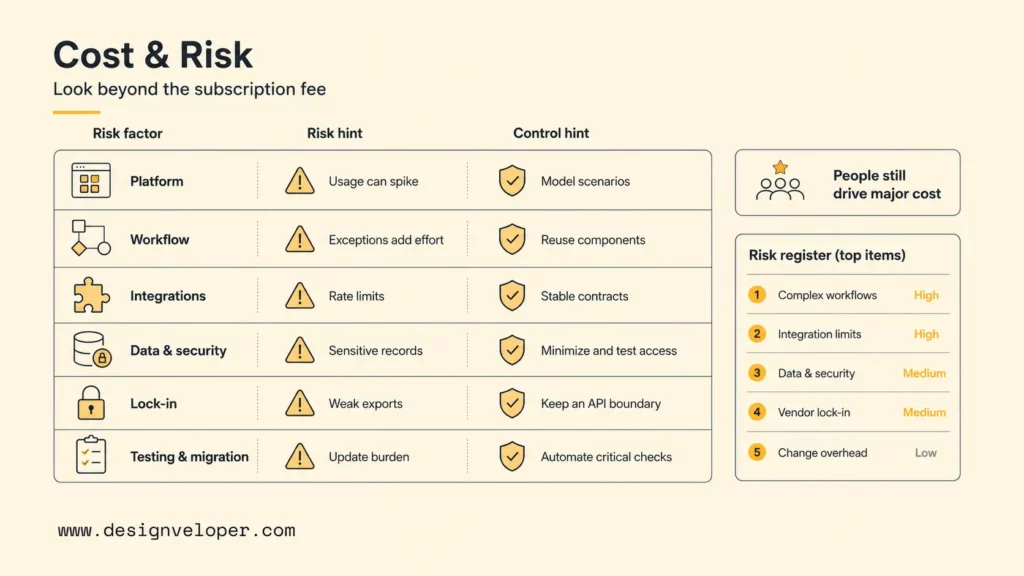
Low-code MVP cost combines implementation, platform consumption, third-party services, operations, and future change. Subscription price alone is a poor estimate. The same workflow can be inexpensive for an internal team but costly for a public product with many users, automation runs, files, messages, AI calls, and support requirements.
| Cost Or Risk Factor | What Affects It | How To Control It |
|---|---|---|
| Platform subscription | Maker seats, users, apps, environments, usage, and premium features | Model three usage scenarios and review plan changes before committing |
| Workflow design and UI | Roles, states, exceptions, responsive behavior, accessibility, and branding | Prototype the hardest journey and reuse a small component system |
| Custom logic and integrations | API complexity, reliability, rate limits, webhooks, and custom components | Build spikes, use stable contracts, and specify failure recovery |
| Data storage, roles, and security | Volume, files, permissions, audit needs, retention, region, and sensitivity | Minimize data, test authorization, and define lifecycle policies |
| Vendor lock-in and code ownership | Proprietary logic, export formats, hosted runtime, and platform-specific services | Keep a data dictionary, export tests, API boundary, and migration trigger |
| Testing, maintenance, and migration | Release frequency, integrations, platform updates, defects, support, and rebuild scope | Automate critical checks, document ownership, and reserve transition capacity |
People remain a major cost driver. Product research, workflow design, data modeling, security review, quality assurance, analytics, training, and support do not disappear because screen assembly is faster. Low-code shifts effort toward configuration, governance, integration, and operations. That shift can be valuable when the team plans for it.
Create a risk register with an owner and an early test for every material uncertainty. Typical items include a connector that cannot meet volume, a formula that returns partial data, an inaccessible component, a licensing threshold, missing audit history, weak export, or an automation that lacks human recovery. Retire the highest-impact unknowns before investing in polish.
For practical examples, check out:
- How to Build an MVP from Scratch
- What Is Web Application Security? OWASP 10 Web App Vulnerabilities
- How To Build And Use AI Business Process Automation Effectively
Once the cost and risk picture is clear, the team can choose how much of the validated product should remain on the low-code platform.
Planning The Path From Low-Code Validation To Custom Ownership
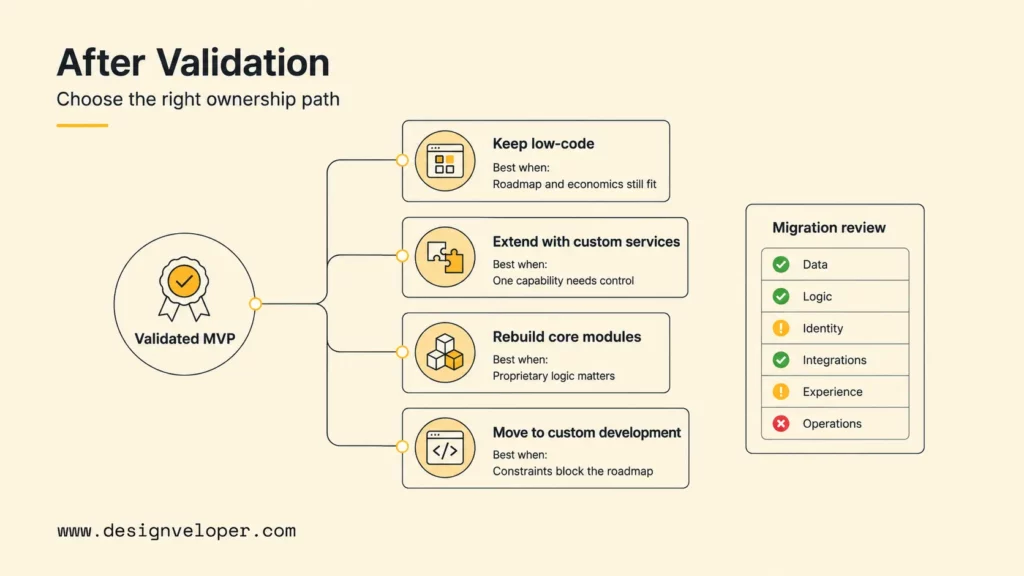
After validation, choose deliberately among four paths: keep improving the low-code product, connect it with custom systems, rebuild only the differentiating modules, or move to custom development. The right answer depends on business evidence and technical constraints, not a belief that every successful MVP must be rewritten.
| Path | Choose it when… | Watch for… |
|---|---|---|
| Keep low-code | The platform meets roadmap, reliability, governance, and unit economics | Uncontrolled complexity and production edits |
| Extend with custom services | Most workflow fits, but one integration or capability needs control | Split observability, duplicated rules, and brittle APIs |
| Rebuild core modules | Proprietary logic or scale creates the advantage | Inconsistent data and user experience during transition |
| Move to custom development | Platform constraints block product, compliance, performance, or ownership goals | Premature rewrite before demand and requirements are stable |
A migration-readiness review should cover six areas. Score each green, amber, or red and attach evidence. Green means the team has executed the process successfully, not merely that a vendor says it is supported.
- Data: repeatable export preserves identifiers, relationships, files, and history.
- Logic: business rules and exceptions are documented outside the visual builder.
- Identity: users, roles, and permissions can be mapped to the target architecture.
- Integrations: contracts, credentials, rate behavior, retries, and owners are inventoried.
- Experience: essential journeys and acceptance criteria are captured for regression testing.
- Operations: monitoring, support, migration rehearsal, rollback, and cutover ownership exist.
Plan transition in seams. Move analytics or notifications first when they are loosely coupled. Put new custom services behind stable APIs. Migrate a small cohort, reconcile data, and keep a rollback window. A big-bang rewrite creates unnecessary risk when the existing MVP is already producing business value.
Related reading:
- AI-Driven Decision Making To Harness Business Data
- AI In Product Development: From Concept To Market Faster
- Cloud Ecommerce Solutions: How To Choose The Right Platform
At Designveloper web application development services, we help teams use low-code where it speeds up validation, then plan the right path for integrations, scalability, AI features, security, and long-term product ownership. Our software development services connect product discovery, UX, engineering, QA, and deployment, while How We Work provides a structured route from requirements to maintained software. We also help teams align AI-assisted workflow experiments with production controls through our AI development services.
FAQs About Low-Code MVP Development
Can A Low-Code MVP Scale After Validation?
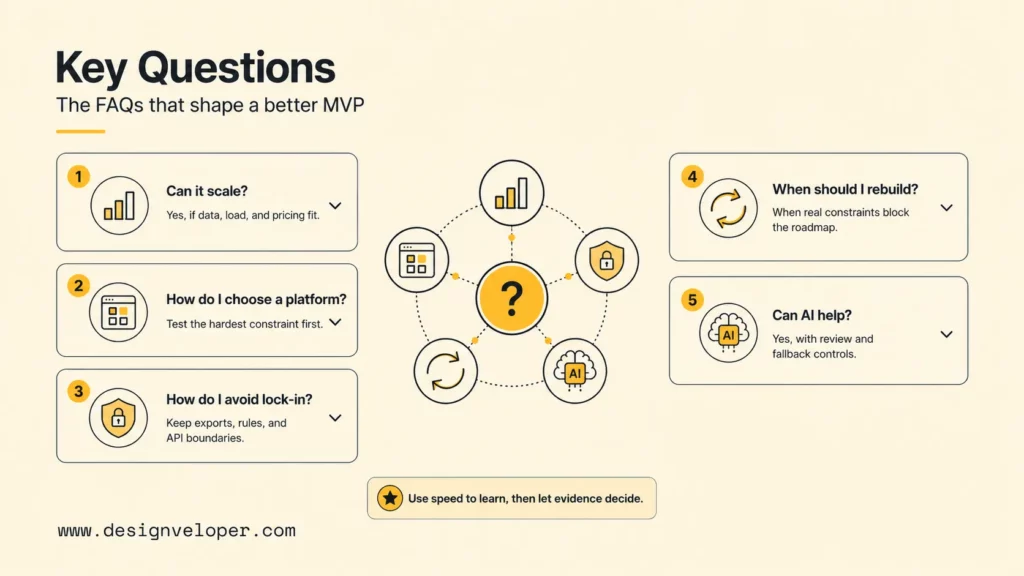
Yes, a low-code MVP can scale when the platform’s data, query, integration, concurrency, deployment, and pricing model fit the product. Scale should be proven with representative load, data volume, and failure tests. Some products remain on low-code for years; others keep the workflow layer while moving high-volume or differentiating modules to custom services. Define thresholds for response time, error rate, operating cost, and team productivity.
What Should I Check Before Choosing A Low-Code Platform?
Check workflow fit, supported interfaces, data model, query behavior, identity, authorization, integrations, offline needs, accessibility, source control, environments, testing, deployment, rollback, monitoring, regional hosting, compliance evidence, support, pricing, export, and code ownership. Build a technical spike around the hardest constraint and estimate three usage scenarios before making the platform a product dependency.
How Do I Avoid Vendor Lock-In With A Low-Code MVP?
Avoid harmful lock-in by keeping stable identifiers, a current data dictionary, documented business rules, automated exports, portable file storage where practical, API boundaries, configuration inventories, and migration triggers. Test data export early. Lock-in is not automatically unacceptable; it becomes dangerous when the team cannot estimate or execute an exit while the platform no longer meets product needs.
When Should I Rebuild A Low-Code MVP With Custom Code?
Rebuild when validated demand justifies investment and measured platform constraints block the roadmap, reliability, performance, compliance, user experience, unit economics, or ownership model. Do not rebuild solely because custom code appears more professional. Compare the cost and risk of staying, extending, replacing core modules, and rebuilding the whole product. Migrate in controlled slices when possible.
Can AI Tools Help Build A Low-Code MVP?
AI tools can help generate initial schemas, screens, formulas, workflows, test cases, documentation, and code extensions. AI can also support the product through classification, extraction, recommendations, or conversational assistance. Human owners must verify generated logic, permissions, data handling, accessibility, edge cases, and output quality. Start with bounded, reversible assistance and retain a deterministic or manual fallback for high-impact actions.
Conclusion: How To Develop A Low-Code MVP
The core principle in how to develop a low-code MVP is simple: use speed to learn sooner, then use evidence to choose the architecture the product deserves. A focused workflow, tested platform, production-minded foundation, controlled launch, and explicit ownership path turn low-code from a shortcut into a disciplined product strategy.
Also published on

Share post on










Related Articles


Low Code Vs Pro Code: Choosing The Right Fit For Your Product
Low Code Vs Pro Code: Choosing The Right Fit For Your Product Published October 15, 2026
Will Low-Code Replace Developers? Roles, Limits, And Trade-Offs
Will Low-Code Replace Developers? Roles, Limits, And Trade-Offs Published September 28, 2026
10 Low Code Development Platforms for Business Apps in 2026
10 Low Code Development Platforms for Business Apps in 2026 Published August 25, 2026


















