
















What Are AI Agents? How They Work And Examples In Business

KEY TAKEWAYS:
- AI agents move from answers to actions: They combine reasoning, memory, tools, and goals to carry out work.
- Agent type changes the fit: Simple, goal-based, and learning agents suit different levels of uncertainty and control.
- Business value comes from workflow fit: Start with repetitive, measurable tasks that have clear data and owners.
- Governance is part of the build: Set data permissions, human approvals, monitoring, and recovery paths before release.
The term “AI agents” keeps appearing in boardroom conversations, product launches, and tech communities these days. And people are wondering what it actually means for the way work gets done.
Many businesses realize the massive benefits of AI agents and are taking the shift seriously. The global AI agent market is estimated to reach $10.6 billion in 2026, at a staggering CAGR of 49.6% through 2033, according to Grand View Research. So what are AI agents, exactly?
This article explains what AI agents are, their core components, and common types. It also covers how AI agents truly work, how they differ from traditional automation, and why businesses can deploy agentic AI architecture in their contexts.
Recommended for you:
- Types of AI Agents: Key Categories and When to Use Each
- A Practical Guide To AI Agent Architecture With Diagrams
- AI Agent Orchestration: How Multi-Agent Workflows Work In Practice
What Is An AI Agent?
The first section details what an AI agent truly is, its core traits, and how it differs from chatbots and traditional automation.
AI Agent Definition
AI agents are smart software agents that can autonomously sense, reason, and act to accomplish a given goal. Simply put, an AI agent monitors its surroundings, decides, and acts without continuous human supervision.
These agents focus on goals. So, they employ artificial intelligence technologies to determine the most appropriate method to achieve their goals. Besides, they could use large language models, data analysis, or other AI tools to design and execute complicated tasks.
How AI Agents Differ From Chatbots And Traditional Automation
People often mix up AI agents with chatbots and traditional automation tools. Although they sound similar on the surface, they operate differently and suit different kinds of work.
| System | Description | How it works | Example | Where it stops |
|---|---|---|---|---|
| Traditional automation | Rule-based scripts and triggers | Executes a fixed sequence of steps when a trigger fires. Follows predefined logic with no interpretation of context. | A nightly script exports sales data to a reporting dashboard every time with the same steps, in the same order. | Breaks when inputs fall outside defined rules. Cannot handle ambiguity, exceptions, or situations the script was not written to anticipate. |
| Chatbot | Conversational interface | Responds to user inputs using natural language. Retrieves information or guides users through structured flows, but does not act on the answers. | A support chatbot answers “What is your return policy?” by retrieving the relevant page. The user still has to initiate the return themselves. | Limited to the conversation layer. Cannot take action across external systems, execute multi-step workflows, or adapt beyond its trained responses. |
| AI agent | Goal-directed autonomous system | Receives a goal, plans the steps needed to achieve it, calls the right tools and systems in sequence, and adjusts when something changes mid-task. | A customer submits a refund request → the agent verifies eligibility, processes the refund, updates the order record, and sends a confirmation. All happens without a human handling each step. | Requires well-defined governance. Decision boundaries, escalation paths, and oversight checkpoints must be configured before deployment. Not suitable for tasks requiring human judgment or compliance sign-off. |
The right choice depends on the task. Particularly, traditional automation works best for predictable, rules-based work. Chatbots are suitable for user-facing communication. Meanwhile, AI agents shine for multi-step workflows that require coordination across systems or handling of exceptions that fixed rules cannot anticipate.
Core Traits Of AI Agents
AI agents are defined by five capabilities that, taken together, separate them from simpler automation tools.
- Autonomy
An AI agent pursues a goal without waiting for a human to approve each step. Once given an objective and the appropriate access, it decides what to do next, in what order, and when to stop. This is what makes AI agents useful for multi-step workflows and what makes governance design non-negotiable before deployment.
- Reasoning
Agents use a large language model (LLM) as their core reasoning engine. This allows them to interpret unclear inputs, break a complex goal into sub-tasks, and choose between different paths depending on what they find. Unlike rule-based automation, reasoning means the agent can handle situations it was not explicitly programmed for.
- Memory
Agents retain context across steps. Short-term memory keeps track of what happened earlier in the current task. Meanwhile, long-term memory (often built with retrieval-augmented generation) lets the agent draw on past interactions, documents, or structured data when making decisions. Without memory, an agent restarts from scratch with every action.
- Tool use
Agents do not just generate text. They call external tools (e.g., APIs, databases, or search engines) to take action. Tool use is what turns an agent from a language model into a system that can actually complete work.
- Adaptability
Unlike static programs, AI agents can adapt in real time. They constantly assess new information from their environment. If conditions change or unexpected data comes in, the agent can change its course accordingly. This makes AI agents suited for dynamic workflows where edge cases are the norm, not the exception.
How AI Agents Work
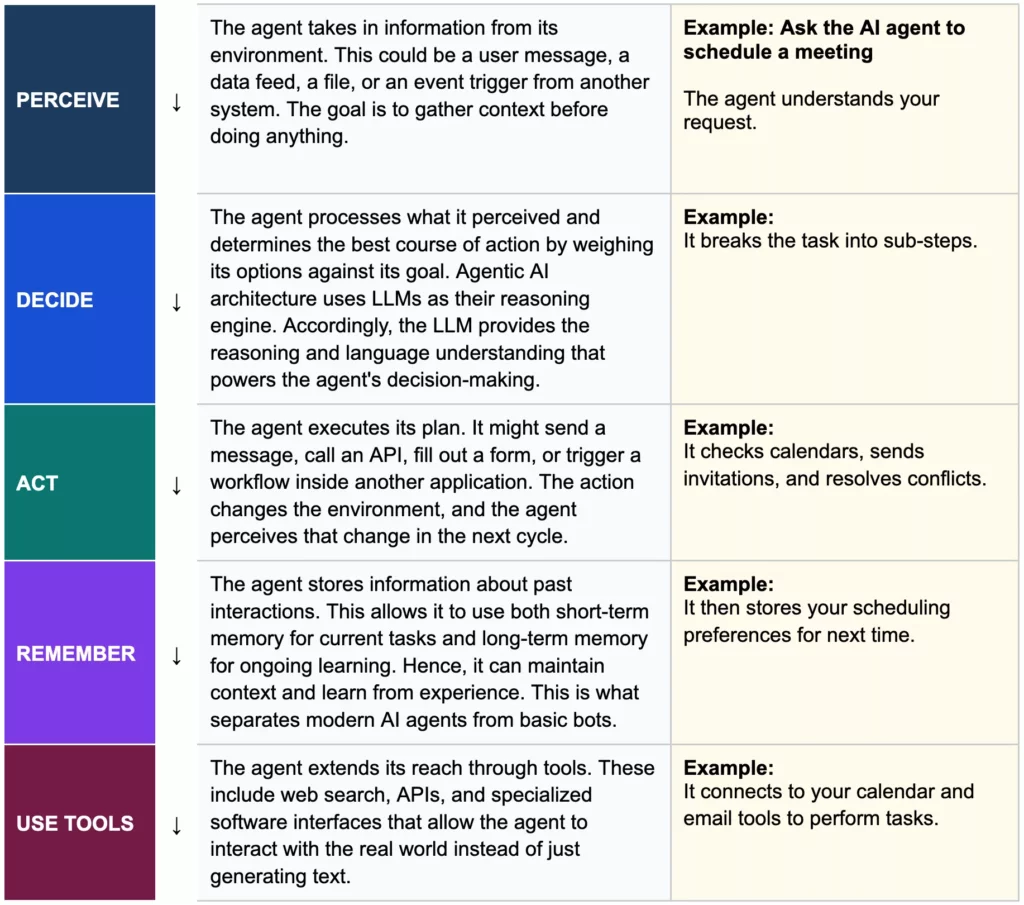
Every AI agent runs on a continuous loop: perceive, decide, and act. But modern agents add two more layers: memory and tools to turn a simple cycle into genuine autonomous capability.
Below is a typical AI agent workflow:
Core Components Of AI Agents
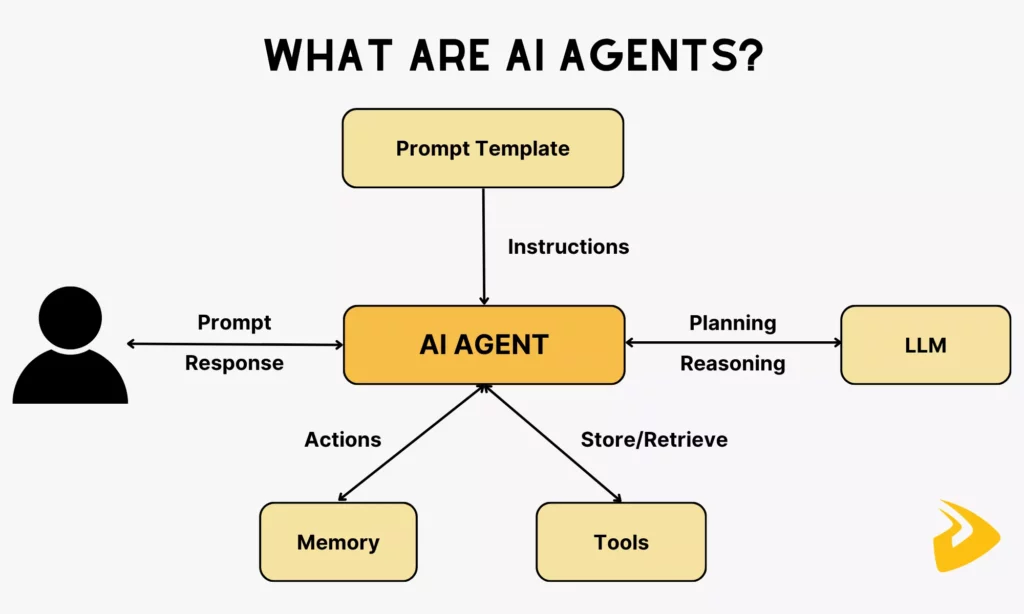
Understanding what an AI agent is starts with knowing what it is built from. Every AI agent relies on four core components working together, regardless of its complexity.
- Brain or Decision Engine
This is the reasoning center of the agent. Modern AI agents use large language models (LLM) as their decision engine, according to IBM. The LLM interprets instructions, evaluates options, and determines the best sequence of actions to achieve a goal. Without this component, the agent cannot plan or adapt.
- Memory and Context Layer
Agents use two types of memory to stay consistent and context-aware over time. Short-term memory holds context for the current task by keeping track of what has happened in the ongoing conversation or workflow. Meanwhile, long-term memory stores information across sessions. This allows the agent to remember user preferences, past decisions, and accumulated knowledge.
- Tools, APIs, and External Systems
An agent without tools can only generate text. But tools give it the ability to perform actions like searching the web, reading files, or sending emails. These integrations are what make agents genuinely useful for business operations.
- Knowledge Sources and Databases
Agents draw on structured knowledge to answer questions and make accurate decisions. A knowledge base for AI agents can hold documentation, policies, style guides, sample code, workflows, compliance rules, and more. It also covers structured, semi-structured, and unstructured data.
To retrieve this information efficiently, most AI agent databases use vector search and retrieval-augmented generation (RAG). Accordingly, the agent can pull the most relevant facts from a database whenever it needs them, rather than relying solely on its training data.
Common Types Of AI Agents
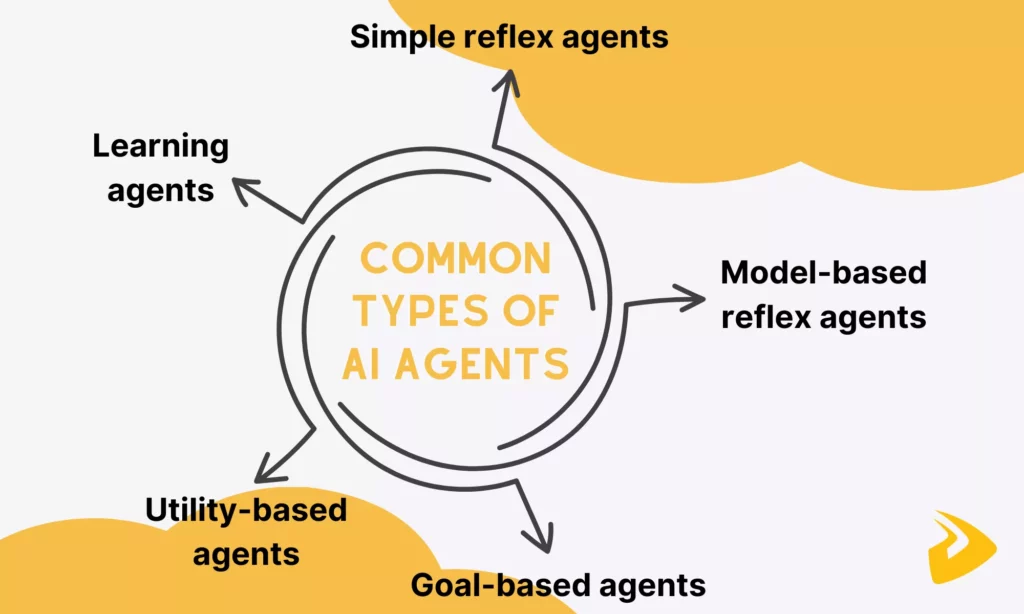
Not all AI agents are built the same. Depending on how they perceive their environment and decide what to do next, AI agents fall into five main categories, and each comes with increasing levels of complexity.
Simple Reflex Agents
Simple reflex agents are the most basic type. IBM indicates that these agents operate on a straightforward condition-action rule: if this happens, do that. In other words, these agents only react to what they currently perceive. They have no memory of the past and no awareness of what might happen in the future.
How it works: The agent reads the current input, matches it against a predefined set of rules, and executes the corresponding action.
Example: A thermostat that turns on the heat when the temperature drops below a set threshold. It doesn’t “remember” yesterday’s weather or predict tomorrow’s. Instead, it simply reacts to right now.
Limitation: They fail in complex or partially observable environments where context matters.
Model-Based Reflex Agents
Model-based reflex agents take one step further by maintaining an internal model of the world. This means they can track things they can no longer directly observe, giving them a basic form of memory.
How it works: The agent updates its internal state based on its history of perceptions. Then, it uses both that internal state and current input to decide on an action.
Example: A robotic vacuum that remembers which areas of a room it has already cleaned, even after moving out of sight of those areas.
Limitation: Their decisions are still rule-based, and they don’t set goals or optimize for outcomes.
Goal-Based Agents
Goal-based agents introduce intentionality. Instead of just reacting to conditions, these agents work toward a defined objective. They evaluate possible actions based on whether those actions help them reach their goal.
How it works: The agent considers its current state, a desired goal state, and plans a sequence of actions to bridge the gap. It often uses search or planning algorithms.
Example: A GPS navigation system finds the best route from point A to point B by considering multiple possible paths before recommending one.
Limitation: They optimize for reaching the goal, but not necessarily for how well they reach it. This means they treat all paths to the goal equally and just consider whether the action takes them to the goal instead of examining whether it is the best route. This way, agents may adopt slower, more expensive solutions over faster, cheaper ones.
Utility-Based Agents
Utility-based agents go beyond simply achieving a goal by aiming to achieve it as efficiently or optimally as possible. Particularly, they assign a utility score (a measure of “how good” an outcome is) to different possible states and choose the action that maximizes that score.
How it works: The agent weighs trade-offs between competing outcomes (such as speed vs. safety or cost vs. quality). Then, it selects the action with the highest expected utility.
Example: When finding a route to the destination, a self-driving car selects the route that best balances travel time, fuel efficiency, and passenger comfort.
Limitation: Defining the right utility function is difficult. So, a poorly designed one can lead to unintended or suboptimal behavior.
Learning Agents
Learning agents are the most advanced type. Rather than relying solely on preprogrammed rules, they improve their performance over time through experience. They observe outcomes, receive feedback, and adjust their behavior accordingly.
How it works: A learning agent typically consists of four components. They include a learning element (improves performance), a performance element (selects actions), a critic (evaluates outcomes), and a problem generator (suggests new experiences to learn from).
Example: A recommendation engine continuously refines its suggestions based on what users click, skip, or rate. This way, it becomes smarter with every interaction.
Why it matters: Learning agents are the foundation of modern AI systems, including large language models, autonomous assistants, and adaptive robotics. They represent the closest current approximation to general-purpose AI agents.
Benefits Of AI Agents
AI agents don’t just automate tasks. They fundamentally change how work gets done at scale. And here are the reasons why many businesses are adopting AI agents for their work.
Further reading:
- Enterprise AI Agents: Use Cases, Tools, And Implementation Guide
- How To Build And Use AI Business Process Automation Effectively
- What Is Agentic AI? Benefits, Architecture and How It Works

- Faster Execution Of Complex Tasks
AI agents can process and act on information in milliseconds, far outpacing human speed on multi-step tasks. McKinsey estimates that AI could automate up to 70% of business tasks by 2030. So, instead of taking hours for completion, tasks can now be completed in minutes, without waiting for a human to approve each step.
- Greater Productivity And Automation
AI agents do not just speed up individual tasks. They free up entire categories of work. Businesses can fully delegate repetitive processes (like data entry, report generation, or customer follow-ups) to agents. According to Microsoft’s 2025 Work Trend Index, business demands outpace human capacity, so 82% of businesses are using agents to handle that demand and boost productivity.
- Better Decision Support
AI agents do not only act. They analyze. By pulling from live data sources, internal databases, and external tools simultaneously, an agent can surface relevant insights at the exact moment a decision needs to be made. This gives teams faster, more complete information without manual research cycles.
- More Scalable Operations
Unlike human teams, AI agents do not hit capacity ceilings. They can handle thousands of simultaneous processes without additional headcount, training time, or burnout. For growing businesses, this scalability is one of the most compelling reasons to understand and adopt AI agents early.
What Are AI Agents Examples?
AI agents are popular across industries to automate processes, enhance efficiency, and even unlock new capabilities. Below are some key areas where AI agents are making a significant impact, along with examples.
Related reading:
- AI Voice Agent For Customer Service: Use Cases, Workflow, And Risks
- AI Chatbot Development: A Step-By-Step Guide
- AI In Product Development: From Concept To Market Faster

Customer Agents
One of the earliest and most common uses of AI agents is in customer service. Companies deploy AI agents as virtual customer support reps, handling inquiries through chat or voice.
Microsoft stated that AI agents provide customers with real-time support for common queries, generate personalized recommendations, and even execute business processes on human’s behalf. These agents can work 24/7, reducing the need for human support.
AI agents also shine in contact centers. They can manage calls and chats simultaneously to confirm appointments, answer billing questions, or collect customer feedback automatically. If a customer is getting frustrated, some advanced agents even detect the emotion and switch tactics to be more helpful.
Real example: Salesforce’s Agentforce is an enterprise AI agent that supports customers and suppliers with answering questions, resolving cases, and troubleshooting issues. It can handle up to 85% of customer queries without a human, hence reducing response time by 65%. The agent also helps employees automate routine tasks, handle deal cycles, perform deep research, and upskill.
Employee Agents
Employee agents support staff internally. They answer questions immediately and automate internal workflows. This reduces the administrative burden on staff, increases productivity, and improves operational efficiency.
These AI agents are highly applicable in different sectors. For example, they are used in HR departments to automate recruitment, onboarding, and HR management processes. In IT support, they handle help-desk tickets and automate password resets or access management. Meanwhile, AI agents in supply chain automate inventory and route planning to avoid understocking, overstocking, and late deliveries.
Real example: HRM is a workforce management platform. Its Mattermost-based internal assistant handles room bookings, leave requests, approval chains, and policy lookups. It helps new hires get answers to onboarding questions instantly, while managers can approve requests without leaving their workflow.
Code Agents
AI coding assistants help software developers autonomously complete tasks that previously required hours of manual work. Stack Overflow surveyed that the majority (54.1%) of developers are using AI to get instant answers for their problems and complex concepts. Besides, code agents act as collaborative colleagues that support the entire software development process by:
- Writing and refactoring code across various files based on a simple prompt
- Analyzing errors and suggesting fixes
- Generating tests, executing them, and refining the code until all tests pass
- Supporting project planning by analyzing a project structure, building a plan, and following coding conventions defined in project files.
Real example: GitHub Copilot with agentic capabilities can break down high-level goals into smaller tasks and use tools (e.g., database systems) to complete actions. Accordingly, it can iterate on code, run terminal commands, and fix its own errors. When developers assign an issue, the AI can create a branch, write code, run tests, and submit a pull request for human review. Further, it supports CI/CD pipelines and security autofixes for flaws.
Creative Agents
Creative agents generate new content at a speed and scale no human team can match alone. That content might involve blog posts, product descriptions, ad copy, social media posts, campaign concepts, and even visuals (e.g., images or graphics).
In text content generation, these AI agents understand platform-specific requirements, optimal posting times, and audience engagement patterns to create targeted content that resonates with specific demographics. Meanwhile, in visual content generation, creative agents help creative professionals handle multi-step workflows to create images, graphics, and marketing assets without requiring a designer at every step.
Real example: Adobe’s Firefly AI Assistant is a creative agent that helps creative directors to implement multi-step creative tasks in a single interface instead of switching between tools. With natural language prompts, it uses different tools (e.g., Photoshop, Illustrator, or Premiere) to design images, edit videos, generate vector assets, and enhance audio quality.
Data Agents
Data agents interact with data sources to collect, analyze, and summarize both structured and unstructured data. When users ask questions using natural language, a data agent can query data without the need for SQL or DAX knowledge. It turns raw inputs into decisions, reports, and recommendations.
In practice, many AI agents across industries have data analysis capabilities. They accordingly help answer questions, generate insights, monitor streams of incoming information, and identify anomalies. For example, in finance, data agents monitor transactions, flag anomalies, explain fluctuations, and generate reports automatically. Meanwhile, data agents in R&D scan thousands of research papers and surface relevant findings.
Real example: Databricks provides the Agent Bricks platform, Genie, the Data Science Agent, and other agentic capabilities to interact with, reason, and act on enterprise data. Particularly, the platform allows businesses to build AI agents that work with large, complex datasets like clinical trial documents or complex legal documents. Genie can answer any data question, while the Data Science Agent supports analytics tasks, like exploring data or finding data.
Security Agents
In cybersecurity, AI agents function as tireless guards and investigators. They monitor network traffic, server logs, and user behavior to detect threats in real time.
If an AI security agent spots something unusual (e.g., a spike in traffic that looks like a cyberattack), it can immediately take action. It might isolate a compromised device or block an IP address within seconds of detecting danger. This rapid response is crucial to prevent breaches.
These agents also perform proactive security tasks. They can scan systems for vulnerabilities or misconfigurations continuously. For example, they might find that a server has an open port that shouldn’t be exposed and then alert the IT team to fix it.
Some advanced agents even simulate cyberattacks (penetration testing) to probe defenses and suggest improvements to firewalls or authentication methods. By doing so, they help organizations strengthen their security posture before an attacker strikes.
Real example: Big Sleep is an AI agent developed by researchers at Google’s DeepMind and Project Zero teams to hunt down software vulnerabilities. It uses LLM reasoning to understand code and find security flaws. In 2024, it successfully discovered a zero-day vulnerability in SQLite (a widely used database engine) all on its own. It also simulates how a cybersecurity expert approaches code analysis and sifts through codebases at lightning speed.
Challenges Of Deploying AI Agents
AI agents offer real capability. But deploying them in production comes with challenges that businesses need to understand before committing. Here are five that matter most:
Explore more:
- Agentic AI Security: Risks, Core Architecture, Solutions
- AI Agent Governance: How To Manage Agents In Production
- How To Build An AI Agent: A Practical Step-By-Step Guide

- Hallucination and Output Errors
AI agents generate responses based on statistical patterns, not verified facts. This means they can produce confident, plausible-sounding outputs that are factually wrong. This problem is known as hallucination.
In an autonomous system, this is especially risky because the error does not stop at one wrong answer. A hallucinated assumption can cascade into hundreds of automated downstream actions before a human detects the error. And each wrong decision becomes an input to the next process, creating compounding failures.
- Data Privacy and Security Risks
AI agents need to integrate with different tools and get data (e.g., from emails, databases, and CRMs) for tasks. This broad access creates significant exposure. According to Gravitee, 88% of surveyed organizations report either confirmed or suspected security or privacy issues related to AI agents. Without solid AI security policies to actively govern and monitor AI agents, organizations may encounter a rise in unexpected security cases.
- Lack of Transparency
When an AI agent makes a decision, it is often difficult to understand why. Unlike a rule-based system where logic is explicit, an agent’s reasoning happens inside a model that even its developers cannot fully audit step by step. This “black box” problem creates friction in regulated industries (e.g., legal, healthcare, and finance) because decisions there must be explainable and defensible.
- Integration Complexity
Connecting AI agents to existing enterprise systems (e.g., legacy databases, ERP platforms, internal APIs) takes significant time and effort. Each integration point is a potential failure mode. Accordingly, data formatting mismatches, authentication issues, and rate limits can all break an agent’s workflow mid-task. The more systems an agent touches, the more complex testing and maintenance become.
How Businesses Can Start Using AI Agents
Getting started with AI agents does not require a large engineering team or a full-scale deployment from day one. Businesses seeing the best results often follow a structured approach: start narrow, prove value, then expand.
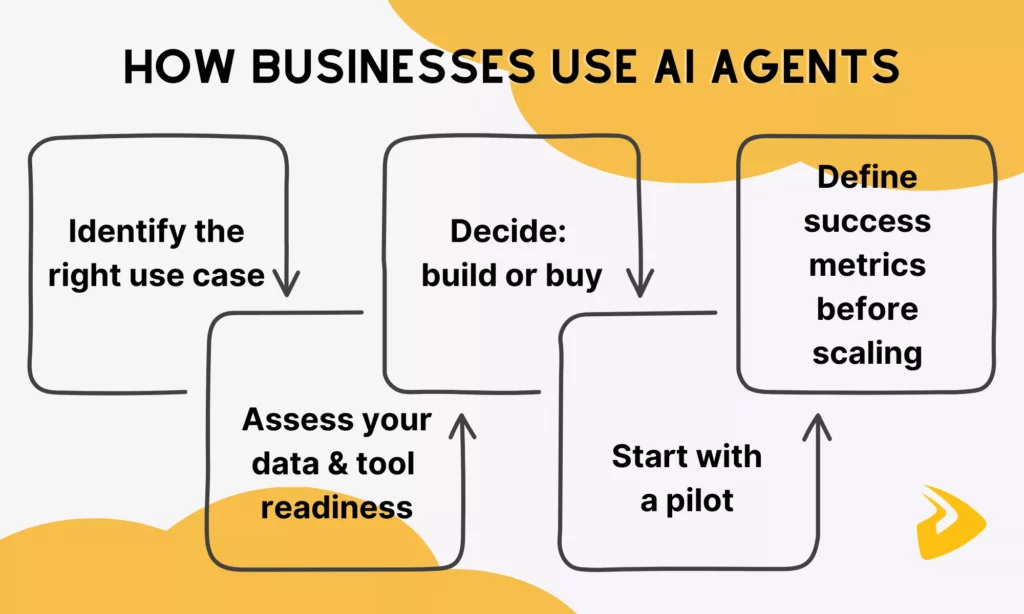
Step 1: Identify the right use case
Not every process is a good candidate for an AI agent. The best starting points share three characteristics: they are repetitive, they consume significant time or resources, and they do not require complex ethical judgment at every step.
A good rule of thumb: it is a strong starting point for your first AI agent if a process is repetitive, time-consuming, and highlights inefficiencies, whether in revenue, customer experience, or employee workload. Common early wins include customer inquiry handling, internal HR requests, document processing, and report generation.
Step 2: Assess your data and tool readiness
An AI agent is only as reliable as the data and systems it connects to. Before deploying, audit whether your relevant data is clean, accessible, and structured enough for an agent to query. Also, identify which internal tools (e.g., CRM, email, ERP, databases) the agent will need to access. Then, confirm that APIs or integrations exist to connect them.
Step 3: Decide: build or buy
Most enterprises find that buying a purpose-built platform saves them from the “cold start” problem. Particularly, they can immediately build an AI agent using available tools and train it on domain-specific data. Platforms like Microsoft Copilot Studio, Salesforce Agentforce, and Databricks Agent Bricks offer no-code or low-code environments suitable for most business teams.
Building from scratch makes sense only when you need deep customization or have specific compliance requirements that off-the-shelf tools cannot meet.
Step 4: Start with a pilot
Launch one agent around one use case, monitor it closely, and collect feedback from the people it serves. Besides, identify the human-in-the-loop insertion points early. Because agentic workflows are not a “set it and forget it” solution, missing these checkpoints can turn small missteps into bigger issues.
Step 5: Define success metrics before you scale
Before expanding, establish clear KPIs tied to business outcomes. Useful metrics include time saved per task, error rate reduction, volume of requests handled without human intervention, and cost per interaction compared to the manual baseline. Define KPIs like “reduce L1 support calls by 60%” or “cut invoice processing time in half.” This alignment helps secure leadership support and ensures technical work stays connected to value creation.
Once a pilot delivers measurable results, the same framework scales. Apply it to the next use case, connect agents across departments, and build toward a coordinated system rather than scattered experiments.
Designveloper – Your Partner In AI And Automation
Understanding AI agents is one thing. But building and deploying them reliably inside a real business is another.
As the AI-first software and automation partner, Designveloper has spent over a decade helping global companies turn complex technology into production-ready systems, from custom AI systems to intelligent workflows. We bring together the experience, technical depth, and structured approach to deliver AI agents that actually work in real business processes, reduce manual tasks, and help teams scale faster.
Why should you choose Designveloper for your AI agent project?
- Track record that speaks for itself: With 100+ software projects delivered across industries (e.g., healthcare, finance, and eCommerce), we help clients successfully deploy AI for business transformation.
- End-to-end AI and automation expertise: Our team works across the full AI agent stack, from LLM selection and tool integration to memory architecture, API connectivity, and production deployment. Whether you need a single-task agent or a multi-agent system, we design for reliability, not just capability.
- A consultative approach, not a one-size-fits-all solution: We work closely with you at every step. We start by understanding your workflows, data, and constraints before recommending a solution. That means you get an agent that fits your operation, not a generic product retrofitted to your use case.
AI agents are moving fast. The businesses that define their automation strategy now will have a meaningful advantage over those that wait. If you are ready to move from understanding AI agents to deploying one, we are ready to help. Talk to our team!
FAQs About AI Agents
Is ChatGPT An AI Agent?
In its standard form, ChatGPT is not a full AI agent. Instead, it is a conversational AI powered by an LLM that responds to prompts but does not autonomously plan or take actions beyond generating text.
However, when configured with tools such as web search or file access, it begins to exhibit agentic behavior. OpenAI’s newer implementations (such as ChatGPT with memory, custom GPTs with actions, or the Operator feature) push it closer to agent territory by allowing it to interact with external systems.
What’s The Difference Between LLMs And AI Agents?
A Large Language Model (LLM) is the reasoning engine. It understands language, generates responses, and makes inferences, but on its own it only produces text. Meanwhile, an AI agent is a system built around an LLM that adds the components needed to act. For example, it uses tools to interact with external systems, memory to retain context across steps, and an execution layer to perform multi-step tasks autonomously.
How Do AI Agents Integrate With Existing Systems And Workflows?
AI agents connect to existing systems primarily through APIs. APIs allow them to read from and write to tools your business already uses (e.g., CRMs, ERPs, databases, email platforms, calendars, and cloud storage). Most enterprise agent platforms also support webhooks, native integrations, and middleware layers like Zapier or Make to bridge systems that lack direct API access.
How Does Human-In-The-Loop Fit Into The AI Agent Workflow?
Well-designed agent systems often involve humans for high-stakes decisions, such as sending a contract, processing a payment, or making a personnel change. The practical implementation varies. Some agentic AI systems pause and notify a human via email or Slack, others present a dashboard for batch approvals, and some flag only exceptions while letting routine tasks run autonomously. The key is defining human checkpoints during the design phase, so that AI agents know when to leave decisions or wait for approvals from humans.
Also published on

Share post on










Related Articles


AI Agent Case Studies: 10 Real-World Examples Across Industries
AI Agent Case Studies: 10 Real-World Examples Across Industries Published October 21, 2026
How Will AI Affect Software Development? Complete Guide In 2026
How Will AI Affect Software Development? Complete Guide In 2026 Published October 21, 2026
How To Build A RAG System: Step-By-Step (New Guide)
How To Build A RAG System: Step-By-Step (New Guide) Published October 19, 2026


















