
















What Is a Web Application (Web App)? Is It the Same as Website?

Chances are that you have accessed a web application at least once ever since starting to use the Internet, but never noticed it. If you now want to develop one for your own business but don’t know much about it, this article is the right place to answer a big question: What is a web application?
Here, we will take you through the fundamentals of a web application, from how it works and the main differences from traditional websites to its pros and cons. Now, let’s begin!
What Is a Web Application?
Briefly, a web application is a piece of software that runs in your browser and lets you do something – let’s say chatting, editing images, or writing essays. Unlike a traditional website that mostly sits there and talks at you, a web app talks back, reacts, and remembers your inputs.
Web apps are everywhere. Think of the time you wake up and check emails in Gmail – that’s a web application. Think of using Uber to book a ride, Apple Pay to pay a bill, Jira to update a project board, and more. They are all web applications, and they slip into daily life and business so smoothly that we barely notice them.
For individuals, web applications remove friction. You don’t need to install heavy software or worry about updates breaking your laptop at the worst time. Just open a browser and go. Further, running on browsers allows web apps to sync your work across devices and platforms.
From a business perspective, web applications allow companies to reach customers instantly, collect feedback in real time, and improve features faster.
There’s also the collaboration angle. Web apps allow teams spread across cities or time zones to work on the same data at the same time. Think about many team members updating a project dashboard concurrently, although they live in different places. This fosters faster decision-making and smoother communication.
Recommended reading: Web Application Architecture: Types, Components, and Tools to Creates
How Does a Web Application Work?
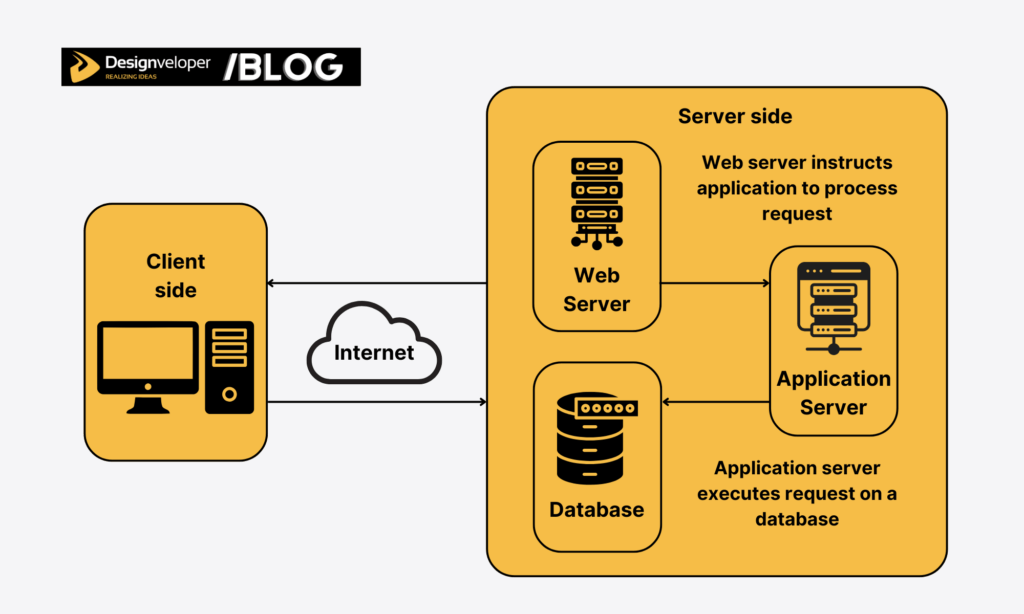
On the client side, the way a web application works may feel easy. You click, scroll, do some action like adding design elements or typing words, click the “submit” button (if any), and something happens.
But behind the scenes, there’s a long story to tell. The working mechanism of a web application depends on the following three elements: the web browser, the application server, and the database. Let’s see:
- Web browser
Everything starts with the user who types a few words, fills out a form, or performs any interactions on the web app’s user interface. The browser becomes the middleman here. It takes those actions and turns them into requests, which are structured messages sent over the internet.
- Application server
Then, the browser passes the request to the backend, or the application server. Technically, the backend processes logic, checks rules, verifies permissions, and figures out what should happen next. More simply, the application server will execute the request and return the results to the web browser.
- Database
The database also plays a crucial role here, often as the web app’s memory. It stores things long-term and tries not to forget, even when traffic spikes or users do unexpected stuff (which they always do). So, when the server needs data (like user profiles, orders, or messages), it “talks” to the database, pulls the data, updates it if needed, and sends the response back up the chain.
Examples of Popular Web Applications
If you’re curious about popular web applications these days, think about the tools you probably open (almost every day) without noticing.
- Gmail lets you send emails, organize conversations, attach files, and search old messages from years ago.
- Google Docs allows you to write, edit, comment, and collaborate in real time.
- Trello is a visual project management tool. You drag cards, move tasks, and track progress within a unified place.
- Notion mixes notes, databases, and planning into one flexible workspace that you sort of shape to your own habits.
- Facebook is a well-known social platform where you can post updates, react to other posts, message others, and manage pages.
You can access all these tools through any web browser. And you may ask why all these are considered web application examples and not just websites.
The key difference lies in what users do, not just what they see. These tools respond to input, process data, save changes, and adapt content based on each user.
A simple website might show information and call it a day, but these tools behave more like living systems. When you send an email, edit a document, move a task card, or update a profile, the system reacts instantly and remembers it. That makes them web applications – dynamic, interactive, and built to handle constant back-and-forth rather than one-way communication.
Recommended reading: Web Application Examples and Definition for Beginners
10 Types of Web Apps
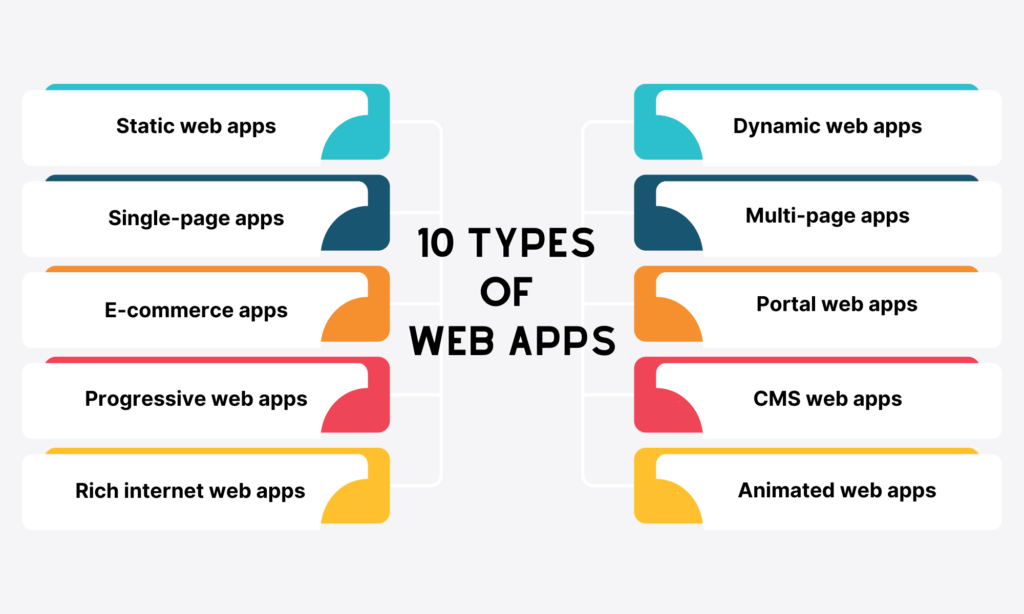
Web applications come into the following ten types:
- Static web apps: They have pre-built content that is sent to your browser without the need for the server to generate or change JavaScript content. Blogs, personal portfolios, documentation websites, and landing pages are typical examples.
- Dynamic web apps: They create data in real time based on what you ask for and how the server responds. Netflix is a typical example, which shows you movie suggestions based on movies you’ve seen.
- Single-page apps: They give you a single web document instead of a whole new page. Some typical examples include Gmail, PayPal, Google Maps, Airbnb, etc.
- Multi-page apps: They have more than one page and can reload the whole page when you go to a different page within the application. Amazon, Trello, and eBay are typical examples.
- E-commerce web apps: They let you buy and sell things over the internet. eBay, Amazon, and Walmart are all e-commerce examples.
- Portal web apps: They let you access many different sections and categories from the home page. Coursera and Udemy are both well-known educational portal web apps.
- Progressive web apps (PWAs): They act like native apps, although they run on browsers. Starbucks, BMW, and Spotify are just a few well-known examples.
- CMS (Content Management System) web apps: They allow you to create, edit, and manage content on a website without needing extensive coding knowledge. Some typical examples include WordPress, Wix, Joomla, and Drupal.
- RIAs (Rich Internet Web Applications): They deliver a user experience closer to traditional desktop software solutions by offering multimedia, dynamic content, and advanced interactivity. Some outstanding examples are Google Maps and some online photo editors.
- Animated web apps: They use animation to provide visually appealing and interactive experiences. Canva, Notion, Airtable, and Basecamp are typical examples.
Difference Between Web Application and Website
While a web app and a website run in your browser and even look similar at first glance, they have many different aspects. The former is developed to do something for you (e.g., email management or image editing), while the latter primarily presents information and static content.
Now, let’s dive deep into the key differences between a web app vs a website.
| Aspect | Web Application | Website |
| Purpose | Built to interact with users and perform certain tasks, like tracking work, scheduling activities, or writing essays. | Primarily share information and static content. |
| User Interaction | High. Users actively do things, like creating content, managing tasks, or sending messages. | Low to moderate. Interaction is limited, often just navigation or filling out a simple contact form. |
| Functionality | Include more complex features to execute certain tasks. | Mainly a clear navigation menu that links web pages together. Not much complex functionality required. |
| Authentication | Login is often required. Accounts, permissions, and access controls matter. | Login is optional or not needed at all in most cases. |
| Technical Complexity | More complex. Requires frontend logic, backend processing, databases, APIs, and constant updates. | Simpler. Can often run with basic frontend code and minimal backend support. |
Difference Between Web Application and Mobile Application
As a web application has the word “app,” does it relate to a traditional mobile app? At first, they may feel the same, being built to perform some tasks with similar features. But once you spend a little time using both, you’ll soon realize how different they are, especially in their “living” environments.
A web application lives in a browser. You open Chrome, Safari, or Firefox, type in a URL, and you’re in. No installation and compatibility with your device. This feature allows you to access web apps from almost any device, as long as there’s an internet connection.
A mobile application, on the other hand, lives on your phone. You download it, give it permissions, and it becomes part of your device.
Mobile apps can tap into native features like the camera, GPS, biometric authentication, or offline storage more deeply and more reliably. That’s why things like fitness trackers, banking apps, or ride-hailing services often feel smoother on mobile.
They’re closer to the hardware, literally. But that closeness comes at a cost, let’s say separate builds for iOS and Android, regular app store updates, and stricter platform rules.
Advantages and Limitations of Web Applications

While the popularity of web apps is undeniable, there’s a bigger question at play: can they truly benefit your business?
In this section, we’ll dig deep into the pros and cons of using a web application in your business.
First, let’s discover its benefits:
- Flexibility: Since a web application can run on various browsers, you don’t need to worry about whether it’s compatible with your current OS or device.
- Save space on disks: You don’t need to install a web app on your computer or phone thanks to the availability of the cloud. This way, you don’t waste any space on disks to perform activities that could easily be done on browsers.
- Avoid app store approvals: As a publisher, you have to sign code on the AppStore and the Play Store and follow their rules and regulations if your product is a mobile app. But with a web application, you can just publish it without any need for approval.
- Reduce costs: With web apps, you don’t need to develop separate apps for operating systems like iOS or Android. This makes development and debugging easier.
Along with all the good things, there are always some downsides.
- Too dependent on the internet connection: Users must use a browser to access your web app, so connection loss will be a common issue.
- Slower speed: A web app is likely to run slower than those hosted on a server locally. This may happen due to the slow server and loading, low bandwidth, DNS issues, and network connectivity.
- Security: Since the cloud hosts your web app, sensitive data can be vulnerable if security measures are not robust.
- Lack native functionalities: Unlike native apps designed for a certain operating system (e.g., iOS and Android), web applications can face some challenges when interacting with the hardware or functionalities of different devices (e.g., camera or finger sensor).
When Should You Build a Web Application?

You already know about the pros and cons of a web app, as well as its differences from a native app and a traditional website. So, should you build a web app in today’s era? The answer depends heavily on your specific use case.
Does your product idea involve presenting information or doing something specific? What do your target users expect from your app idea? And more questions you need to ask to learn about what your potential product should be.
A web app is usually the right option when your product idea is to help users do things, like collaborating, tracking progress, or paying bills. When you need frequent updates and don’t want app store approval delays, a web app also makes sense.
A web app is also the right answer if your target audience uses many devices and often switches between them. This time, with a web app, users only need to access browsers on any internet-connected device and continue their work.
But, if your product requires heavy dependence on hardware features or offline access, a web app may not be a good answer. Or if you just want to showcase static content, like your company’s portfolio or services, developing a web app isn’t worthwhile.
How Designveloper Helps Your Business Build an Effective Web Application
Designveloper is a leading software and app development company based in Ho Chi Minh City, Vietnam. Our team of 100+ dedicated, skilled engineers has deep technical skills and hands-on experience in developing web applications, especially PWAs (Progressive Web Applications).
We don’t choose a software solution or tech stacks randomly, but strategically. One typical example is our Lumin project. The choice of PWA for this project results from some key reasons as follows:
- PWAs leverage new APIs to interact directly with devices. This allows Lumin to access and edit files locally without needing to upload them to the cloud. Especially for a PDF Editor like Lumin, opening files directly from devices not only reduces file loading times but also ensures user privacy.
- PWAs provide a native-like user experience. Further, it offers features like offline functionality and push notifications. This turns Lumin into a strong default PDF editing tool across multiple operating platforms (e.g., macOS or Windows).
- Developing and maintaining a native desktop app for each operating system can be a big investment. So PWAs come as a cost-effective alternative. Why? By leveraging the existing web app codebase and extending it with PWA functionalities, Lumin can avoid the need for separate teams for different platforms. This translates into significant cost savings for Lumin.
If you’re hesitating whether a web application is the best option for your company’s long-term success, come to us for a detailed consultation. With our proven Agile approach and commitment to excellence, we’re confident in turning your product idea into a working solution on time and within budget!
FAQs about Web Application
Is a Web Application The Same As a Website?
No. Especially with the basics we provided, you may easily realize that a web app and a website both run on browsers. That’s the most visible similarity. Apart from that, they serve different purposes. A website is built mainly to present information, while a web application aims at interaction, allowing users to execute specific tasks.
Do Web Applications Require Installation?
No installation is required, in most cases. What you need to do is open a browser, type a URL, and access a web app. However, you can still add some web apps, especially Progressive Web Apps (PWAs), to your home screen or desktop to gain native experiences from hardware features, like cameras or GPS.
Can a Web Application Work Offline?
It depends on whether a web application has PWA functionality. Traditional web applications rely heavily on an internet connection to function conveniently, especially when they require real-time data or server communication. However, modern technologies like caching and service workers allow you to add the “offline” functionality to a web app. Accordingly, some web apps can save limited content or make limited changes that sync later when the Internet is available.
Also published on

Share post on










Related Articles


What Is a Web Application (Web App)? Is It the Same as Website?
What Is a Web Application (Web App)? Is It the Same as Website? Published April 23, 2026
What Is a Progressive Web App (PWAs)? Key Features, Examples
What Is a Progressive Web App (PWAs)? Key Features, Examples Published April 23, 2026
How to Outsource Web App Development in 2026?
How to Outsource Web App Development in 2026? Published April 23, 2026Read more topics

AI Development
AI Development
AI/Machine Learning
AI/Machine Learning

Automation Technologies & Solutions
Automation Technologies & Solutions

Back-End Development
Back-End Development

Best Companies
Best Companies

Blockchain Technology and Applications
Blockchain Technology and Applications

Business Analyst Role & Skills
Business Analyst Role & Skills

Chatbot Development
Chatbot Development

Cloud Technology Revolution
Cloud Technology Revolution

CMS Platforms Development
CMS Platforms Development










