
















10 Best Recruitment Automation Tools For Faster Hiring In 2026

KEY TAKEAWAYS:
- Recruitment automation tools reduce repetitive work across sourcing, screening, scheduling, communication, and reporting.
- Shortlist tools by existing HR workflows, hiring volume, integration fit, and total cost of ownership.
- This guide compares end-to-end ATS, sourcing/CRM, and scheduling/engagement platforms by features, pricing, and best use cases.
Recruitment automation tools help organizations remove repetitive coordination work from the hiring process. Instead of asking recruiters to manage hiring tasks manually, these tools use AI and automation capabilities to keep recruitment moving without heavy workloads.
These tools have expanded gradually at a CAGR of 2.7%, according to Future Market Insights. It is because recruiting teams are under pressure to move faster without lowering hiring quality. Indeed also points out that automated recruiting helps organizations scale hiring while reducing recruiter burnout and inefficiency.
This guide compares the best recruitment automation tools by category, with their key features, best use cases, pricing, and practical selection criteria. It also explains how they support HR teams and how to choose the right one for real business needs.
Recommended for you:
- What Is Recruitment Automation? How to Hire Faster at Scale
- AI Resume Screening: How It Works, Risks, and What to Look For
- 11 Best AI Chatbot Automation Tools By Categories
What Are Recruitment Automation Tools?
| Recruitment automation tools are software platforms that automate repetitive hiring tasks and move candidates through the recruiting process using predefined workflows, triggers, and integrations. |
In practice, recruitment automation tools handle tasks such as:
- Posting jobs across multiple channels
- Routing candidates into the right pipeline stage
- Triggering screening steps
- Scheduling interviews
- Sending reminders
- Updating candidate records
- Generating reports
The goal of automating recruitment is not to remove recruiters from the process. It is to remove low-value coordination work that slows them down.
Instead of acting as a database, these tools function as a workflow layer for hiring teams. They work by using predefined rules and even AI capabilities to trigger events across different systems automatically.
So, how are recruitment automation tools different from a traditional ATS?
An applicant tracking system (ATS) primarily stores candidate data, job postings, and hiring stages. Meanwhile, recruitment automation tools determine what happens next after an application arrives, an assessment finishes, or a hiring manager submits feedback.
Many modern ATS platforms include automation features. But they still mainly act as systems of record instead of moving the hiring process forward automatically. That is why recruitment automation tools add value, reducing manual work.
Why Companies Invest In Recruitment Automation Tools
Most teams do not invest in recruitment automation tools because automation sounds innovative. They choose these tools because manual hiring workflows create delays, inconsistency, and avoidable recruiter workload at scale. Below are the benefits that automation actually brings to recruitment:
Faster Hiring With Less Manual Work
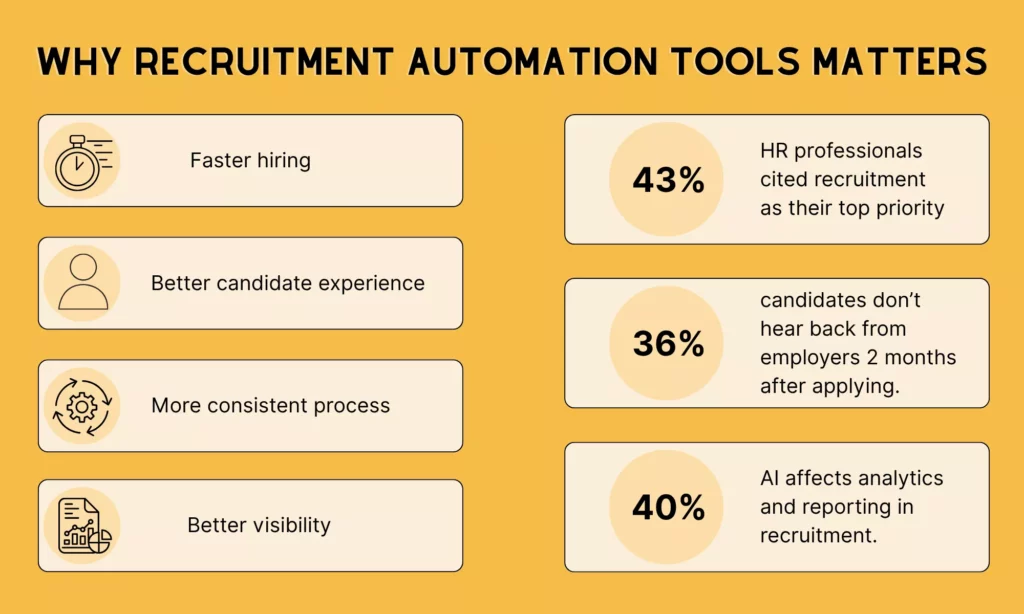
SHRM found that recruitment was the most common challenge in HR due to heavy workloads and increased burnout. Therefore, most HR professionals (43%) cited recruitment as their top priority.
Automation can reduce repetitive tasks in hiring, such as schedule coordination, candidate updates, workflow routing, and report preparation. That gives recruiters more time to evaluate candidate qualifications, align stakeholders, and build relationships with candidates.
Today, many recruitment automation tools integrate AI to automate routine tasks. From identifying top talent and screening resumes to scheduling interviews and sourcing candidates, AI helps reduce time-to-hire significantly.
Better Candidate Experience And More Consistent Processes
Candidate experience improves when the process feels responsive. Automated reminders, scheduling flows, and status updates make recruiting feel more organized and reduce drop-off caused by silence or avoidable delays.
Besides, automation creates a more standardized process for recruiters and hiring managers. This improves consistency in how candidates move through the funnel. Research from SHRM’s Talent Board Candidate Experience study confirms this gap is real: One-third of candidates reported not hearing back from employers two months after applying. But automated communication workflows can directly address this problem.
Better Visibility Across The Hiring Funnel
Automation also improves visibility. When workflows, alerts, and status changes are structured, recruiting leaders can see where bottlenecks happen, which stages take too long, and how candidate movement differs by role or team.
That reporting layer is one reason larger organizations often treat recruiting automation as an operating capability rather than a feature add-on. According to GoodTime’s 2026 Tech Hiring Trends report, one of the strongest AI impacts on recruiting comes from analytics and reporting (40%). Accordingly, tools with AI capabilities can surface bottlenecks, improve decision-making, and reduce coordination load across the funnel effectively.
Further reading:
- How To Build And Use AI Business Process Automation Effectively
- AI Automation Agency: Services, Pricing, Examples, and Business Model
- 15 Best AI Coding Assistant Tools For Developers
Core Features That Matter Most
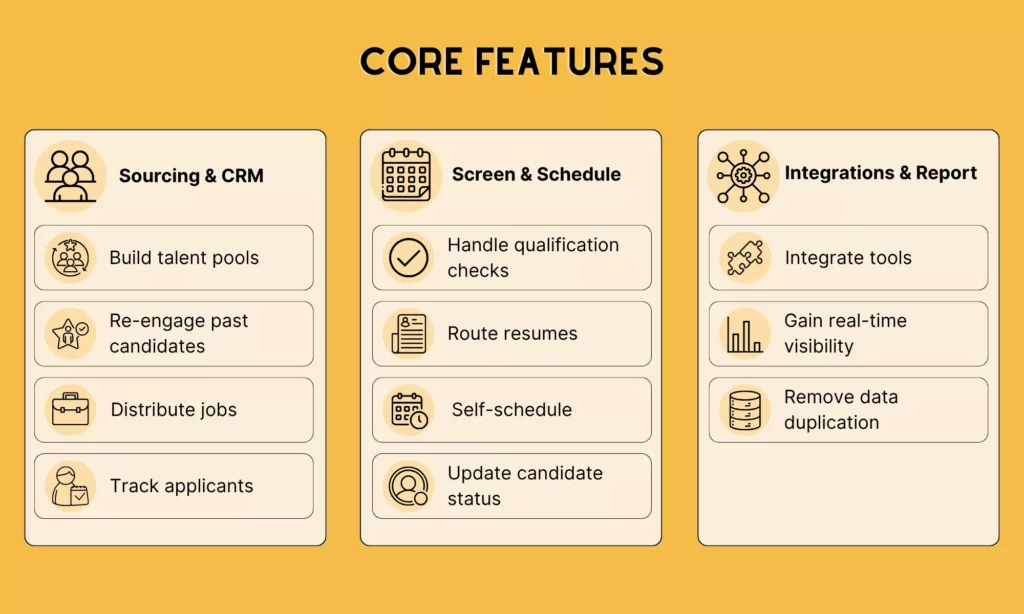
Different recruitment automation tools have different feature lists, and not every feature will matter on Day 1. But these tools still share a common trait: they remove challenges that slow hiring down the most through the following core features:
Sourcing, CRM, And Candidate Pipeline Management
This feature matters because it keeps warm talent organized and re-engageable before a role opens. Most teams default to reactive hiring: posting a role, waiting for applicants, and starting from scratch every cycle.
But sourcing and CRM capabilities break that pattern. They let teams build talent pools, automate re-engagement for past candidates, distribute jobs across multiple channels from one place, and track who applied. According to Gem’s 2025 Recruiting Benchmarks Report, building deep, qualified pipelines increases the likelihood of rediscovering talent, saving time, and speeding up hiring.
How to evaluate this feature: Check whether the tool supports automated re-engagement for past candidates, not just manual tagging. If a recruiter still has to initiate every outreach manually, the CRM is a database, not an automation.
Screening, Scheduling, And Communication Automation
This feature matters because screening and scheduling are where recruiter time disappears fastest. Calendar back-and-forth, manual resume routing, and delayed status updates are not strategic work. But they consume hours that should go toward evaluation and relationship-building.
With strong screening and scheduling, HR professionals can automatically handle qualification checks, resume routing, self-scheduling, automated reminders, and candidate status updates. This allows HR teams to spend most productive hours on assessment, while reducing drop-off caused by long wait between touchpoints.
How to evaluate this feature: Ask whether candidate self-scheduling triggers without recruiter action, or whether someone still has to send the link manually.
Integrations, Reporting, And Workflow Control
Automation tools do not work alone, but combines with other software to keep hiring seamless and effective. Deloitte indicates that integrating tools is a talent acquisition trend that reduces costs, lowers manual work, and delivers more personalized experiences for both recruiters and applicants.
Therefore, integration depth, especially with your company’s existing software, is worth considering when you look for a recruitment automation tool. Without integrations, teams end up managing tool sprawl, duplicating data across systems, and losing visibility into where candidates are stalling. A strong integration and reporting layer should connect your ATS, calendar, assessment tools, communication channels, and analytics.
Besides, recruiters need real-time visibility into funnel health. So, through analytics and reporting, they can identify bottlenecks and make informed decisions.
How to evaluate this feature: Map every system the recruiting team currently uses and check native integration availability before the demo. A tool that requires Zapier to connect to the ATS adds a dependency layer that compounds over time.
Top 10 Recruitment Automation Tools To Consider In 2026
Not every recruitment automation tool solves the same problem. Some cover the full hiring funnel from job posting to offer. Meanwhile, others specialize in finding passive candidates or eliminating scheduling bottlenecks. The tools below are grouped by what they’re built to do, which is the fastest way to find what your team actually needs.
The three categories covered here are: end-to-end ATS and recruiting platforms, sourcing and CRM tools, and scheduling and candidate engagement tools. Most teams combine one platform from the first category with one or two specialized tools from the other two.
Best End-To-End ATS And Recruiting Platforms
These tools act as a hiring system of record. They manage pipelines, automate workflows, coordinate interviews, and report across the full funnel. Teams typically start here before layering in specialized tools.
1. Greenhouse: Structured, Compliance-Focused Hiring At Scale
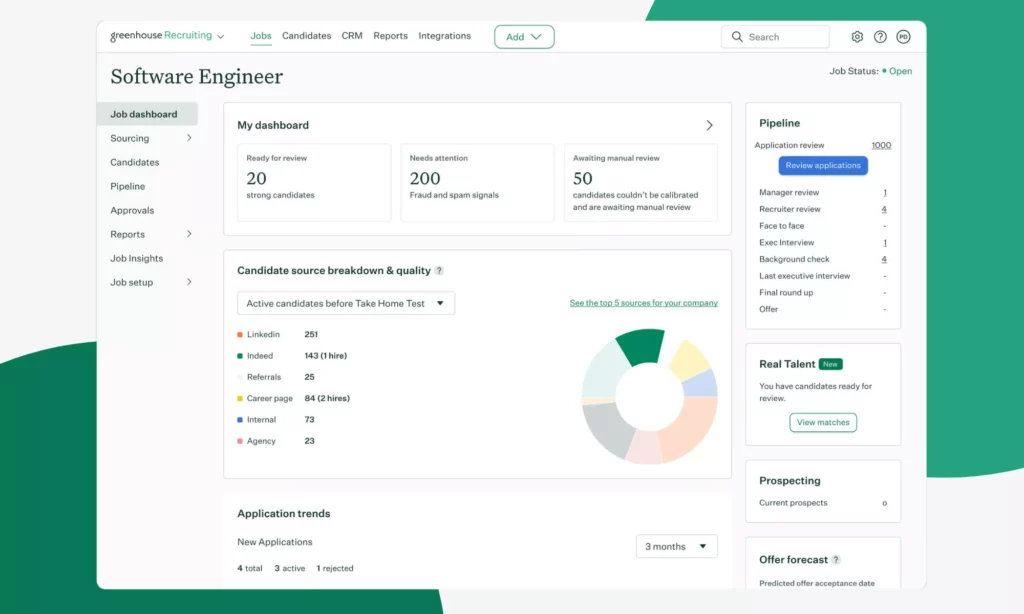
Greenhouse is built around the principle of structured hiring. It supports standardized scorecards, interview kits, defined evaluation criteria, and workflow automation to enforce consistency across teams.
Key features:
- Customizable hiring workflows with stage-level automation and approval flows
- Structured interview kits and role-specific scorecards with 500+ native integrations
- Greenhouse AI: Finds and engages high-quality talent, streamlines interviews, builds reports, and predicts offer acceptance
- DEI reporting tools and bias-reduction features built into the evaluation process
- Pipeline analytics with time-in-stage visibility and recruiter productivity dashboards
Best for: Mid-to-large companies that prioritize process consistency, compliance, and cross-team hiring coordination.
Limitations:
- Native scheduling still requires significant manual setup, and reporting requires exporting data to get deeper insights.
- The platform is click-heavy for recruiters without dedicated recruiting ops support.
Pricing: Custom quotes for Core, Plus, and Pro. No free trial, only demo.
2. Lever: ATS And CRM
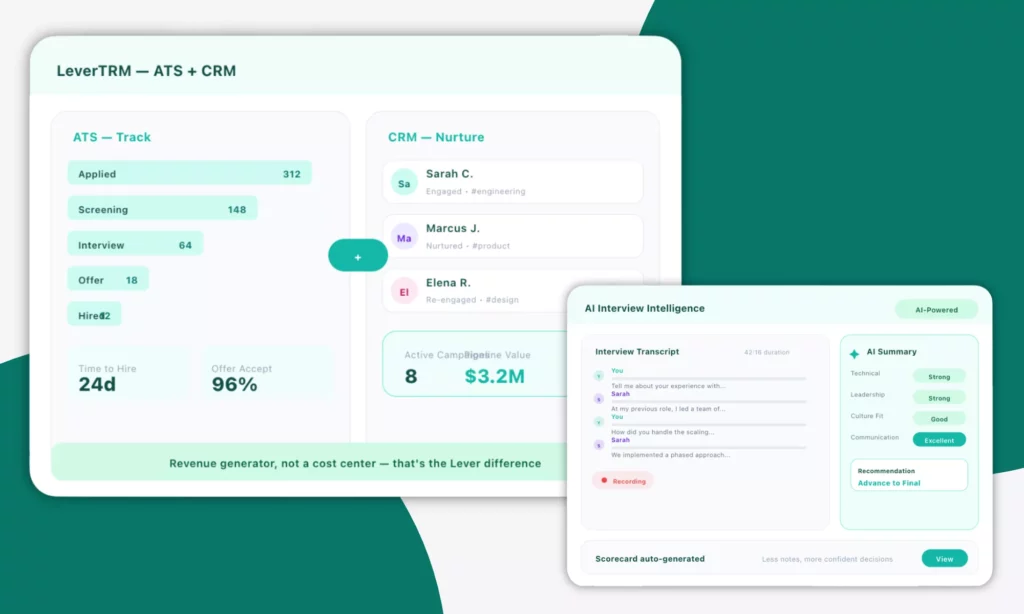
Lever is one of the best recruitment automation tools that combines applicant tracking with candidate relationship management in a single platform (LeverTRM). This makes it well-suited for teams that want to build talent pipelines alongside tracking active applicants. Its AI Interview Companion and sourcing tools add automation depth that pure ATS platforms lack.
Key features:
- Unified ATS + CRM with automated nurture sequences for passive candidates
- AI-powered resume screening, interview transcripts, and smart candidate summaries
- Visual pipeline dashboards with funnel health and recruiter activity reporting
- Automation Hub for workflow triggers across candidate stages
- AI-powered fraud prevention to maintain hiring integrity
Best for: Growing companies running collaborative hiring across multiple departments, with a focus on long-term talent pipeline management.
Limitations:
- Advanced analytics and CRM features are often locked behind higher tiers.
- Pricing scales by total headcount, not recruiter seats. This makes costs unpredictable as teams grow.
Pricing: Custom quote. No free trial, only demo.
3. Workable: Full-Featured ATS For SMBs
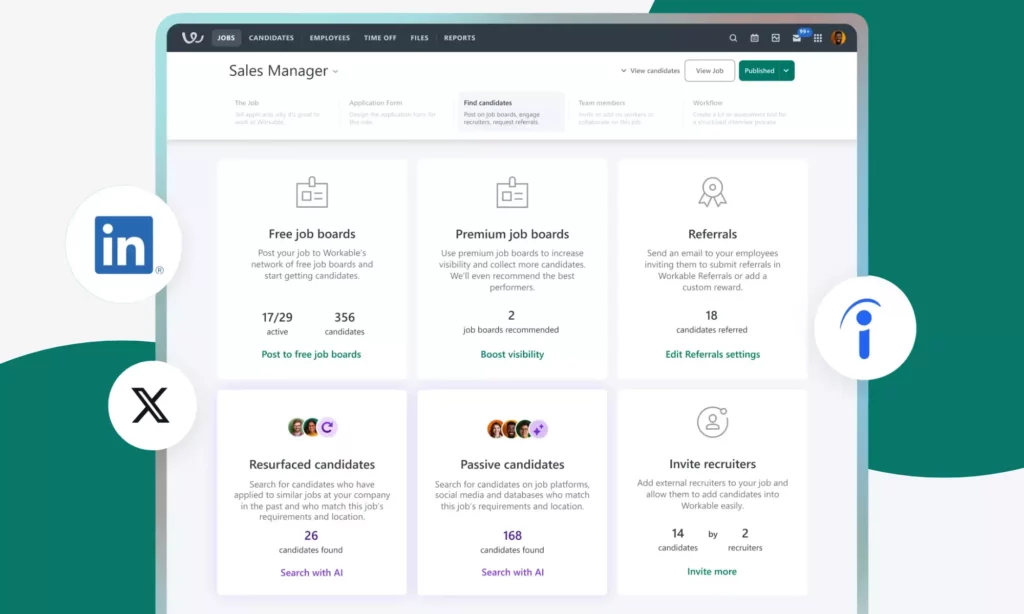
Workable is an all-in-one HR and recruitment automation platform that supports companies finding, recruiting, and managing employees. It combines AI-powered sourcing across 400M+ candidate profiles with job distribution to 200+ boards, automated screening questions, and pipeline management in one interface. For this reason, the tool is the best choice for teams without dedicated recruiting operations.
Key features:
- AI sourcing engine that recommends qualified candidates based on job ads from 400M+ passive candidate profiles
- Automated job posting to 200+ boards with screening question templates
- Self-scheduling, email automation, and mobile-friendly candidate experience
- Strong candidate evaluation with standard interviews, AI-powered candidate screening, and science-backed assessments
- Built-in reporting with BI tool integration for deeper analysis
- Deep integrations with email & calendar apps, video conferencing apps, and 70+ HR tools
Best for: SMBs and growing teams that need a reliable, easy-to-implement ATS without a heavy setup process.
Limitations:
- Automation depth is more limited than AI-first platforms, with no advanced candidate matching or predictive analytics.
- Teams scaling beyond 200 employees often need to supplement with dedicated sourcing and CRM tools.
Pricing: Start at $299/month (billed annually), with a 15-day free trial.
4. Ashby: Data-Driven Recruiting
Ashby is an all-in-one ATS and recruitment automation platform that uses AI to support high-growth companies to manage the entire hiring process in one place. It helps recruiters overcome the reporting limitations of legacy ATS platforms.
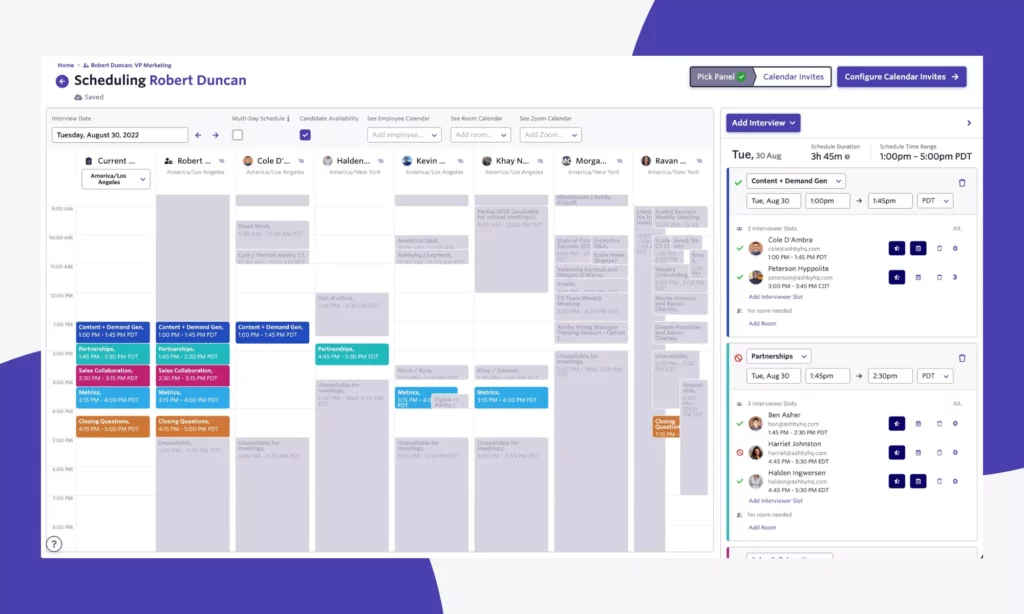
Accordingly, the tool focuses on data analytics by enabling custom dashboards, funnel conversion tracking by source and department, recruiter capacity planning, and a report builder that replaces the need for a separate BI tool. It combines this with built-in scheduling, CRM, and AI filtering in one platform.
Key features:
- Custom analytics dashboards with unlimited report building and real-time funnel metrics
- Ashby Assistant: Reviews applicants, filters candidates, analyzes pipelines, and more using natural language queries
- Custom AI agents that act on a company’s hiring data
- Native scheduling with automatic interview summaries and AI-generated notes
- Built-in CRM with sourcing workflows and tag-based candidate segmentation
Best for: Data-driven recruiting teams at Series B–D tech companies (50-2,000 employees) that have outgrown a simpler ATS and want deep operational visibility without a separate analytics tool.
Limitations:
- Steeper learning curve than Greenhouse or Lever.
- Not suited for high-volume hourly hiring.
Pricing: Starts at $300/month (for 1-10 employees). No free trial.
Best Tools For Sourcing, CRM, And Candidate Pipeline Management
These tools help teams find passive candidates, build proactive pipelines, and run multi-touch outreach. They are typically layered on top of an existing ATS rather than replacing it.
5. Gem: AI-Native Platform With Sourcing, CRM, And ATS
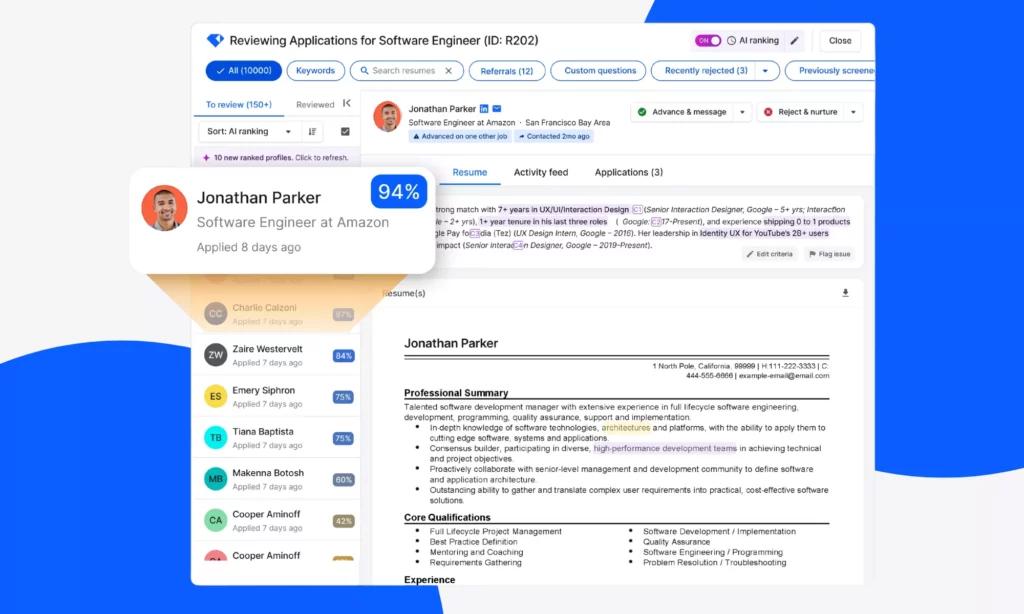
Gem started as a sourcing and CRM tool. But it has evolved into a full recruiting platform that can replace or sit alongside an existing ATS. The platform features AI sourcing agents that can search across 800M+ profiles, surface past candidates from your own database, and prevent duplicate outreach. These AI capabilities help accelerate hiring by up to 5x and reduce costs by 30-50%.
Key features:
- AI-powered sourcing and outreach that lets recruiters to find candidates across 800M+ profiles with talent rediscovery for past applicants
- Application Review Agent that evaluates past interactions and qualifications to find the most qualified candidates
- CRM hub that gathers every candidate interaction from ATS, LinkedIn, email, and past applications to manage candidate relationships, track engagement, and prevent duplicate outreach
- Multi-stage outreach automation with ATS sync and scheduling integration
- End-to-end analytics across the full recruiting funnel
- AI-powered fraud detection that helps recruiters avoid suspicious applications and focus on real candidates
Best for: Mid-to-large teams that want to combine sourcing, CRM, and pipeline management in one platform, or enhance an existing ATS with a dedicated sourcing and engagement layer.
Limitations:
- Users report dashboard customization friction and occasional data sync lags with major ATS platforms.
- Pricing is modular, which means costs can climb as teams layer on additional features.
Pricing: Start at $135/month, with a 7-day free trial.
6. hireEZ: High-Volume Outbound Sourcing
hireEZ (formerly Hiretual) is one of the most established AI sourcing platforms, used by enterprise teams at companies like Amazon, Intel, and Deloitte. With deep ATS integration, the recruitment automation tool connects candidate profiles across 800M+ public web sources, syncs sourced candidates directly into existing pipelines, and enriches contact data.
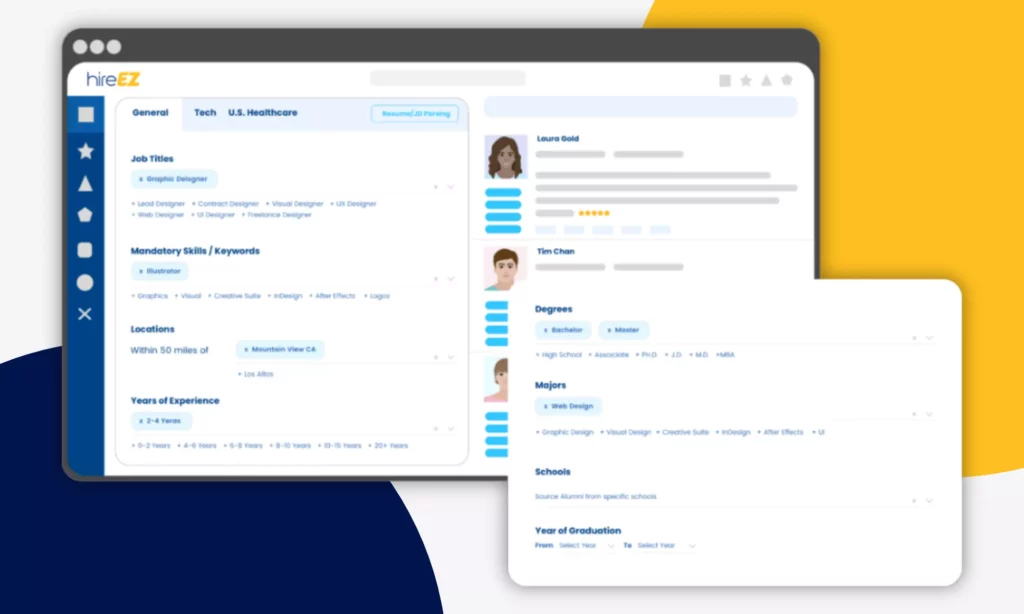
Besides, the platform offers EZ Agent. This enterprise AI agent that automates multi-channel outreach sequences, from finding talent instantly to managing pipelines effortlessly.
Key features:
- AI matching across 800M+ profiles from GitHub, LinkedIn, and 45+ platforms
- Automated outreach sequences with verified contact data enrichment
- ATS sync for direct pipeline handoff without manual data entry
- AI rediscovery workflows that surface warm candidates from existing databases
- AI-led application review, screening, and scheduling
- Real-time analytics in hiring processes, candidates, and market
Best for: Enterprise recruiting teams running high-volume outbound sourcing across multiple roles simultaneously, particularly for technical and specialized positions.
Limitations:
- Core ATS and CRM capabilities are less mature than dedicated platforms. So, most teams use hireEZ alongside an existing ATS rather than replacing it.
- Data accuracy on contact information varies by region and role type.
Pricing: Custom quote. A 14-day free trial.
7. SeekOut: Specialized And Diversity-Focused Sourcing
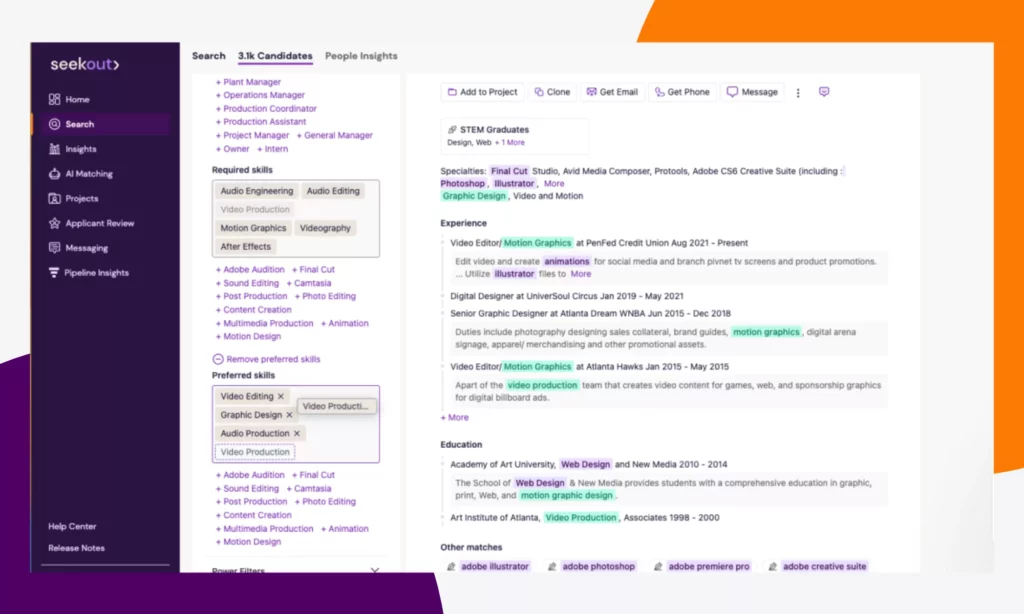
SeekOut is a recruitment automation tool that uses agentic AI to find candidates with rare skill combinations or specific background filters. Its autonomous agents can find, evaluate, and engage candidates with very specific certifications, from niche engineering roles to security clearances. Going beyond profile connection, its talent intelligence layer provides market availability data and diversity analytics to streamline the hiring process.
Key features:
- A suite of AI agents (Rubric Creator, Candidate Finder, Outreach Expert) that build hiring rubrics, find qualified candidates, and create personalized outreach
- Deep search filters across technical skills, certifications, diversity attributes, and career trajectory
- 330M+ underrepresented candidate profiles with diversity sourcing filters
- Talent rediscovery with internal mobility insights for identifying existing employee fit
- Market intelligence dashboards showing candidate availability by skill, location, and title
Best for: Enterprises and regulated industries that need precise sourcing for hard-to-fill roles, with a specific need for diversity pipeline building or internal talent visibility.
Limitations:
- Higher cost than general sourcing tools. This makes it harder to justify for teams with broad rather than specialized sourcing needs.
- CRM and outreach features are less robust than Gem or hireEZ.
Pricing: Starts at $179/month (billed annually), with a 14-day free trial.
Best Tools For Scheduling And Candidate Engagement
These tools eliminate coordination bottlenecks. In other words, they replace calendar back-and-forth with automated scheduling and engage candidates across touchpoints through conversational AI.
8. GoodTime: Enterprise Interview Scheduling
GoodTime is an AI-powered interview scheduling tool that helps large enterprises run complex, multi-panel interview processes.
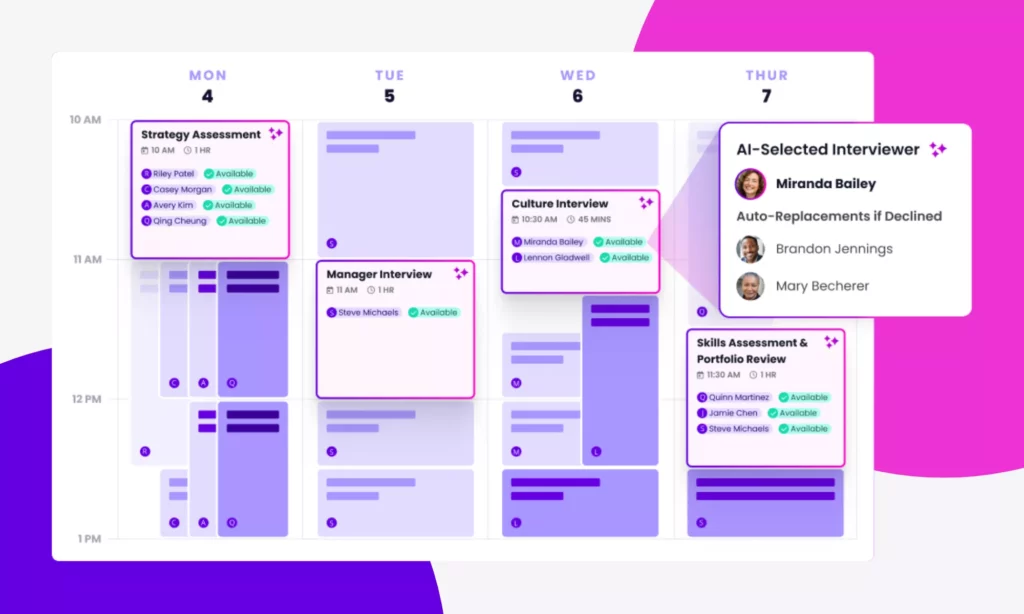
The tool provides AI agent orchestration to automate not just scheduling but also candidate advancement, recruiter briefing requests, and pre-interview communication. Additionally, it uses interviewer analytics to help TA (Talent Acquisition) leaders manage bandwidth across large hiring teams. This way, GoodTime can eliminate manual scheduling, reduce time-to-hire by 88%, and lower administrative errors by 62%.
Key features:
- Cori: An AI agent that autonomously screens candidates, schedules interviews, follows up, triggers workflows, detects conflicts, and more
- Panel scheduling automation with real-time calendar sync across all participants
- AI-powered interviewer capacity planning based on availability trends and decline rates
- Automated candidate advancement, reminders, and recruiter Slack alerts
- Detailed analytics on interviewer performance, scheduling efficiency, and pipeline velocity
- GoodTime Meet: A free meeting scheduling feature that enables unlimited scheduling links, routing logic, deep integrations with platforms like Salesforce, meeting analytics, and colleague relationship management
Best for: Enterprise recruiting teams running high-volume or complex multi-stage hiring processes where interviewer coordination and scheduling delays are the primary bottleneck.
Limitations:
- Feature-heavy interface with a steeper learning curve than simpler scheduling tools.
- Limited flexibility in scheduling algorithms for organizations with highly non-standard workflows.
Pricing: Custom quote. No free trial.
9. ModernLoop: Scalable Interview Scheduling for Technical Recruiting
ModernLoop is a purpose-built interview scheduling and recruiting automation tool. It helps HR professionals save hours to interview coordination, reduce manual administrative work, and enhance candidate experience.
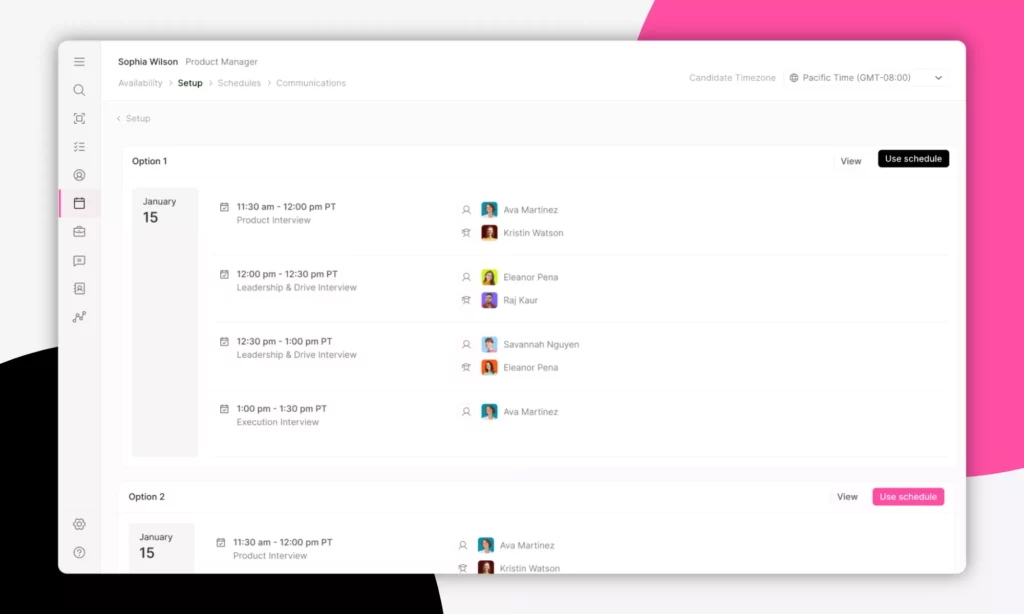
ModernLoop is better know for its Zero-Click Scheduling that triggers automatically when a candidate advances to a new ATS stage. This eliminates the need for a dedicated recruiting coordinator to manage calendar logistics manually. Besides, the tool uses AI agents to automate interviews 24/7 and deliver consistent experiences. Customers like Instacart have used it to triple interview volume without adding more coordinators.
Key features:
- Zero-Click Scheduling that automatically selects interviewers and sends invites when a candidate advances in the ATS
- Interviewer Training module that tracks readiness and blocks unqualified interviewers from being scheduled
- AI-powered load balancing based on real-time availability, workload, and time zone across the interview panel
- Branded Candidate Portal giving applicants self-serve access to their interview schedule, company info, and next steps
- Slack, Zoom, and Google Meet integration with automated notifications and real-time rescheduling
- Customizable Taylor AI that automatically handles millions of interviews simultaneously, answers candidate questions, delivers a consistent experience with assessment criteria, and improves continuously
Best for: Mid-to-large engineering and tech companies that run high interview volumes and want to reduce interviewer burnout, scheduling conflicts, and coordination overhead.
Limitations: UI requires a learning curve and some users report limited flexibility in automated email customization.
Pricing: Start at $450/month with a free trial.
10. Humanly: Mid-Market Tool for Early-Stage Engagement With DEI Focus
Humanly is an AI-powered conversational screening and interview scheduling tool. In particular, it automates early-stage candidate engagement, pre-screening, and scheduling without requiring complex setup, especially for frontline, hourly, and fast-moving teams.
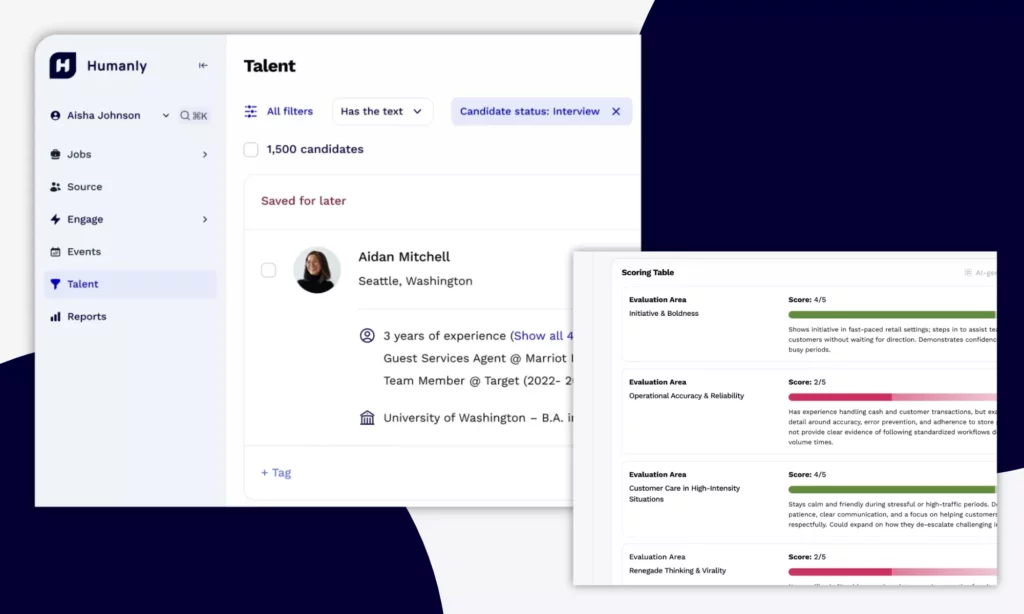
The tool also features its DEI-focused conversation design that helps teams reduce bias in early screening interactions. According to various businesses like Trinity Health or DK Security, Humanly increases daily interviews 8 times, reduces interview time by 44%, and cuts response times.
Key features:
- Conversational AI screening integrated directly into scheduling workflows
- Post-screening scheduling prompts that sync automatically with ATS and calendar
- DEI-conscious conversation design with bias-reduction guardrails built in
- Logic-based follow-ups and outreach automation across 600M+ profiles of passive candidates
- AI-powered interviews integrated into ATS to ask structured questions and score candidates automatically
Best for: Mid-market businesses that want to reduce early-stage hiring workload without enterprise-level complex setup.
Limitations:
- Sourcing capabilities are more limited than dedicated sourcing tools.
- Struggles to understand complex queries, hence reducing a recruiter experience.
Pricing: Custom quote, with a free trial.
Comparison Table Of Best Recruitment Automation Tools
| Tool | Description | Best For | Free Trial? | Pricing |
|---|---|---|---|---|
| Greenhouse | An all-in-one ATS and recruitment automation tool that manages the entire hiring process, from candidate sourcing to onboarding. | Structured, compliance-focused hiring at scale | ❌ | Custom |
| Lever | An advanced ATS and CRM (Candidate Relationship Management) platform that finds, engages, and hires top talent. | Growing teams that want ATS and CRM in one place | ❌ | Custom |
| Workable | A comprehensive ATS and hiring tool that covers every recruitment process, from job posting to interview scheduling and final offers. | SMBs that need a full-featured ATS with transparent pricing | ✅ | $299/month |
| Ashby | AI-powered ATS software for fast-growing companies that handles application tracking, CRM, scheduling automation, and advanced analytics. | Analytics-driven recruiting ops | ❌ | $300/month |
| Gem | A full recruitment tool that provides AI agents to mainly support candidate sourcing and candidate management. | Teams that want sourcing, CRM, and ATS in one AI-native platform | ✅ | $135/month |
| hireEZ | An agentic AI recruitment tool that features deep ATS integrations and the EZ Agent to automate multi-source candidate outreach. | High-volume outbound sourcing across multiple talent databases | ✅ | Custom |
| SeekOut | A talent intelligence and recruitment platform that sources, screens, and engages specialized candidates. | Specialized and diversity-focused sourcing | ✅ | $179/month |
| GoodTime | An AI-powered tool that automates scheduling, candidate advancement, and more for complex, multi-panel interview processes. | Enterprise interview scheduling with panel coordination | ❌ | Custom |
| ModernLoop | An automated interview scheduling platform that automates recruiting operations. | Engineering-heavy teams that need interviewer load balancing at scale | ✅ | $450/month |
| Humanly | A conversational screening and scheduling tool that automates early-stage candidate engagement. | Mid-market teams automating early-stage engagement with DEI focus | ✅ | Custom |
Related reading:
- Agentic AI Architecture: Components, Workflow, Design Patterns
- Types of AI Agents: Key Categories and When to Use Each
- AI Agent Vs. Chatbot: Key Differences & Which One Do You Need?
Our services relevant to include custom AI software development, workflow automation and system integration, and end-to-end mobile and web app builds for HR operations. Unlike agencies that stop at prototypes or generic chatbot demos, Designveloper combines AI engineering, workflow design, and software delivery to build solutions around a company’s real process. Accordingly, these solutions help reduce manual work and help teams scale faster.
How To Choose The Right Recruitment Automation Tool
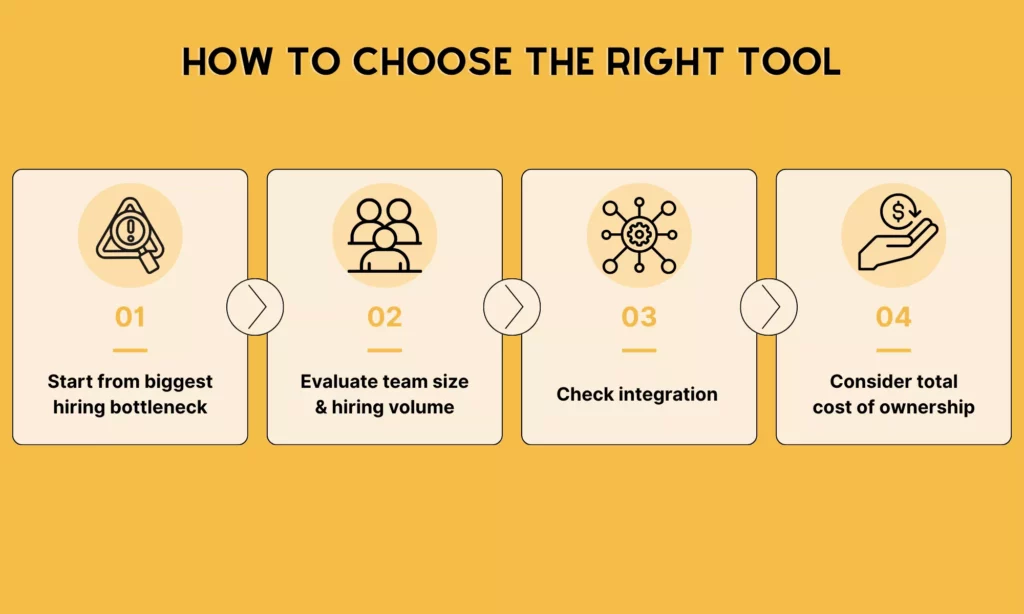
Many teams often jump into product evaluations without a clear picture of what they actually need to fix. As a result, they end up selecting tools based on interface impressions rather than workflow fit. Before booking a demo, you should follow these four steps to cut that risk down:
Start From Your Biggest Hiring Bottleneck, Not The Feature List
The right starting point is identify where your hiring process breaks down most consistently, not compare a feature list. Is time disappearing into interview coordination? Are sourced candidates going cold between touchpoints? Is the team rebuilding pipelines from scratch every time a new role opens?
The answer to that question should determine which category of tool you evaluate first. A team losing hours to scheduling coordination needs a dedicated scheduling platform before it needs a better ATS. By matching the tool category to the bottleneck first, you avoid buying a broad platform that automates everything but does not handle your biggest problem.
Match The Tool To Your Team Size And Hiring Volume
Not every tool meets every business demand. Some platforms are built for enterprise governance but become unnecessarily complex for teams running fewer than 50 hires per year. Meanwhile, others that are optimized for simplicity may struggle to handle an increasing hiring volume and team size.
As a general guide:
- SMBs and growing teams under 200 employees typically benefit most from tools that are fast to deploy. These tools should be easy for hiring managers to adopt without training and offer transparent pricing. So, recruitment automation tools like Workable are best options here.
- Mid-market businesses tend to need stronger workflow control, CRM depth, and reporting to support structured hiring across multiple departments. So, Lever, Ashby, or Gem is typically suitable.
- Enterprise teams prioritize compliance, global process consistency, permissions management, and deep integration with existing HRIS infrastructure. That is why Greenhouse and GoodTime are common choices at this level.
Check Integration Compatibility Before Shortlisting
Integration gaps are the most common reason a well-reviewed tool fails in practice. For example, a scheduling tool that does not connect with your ATS fails to connect recruiting data for automation.
Before shortlisting any tool, map your current stack (e.g., ATS, HRIS, calendar, communication channels, and assessment tools). Then, verify whether recruitment automation tools natively support integration with your current stack.
Factor In Total Cost Of Ownership
Published pricing rarely reflects what teams actually pay. Most recruitment automation tools layer implementation fees, per-seat scaling, add-on modules, and annual contract minimums on top of a base price. This means the real cost of a tool often looks significantly different after procurement than it did during the demo.
When requesting quotes, ask vendors specifically about:
- Implementation and onboarding fees
- Which features are included vs. gated behind higher tiers
- How pricing scales as headcount or hiring volume grows
- Minimum contract length.
For tools without public pricing, budget for a negotiation process and request itemized quotes rather than bundled packages. If your team skips this step, you often sign contracts priced for your current headcount and face significant cost increases within 12–18 months as the organization scales.
Continue reading:
- Custom Software Development: How It Can Drive Your Business Growth
- Software Development Process: A Practical Guide For Teams
- 10 Must-Have AI Apps And How They Work
Best Practices For Implementing Recruitment Automation Tools
Choosing a recruitment automation tool is one thing. But how companies can implement it is another thing. Even a strong platform creates new friction if automation is rolled out without clear priorities, ownership, and review points. Below are several practices to deploy the tool effectively in real hiring processes:
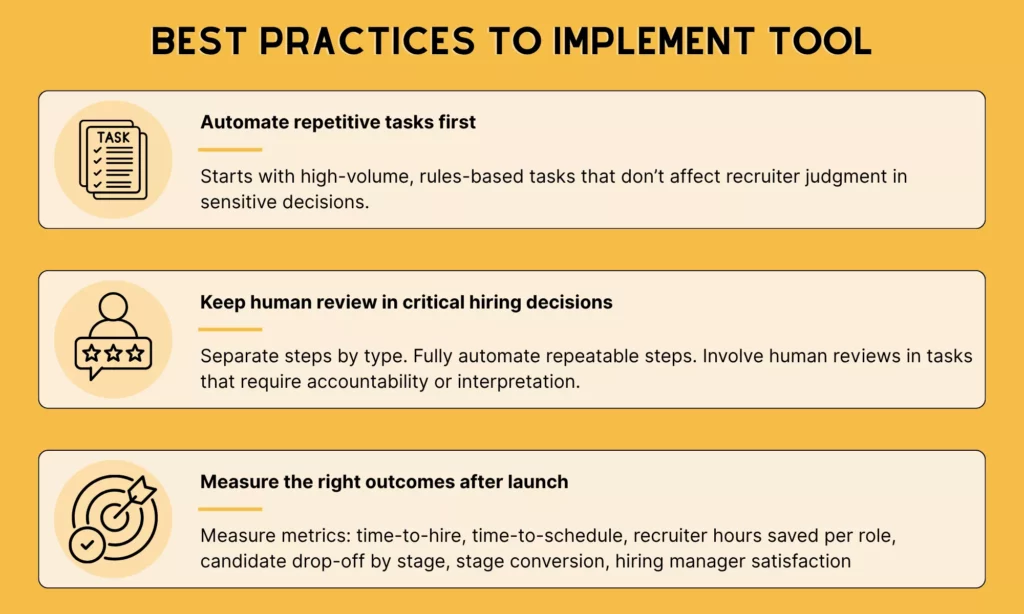
Automate Repetitive Tasks First
Starts with the tasks that are high-volume, rules-based, and do not affect recruiter judgment in sensitive decisions.
Interview scheduling is the highest-impact first step for most teams. A recruiter coordinating 20 roles per month can spend 8-10 hours on finding candidates, sending links, and handling reschedules. By automating self-scheduling and reminders, recruiters can eliminate that overhead.
When deploying recruitment automation tools, start with one task, run it through one role type, confirm it works, then expand.
Keep Human Review In Critical Hiring Decisions
Automation handles execution well. It does not handle judgment well, though. So, human still plays an important role in making critical recruitment decisions.
The clearest way to apply this in practice is to separate steps by type. Repeatable steps (e.g., scheduling, routing, reminders, document collection) are safe to automate fully. Meanwhile, steps that require interpretation or accountability (e.g., evaluating a candidate’s fit or making a final offer decision) need a human owner, even when AI provides a recommendation or score.
When AI-assisted ranking or matching enters the workflow, that principle becomes more important. A tool that surfaces a ranked shortlist can save time on initial review. But if no one on the team can explain why a candidate was ranked third versus seventh, the process has a compliance and accountability gap that automation created rather than solved.
Measure The Right Outcomes After Launch
The right metrics show whether automation is reducing process friction or just shifting the workload somewhere else.
Below are six metrics that evaluate how effectively the tool works:
| Metric | What it measures | Target / signal |
|---|---|---|
| Time-to-hire | Full cycle from job open to offer accepted | 30-45 days benchmark (mid-size). Should improve within 2–3 hire cycles. |
| Time-to-schedule | How long it takes from recruiter outreach to confirmed interview | Target below 24 hours for standard roles. If it is still taking 3-5 days, the scheduling trigger is not firing correctly or candidates are not receiving the link. |
| Recruiter hours saved per role | Direct operational impact of automation | Must be measurable. If not, automation has not changed how time is spent. |
| Candidate drop-off by stage | Where candidates go silent in the funnel | If drop-off spikes at a specific stage after automation is introduced, the automated communication at that step is creating friction rather than reducing it. |
| Stage conversion rates | Whether automation is improving pipeline quality or just moving candidates through faster | Higher screen-to-interview rate = better matching. Lower = over-tight criteria. |
| Hiring manager satisfaction | Coordination quality at recruiter-manager handoff | If managers report that the process feels less coordinated after automation, the workflow has gaps in the handoff points between recruiter and manager tasks. |
Review these metrics after the first full cohort of automated hires, not after individual roles. Patterns only become visible at volume.
When To Build A Custom Recruitment Automation Solution
Off-the-shelf tools cover most hiring workflows well. But there are situations where no packaged product fits cleanly, and forcing one into place creates more workarounds than it eliminates.
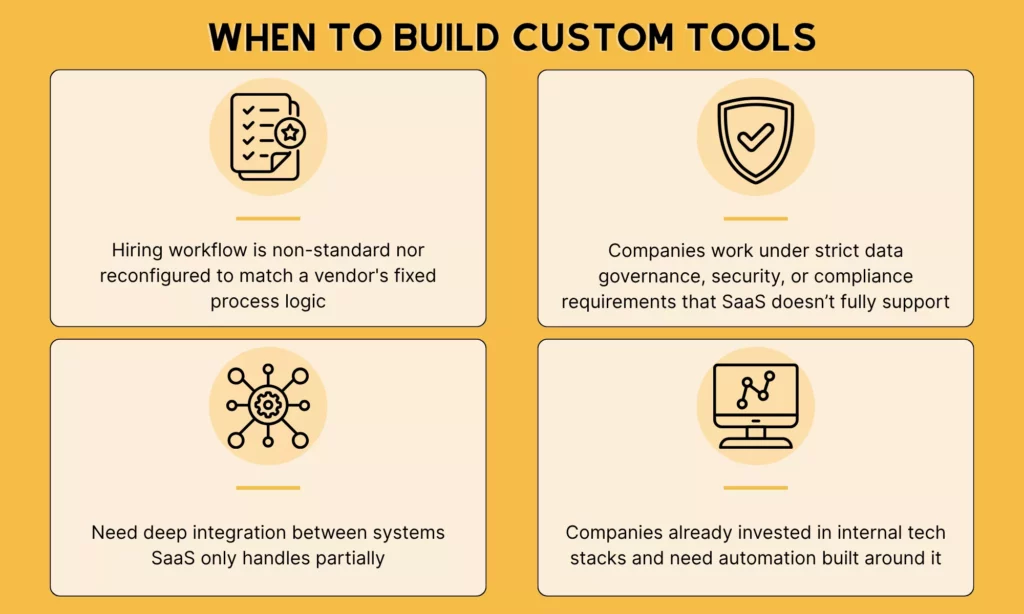
Custom development becomes the more practical path when:
- Your hiring workflow is non-standard and cannot be reconfigured to match a vendor’s fixed process logic
- Your organization operates under strict data governance, security, or compliance requirements that SaaS platforms don’t fully support
- You need deep integration between recruiting, HR, payroll, and internal systems that packaged tools handle only partially
- You’ve already invested in an internal tech stack and need automation built around it, not on top of it
In these cases, the question shifts from “which tool do we buy?” to “what do we need to build, and who builds it?”
What Custom Recruitment Automation Typically Involves
Custom recruiting software is not a single product. It is a scoped build designed around your specific workflow. Depending on the organization’s needs, software development companies can develop:
- A purpose-built ATS with role-specific pipeline logic
- A workflow automation layer that connects existing tools through custom APIs
- An internal candidate portal or hiring manager dashboard
- An AI-assisted screening and routing system built on your own data.
The advantage over off-the-shelf tools is control. Accordingly, custom systems follow your process exactly, integrate with what you already use, and scale without per-seat pricing that compounds as headcount grows.
But the tradeoff is time and upfront investment. That is why most businesses consider custom builds only after confirming that no packaged solution fits without significant compromise.
How Designveloper Can Help Build Custom Recruiting Solutions
If your organization has reached that conclusion, you may be looking for a reliable, experienced partner to build a custom hiring automation tool. Designveloper is a Vietnam-based custom software development and automation company. We have over a decade of experience building business-critical systems for HR, operations, and enterprise teams.
If your team has mapped hiring bottlenecks, evaluated off-the-shelf options, and concluded that a tailored solution is the right path, Designveloper offers the development capacity to build that system.
Ready to scope your build? Talk to our team to discuss your requirements and get an initial consultation.
For a deeper dive, read:
- AI In Software Development: Changing How Software Gets Built
- 13 Different Types of Software Development Services
- What Is Software Development Outsourcing?
FAQs About Recruitment Automation Tools
What Are Recruitment Automation Tools?
Recruitment automation tools are software platforms that replace manual, repetitive steps in the hiring process. It helps recruiters spend less time on coordination and more time on evaluation and relationship-building.
Some tools automate one specific step well, such as interview scheduling or passive candidate outreach. Meanwhile, others cover the full hiring funnel as an end-to-end platform.
Are Recruitment Automation Tools The Same As An ATS?
No. An ATS is a system of record. It tracks applicants, manages pipeline stages, and stores candidate data. A recruiting CRM adds a proactive layer, helping teams build talent pools and nurture passive candidates before a role opens. Meanwhile, recruitment automation tools apply workflow logic to help teams build talent pools, schedule interviews, route candidates between stages, an more without manual intervention.
Which Recruitment Tasks Should Be Automated First?
Start with the tasks that are highest in volume, lowest in judgment risk, and clearest to measure. For most teams, interview scheduling are often automated first because it consumes the most recruiter time and requires no interpretive decision-making. Avoid automating tasks that involve evaluating candidate fit or making final hiring decisions, as those require human ownership.
Can Recruitment Automation Improve Diversity Hiring?
It depends on whether recruitment automation tools support diversity-focused hiring. Many tools prioritize structured screening criteria, standardized scorecards, and broader job distribution. This thus reduces the likelihood of recruiting candidates from underrepresented groups.
But tools like SeekOut also include diversity-specific sourcing filters. This feature helps expand the candidate pool beyond the channels a team would typically search.
What Features Should Buyers Prioritize In Recruitment Automation Software?
Start with workflow coverage by asking: does the tool automate the specific steps where your team loses the most time? Then check integration compatibility with your existing ATS, HRIS, and calendar stack. After that, evaluate reporting depth, recruiter usability, and how the tool handles AI-assisted decisions.
Also published on

Share post on










Related Articles


Best AI Chatbots For Businesses In 2026: Compare Tools By Use Case
Best AI Chatbots For Businesses In 2026: Compare Tools By Use Case Published September 21, 2026
Best Claude Model in 2026: Fable, Opus, Sonnet and Haiku
Best Claude Model in 2026: Fable, Opus, Sonnet and Haiku Published September 18, 2026
Generative AI Applications: 20 Practical Use Cases Across Industries
Generative AI Applications: 20 Practical Use Cases Across Industries Published September 18, 2026



















