
















LangChain Vs LangGraph Vs Langflow Vs LangSmith: Which Is Better?

KEY TAKEWAYS:
- LangChain, LangGraph, Langflow, and LangSmith solve different parts of the AI lifecycle rather than competing as one interchangeable tool.
- Langflow is best for visual prototyping, LangChain for application logic, LangGraph for stateful agent control, and LangSmith for tracing, evaluation, debugging, and monitoring.
- Real projects often combine the tools: prototype visually, build logic in code, add state and branching, then observe and evaluate production behavior.
- Tool choice should follow the project bottleneck: demos, chain logic, multi-step agent execution, or production reliability.
- Production AI systems still need security, data governance, testing, human review, integration design, and deployment ownership around these workflow tools.
LangChain vs LangGraph vs Langflow vs LangSmith is not a winner-takes-all comparison. LangChain helps developers build LLM application logic, LangGraph controls stateful and branching agent execution, Langflow gives teams a visual way to prototype AI pipelines, and LangSmith traces, evaluates, debugs, and monitors LLM applications. The better tool is the one that matches the part of the AI lifecycle you are working on.
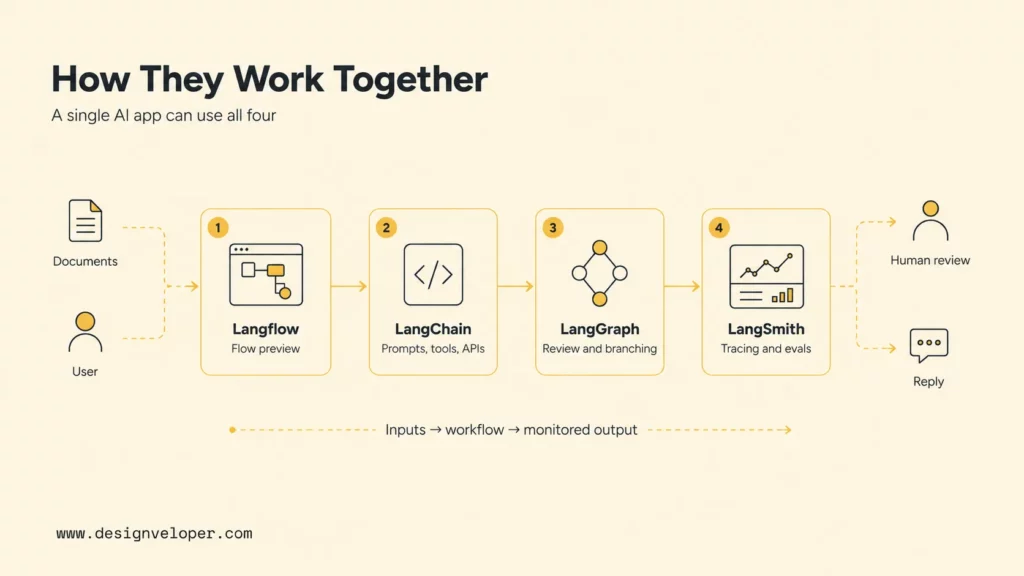
Many teams confuse these names because the tools often appear in the same project. A RAG chatbot may start as a Langflow canvas, move into LangChain code, use LangGraph for human approval and retry loops, and rely on LangSmith to inspect traces and evaluate answer quality. Treating the tools as layers instead of rivals makes the decision much easier.
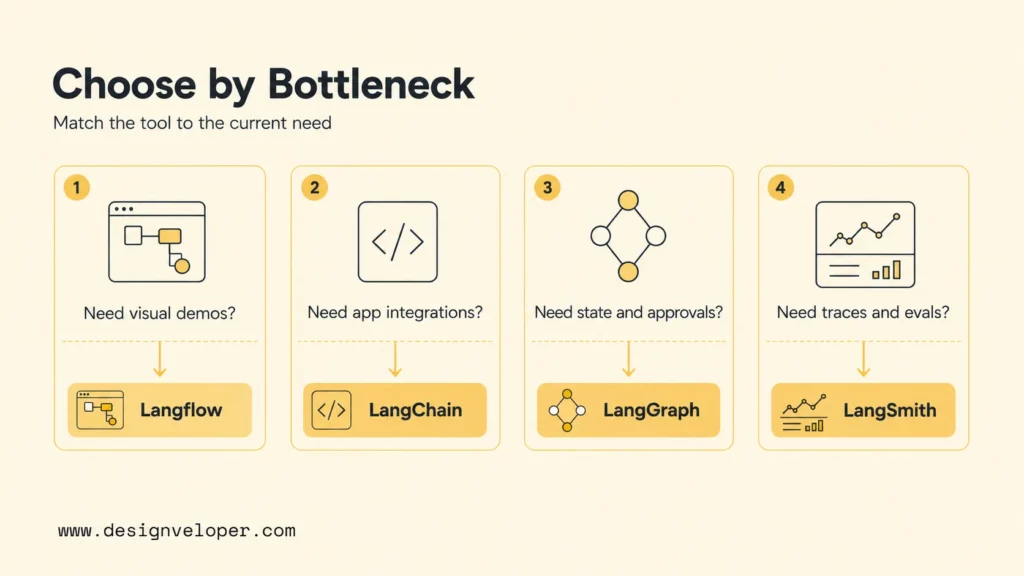
Quick decision guide: Use Langflow when the team needs visual iteration, demos, and stakeholder alignment. Use LangChain when the team needs coded integrations, retrievers, tools, prompts, and application logic. Use LangGraph when the workflow needs state, loops, routing, persistence, or human review. And use LangSmith when the AI app needs tracing, evaluation, debugging, feedback, and production monitoring.
| Need | Best fit | Why it fits | Production note |
|---|---|---|---|
| Prototype an AI workflow quickly | Langflow | Visual components make the flow easier to explain and test with non-specialists. | Rebuild or harden the flow before high-risk production use. |
| Build LLM app logic | LangChain | It connects models, prompts, retrievers, tools, and application code. | Keep interfaces testable and avoid hiding business logic inside prompts. |
| Control stateful agent execution | LangGraph | It supports durable execution, streaming, human-in-the-loop flows, and long-running agents. | Use explicit state, checkpoints, and failure paths. |
| Debug and monitor behavior | LangSmith | It provides traces, evals, datasets, dashboards, cost, latency, and production observability. | Create regression datasets before expanding user access. |
Recommended for you:
- LangChain Vs MCP: How They Compare For AI Agent Workflows
- MCP Vs AI Agent: How They Fit Into Modern AI Workflows
- LangGraph Vs LangChain: How To Compare Agent Frameworks
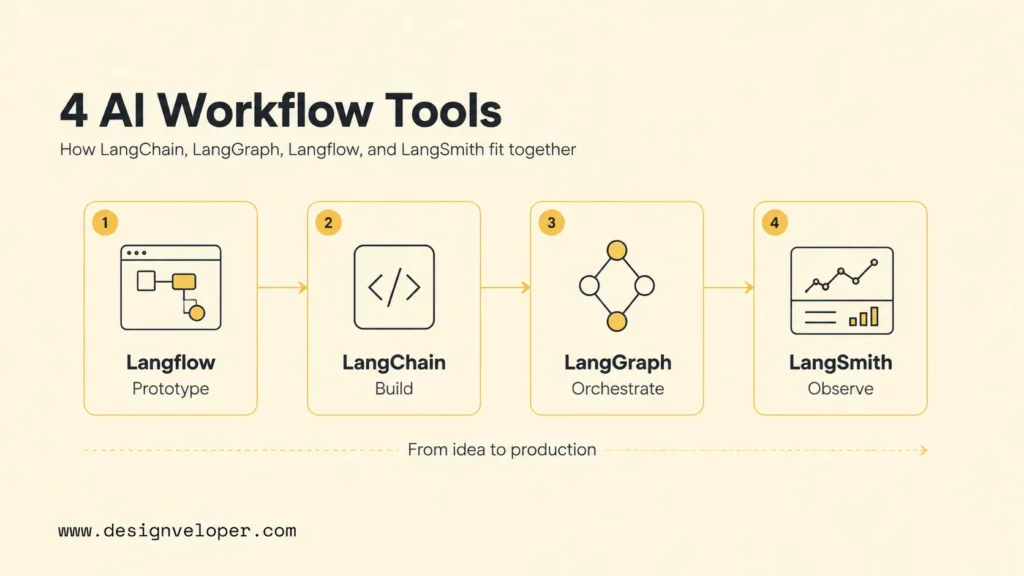
LangChain, LangGraph, Langflow, And LangSmith In One View
LangChain is the application-building layer. The LangChain documentation describes a platform for building, testing, deploying, and monitoring agents, while the Python reference positions the main LangChain package as the entry point for implementations used in LLM applications. In practical terms, LangChain is where developers connect models, prompts, retrievers, vector stores, tools, structured outputs, and application code.
LangGraph is the orchestration layer for stateful agents and workflows. The official LangGraph overview says LangGraph focuses on capabilities such as durable execution, streaming, and human-in-the-loop control. LangGraph is useful when a workflow cannot be represented as a simple one-way chain because it needs routing, retries, approvals, loops, state, or AI agent orchestration.
Langflow is the visual prototyping layer. The Langflow documentation presents Langflow as a way to drag and drop components to build and test AI application workflows. The Langflow GitHub repository describes a visual authoring experience with built-in API and MCP servers, support for major LLMs and vector databases, and a growing component library. That makes Langflow useful when a team wants to see the flow before committing to code.
LangSmith is the quality and observability layer. The official LangSmith observability documentation says LangSmith provides visibility from individual traces to production-wide performance metrics. The LangSmith platform page highlights tracing, debugging, evaluation, monitoring, cost, latency, errors, and qualitative metrics. That makes LangSmith important after a prototype becomes a real product with users, incidents, and quality expectations.
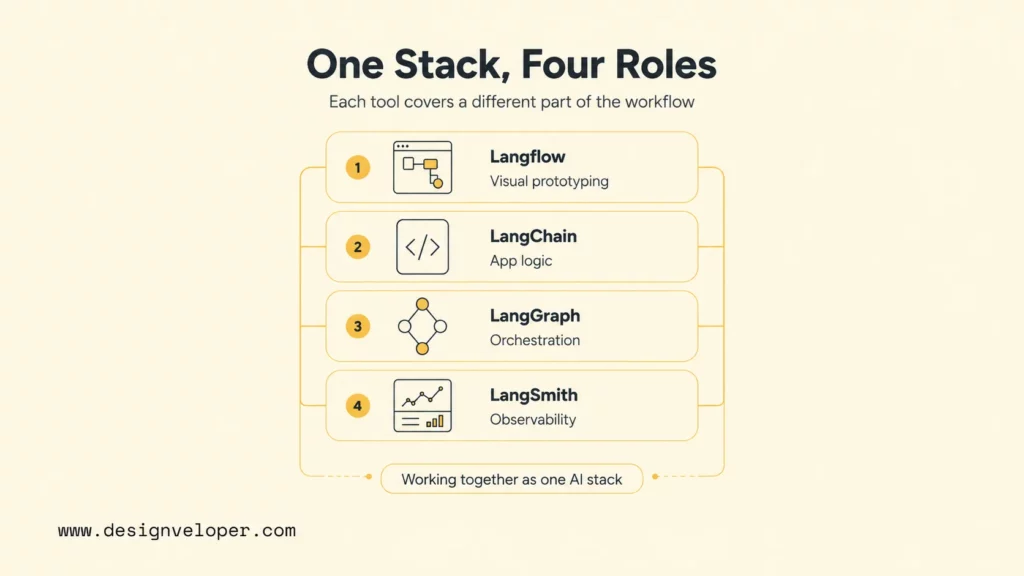
These Tools Solve Different Parts Of The AI Lifecycle
The tools are not direct competitors because each one answers a different engineering question. LangChain asks: how should the application connect models, prompts, tools, retrievers, and data? LangGraph asks: how should the workflow move through state, decisions, loops, pauses, and human approval? Langflow asks: how can the team prototype and communicate the flow visually? LangSmith asks: what happened, why did it fail, and how can quality be measured over time?
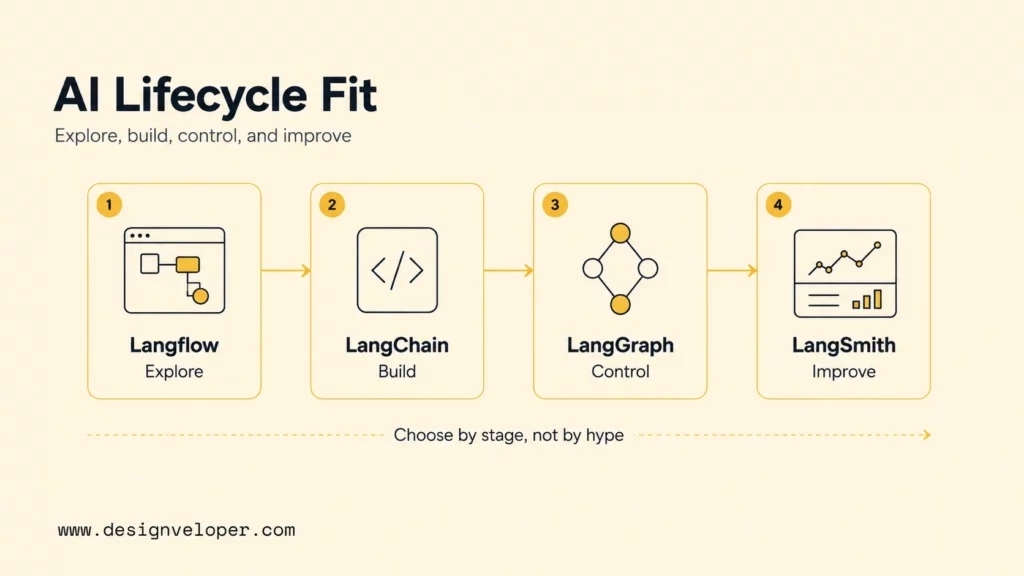
A useful mental model is lifecycle fit. Langflow helps with exploration and alignment. LangChain helps with implementation. LangGraph helps with runtime control. LangSmith helps with quality management. Teams can use only one tool for a small proof of concept, but production AI applications often need several layers because prompt quality alone does not solve state, integration, observability, security, or maintenance.
- LangChain handles core application development: models, tools, retrievers, chains, agents, and integrations.
- LangGraph handles workflow orchestration: durable state, branching, retries, loops, human-in-the-loop steps, and long-running agent control.
- Langflow handles visual prototyping: drag-and-drop flows, component testing, stakeholder demos, and quick API exposure.
- LangSmith handles observability and monitoring: traces, evaluations, datasets, feedback, cost, latency, errors, dashboards, and debugging.
Further reading:
- AI Agent Architecture Diagram: How To Design Reliable Agent Systems
- Best AI Agent Frameworks For Building Smarter AI Systems
- Types Of AI Agents: How To Choose The Right Agent For Your Workflow
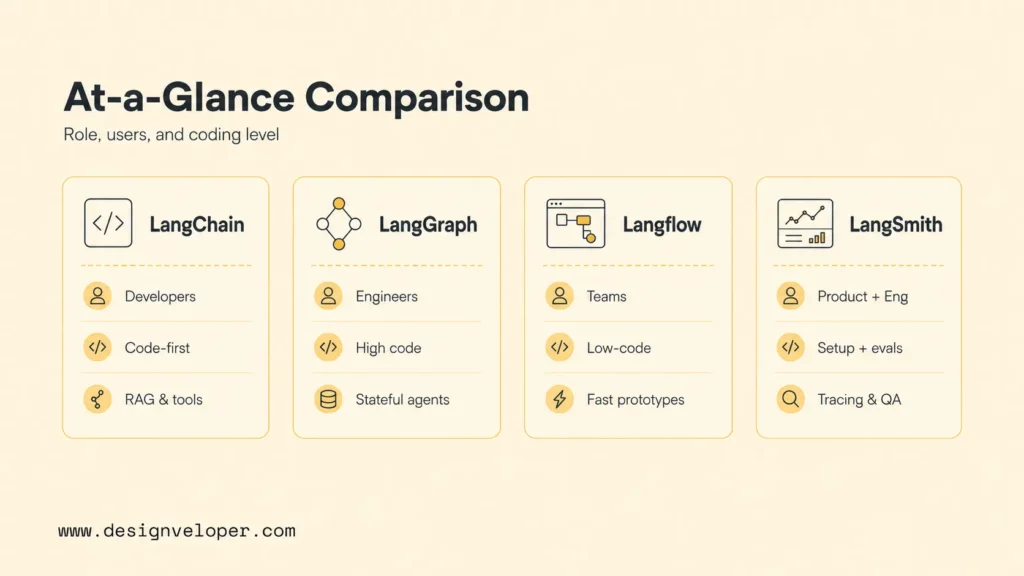
LangChain Vs LangGraph Vs Langflow Vs LangSmith Comparison
The clearest comparison is by production role, not by popularity. LangChain and LangGraph are code-first frameworks. Langflow is more visual and low-code. LangSmith is not primarily a builder; it is an observability and evaluation platform. A mature AI project may use all four, but each one should have a clear responsibility.
| Tool | Primary Role | Best User | Coding Requirement | Best Use Case | Production Role |
|---|---|---|---|---|---|
| LangChain | Core LLM app logic and integrations. | Developers building RAG, tools, agents, and model-connected features. | Medium to high. | Custom LLM applications with real data and services. | Application logic layer. |
| LangGraph | Stateful orchestration and agent control. | Engineers building branching workflows, approvals, loops, and multi-agent systems. | High. | Long-running or stateful agents that need reliability. | Runtime orchestration layer. |
| Langflow | Visual AI workflow prototyping. | Developers, AI builders, product teams, and stakeholders who need fast visual iteration. | Low to medium. | RAG demos, flow design, component experiments, and proof-of-concept APIs. | Prototype and alignment layer. |
| LangSmith | Tracing, evaluation, debugging, and monitoring. | Engineering and product teams shipping LLM apps to users. | Low to medium for setup; higher for custom evals. | Production observability, prompt regression tests, feedback loops, and quality review. | Quality and observability layer. |
For production readiness, LangGraph and LangSmith usually matter most once an AI app leaves the demo stage. LangGraph helps the application resume, route, wait, and recover when tasks take time or need human decisions. LangSmith helps the team inspect what the model saw, what tools were called, how long steps took, where costs rose, and which outputs failed evaluation.
This split also helps teams avoid common architecture mistakes. Do not use Langflow as a substitute for source control, test coverage, and deployment discipline. Do not use LangChain chains as a hidden place for business-critical approval rules. Additionally, do not let LangGraph loops run without budgets, stop conditions, and escalation logic. And you do not want to wait until users complain before adding LangSmith traces and evaluations. Each tool is strongest when its boundary is explicit.
A production AI system is not just a prompt connected to a model. It is a workflow with state, tools, feedback, evaluation, observability, and owners.
How They Work Together In A Real AI App
A real AI app rarely lives inside one tool boundary. Consider an internal policy assistant for a support team. Product managers want to preview the experience. Engineers need to connect documents, permissions, retrieval, and backend systems. Operations leaders need human review on sensitive answers. Engineering managers need traces, regression tests, and monitoring after launch. The four tools can map cleanly to those concerns.
Prototype The Flow With Langflow
Langflow is a strong starting point when the team needs to see the AI workflow. The Langflow visual editor documentation explains that flows are functional representations of application workflows made from components. A team can connect an input, a prompt, a model, a retriever, a vector database, and an output, then discuss whether the flow matches the user journey.
The value is not only speed. Langflow makes hidden assumptions visible. Stakeholders can see where documents enter, where a model responds, and where an API might be exposed. That reduces vague conversations about “adding AI” and turns the discussion into a concrete flow that can be tested and improved.
Build Core Logic With LangChain
LangChain becomes useful when the flow needs robust application logic. Developers can move from a visual concept to code that controls prompts, retrievers, tools, structured outputs, error handling, and integration boundaries. LangChain is especially helpful when the product needs custom logic around multiple model providers, vector stores, databases, APIs, and data transformation steps.
The production risk is over-abstracting. Teams should keep the boundaries clear: retrieval code should be testable, prompt templates should be versioned, tool calls should validate inputs and outputs, and business rules should not live only inside natural-language instructions. LangChain gives useful building blocks, but the team still needs software engineering discipline.
Add State And Branching With LangGraph
LangGraph fits when the workflow is not linear. In an AI agent vs chatbot scenario, a support workflow may need to classify the question, search policy, call an order API, ask for human approval, retry a failed tool, and escalate risky cases. The LangChain v1.0 milestone post describes durable state and built-in persistence for workflows that can resume after interruptions, which is exactly the kind of behavior production agents often need.
LangGraph is also useful for multi-agent systems because the workflow can define who acts next, what state is carried forward, when a loop stops, and where a human can inspect or modify the process. That control is difficult to maintain if the whole app is a single prompt or a loose sequence of calls.
Trace, Evaluate, And Monitor With LangSmith
LangSmith closes the loop by making behavior inspectable. LangSmith can show traces for model calls, tool calls, latency, costs, errors, and outputs. It can also help teams build evaluation datasets, compare versions, and monitor production behavior. The Langflow LangSmith integration docs also show that Langflow can integrate with LangSmith through LangChain API configuration, which reinforces how these layers can work together.
Without LangSmith or a similar observability layer, teams often debug AI apps by reading user complaints and guessing which prompt failed. That approach is too weak for production. A production team needs traces, examples, feedback labels, evaluation scores, and dashboards that reveal whether quality is improving or degrading.
A useful LangSmith rollout starts with a small evaluation set. Collect successful answers, failed answers, edge cases, tool errors, missing-source cases, and unsafe handoff examples. Then run the same dataset whenever prompts, retrievers, models, tools, or LangGraph state logic change. This turns AI quality from a subjective review meeting into a repeatable release check.
For practical examples, check out:
- Train Chatbot With Your Own Data: A Practical Guide For Business Teams
- How To Build Chatbot With LangChain: A Practical Guide For Teams
- AI Chatbot With Memory: How To Design Context-Aware Chatbots
Practical Workflows Where These Tools Work Together
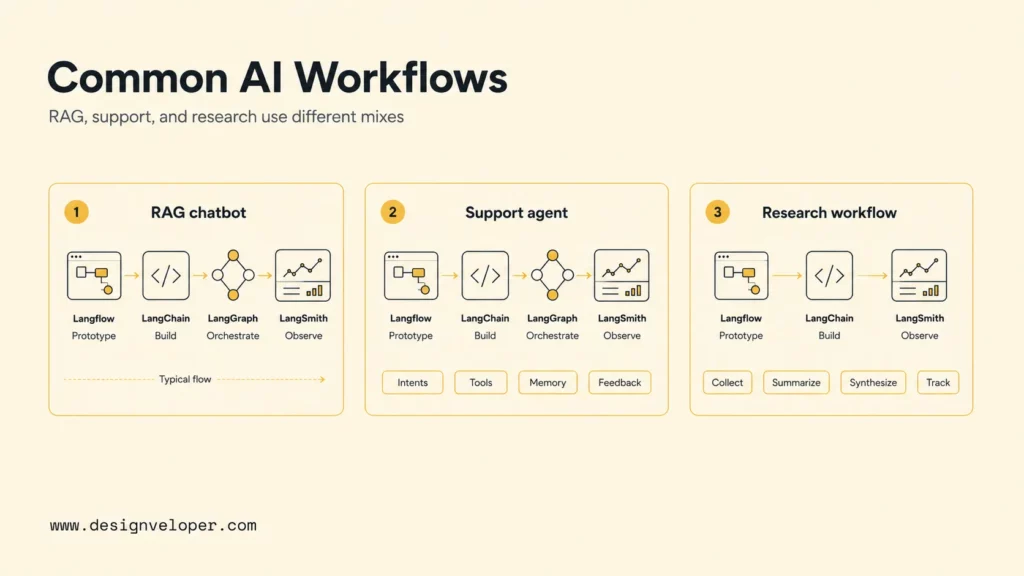
The practical value of these tools becomes clearer through workflows. A RAG chatbot, a customer support agent, and a multi-agent research system all need different combinations of visual design, coded integrations, stateful orchestration, and monitoring. It’s not just a simple story of LangChain vs LangGraph vs Langflow vs LangSmith.
RAG Chatbot From Prototype To Production
A RAG chatbot can begin in Langflow because the team can prototype document ingestion, embedding, retrieval, prompt behavior, and response output. Once the team agrees on the flow, LangChain can implement the retriever, chunking strategy, prompt templates, citations, and app logic. LangGraph can manage multi-step reasoning, fallback paths, human review, or tool calls. LangSmith can evaluate answer quality, trace failed retrieval, and monitor production issues.
This workflow aligns with Designveloper’s RAG chatbot guide, which frames RAG as a way to connect LLMs with external knowledge so responses are grounded in business data. A production RAG chatbot still needs data permissions, indexing rules, freshness checks, citation behavior, and monitoring. Tool choice is only the beginning.
Customer Support Agent With Tool Calls
A customer support agent usually needs more than retrieval. The agent may identify intent, check order status, update a ticket, summarize conversation history, offer a refund policy, and escalate sensitive cases. LangChain can connect the model to tools and APIs. LangGraph can route the workflow through review, escalation, or retry paths. Langflow can help nontechnical stakeholders understand the process. LangSmith can trace failed handoffs and measure whether responses meet quality rules.
Designveloper’s AI chatbot integration guide emphasizes planning needs, channels, integrations, implementation, and improvement. That sequence matters for support agents because every tool call can affect a real customer. Teams should design approved actions, rejected actions, audit logs, and fallback copy before the agent handles production tickets.
Multi-Agent Research Or Data Analysis Workflow
A multi-agent research or data analysis workflow needs clear coordination. One agent may gather sources, another may extract facts, another may critique assumptions, and another may prepare a final brief. LangChain can connect model and tool calls. LangGraph can coordinate state, loops, and stop conditions. LangSmith can reveal which agent produced a weak claim, where latency increased, and which prompt version caused regressions.
The main risk is uncontrolled autonomy. Multi-agent workflows can loop, duplicate work, cite weak sources, or overuse tools. LangGraph helps by making transitions explicit, while LangSmith helps by showing the trace when something goes wrong. Teams should add budgets, timeouts, source rules, and human review for high-stakes conclusions.
For data analysis, the safest pattern is to make every agent role narrow. A planner can break down the question, a retriever can gather source material, an analyst can compute or summarize, and a reviewer can check assumptions before a final answer is shown. LangGraph can enforce that sequence, while LangSmith can compare whether the reviewer catches weak analysis across versions.
Production readiness checklist for LangChain ecosystem apps
- Define which layer owns visual design, app logic, orchestration, and observability.
- Write acceptance tests for retrieval, tool calls, routing, refusals, and human review.
- Version prompts, datasets, tool schemas, and evaluation criteria before launch.
- Trace representative runs in LangSmith or an equivalent observability tool.
- Set limits for cost, latency, retries, tool permissions, and escalation thresholds.
- Assign an owner for monitoring dashboards, feedback review, and post-launch fixes.
Related reading:
- Agentic AI Security: Risks, Controls, And Production Guardrails
- Enterprise AI Agents: What Matters Before Scaling AI Across Teams
- AI Tools For Developers: Practical Options For Modern Software Teams
Which Tool Should You Use?
Use Langflow if the team needs visual iteration and stakeholder alignment. Langflow is useful for demos, workshops, early RAG flows, and experiments where the shape of the workflow is still changing. It is also a helpful bridge between product, engineering, and business teams because a canvas is easier to discuss than hidden application code.
Use LangChain if the team needs integrations and custom LLM app logic. LangChain is a better fit when developers need to connect models, prompts, retrievers, APIs, tools, data stores, structured outputs, and application-specific rules. It is usually the right layer for turning a validated idea into maintainable software.
Use LangGraph if the team needs state, branching, loops, human review, or multi-agent coordination. LangGraph is the better fit for workflows that cannot be expressed as one request and one answer. Use it when the application must pause, resume, remember state, call tools safely, retry failed steps, or route decisions through humans.
Use LangSmith if the team needs tracing, evaluation, feedback, and production monitoring. LangSmith is the right layer when people ask why an answer failed, whether the new prompt is better, which model call is expensive, how latency changed, or whether production quality is improving. Without a tool like LangSmith, LLM app quality is mostly guesswork.
From AI Workflow Tools To Production Systems
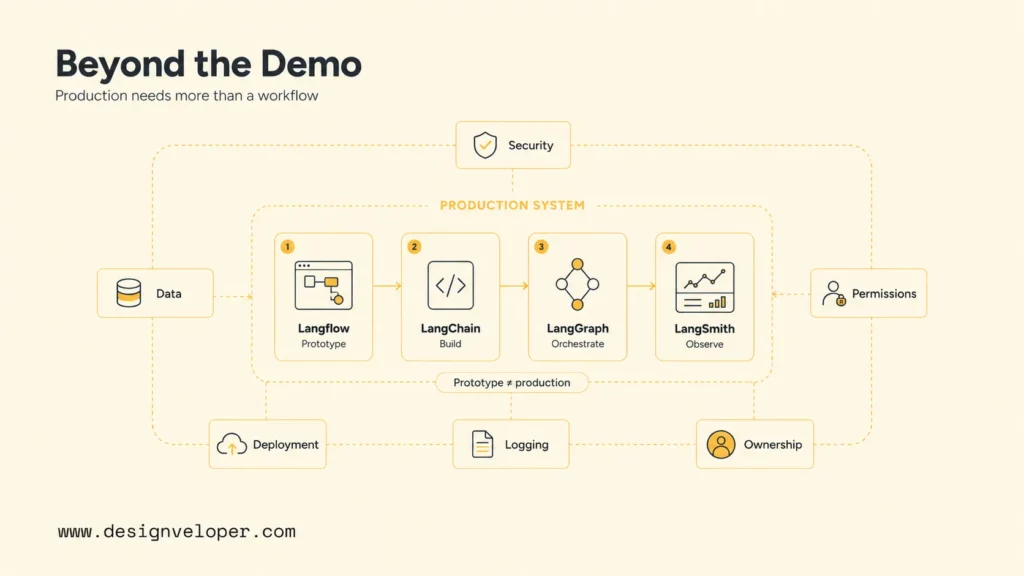
AI workflow tools help teams prototype faster, but production systems still need backend integration, orchestration, evaluation, observability, security, and maintenance. A Langflow demo can prove an idea. LangChain can implement the core app. LangGraph can make the workflow stateful and reliable. LangSmith can help the team observe and improve the system. A production system still needs user permissions, data pipelines, deployment, logging, incident response, and business ownership.
At Designveloper, we work with teams on AI development services that connect AI agents, RAG chatbots, workflow automation, dashboards, and production-ready software. The important delivery question is not only which tool to use. The important question is how the AI system fits the product, data, approvals, security, monitoring, and maintenance model that the business can actually operate.
For teams moving beyond prototypes, Designveloper’s AI automation services can help map manual workflows, define integration points, design human approval steps, and build maintainable systems around AI tools. That is where LangChain, LangGraph, Langflow, and LangSmith become practical building blocks instead of isolated experiments.
A sensible implementation plan starts small. Pick one workflow with measurable value, such as answering internal policy questions or triaging support tickets. Build a Langflow prototype, convert stable parts into LangChain code, add LangGraph only where state and review are required, and add LangSmith before the first user pilot. That sequence keeps the stack understandable while giving the team room to improve reliability after real usage begins.
The best stack is the one where every layer has a job: prototype visibly, build deliberately, orchestrate safely, and measure continuously.
FAQs About LangChain Vs LangGraph Vs Langflow Vs LangSmith
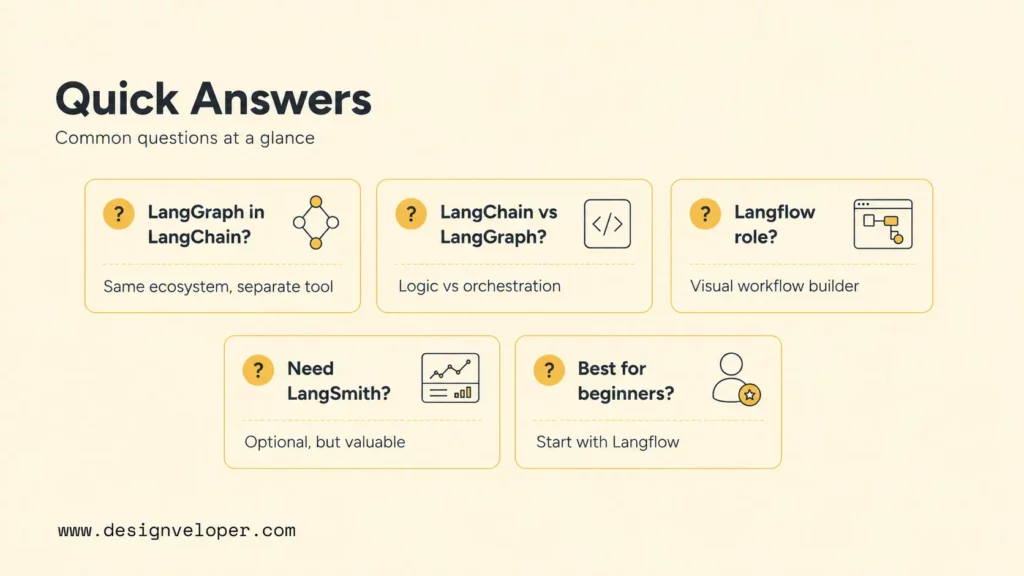
Is LangGraph Part Of LangChain?
LangGraph is part of the LangChain ecosystem, but it is a distinct orchestration framework. The LangGraph documentation says LangGraph can commonly use LangChain components to integrate models and tools, but developers do not need to use LangChain to use LangGraph. That distinction matters because LangGraph focuses on stateful execution, while LangChain focuses more on application-building components.
What Is The Difference Between LangChain And LangGraph?
LangChain helps developers build LLM application logic, such as prompts, retrievers, model calls, tools, agents, and data connections. LangGraph helps developers control stateful workflows that branch, loop, pause, resume, or involve multiple agents and human review. LangChain is often the application logic layer, while LangGraph is the orchestration layer.
Is Langflow Built On LangChain?
Langflow is closely associated with LangChain-style AI workflows and provides components for building agents and RAG applications visually. Current Langflow materials describe it as a visual platform for building AI agents and workflows with support for major LLMs, vector databases, APIs, and MCP servers. Teams should verify exact package dependencies for their deployment version, but the practical role is clear: Langflow is the visual workflow builder layer.
Do You Need LangSmith To Use LangChain Or LangGraph?
You do not need LangSmith to use LangChain or LangGraph, but LangSmith becomes valuable when the app needs debugging, evaluation, tracing, or production monitoring. Small experiments can run without it. User-facing systems should have some observability layer, and LangSmith is designed specifically for LLM and agent behavior.
Which Tool Should Beginners Start With?
Beginners should start with Langflow if they learn best visually or need to understand RAG and agent flows without heavy code. Beginners who are comfortable with Python or TypeScript can start with LangChain for core concepts, then learn LangGraph when they need stateful control. LangSmith should enter the workflow as soon as the beginner wants to debug, compare, or monitor real runs.
LangChain vs LangGraph vs Langflow vs LangSmith is easiest to decide by lifecycle role. Langflow prototypes, LangChain builds application logic, LangGraph orchestrates stateful workflows, and LangSmith observes and evaluates behavior. Teams building serious AI products should choose the layer that matches the current bottleneck, then combine tools when the app moves from experiment to production.
Also published on

Share post on










Related Articles


What Is LangChain and Where Does It Fit in an AI Application?
What Is LangChain and Where Does It Fit in an AI Application? Published August 25, 2026
8 LangChain Use Cases For AI Products That Need More Than Prompts
8 LangChain Use Cases For AI Products That Need More Than Prompts Published August 25, 2026
How Much Does Generative AI Cost? Understanding Generative AI Pricing
How Much Does Generative AI Cost? Understanding Generative AI Pricing Published August 25, 2026



















