














AI Automation For E-Commerce: Workflows, Risks, And Rollout Steps

AI automation for e-commerce uses artificial intelligence to interpret information, predict outcomes, or prepare work within store processes. Start with one frequent, measurable task where AI can reduce manual effort without gaining unrestricted control over orders, payments, or product information.
A good first project could be sorting support tickets or preparing product descriptions for review. Keep predictable decisions in business rules and reserve costly or difficult-to-reverse actions for authorized staff. The aim is to improve a specific operation, not to run an entire store without people.
How AI Automation Fits Into E-Commerce Workflows
AI adds value to ecommerce workflow automation when the input varies too much for a simple rule. A customer may describe a delivery problem in several ways. A model can classify the message as a shipping delay, while the workflow uses that classification to send the ticket to the right team. The model interprets the request; the workflow determines what happens next.
Fixed rules are still useful for tasks with clear conditions. The Shopify Flow reference describes workflows through triggers, conditions, and actions. A trigger starts the process, a condition checks a business rule, and an action carries out the permitted step. For instance, a store can send a stock alert when inventory falls below a fixed threshold. It does not need AI to make that comparison.
Combining these approaches helps separate uncertain predictions from firm business decisions. An AI model might estimate how soon a product will run out. A rule can then send an alert when the estimated shortage falls within the supplier’s lead time. Our guide to AI business process automation explains how rules, AI, and human review fit together across business systems.
Adding AI does not guarantee more sales. Results depend on whether the chosen task has a real problem to solve and whether the store can act reliably on the output.
Where AI Automation Can Help E-Commerce Teams
The most useful ecommerce AI use cases address a specific task within support, merchandising, product discovery, inventory, or marketing. Shopify’s guide to using AI for ecommerce describes applications across these areas. The examples below illustrate how to turn those capabilities into controlled workflows.
Customer Support, Order Status, And Returns
AI can help support teams understand customer requests and prepare answers using current order information. It can assign a category to a ticket, retrieve the relevant policy through a connected system, and draft a reply. The same workflow can send a complex request to a specialist instead of trying to answer it automatically.
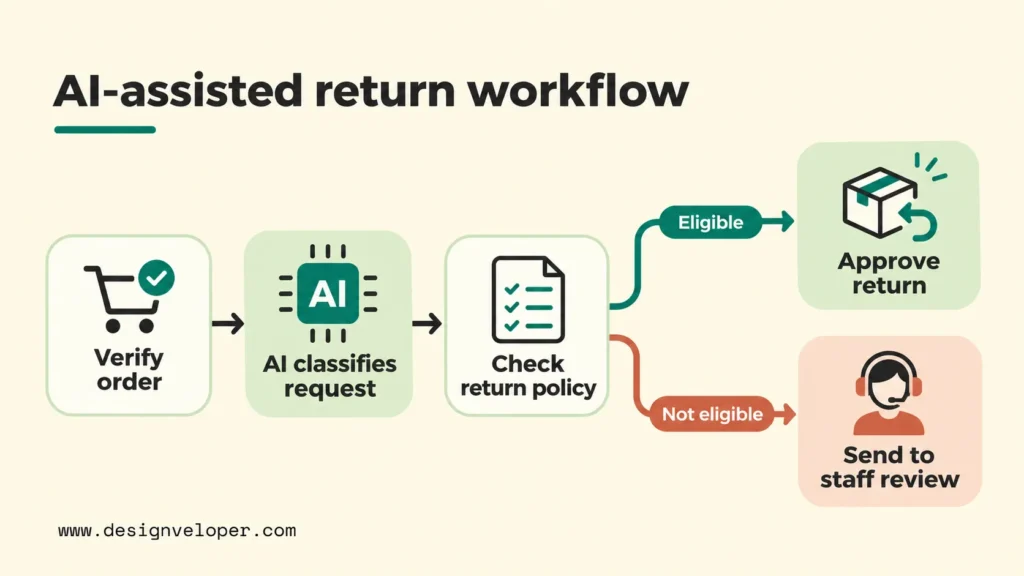
Consider a customer who asks to return a pair of shoes because they do not fit. In this illustrative workflow, the system first verifies the customer’s identity and retrieves the order. AI identifies the reason for the return. Fixed rules check the purchase date and return eligibility. A draft response then explains the available options based on the actual policy.
A damaged-item claim or a disputed charge needs a different path. Send it to an authorized person, along with the order details and the original message. Do not let the model issue a consequential refund on its own. Our guide to AI chatbot integration covers the connections and handoffs needed for this kind of service.
Product Catalog And Merchandising
AI can reduce the manual work involved in preparing supplier data for a store’s catalog. It can suggest consistent product categories and tags or extract attributes from inconsistent descriptions. For example, a supplier might use several terms for the same material. A model can propose a common label from the store’s approved list.
The catalog team should check those suggestions against the supplier’s specifications. Product dimensions, materials, safety claims, and prices need verified sources. AI can also draft descriptions using approved attributes, but an editor should review them before publication. If a supplier omits a measurement, leave that field unresolved rather than asking a model to guess.
Product Search, Recommendations, And Personalization
AI can help shoppers find products even when their search terms differ from the catalog’s wording. A search for office shoes suitable for wet weather might match products tagged with relevant features. Recommendation systems can also suggest related items based on shopping activity, such as product views or past purchases.
For example, Google Cloud’s AI Commerce Search documentation describes search and recommendation features that use product and interaction data. Its recommendation model requirements vary by model and objective. Check whether your store collects enough of the right events before choosing a personalization feature.
Accurate product attributes and up-to-date availability matter as much as the ranking model. Use only customer data that your business is permitted to process. If a store has little interaction history, start with catalog-based discovery or curated suggestions. Test personalized results against that simpler alternative rather than assuming conversion will improve.
Inventory, Forecasting, And Order Exceptions
AI can estimate future demand to help staff plan replenishment. A forecast may use past sales and seasonal patterns to predict the quantity needed for an upcoming period. Business rules can combine that forecast with current stock and supplier lead times to flag products that need attention.
Forecasts need context. Low sales during a stockout may reflect limited availability rather than weak demand. A planned promotion may also change expected sales. Let inventory staff review unusual forecasts before approving large purchases.
Order operations offer another use case. AI can group shipping exceptions or classify failure messages from fulfillment partners. The workflow can route each case to the right team. Require approval for consequential changes, such as canceling paid orders or committing to a new supplier purchase.
Marketing Content And Campaign Operations
Marketing teams can use AI to draft campaigns, suggest audience groups, and adapt product messaging for different customer needs. For instance, a store could prepare separate email drafts for first-time buyers and returning customers. The drafts should use the same approved product information but address different questions.
Keep campaign execution separate from content generation. Check product claims and confirm that discounts are valid. Apply audience eligibility and unsubscribe rules before sending. A campaign owner should approve the audience and timing, especially when a mistake could reach thousands of customers.
How To Choose An E-Commerce Workflow To Automate First
Choose a frequent task with a stable process, reliable data, and a clear way to check the result. Estimate how much staff time it consumes and whether delays affect customers. A high-volume task is not automatically a good candidate if the source data is incomplete or a wrong action would be expensive.
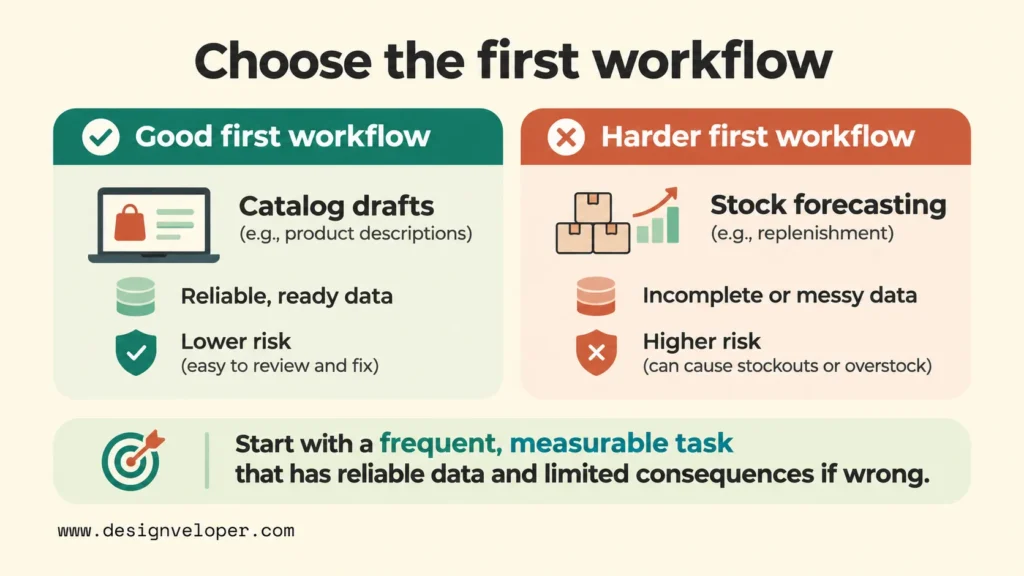
The following decision table illustrates how a store might compare candidates. The conditions are hypothetical, not industry averages. Replace them with observations from your own operations.
| Candidate workflow | Current effort or friction | Data readiness | Risk if wrong | Integration effort | Baseline metric |
|---|---|---|---|---|---|
| Support ticket classification | Repeated manual sorting | Labeled ticket history available | Delayed response after misrouting | Help desk connection | Staff minutes per ticket |
| Catalog description drafts | Manual writing for new products | Approved specifications available | Incorrect product claim | Catalog read access and draft queue | Review minutes per product |
| Personalized recommendations | Generic suggestions | Sparse interaction history | Irrelevant products shown | Catalog and event tracking | Add-to-cart rate among eligible sessions |
| Replenishment suggestions | Manual stock analysis | Incomplete stockout history | Excess stock or shortages | Inventory and purchasing data | Forecast error by product |
In this example, catalog drafts or ticket classification may be better starting points than replenishment. Both have accessible data and can begin with limited permissions. The inventory workflow needs better historical records before its forecasts can support a purchasing decision.
Consider the cost of connecting systems as well as the value of faster work. A built-in tool may cover a narrow task inside one application. Our guide to automating routine tasks with AI explains when a more connected workflow is worth considering. If staff disagree about the current process, settle those rules before automating it.
What To Control Before AI Can Take Action
Set the boundaries of AI automation before allowing it to read customer records or change store systems. The level of access and review should reflect the possible harm of an error, not just how accurate a model appears during a demo.
Customer Data And System Access
Give the workflow access only to the information and actions it needs. A product-description tool does not need customer addresses. An order-status assistant may need to read an authenticated customer’s order, but it does not need permission to change payment records.
Review how each AI provider handles information submitted in prompts and files. Check retention periods, deletion options, who can access the data, and whether the provider uses it for model training. The NIST Generative AI Profile identifies privacy and false generated information as risks. Review the actual service terms and settings rather than assuming all AI tools handle data the same way.
Product, Order, And Pricing Errors
Use the store’s trusted systems to verify facts before AI output reaches a customer. Generative AI can produce plausible but false information. Even a correct answer based on an old catalog could show an outdated price or incorrect stock level.
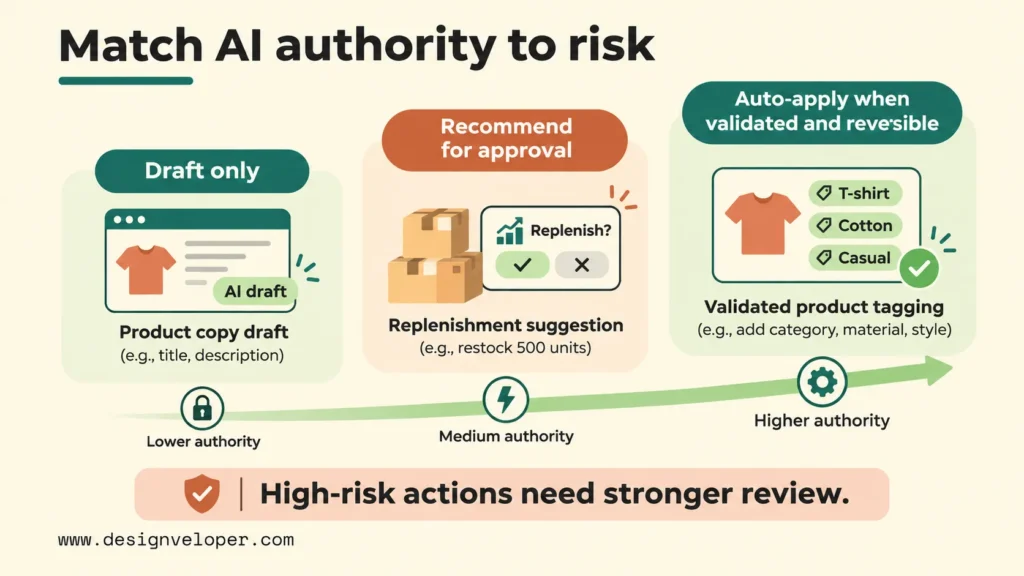
Match the workflow’s authority to the cost of an error. A draft description needs editorial review. A replenishment suggestion needs approval from the purchasing team. An internal tag may be suitable for automatic application if it passes validation and is easy to correct. Keep prices, return eligibility, and refund amounts tied to current records and explicit rules.
Monitoring, Ownership, And Fallbacks
Assign a person who is accountable for the workflow’s performance and can stop it. Keep records of inputs, output decisions, approvals, and system changes as appropriate. Limit sensitive information in logs. These records help the owner identify which orders or products require correction when something goes wrong.
Plan for missing data, uncertain classifications, unusual requests, and service outages. A support workflow can return tickets to the normal manual queue when it cannot retrieve an order. If an action has already occurred, define how staff will correct it and notify affected customers when necessary. For AI systems that can call tools or change records, our guide to AI agent governance covers additional permission and recovery controls.
How To Roll Out And Measure An AI Automation Pilot
Roll out AI automation for e-commerce in a limited pilot before expanding its authority or reach. Test the entire business process, including its connections and review steps, rather than evaluating only the quality of the model’s answers.
Map The Current Workflow And Set A Baseline
Follow a real task from arrival to completion. Record what starts it, who handles it, where decisions occur, and when work passes to someone else. Identify the system of record, meaning the trusted source for each type of data. Include cases that do not follow the usual path.
Measure current performance before changing the process. For support, record resolution time and manual handling effort. For catalog work, measure time spent writing and reviewing each product. For inventory, compare forecasts with actual demand where reliable demand data is available. Define the measurement period and which cases count so the pilot can use a comparable baseline.
Connect Store Data And Operational Systems
Identify which systems the pilot actually needs to connect. A return workflow might use the commerce platform, help desk, order management system, payment service, and shipping provider. Other workflows may need inventory data, customer relationship management (CRM) software, or an enterprise resource planning (ERP) system.
For every connection, establish which system owns the data and how often it updates. Check the available application programming interfaces (APIs), permissions, request limits, and how failures are logged. Test what happens if an update arrives late or an action is retried. For a refund request, a retry must not create a second refund.
Pilot With Review And Recovery
Start with representative historical cases and test the workflow on unusual requests as well as ordinary ones. Use data your team is authorized to use. For a return pilot, include expired return periods, missing order details, damaged products, and disputed eligibility. Check whether the system follows the policy and routes exceptions correctly.
Begin in draft or recommendation mode for customer-facing or financial decisions. Give reviewers the source records and a clear way to report mistakes. Before launch, agree on the conditions that require a pause, such as an unauthorized data disclosure or a duplicate financial action. Test the manual fallback so staff can continue working when the pilot stops.
Measure Cost And Decide Whether To Scale
Compare the pilot’s outcome with the baseline and check that quality has not declined. A support workflow may reduce staff handling time but increase repeat contacts because customers receive incomplete answers. Track both measures. The second acts as a guardrail, or a limit on unacceptable side effects.
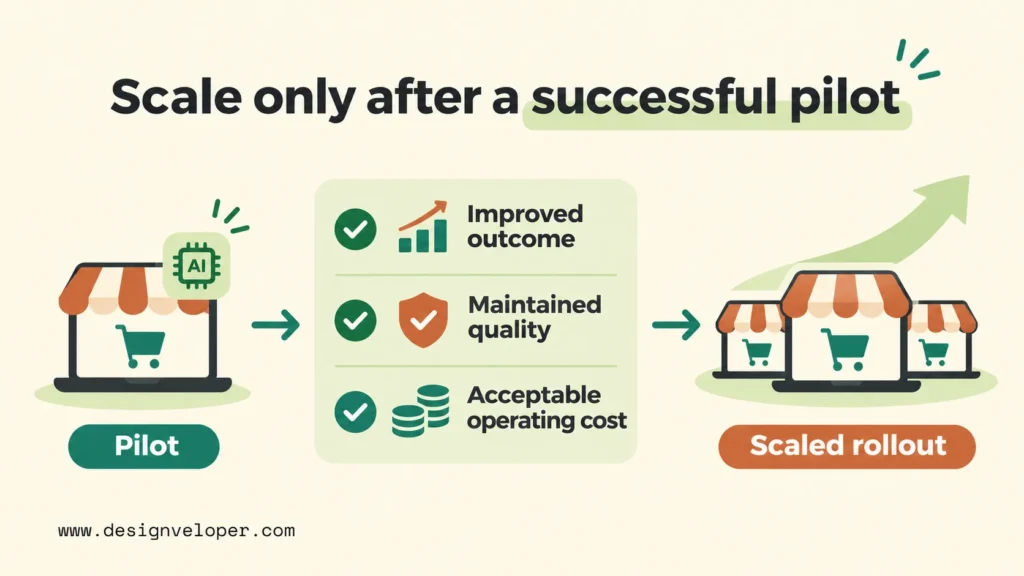
Include the full cost of operating the workflow. Count model or subscription fees, integration work, data preparation, maintenance, monitoring, and staff review time. Calculate net savings using the actual reduction in labor effort or other verified benefits. Time saved is not necessarily cash saved if the same staff remain on payroll.
Ask the workflow owner to review results on an agreed schedule. Set business-specific thresholds for outcome, error rate, and cost before the pilot begins. Expand only if the workflow meets those conditions across representative cases. If it fails a quality limit, repair the process and retest it rather than extending it to more customers.
Use existing store tools if they meet those requirements. If custom integrations or special workflow rules are necessary, we can discuss how to fit them into your commerce systems. In our Aha e-commerce project, we implemented configurable content components and addressed performance and infrastructure costs. That project illustrates commerce customization, not AI automation results. The useful starting point for an AI project is a defined workflow and its operating constraints, so you can judge whether custom development is justified.
Also published on

Share post on










Related Articles



AI Automation For E-Commerce: Workflows, Risks, And Rollout Steps
AI Automation For E-Commerce: Workflows, Risks, And Rollout Steps Published November 27, 2026
AI Resume Screening: How It Works, Risks, and Tool Choices
AI Resume Screening: How It Works, Risks, and Tool Choices Published November 26, 2026
How AI Automates Routine Tasks: A Workflow and ROI Guide
How AI Automates Routine Tasks: A Workflow and ROI Guide Published November 25, 2026