
















AI Agents Vs. RPA: How To Choose The Right Fit For Your Workflow

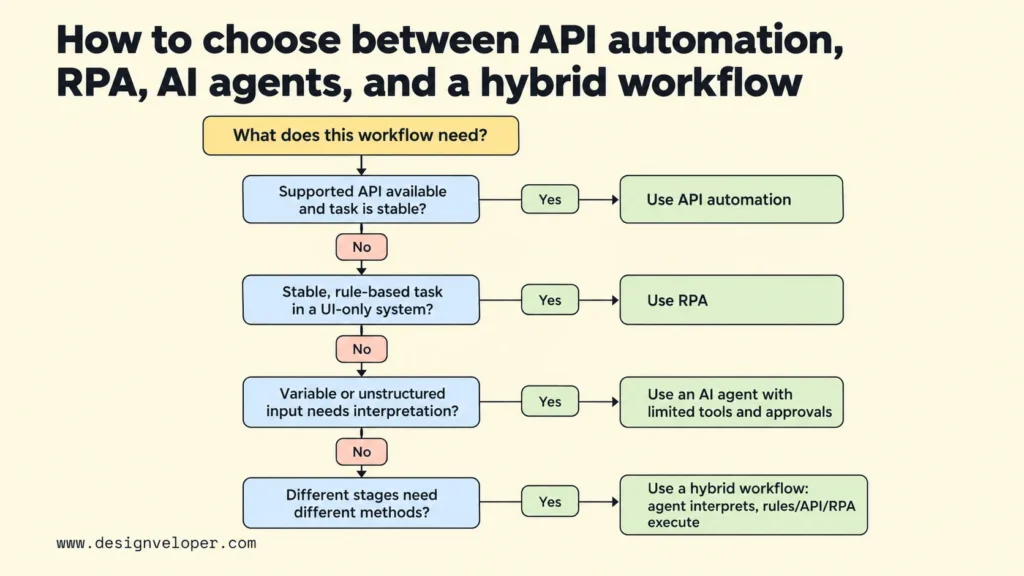
Use RPA for stable, rule-based steps and AI agents when varied information must be interpreted before an approved action is clear. If an application offers a supported API (a way for software to update it directly), that route may be simpler than screen automation. Combine these methods only when different steps need different handling. Make the choice by examining input variation, exception rates, error impact, reversibility, data access, and the cost of each correctly completed case.
AI Agents Vs. Robotic Process Automation (RPA): Core Differences
AI agents select actions toward a goal using context and available tools. Conventional robotic process automation (RPA) bots carry out instructions and rules set in advance. An agent might interpret an unusual customer request and propose a response. An RPA bot might enter approved information into the same set of fields every day.
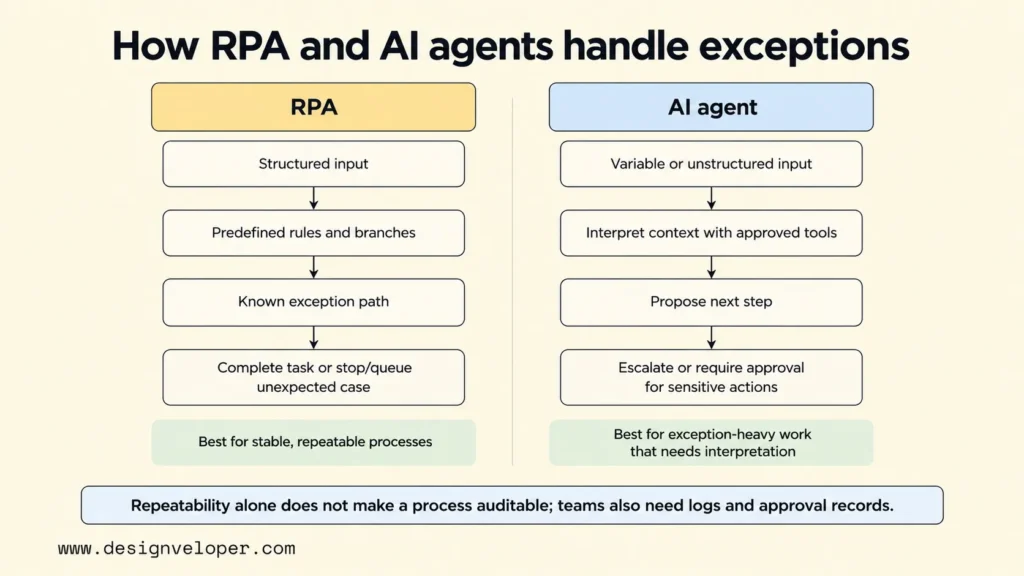
An agent is not simply any workflow that contains AI. In this comparison, an AI agent can use a model to assess information, decide on a next step, and call an approved tool. Our guide to what AI agents are and how they work explains those parts in more detail. RPA, by contrast, can perform complex branching logic, but the developer has to define the rules and branches beforehand.
| Dimension | AI Agents | RPA |
|---|---|---|
| Work model | Interpret context and select actions toward a goal | Execute predefined steps and rules |
| Inputs | Can handle variable or unstructured inputs, with limits | Best with structured inputs and predictable processes |
| Exceptions | Can assess permitted next steps or escalate | Follows configured branches; unexpected cases may stop or queue |
| System access | Tools, APIs, connectors, or computer-use interfaces | Usually UI automation; some platforms also provide APIs or connectors |
| Control | Requires evaluations, permissions, and action boundaries | More repeatable within the script’s assumptions |
| Cost and upkeep | Model use, integration, evaluation, and monitoring | Licensing, bot maintenance, and process or UI changes |
API access and RPA are not the same thing. An RPA platform may call an API, but a direct API workflow does not need an RPA bot. When both can complete the same stable update, compare the simpler direct connection before choosing screen automation.
The main trade-off is flexibility versus repeatable execution. RPA follows known paths consistently when inputs and process steps stay stable. Agents can interpret more variation, but their proposed actions still need permission checks and monitoring. Repeatability alone does not make a process easy to audit. Teams also need logs showing what happened and records of who approved important changes. Microsoft’s guidance on computer-using agents and RPA explains the difference between scripted execution and context-driven action. Computer-using agents are one kind of agent, not a requirement for all agent systems.
The boundary is not absolute. Modern RPA platforms may include document AI, language models, or agents alongside scripted bots. In that setup, the model interprets a document or selects a path, while a separate bot may still execute fixed instructions. UiPath’s agent documentation distinguishes probabilistic agents from deterministic robots. Compare the role of each component rather than treating an entire vendor platform as one technology.
Cost also depends on the shape of the work. A repetitive process may justify an RPA license if people would otherwise spend many hours using a system without an API. An agent introduces model calls, testing, and monitoring. Yet an RPA bot can also become expensive if screen layouts or rules change often. Compare the cost of completed, correct cases, not just the price of a bot or model.
AI Agents Vs. RPA Use Cases: When Each Fits
RPA fits tasks whose steps can be written down before work starts. AI agents fit tasks where someone must first understand the input to decide which approved path to follow. Many business processes contain both kinds of tasks, so evaluate them step by step rather than assigning one technology to a whole department.
When RPA Fits Stable, Rule-Based Processes
Choose RPA when inputs are well defined, rules rarely change, and actions repeat at enough volume to justify automation. Consider an operations team that copies approved order numbers into a legacy desktop application. A bot can open the record, fill known fields, and record success or a predefined error. There is little value in asking an AI model to choose each click.
The application interface matters. If the same order update can be made through a supported API, use an API or standard workflow first. It avoids depending on the position of buttons or the current desktop session. RPA becomes more useful when an important application exposes only a user interface. Microsoft documents how Power Automate desktop automation interacts with Windows application elements and input controls.
Even a stable bot needs exception handling. A missing record, changed form, or expired login should not silently produce an incorrect update. Set checks for expected values, capture errors, and give a person enough information to retry safely. Our article on designing an RPA workflow covers planning and ongoing monitoring for these scripted processes.
When AI Agents Fit Unstructured, Exception-Heavy Work
AI agents fit work where variable information must be interpreted before a permitted next step becomes clear. For example, a support message may report a missing delivery and request a refund at the same time. An agent can identify both issues, check the order and approved refund policy, and draft a response. A person still decides whether an unusual refund or policy exception is allowed. This helps when requests do not follow one fixed path.
Those actions need limits. A customer message may contain false information or instructions that should not control the agent. The model may misunderstand a policy, or the agent may choose an unsuitable tool. Give it access only to the records and actions needed for support triage. It can draft an answer, but a person should approve refunds and sensitive account changes.
Tool integration deserves separate attention because it determines what an agent can really do. Our explanation of how AI agents connect to tools and data through MCP shows why a connection standard does not replace permission checks. For a pilot, a small set of approved tools is easier to test than unrestricted access to every business system.
Use an agent only when the added interpretation improves a real task. If every request falls into three clear categories, ordinary classification plus workflow rules may be enough. Google Cloud’s agentic AI design guidance recommends considering non-agentic solutions for predictable or structured work. This avoids adding new failure modes where fixed logic already works.
How AI Agents And RPA Work Together In A Hybrid Workflow
A hybrid workflow assigns interpretation to the AI component and repeatable execution to rules, APIs, or RPA. It works best when those responsibilities are separate. A clear handoff stops a model’s uncertain suggestion from becoming an unrestricted system change.
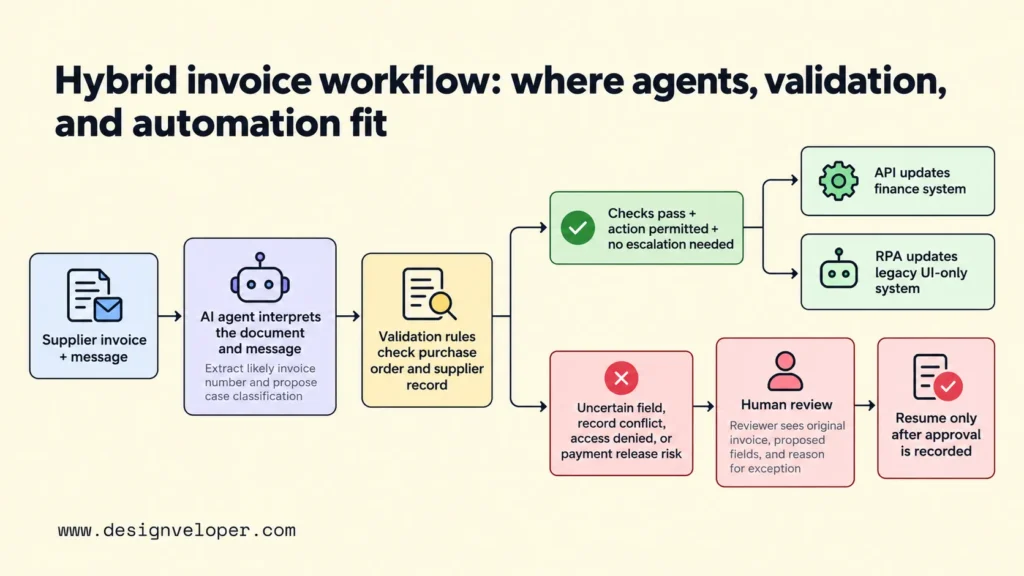
Consider this illustrative invoice exception, not a real customer case study. A supplier sends an invoice in an unfamiliar format and asks why payment is delayed. An agent reads the document and message, identifies the likely invoice number, and drafts a proposed case classification. It also records the relevant evidence rather than treating its own conclusion as proof.
Next, ordinary validation rules compare the extracted fields with the purchase order and supplier record. If those checks pass, the action is permitted, and no escalation is required, an API can update the finance system. For a separate legacy application without an API, an RPA bot can enter the approved status through its stable screen. Neither component needs to interpret or approve the invoice.
If an invoice field is uncertain, supplier records conflict, access is denied, or an action could release payment, the workflow stops for a person. The reviewer receives the original invoice, proposed fields, and reason for the exception. Processing resumes only when the checks pass and any required approval is recorded. An instruction inside the supplier email cannot override those controls.
This design also makes failures easier to locate. An incorrect extracted field calls for improving the AI evaluation and review threshold. A failed legacy update calls for fixing the RPA step or its environment. A rejected purchase order calls for correcting source data or the business rule. Mixing these failures into one agent obscures the real cause and makes recovery harder.
When systems expose supported APIs, the integration should also handle duplicate requests, timeouts, and retries. An approved invoice status update should not be posted twice because a bot lost its connection. Our guide to API integration architecture and error handling explains the connection choices behind that part of the workflow.
How To Choose Between AI Agents, RPA, And API Automation
Start with the simplest method that can complete the workflow accurately within its business rules. If the task is stable and has a supported API, choose an API-driven or deterministic workflow. If it is stable but requires clicks in a UI-only system, evaluate RPA. And if the input varies and selecting the next step requires context, test a narrowly permitted agent. Combine them when different stages have different needs.
Before choosing, study a representative set of real cases. Estimate the exception rate: what proportion follows the normal path, and what proportion needs judgment or manual repair? A low exception rate may favor improving existing rules. Frequent, genuinely varied exceptions can make a limited AI layer worthwhile. Count exceptions that an agent could resolve, not simply every case a current bot fails to complete.
Next, assess the consequences of a wrong action. Incorrectly categorizing an internal ticket is different from releasing a payment or changing a customer’s bank details. High-impact actions need tighter rules and approval. Reversibility matters too: a draft can be corrected, while an external transfer may be difficult to undo. These differences should decide which steps remain automated and which require human review.
Check data access before assuming an agent can help. If the records are incomplete, the API has weak permissions, or a legacy screen frequently changes, no model will repair the underlying system reliably. Build a clear inventory of required fields and allowed actions. Our guide to AI agent governance explains permissions, audit records, review gates, and rollback paths that help keep these boundaries practical.
Evaluate total cost per correctly completed case, not a demo’s cost per response. Include integration work, license and model charges, retries, reviews, maintenance, and time spent repairing errors. Compare the same case mix with the current manual or RPA process. If an agent resolves more difficult cases but creates extra review work, the net benefit may be smaller than its automation rate suggests.
A useful pilot starts in observation mode, without writing to production systems. Agree on minimum quality and maximum serious-error limits before testing. Let the candidate agent classify cases or propose actions, then compare its proposals with reviewed outcomes. Grant low-impact write permissions only when the pilot meets those limits. OWASP’s guidance on excessive agency explains why unnecessary tools, broad permissions, and unsupervised actions increase risk.
For a team planning custom AI automation, we recommend documenting one real workflow before committing to an agent platform. Separate decisions that need interpretation from actions that should stay rule-based. Then test one measurable exception category with explicit approval limits. Our AI development services are relevant when custom software or integration is needed. The first deliverable should still be a clear workflow scope and success criteria, not a promise of full autonomy.
FAQs About AI Agents Vs. RPA
Are AI Agents Reliable Enough For Regulated Processes?
They may support parts of a regulated process, but reliability depends on the use case, controls, and applicable rules. An agent can prepare information or flag exceptions while deterministic checks and authorized people handle sensitive decisions. Record input evidence, tool actions, approvals, and failures so the process can be reviewed. The NIST AI Risk Management Framework calls for risk assessment, measurement, and continuing management. It does not certify a particular agent as compliant.
Should You Replace Existing RPA Bots With AI Agents?
Not if the existing bots reliably complete stable tasks at an acceptable cost. Keep those steps and consider adding AI only where document variation, ambiguous requests, or growing exception queues create a measurable problem. If a legacy application gains a reliable API, replacing a fragile UI bot with an API workflow may deliver more value than adding an agent. Review migration cost and business risk before retiring working automation.
How Do You Measure An AI Agent Pilot Against An RPA Baseline?
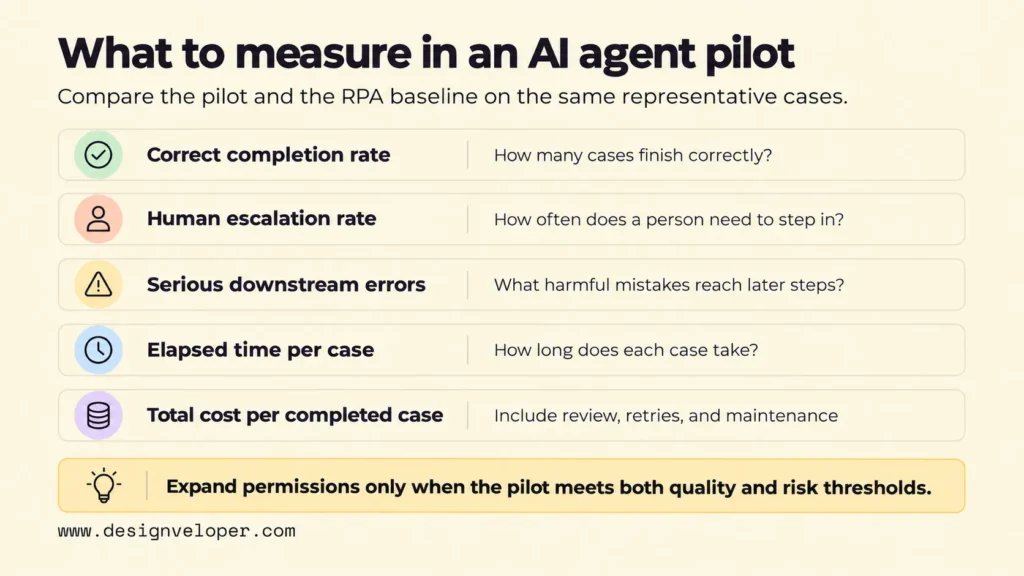
Compare both approaches on the same representative cases and record correct completion rate, human escalation, downstream errors, elapsed time, and total cost per completed case. Define success before testing. Keep difficult exceptions in the sample rather than measuring only easy cases. Review serious errors separately; an average speed gain cannot justify an unacceptable payment or data-access mistake. Expand permissions only when the pilot meets both quality and risk thresholds.
Also published on

Share post on










Related Articles


AI Agents Vs. RPA: How To Choose The Right Fit For Your Workflow
AI Agents Vs. RPA: How To Choose The Right Fit For Your Workflow Published October 23, 2026
AI Proof Of Concept Development: How To Test Before You Scale
AI Proof Of Concept Development: How To Test Before You Scale Published October 22, 2026
LLM Deployment Pipeline: Stages, Testing, And Production At Scale
LLM Deployment Pipeline: Stages, Testing, And Production At Scale Published October 20, 2026


















