










From Install To Human-Reviewed PR: An AI Coding Agent Workflow

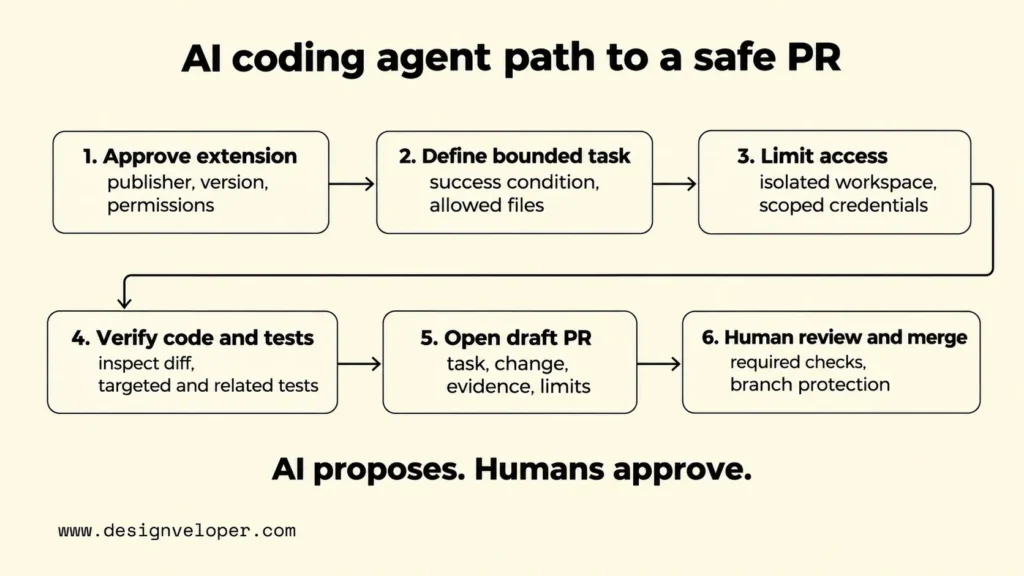
A safe, PR-based AI coding agent workflow starts with an approved tool and a bounded task. It ends with a draft pull request (PR), independent test evidence, and a human decision about merging the code.
This guide follows the PR-based path, from a small issue to a human merge decision. Other AI coding agent workflows use an IDE, a terminal, or a cloud workspace. These are overlapping ways of working, not separate safety levels. Choose the interface that fits the task, then apply the same limits to what the agent may change.
| Working mode | When it fits | Review boundary |
|---|---|---|
| IDE agent | A developer guides changes while exploring code in an editor. | Inspect proposed file edits and tool approvals. |
| Terminal agent | A developer runs a bounded repair or scripted repository task. | Constrain commands, directories, and credentials. |
| PR agent | A defined issue can become a branch and draft PR for review. | Keep test checks and merge approval outside the agent’s control. |
| Cloud workspace | The task needs remote or asynchronous execution. | Check remote data access, logs, and execution permissions. |
Approve The Extension Before It Enters The Team Workflow
Approve the exact extension package and its source before allowing an AI coding agent into a team repository. A familiar product name is not enough. The publisher, marketplace, version, update channel, and available permissions all affect what runs on a developer’s machine.
Our guide to the vibe coding workflow shows how project rules and acceptance criteria carry an AI-assisted change through testing. Extension approval comes before that process: the team first needs to trust the code and tools that will read its repository.
Start with the team’s approved software list and the vendor’s official installation instructions. Compare the listing against those records. Then inspect what the extension can read, what commands it can execute, and which service receives code or prompts. Microsoft’s VS Code AI security guidance explains why extension trust, tool approval, and network access are separate decisions.
| Review item | Evidence to inspect | Decision it informs |
|---|---|---|
| Publisher and marketplace | Official vendor link, publisher identity, and exact listing | Is this the intended package from an approved source? |
| Version and updates | Installed version, release history, and automatic update route | Can the team approve and recheck changes to the package? |
| File and command access | Declared capabilities, actual tool permissions, and terminal approval settings | Must access be reduced or installation blocked? |
| Code and data transfer | Vendor terms, model provider, data handling, retention, and network destinations | May this repository’s content be sent to these services? |
| Removal and incident response | Disablement steps, extension inventory, and endpoint investigation procedure | Can the team stop use and investigate suspicious behavior? |
A recent incident shows why the distribution channel matters. On October 29, 2026, Cursor reported tampered anthropic.claude-code extension versions 2.1.312 and 2.1.313 in its marketplace. Microsoft Security Research’s investigation found code that attempted to install SSH access and persistence. Microsoft said the malicious packages were not distributed through the Visual Studio Marketplace or the Anthropic npm package, and the available evidence limited the incident to Cursor’s marketplace.
The practical lesson is to approve a package and its update path, not just a brand. If a team installed an affected version from that marketplace, updating the extension alone is not sufficient evidence of cleanup. Follow the vendor’s incident guidance and investigate possible changes outside the extension directory. Once a package is approved, the next control is the task it receives.
Assign A Bounded Task With A Clear Success Condition
Give the agent one change whose success a reviewer can observe and test. A request such as “fix our flaky tests” is too broad. It leaves the agent free to alter unrelated tests, increase timeouts, or hide failures without resolving the original problem.
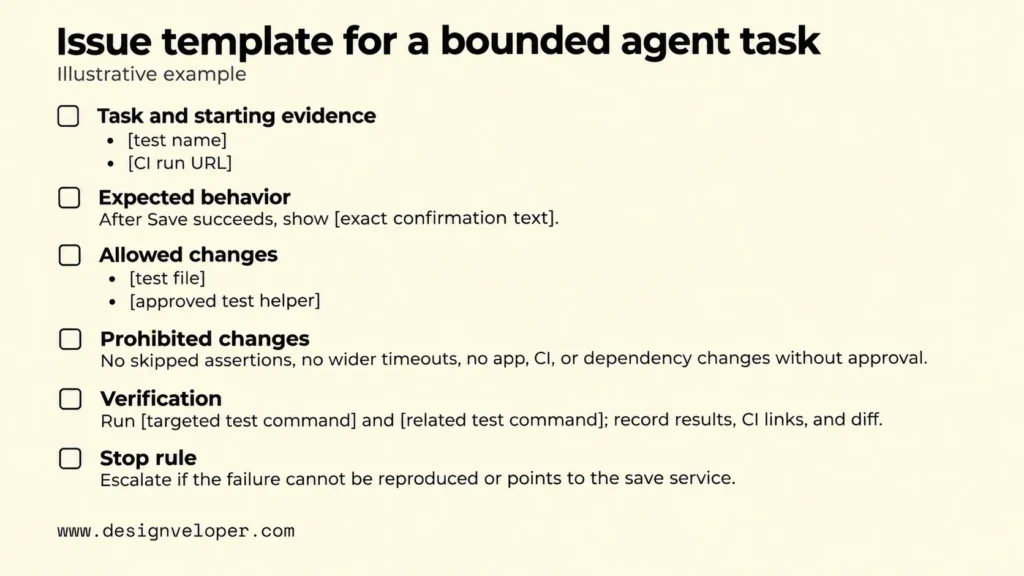
Consider an illustrative task: a Playwright test for a preferences page sometimes fails in continuous integration (CI) after the user clicks Save. The intended behavior is that a confirmation message appears after the settings are stored. The assignment should tell the agent to diagnose the timing failure, make the smallest justified correction, and show that the test still checks the confirmation.
For this illustrative failure, put the whole assignment in one issue that a developer can fill in and review. Replace each bracketed field with real project information before giving the task to the agent:
- Task and starting evidence: Diagnose the intermittent failure in
[test name]shown in[CI run URL]. - Expected behavior: After Save succeeds, the page displays
[exact confirmation text]. - Allowed changes: Edit only
[test file]and, if necessary,[approved test helper]. - Prohibited changes: Do not skip or weaken assertions, widen global timeouts, or change application code, CI configuration, or dependencies without approval.
- Verification: Run
[targeted test command]and[related test command]. Record the actual results, CI links, and Git diff. - Stop rule: Report findings and request new scope if the failure cannot be reproduced or the evidence points to the save service.
Provide only the repository context the agent needs. Point it to the project’s coding rules, the relevant test helper, and the failing log. Our guide to prompt engineering for developers explains why specific code and error evidence work better than vague instructions. The agent should not explore private files or add packages merely to gather context.
Before editing, ask the agent to inspect the affected code path and propose a short plan. Then it can make the bounded change, run the approved checks, and report what happened. This inspect, plan, edit, and verify loop gives the reviewer a traceable reason for each changed file.
The stop rule prevents a small test repair from turning into an unapproved product change. If inspection shows that the save service loses updates, the agent should explain the evidence and ask for a new assignment. If the failure cannot be reproduced, it should report what it tried and what evidence is missing. The completed issue record then gives the reviewer a clear basis for judging the final PR.
Limit The Agent To The Authority It Needs
Run the agent in an isolated workspace and grant only the access needed to complete the approved task. A separate Git worktree keeps its branch edits away from a developer’s current working tree. For command execution, use an appropriately configured sandbox or container as well. A worktree by itself is not a security boundary.
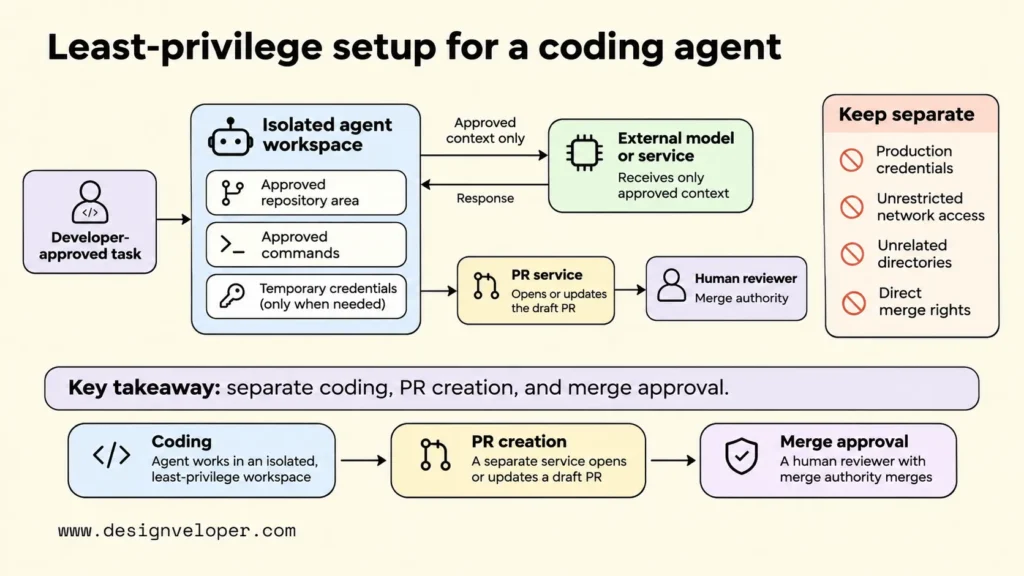
Scope permissions by action, not only by repository. The preferences-test task may need to read the project, edit the relevant test, install dependencies from approved sources if already required, and run a local test command. It should not need production credentials, unrestricted outbound network access, access to unrelated directories, or permission to merge a PR. If a tool cannot enforce a needed boundary, run the task in a more restrictive environment or keep that step manual.
Keep secrets out of the agent’s context wherever possible. Repository files, terminal output, environment variables, and connected tools can all expose data to a model or external service. Use temporary, task-scoped credentials when access is unavoidable. Revoke them after the run and review logs for unexpected destinations or commands. The exact settings depend on the agent and hosting environment; an instruction in a prompt does not enforce a permission limit.
VS Code security guidance recommends session-scoped approvals and reviewing edits before integration. It also warns that sandboxing adds protection but cannot replace other security controls. Our agentic AI security guide explains the wider reason: an agent can call tools, so its allowed actions and audit records must be explicit.
One useful separation is to let the coding process propose a change while a different, trusted service opens or updates the PR. This prevents the process that reads untrusted source files or issue text from also holding every integration credential. Keep the reviewer and merge authority separate from both. With access contained, the team can assess the actual patch instead of trusting the agent’s summary of its own work.
Verify The Code And Tests Before Opening A Draft PR
Verify what changed against the original failure before opening a draft PR. Inspect the actual Git diff, not only the agent’s explanation. Check that the patch stays within scope, the test still asserts the required behavior, and no workflow or dependency change weakens existing checks.
Begin with the failed CI log and the test’s previous behavior. Identify whether the problem is in the application, test timing, shared test data, or the CI environment. A flaky result means a test sometimes passes and sometimes fails without an intentional change to the tested behavior. It does not, by itself, identify the cause. Our CI/CD pipeline guide explains where automated test results fit in the path from a commit to a release decision.
Diagnose A Flaky CI Test Before Adding sleep()
Do not treat an arbitrary sleep() as the default fix for an unstable test. A fixed delay can make the next run pass while leaving the underlying race condition in place. It may also slow every test run. The correct repair depends on the event or state the test is supposed to observe.
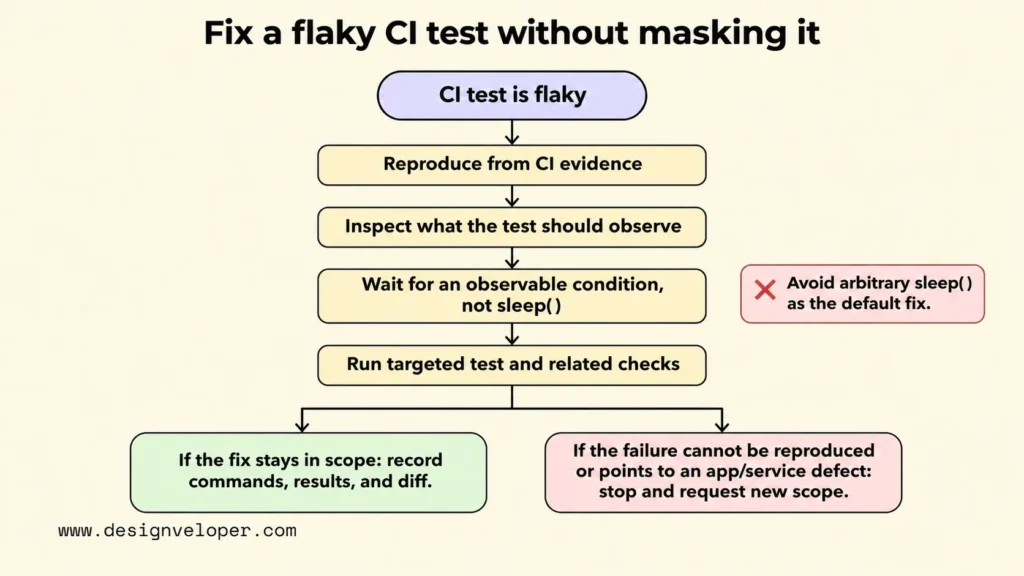
In the preferences example, the click may finish before the page displays its saved confirmation. Waiting two seconds assumes the application will always respond within that time. A better test waits for the confirmation element to become visible and then asserts its expected text. If the app promises that a save request must succeed before the message appears, the test should also check that relevant behavior rather than accept any unrelated notification.
Playwright’s Page API documentation discourages page.waitForTimeout() in production tests. It recommends observable signals, such as locator actions and web assertions that wait automatically. That advice is specific to Playwright. Other frameworks have different APIs, but the same diagnosis applies: wait for the condition that proves readiness, not an unexplained amount of time.
A condition-based wait can still be wrong. The agent might wait for any visible banner, even though the save failed and an error banner appeared. Review the selector, assertion, and application state together. If no reliable signal exists, record that limitation and ask whether the product needs a clearer state transition. Do not raise a global timeout just to make the failure less frequent.
Confirm The Fix With Independent Test Evidence
Confirm a proposed fix with test results that reviewers can inspect independently of the agent’s claims. First run the targeted test under conditions close to the original CI failure. Then run the relevant surrounding tests to check that the change did not break related behavior. Record commands, environment details, results, and links to available CI logs.
For the intermittent preferences test, a useful record distinguishes the original failure, the changed assertion, and the follow-up runs. Several passing runs can increase confidence that a timing problem has improved. They cannot prove the failure will never return. If the original failure cannot be reproduced, describe that limit instead of claiming the patch definitively fixed it.
Check the test file itself for weakened evidence. A pass means little if the agent removed the expected message assertion, marked the test as skipped, or changed the pipeline so the job no longer runs. Look at the before-and-after behavior, not just the green badge. A successful build also says nothing about untested security or product paths outside its coverage.
Finally, confirm which checks actually executed in CI. GitHub’s Copilot review documentation notes that GitHub Actions workflows do not automatically run by default when Copilot pushes changes to a PR. That is a platform-specific warning, not a rule for every agent. It shows why reviewers must verify the status of required jobs rather than infer it from the existence of a PR.
Open A Draft PR That Makes The Work Easy To Review
Open a draft PR only after the change is scoped and its available evidence is recorded. Draft status tells the team the work is ready to inspect, not ready to merge. A reviewer should be able to compare the issue, patch, and checks without reconstructing the agent session from scattered messages.
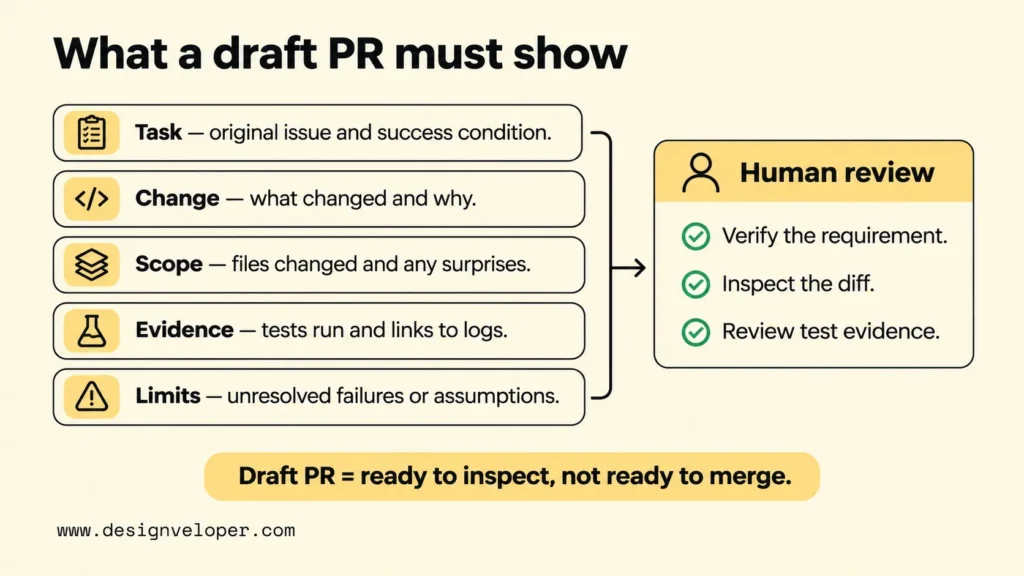
The PR description should make five things easy to find:
- Task: the original issue and observable success condition.
- Change: what behavior changed and why that approach was chosen.
- Scope: the files changed and any surprising edits that need explanation.
- Evidence: the exact tests and checks run, their results, and links to logs.
- Limits: unresolved failures, tests not run, assumptions, and any requested follow-up.
For the preferences example, carry the issue’s [failing test] and [CI run URL] into the PR. Describe the proposed change from a fixed timer to an assertion on the expected saved message. Replace the command placeholders with the actual commands and results. If a related CI job is still red, report it. This lets reviewers check whether the work answered the original task.
Inkitt described one implementation of this approach in its August 2026 one-shot PR creator case study. The team used short-lived agent containers for narrow stages and kept broader credentials with an orchestrator. Its code checked restricted file paths against the actual Git diff. PRs opened as drafts, with a human responsible for moving work toward review and approval.
That is an example of architectural choices, not proof that one design works for every repository. The transferable idea is that approval rules live outside the model’s own judgment. A team with a simpler workflow can apply the same principle through scoped tokens, diff checks, and a required human PR review without rebuilding Inkitt’s system.
Keep Human Review And Merge Approval In The Loop
A human reviewer must decide whether the AI-generated change satisfies the task and is safe to merge. The reviewer should read the original request, inspect the diff, and assess the test evidence as one set. An agent’s confidence or a passing run cannot replace that decision.
Review the most consequential parts first. Check whether the code handles the expected behavior and failure cases. Pay extra attention to authentication, secrets, data access, package updates, test assertions, and CI configuration. An unexpected change to a protected area should trigger an explanation and, when necessary, a new task or specialist review. The same rule applies if the patch solves the test failure by changing product behavior that nobody approved.
Our AI code review guide distinguishes repeatable checks from the judgment that belongs to engineers. For this workflow, we recommend using automated tools to surface problems while asking the human reviewer to verify the requirement, the changed behavior, and the remaining risk. That division gives AI-generated code review a clear purpose without treating another model’s approval as independent proof.
Enforce the decision in repository settings, not just team etiquette. GitHub’s protected-branch documentation describes rules for required status checks and approving PR reviews. Configure the equivalent controls in the team’s Git platform, restrict bypass rights, and keep agent credentials separate from merge permissions. If new commits arrive after approval, apply the team’s rules for rechecking the changed revision.
To try this AI coding agent workflow, choose one low-risk test or maintenance issue and run the full process with a named reviewer. Keep the extension approval record, task limits, diff, test evidence, and review decision together. The goal is not to make the agent’s output unquestioned; it is to make every proposed change small enough to understand and well evidenced enough to accept or reject.
If the pilot reveals a broader product need, our AI development services cover custom AI software and integrations. Bring the required behavior, data limits, and human approval points into that conversation. They give us a concrete basis for discussing the next software project without assuming the coding agent should make its own release decisions.
Also published on

Share post on










Related Articles


From Install To Human-Reviewed PR: An AI Coding Agent Workflow
From Install To Human-Reviewed PR: An AI Coding Agent Workflow Published November 18, 2026
Why The Cheapest Model Can Raise Your AI Agent Cost Per Task?
Why The Cheapest Model Can Raise Your AI Agent Cost Per Task? Published November 16, 2026
AI Agent Evaluation That Catches Regressions Before You Ship
AI Agent Evaluation That Catches Regressions Before You Ship Published November 16, 2026