













Why The Cheapest Model Can Raise Your AI Agent Cost Per Task?

The cheapest model can raise your AI agent cost per task when it fails more often, repeats work, or needs expensive fallbacks. The better choice is the lowest-cost route that completes the task correctly within your quality and risk limits, not the model with the lowest token price.
To find that route, count the cost of unsuccessful attempts, trace what the agent actually does, and compare routing policies on the same tasks. A cheaper first call only matters if the whole workflow becomes cheaper without losing reliable outcomes.
Measure Cost Per Successful Task, Not Just Per Agent Run
Cost per successful task measures how much you spend to achieve one verified outcome. It is a better decision measure than cost per agent run because failed runs, retries, and corrections still consume resources. A run is one execution attempt; a task is the business outcome the agent was asked to deliver.
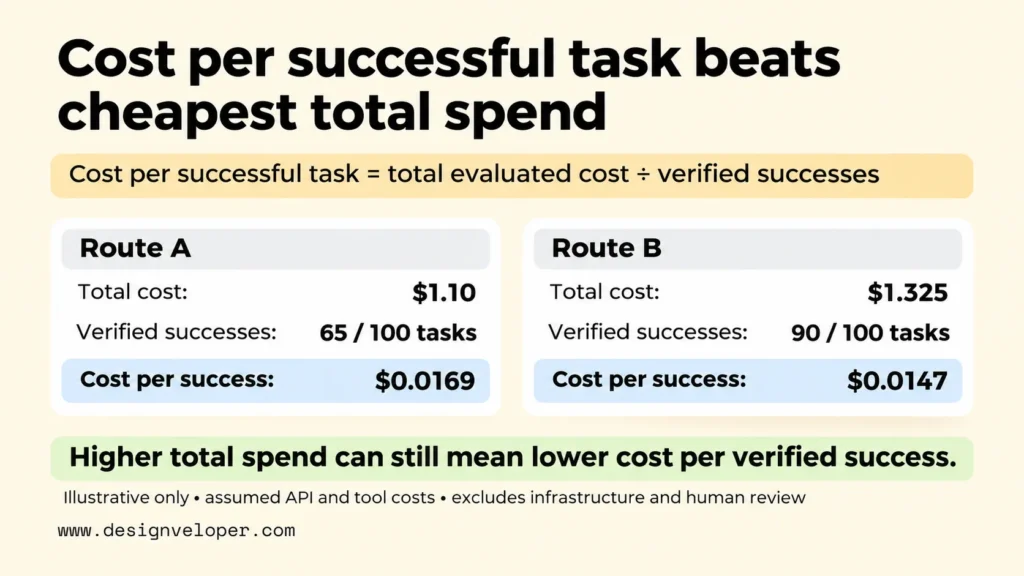
For live operations, use the business task ID as the counting unit. Cost per successful task = total cost of all evaluated business tasks / number of those tasks verified as successful. Include failed attempts and retries in the cost total. Count each business task ID once, even if the agent makes several attempts. If no task succeeds, the cost-per-success figure is undefined, not zero. Benchmarks with repeated trials need a different counting unit, explained below.
Success needs an observable rule. For a ticket-triage agent, it might mean that the correct category, priority, and queue are saved in the ticketing system. A plausible text response is not enough if the update was never made. NVIDIA’s guide to evaluating agent task completion distinguishes correct individual tool calls from the verified final state of a task.
The measurement boundary matters just as much as the formula. Decide whether your figure includes only model API charges or also paid tools, hosting, reviews, and human correction. Keep those components visible instead of mixing a narrow API figure with a full operating figure. Our guide to AI agent pricing explains how billing units and hidden operating costs affect the monthly budget.
To estimate that cost from usage, multiply the input and output token totals by their respective rates. Use rates per million tokens when that is how the provider bills. Add tool, routing, and verification charges from every attempt, including retries. Apply cached-input rates separately if the provider bills cached tokens differently. Divide the combined cost by the number of verified successes.
Consider a fully hypothetical comparison using the same 100 ticket tasks. Route A consumes 2.8 million input tokens at an assumed $0.20 per million ($0.56) and 140,000 output tokens at $1.00 per million ($0.14). It also incurs $0.40 in tool, routing, and verification charges. These totals include all attempts and retries. The total is $1.10. If 65 tasks pass, the cost per successful task is $1.10 / 65, or about $0.0169.
Route B uses 2.0 million input tokens at an assumed $0.35 per million ($0.70) and 150,000 output tokens at $1.50 per million ($0.225). With the same $0.40 in other charges, its total is $1.325. If 90 tasks pass, its cost per successful task is $1.325 / 90, or about $0.0147. Route B costs more in total but less per verified success. All rates and outcomes are invented for illustration, not provider prices or benchmark findings. This API-and-tool example excludes infrastructure and human review; both routes still need to meet the same pre-set quality and risk rules.
Report results by workflow, not just as one overall average. A routine classification task may be cheap and reliable, while an account-access exception may trigger several checks and require a person. If the share of easy tasks rises, the average cost can fall even though the expensive workflow has not improved. Separate autonomous completions from successful human-assisted handoffs so moving work to people does not look like free automation.
Trace Every Model Call To Find The Cost Drivers
Trace each task from the first request to its verified outcome so you can see which steps consume money without helping the task succeed. A trace is a time-ordered record of model calls, tool actions, errors, and the final result. One total token count cannot explain whether an agent spent its budget on necessary reasoning or repeated work.
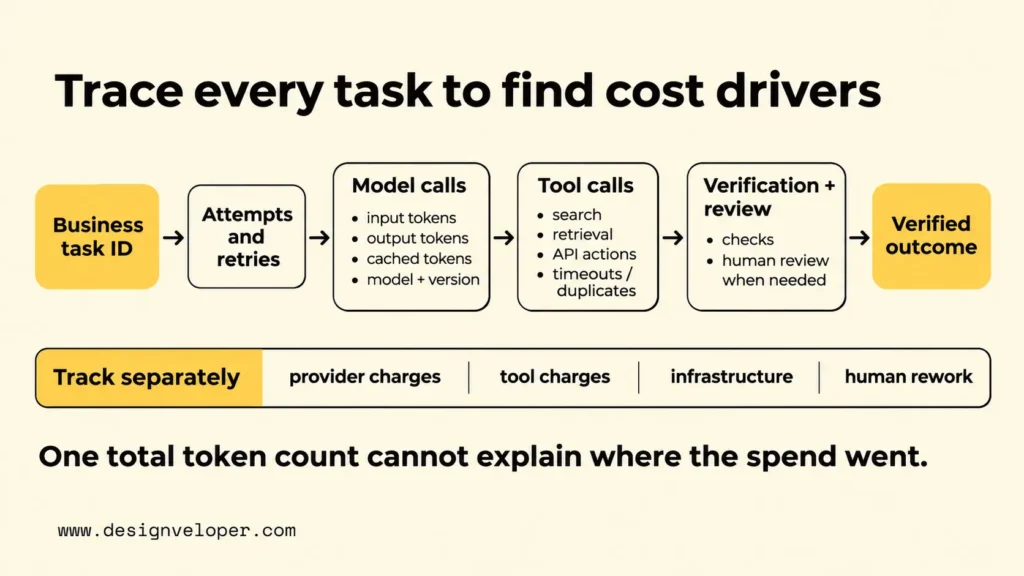
Give each business task a stable task ID, then connect every attempt and fallback to that ID. For each model call, store the model and version, input and output tokens, applicable cached tokens, price basis, and estimated or billed charge. Also record the prompt or workflow version. These details let you tell a model-price change from a prompt change or a longer input.
Next, record tool calls with their outcomes and charges. A search request, document retrieval, or business API update may take time or incur a separate fee even when its output contains few tokens. Note timeouts, duplicate actions, and retries. If a tool fails, the agent may repeat the request and send more context to another model. The cost of the failed path belongs to the original task.
Repeated context is an easy cost driver to overlook. An agent may send the same instructions, conversation history, and retrieved documents with every call. Before switching models, check whether the next decision actually needs all that material. Shorter tool results, limited history, and supported prompt caching can reduce repeated work, but test their effect on answer quality. The OpenAI Cookbook’s support-agent optimization example tests prompt controls, tool use, routing, and caching against quality checks. Its results come from a synthetic simulation, not a production savings guarantee.
Keep a cost ledger with separate fields for model-provider charges, third-party tools, infrastructure, automated verification, and human review. For a full operating measure, include the cost of necessary rework and escalations as well. Do not add the same charge twice if a platform fee already covers it. Record whether each amount comes from actual billing, an agreed internal rate, or an estimate so readers of the report know how precise it is.
Traces are also useful for AI agent cost tracking after launch. Compare retries per task, model calls per success, and the share of tasks that require fallback alongside the total spend. If cost rises while tokens per call stay stable, a new retry loop or a changed task mix may be responsible. Our guide to AI model monitoring explains how outcome signals and operational traces help teams investigate changes rather than assuming every problem comes from the model.
Route Models By Task Complexity, Risk, And Quality Needs
LLM model routing should send a task to a lower-cost model only when that model can meet the task’s quality requirements. Routing is the rule or system that chooses which model handles a request or step. It can lower spending on routine work, but an incorrect choice can add retries, stronger-model calls, and human review.
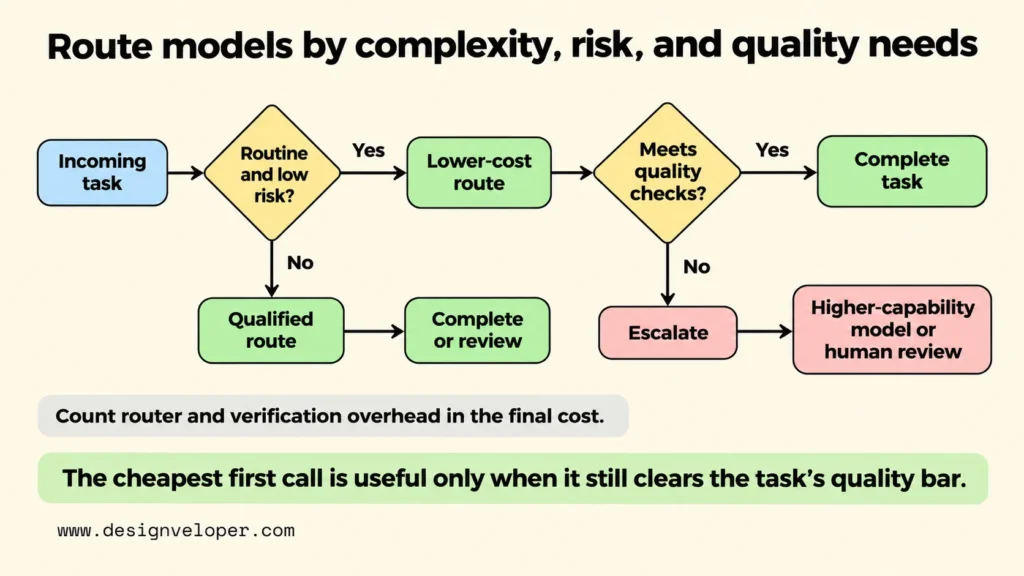
Start with the work, not a vendor price list. Separate predictable classification and extraction from tasks that need multi-step reasoning, sensitive decisions, or a difficult tool sequence. Then define what each group must get right. For a structured classification, test label accuracy and whether required fields are present. For a sensitive account change, verify identity checks and authorization before considering cost.
Microsoft’s Foundry model routing documentation for agents describes request-level model selection based on complexity and tool requirements. That is a useful design pattern, not proof that an automatic router will meet your own workflow rules. Eligibility still depends on the available models, tool support, and configuration. Your release tests must confirm the chosen route performs well on your tasks.
For example, imagine a hypothetical support queue that receives simple delivery questions and requests involving disputed charges. A lower-cost model may assign a delivery question to a known category when it can do so reliably. A disputed charge should take a qualified route with the required policy and identity checks. If the first classification is uncertain, fails a required field check, or flags sensitive content, the system should escalate rather than keep guessing with the same route.
Make escalation rules explicit before release. The router might stop after one failed structured-output check, choose a more capable model for a permitted second attempt, or send a high-risk case for human review. Each option has a cost and a quality consequence. Place firm limits on repeated calls and do not let the agent bypass an approval rule simply because the fallback is expensive. Our guide to AI agent governance explains how permissions, approval thresholds, and rollback plans bound what an agent may do.
Count the router itself in the comparison. A separate classification model can add an extra inference call, delay, and another point of failure. Verification may require a second model or a person. Routing only improves AI agent cost optimization when the successful tasks handled cheaply outweigh those added costs and any extra failures. Test that balance by workflow; an efficient policy for high-volume triage may be unnecessary for a simple one-call task.
Benchmark Routing Against A Quality Baseline
Benchmark the current route and the proposed routing policy on the same representative tasks before calling either one cheaper. Fix the task definitions, success rules, tools, and cost boundary first. Otherwise, a lower bill could simply reflect easier inputs or weaker verification rather than a better system.
Build an evaluation set from normal requests, difficult exceptions, and cases with important policy or security constraints. Keep workflow proportions visible. When outcomes vary, repeat each case across defined trials or random seeds. Treat each task-trial pair as one observation. Include all calls and retries within that observation, and count it as successful only if it passes the task rule. Do not divide the costs of repeated trials by the number of unique task prompts.
Compare both routes on the same cases and trial plan. Report success rate, mean cost per task-trial, cost per successful task-trial, and variation across trials. Production cost per successful business task remains a separate figure. MLflow’s agent benchmarking protocol recommends full traces, configuration records, and repeated evaluation rather than judging one final answer.
Use the following table as a measurement specification, not as a table of observed results. Fill both route columns from the same task-trial observations and record the cost rules used for each calculation.
| Measure | Current route | Proposed route | Decision check |
|---|---|---|---|
| Verified task success | Successful task-trial pairs / evaluated pairs | Same cases, trials, and success rule | Meets the required quality floor, including high-risk cases |
| Cost per successful task-trial | All baseline task-trial costs / successful pairs | All routed task-trial, routing, and fallback costs / successful pairs | Lower under the same cost boundary |
| End-to-end latency | Median and 95th-percentile time per task-trial | Same start and stop points | Stays within the workflow’s response-time limit |
| Fallback rate | Task-trial pairs entering fallback / evaluated pairs | Same definition; report human escalation separately | No unacceptable increase or hidden transfer of work |
A good benchmark explains differences rather than hiding them in an overall score. For example, the proposed route might lower average cost on routine tickets but misroute rare billing disputes. That failure can make the policy unacceptable even if its combined cost per success is lower. Set a minimum result for high-risk categories and review serious errors case by case. Quality is a release condition, not a number to trade away after seeing savings.
Keep a holdout set that you do not use to tune the router. Evaluate the selected policy on that set after the development tests, using the same rules and recording the model and prompt versions. If it performs well only on the examples used during tuning, the improvement may not extend to live traffic. Our guide to AI proof of concept development explains why a bounded experiment should produce a go, revise, or stop decision based on evidence.
Do not publish a savings percentage without comparable measured results. When the test is small or outcomes vary across repeats, state that uncertainty. Also check whether the proposed route changes the mix of autonomous completions and human-assisted cases. A policy that sends more difficult work to staff can appear cheaper in API charges while increasing the cost of completing the business process.
Roll Out Routing With Cost And Quality Guardrails
Roll out a validated routing policy one workflow at a time, with a clear way to pause it when cost or quality moves outside its limits. Passing an offline benchmark is necessary but not enough. Live requests may involve different language, document length, tool failures, and urgency than the test set.
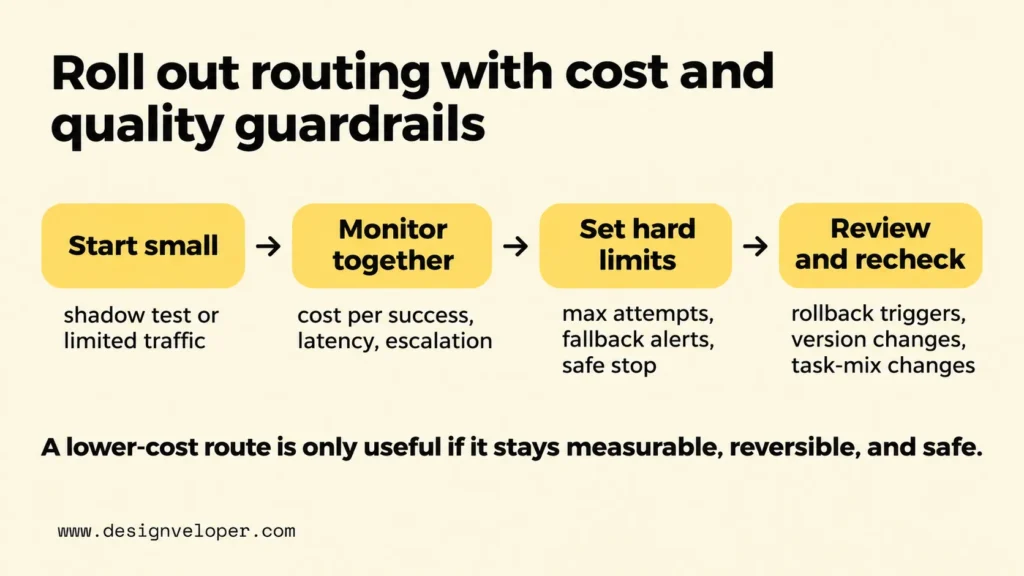
Begin with a restricted share of eligible traffic or a shadow test in which the new route makes predictions without carrying out business actions. Keep the current route available as a fallback. Compare verified outcomes, total cost per successful task, latency, and escalation patterns for each workflow. A canary release is useful only if someone can see the results and switch the affected traffic back quickly.
Set cost guardrails at the task level as well as at the monthly budget level. A maximum number of model calls or tool attempts can stop a retry loop before it runs up charges. An alert for rising fallback rates can catch a failing route earlier than the monthly invoice. These limits should lead to a safe stop or approved human handoff, not an unverified answer that happens to be cheap.
Quality guardrails need owners and review actions. Define which outcomes trigger investigation, such as a confirmed wrong update, missed escalation, or rising error rate in a high-risk category. Specify which issues demand immediate rollback and which call for another controlled test. Our guide to LLM deployment pipelines covers versioned releases, staged validation, and returning to a known working configuration when a change fails.
Recheck the policy after changes to model versions, prompts, tool APIs, pricing, or the mix of incoming tasks. A route that worked on short requests may struggle after customers begin attaching long documents. Keep a versioned record of the task sample, success criteria, route configuration, and cost assumptions. This makes a changed result easier to investigate and prevents old benchmark figures from being treated as permanent proof.
If a team needs to turn this approach into a working product, we can support the software and integration work through our AI development services. A useful project brief should define the approved actions, task-level success evidence, reporting fields, and rollback owner before choosing a router. Those details give developers something concrete to implement and give the business a fair test of whether routing improves completed work.
The practical goal is not to use the cheapest model on every call. It is to spend less on each correct, verified outcome while keeping sensitive tasks safe and recoverable. Start with one workflow, measure every attempt, and expand routing only when a comparable test proves that the whole task performs better.
Also published on

Share post on










Related Articles


Why The Cheapest Model Can Raise Your AI Agent Cost Per Task?
Why The Cheapest Model Can Raise Your AI Agent Cost Per Task? Published November 16, 2026
AI Agent Evaluation That Catches Regressions Before You Ship
AI Agent Evaluation That Catches Regressions Before You Ship Published November 16, 2026
How To Build And Use AI Business Process Automation Effectively
How To Build And Use AI Business Process Automation Effectively Published October 27, 2026