
















On-Premises Vs Cloud: Key Differences, Costs, And Use Cases

On-premises infrastructure runs on hardware your organization controls, while public cloud infrastructure uses provider-operated computing resources accessed as a service. For teams comparing on-premises vs cloud options, the better choice between on premise vs cloud depends on the workload’s real requirements. Control, performance, compliance, cost, and operating capability matter more than a blanket rule that one model is newer or more secure.
Public cloud is usually a strong starting point when demand changes quickly, teams need fast provisioning, or managed services can remove useful infrastructure work. On-premises can be the better fit when a workload needs direct hardware control, very low local latency, specialized equipment, or an existing environment that is economical and well operated. Hybrid cloud is a deliberate third option when different parts of the system have different constraints. In this article, “cloud” means provider-operated public cloud unless private or hybrid cloud is named.
On-Premises Vs Cloud: The Core Differences
The core difference is ownership of the infrastructure and the responsibilities that follow from it. On-premises keeps more of the stack under your organization’s direct control. Cloud shifts physical infrastructure and some platform work to a provider, but your team still owns important decisions about data, identity, configuration, applications, monitoring, and recovery. Our cloud application development guide explains how those responsibilities affect application architecture and operations.
| Factor | On-Premises | Cloud |
|---|---|---|
| Infrastructure ownership | The organization owns or directly controls servers, storage, networking, and facilities or colocation arrangements. | The provider owns the physical infrastructure; the customer rents or consumes computing resources. |
| Upfront and ongoing cost | Usually requires larger upfront capital spending plus ongoing facilities, hardware, licensing, and staff costs. | Usually reduces upfront infrastructure spending but creates recurring usage, service, support, and data-transfer costs. |
| Scalability | Capacity grows through procurement, installation, and configuration, so excess capacity is often planned in advance. | Resources can often be provisioned and released quickly, which suits variable or uncertain demand. |
| Maintenance | Your team maintains hardware, operating systems, virtualization, networking, and the application stack. | The provider maintains the physical platform; customer work depends on whether the service is IaaS, PaaS, or SaaS. |
| Security responsibility | The organization owns the full security stack, including physical controls, patching, identity, monitoring, and response. | Security is shared. The provider secures its infrastructure while the customer retains responsibilities such as data and identity. |
| Deployment speed | New environments may wait on hardware, network, and capacity changes. | Standard resources can often be created through a portal, API, or infrastructure automation. |
| Customization | Offers broad hardware and platform control when the organization can support it. | Offers broad service choice, but each managed service has provider-defined limits and interfaces. |
| Cost predictability | Can be predictable after major purchases when demand is stable, though refresh cycles and staffing still matter. | Can track usage closely, but variable consumption and service combinations can make monthly spending less predictable. |
| Disaster recovery | The organization must design and fund redundancy, backup, alternate sites, testing, and recovery operations. | Providers offer resilience and recovery building blocks, but customers must still design, configure, test, and pay for the recovery model. |
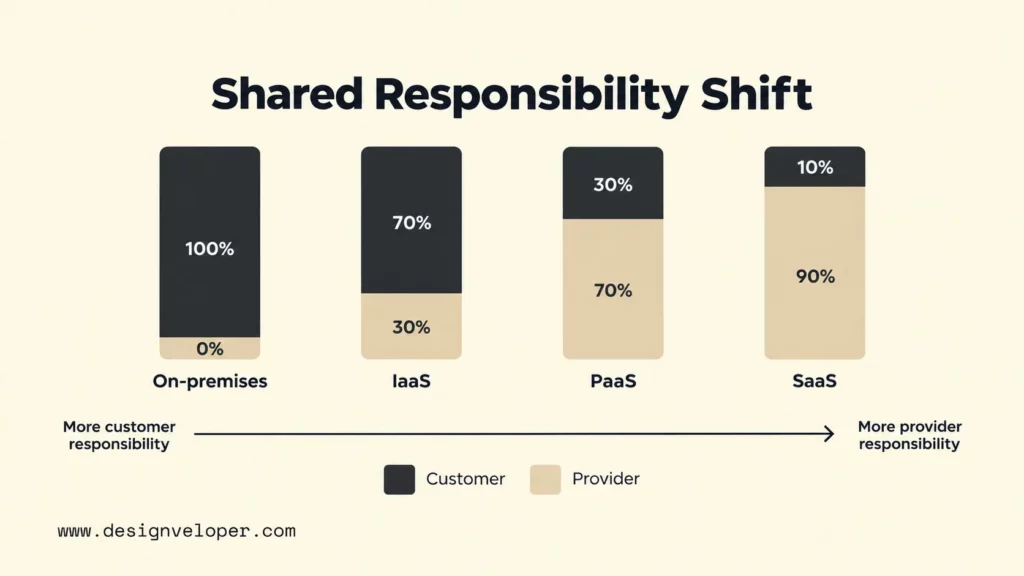
Neither location guarantees a stronger result. Microsoft’s shared responsibility guidance shows that customer responsibilities change as a workload moves from on-premises to IaaS, PaaS, and SaaS, rather than disappearing. The practical question is whether your organization can operate its chosen responsibilities consistently.
What On-Premises, Cloud, And SaaS Mean
On-premises infrastructure means the organization directly owns or controls the environment that runs its workloads. That can include servers in a company facility, a private data center, or equipment placed in a colocation facility. The important point is operational ownership: the organization remains responsible for capacity, hardware lifecycle, platform maintenance, and the controls around the workload.
Cloud computing is a computing model, not merely a remote server. NIST SP 800-145 describes on-demand access to a shared pool of configurable resources. Those resources can be provisioned and released with limited provider interaction. It also distinguishes public, private, community, and hybrid deployment models, so a private cloud can still be a cloud even when it serves one organization.
Public cloud uses provider-operated infrastructure offered to many customers. Private cloud serves one organization and may be managed by that organization, a third party, or both. Hybrid cloud connects two or more distinct environments so workloads and data can remain in the locations that best fit their constraints. Hybrid should be chosen because the split solves a real requirement, not because it sounds like a safe compromise.
SaaS describes how software is delivered and consumed, while infrastructure describes where and how the underlying system runs. A SaaS customer uses a provider-operated application and usually has much less control over its infrastructure than an IaaS customer. Our SaaS application development guide goes deeper into tenant isolation, subscriptions, security, monitoring, and the operating responsibilities of a SaaS product.
How Ownership Changes Security And Daily Operations
Ownership changes which team performs each task, but it does not remove the task itself. Hardware care, facilities, patching, identity, application security, monitoring, backups, and incident response must all have clear owners. Moving to cloud can transfer some layers to the provider, yet the customer still has to operate the layers it controls.
On-Premises Infrastructure And Direct Control
On-premises gives your organization direct control over the hardware and the surrounding environment. That can matter when a workload uses specialized devices, must continue through a wide-area network outage, or needs tightly controlled network paths. The same control also means your team must plan capacity, replace failed hardware, patch operating systems and hypervisors, maintain network controls, protect administrator access, and keep monitoring useful.
Backup and incident response also stay with the organization. A backup policy is not enough if restores are untested, and direct control does not automatically make a system secure. Security depends on how well identity, patching, segmentation, logging, vulnerability management, physical access, and response procedures are designed and maintained.
Cloud Infrastructure And Shared Responsibility
Cloud moves physical facilities, servers, and parts of the platform into the provider’s responsibility. The exact boundary depends on the service. With IaaS, the customer still manages operating systems and applications. With PaaS, the provider manages more of the runtime. With SaaS, the provider operates most of the application stack, while the customer still controls areas such as accounts, access, data use, and configuration.
This makes cloud operations different rather than effortless. Teams still need identity governance, secure configuration, application security, log review, cost monitoring, backup and recovery decisions, and incident ownership. A managed database may remove patching of the database host. It still does not decide which users should have access or whether the recovery plan meets the business requirement.
Cost, Scalability, And Performance Trade-Offs
Cloud is not always cheaper than on-premises, because the two models spend money differently. Google’s cost optimization guidance distinguishes on-premises capital and operating expenditure from cloud consumption-based operating costs. A fair comparison therefore needs the same planning horizon and the same workload requirements on both sides.
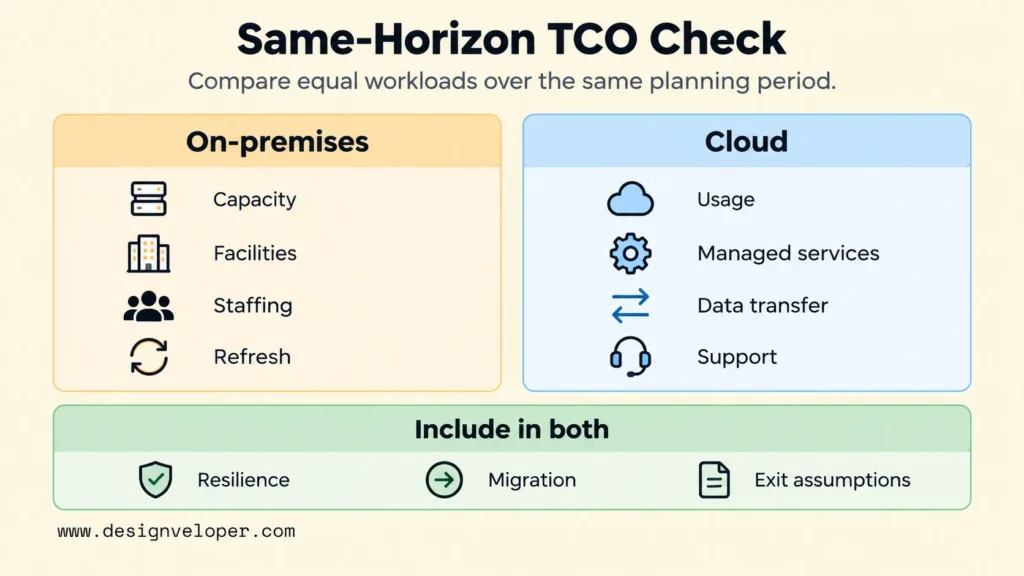
On-premises cost includes servers, storage, networking, facilities, power, licenses, support, spare capacity, staff time, and periodic hardware refreshes. Public cloud removes much of the physical procurement, but the bill can include compute, managed services, storage, observability, support, and network egress. Our cloud provider selection guide explains how to compare support, backups, scalability, security, and the full cost of a hosting plan. That is more useful than focusing only on the advertised base price.
For a practical TCO check, put both models on the same planning horizon. Record expected capacity and resilience, staffing and facilities, migration work, data transfer, support, and exit costs. Write the main assumptions beside each item. This does not produce a universal winner; it makes the decision auditable and shows which assumptions would change it.
Demand shape often decides the economics. A seasonal ecommerce platform may benefit from adding capacity for a campaign and releasing it afterward. A stable 24/7 workload can make owned capacity more competitive when the organization already has efficient facilities and operations. Cloud elasticity helps most when the architecture can actually scale and shrink; leaving oversized resources running all month turns elasticity into a theoretical benefit.
Performance is also workload-specific. Cloud can place services near users and provide fast access to specialized managed services, but distance, network design, service limits, and cross-region traffic still affect latency. On-premises can keep network paths local for factory systems or specialized equipment, which can reduce dependence on wide-area links. It still does not automatically solve throughput, resilience, or global delivery. Capacity planning should start from measured latency, throughput, I/O, concurrency, and recovery requirements rather than from a preferred hosting label.
Security, Compliance, And Data Residency
Security and compliance should be translated into controls that either deployment model can be tested against. Start with identity and access management, encryption, logging, audit evidence, incident response, network isolation, vulnerability management, backup, and recovery. Then map regulatory and contractual requirements to those controls instead of assuming that one location is compliant by default.
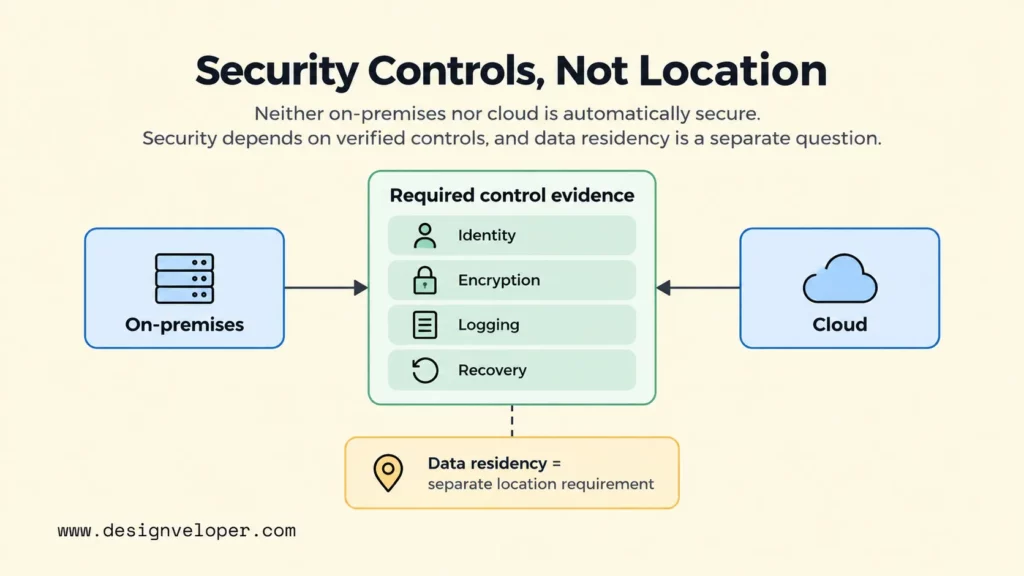
Data residency adds a separate question: where may specific data be stored, processed, backed up, and accessed? Public cloud platforms offer regional and geographic controls, but availability and residency rules vary by service. Microsoft’s cloud adoption plan guidance recommends recording geographic restrictions, operating locations, data sensitivity, compliance requirements, and recovery objectives for each workload before migration. That evidence is more useful than a general statement that sensitive data must always stay on-premises.
Network location should not be treated as proof of trust. Whether a workload runs on-premises or in cloud, access should be based on verified identity and the minimum permissions needed. Our zero-trust architecture guide explains how explicit verification, least privilege, segmentation, and continuous monitoring reduce dependence on a trusted internal perimeter.
Provider risk still matters when you depend on cloud services. Review the provider’s service commitments, region availability, security responsibilities, audit evidence, support model, portability, and exit path. Regulated workloads can run on-premises, in public or private cloud, or in a hybrid design when the chosen architecture can produce the controls and evidence the organization actually needs.
Choosing A Deployment Model For Common Workloads
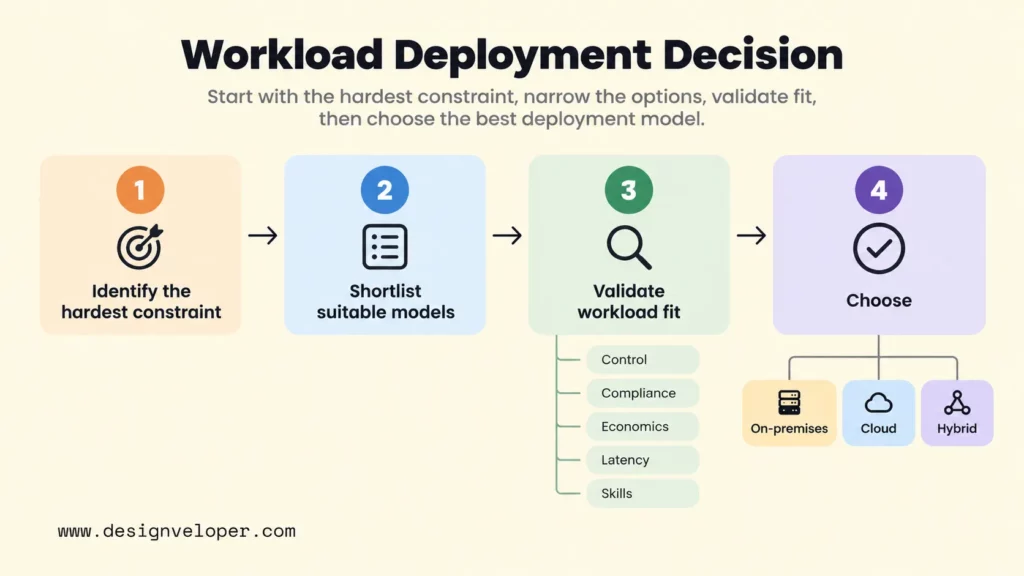
The best starting fit is usually the model that satisfies the hardest constraint with the least unnecessary operational burden. The table below uses illustrative scenarios as a decision aid, not a universal ranking. A workload can fit more than one model, so validate its dependencies, controls, economics, latency, and operating capability before committing.
| Workload | Strong Starting Fit | Main Reason | When To Consider Another Model |
|---|---|---|---|
| Legacy enterprise systems | On-premises or hybrid | Existing hardware, licensing, integrations, and tightly coupled dependencies can make an immediate move risky. | Consider cloud after dependency mapping shows clear value from rehosting, replatforming, or selective modernization. |
| Seasonal ecommerce | Cloud | Variable demand benefits from elastic capacity, automation, and temporary environments. | Consider hybrid or dedicated capacity when fixed high load, data constraints, or specialized integrations dominate. |
| Data-intensive analytics | Cloud or hybrid | Managed storage and analytics services can expand capacity without building a large internal platform first. | Keep selected processing local when data movement, residency, latency, or existing investments make transfer impractical. |
| Low-latency industrial workloads | On-premises or edge with cloud integration | Local processing can keep control loops and equipment interactions close to the physical process. | Use cloud for fleet management, analytics, backup, or less latency-sensitive services when connectivity and controls allow. |
| Regulated records | Depends on required controls | Compliance is determined by evidence, data location, access, retention, audit, and recovery requirements rather than hosting label alone. | Choose on-premises, cloud, or hybrid based on which design can prove the required controls for the specific regulation and service. |
| Customer-facing SaaS products | Cloud | Cloud services support rapid provisioning, managed infrastructure, automation, and scaling for internet-facing products. | Use dedicated or hybrid components when customers require specific isolation, residency, integration, or performance guarantees. |
| Disaster recovery and backup | Cloud, hybrid, or a separate on-premises recovery site | Each model can provide recovery separation when it is designed and tested for the required recovery objectives. | Choose based on RTO/RPO, locality, connectivity, testing capability, and the need for provider independence. |
Hybrid cloud is most useful when the boundary is explicit. A factory application might keep time-sensitive control services local while sending non-real-time telemetry to cloud analytics. A regulated system might keep a restricted data store in one environment while allowing approved application services elsewhere. The design succeeds when identity, networking, monitoring, recovery, and support work across that boundary without hidden ownership gaps.
How To Choose Between On-Premises And Cloud
Use the scenario table to form a shortlist, then validate the choice against workload-specific constraints. A useful on-premises vs cloud decision starts by defining what the workload must do and which requirements are non-negotiable. Then compare the operating model that each option requires.
- What must the organization control directly? Separate true hardware, data-location, vendor, or access requirements from preferences that could be met with configuration or contracts.
- How variable is demand? Measure normal load, peaks, growth, and idle periods. Variable demand increases the value of elastic capacity, while stable demand makes long-term capacity economics more important.
- What security and compliance requirements apply? Convert policies into testable controls for identity, encryption, logging, data location, retention, recovery, and evidence.
- What infrastructure skills are available? On-premises needs hardware and platform operations. Cloud needs architecture, identity, automation, cost governance, observability, and provider-specific knowledge.
- How quickly must the product change? Cloud can shorten environment provisioning, but release speed still depends on application architecture, testing, and delivery automation.
- Which costs need to be predictable? Decide whether the organization is better equipped for upfront capacity investment or variable consumption, and model both across the same time period.
- What migration, exit, and disaster-recovery plans are required? A deployment decision should include how data moves in, how workloads can be restored, and how the organization would change providers or return a workload if assumptions fail.
Weight these questions by consequence. If a very low local response time is essential to a production line, that constraint can outweigh an apparent cloud cost advantage. If a startup needs to test demand before it knows its capacity needs, avoiding a large hardware commitment may matter more than optimizing steady-state unit cost. The strongest answer is the one that makes the important trade-offs visible.
Migration And Operating Readiness
A cloud migration should begin with workload assessment and a limited scope, not with a plan to move the entire portfolio at once. Google’s migration assessment guidance starts with inventory, dependencies, requirements, total cost, migration strategy, tools, timeline, and plan validation. Those steps expose the risks that a simple server list misses.
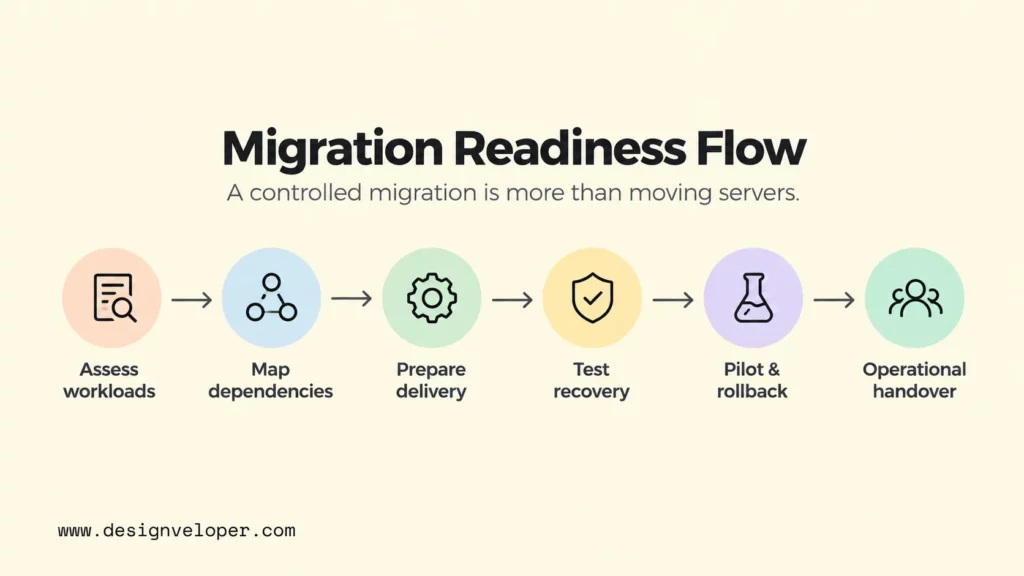
- Map application and data dependencies. Identify shared databases, APIs, identity services, batch jobs, network paths, licenses, and upstream or downstream systems before choosing migration waves.
- Define data transfer and integration boundaries. Estimate what must move, how long transfer can take, what continues to change during migration, and how old and new environments will stay consistent.
- Prepare CI/CD and observability. Use repeatable builds, deployment controls, logs, metrics, traces, and alerts before cutover so failures are easier to detect and reverse. Our DevOps pipeline guide covers the delivery and monitoring stages that support this operating model.
- Test backup and recovery. Define recovery point and recovery time objectives, restore data into a usable environment, and verify the application rather than checking only whether backup jobs completed.
- Assign incident response ownership. Document who monitors the workload, who can make emergency changes, how the provider is escalated, and how business stakeholders are informed.
- Plan rollback before cutover. Define the conditions that stop a migration, how traffic and data return to the prior environment, and which changes cannot be safely reversed.
- Use pilot workloads. Start with a workload that is meaningful enough to test the target operating model but contained enough that the team can learn without putting the whole portfolio at risk.
- Complete operational handover. Transfer runbooks, architecture decisions, credentials, dashboards, budgets, alert ownership, recovery procedures, and known limitations to the team that will operate the system.
If your team needs help assessing workloads, defining migration waves, connecting systems, or preparing operational handover, we can support that transition. Through our software development services, we can support the architecture and software work around it. Useful deliverables can include a workload inventory, target architecture, migration waves, delivery automation plan, security requirements, monitoring ownership, recovery steps, and handover criteria. Those artifacts give decision-makers something concrete to review against cost and risk instead of a generic cloud-first recommendation.
FAQs About On-Premises Vs Cloud
Is Cloud Cheaper Than On-Premises?
Not always. Cloud often lowers the upfront cost of acquiring infrastructure, but total cost depends on workload usage, service choices, data transfer, support, architecture, discounts, staffing, and the planning horizon. On-premises can be competitive for stable workloads when the organization already operates infrastructure efficiently. Compare equivalent capacity, resilience, security, and operations over the same period before deciding.
How Does On-Premises Differ From SaaS?
On-premises describes where and under whose control infrastructure runs. SaaS describes a software delivery model in which a provider operates an application for customers to use. An organization can run packaged software on-premises, use a SaaS product in a public cloud, or use a provider that delivers SaaS from dedicated infrastructure. The concepts answer different questions.
Can Sensitive Data Stay On-Premises While Applications Run In The Cloud?
Yes, if the architecture supports that boundary and the resulting controls meet the workload’s requirements. A hybrid design can keep selected data or processing on-premises while cloud services handle other application functions. The team must still design secure connectivity, identity, authorization, encryption, logging, latency, failure handling, backup, and recovery across both environments.
How Long Does A Cloud Migration Usually Take?
There is no reliable universal duration for a cloud migration. The timeline depends on the number of workloads, their dependencies, data volume, migration strategy, compliance work, testing, cutover windows, rollback needs, and team readiness. Estimate the program after workload discovery and dependency mapping, then deliver it in controlled waves. A pilot can validate the process before later waves are committed in detail.
Also published on

Share post on










Related Articles


On-Premises Vs Cloud: Key Differences, Costs, And Use Cases
On-Premises Vs Cloud: Key Differences, Costs, And Use Cases Published September 18, 2026
Cloud Application Development: Architecture, Process, And Cost
Cloud Application Development: Architecture, Process, And Cost Published September 14, 2026
How To Choose A Cloud Provider For Hosting: Checklist And Cost Tips
How To Choose A Cloud Provider For Hosting: Checklist And Cost Tips Published August 05, 2026



















