
















AI CRM Helps Teams Act on Customer Data, Not Just Store It

AI CRM refers to customer relationship management software that uses predictive models, generative AI, or automation to help teams prioritize, understand, and respond to customers. It can score leads, summarize account history, prepare replies, recommend next actions, and complete low-risk work. In this article, AI CRM is a practical working definition rather than a universal vendor taxonomy. Reliable results still depend on trustworthy data, controlled permissions, clear business rules, and human review.
This guide explains what AI CRM changes across sales, service, and operations. It also helps CTOs, technical leads, and CRM decision-makers choose an implementation path, define governance, and scope a measurable pilot before wider rollout.
What AI CRM Does for Sales, Service, and Operations
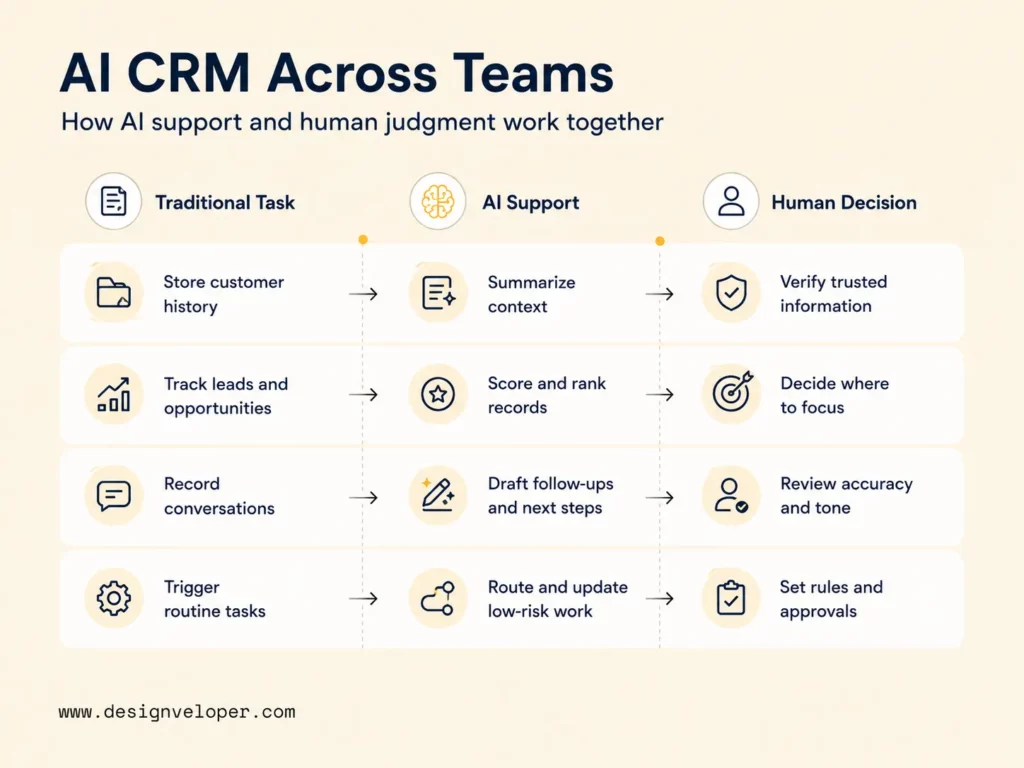
A traditional customer relationship management system stores customer activity and helps teams manage accounts, deals, and cases. AI CRM adds decision support around that information. It can interpret context, rank work, prepare content, and automate approved actions.
The important difference is not that people stop making decisions. AI handles more sorting and preparation, while people keep responsibility for accuracy, customer impact, and exceptions. The table below makes that boundary practical.
| Traditional CRM task | AI CRM support | Human decision |
|---|---|---|
| Store contact, account, deal, and case history | Summarize recent activity and surface missing or conflicting context | Decide which information is trusted and what needs correction |
| Track leads and opportunities | Score or rank records by likely value, urgency, or risk | Choose which accounts deserve attention and why |
| Record customer conversations | Draft follow-ups, meeting briefs, case responses, or next-step suggestions | Review accuracy, tone, commitments, and customer impact |
| Trigger routine tasks | Route work, update approved fields, or call allowed tools | Set permissions, approval thresholds, and exception rules |
For sales teams, this can reduce the time spent rebuilding account context before a conversation. Service teams can understand a case faster before replying. Operations teams can identify missing information and coordinate routine handoffs without turning every task into manual record maintenance.
AI CRM is most useful when it shortens the distance between customer data and a responsible next action.
Core AI-Powered CRM Capabilities
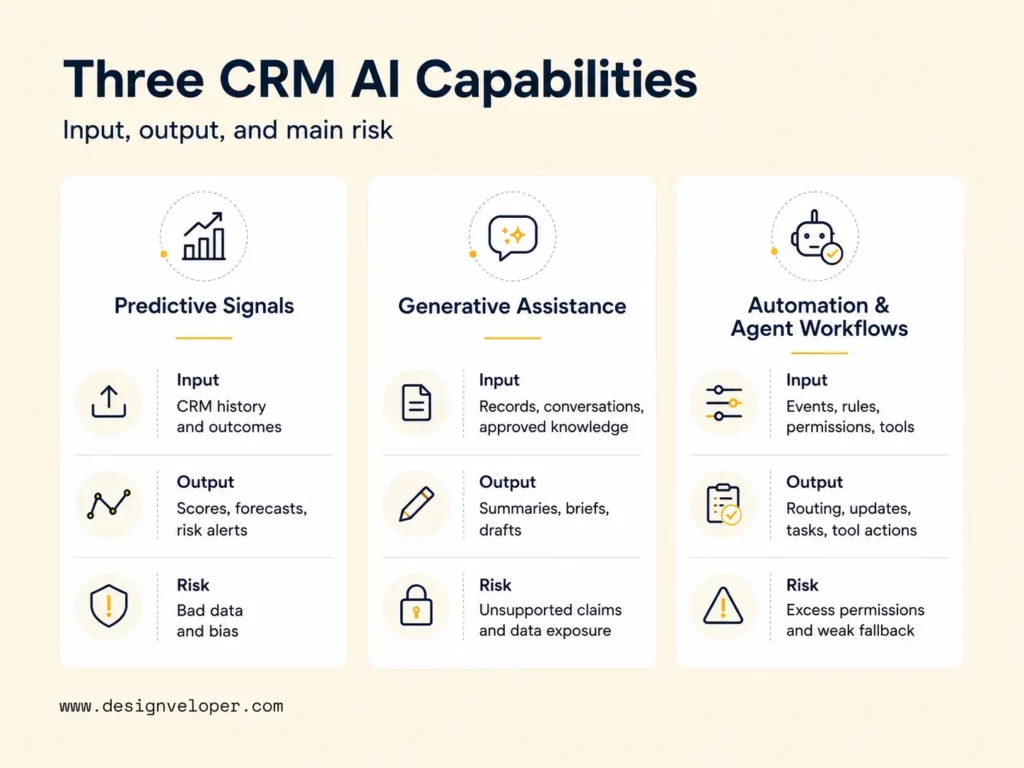
Many AI-powered CRM products combine several forms of assistance rather than relying on one model. Salesforce, for example, currently describes predictive, generative, and agentic AI as capabilities within its CRM platform in Salesforce’s overview of AI across CRM workflows. That is a vendor example, not a universal classification for every AI CRM product.
For a buyer, the more useful questions are simpler: what data does the capability read, what does it produce, and what happens when the information is incomplete or wrong?
| Capability | Main input | Typical output | Main failure risk |
|---|---|---|---|
| Predictive signals | Historical CRM records, outcomes, activity, and behavioral signals | Lead scores, deal priorities, forecasts, or churn-risk signals | Bad labels, missing history, bias, or changing customer behavior |
| Generative assistance | Customer records, conversations, approved knowledge, and instructions | Summaries, briefs, notes, drafts, and suggested responses | Unsupported claims, stale context, wrong tone, or sensitive-data exposure |
| Automation and agents | CRM events, business rules, permissions, tools, and model output | Routing, task creation, record updates, tool actions, or escalations | Excessive permissions, incorrect updates, loops, or weak fallback behavior |
Predictive Signals for Leads, Deals, and Customer Risk
Predictive CRM features estimate what may happen next from historical patterns. Typical outputs include lead scores, opportunity priorities, forecasts, and churn-risk signals. The model may use past outcomes, account attributes, engagement history, deal movement, or service activity.
These predictions should guide attention rather than replace judgment. A high lead score does not prove that a buyer will convert. A churn flag also cannot explain every customer motive. Sales and account teams still need to consider relationship history, strategic value, timing, and information the CRM does not capture.
Prediction quality depends heavily on historical data. If teams use stages inconsistently, leave important fields empty, or repeat biased past decisions, the model can reproduce those weaknesses. Teams should compare predictions with real outcomes and check whether performance changes by segment or time period.
Generative AI for Customer Context and Team Productivity
Generative AI turns customer context into readable work products. It can prepare an account brief, summarize a meeting, structure notes, draft an email, or suggest a support response. HubSpot’s Smart CRM description of AI across calls, meetings, and emails is one current example of this pattern.
Useful output needs traceable context. A sales summary should make important source records easy to review. A service draft should use approved knowledge rather than inventing policy. Customer-facing content should also require review when it can affect refunds, pricing, eligibility, contracts, or another significant commitment.
Data boundaries matter as much as prompt quality. Teams should decide which CRM fields a model may read, which knowledge sources are approved, and when a human must rewrite or approve the result. Generated content is useful only when the review path is clear.
CRM Automation and Agent Workflows
Automation connects AI output to business action. A workflow can route an incoming lead, create a follow-up task, update an approved field, prepare a case handoff, or call another system. Our guide to AI automation explains how AI interpretation can work with business rules, integrations, and human review.
Agent workflows require tighter controls because the software may act on CRM data rather than only suggest an answer. Start with the smallest permission set. Define what the agent can read, which fields it can change, which tools it can call, and which actions require confirmation. The workflow also needs a fallback when data is missing or an integration fails.
For more autonomous implementations, the technical team should also log tool calls, set timeouts, limit repeated actions, and assign an owner for failed executions. Our guide on building agentic AI covers these production controls in more detail.
AI CRM Use Cases Across the Customer Lifecycle
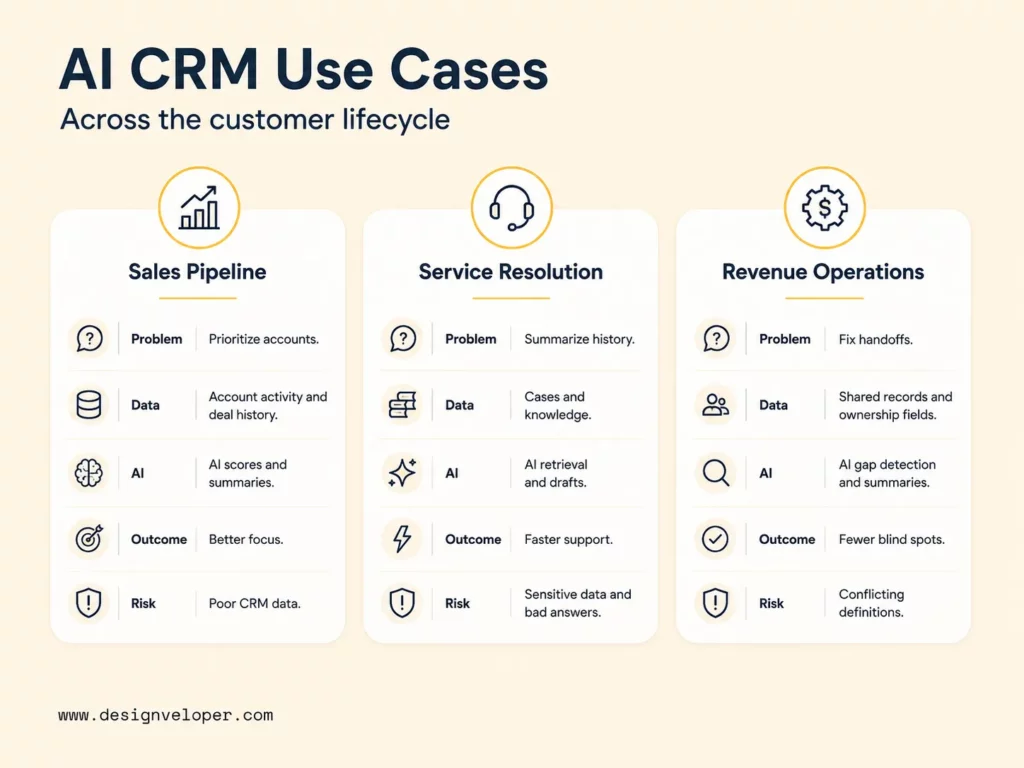
The strongest use cases start with a customer workflow rather than an AI feature. Sales leaders usually need better focus. Service managers need faster context without unsafe replies. Revenue operations teams need cleaner handoffs and fewer gaps between systems.
The summary below gives one decision insight for each use case. The H3 sections then explain the data, capability, outcome, and implementation risk in more detail.
Customer lifecycle use-case summary
- Sales pipeline Use AI to focus reps on the accounts that need attention and reduce preparation work.
- Service resolution Use AI to reconstruct case context faster while keeping sensitive issues with human agents.
- Revenue operations Use AI to surface missing handoff information and exceptions across customer workflows.
Sales Teams and Pipeline Management
AI for sales is most useful when it helps a rep decide where to spend the next hour. The business problem is often not a lack of data. It is the time required to review activities, deals, conversations, and account history before choosing a next action.
An AI CRM can use account records, deal history, engagement, and previous outcomes to rank opportunities or prepare context. Generative features can turn that information into a meeting brief or suggested follow-up. Predictive features can add priority or risk signals for forecast reviews.
The expected outcome is better focus and faster preparation. The main risk is poor CRM adoption. If reps do not log meaningful outcomes or use inconsistent deal stages, recommendations will reflect an incomplete view. A pilot should test whether the suggestions improve useful behavior, not only whether the system can produce a score.
Customer Service and Case Resolution
AI customer service inside a CRM can shorten the time between opening a case and understanding it. The system can combine case history, account context, orders, conversations, and approved knowledge before an agent responds.
AI can summarize the history, retrieve relevant support content, route the case, and draft a response. Our guide to an AI agent for customer service explains how customer context, tool actions, and human handoffs can work together.
The expected outcome is faster case understanding and more consistent handoffs. The main risk is customer harm from a wrong or inappropriate answer. Sensitive records should remain restricted, and unusual cases should move to a human when the workflow reaches its approved boundary.
Revenue Operations and Cross-Team Visibility
Revenue operations teams often need to understand what happened between sales, service, finance, and other customer-facing systems. AI CRM can help identify missing handoff fields, summarize status, flag exceptions, and surface customer context where the next team already works.
Microsoft’s Dynamics 365 Customer Insights – Data 2026 release wave 1 overview, updated in June 2026, describes unified customer profiles as grounding data for AI agents across CRM workflows. That vendor example illustrates why connected customer context can support cross-team work without requiring every team to open the same system.
The expected outcome is fewer blind spots during handoffs. If source systems use conflicting definitions or ownership rules, resolve those governance issues before allowing AI to automate the handoff.
AI cannot create reliable cross-team visibility when the source systems disagree about what the customer record means.
Customer Data and Governance Behind Reliable AI CRM
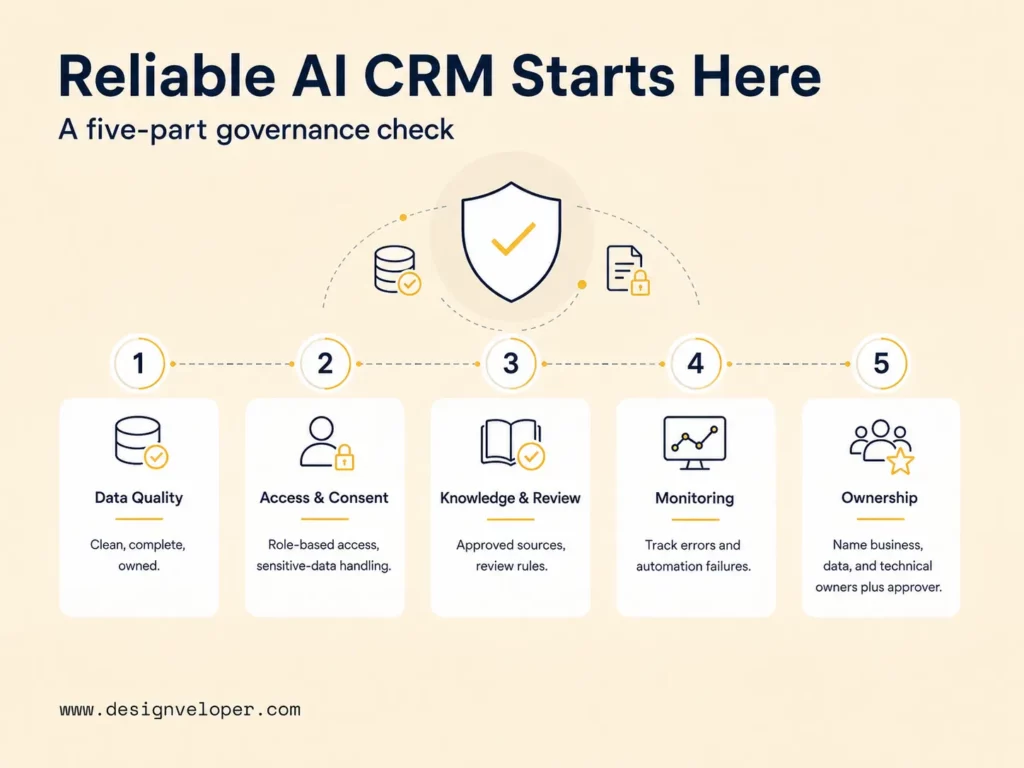
Reliable AI CRM is a data and governance problem as much as a model problem. Teams need to know which records are authoritative, who can access them, what knowledge is approved, how AI output is evaluated, and who owns failures after launch.
The NIST AI Risk Management Framework provides one useful reference for structuring that work. AI RMF 1.0 uses four functions: Govern, Map, Measure, and Manage. NIST describes the framework as voluntary and use-case agnostic, so it should be treated as risk-management guidance rather than a mandatory CRM compliance rule.
For an AI CRM project, the framework can be translated into practical operating questions. What customer data is in scope? Who may read or change it? How will recommendation quality be measured? Who responds when an automated update fails?
Use the readiness check below before giving AI broader access to customer workflows. A weak result does not always block a pilot, but it should reduce the pilot’s scope or authority.
Governance also needs an operating model after launch. The business owner decides whether the workflow still solves the right problem. The data owner handles source quality and access. The technical owner manages integrations, model changes, monitoring, and incidents. An approver owns decisions that should not be delegated to automation.
These roles should also appear in system architecture. The CRM or customer-data platform should remain the authoritative source where appropriate. AI services should access it through supported APIs, events, or an integration layer. Logging and monitoring should show which model, tool, user, or workflow changed a record.
Choose an AI CRM Platform, Extension, or Custom Build
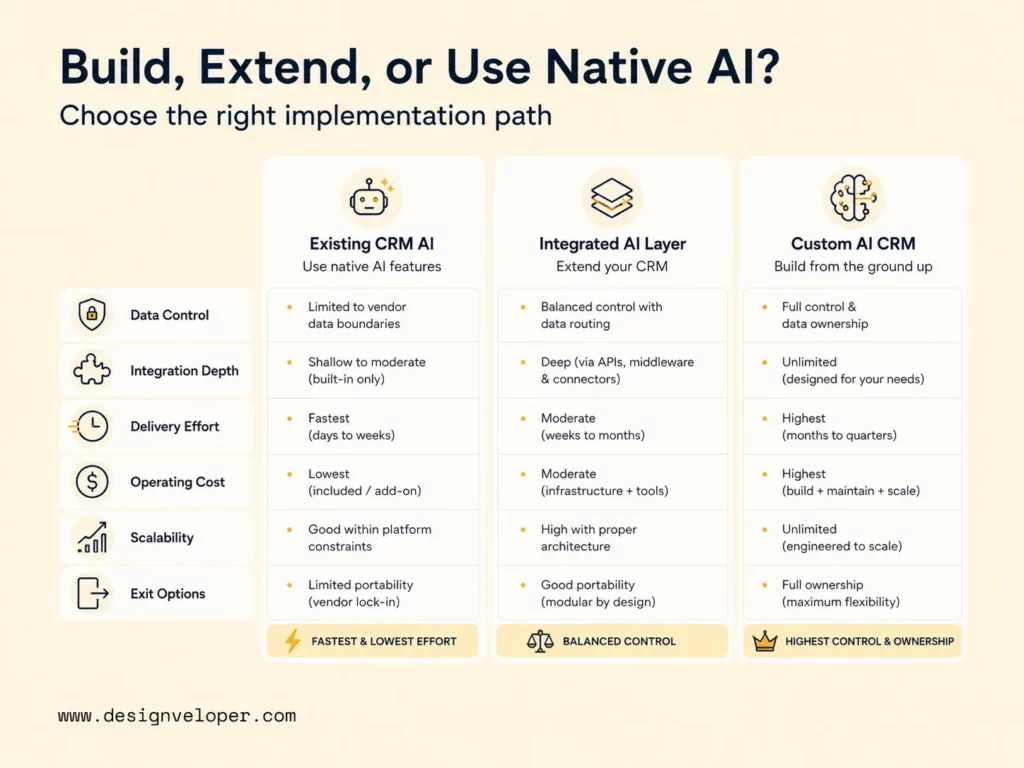
Choose native CRM AI when the current platform already matches the workflow and data model. Choose an integrated AI layer when the CRM should remain in place but the team needs controlled assistance across several systems. Consider a custom AI CRM when product requirements, permissions, integrations, or differentiation exceed what the platform can support.
The table below focuses on the trade-offs that matter after the demo. Use it to compare control, architecture effort, operating responsibility, and the cost of changing direction later.
| Decision factor | AI features in an existing CRM | Integrated AI layer | Custom AI CRM product |
|---|---|---|---|
| Data control | Mostly follows the CRM’s existing data and permission model | Can add a controlled service layer across selected CRM and business data | Highest design control, with the team responsible for the full data model and controls |
| Integration depth | Best when most work already happens inside the CRM ecosystem | Useful for connecting CRM with knowledge, ERP, support, analytics, or internal tools | Best when integrations and workflow logic are core product requirements |
| Delivery effort | Lowest when configuration covers the target workflow | Medium; requires integration, evaluation, security, and workflow design | Highest; requires product design, engineering, testing, deployment, and operations |
| Operating cost | Platform subscriptions plus usage and administration | Platform costs plus model, integration, monitoring, and maintenance costs | Infrastructure, model, support, monitoring, and product maintenance are owned directly |
| Scalability | Follows vendor limits and available configuration | Can scale selected workloads without replacing the CRM | Can be designed for specific scale and performance needs, but the team must operate it |
| Exit options | Harder when workflows depend heavily on vendor-specific features | Better if business rules and integration logic remain separated from the CRM | Highest code and architecture ownership, although migration still depends on design choices |
Before choosing a path, review four architecture questions. They reveal costs that a feature comparison often misses.
- System of record: Which system remains authoritative for contacts, deals, cases, permissions, and customer status?
- Integration path: Will AI use native CRM functions, supported APIs, webhooks, events, or a separate orchestration layer?
- Evaluation and monitoring: Who measures output quality, integration failures, latency, usage, and operating cost after launch?
- Operating ownership: Who updates prompts, models, rules, permissions, integrations, and fallback behavior when the workflow changes?
Native AI is usually the simplest path when the existing platform already fits the process. An integrated layer can preserve the CRM as the system of record while adding AI around selected workflows. A custom product gives more control, but it also transfers more security, monitoring, integration, and maintenance responsibility to the product team.
Build a custom AI CRM only when the workflow, data boundary, or product differentiation cannot fit the platform you already own.
Scope an AI CRM Pilot Before Scaling
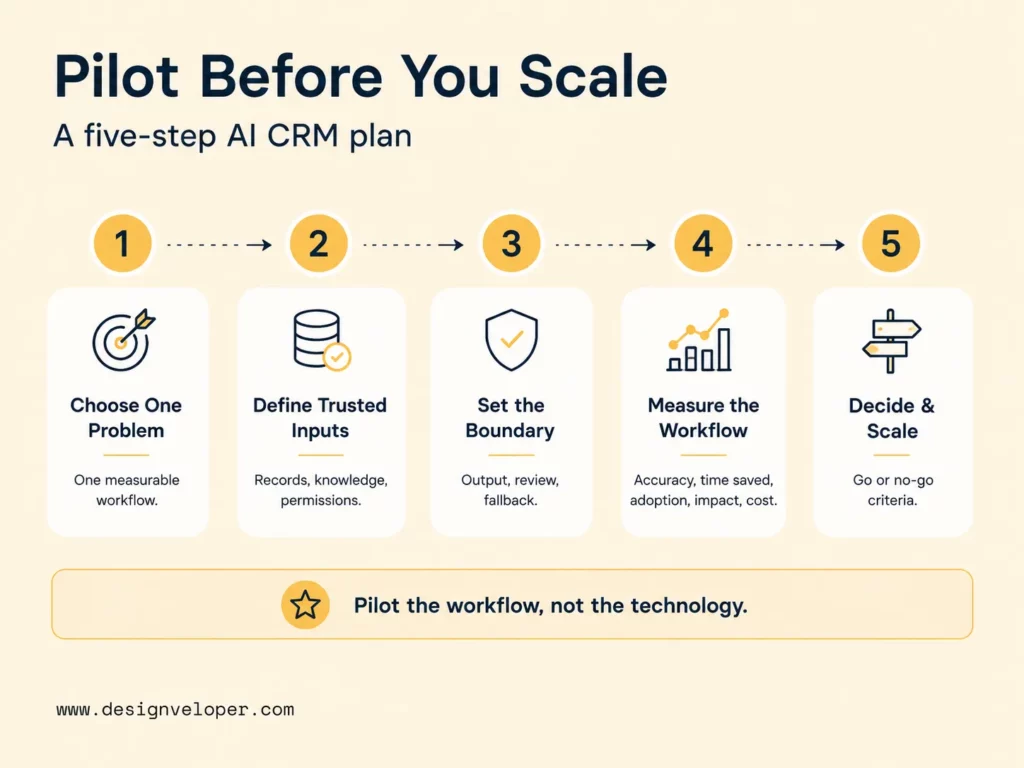
A good pilot tests one measurable workflow, one defined user group, and one clear failure boundary. It should not try to prove that AI can improve the whole customer lifecycle at once. Narrow scope makes it easier to compare the new workflow with a baseline and understand why it succeeds or fails.
Use the five-step plan below to turn an AI CRM concept into a controlled test.
Five-step AI CRM pilot plan
-
STEP 1Choose one problem Select one sales, service, or operations workflow with a measurable outcome.
-
STEP 2Define trusted inputs Name the CRM records, knowledge sources, permissions, and approval rules the pilot may use.
-
STEP 3Set the failure boundary Define the AI output, review step, write permission, escalation path, and fallback.
-
STEP 4Measure the workflow Track accuracy, time saved, adoption, customer impact, and operating cost against the baseline.
-
STEP 5Decide and scale Set go-or-no-go criteria before the pilot ends and scale only the behavior that meets them.
Step four needs both quality and business measures. A sales pilot may compare response time, rep adoption, recommendation acceptance, and movement to the next qualified stage. A service pilot may track time to first useful response, draft acceptance, correction rate, and escalations. An operations pilot may measure handoff delay, missing-field resolution, or manual updates removed.
Evaluation ownership should be explicit before the pilot starts. A product or business owner should decide what success means. A technical owner should monitor model output, API failures, latency, and cost. Users should have a simple way to flag wrong recommendations or unexpected updates so the team can review failure cases.
Keep initial delivery cost separate from ongoing operating cost. Initial work includes data preparation, integration, workflow design, testing, and rollout. Ongoing cost includes model usage, platform subscriptions, monitoring, human review, support, and maintenance. A pilot can appear efficient during setup but become expensive if every task requires repeated model calls or heavy manual correction.
FAQs About AI CRM
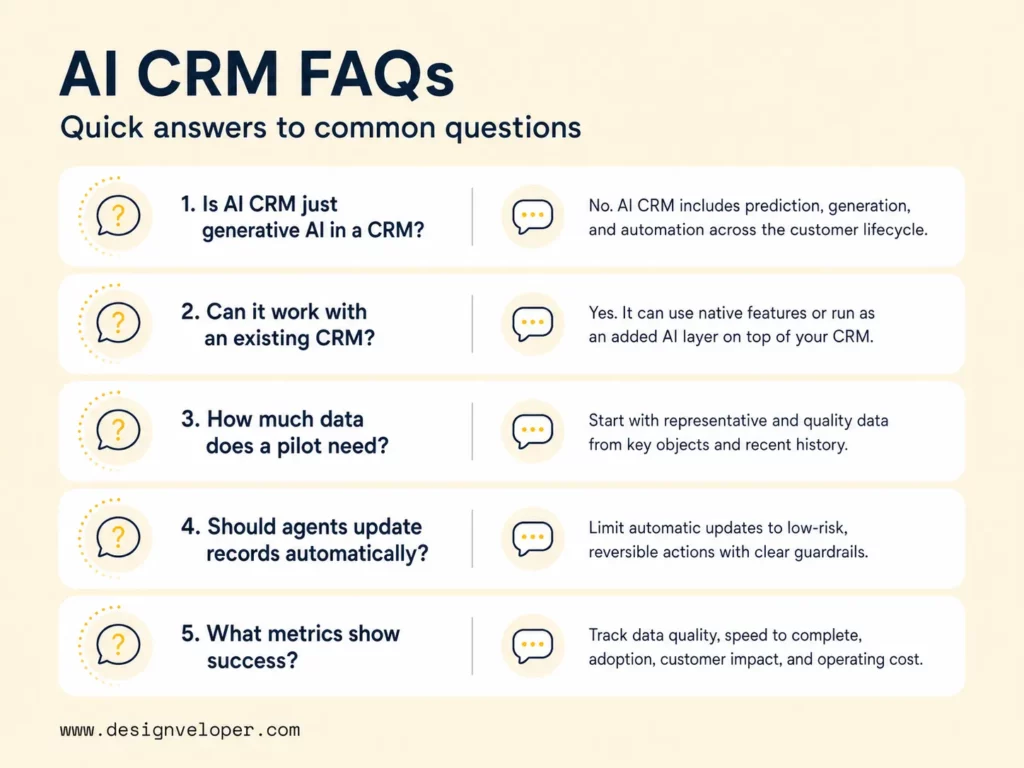
Is AI CRM the Same as Generative AI Added to a CRM Platform?
No. Generative AI is one possible capability inside AI CRM, but the working definition used in this article is broader. A product may also use predictive models for prioritization or forecasting, plus automation or agents for approved workflow actions.
A simple test is to ask what the system does beyond generating text. If it only drafts a follow-up, the feature is mainly generative. If it also scores the account, retrieves customer context, routes the task, or updates an approved field, the workflow uses additional AI or automation capabilities.
Can AI CRM Work With an Existing CRM System?
Yes. The implementation does not require replacing a CRM that already works well as the system of record. Use this short integration check before adding AI:
- Read: Which CRM objects, fields, conversations, and knowledge sources can the AI access?
- Write: Which fields or actions, if any, can the AI change automatically?
- Approve: Which customer-impacting actions require a named human reviewer?
- Recover: What happens when the API fails, records conflict, or the requested action is outside policy?
If those four boundaries are clear, the team can then decide whether native CRM features or an integrated AI layer is the better fit.
How Much Customer Data Does an AI CRM Pilot Need?
There is no universal record count for an AI CRM pilot. The useful amount depends on the workflow and data quality. Predictive scoring needs enough consistent historical examples with reliable outcomes. Generative summarization can often be evaluated with a smaller representative set of current records and approved knowledge.
Start with representative cases rather than volume alone. Include normal records, incomplete records, edge cases, and examples where the AI should refuse or escalate. A large dataset can still give a misleading result when it does not represent the real workflow.
Should AI CRM Agents Be Allowed to Update Customer Records Automatically?
Only for narrow, low-risk, reversible actions with clear permissions and audit records. Creating a follow-up task or filling a non-sensitive field from an approved source may be reasonable. High-impact changes should usually require human confirmation.
Define the write boundary field by field. Decide what is automatic, what needs review, and what the agent must never change. The workflow also needs a fallback for API failure, locked records, conflicting sources, and requests outside policy.
What Metrics Show Whether an AI CRM Pilot Is Working?
Use the pilot framework above and compare the new workflow with its baseline. Track output quality, workflow speed, adoption, customer impact, and operating cost. The exact metric should match the job being tested.
An AI CRM pilot is working when it improves the target workflow without creating unacceptable errors, review burden, security risk, or operating cost. Review failed cases as closely as successful ones before expanding the workflow or its permissions.
If your team needs to define a controlled AI CRM pilot, talk to our technical team about workflow design, AI integration, data boundaries, evaluation, and custom delivery through our AI development services. For public evidence of workflow-heavy software delivery, our workflow-focused HR software case study shows automated requests, employee self-service, centralized policies, and resource-management features. It is not presented as an AI CRM case study.
Also published on

Share post on










Related Articles


AI Agent Case Studies: 10 Real-World Examples Across Industries
AI Agent Case Studies: 10 Real-World Examples Across Industries Published October 21, 2026
How Will AI Affect Software Development? Complete Guide In 2026
How Will AI Affect Software Development? Complete Guide In 2026 Published October 21, 2026
How To Build A RAG System: Step-By-Step (New Guide)
How To Build A RAG System: Step-By-Step (New Guide) Published October 19, 2026


















