
















Agentic AI Replacing AI: How Workflows Change and When to Switch

KEY TAKEAWAYS:
- Agentic AI usually replaces a workflow or feature, not AI as a whole.
- An agent can use an existing model while adding tools, data access, and bounded actions.
- Compare it with the current process before switching, using a baseline, guardrails, an owner, and a rollback rule.
The phrase “AI agents will replace older AI” can hide three decisions: replacing a model, replacing a chatbot feature, or changing a whole workflow. Each choice has different costs and risks. A team that treats these moves as one trend can retire a reliable tool too early or give an agent more access than its task needs. Start by naming the layer being replaced and the outcome the new system must improve.
What Does “AI Replacing AI” Mean?
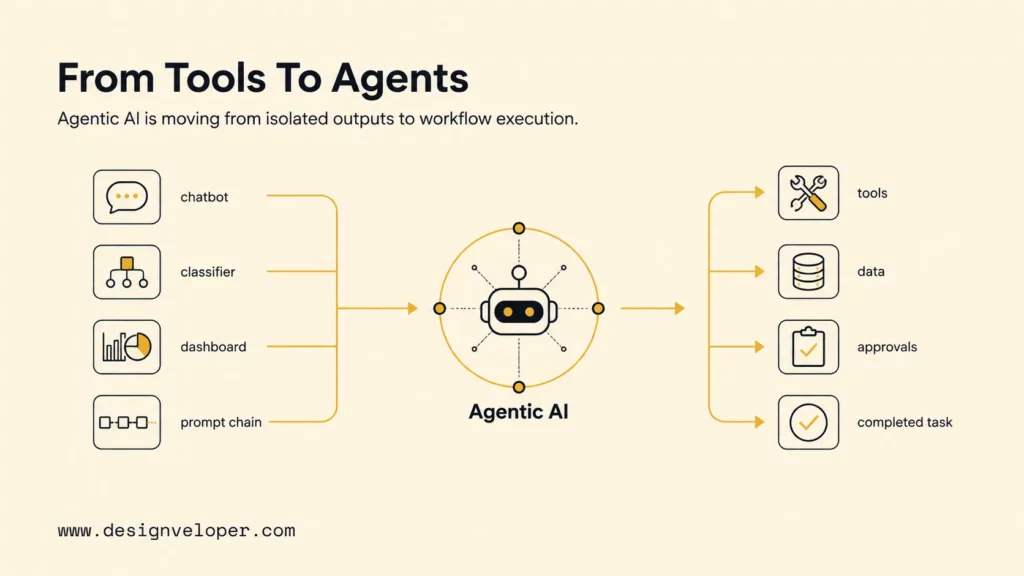
“AI replacing AI” usually means that a new AI-enabled feature or workflow takes over some work handled by an older one. It does not mean that artificial intelligence is replacing itself as a whole. An agentic system may still use the same generative model; the change is often the layer around that model: planning, tool use, data access, checks, and handoffs.
Agentic AI describes systems that pursue a goal through steps and actions, within limits set by people. An AI agent can use a language model to interpret a request or draft content. Surrounding logic selects an approved tool and decides when a person must review the result. Google Cloud’s agentic workflow guide describes the model as the reasoning engine inside a wider tool-using system; that is one common design, not a requirement for every agent.
| Layer | What may change | What “replacement” means |
|---|---|---|
| Model | A language model, classifier, or other model is swapped for another model. | A model-to-model change; the surrounding product may stay the same. |
| Feature or application | A chatbot, classifier, or copilot is replaced or gains new functions. | The user-facing tool changes, but it may still rely on an existing model. |
| Workflow | Several steps and system handoffs are coordinated around a task. | An agent layer may take over work while older models and rules remain. |
This distinction matters when teams estimate cost, risk, and migration effort. Replacing a model may need a new evaluation set. Replacing a workflow can also require API permissions, records of actions, exception handling, and a way to return to the old process. A project brief should name the layer before it promises that “AI will replace AI.”
How Can Agentic AI Replace an Earlier Workflow?
An agentic system changes a workflow when it does more than return an answer. It selects a next step, uses an approved tool, checks the result, and stops or escalates when needed. The model alone does not provide that authority. Teams define the workflow, connect the tools, and decide which actions require review.
From One Answer to Several Connected Steps
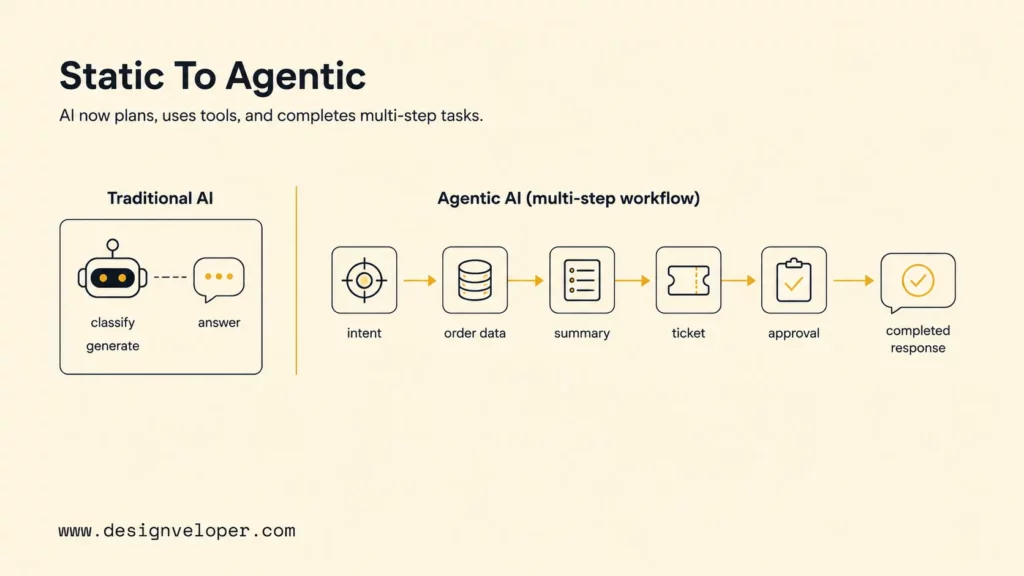
A single-purpose AI tool finishes when it classifies a case, drafts text, or returns a score. A workflow agent can connect those outputs to later steps. For example, a support agent handling a late-delivery complaint could follow this bounded sequence:
- Confirm the case: read the customer’s message and use an authenticated order lookup to find the matching shipment. If the identity or order is unclear, stop and ask for help.
- Check trusted rules: retrieve the current tracking state and compare it with the company’s delivery and refund policy. Do not infer eligibility from a customer’s wording alone.
- Prepare the next action: draft a reply and create a ticket with the evidence used. The agent can suggest a remedy, but a write action must stay within its approved permission.
- Escalate exceptions: send a refund, conflicting policy, or missing record to a human reviewer, then log the decision and response.
This is an illustrative workflow, not evidence that every support team has deployed it. Its value is the handoff it removes; its added risk is that a wrong lookup or permission could affect a real customer record. The team should test both the happy path and the stop conditions before allowing live actions.
From Assistance to Bounded Action
An assistant helps a person complete a task; an agent may carry out defined steps for that person. The line is not simply “human” versus “autonomous.” A system may draft freely or read a record with permission. It may update a low-risk field after validation, yet still need approval before changing an account or sending money.
Teams should grant access action by action. A useful permission plan says what the agent may read, what it may write, which actions it can only propose, and which events force a pause. A product or operations owner should approve the plan with security and data owners before connecting the agent to production systems.
Feedback Does Not Make a Model Self-Improving
Logging failures and collecting feedback can help a team find recurring problems, but those steps do not automatically change a production model. A safer improvement cycle records an issue, proposes a prompt, rule, or model change, tests it against a fixed evaluation set, and requires an owner to approve release.
The same limit applies to model routing. Sending easy cases to a smaller model can reduce one part of the bill. Yet extra calls, retrieval, checks, retries, integration, and human review can raise total workflow cost. Compare the full process per accepted outcome rather than assuming that an agent is cheaper or learns on its own.
For a deeper dive, read:
- AI Agent Architecture Diagrams: Components, Patterns, and Design Steps
- Why AI Agents Need MCP: How AI Systems Connect To Tools And Data
- How To Build An AI Agent: A Beginner’s Step-By-Step Python Example
Where Is Agentic AI Being Used Today?
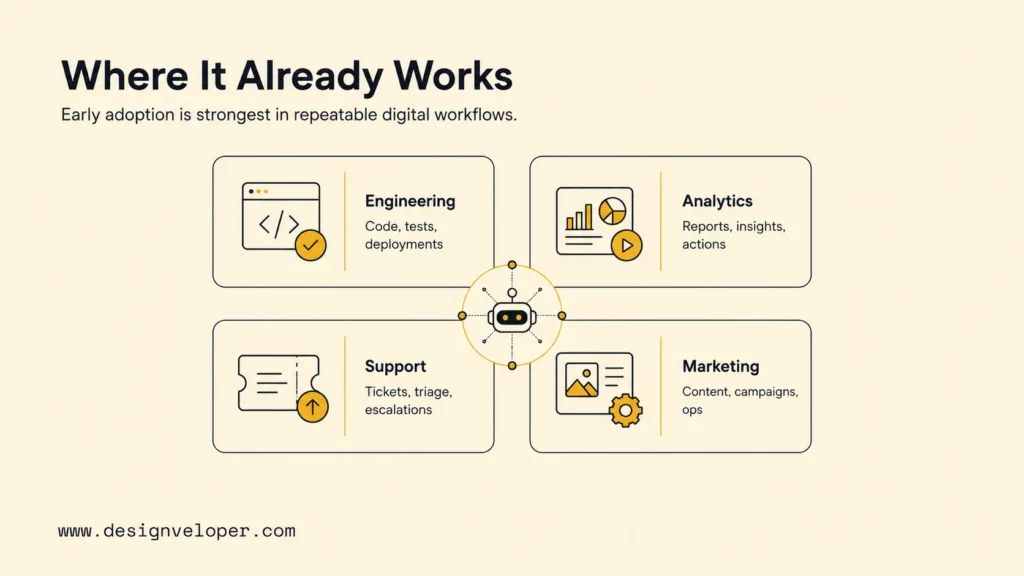
Organizations are experimenting with agents, and some use them for bounded tasks. That does not prove agentic AI has broadly replaced existing AI across industries. The UK Competition and Markets Authority’s 2026 review describes current consumer-facing uses as narrow applications. It says deployments focus more on specific workflows than end-to-end autonomous decisions. The examples below separate reported evidence from practical patterns.
Software Development and Engineering
In software work, an agent can inspect a repository, propose a change, run tests, and summarize what failed. A developer still sets the task, checks the patch, and approves a merge. The useful replacement question is whether the agent safely takes over a defined handoff, such as preparing a test-backed change, rather than whether it can replace a developer.
The 2025 Stack Overflow Developer Survey reports that 52% of respondents either did not use AI agents or used simpler AI tools. Another 38% said they had no plans to adopt agents. These self-reported answers came from 31,877 respondents to the agent question. They are not a measure of enterprise replacement, but they caution against calling coding agents universal. The survey also records accuracy concerns, so teams should test generated changes and keep a human review gate.
For a wider view of how AI fits into the software lifecycle, see AI in software development.
Customer Support and Service
A support workflow can move from answering a common question to checking order or account data, applying a documented policy, updating a ticket, and preparing a response. The business should begin with low-risk requests that have clear inputs and a reliable source of truth. Account access, unusual refunds, legal complaints, and conflicting records should remain human-owned until the team proves a safe boundary.
This is a workflow pattern, not a claim of broad adoption. Track whether each case was resolved correctly, how often it was escalated, and whether the agent made an unauthorized change. The support team should be able to disable write access quickly and return to its existing chatbot or manual queue. See customer service chatbots for the earlier support layer that an agent might extend.
Data Analysis and Business Intelligence
An analytics agent might answer a question by querying a governed semantic layer, checking approved definitions, and drafting a short explanation with links to the underlying data. An analyst can review the filters and source tables before the answer informs a business decision. This can reduce repeated report requests, but it should not replace a shared dashboard when teams need a stable view of the same measure.
Data quality remains a hard boundary. An agent cannot resolve inconsistent metric definitions, missing lineage, or access rules by generating a more fluent answer. Start with read-only access, show the query and source behind each result, and route missing or conflicting data to an analyst rather than filling gaps with guesses.
Marketing and Content Operations
Marketing can connect audience research, content variants, brand checks, localization, and approval. As an illustrative launch workflow, an agent could read an approved brief, prepare regional drafts, check them against the source and brand rules, then route each version for legal review. A marketer still owns the final message and product claims. This is a pilot pattern, not evidence of a named deployment or measured result.
A local test should measure cycle time alongside rework, factual or legal errors, and approval effort. The agent should use current brand guidance, and reviewers should catch unsupported claims before publication. If the team cannot trace which source informed a statement, the workflow should hold that draft for review.
For practical examples, check out:
- Top 10 AI Code Review Tools & Best Practices For Implementation
- Vibe Coding Vs Traditional Coding: Where Fast AI Coding Helps And Where It Hurts
- AI Engineer Vs ML Engineer: Key Differences, Skills, And Best Fit
What Changes for Teams and Businesses?
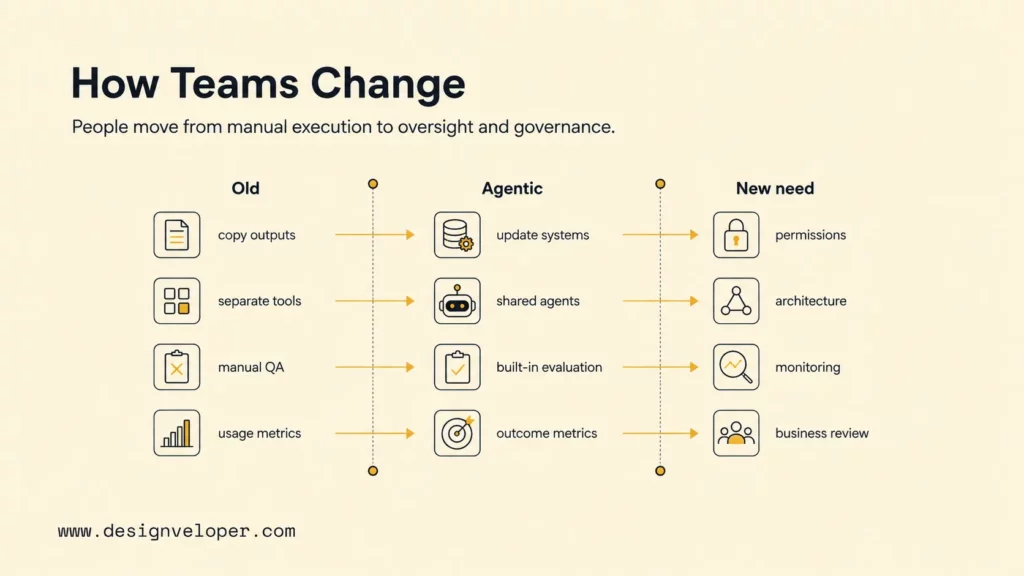
Agentic AI can change who handles a step, but it does not make people unnecessary by default. Depending on the process, staff may spend less time copying outputs and more time defining rules, reviewing exceptions, or improving service. Other tasks may stay human-led because they depend on judgment, accountability, or a relationship with the customer.
Before rollout, assign owners for the process, the agent’s permissions, data quality, and incident response. A vendor or model provider does not become the business owner of an action taken inside the company’s systems. The team needs a clear record of which tool was called, what data was used, what the agent changed, and who approved a sensitive step.
| Operating change | Team responsibility |
|---|---|
| AI output can trigger a system action. | The process owner defines allowed actions and approval points. |
| Work crosses a model, API, and business record. | System owners manage access, data quality, and integration changes. |
| A task can fail after several steps. | Operations defines escalation, incident handling, and recovery. |
| Quality varies by case type. | A named reviewer maintains test cases and checks changes before release. |
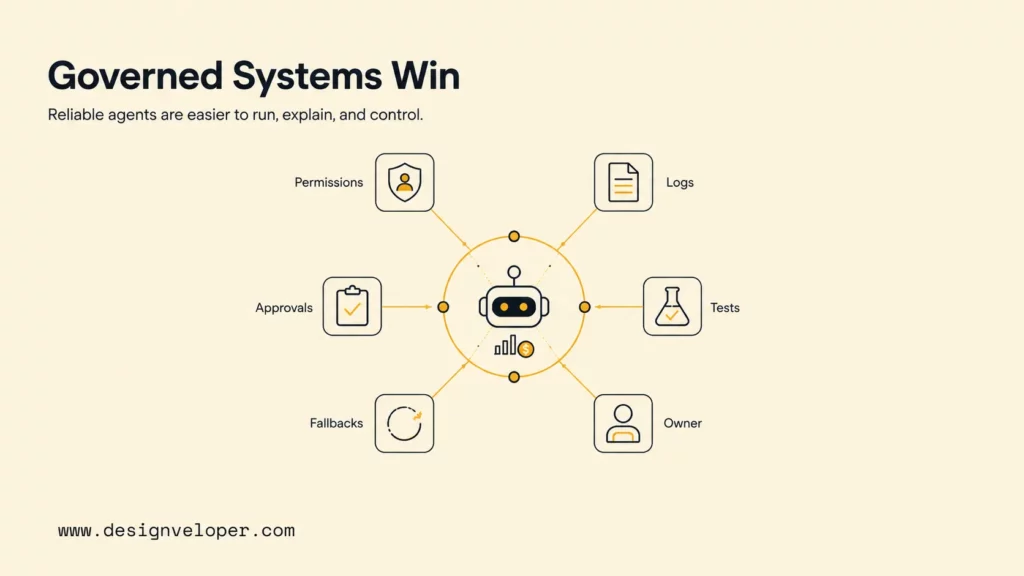
These roles may sit with one small team or several departments; the important point is that ownership is explicit. NIST’s AI Risk Management Framework offers a structure for considering risk across AI design and use. A focused agentic AI security review can help teams map those risks to permissions, testing, monitoring, and recovery. The diagram below shows controls around an agent; it is not proof that any system is secure by default.
Related reading:
- How To Build And Use AI Business Process Automation Effectively
- AI Voice Agent For Customer Service: Use Cases, Workflow, And Risks
- AI Chatbot Integration: A Practical Guide to Connecting Your Systems
When Should a Business Keep, Augment, or Replace an AI Tool?
The best choice is the simplest system that meets the business outcome. A working classifier or chatbot does not need an agent layer just because newer products can take more actions. First check whether the process is repeated often enough, its inputs and rules are clear, and the team can measure a result that matters.
| Choice | Use it when | Example direction |
|---|---|---|
| Keep | The current tool meets its service target and the task is narrow or predictable. | Keep a classifier that routes standard tickets accurately and cheaply. |
| Augment | The model is useful, but a defined step or data connection is missing. | Add a read-only lookup or a human approval step before changing the whole process. |
| Replace | A repeatable multi-step task needs coordination, tools are available, and a supervised test shows a better result within agreed limits. | Test an agent on a narrow case type before extending it to other requests. |
Assess the full workflow, not just the model’s answer quality. Count calls, retrieval, tool use, retries, integration upkeep, human review, and rework. A higher completion rate can still be a poor trade if the agent adds delay, creates more exceptions, or raises cost per successful outcome.
Reliability and control are part of the comparison. Check how the system handles missing data, conflicting instructions, stale records, tool failure, and sensitive requests. If the team cannot trace actions, limit access, pause risky steps, or restore the previous route, it is not ready to replace a production tool.
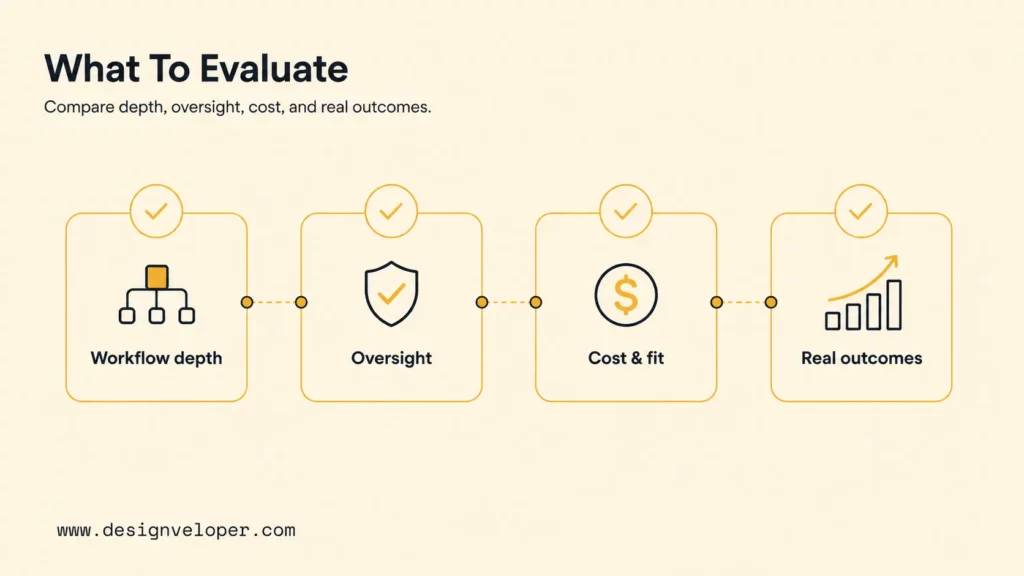
The four evaluation dimensions in the original comparison graphic belong here: workflow depth, reliability and oversight, total cost and speed, and measurable outcomes. Treat each as a test question, not as a feature checklist: does the proposed change improve a defined business result without breaching its safety or service limits?
How to Pilot an Agentic AI Replacement
A useful pilot can disprove the replacement case as well as support it. Keep the existing process available, use representative cases, and agree on the measurement rules before looking at results. Do not move from a promising demo straight to production write access.
- Choose one workflow and baseline. Record how the current tool and people handle the task, including its normal cases, exceptions, manual time, errors, and cost. Name the process owner and choose a case sample that reflects the real workload.
- Set the action boundary. List the data the agent can read, the tools it may call, and the changes it may propose or make. Start read-only or in shadow mode; require a person to approve external messages, payments, account changes, or other consequential actions.
- Build a representative test set. Include normal requests, missing or conflicting data, policy exceptions, and tool failures. Keep the same cases for the old workflow and agent so the comparison is fair, and record how each result is judged.
- Set the pass rule before testing. Choose one primary measure, such as cost per correctly completed case, and guardrails for wrong actions, escalation, latency, privacy, and user harm. The owner must set the sample window and pass threshold from the current service target and risk tolerance; there is no universal number that fits every workflow.
- Roll out with a rollback path. Start with a limited, supervised group and review the logs. Stop writes and route cases back to the old system if the agent crosses a permission boundary, repeats a harmful error, or misses a pre-set guardrail.
For example, a support team testing refund triage could compare the existing chatbot-and-agent process with a read-only agent on the same order cases. The primary measure might be correctly resolved cases per total handling cost. Guardrails could include policy errors, unauthorized changes, escalation rate, and response time. A support operations owner sets the acceptable limits with security before the test; a failed guardrail means the agent does not advance to write access.
Keep the result record short and auditable: test dates and case types, baseline, agent version, primary metric, guardrail results, reviewer, and the decision to keep, adjust, or roll back. If the agent fails, the result is still useful: the business may need cleaner data, a narrower task, a better permission design, or no agent at all.
The diagram summarizes a staged rollout, but the numbered steps above define the test and decision rules.
FAQs About Agentic AI Replacing AI
These answers separate model changes from workflow changes and keep current evidence within its limits.
Can Agentic AI Replace Generative AI?
Usually, agentic AI does not replace the generative model underneath it. An agent can use a language model to interpret a request or draft a response, then add planning, tools, and rules around that model. A business might replace a generative-AI feature, but the new workflow can still depend on generative AI.
Is Agentic AI Already Replacing Older AI at Scale?
Current sources show experimentation and bounded deployments, not proof of broad replacement across business AI. The UK CMA’s 2026 review describes narrow consumer-facing examples, while the 2025 Stack Overflow survey shows that agent use among developers is not universal. These sources cover different populations, so they should not be combined into one market-wide adoption rate.
Will AI Agents Replace Human Jobs?
Evidence about task exposure does not establish how many jobs agents will remove. The ILO’s Generative AI and Jobs: A 2025 Update studies generative AI, not agentic AI. It says most jobs are more likely to be transformed than made redundant. That report is not a forecast of agentic AI’s net employment effect. Describe the tasks that may change, and do not treat an automation capability as a job-loss prediction.
If you are assessing an AI feature or connected workflow, Designveloper’s AI development services publicly include AI software development, chatbot integration, testing, and maintenance. A replacement plan should still begin with the workflow boundary, evidence, and controls—not a commitment to use an agent.
Also published on

Share post on










Related Articles


Is Vibe Coding Legal? Ownership, Copyright, and Release Risks
Is Vibe Coding Legal? Ownership, Copyright, and Release Risks Published October 16, 2026
How to Build a Chatbot with LangChain in Python: 6 Steps
How to Build a Chatbot with LangChain in Python: 6 Steps Published October 16, 2026
Agentic AI Replacing AI: How Workflows Change and When to Switch
Agentic AI Replacing AI: How Workflows Change and When to Switch Published October 16, 2026


















