
















Onboarding Automation: How to Streamline Employee Onboarding Workflows

KEY TAKEAWAYS:
- Onboarding automation uses software, workflow rules, and integrations to handle repetitive, low-complexity onboarding tasks with less manual effort.
- To automate onboarding effectively, businesses should start with repetitive workflows, then expanding into role-based work once the core process is stable.
- Only when the workflow is well designed, strong onboarding automation improves HR efficiency, new-hire readiness, compliance, and employee experience.
- The right onboarding automation stack often covers a system of record, a workflow layer, and supporting tools for identity, signatures, communication, and training.
- AI works best as a support layer inside onboarding automation, not as a replacement for manager guidance, human check-ins, or culture-building moments.
Onboarding automation helps organizations replace manual new-hire coordination with structured digital workflows. It removes the need for email chains, spreadsheets, and manual follow-ups. Instead, HR teams can automate HR processes, from offer acceptance to early ramp-up. This way, every new hire goes through a consistent, timely onboarding and has a smoother experience.
Onboarding automation has become more important, as companies try to improve speed, consistency, and employee experience at the same time. Gusto highlighted that automation helps HR teams reduce repetitive administration without losing visibility over processes.
This guide explains how onboarding automation works, why it matters, and which workflows to automate first. It also covers how to deploy automation effectively and common mistakes to avoid when automating new-hire processes.
What Is Onboarding Automation?
Onboarding automation is the use of software to manage and execute repetitive new-hire tasks with minimal manual intervention. For example, once an offer is signed, the automation system can trigger contract delivery. It particularly collects employee data, assign compliance forms, initiates access requests, and schedules onboarding activities without constant follow-ups.
As noted by IBM, onboarding automation combines both advanced technologies (like Al or RPA) and business processes to streamline employee onboarding workflows, making them more efficient and consistent across teams.
The value goes beyond speed. It introduces process control to ensure that critical steps happen in the right order, every time, with fewer gaps or inconsistencies. This structured approach allows onboarding to scale reliably as organizations grow.
So, what is the key difference between manual onboarding vs automated onboarding?
Manual onboarding relies on people remembering to push each step forward. This causes delays, missed tasks, and fragmented ownership across HR, IT, and managers. However, automated onboarding handles that by linking each completed step to the next required action automatically. So, the process moves forward without anyone having to chase it.
| Different Aspects | Manual Onboarding | Automated Onboarding |
|---|---|---|
| How it works | Email threads, spreadsheets, and repeated follow-ups | Trigger-based workflows across systems |
| Ownership | Fragmented across HR, IT, and managers | Centralized logic with assigned fallbacks |
| Main risk | Missed steps, delays, and weak visibility | Poorly designed workflows automate confusion |
| Main advantage | Flexible when process is still evolving | Consistent, auditable, and scalable |
| Best for | Early-stage teams with simple hiring needs | Growing teams onboarding multiple roles |
How An Automated Onboarding Process Works
An automated onboarding process starts from a single trigger and expands into coordinated actions across multiple teams and systems. These actions are often implemented by different tools in the orchestration layer. To understand how onboarding automation works, you need to understand two things separately: the sequence of events a new hire moves through, and the system architecture that makes that sequence reliable.
Trigger-Based Workflows From Offer Acceptance To Day One
This section focuses on flow. It describes the specific sequence of steps that automation executes once a trigger fires, and how each action connects to the next.
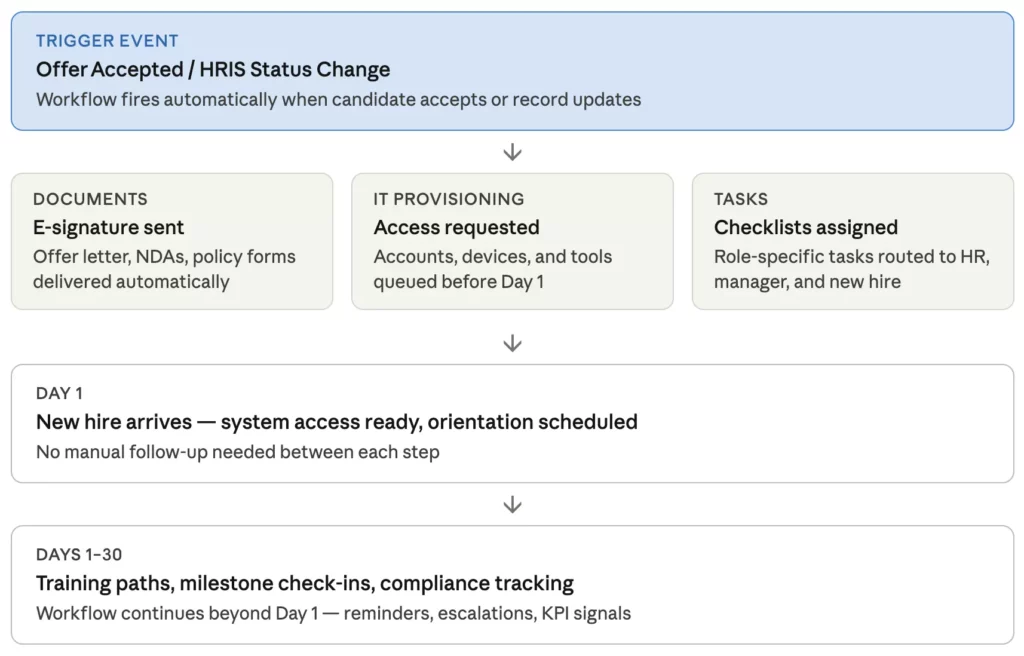
Events like offer acceptance, HRIS update, or recruiting-stage change trigger the full onboarding flow. Each event can launch forms, route approvals, notify IT, create checklists, and schedule orientation steps without manual intervention. In practice, this looks like:
- Candidate marked as hired in ATS
- HRIS profile created automatically
- IT notified to provision equipment and access
- New hire receives welcome email and paperwork link
- Manager receives checklist and day-one briefing
- Training modules assigned based on role
In one case study, Microsoft shows how Epiq used Microsoft Power Automate, Dataverse, and AI Builder to automatically validate data, create accounts, and track status across the entire onboarding process without manual handoffs.
The Core Systems Behind The Workflow
This section focuses on architecture. It explains why onboarding automation depends on multiple platforms, and what role the orchestration layer plays in keeping them connected.
Most onboarding automation depends on more than one platform. Each system owns a specific function:
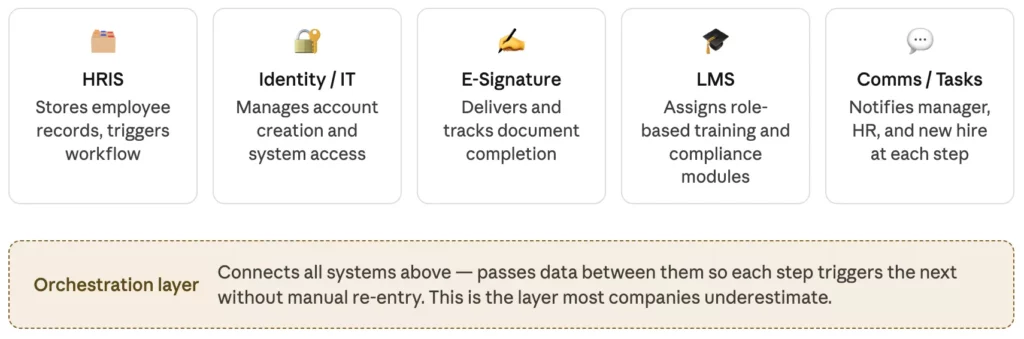
The process only works seamlessly when those systems share the right data at the right time. So, whether onboarding automation is effective does not just depend on tool choice. Instead, companies need to decide how tasks, approvals, and data move between tools.
The Biggest Benefits Of Onboarding Automation
Onboarding automation brings massive benefits to both new hires and HR professionals. Let’s see how beneficial automation is:
Time And Cost Savings For HR Teams
HR teams spend less time re-entering data, chasing documents, and checking whether each stakeholder completed the next step. That time savings compounds when hiring volume increases or when onboarding spans multiple departments and locations. For example, Zenni Optical saved five hours per week on new-hire onboarding after automating recurring HR workflows through Rippling.
Faster Time-To-Productivity For New Hires
Employees become productive sooner when they receive the right access, tools, and learning materials before or on day one. One research found that employees who went through an improved onboarding process are fully productive two months faster than those who joined traditional programs. This is because automation removes the waiting for credentials, device configurations, and training that typically prevents early momentum.
Better Compliance And Lower Administrative Risk
Automation improves consistency around forms, signatures, policy acknowledgments, and required documentation. This helps HR teams to create standardized onboarding workflows for cleaner audit and ensures mandatory steps are not missed or completed late.
More Consistent And Engaging Employee Experience
New hires notice when onboarding feels organized. Zendesk highlighted that emphasizes that automated onboarding helps organizations create a smoother experience than fragmented manual processes, which supports both engagement and long-term retention. Accordingly, automation enables timely updates, clear next steps, and fast access to support. This encourages employees to engage in new companies faster while making companies more competent and supportive.
Common Onboarding Workflows You Can Automate First
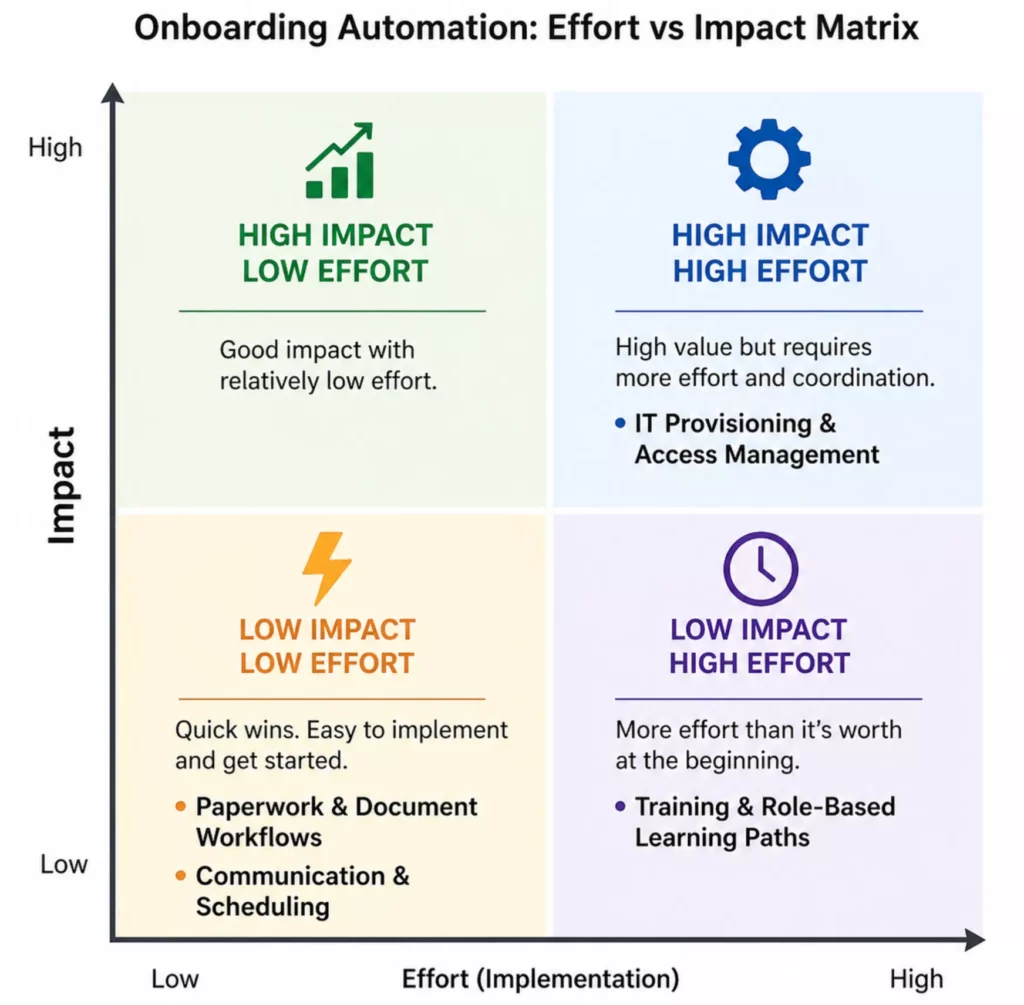
Different processes have different payoffs. So, trying to automate every process at once is one of the most common implementation mistakes. But which workflow do businesses should automate first? The right starting point depends on two factors: how repetitive the task is, and how directly it affects the new hire’s first-week experience.
The four workflows below meet both criteria. They are rules-based enough to automate reliably, and manual failure in any of them produces an immediate, visible problem.
Use the effort-impact matrix below to decide where your team starts based on your current capacity and the gaps most visible in your process.
Paperwork, Digital Signatures, And Employee Data Collection
Start here if: your HR team spends time chasing incomplete forms or re-entering data across systems.
New hire paperwork (like tax forms, policy acknowledgments, and handbook sign-offs) is one of the easiest workflows to automate because every step is predictable. Accordingly, the system sends the form, the employee signs it, and the record is stored automatically. HR professionals do not need to follow every step and re-enter data, but still have a clean compliance audit trail from day one.
IT Provisioning, Equipment Setup, And Access Management
Start here if: new hires regularly arrive on day one without credentials, devices, or system access.
When a hire is approved in the HRIS, that event can automatically notify IT, create the employee’s accounts, assign software licenses, and queue equipment requests. Without automation, this depends on someone remembering to submit a ticket at the right time. With it, the sequence runs on its own. However, the coordination between HR and IT adds some setup complexity.
Welcome Messages, Orientation Scheduling, And Team Introductions
Start here if: new hires arrive without a clear schedule or managers forget to prepare before day one.
These are fixed, time-based steps. This makes them straightforward to automate. That way, when the new hire is confirmed, a welcome email goes out automatically. Besides, an orientation invite lands on the calendar a week before start, and the manager gets a preparation checklist three days out.
Training Enrollment And Role-Based Learning Paths
Start here if: new hires complete generic training that does not match their role, team, or location.
Instead of assigning one training track to everyone, automation can route each new hire into the right learning path based on their job title, department, or seniority level automatically. For example, a sales hire gets product training, while an engineer gets system access walkthroughs.
The setup takes more planning than the other workflows. But it has a direct impact on how quickly someone becomes useful in their role.
How To Implement Onboarding Automation Successfully
Most onboarding automation projects fail not because of the wrong tool choice, but because the process behind them was never clearly defined. Get the workflow right first, and the software configuration becomes the easy part. Below are seven steps to implement onboarding automation effectively:
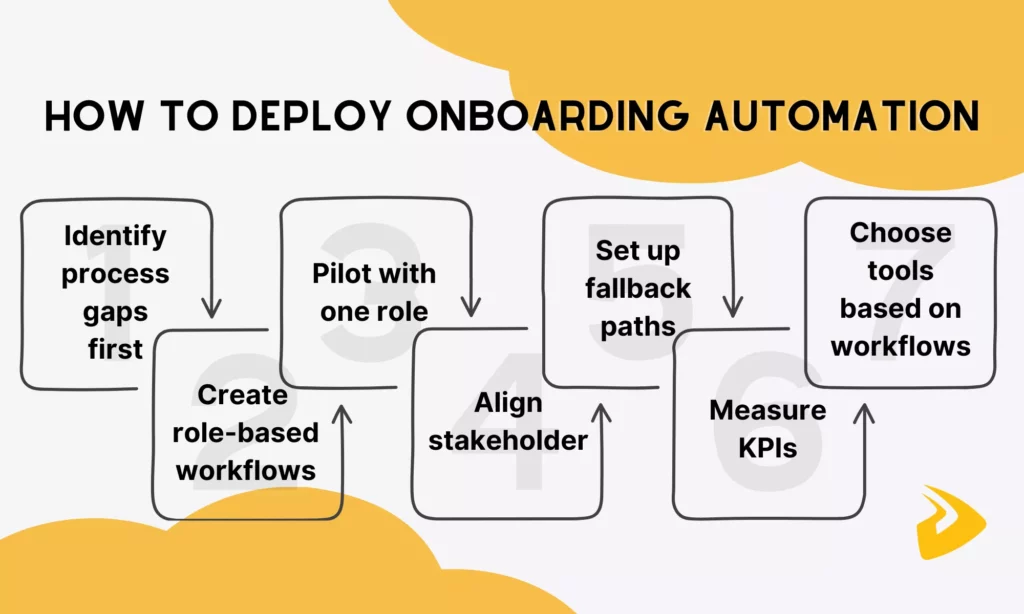
1. Identify Process Gaps First
Start by evaluating the current onboarding process. Accordingly, teams look for tasks that generate rework, require repeated follow-up, or depend on one person remembering to act. The goal is to automate the steps that break most often, not the ones that are easiest to configure.
2. Create Role-Based Workflows By Team, Location, Or Seniority
Next, build role-based workflows by team, location, or seniority, because there is no “one-size-fits-all” workflow for every hire. Engineers need different system access than sales hires. Meanwhile, leaders need different approval chains than frontline employees. So, build separate workflow branches for each meaningful employee type from the start.
3. Pilot With One Role Before Expanding
Choose one repeatable employee type, ideally the most common hire in the organization. Then, run the full automated workflow with that group first. This helps HR teams to validate timing, catch missing steps, and confirm that ownership is clear before the workflow scales. Expand only after the first cohort completes without manual intervention.
4. Align Stakeholders Before Launch
Onboarding automation surfaces ownership problems that were previously invisible. HR, IT, managers, finance, and learning teams all touch different parts of the process. But if it is unclear who approves what or who fixes what when something breaks, HR automation will not solve that. Before launch, confirm that every step has a named owner, every approval has a defined path, and every team understands what the system will handle versus what still requires human action.
5. Set Up Fallback Paths And Error Monitoring
Every automated workflow needs a plan for recovery when something goes wrong. Define what happens if a form is not completed within the expected window, if a system fails to sync, or if a provisioning request stalls. Without fallback logic, failures become invisible. Accordingly, the workflow appears to run while a new hire is quietly missing access or waiting on a document no one knows is stuck.
6. Measure KPIs That Actually Matter
Track metrics that reflect the employee experience, not just workflow activity. Some common metrics include time-to-productivity, first-day readiness rate, task completion rate, onboarding support ticket volume, and new-hire satisfaction scores. They show whether automation is improving outcomes or simply moving the same problems faster.
Review these metrics after each pilot cohort and again at 90 days. If a metric is not improving, the workflow needs adjustment.
7. Choose Tools Based On The Workflow You Just Mapped
Select software after the workflow is designed, not before. The right tool is not the one with the most features or the largest market share. Instead, it must be the one that supports the specific tasks, triggers, owners, and system integrations your process actually requires.
Evaluate each candidate against the workflow map. Can it handle the triggers you need, connect to the systems already in use, and support the exception logic you defined? A tool that fits a well-mapped process will always outperform a better-rated tool applied to a process that was never properly defined.
Tools That Support Onboarding Automation
Onboarding automation rarely runs on a single platform. Most organizations piece together a stack where each tool owns a specific function and the automation layer connects them. The categories below reflect how that stack typically breaks down.

- An HRIS or HCM platform is usually the system of record and the source of the trigger. When a candidate is marked as hired, that event is what kicks off the rest of the workflow. Common examples include Workday, BambooHR, and Rippling.
- A workflow automation tool handles the orchestration. It accordingly routes tasks, sends notifications, and connects systems that do not natively talk to each other. Tools like Zapier, Make, and Microsoft Power Automate sit in this layer.
- An e-signature and document tool manages form distribution, completion tracking, and storage. DocuSign and Adobe Sign are the most common, though several HRIS platforms have this built in.
- An LMS or learning platform handles training assignment and completion tracking. Well-configured LMS assigns role-specific learning paths automatically without requiring HR to enroll each hire manually.
- An IT provisioning or identity tool manages access, credentials, and device requests. Okta, JumpCloud, and ServiceNow are common in this layer, particularly in larger organizations.
The right combination depends on the workflows you mapped and the systems already in your stack. For a full breakdown of tools by use case and team size, see our guide to onboarding automation software.
Explore more:
- Best HR Automation Tools: Features, Use Cases, and Tips
- What Is AI Automation? How It Works, Benefits, Tools, and Use Cases
- AI Chatbot Integration: How To Connect Chatbots With Business Systems
Where AI Fits In An Onboarding Automation Workflow
Today, AI adds value at specific points in the onboarding workflow. It acts as an extension of the automation layer already in place, handling issues that rigid rules fall short.

Answering Repetitive Day One Questions
Many businesses connect AI chatbots with the company knowledge base to handle the highest-volume, lowest-complexity tasks in onboarding. They answer the same questions repeatedly, from how to submit expenses to who to contact for IT issues. This free HR teams for higher-value interactions.
However, to let AI automate routine tasks effectively, the key condition is that the knowledge base needs to be accurate and up to date before the chatbot is connected. A chatbot trained on outdated policy documents creates more confusion than it resolves.
Routing Exceptions That Rules Cannot Predict
Rule-based automation handles predictable paths well. It breaks on edge cases, such as a hire who joins mid-cycle or a role that spans two departments. But AI integration adds value here by interpreting the situation and routing it to the right owner rather than letting it stall.
Keeping Automation Human Where It Matters
AI agents should not replace the high-impact human moments in onboarding, like manager check-ins or team introductions in the first week. These moments have outsized impact on retention and engagement and cannot be automated without losing their value. The right automation uses AI to eliminate low-value repetition so that human attention is available for the interactions that actually build belonging.
Common Onboarding Automation Mistakes To Avoid
Most onboarding automation problems are not about tools, but about process and planning. Understanding these problems helps businesses deploy onboarding automation more effectively.

Over-Automating Before Mapping The Process
The most common mistake is configuring workflows before anyone has documented how onboarding actually works today. Accordingly, teams select a platform, start building triggers, and discover three months later that the automated process has the same gaps as the manual one.
Solution: Map the current process first, identify where it breaks, and automate those specific failure points.
Ignoring Integration With Existing Systems
Onboarding automation only works as well as the connections between the systems behind it. What if HRIS does not sync with the identity tool, or an e-signature platform does not write back to the employee record? Any of these gaps turns automation into a partial solution that still requires someone to handle missing steps manually.
Solution: Before committing to a tool, confirm it integrates smoothly with the systems already in use. Integration problems discovered after launch are significantly more expensive to fix than before.
Skipping Stakeholder Buy-In
Automation and AI reshape how different teams (e.g., HR, IT, finance) involved work. Launching without their input means the workflow will reflect HR’s assumptions about how other teams work, which are often wrong. As a result, an automated workflow runs alongside the old manual habits rather than replacing them.
Solution: Get each stakeholder group involved before the workflow is designed, not after it is built.
Treating Automation As A Replacement For Human Connection
Automation handles the logistics of onboarding well, like sending a welcome email or assigning a buddy. But it does not handle belonging, confidence, or the kind of early impression that determines whether a new hire feels like they made the right decision.
Solution: Use automation to remove the administrative burden so that the people involved in onboarding have more time for the interactions that actually matter.
FAQs About Onboarding Automation
Which Onboarding Tasks Should Be Automated First?
Onboarding tasks to automate first are often high-volume, rules-based, and currently causing visible delays. They may involve paperwork and digital signatures, IT provisioning, and welcome communications. These workflows are predictable enough to automate reliably and produce immediate, measurable results without requiring deep system integration.
Is Onboarding Automation The Same As An HRIS?
No. A HRIS manages employee records and is typically the trigger that starts an automated workflow. Onboarding automation usually connects the HRIS to other systems like e-signature tools, identity management platforms, and learning systems to move tasks and data between them automatically.
Can Onboarding Automation Improve Compliance?
Yes. Onboarding automation ensures that required forms, policy acknowledgments, and documentation steps happen in the right order every time. This reduces the risk of missed steps and creates a clean audit trail without relying on anyone to remember.
What Tools Are Needed For Effective Onboarding Automation?
Most organizations need at least four tool categories: an HRIS as the system of record, a workflow automation tool to orchestrate tasks across systems, an e-signature platform for document management, and an LMS for training assignment. The exact stack depends on team size and which workflows are being automated first.
How Do You Keep Onboarding Personal When It Is Automated?
To keep onboarding personal, your HR team should use automation for repetitive workflows and system coordination, not for every meaningful interaction. This way, managers, HR, and mentors still play an important role in shaping confidence, belonging, and role clarity.
Conclusion
This article has highlighted what onboarding automation means and why it matters. Despite powerful, automation is only as effective as the process thinking behind them and the people willing to maintain, refine, and own them over time.
If your onboarding process still depends on email follow-ups, manual checklists, and individual memory, automation is a helpful choice. The starting point is deciding where current workflows break, which failure to solve first, and involve stakeholders to keep automation reliable, even when it scales.
| How Designveloper Helps Automate Onboarding Effectively As an AI-first software and automation partner, Designveloper builds custom onboarding automation workflows for teams that have outgrown off-the-shelf HR tools or need tighter integration between their existing systems. With years of hands-on experience, we provide dedicated AI Development Services to help operational teams: – Map current onboarding processes and identify the highest-impact automation opportunities – Design role-based workflows that connect HRIS, IT provisioning, e-signature, and LMS platforms – Build fallback logic and error monitoring so the system runs reliably without constant manual oversight – Pilot, test, and expand automation in a way that brings HR, IT, and management stakeholders along One of our successful projects is HRM, a Mattermost-based internal HR assistant. The assistant integrates well with internal systems to automate booking, leave requests, approvals, and policy lookup. We also help clients across different industries create AI-powered document workflows, call systems, and intelligent assistants to handle repetitive internal or customer-facing tasks more effectively. If you are ready to move from manual coordination to a structured, scalable onboarding process, talk to our team to discuss what that looks like for your organization. |
Also published on

Share post on










Related Articles


10 Best AI Chatbot Of 2026: We’ve Tried & Tested By Use Case
10 Best AI Chatbot Of 2026: We’ve Tried & Tested By Use Case Published September 22, 2026
Best AI Chatbots For Businesses In 2026: Compare Tools By Use Case
Best AI Chatbots For Businesses In 2026: Compare Tools By Use Case Published September 21, 2026
Best Claude Model in 2026: Fable, Opus, Sonnet and Haiku
Best Claude Model in 2026: Fable, Opus, Sonnet and Haiku Published September 18, 2026



















