
















Is It Hard to Learn HTML? A Realistic Look

Have you ever wondered how the websites you often visit are built? The answer lies in HTML (Hypertext Markup Language), one of the foundational web languages. If you’re starting to learn about web development and HTML is the first programming language you want to conquer, you may ask: Is it hard to learn HTML? The answer depends on many factors. But fortunately, HTML is widely recognized as one of the most accessible entry points to web development. To help your learning journey with HTML, we’ll offer you a realistic view of its learning difficulty, along with practical tips to learn this language effectively. But first, we’ll elaborate on what HTML is truly used for.
What is HTML Used For?
HTML is a simple markup language. But it lays a foundation for every digital content we interact with on websites or web applications.
Imagine HTML as your house’s architectural blueprint, identifying where each door, window, room, and piece of furniture will be organized so that you can navigate around easily. At its core, HTML’s main purpose is to structure and organize a webpage’s content through HTML elements. These elements include a start tag, element content, and an end tag.
| Start tag | Element content | End tag |
| <h1> | What is W3Schools? | </h1> |
Within an HTML document, you can structure the content of a webpage with different types of tags. Here’s an example we created with the W3Schools Tryit Editor:
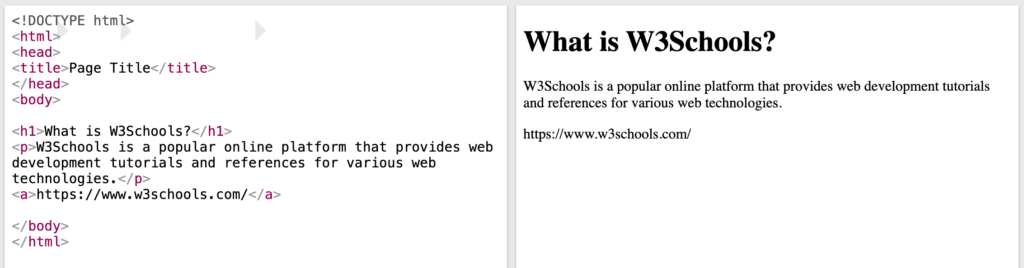
Some basic HTML tags you may see from the example above include:
- The <title> tag designates the title of the document. It’ll be displayed in the page’s tab or the browser’s title bar, showing readers what the document will talk about.
- The <h1> tag is typically used for the main title of a page or section. Besides, you may use tags from <h2> to <h6> to determine different levels of headings or subsections. This enables a clear hierarchy for website visitors and search engines.
- The <p> tag identifies a block of text (aka “a paragraph”). It enables web browsers to know where one paragraph begins and ends.
- The <a> (anchor) tag refers to hyperlinks that connect different web pages or sections within the same page.
Additionally, there are many other HTML tags that help you embed different elements into your site. For example, the <img> tag adds images to your webpage, while the <ul>, <ol>, and <li> tags help organize information clearly with bullet points or numbered sequences.
The Importance of HTML in SEO
HTML not only presents content for visitors to understand. Beyond that, it helps optimize search engines, increasing high-quality organic traffic to your website through search engine results.
Normally, search engines like Google understand your webpage’s content by depending on the structure and organization of HTML elements. A well-structured HTML document will have proper semantic tags (that convey specific meaning for search engines to understand the webpage’s content, like <header>, <nav>, <article>, or <footer>) to help search engines crawl, index, and understand your content more precisely.
For example, a heading hierarchy (<h1> to <h6>) allows search engines to interpret the main topics and subsections of your content. Meanwhile, the <img> tag often comes with the alt attribute to offer descriptive text for an image. If the image fails to load, the text will show up, help search engines interpret the image’s content, and improve image search rankings.
The Importance of HTML in Accessibility
When it comes to web accessibility, we often think of developing websites that even the disabled can perceive, navigate, and interact with. Without HTML, it’s hard for websites to be accessible to everyone. Particularly, thanks to semantic HTML tags, screen readers (assistive software that reads digital text and information aloud) can navigate the page seamlessly and tell users where they are on the page and what the content talks about. These readers can “read” the image, allowing those with visual impairment to understand the image through the alt text.
HTML, CSS, and JavaScript: Formula to Create Dynamic Pages
Basically, HTML helps you build static web pages for your website and web application. Whether you want to create a simple blog post or a complex eCommerce product page, the page always starts with an HTML document (which starts with <html> and ends with </html>). The document has all the content (e.g., text, images, and other multimedia elements) to create what you often see in the site’s frontend.
HTML is powered when combined with CSS (Cascading Style Sheets) and JavaScript. Accordingly, CSS plays a crucial role in styling HTML elements and deciding how they look in the front end (e.g., layout, colors, fonts, animations). JavaScript, meanwhile, makes HTML pages interactive with features like interactive forms, animated menus, photo galleries, etc. Together, these three languages turn the site’s static user interface into something lively and attractive to your users.
Is It Hard to Learn HTML?

For those starting their journey to web development, they’re often advised to take up HTML first as it’s foundational and considered “easy to learn.” This is not wrong. But in reality, HTML still presents some “difficult” aspects for beginners. The perceived difficulty of learning HTML depends much on various factors:
- Prior Experience: Learning Finnish will become easier if you have prior experience with Sweden, as these two languages have some similarities. The same also applies to HTML learning. If you have some prior coding experience or logical thinking, learning HTML will be much easier. But it doesn’t mean that this language is too hard for those without a coding background.
- Well-Structured Learning Resources: You may struggle to learn HTML if your learning resources lack organization, quality, hands-on examples, and even an environment for practice.
- Consistency & Practice: Practice makes perfect, even when you learn something considered simple and easy. Consistent effort and regular practice are the key to mastering HTML.
Besides these individual factors, HTML itself still has some “easy” and “challenging” aspects. Understanding these facets will help you start your learning journey more easily.
The “Easy” Aspects
HTML is accessible for anyone because of its following characteristics:
- Simple Syntax: As we mentioned, HTML uses a simple system of tags enclosed with angle brackets to start and enclose the content you want to display. Each tag has a simple name for learners to understand what it represents. For instance, <p>, short for Paragraph, refers to a block of text, while <img> is abbreviated by Image and used for showing images. This tag system is straightforward and easy to understand.
- Declarative Nature: HTML is naturally declarative. It means you use HTML elements to declare and describe the structure and meaning of your content. The nature of HTML differentiates it from programming languages (like Python, JavaScript), which give a sequence of explicit instructions to guide computers to perform a specific action step-by-step. Therefore, if you want your content to be presented in which way, just declare that way with HTML tags.
- Instant Visual Output: You can observe your HTML output immediately by saving .html files and opening them in a web browser. Further, you can leverage free tools like the W3Schools Tryit Editor to see how your code works in practice.
- Abundant Resources & Strong Community: HTML is the second most used language, with nearly 53% of developers worldwide employing it for their projects. Besides, HTML was released decades ago. Therefore, it has built abundant resources and a robust community to support development. These factors allow you to easily find resources to start your learning journey or troubleshoot problems associated with HTML.
The “Difficult” Parts & How to Address Them
HTML may have several “hard” facets for beginners. Below are some common challenges and how to overcome them:
- Elements Nesting: An HTML document is built with nested elements. This means that the document includes elements being nested in other elements. Improper nesting can result in layout issues and unexpected behavior. It’s like when you play with Lego blocks (“HTML elements”). If you put these blocks in the wrong place, you won’t create what you want. Similarly, if you don’t open and close HTML tags properly and don’t let them be nested logically, you can’t build your desired website.
- Tips: Structure your code visually by adding spaces before HTML tags to showcase a clear hierarchy and relationship between them (example below).
- Browser Compatibility: Different web browsers (like Google Chrome, Brave, Firefox) may render HTML in a slightly different way. This will affect the look of your content on a web page when opening it on these browsers, hindering a consistent user experience across browsers.
- Tips: Test your HTML code on various web browsers before launching it. This ensures a seamless experience across various platforms.
- Combination with CSS and JavaScript: In reality, HTML doesn’t work alone. It’s always combined with CSS and JavaScript to make your website dynamic and interactive. Whether you want to build a simple or complex website, learning all these languages is necessary to ensure you can create a visually appealing, yet fully functional site.
- Tips: Master HTML first to understand how your site’s content should be structured and organized. Then, move forward to CSS for styling and JavaScript for interactivity.
How to Learn HTML Effectively

After the previous section, you may answer the question yourself: “Is it hard to learn HTML?” In this section, we’ll give you a detailed roadmap to help you learn HTML effectively and not waste too much time on your learning.
1. Start with the basics and build gradually
First, focus on learning the fundamental tags, attributes, and document structure. Accordingly, start by understanding the core tags that create the basic HTML structure of a web page, including <!DOCTYPE html>, <html>, <head>, and <body>. Then, you can get used to common block-level and inline elements like paragraphs (<p>), headings (<h1> to <h6>), or lists (<ul>, <ol>, <li>). Further, you can learn about how attributes are used to add information to HTML elements (e.g., the alt and src attributes for <img>).
You should also avoid learning everything at once. Begin with the most commonly used ones and gradually grow your knowledge when you make progress and meet more needs in your projects.
2. Understand “Why,” not just “What”
Don’t just memorize HTML tags. Try to understand the purpose and meaning behind each tag and how it contributes to the overall structure of a webpage. This makes your HTML learning more interesting, meaningful, and much easier in the long run.
3. Combine with hands-on experience
Learning HTML isn’t hard if you combine theory with regular practice. Don’t just passively read or watch tutorials. Instead, open a code editor and try out examples yourself. This active engagement helps you catch syntax errors early and reinforces your learning.
When you’ve understood the fundamentals, you can challenge yourself by building a simple website from scratch or modifying website templates to meet your needs. This helps you apply what you’ve learned and find out areas where you need to understand further.
4. Use Quality Learning Resources
There are different types of sources to learn HTML. You can enroll in comprehensive online courses on common platforms (e.g., Coursera, edX) or invest in good books if you want a linear learning path. Further, you can look for online tutorials like W3Schools, freeCodeCamp, or MDN Web Docs to provide concise, detailed explanations, interactive coding challenges, and even code editors to try out your HTML code. Choose the one that suits your learning style.
5. Make mistakes and improve
No matter how easy HTML is, making mistakes is normal. So, don’t get demotivated when your HTML code doesn’t work as expected. Look at your errors and try to understand why you made those mistakes. When you get stuck, use online forums or communities like Stack Overflow, Discord, or Reddit’s r/learnprogramming to resolve your problem.
Final Thoughts
After this article, you may find the answer to whether it is hard to learn HTML. To be honest, HTML is an easy entry point to web development due to its syntax simplicity. However, you need consistency and regular practice to master this language.
Wanna learn more about HTML and other languages like CSS or JavaScript to build a seamless frontend for your site? Subscribe to our blog and receive the latest posts about them!
Also published on

Share post on










Related Articles


Best JavaScript Frameworks For Web Development In 2026
Best JavaScript Frameworks For Web Development In 2026 Published August 05, 2026
Why Learn JavaScript? Career Benefits, Uses, And Learning Path
Why Learn JavaScript? Career Benefits, Uses, And Learning Path Published August 05, 2026
vLLM Tutorial: A Step-By-Step Guide To Deploying And Serving LLMs
vLLM Tutorial: A Step-By-Step Guide To Deploying And Serving LLMs Published June 29, 2026



















