















Best JavaScript Frameworks For Web Development In 2026

KEY TAKEAWAYS:
- Match the framework layer to the workload: React is a UI library, Next.js and Nuxt add application structure, and Express or NestJS organize Node.js services.
- Compare rendering, integrations, team skills, and maintenance rather than relying on one feature or a popularity signal.
- Keep backend frameworks such as Express.js and NestJS in a different layer: they organize APIs, server logic, authentication, and integrations.
- Before committing, test two or three candidates on the same real route with production data, access rules, error states, and deployment.
The best JavaScript frameworks in 2026 depend on the product: React often pairs with Next.js for broad ecosystem coverage, Vue with Nuxt for progressive application development, Angular for teams that need an integrated enterprise platform, Svelte for concise interactive interfaces, Astro for content-heavy sites, and Express or NestJS for Node.js APIs. These options solve different jobs, so this is an editorial shortlist rather than a universal ranking. Compare the rendering model, security needs, integrations, team experience, and maintenance horizon, then prototype one difficult route with real data before committing.
What Are JavaScript Frameworks?
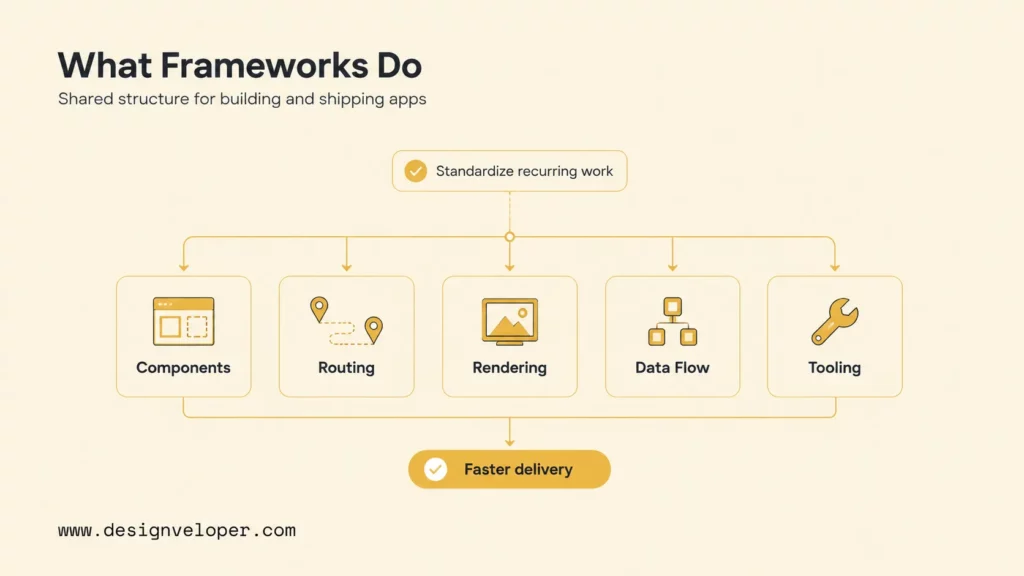
JavaScript frameworks are reusable structures, conventions, and tools that help developers build web interfaces, full-stack applications, APIs, routing, rendering, state management, and product workflows faster. A framework normally makes architectural decisions on the team’s behalf: where files live, how routes work, how data enters a page, when code runs on the server or browser, and how applications are built and deployed.
Further reading:
- Best Frontend Frameworks In 2026 : 8 Options, Tradeoffs, And Tips
- 7 Most Popular Frontend Web Development Tools
- Front-End vs Back-End: Which Suits You Best?
The term is used loosely. React officially describes itself as a library, while Angular is a complete web framework. Next.js and Nuxt are meta-frameworks that add routing, server rendering, data access, and deployment conventions around React and Vue. Express and NestJS operate on the server. Developers still group all of them under “JavaScript frameworks” when comparing practical stack choices, so this guide makes each category explicit.
A framework does not remove architecture work. It standardizes common decisions so a team can focus on product behavior. The team still owns data modeling, API contracts, authentication, authorization, accessibility, performance budgets, error handling, testing, deployment, monitoring, and upgrades. A mature ecosystem can make those tasks easier, but it can also introduce overlapping libraries and hidden coupling.
- Component model: how the interface is divided into reusable, testable units.
- Reactivity: how data changes update the rendered interface.
- Routing: how URLs map to pages, layouts, and navigation.
- Rendering: whether HTML is produced in the browser, on a server, during a build, at the edge, or through a hybrid strategy.
- Data flow: how components retrieve, cache, mutate, and synchronize data.
- Tooling: how projects are created, built, tested, linted, optimized, and deployed.
The practical benefit is coordinated delivery. A good framework gives developers a shared vocabulary and a supported path through recurring problems. The practical risk is accidental commitment: a convenient default can become expensive when it conflicts with the product’s traffic pattern, user experience, hosting model, security boundary, or team capabilities.
JavaScript Frameworks Vs Libraries Vs Meta-Frameworks
Libraries supply focused capabilities, frameworks define broader application structure, and meta-frameworks combine a UI technology with routing, rendering, data, and deployment conventions. Backend frameworks solve server-side concerns such as HTTP routing, validation, dependency management, and service organization. The distinction matters because it predicts how many architectural decisions the team must make and maintain.
Recommended for you:
- Web App vs Website: Similarities, Differences and Misconceptions
- 10 Best Web App Languages in 2026
- Web App Development Cost: 2026 Breakdown
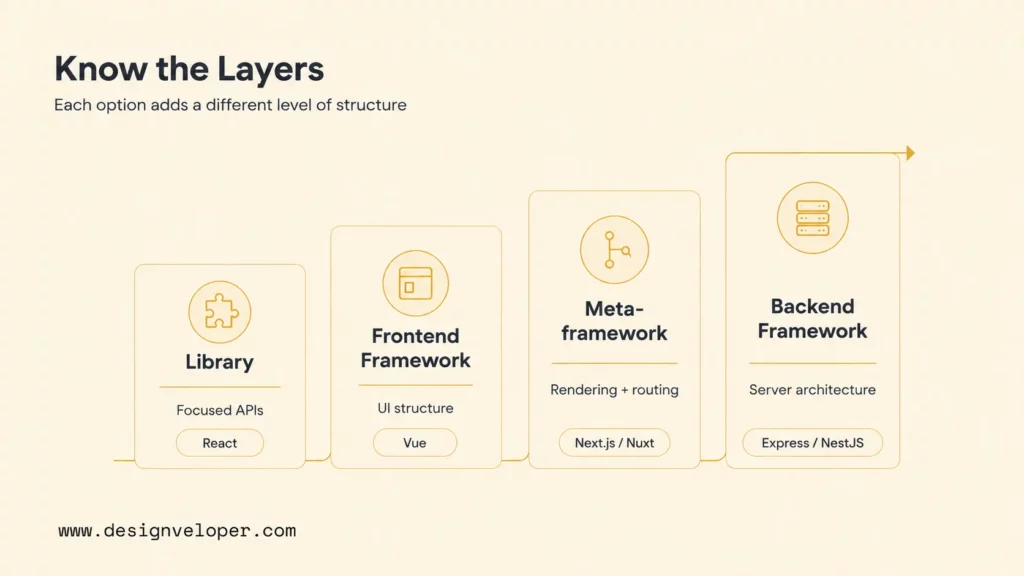
| Type | What It Does | Examples | Best For |
|---|---|---|---|
| JavaScript library | Provides focused APIs while leaving most application structure to the team | React, Redux, TanStack Query | Teams that want composability and can own architecture decisions |
| Frontend framework | Supplies a component and reactivity model plus an organized application ecosystem | Vue, Angular, Svelte, SolidJS, Qwik | Interactive web interfaces and single-page applications |
| Meta-framework | Adds routing, rendering, server features, data conventions, and build/deployment behavior | Next.js, Nuxt, Astro, SvelteKit, SolidStart, Qwik City | Production websites and full-stack applications with mixed rendering needs |
| Backend framework | Organizes HTTP APIs, services, middleware, validation, security, and integrations | Express.js, NestJS | APIs, business services, real-time systems, and server applications |
React demonstrates why the label alone is insufficient. React provides the component model, but its official guidance recommends starting a new application with a framework. A team using React alone must still select routing, data loading, server rendering, bundling, testing, and deployment conventions. Next.js or React Router can supply more of that production structure.
More structure is not automatically better. An internal dashboard that never needs indexing may work well as a client-rendered Vue or React application. A public marketplace may need server-rendered product pages, cache control, image optimization, and structured metadata, making a meta-framework more useful. A stable REST API may need Express’s minimal surface, while a large team may prefer NestJS modules, dependency injection, guards, and standardized testing patterns.
Choose the smallest layer that solves the product’s real constraints, then add structure only where the team can test and maintain it.
Best JavaScript Frameworks To Know In 2026
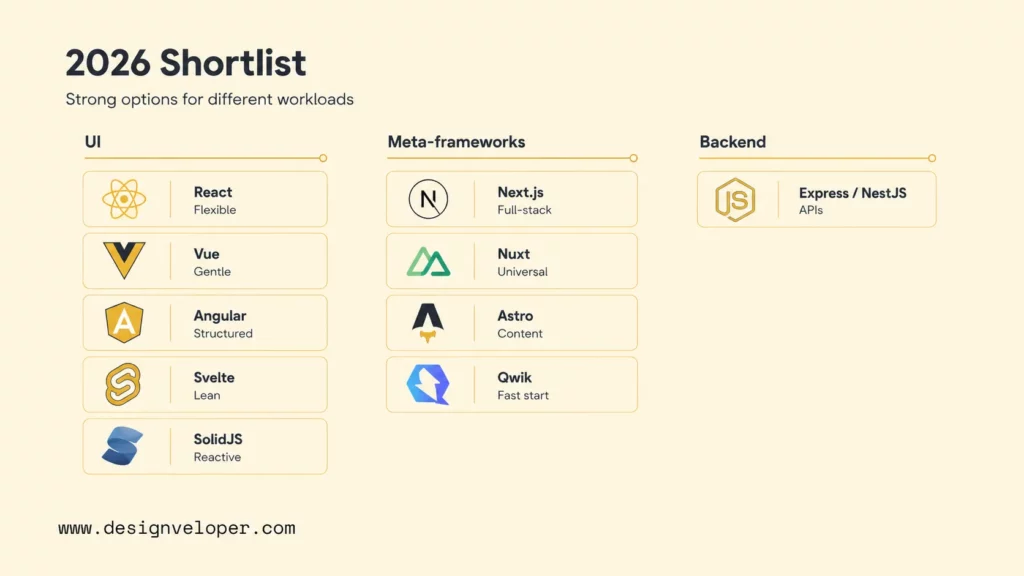
This is an editorial shortlist, not a ranking or performance benchmark. It includes tools that cover distinct layers and use cases—from UI libraries and frontend frameworks to meta-frameworks and Node.js backends—so readers can compare product fit, rendering, ecosystem, and operational tradeoffs. Inclusion reflects a distinct role and a practical fit question to test; popularity alone is not a selection rule.
React For Component-Based UI Development
React is a library for building user interfaces from components. It remains a strong general-purpose choice when a product needs a broad ecosystem, reusable design-system components, complex interaction, and a large hiring pool. React 19.3 is the current release as of 19 October 2026. React’s official guidance for creating an app recommends starting a new React application with a framework, though standalone React remains useful for embedded interfaces and projects with specific constraints.
React fits dashboards, collaboration tools, marketplaces, SaaS applications, and products with many interactive states. The component model is flexible, and teams can combine it with Next.js, React Router, Vite, TanStack Query, and specialized state tools. The flexibility is also the main tradeoff. Two React applications can use very different routing, data, state, styling, and test conventions, which raises onboarding and maintenance costs when architecture is not documented.
Choose React when ecosystem depth and long-term hiring options matter. Validate a representative workflow with the intended framework, state strategy, accessibility approach, and server/client boundaries. Do not select React based only on popularity if a smaller framework can meet the workload with less operational complexity.
Vue.js For Flexible And Beginner-Friendly Web Apps
Vue.js is a progressive framework that can enhance static HTML, power a single-page application, or support server-rendered and full-stack development through its ecosystem. Vue’s templates, single-file components, Composition API, and documentation make it approachable for developers who already understand HTML, CSS, and JavaScript.
Vue is a strong fit for product dashboards, commerce interfaces, content management tools, gradual modernization, and teams that want framework guidance without Angular’s broader commitment. Existing server-rendered pages can adopt Vue for selected interactive areas, while larger projects can use Vue Router, Pinia, Vite, and Nuxt.
The tradeoff is ecosystem and labor-market size relative to React in many regions. Teams should verify critical component libraries, testing support, authentication integrations, and local hiring before choosing Vue for a long-lived product. Vue is beginner-friendly at the component level, but production architecture still requires decisions about data, rendering, caching, and deployment.
Angular For Enterprise-Grade Applications
Angular is a Google-maintained web framework with components, signals, routing, forms, dependency injection, server-side rendering, static generation, a CLI, testing support, and update tooling. Angular v22 is current in the official documentation in July 2026. Its integrated platform and predictable release policy make it suitable for large applications and teams that value consistent conventions.
Angular works well for enterprise portals, regulated workflows, complex forms, administrative systems, and multi-team codebases where shared architecture is more important than maximum freedom. TypeScript is central to the experience, and first-party tooling reduces the number of foundational packages a team must select.
The tradeoff is commitment. Angular has more concepts, conventions, and framework-specific patterns to learn than a minimal library. Initial delivery can feel heavier for a small product. Angular becomes valuable when the team actually uses its structure to enforce boundaries, testing, upgrades, accessibility, and consistent components. A pilot should include one complicated form, route protection, data integration, and an upgrade rehearsal.
Svelte For Lightweight And Fast Interfaces
Svelte uses a compiler-led approach that transforms components during the build rather than relying on a large client runtime. Svelte 5 uses runes such as $state, $derived, and $effect for reactivity. The syntax is compact, and SvelteKit adds routing, server rendering, data loading, and full-stack application features.
Svelte is attractive for focused web applications, interactive data stories, embedded tools, and teams that value concise components. Less runtime machinery can support small bundles and responsive interfaces, but performance still depends on application code, third-party scripts, data fetching, images, and rendering strategy.
The ecosystem and hiring pool are smaller than React’s, and the Svelte 5 model may require retraining for teams familiar with earlier Svelte patterns. Validate enterprise components, test tooling, deployment adapters, and the availability of developers. Use Svelte when the team appreciates its model enough to maintain it, not only because a benchmark makes it look fast.
Next.js For SEO-Friendly React And Full-Stack Apps
Next.js is a React framework for full-stack web applications. Its App Router supports React Server Components, Suspense, file-based routing, layouts, server and client components, and multiple rendering and caching patterns. The official Server and Client Components guide explains how those components divide server-only work from browser interaction. Next.js can fit public React products that need indexable HTML, dynamic routes, authentication, server logic, and interactive UI in one codebase.
Next.js fits commerce, SaaS marketing plus application surfaces, marketplaces, editorial platforms, and customer portals. It can mix static, cached, and dynamic routes, so teams can choose different strategies by workload. SEO still depends on crawlable content, metadata, internal linking, canonicalization, structured data, and performance; using Next.js does not automatically optimize a site.
The tradeoff is framework complexity around server/client boundaries, caching behavior, runtime choice, and upgrades. Teams must know where code runs, how data is invalidated, and how production behavior changes across hosting targets. Prototype the most dynamic and SEO-critical routes rather than evaluating only a static landing page.
Nuxt For Vue-Based Universal Applications
Nuxt supplies full-stack structure around Vue. It supports universal rendering by default, client-side rendering, prerendering, and hybrid route rules. File-based routing, auto-imports, server endpoints, data utilities, and deployment adapters make Nuxt a practical choice for teams that want Vue’s component model with production application conventions.
Nuxt works well for content and commerce sites, dashboards, customer portals, and products that need a mix of indexable pages and authenticated application routes. It can reduce setup compared with assembling a Vue stack package by package.
The tradeoff resembles other meta-frameworks: rendering and caching defaults can become confusing when the team does not map them to real routes. Server-compatible code also has different constraints from browser-only code. Validate deployment adapters, module maintenance, cache invalidation, authentication, and observability. Choose Nuxt when Vue is already a good team fit and universal rendering solves a real requirement.
Astro For Content-Heavy And Performance-Focused Sites
Astro is designed for content-driven websites and an islands architecture. Astro renders most page content as HTML and loads client JavaScript only for components explicitly marked as interactive. It can use Astro components alongside React, Vue, Svelte, SolidJS, and other UI technologies.
Astro is a strong choice for documentation, blogs, marketing sites, portfolios, editorial publications, and commerce front ends where most content is static but selected widgets need interaction. Client islands let a team hydrate a search box, calculator, carousel, or account widget without turning the entire page into a client application. Server islands can isolate dynamic server-rendered areas.
The tradeoff appears when the product is fundamentally one highly interactive application with shared client state across most of the page. Astro can still host application islands, but another framework may offer a more coherent model. Audit each route by interactivity: if nearly every region requires hydration and shared state, Astro’s principal advantage becomes smaller.
SolidJS For Fine-Grained Reactivity
SolidJS uses fine-grained reactivity so state changes update the specific computations and DOM regions that depend on them. Components generally run once for initialization rather than re-executing as the primary update model. The result is a React-like component authoring experience with a different runtime architecture.
SolidJS can fit highly interactive interfaces and data-dense tools when a team values its targeted update model. Treat that technical fit separately from ecosystem reach: validate the components, test tooling, accessibility support, framework adapters, and hiring options the product will need rather than inferring commercial fit from developer sentiment.
The main tradeoff is ecosystem scale. Verify UI components, testing, accessibility support, hiring, framework adapters, and long-term ownership. SolidStart can add full-stack capabilities, but the team should assess its maturity against the exact deployment. Solid is a strong technical option when performance and its reactive model matter enough to justify a smaller market.
Qwik For Edge-Optimized And Fast-Loading Apps
Qwik is built around resumability. The server serializes component boundaries, listeners, and application state so the browser can resume work without replaying a conventional hydration process. Qwik also uses fine-grained lazy loading, downloading code in response to the interactions that need it.
Qwik can be valuable for interaction-heavy public experiences where startup JavaScript is a serious constraint, especially on slower devices and networks. It deserves evaluation for commerce, booking, and large content/application hybrids that must become usable quickly.
The tradeoff is a different mental model and a smaller ecosystem. Resumability places serialization constraints on application design, and teams need to understand server-to-browser execution. The Qwik guide to resumability describes how this differs from hydration. Measure a real route on target devices and confirm integrations, debugging, deployment, and maintainability before adoption.
Express.js Or NestJS For Backend JavaScript Applications
Express.js is a minimal Node.js web framework for HTTP applications and APIs. NestJS provides a higher-level architecture with TypeScript support, modules, controllers, providers, dependency injection, guards, validation, testing, and integrations for GraphQL, WebSockets, queues, and microservices.
Use Express when the service is small, the team wants direct control, or an existing architecture already supplies conventions. Use NestJS when multiple developers need consistent modules, dependency boundaries, application lifecycle, testing patterns, and security controls. Nest uses Express by default and can also use Fastify, so the choice is partly about architectural structure rather than only the HTTP engine.
Express can become inconsistent when every team invents middleware, error, validation, and dependency patterns. NestJS can be unnecessarily elaborate for a tiny endpoint or serverless function. Compare the frameworks using one representative service with authentication, validation, data access, errors, logging, health checks, and tests. The backend choice should also reflect runtime operations, not just code organization.
JavaScript Frameworks Comparison
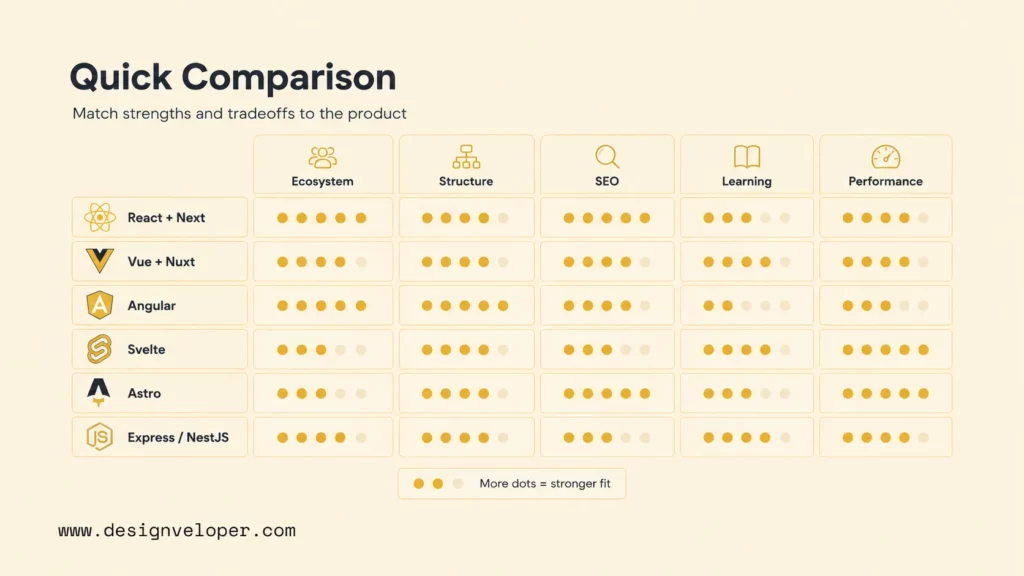
The comparison below is a starting point, not a scorecard. “Best” means the framework’s design aligns with the workload and team. Main tradeoffs should become prototype questions and acceptance criteria rather than reasons for automatic rejection.
| Framework or tool | Type / layer | Main use case | Strengths | Main tradeoff |
|---|---|---|---|---|
| React | UI library | Complex component-based product UI | Ecosystem, hiring pool, flexibility, framework options | More architecture choices and package coordination |
| Vue | Frontend framework | Approachable web applications and progressive adoption | Clear templates, documentation, flexible adoption | Smaller ecosystem and hiring pool in some markets |
| Angular | Frontend framework | Large structured enterprise applications | Integrated platform, TypeScript, updates, team consistency | Learning curve and framework commitment |
| Svelte | Compiler-led UI framework | Lean interactive applications | Compiler model, concise components, small runtime | Smaller ecosystem and Svelte 5 transition knowledge |
| Next.js | React meta-framework | React full-stack and public web applications | Mixed rendering, routing, server features, React integration | Caching and server/client complexity |
| Nuxt | Vue meta-framework | Vue universal and full-stack applications | Rendering modes, conventions, server features, modules | Meta-framework behavior and module due diligence |
| Astro | Content-focused meta-framework | Content-heavy performance-focused sites | HTML-first output, islands, multiple UI integrations | Less natural for one highly interactive shared-state app |
| SolidJS | Reactive UI library | Fine-grained interactive interfaces | Targeted updates, signals, fine-grained reactivity | Ecosystem and hiring depth vary by market |
| Qwik | Resumable UI framework | Fast-starting public applications | Resumability and fine-grained lazy loading | Different model, serialization constraints, smaller ecosystem |
| Express/NestJS | Node.js backend frameworks | Node.js APIs and backend services | Minimal control or structured TypeScript architecture | Express needs conventions; Nest can be heavy for small services |
A team should weight the rows according to business risk. A public publisher may weight crawlable HTML, content build time, and JavaScript cost. A trading dashboard may weight update latency, interaction, and real-time reliability. A regulated enterprise portal may weight predictable upgrades, access control, form validation, and auditability. The same framework can rank differently for each product.
How To Choose The Right JavaScript Framework
Choose a JavaScript framework by converting product requirements into a short technical evaluation, not by comparing feature lists. Define the pages, user journeys, data, integrations, traffic, indexing needs, team, and maintenance period first. Use the map below to narrow the candidates, then test two or three against one difficult, representative route.
| Project need | Strong starting point | Validate before committing |
|---|---|---|
| Complex product UI with a broad ecosystem | React with Next.js | Server/client boundaries, state model, caching, and upgrade ownership |
| Approachable application development | Vue with Nuxt | Required integrations, hiring pool, and rendering mode |
| Large enterprise application | Angular | Team readiness for its conventions and release cadence |
| Content-heavy marketing or editorial site | Astro | How much interactivity actually needs client JavaScript |
| JavaScript or TypeScript backend | Express or NestJS | Desired architecture, observability, security, and team size |
- Classify: Separate content pages, interactive app routes, APIs, and real-time workflows.
- Set budgets: Define performance, accessibility, SEO, security, and delivery thresholds before testing.
- Shortlist: Keep two or three options whose type, rendering model, and team fit the workload.
- Prototype: Build one difficult route with representative data, authentication, error states, and the intended deployment.
- Test operations: Check logging, rollback, cache invalidation, upgrades, and who will diagnose failures.
- Decide and record: Compare the same acceptance checks, document remaining risks, and name the update owner.
Project type: distinguish a content website, interactive SaaS interface, commerce platform, internal tool, API, and real-time application. A mixed product may use more than one rendering strategy or framework boundary, but avoid multiplying stacks without an ownership benefit.
Frontend versus backend needs: a UI library does not replace an API architecture. Decide whether the product needs one full-stack repository, separate services, edge functions, background jobs, WebSockets, or existing backend integration. Next.js and Nuxt can handle server work, while NestJS may be better for a large independent business service.
SEO and rendering strategy: map each public route to static generation, server rendering, incremental regeneration, client rendering, or islands. Search engines can process JavaScript, but crawlable HTML, fast delivery, stable links, and complete metadata reduce dependency on client execution. Rendering should follow content freshness and personalization, not a single site-wide rule.
Performance and Core Web Vitals: set budgets for JavaScript, images, fonts, server response, Largest Contentful Paint, Interaction to Next Paint, and Cumulative Layout Shift. Framework benchmarks rarely include the product’s analytics, CMS, authentication, component library, and third-party scripts. Measure the assembled route on representative mobile hardware and networks.
Team skills and hiring availability: count production experience, not tutorial familiarity. The team must be able to debug rendering, caching, state, tests, builds, and deployments. Check the regional hiring market and the cost of training. A theoretically efficient framework can slow delivery when only one person understands it.
TypeScript maturity: examine framework types, router and data types, component library definitions, generated API clients, build performance, and strict-mode support. TypeScript helps large teams when API contracts and domain models remain accurate; it cannot compensate for unclear ownership or poorly designed boundaries.
Ecosystem and community support: verify accessibility libraries, design systems, authentication, internationalization, testing, monitoring, CMS, payments, and deployment adapters. Check release activity and issue handling on the exact packages. Raw package counts do not prove that critical dependencies are maintained.
Long-term maintenance: review release cadence, long-term support, migration tools, security policy, deployment portability, and the ability to replace dependencies. Rehearse one upgrade in the prototype. Record why the stack was chosen, its allowed patterns, and which team owns framework updates.
AI-assisted development compatibility: provide coding assistants with the exact framework version, current documentation, repository rules, and test commands. Treat generated code as a draft, then check it for deprecated APIs, permission errors, accessibility issues, and unsupported packages before merging.
Related reading:
- Top 7 Best Resources to Learn React JS for Free
- Top 5 Best Resources to Learn Vue.JS
- WebAssembly vs JavaScript: Key Differences, Performance & Use Case
A framework decision is complete only when the team can build, measure, deploy, debug, upgrade, and eventually replace the stack.
JavaScript Framework Trends In 2026
A practical way to evaluate JavaScript frameworks in 2026 is to consider rendering, server work, browser interaction, type safety, and operations together. A framework can move work between build time, server, edge, and browser, changing when data is available and which code can access secrets. Instead of choosing one rendering mode for every route, map each route to its content freshness, privacy, interaction, and performance needs. A newer feature matters only when it solves a product constraint.
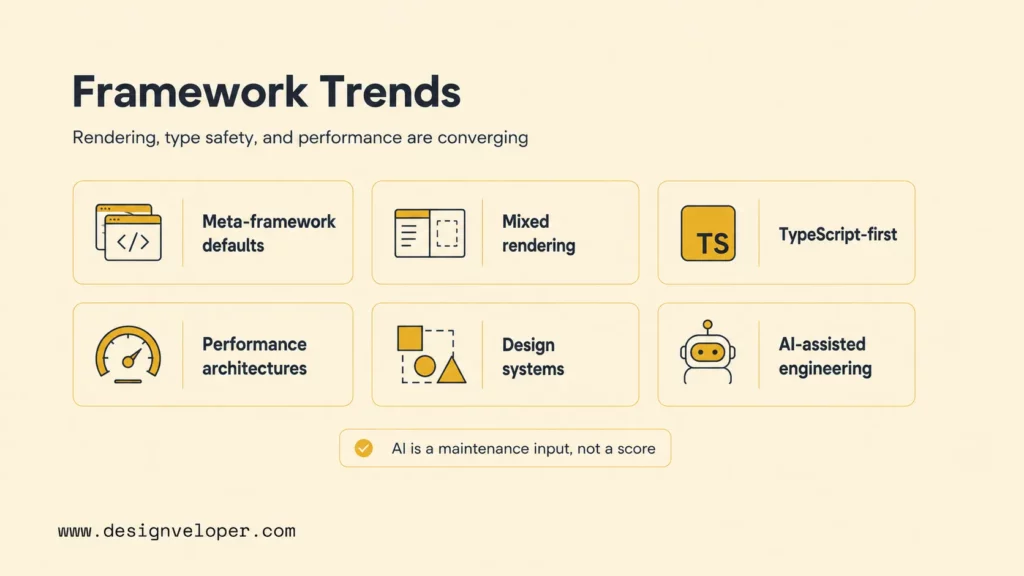
- More application structure around UI: meta-frameworks combine interface code with routing, rendering, data, or deployment conventions; compare how much structure the team needs with how much it must own.
- Route-level rendering: choose static generation, server rendering, streaming, islands, caching, or client execution per route or component instead of assuming one mode fits the whole site.
- TypeScript-first development: framework CLIs, route types, server APIs, and generated clients make type checking part of the default workflow for larger applications.
- Performance-focused architectures: signals, compiler optimization, server components, islands, partial hydration, and resumability target different sources of client work.
- Component-driven design systems: reusable components connect design, accessibility, documentation, visual testing, and product delivery across teams.
- AI-assisted engineering: generated code is a draft, not proof of framework fit; require current documentation, tests, type checks, and human review.
- API-first and headless products: content, commerce, identity, and business services increasingly connect through typed APIs while frontends select the rendering mode that fits each experience.
Server-side features do not eliminate the browser. A framework may separate server-only work from interactive client code, which makes data ownership and serialization important. Teams should check which code can access secrets, which data enters HTML, which components hydrate, how caches are invalidated, and how failures cross those boundaries.
For AI-assisted development, provide the repository’s exact framework version, current documentation, coding rules, and test commands. Check generated code for deprecated APIs, authorization gaps, accessibility problems, and package assumptions before merging. These review controls are useful whichever framework the team selects; no claim about training-data volume is needed to make the decision.
Choosing A JavaScript Stack That Survives Real Product Complexity
A JavaScript stack survives real product complexity when its architecture fits the product’s riskiest workflows and the team’s ability to operate changes safely. Long-lived products accumulate user roles, permissions, localization, integrations, background work, search, analytics, error recovery, accessibility, and migration needs. Include web application security in the prototype instead of treating authentication and permissions as later framework add-ons.
Continue reading:
- Web Application Development Tutorial: The Ultimate Guide for Beginners
- 16 Real Web App Examples to Inspire Your Next Digital Product
- Choosing Web App Development Services: 5 Essential Tips
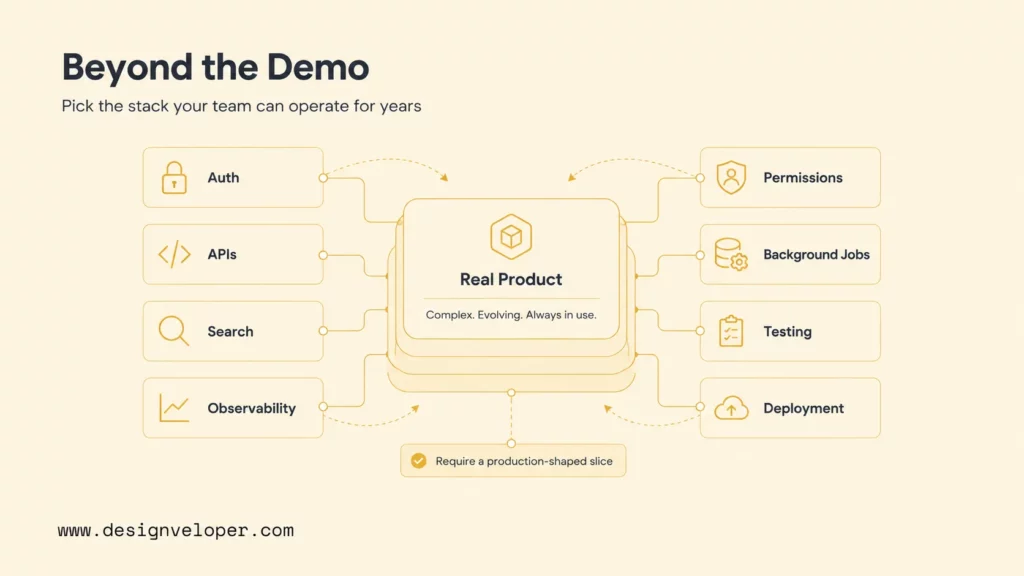
Consider a retailer with public catalog pages and a private dashboard where staff approve price changes. Shortlist Next.js for a team already invested in React or Nuxt for a team with Vue experience; that is a conditional starting decision, not a benchmark winner. Build one product route from representative CMS data and one role-restricted approval flow. Check that page HTML includes the correct product name and canonical URL, a price update invalidates the relevant cache, an unauthorized role cannot approve a change, and a failed import gives staff a recovery path. Keep the stack only if it meets the team’s pre-set performance and security limits without hiding ownership gaps.
A document product with live co-editing and redaction needs a different prototype. Test realistic file sizes, simultaneous edits, role-based access, and recovery after a dropped connection. A React-based stack may be the practical choice when the team already uses React and can pair it with a proven editor and real-time service; keep the authoritative document and permission state on the server. Reject any option that cannot restore edits safely or enforce redaction and access rules, regardless of how quickly its static interface can be assembled.
A team can make the choice auditable with a representative prototype, a short architecture decision record, and a maintenance review covering upgrades, hiring, tests, and critical dependencies. Record the reason for the chosen layer, the remaining risks, and who owns framework updates. This turns a preference into a decision that can be revisited when the workload or team changes.
Before approval, require the slice to pass the same agreed checks for every candidate: access control, the hardest user workflow, public rendering where needed, error recovery, accessibility, tests, observability, deployment, and rollback. If no option meets a security or accessibility constraint, change the design or reduce scope rather than relaxing that requirement.
FAQs About JavaScript Frameworks
What Is The Most Popular JavaScript Framework?
There is no single answer unless the survey’s category is clear. In the 2026 Stack Overflow Developer Survey, 46% of 10,281 respondents reported extensive work with Node.js and 42% with React in the past year. The question groups web frameworks and technologies: Node.js is a JavaScript runtime, while React is a UI library, so those figures are adoption signals from survey respondents, not a like-for-like framework ranking or proof of project fit.
Is React A Framework Or A Library?
React is a library for building user interfaces. It supplies components, state, and rendering primitives but does not prescribe a complete application architecture. React’s official documentation recommends starting new applications with a framework such as Next.js or React Router when teams need routing, data loading, rendering, and production conventions.
Which JavaScript Framework Is Best For Beginners?
Vue is often the most approachable starting framework for developers who know HTML, CSS, and JavaScript because its templates and documentation build on familiar web concepts. Svelte is also concise, while React has the largest learning ecosystem. Beginners should learn JavaScript and browser fundamentals alongside a framework so they can debug behavior rather than memorize syntax.
Which JavaScript Framework Is Best For SEO?
Next.js, Nuxt, Astro, and SvelteKit are strong SEO choices because they can deliver rendered HTML and route-level metadata. Astro is especially suitable for content-heavy sites with limited interactivity. SEO results still depend on content, crawlability, canonical URLs, structured data, internal links, performance, and rendering configuration; no framework guarantees rankings.
Should I Use A Frontend Or Backend JavaScript Framework?
Use a frontend framework when the main problem is interface components, interaction, and browser state. Use a backend framework when the product needs APIs, authentication, business logic, databases, queues, or server integrations. Most production applications need both layers, whether they live in one full-stack framework such as Next.js or Nuxt or in separate frontend and backend services.
Also published on

Share post on










Related Articles



Why Learn JavaScript? Career Benefits, Uses, And Learning Path
Why Learn JavaScript? Career Benefits, Uses, And Learning Path Published October 21, 2026
Best JavaScript Frameworks For Web Development In 2026
Best JavaScript Frameworks For Web Development In 2026 Published October 19, 2026
How To Learn Rust? A Practical Roadmap For Beginners & Developers
How To Learn Rust? A Practical Roadmap For Beginners & Developers Published October 03, 2026