












Average Typing Speed: Does Average WPM Matter for Programmers?

Average typing speed depends on the device: a 2026 U.S. adult study reported median accuracy-adjusted scores of 37.8 words per minute (WPM) on computers and 29.4 WPM on smartphones. The figures come from separate device groups and are not universal targets. A useful comparison depends on the device, the test, and how errors affect the score.
If you want to judge your own speed, start with the benchmark for your device. Then compare results from the same type of test. A higher WPM number is helpful only when the writing is accurate enough for the task.
Average Typing Speed On Computers And Phones
For the 10,613 U.S. adults studied by Hernandez and colleagues, the typical computer score was higher than the typical smartphone score. The researchers used a one-sentence copying task and adjusted typing speed for accuracy. Their 2026 study in Scientific Reports gives the following results.
| Device | Median Adjusted WPM | Middle 50% |
|---|---|---|
| Computer | 37.8 | 24.1-55.8 |
| Smartphone | 29.4 | 20.0-42.6 |
The middle 50% spans the 25th to the 75th percentile. For example, half of the computer users scored between 24.1 and 55.8 adjusted WPM. The median is the middle score when the results are arranged from slowest to fastest; it is not the arithmetic mean.
These figures came from two separate groups. Of the participants, 5,835 used computers and 4,778 used smartphones. People chose their own devices, and the smartphone group was younger on average. The gap is therefore an observed difference between those groups, not a controlled test proving that one person would type 8.4 WPM faster by switching devices.
The panel was designed to represent U.S. adults, but an online study may still miss some people with limited digital skills. It also used one short sentence, not a full working day of typing. Use the results as a reference for this task and population, not as a worldwide typing standard.
Why WPM Benchmarks Differ Across Studies
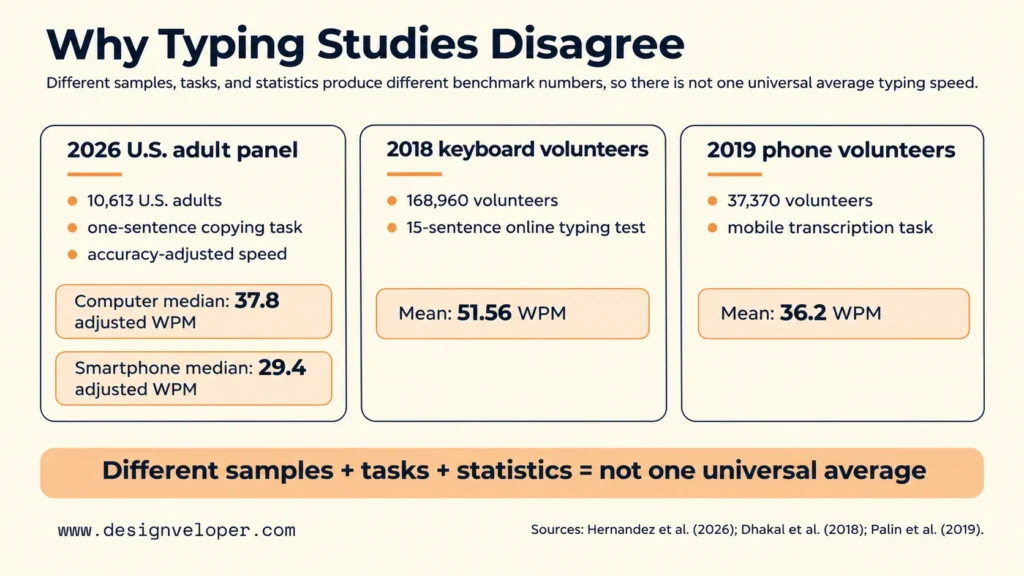
Typing benchmarks differ because studies measure different people doing different tasks. Even when every source reports WPM, the numbers may describe a median, a mean, or a speed adjusted for errors. Before comparing them, check who took the test and how it was scored.
A 2018 keyboard study by Dhakal and colleagues recorded more than 136 million keystrokes from 168,960 volunteers. Its published analysis of keyboard typing reported a mean speed of 51.56 WPM. Participants were volunteers in an online typing test and copied 15 sentences. That figure describes those volunteers. It does not replace the 37.8 median from the later U.S. adult panel.
A separate 2019 study by Palin and colleagues examined mobile text entry by 37,370 volunteers. The mobile typing research reported a mean of 36.2 WPM and 2.3% uncorrected errors. This was a web-based transcription task, not the one-sentence population-panel test. Its result is useful for understanding mobile typing among test volunteers, but it is not the U.S. adult smartphone median.
The sample matters as much as its size. A person who volunteers for a typing study may be especially comfortable with keyboards. A broader survey panel can include more people who rarely practice typing. A large volunteer sample may be excellent for studying how people press keys while still being a poor basis for declaring one national average.
The task matters too. Copying one familiar sentence can feel different from transcribing several passages. Some tests include capitals, numbers, or punctuation; others use common lowercase words. Smartphones also use different input methods and may provide correction tools. Those differences can change both speed and error rates.
Finally, a mean and a median answer different questions. The mean adds everyone’s score and divides by the number of people. Very fast or slow scores can affect it. The median identifies the middle participant. Do not blend the 2018 keyboard mean, the 2019 phone mean, and the 2026 medians into one average typing speed. Choose the study closest to your own device, task, and population instead.
How WPM And Typing Accuracy Are Measured
WPM estimates how much text a person enters in one minute, while accuracy shows how much of that text is correct. In many standard transcription tests, one word means five characters, including spaces, rather than one dictionary word. Dividing five-character units by elapsed minutes produces a raw speed, but it says little about mistakes.
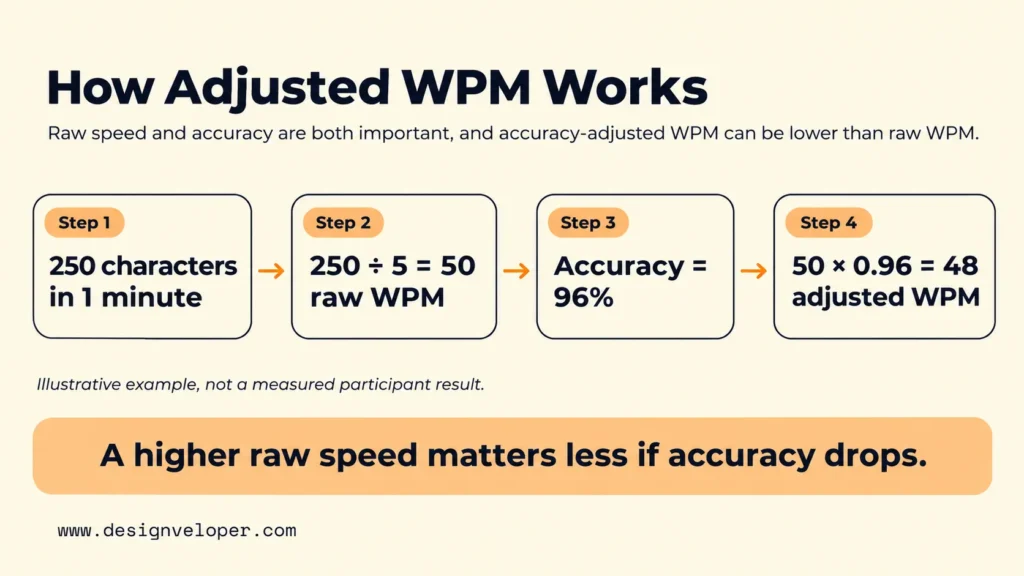
Consider an illustrative one-minute test with 250 typed characters. Under a five-character convention, the raw result is 50 WPM. If the test records 96% accuracy and calculates adjusted WPM by multiplying raw speed by accuracy, the adjusted result is 48 WPM. This is an example of the calculation, not a measured participant result.
The 2026 adult study used adjusted words per minute, or AWPM, computed as typing speed multiplied by accuracy. Other sites may display gross or raw WPM before error penalties. Some report net speed after subtracting errors. The label alone may not reveal whether backspace corrections count, so read the test’s scoring rules before comparing scores.
Test length also affects what a score means. A brief test can capture an initial burst, while a longer passage may reveal hesitation or fatigue. The text itself matters when unfamiliar words or punctuation demand extra attention. For a meaningful personal comparison, use the same test length, settings, language, and device on every attempt.
Accuracy should remain visible alongside speed. Someone who types quickly but spends time repairing errors may not finish a real message sooner. A useful progress record therefore contains both WPM and accuracy, rather than treating the fastest raw number as the only result.
Typing Speed Trends By Age Group
In the 2026 U.S. adult panel, average accuracy-adjusted typing speed generally decreased across older age groups on both devices. The researchers grouped adults aged 18 to 81 into two-year age bins. They plotted a mean and a 95% confidence interval for each bin and device in Figure 1 of their study.
The following selected age bins are approximate readings of the published chart, rounded to whole adjusted WPM. They are not a separately published numerical dataset, and they should not be treated as exact age norms.
| Adult age group | Computer mean AWPM, approx. | Smartphone mean AWPM, approx. |
|---|---|---|
| 18-19 | 54 | 47 |
| 30-31 | 61 | 44 |
| 40-41 | 50 | 34 |
| 50-51 | 43 | 31 |
| 60-61 | 35 | 24 |
| 70-71 | 27 | 19 |
| 80-81 | 26 | 15 |
The source chart shows the 95% confidence intervals as shaded bands. It does not publish exact interval endpoints in its text, so precise upper and lower limits cannot be responsibly copied into this table. Readers who need to interpret uncertainty should consult the original figure rather than treating these rounded chart readings as exact estimates.
The pattern reflects differences between age groups at the time of testing. It cannot, by itself, tell you how much one individual will slow down over the next decade. Participants also differed in experience, device preference, and other characteristics. In the study, computer and smartphone speed were associated with age, but age alone did not explain every participant’s score.
These results do not provide average typing speed by age for children. The youngest study participants were adults aged 18. They also should not be used to screen a person’s health or ability: a typing test cannot separate device familiarity, practice, and other possible influences without further assessment.
What Counts As A Good Typing Speed?
A good typing speed is one that lets you complete your task accurately and comfortably. The number depends on what you type, which device you use, and which benchmark you choose. There is no single WPM threshold that makes every student, office worker, or professional a good typist.
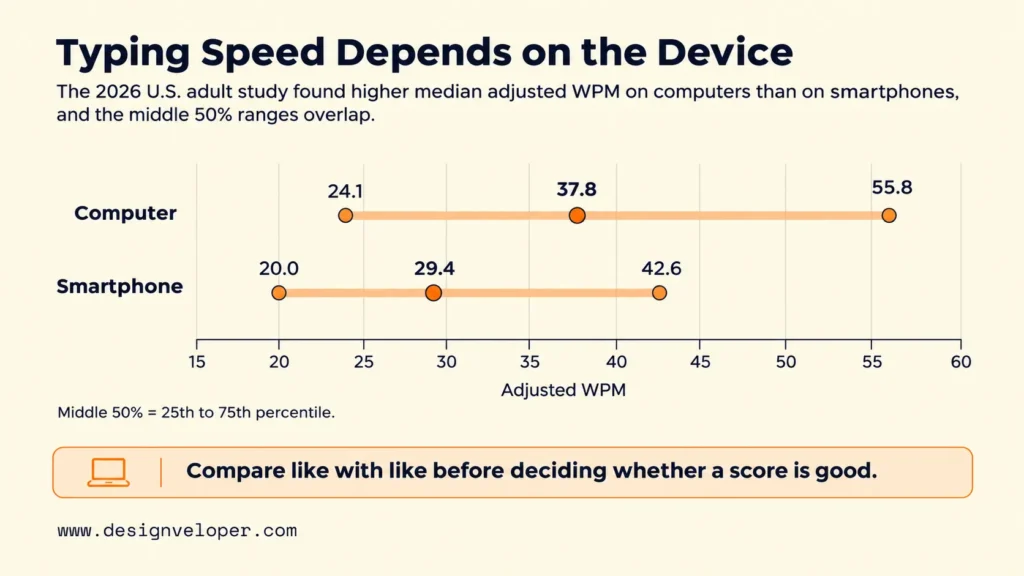
For ordinary computer use, the 2026 U.S. study gives a practical point of reference. An accuracy-adjusted score of 40 WPM on a comparable computer test is just above its 37.8 median. A score of 60 adjusted WPM exceeds the study’s 75th-percentile value of 55.8. In that specific comparison, 60 WPM is a strong result, but it is not a universal job standard.
On a phone, the same number means something different. The smartphone median in the study was 29.4 adjusted WPM, with a middle 50% range of 20.0 to 42.6. A 40-WPM adjusted phone score therefore sits much closer to the upper end of the study’s middle range than a 40-WPM computer score does. Compare like with like before deciding whether your result is good.
In the 2026 study, 24 adjusted WPM was just below the computer group’s 25th percentile of 24.1. It was within the smartphone group’s middle 50%. A score of 25 adjusted WPM fell within both groups’ middle ranges, though below their medians. At 30 adjusted WPM, a computer score was below the 37.8 median. A smartphone score was just above its 29.4 median. A score of 70 adjusted WPM exceeded the 75th percentile for both groups. These comparisons describe the study’s accuracy-adjusted scores, not universal labels or job requirements.
For typing-heavy work, the job itself is a better guide than a general online table. A transcription role may test sustained entry with strict accuracy rules. A customer support role may depend more on writing clear replies while using several systems. Check an employer’s stated WPM and error requirements, then practice with work-like material. Do not assume a broad population median is a hiring cutoff.
Improvement is also personal. If 30 accurate WPM already lets you finish short messages without difficulty, there may be little reason to chase 80 WPM. If typing interrupts your thinking or takes time away from a repeated work task, accuracy-first practice can be more worthwhile.
Typing Speed In Programming Work
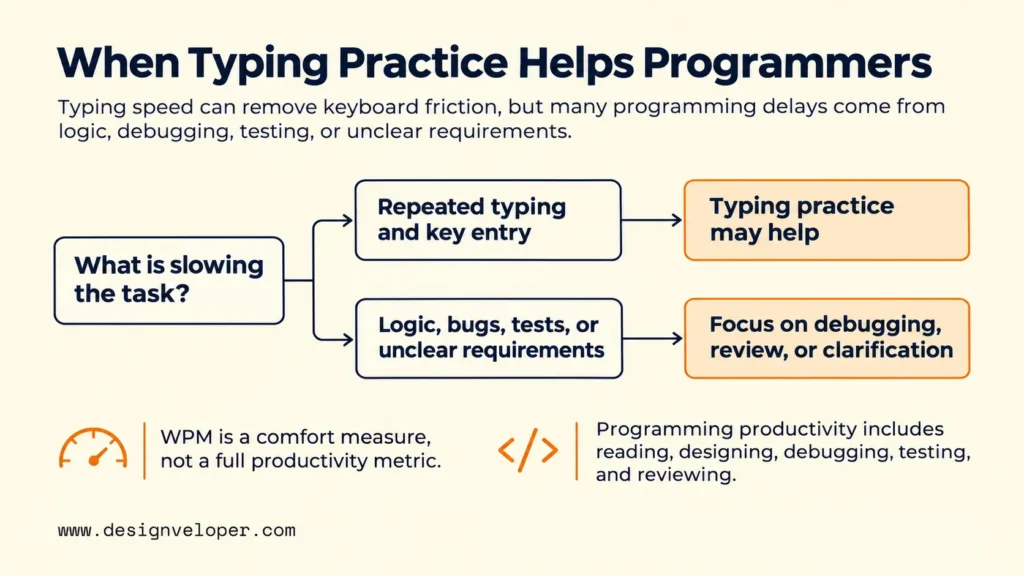
Typing speed can help programmers enter code and commands with less friction, but WPM alone does not measure developer productivity. Programming includes understanding requirements, reading unfamiliar code, designing changes, debugging, testing, and reviewing work. Most of these tasks cannot be reduced to the number of characters entered per minute.
There is no dependable average typing speed for programmers in the studies used for this article. The 2026 panel studied U.S. adults by device, not a verified sample of software developers. The earlier large keyboard study also did not establish a representative occupational benchmark for programmers. Assigning developers an average of 60, 80, or 100 WPM from those sources would invent a distinction the data cannot support.
Consider an illustrative bug fix. One developer can type a patch rapidly but misses an edge case. Another spends longer tracing the failing path and then writes a shorter change with a test. The second developer may deliver the safer result despite entering fewer characters. The example shows why time spent thinking and checking work belongs in a productivity discussion; it is not evidence that slow typing is better.
Collaboration makes the difference even clearer. In our guide to pair programming, the driver writes code while the navigator watches for risks and missing tests. That division makes typing only one part of a shared problem-solving task. For complicated changes, a good decision or timely correction may matter more than a faster keyboard.
Modern tools can also reduce how much code a person needs to type. Autocomplete and code assistants may draft repetitive material, but generated changes still require review. Our comparison of AI tools for developers explains why code completion, debugging, and review need different kinds of support. Counting keystrokes misses both the help these tools provide and the checking they create.
Programmers should therefore treat WPM as a personal comfort measure, not a team performance target. If frequent typing slows down a familiar workflow, improving keyboard fluency can remove some friction. If the main delay is unclear requirements or unreliable tests, a typing drill will not solve that problem.
Improving Typing Speed And Accuracy
The most practical way to improve typing is to measure a baseline, practice manageable tasks consistently, protect accuracy, and retest under the same conditions. This sequence helps you detect real change without confusing a shorter test or easier passage with better skill.
- Record your starting point. Choose a test that matches your main device and language. Complete more than one attempt if possible, and note both WPM and accuracy. Keep the test length and scoring method in your record so later comparisons remain fair.
- Practice short sessions regularly. Start with text you can type without rushing. Work on common key combinations and on entering text without repeatedly looking at the keyboard, if that suits your device. Consistency gives you a clearer basis for checking progress than a single marathon session.
- Reduce errors before pushing speed. Slow down when mistakes or corrections begin to dominate. Work on the keys or punctuation that cause repeated problems, then gradually increase pace. A higher raw score is less useful when it produces more repair work.
- Retest in matching conditions. Use the same device, test format, language, and duration as your baseline. Compare several attempts rather than celebrating one unusually fast run. If accuracy falls while WPM rises, keep practicing at a controlled pace before calling it an improvement.
Games can make repetition more engaging, but competition should not replace careful measurement. In our Typing Racer game article, we described a racing format where players moved cars by typing and could practice alone or race with friends. That is a historical example of game-based practice, not evidence of measured WPM gains. The game site’s current availability is unconfirmed, so choose an accessible test that reports speed and accuracy if you want to track progress.
Choose exercises that resemble what you actually write. A student may benefit from ordinary sentences, while a programmer can also practice symbols and short commands. Those exercises answer different needs, so progress on one passage does not automatically predict progress on every task. What matters is whether your typing becomes accurate and less disruptive in daily use.
Treat improvement as meaningful when repeated results on the same test show higher adjusted WPM without lower accuracy. More importantly, notice whether typing interrupts your real work less often.
Also published on

Share post on










Related Articles



Using Stacks And Queues: How These Data Structures Work In Code
Using Stacks And Queues: How These Data Structures Work In Code Published November 19, 2026
Average Typing Speed: Does Average WPM Matter for Programmers?
Average Typing Speed: Does Average WPM Matter for Programmers? Published November 19, 2026
How To Build A RAG System: Step-By-Step (New Guide)
How To Build A RAG System: Step-By-Step (New Guide) Published October 19, 2026