
















Product Design Process: 6 Steps From Research To Launch

A product design process is the iterative workflow a team uses to turn a validated user problem into a tested, buildable, and launch-ready product experience. It connects research, product decisions, UX and UI work, technical constraints, user testing, delivery, and post-launch learning, so teams can reduce uncertainty before they commit more time and engineering effort.
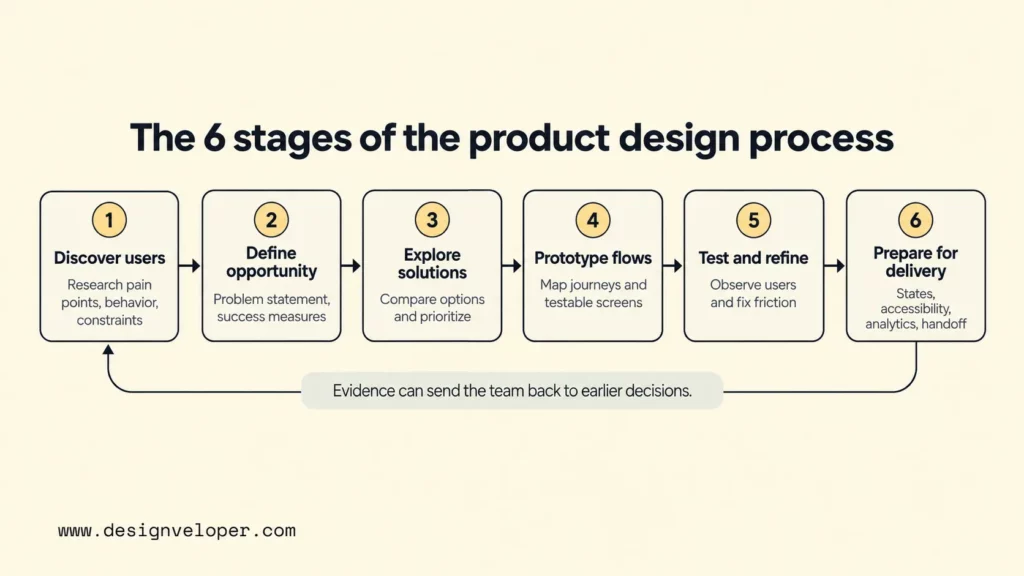
The six-stage model below is a practical way to organize that work for digital products. It is not a one-way conveyor belt: evidence from prototypes, development, or live usage can send the team back to an earlier decision. This iterative view is consistent with Nielsen Norman Group’s design thinking guidance, which describes design phases as cyclical rather than strictly linear.
What A Product Design Process Covers
A product design process covers the decisions needed to make a digital product useful, viable, understandable, and practical to build. It starts before screens exist and continues after launch, because the team still needs evidence about whether the product works in real use.
At the start, the team studies user needs, pain points, current behavior, business goals, and market context. The purpose is not to collect research for its own sake. The team is trying to decide which problem is worth solving, for whom, and under what constraints. Our guide to building the right product and building it right explores the same distinction between choosing a valuable direction and executing it well.
The process then turns that evidence into product priorities, user flows, interaction decisions, interface details, and testable prototypes. It also brings technical feasibility into the conversation early enough to change the design. A flow that looks simple in a prototype may depend on an unavailable API, a slow data source, or a security rule that changes what users can do.
Finally, product design has to account for delivery and learning. That means responsive behavior, accessibility, loading and error states, analytics, acceptance criteria, design handoff, quality checks, and a plan for learning after release. The goal is not a perfect static design file. The goal is a coherent set of decisions that can survive implementation and improve when new evidence appears.
How Product Design Relates To UX, UI, And Product Development
Product design is broader than UX or UI alone, while product development is the work that turns product decisions into a functioning release and maintains it afterward. The boundaries vary by company, but separating the responsibilities helps teams notice what is missing.
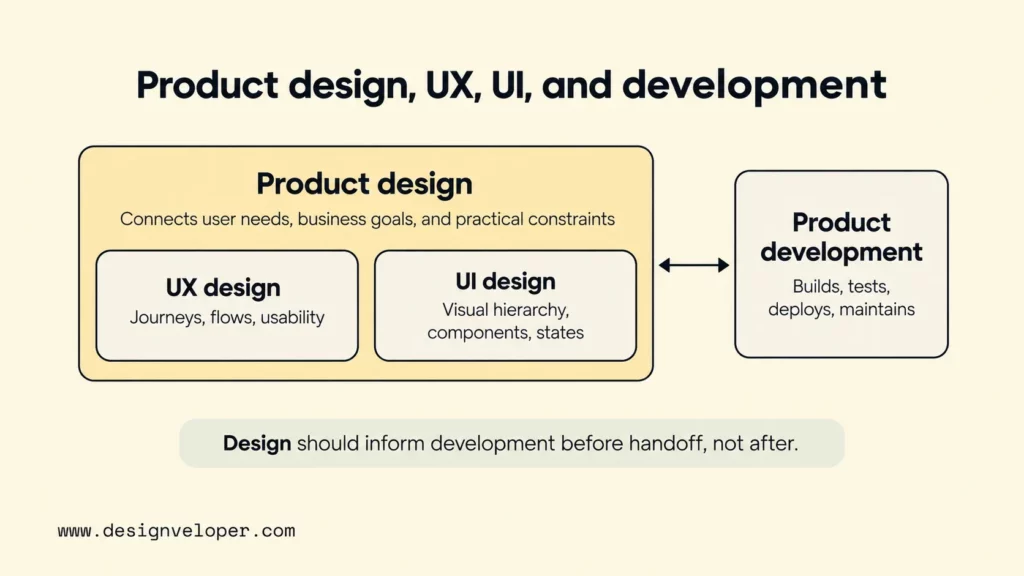
- Product design connects user needs, business priorities, experience decisions, and practical constraints across the product. Figma’s product design guide describes the discipline as work that links user research, interaction design, and business strategy into decisions the wider team can build from.
- UX design focuses on the overall experience: user journeys, task flows, information structure, usability, and the way people understand and complete their goals. If you need more detail on that work, our UX design process guide covers research, wireframing, prototyping, testing, and iteration.
- UI design defines the visual and interactive presentation of the interface, such as hierarchy, typography, color, component states, and detailed interaction behavior. Our UI and UX design comparison explains why these disciplines work together rather than compete.
- Product development builds, integrates, tests, deploys, and maintains the actual software. Design and development overlap in practice because technical choices can change the experience, while experience requirements can create engineering work.
The practical lesson is to avoid treating design as a handoff-only function. Product managers, designers, researchers, engineers, QA specialists, and relevant business stakeholders should collaborate at the decisions that affect their work. This does not mean everyone designs the interface. It means the people who own user, business, and technical evidence can challenge assumptions before those assumptions become expensive to change.
The 6 Stages Of The Product Design Process
These six product design stages move from understanding the problem to preparing a tested experience for delivery and learning from real usage. To make the decisions concrete, each stage follows one illustrative example: a B2B expense-approval app for small finance teams. The example is hypothetical and shows how evidence should change a decision, not how every project must run.
Step 1: Discover The Problem And Understand Users
The first decision is whether the team understands a real user problem well enough to invest in solving it. Research should examine what target users do today, where the workflow breaks down, what workarounds they use, and which constraints shape their behavior. Business goals and market context matter too, but they should not replace evidence about the user problem. Atlassian defines product discovery as understanding customer needs and validating ideas before building solutions.
For the expense-approval example, the team might interview finance staff and employees, observe how receipts and approvals move through current tools, and review support or process data if available. The expected output is a research summary with observed pain points, current behaviors, important constraints, and assumptions that still need validation. This stage reduces the risk of optimizing a workflow that users do not actually have or treating a symptom as the core problem.
Step 2: Define The Opportunity And Success Measures
The second decision is which part of the problem deserves attention now and how the team will know whether the product improves it. A useful problem statement names the target user, the situation, the friction or unmet need, and the outcome that matters. The team should also distinguish user outcomes from delivery outputs. “Ship an approval dashboard” is an output; “reduce unclear approval status for finance staff” is an outcome direction that can be tested.
In the example, research may show that reimbursement delays are not mainly caused by slow approvals. They may come from missing receipt details and uncertainty about policy before submission. The team could therefore prioritize clearer submission guidance and set success measures around task completion, correction rates, approval cycle behavior, and support questions. The expected output is a scoped problem statement, target-user definition, priority assumptions, and measurable criteria. This reduces the risk of using a polished interface to solve the wrong bottleneck.
Step 3: Explore And Prioritize Solutions
The third decision is which solution direction is promising enough to test. Teams should generate more than one answer before converging, because the first idea often reflects existing habits rather than the best response to the evidence. The Design Council’s Double Diamond captures this pattern: teams first widen their view of a problem or solution space, then narrow it as evidence and constraints become clearer.
For the expense app, options might include guided receipt capture, policy checks before submission, automatic field extraction, or a clearer approval-status timeline. The team compares each direction against user value, business value, technical feasibility, and the uncertainty it can realistically resolve. The output is a prioritized concept with rejected alternatives and the reasons behind the choice. This reduces the risk of committing to the loudest stakeholder idea without understanding its trade-offs.
Step 4: Map User Flows And Build Prototypes
The fourth decision is whether the proposed experience makes sense before the team builds production software. Start by mapping the main user journey and the decisions users make along it. Then create wireframes or an interactive prototype at the lowest fidelity that can answer the current question. A prototype is especially useful when the unknown is comprehension, navigation, trust, or interaction rather than technical feasibility.
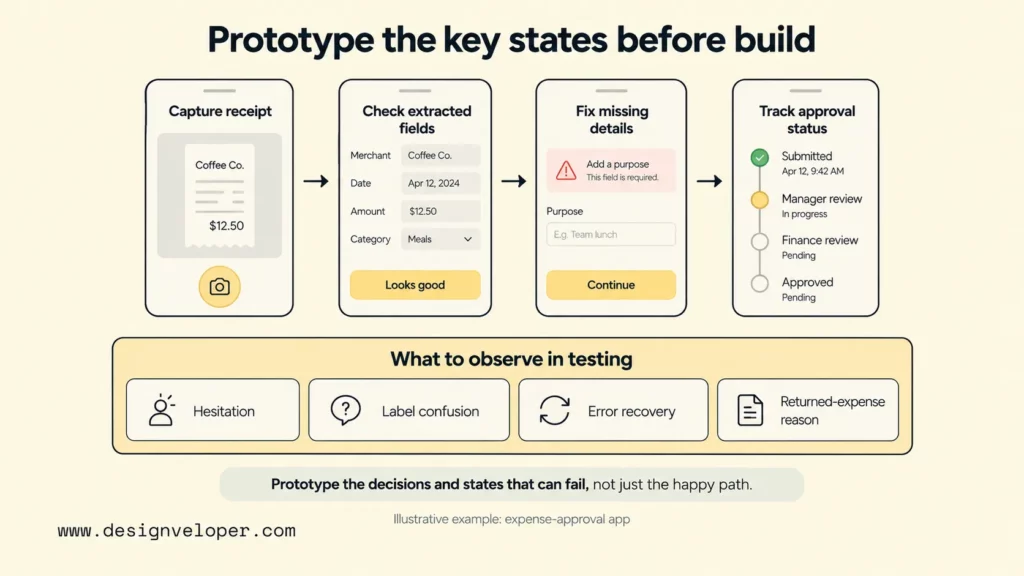
For the example, the team could prototype the path from photographing a receipt to checking extracted fields, fixing missing information, submitting the expense, and seeing its approval status. The prototype should include the states that affect the task, not just the happy path. That includes empty, loading, error, disabled, confirmation, and permission states where relevant. Our guide to POC vs MVP vs prototype can help when a team needs to choose between testing feasibility, usability, or real-world product value.
The expected output is a testable flow with enough detail to expose important decisions and edge cases. This reduces the risk of discovering basic workflow problems only after engineering has implemented them.
Step 5: Test And Refine The Experience
The fifth decision is whether representative users can complete important tasks and understand the product well enough to justify moving forward. Usability testing should focus on realistic tasks and observable behavior. Nielsen Norman Group’s usability-testing guidance emphasizes representative users and representative tasks, because feedback from the wrong audience can create false confidence.
In the expense example, participants might submit a receipt with one missing field and correct an extraction error. They could also find the reason an expense was returned and check where an approval is stalled. The team records where people hesitate, misread labels, take unexpected paths, or fail to recover from errors. Preference comments can still be useful, but observed task problems are usually more actionable for workflow decisions.
The output is a set of findings tied to design changes and unresolved questions, followed by another prototype or test where needed. Refinement should follow evidence rather than stakeholder taste. This stage reduces the risk of shipping an interface that looks complete but fails when users try to accomplish real tasks.
Step 6: Prepare For Delivery, Launch, And Learning
The sixth decision is whether the experience is defined well enough for engineering and QA to build and verify it without guessing at important behavior. Designers and developers should resolve technical constraints together, confirm responsive behavior, review accessibility requirements, define analytics events, and agree on acceptance criteria for the critical flows. The product should also specify what happens when data is slow, missing, invalid, or unavailable.
For the expense app, that may mean documenting field validation, receipt-upload limits, role permissions, empty states, approval-state transitions, responsive behavior, and the events needed to understand where submissions fail. W3C accessibility guidance on error identification requires detected input errors to be identified and described in text. That requirement shows why error behavior belongs in the product design instead of being left to implementation by default.
The output is not just a final screen set. It is a delivery-ready package of approved flows, component behavior, content, states, accessibility notes, analytics requirements, acceptance criteria, and unresolved decisions with owners. After launch, real usage and support evidence feed the next iteration. This reduces the risk of design drift during development and the risk of treating launch as the end of product learning.
Product Design Methods And When To Use Them
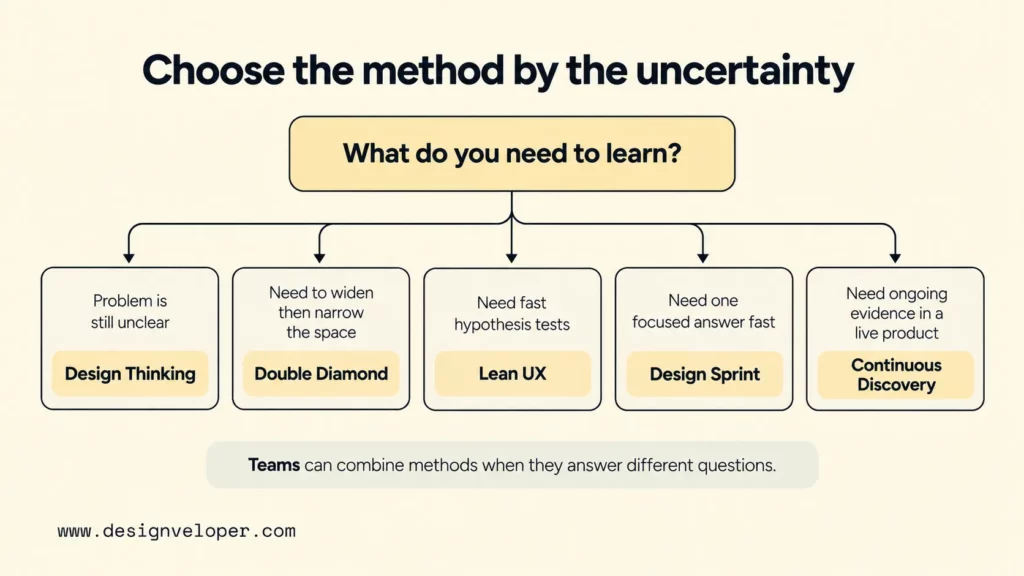
No single product design method is correct for every team. Choose the method by the uncertainty you need to reduce: discover the problem, frame the opportunity, explore solutions, validate a focused concept, or keep learning after launch. Teams can combine methods when each one answers a different product question.
| Method | Use It When | What It Helps The Team Do |
|---|---|---|
| Design Thinking | The problem is uncertain and the team needs a user-centered way to learn before committing to a solution. | Move through understanding, defining, ideating, prototyping, testing, and implementation in an iterative cycle. NN/g’s framework is useful as scaffolding rather than a rigid recipe. |
| Double Diamond | The team needs a clear structure for widening and narrowing both the problem space and the solution space. | Separate Discover, Define, Develop, and Deliver so divergent exploration happens before convergence, as shown in the Design Council framework. |
| Lean UX | A cross-functional product team needs fast learning cycles and wants to test assumptions with less up-front documentation. | Frame assumptions as testable hypotheses, then use small experiments to learn before committing more work. Jeff Gothelf’s Lean UX Canvas shows this sequence from assumptions to hypotheses to experiments. |
| Design Sprint | A team has a focused challenge and needs to align, prototype, and validate a direction in a short, facilitated cycle. | Use a bounded five-day process to align on a problem, choose a direction, build a realistic prototype, and test it with customers. GV’s Design Sprint guide describes the sprint as a shortcut to learning before a larger build. |
| Continuous Discovery | A live product changes often and the team needs fresh customer evidence for recurring product decisions. | Keep discovery close to delivery through frequent customer touchpoints, interviews, prototype tests, and assumption tests. Product Talk’s definition emphasizes small, regular research activities tied to outcomes. |
A team might use the Double Diamond to frame a large discovery effort, a Design Sprint to answer one urgent workflow question, and continuous discovery after launch. The names matter less than the discipline behind them: identify the uncertainty, choose evidence that can resolve it, and make the next investment depend on what the team learns.
Product Design Artifacts That Keep Teams Aligned
Product design artifacts are useful when they preserve evidence or make a decision easier to understand, review, or implement. They become waste when the team creates them because a process template says every project should have one.
| Artifact | Purpose | Decision It Should Support |
|---|---|---|
| Problem statement | Defines the target user, context, problem, and desired outcome. | Are we solving the right problem now? |
| User research findings | Summarize observed needs, behavior, pain points, patterns, and open questions. | Which assumptions have evidence, and which still need testing? |
| Journey maps and user flows | Show how users move through a current or proposed experience. | Where does the workflow break, branch, or create unnecessary effort? |
| Wireframes and prototypes | Make structure and interactions concrete enough to review or test. | Does the proposed experience make sense before full implementation? |
| Design system | Provides reusable standards, components, and patterns for consistent design at scale. | Which interaction and visual decisions should teams reuse instead of redesigning repeatedly? |
| Acceptance criteria | Describe the observable conditions a feature or flow must meet. | How will design, engineering, and QA agree that the intended behavior is present? |
| Decision log | Records important choices, evidence, trade-offs, and unresolved questions. | Why did the team choose this direction, and what new evidence would justify changing it? |
Not every product needs every artifact at the same level of detail. A small team may capture a problem statement and key decisions in one shared document. A large product may need a maintained design system and explicit acceptance criteria across many squads. Nielsen Norman Group defines a design system as standards for managing design at scale, including reusable components and patterns. That value appears when reuse and shared language reduce repeated decisions, not when a library exists only for presentation.
Making Product Design Ready For Real-World Delivery
A design is ready for real-world delivery when the team has resolved the important behavior, constraints, and quality conditions that engineering and QA need to implement it. High-fidelity screens alone are not enough because they rarely show every device size, system state, permission rule, data failure, or acceptance condition.
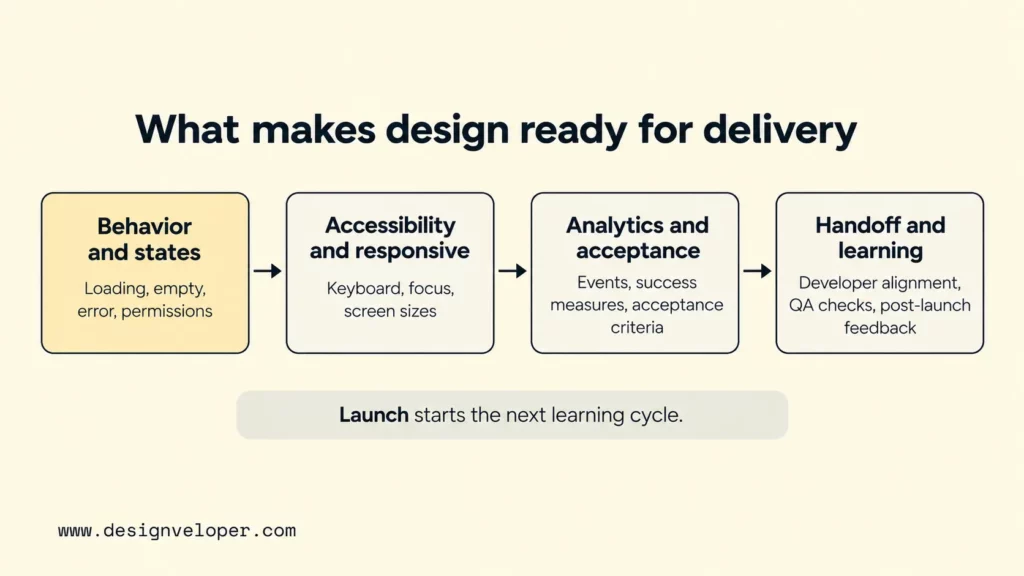
Bring developers into the work before the final handoff. Early technical feasibility checks can reveal limits in APIs, data models, performance, authentication, or platform behavior while the team still has inexpensive design options. The same collaboration helps engineers understand the user reason behind a requirement, which makes implementation trade-offs easier to discuss. For the broader build cycle, our software development life cycle guide explains how planning, design, implementation, testing, deployment, and maintenance connect.
Define responsive and accessibility behavior as part of the experience. Decide how layouts reflow, how controls behave with keyboard or assistive technology, how focus moves, and how errors are communicated. Also specify loading, empty, offline, permission, and failure states for important tasks. W3C’s form guidance notes that error messages should be clear and explain how users can correct a problem. That is also a useful model for product states beyond forms.
Analytics and success measures should trace back to the problem defined earlier. Instrument the events needed to answer product questions, not every click because it is measurable. Pair those events with qualitative evidence such as support patterns, interviews, and usability follow-ups. A dashboard can show where behavior changed; it cannot always explain why.
Handoff should make ownership explicit. Designers clarify intended behavior and edge cases, engineers surface implementation trade-offs, and QA checks the agreed acceptance conditions. When implementation forces a change, record the decision instead of letting the built product silently diverge from the design file.
At Designveloper, our public services connect UX/UI design with software development. Our software services page describes support from market research through production and release. This matters when product discovery and UX/UI decisions must survive engineering constraints, testing, and delivery instead of ending at design handoff. The same principle applies with separate vendors: connect discovery, design, engineering, and QA through shared evidence and explicit decisions. If your team needs help carrying those decisions into a buildable product experience, review our software development services.
FAQs About Product Design Process
How Long Does The Product Design Process Take?
There is no reliable universal duration because the work depends on product scope, research access, technical uncertainty, team availability, regulatory needs, and how much of the product already exists. A focused feature can move through discovery, prototyping, and testing faster than a new platform with several user roles and integrations. Plan the work around decisions and evidence, then timebox activities where useful. Do not treat an arbitrary number of weeks as proof that discovery or validation is complete.
Who Should Be Involved In Product Design?
Product design should involve the people who hold essential user, business, and technical knowledge. That usually includes product management, product or UX design, engineering, and relevant research or data roles. QA, content, security, accessibility, operations, marketing, sales, or domain specialists should join when their constraints affect the decision. Representative users should be involved when the team needs evidence about behavior or usability. The exact titles matter less than having the right evidence and decision owners in the room.
What Should A Team Ask Before Starting Product Design?
Ask who has the problem, what they do today, and why the problem matters. Then identify the evidence behind the assumption, the business outcome that matters, and any technical or operational constraints that could change the solution. Then ask what the team needs to learn before committing to a larger build. If those questions are still vague, the first design task is discovery, not high-fidelity UI.
What Is The Difference Between Product Design And Product Management?
Product management mainly owns product direction, priorities, outcomes, and stakeholder alignment, while product design focuses on understanding users and shaping how the product should work and feel. The roles overlap in discovery and decision-making. Atlassian’s product manager guide describes product managers as responsible for strategy, roadmap, features, customer needs, and success definitions. Designers and researchers contribute specialized experience and validation work. Strong teams make the overlap explicit instead of assuming one role can replace the other.
Also published on

Share post on










Related Articles


Product Design Process: 6 Steps From Research To Launch
Product Design Process: 6 Steps From Research To Launch Published September 18, 2026
6 Proven Ways Chicago Brands Can Build Loyalty That Lasts
6 Proven Ways Chicago Brands Can Build Loyalty That Lasts Published July 02, 2025
How to Organize Design Files That Help to Save Time?
How to Organize Design Files That Help to Save Time? Published June 27, 2025



















