
















Choosing Between Low Code and No Code Development

Low-code and no-code development let teams build applications with less hand-written code. No-code tools often suit simpler, business-owned workflows, while low-code tools give technical teams more control over integrations, custom logic, and governed delivery.
For teams evaluating low code no code development, speed is only one part of the choice. Custom development becomes the alternative when a required integration is unsupported, performance targets fail, platform costs exceed budget, or critical logic cannot fit the platform.
Low-Code and No-Code Development Defined
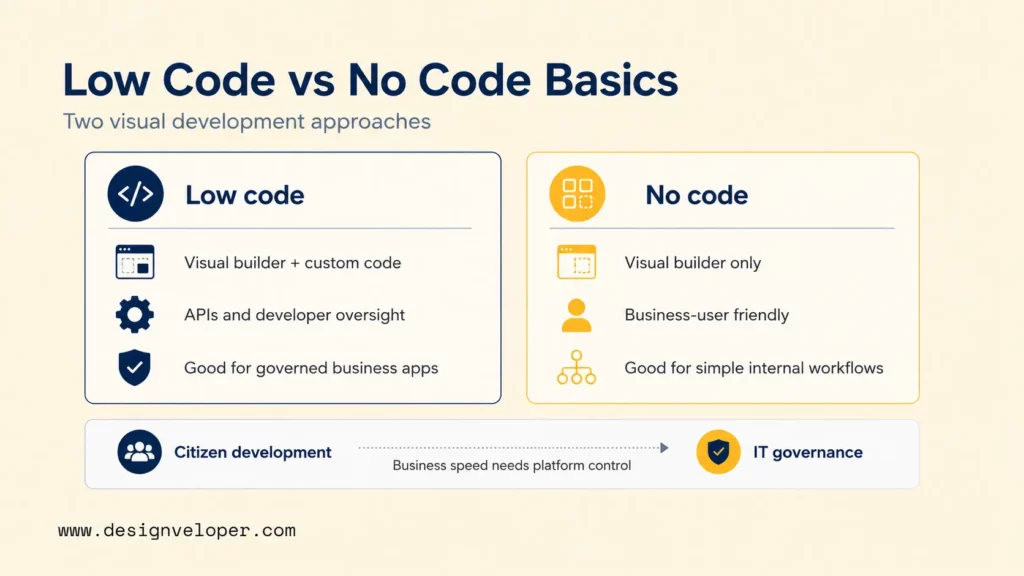
Low-code and no-code are visual development approaches that reduce manual coding, but they expose different levels of technical control. While low-code usually leaves room for code extensions and developer oversight, no-code usually keeps builders inside platform-provided components and rules.
| Low-code | No-code |
|---|---|
| Uses visual builders, reusable components, and automation while leaving room for custom code, APIs, scripts, or developer extensions. | Uses visual builders and platform-provided components so users can create workflows within the limits set by the platform. |
| Usually expects some technical skill for data models, integrations, environments, testing, and deployment. | Usually targets business users who can configure forms, rules, dashboards, or simple applications without traditional programming. |
| Fits applications where developers need more control over logic, integration, security, or future extension. | Fits repeatable workflows where standard platform features already cover most requirements. |
Google Cloud’s low-code versus no-code guide describes low-code as visual building with code extension and no-code as a more constrained visual approach. The same guide also shows how generative AI and natural-language tools are entering both categories.
Some AI-assisted builders can generate parts of an application from natural-language instructions. That can shorten setup, but teams still own data quality, permissions, testing, security, and maintenance.
Citizen development lets business specialists build approved tools without becoming full-time developers. IT governance still defines approved platforms, data, connectors, environments, and production ownership.
Low-Code vs No-Code: Key Differences
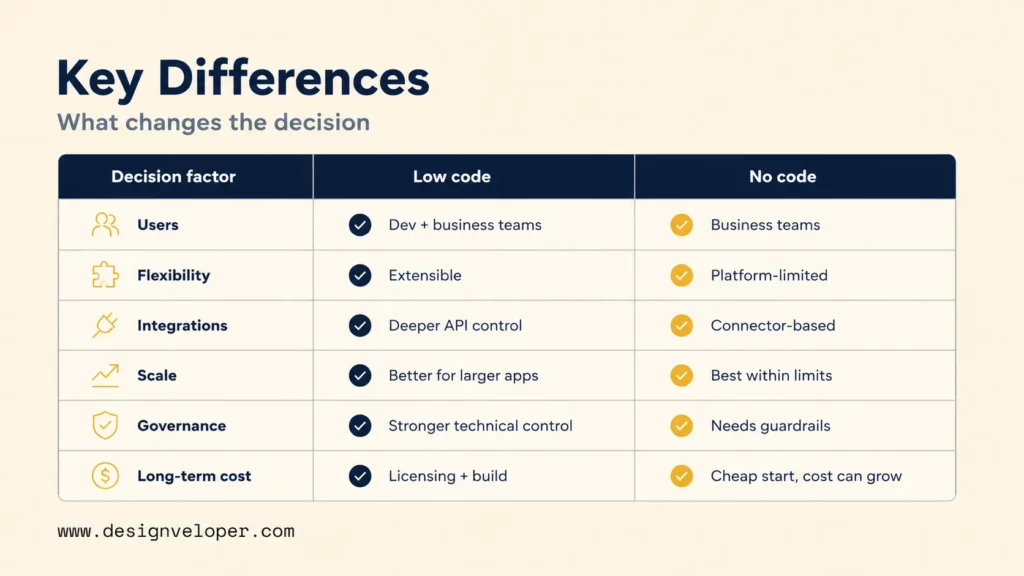
The practical difference is how much control the team needs over logic, integrations, governance, and future changes.
| Decision factor | Low-code | No-code |
|---|---|---|
| Primary users and technical skill level | Developers, technical analysts, and mixed product teams. Business users may contribute, but technical review is common. | Business users and operations teams. Basic workflows can often be built without programming knowledge. |
| Custom code, flexibility, and extensibility | More likely to allow code extensions, reusable components, scripts, or custom services. | Usually relies on platform components and configuration. Complex behavior may require workarounds or a different platform. |
| Integrations, data access, and API control | Better fit when the app needs several APIs, custom authentication flows, controlled data access, or deeper backend integration. | Works best when supported connectors and standard data sources already meet the need. |
| Scalability, performance, and testing needs | Can support larger business applications, but teams still need load, integration, regression, and failure testing. | Can scale within platform limits. Teams should test record limits, automation volume, concurrency, and response times before broad rollout. |
| Security, governance, and audit requirements | Offers more room for controlled environments and technical governance, depending on the platform. | Can be safe for approved use cases, but unmanaged adoption can create shadow IT and unclear data ownership. |
| Licensing, vendor lock-in, and long-term cost | May add cost through users, environments, premium connectors, capacity, or platform services. Migration can become harder as custom extensions grow. | Low entry effort can become expensive when many users, apps, records, or automations need paid capacity. Export and replacement options may be limited. |
| Best-fit application types | Integration-heavy business apps, governed departmental systems, portals, and workflows with custom logic. | Forms, approvals, trackers, simple dashboards, lightweight internal tools, and early workflow validation. |
These are selection tendencies, not universal product rules. A mature no-code platform may offer strong APIs, while a low-code platform may still impose deployment or licensing limits.
Governance deserves its own launch check because IBM’s low-code versus no-code comparison notes that shadow-IT risk can rise when no-code adoption happens without IT oversight.
Choose the least complex platform that still gives the team enough control to operate the workflow safely after launch.
Where Low-Code and No-Code Platforms Fit Best
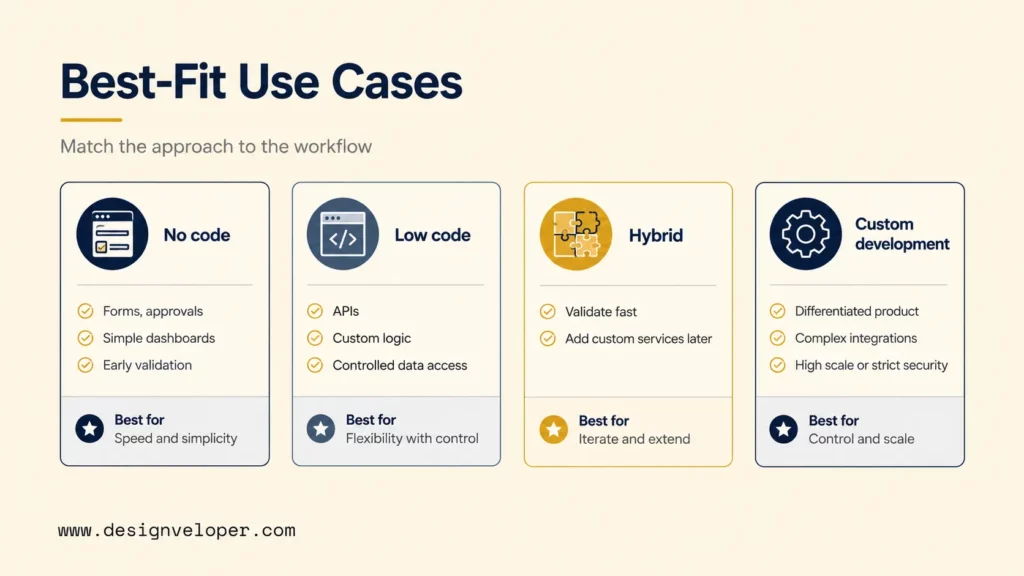
Fit depends on the workflow’s risk, integration depth, and expected life. The scenarios below help product managers and business owners choose a starting route without treating either platform type as a universal shortcut.
Scenario: Lightweight internal workflow
Recommended approach: No-code.
Boundary: Keep the app inside approved data sources, connectors, and user roles.
Example: Staff submit purchase requests, managers approve them, and a dashboard shows status.
Scenario: Governed business app
Recommended approach: Low-code.
Boundary: Put custom logic and sensitive integration work under developer review.
Example: A field team updates service cases while the app reads customer and inventory data from existing systems.
Scenario: Fast validation with planned extension
Recommended approach: Hybrid delivery.
Boundary: Keep core data exportable and avoid burying critical rules in a tool that cannot be replaced.
Example: A supplier portal begins with forms and approvals, then adds a custom pricing service after demand is proven.
Scenario: Differentiated or constrained product
Recommended approach: Custom development.
Boundary: Own the architecture, code, test strategy, deployment path, and operating responsibilities.
Example: A customer product combines custom pricing, real-time events, several external services, and role-specific experiences.
Start with the scenario closest to the real operating need, not the most attractive demo. A simple approval tool rarely needs custom architecture. A differentiated product should not be forced into a platform that blocks its critical logic or integrations.
Delivery Speed Versus Long-Term Control
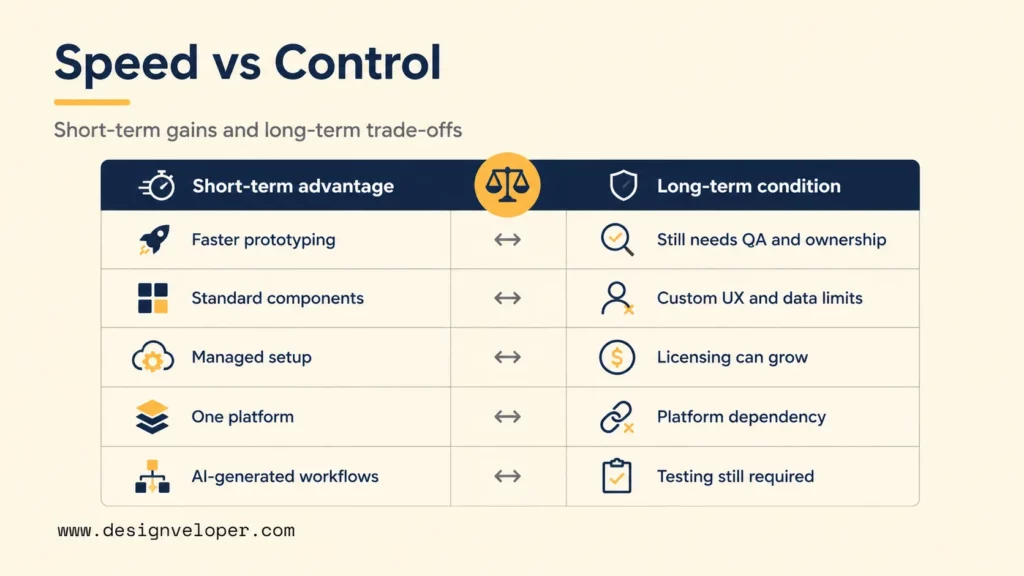
Low-code and no-code can reduce the effort needed to reach a prototype or first usable workflow. The trade-off is that speed often comes from accepting platform rules for interface design, data, deployment, integrations, and pricing.
| Short-term advantage | Long-term condition |
|---|---|
| Visual builders and reusable components can shorten initial prototyping. | Teams still need clear requirements, acceptance tests, error handling, and an owner for production changes. |
| Standard components reduce the amount of custom UI and logic to build. | Custom UX, unusual data models, performance targets, or platform-specific features may expose hard limits later. |
| Managed hosting and connectors can reduce setup work. | User, app, automation, storage, connector, or capacity charges can rise as adoption grows. |
| One platform can combine data, workflow, UI, and deployment. | That convenience increases dependency. Teams need an export plan and a route for replacing critical functions. |
| AI can generate parts of screens, workflows, formulas, or starter code. | Generated output still needs testing, security review, maintainability checks, and a named owner. |
Licensing deserves a model, not a guess. Estimate expected users, apps, environments, automation volume, data capacity, premium connectors, and support needs. Compare that total with the cost of custom development and maintenance.
Set a budget ceiling and performance acceptance target before the pilot. If the platform misses either threshold, compare alternatives instead of treating the first tool as a permanent choice.
Exit planning matters for the same reason. Check whether the team can export data in a usable format, recreate business rules, replace integrations, and continue operating during migration.
Fast delivery is valuable only when the team also knows who will test, support, change, and eventually replace the workflow.
Choose Low-Code, No-Code, or Custom Development
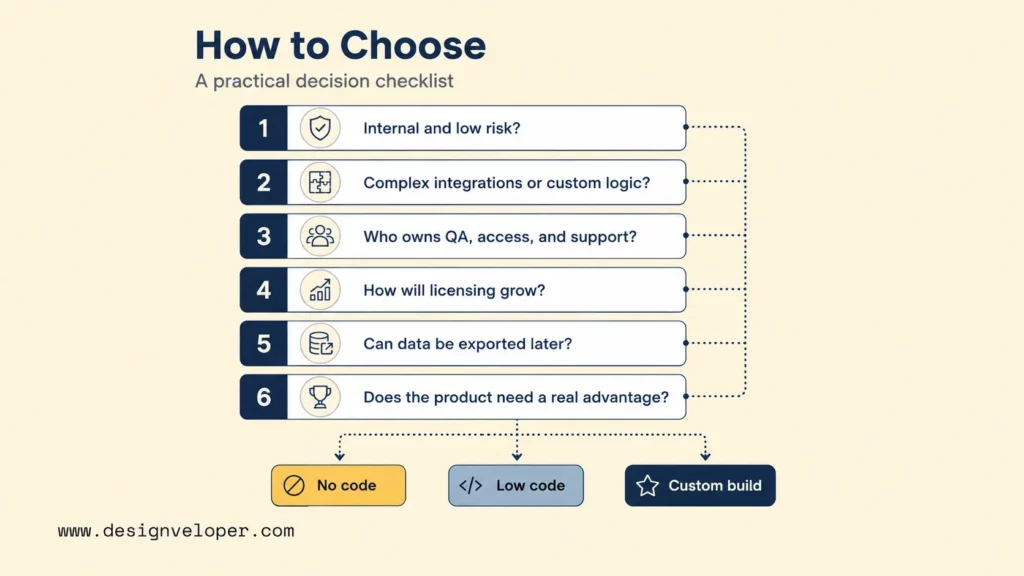
Use the checklist as a decision sequence, not a scoring formula. The aim is to expose the requirement that a platform must satisfy before launch.
- Is the workflow internal, repeatable, and low risk? A strong yes supports no-code when approved connectors already cover the task.
- Does it need complex integrations or custom business logic? A yes moves the choice toward low-code or custom development.
- Who owns changes, QA, access, and support? Production use needs named owners.
- How will licensing grow? Model expected adoption before approving the platform.
- Can the team export data and replace the platform? Weak portability raises long-term risk.
- Does the product need a meaningful custom advantage? Unique logic, UX, scale, or security needs may justify custom development.
No-code fits when the workflow is low risk and standard connectors cover the job. Low-code fits when custom logic, API control, or stronger technical review is needed.
Move toward custom development when a release blocker appears:
- A must-have integration has no supported connector or API path.
- Projected platform total cost exceeds the approved budget.
- Performance testing misses the agreed target.
- Required data or business rules cannot be exported in a usable form.
- Critical logic or a security requirement cannot be implemented safely within platform limits.
Hybrid delivery makes sense only when the prototype keeps data portable and the team knows which component will move to custom software.
Governance and Integration Requirements Before Launch
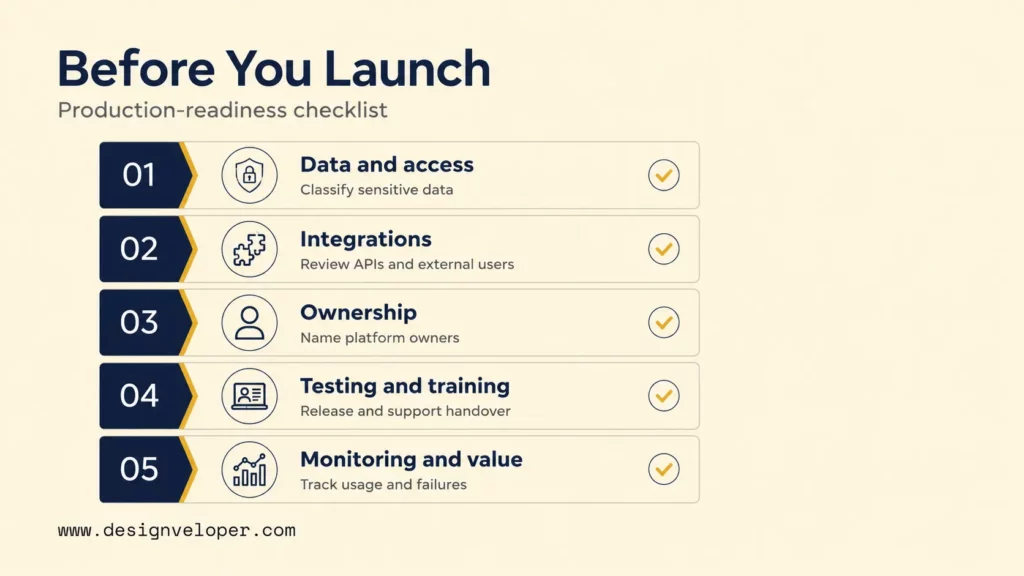
Production readiness begins before broad rollout. Assign a named owner and define evidence for each layer so approval can be checked rather than assumed.
- Layer: Data and access.
Owner: Business data owner with security input.
Evidence: Data classification and access matrix.
Pass criteria: Sensitive data handling and least-privilege access are approved. - Layer: Integrations and external users.
Owner: Technical owner.
Evidence: Connector, API, identity, and failure test results.
Pass criteria: Required integrations work within approved access and capacity limits. - Layer: Platform ownership and change control.
Owner: Product or process owner.
Evidence: App inventory, approver, and change record.
Pass criteria: Production ownership and release authority are named. - Layer: Testing, training, and support.
Owner: Release owner and support lead.
Evidence: Acceptance results, training material, and support runbook.
Pass criteria: Normal paths, failures, release steps, and handover are tested. - Layer: Monitoring, cost, and value.
Owner: Product or operations owner.
Evidence: Usage, licensing, failure, and outcome measures.
Pass criteria: The team can detect failures, cost growth, and declining business value.
Data classification should come before production approval when the workflow handles sensitive information. Check the selected platform against the organization’s security, legal, and compliance requirements rather than assuming a platform category is safe.
Integration review should also test failure behavior. Confirm what users see when:
- An API is slow or unavailable.
- A connector token expires.
- A record update is rejected.
- A dependent service hits a rate or capacity limit.
Governance should make fast delivery safer, not slower. Give business teams approved platforms and connectors, clear data rules, and a defined path to technical review when a workflow crosses those boundaries.
FAQs About Low-Code and No-Code Development
Can A No-Code Prototype Be Moved To A Custom Application Later?
Yes, but it often means rebuilding the application rather than exporting it as custom code. Preserve the data, workflow rules, requirements, and acceptance criteria. Use the Delivery Speed Versus Long-Term Control section above for portability and exit planning.
How Do Low-Code Platform Licenses Affect Total Cost As Usage Grows?
Licensing can raise total cost as users, apps, automation, connectors, or data capacity grow. Model realistic adoption before buying, and use Microsoft’s current Power Apps pricing page to verify plan structure at purchase time.
What Business Data Should Not Be Stored In A No-Code Tool?
Do not place sensitive or regulated business data in a no-code tool unless that exact platform, configuration, and contract meet the organization’s applicable requirements.
The review should cover:
- Identity controls and least-privilege access.
- Audit logging and encryption.
- Retention, export, deletion, and hosting requirements.
- Backup, recovery, and incident-response responsibilities.
A security or legal owner should confirm the applicable controls before production use.
Can Business Teams Build Low-Code Apps Without IT Review?
Business teams can prototype in an approved low-risk sandbox, but production review is needed when the app crosses a defined threshold:
- It handles sensitive data.
- It serves external users.
- It connects to business systems or custom APIs.
- It automates material business decisions.
- Daily operations would depend on it after launch.
Do Low-Code and No-Code Platforms Support Offline Mobile Apps?
Some do, but offline support is platform-specific. In Power Apps, built-in offline-first support applies to Dataverse-based canvas apps in native Power Apps Mobile, while browser-based canvas apps do not run offline.
Microsoft Learn’s guidance for offline-capable canvas apps documents those boundaries. Teams should still test sync, conflict handling, authentication, local storage, attachments, and recovery on the real devices they plan to support.
Related resources: Compare low-code development platforms, plan a low-code MVP, or review low-code vs pro-code development. For budget and mobile questions, see our low-code development cost and iOS and Android app development guides.
If your workflow now needs custom services, enterprise integrations, stronger ownership, or a platform migration, our software development services team can help define the next architecture step.
Also published on

Share post on










Related Articles


Low Code Vs Pro Code: Choosing The Right Fit For Your Product
Low Code Vs Pro Code: Choosing The Right Fit For Your Product Published October 15, 2026
Will Low-Code Replace Developers? Roles, Limits, And Trade-Offs
Will Low-Code Replace Developers? Roles, Limits, And Trade-Offs Published September 28, 2026
10 Low Code Development Platforms for Business Apps in 2026
10 Low Code Development Platforms for Business Apps in 2026 Published August 25, 2026


















