
















15 Best AI No-Code App Builders In 2026 (No Coding Skills Required)

The best no code app builder in 2026 depends on what the app must become: a fast prototype, a SaaS MVP, a mobile app, an internal tool, a client portal, or a production business workflow. AI no-code app builders can now turn prompts, spreadsheets, Figma ideas, and business data into working software, but each platform has a different strength and a different ceiling.
Quick decision guide: choose Base44, Lovable, Shipper, or v0 for fast AI-generated prototypes; Bubble or Momen for more complex web apps; FlutterFlow or Appy Pie for mobile apps; Softr, Glide, or Zite for business apps and portals; Backendless when data and backend control matter; and ToolJet or Retool for internal tools. Move to custom development when security, performance, deep integrations, or long-term product ownership become more important than launch speed.
| Project need | Best starting point | Why it fits | Watch out for |
|---|---|---|---|
| Fast AI web app prototype | Base44, Lovable, Shipper, or v0 | They turn prompts into visible app screens or working web app flows quickly. | Generated logic, security, and maintainability still need review. |
| SaaS MVP | Bubble, Momen, or Replit | They can support richer workflows, data, and iteration than simple page builders. | Complex logic can become hard to maintain without architecture discipline. |
| Mobile app | FlutterFlow or Appy Pie | They focus on mobile-friendly builds and publishing paths. | App store requirements, device QA, and native behavior still matter. |
| Client portal | Softr, Glide, or Zite | They fit structured data, permissions, dashboards, and business workflows. | Data model and role-based access must be planned early. |
| Internal tool | ToolJet or Retool | They connect databases, APIs, workflows, and operational interfaces. | Usually needs a technical owner for governance and integrations. |
AI no-code builders are strongest when they compress the first build. They are weakest when teams confuse a fast first build with a production-ready product.
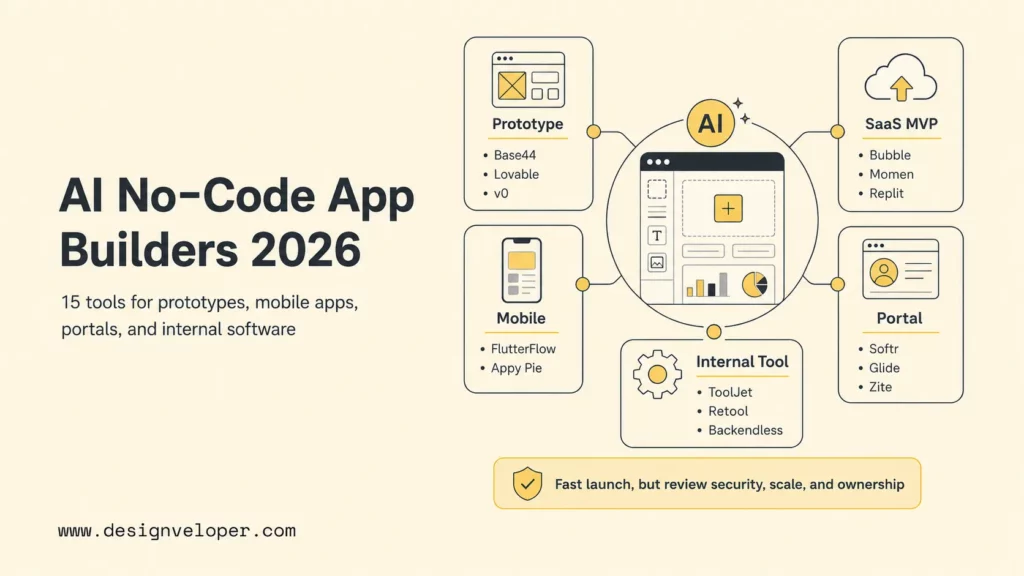
Top 15 AI No-Code App Builders For Different Use Cases
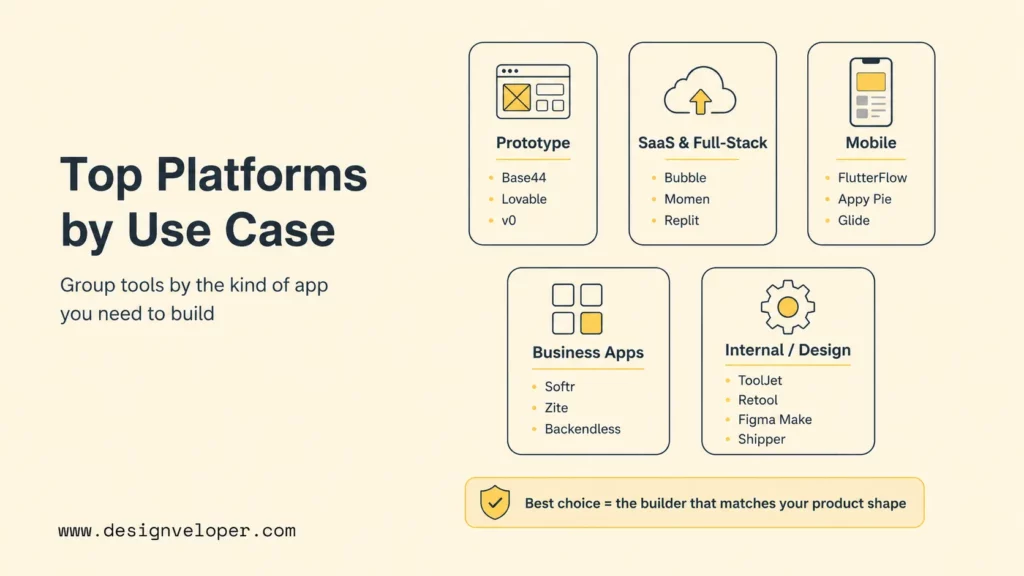
This list focuses on practical use cases rather than declaring one universal winner. A beginner building a booking app has different needs from a founder building a SaaS MVP or an operations team replacing spreadsheets. The strongest choice is the builder whose default product shape matches the app you actually need.
| Tool | Best for | App type | AI support | Beginner fit | Main limitation |
|---|---|---|---|---|---|
| Base44 | Fast AI-generated web apps | Web apps, portals, back-office tools | Strong natural-language app generation | High | Review security, ownership, and production controls before using it for sensitive business apps. |
| Lovable | Prompt-to-app prototypes | Web apps and SaaS prototypes | Prompt-based build credits and AI app generation | High | Credits, generated code quality, and security review can become constraints as the app grows. |
| Shipper | AI-assisted app building | Full-stack web apps from plain English | AI builder and Advisor workflow | High | Still needs careful testing before business-critical use. |
| v0 | UI-first app prototypes | React-style web app interfaces | AI assistant for design, iteration, and full-stack web apps | Medium | Best when someone can review front-end structure, UX, and deployment details. |
| Replit Agent 4 | AI app building with code access | Web and full-stack apps | Agentic build workflows with source code access | Medium | Powerful, but teams need environment separation, backups, and code review. |
| Bubble AI app generator | SaaS and complex web apps | Web apps, SaaS, marketplaces, dashboards | AI prompt generation plus visual editing | Medium | Complex workflows still require Bubble architecture knowledge and performance planning. |
| FlutterFlow AI | Cross-platform mobile apps | iOS, Android, web, desktop apps | AI-assisted component and page generation | Medium | Best when the team understands app store publishing and mobile QA. |
| Softr | Client portals and simple business apps | Portals, intranets, directories, dashboards | AI business app creation and data syncing | High | Works best for structured business apps, not unusual custom product logic. |
| Glide | Spreadsheet-based apps | Internal apps from spreadsheets, files, and data sources | AI-powered app and workflow features | High | Data model and permissions become important as spreadsheets turn into software. |
| Zite | Production-ready business apps and portals | Business apps, workflows, databases, portals | AI builder for apps, workflows, and data | High | Focus is business software, so evaluate fit for consumer or design-heavy apps. |
| Backendless | Data and infrastructure control | Apps with visual UI, backend, database, APIs | Low-code/no-code backend and visual logic | Medium | More control means more learning around data, APIs, and server logic. |
| Momen | Full-stack apps with AI features | Full-stack web apps and AI agent workflows | AI agentic workflows and no-code full-stack building | Medium | Evaluate scalability, integration depth, and team ownership before committing. |
| Figma Make | Design-to-app workflows | Interactive prototypes and design-led app flows | AI-powered design and app creation inside Figma | High for designers | Not a full replacement for production engineering on complex apps. |
| Appy Pie AI app builder | Simple small-business apps | Native Android, iOS, and PWA apps | Prompt-based native app generation | High | Good for straightforward business apps; check app store, template, and customization limits. |
| ToolJet / Retool AI app generation | Internal tools | Admin panels, workflows, dashboards, operational apps | AI-generated internal apps and workflows | Medium | Best for internal software with data and governance needs, not consumer app stores. |
1. Base44 For Fast AI-Generated Web Apps
Base44 is a strong option for people who want to describe a web app in plain language and see a working product quickly. Its positioning centers on building apps, workflows, back-office tools, customer portals, and enterprise products from natural-language prompts. That makes it attractive for founders, operators, and nontechnical teams that need a fast first version without wiring every screen and database manually.
Base44 is best for productivity apps, simple portals, internal workflows, and early product validation. It is not a reason to skip product thinking. Users should define the app’s data, roles, core workflow, and acceptance criteria before prompting. For anything involving customer data, HR records, payments, or internal approvals, teams should test permissions, export paths, security settings, and admin ownership before calling the app production-ready.
2. Lovable For Prompt-To-App Prototypes
Lovable fits prompt-to-app prototyping. The platform lets users start for free and uses build credits, which makes it easy to test an idea before committing to a larger plan. Lovable is useful when a founder, marketer, or product manager wants to turn a product idea into a working web interface quickly and then iterate through prompts.
Lovable is especially useful for clickable SaaS concepts, landing-to-app flows, dashboards, and simple web app MVPs. The practical limitation is that AI-generated apps still need review. Teams should inspect authentication, data rules, responsive behavior, dependency choices, and generated code before a prototype touches real users. Lovable can speed the first build, but it cannot replace QA, security review, and product ownership.
3. Shipper For AI-Assisted App Building
Shipper describes itself as a no-code AI app builder that turns plain English into working software. It is designed for both nontechnical and experienced builders, which makes it a useful candidate when the buyer wants an AI assistant to do more than generate a static mockup. Shipper’s pitch is simple: describe what you want, then let the builder create a live app experience.
Shipper is a good fit for entrepreneurs and small teams that want guided AI-assisted app creation. It can help users move from idea to first working version without opening a full development environment. The tradeoff is control. Before using Shipper for production business apps, review data access, app ownership, hosting, authentication, integrations, and rollback options. A live app still needs operational responsibility.
4. v0 For UI-First AI App Prototypes
v0 from Vercel is one of the strongest tools for UI-first AI app prototyping. Vercel describes v0 as a collaborative AI assistant to design, iterate, and scale full-stack applications for the web. Its value is strongest when the first problem is interface quality: dashboards, onboarding flows, admin panels, pricing screens, product pages, and front-end app states.
v0 works well for designers, product managers, and developers who want a polished starting point that can move closer to a real web stack. It is less beginner-only than some tools because the best results often come when someone can evaluate React structure, state handling, accessibility, and deployment details. For teams already using Vercel or React-oriented workflows, v0 is a practical bridge from prompt to front-end implementation.
5. Replit For AI App Building With Code Access
Replit Agent 4 is useful when users want AI app building with real code access. Replit’s agentic workflow can design, build, and iterate apps while keeping the project in a development environment. That makes it a better fit for users who may start with no code but want the option to inspect files, edit logic, add packages, and involve developers later.
Replit is strong for prototypes, educational builds, hackathon-style projects, and MVPs where code ownership matters. It also requires discipline. AI coding tools can make large changes quickly, so teams should use version control, separate development and production data, backups, code review, and clear permissions. Replit gives more control than pure no-code tools, but that control comes with engineering responsibility.
6. Bubble For SaaS And Complex Web Apps
Bubble remains a major choice for SaaS and complex web apps because it combines visual UI building, data, workflows, plugins, and now AI-assisted app generation. Bubble’s AI app generator positions itself around complete working apps rather than mockups, and Bubble’s broader platform has long been used for marketplaces, CRMs, dashboards, membership apps, and SaaS products.
Bubble is best when the product needs richer workflows than a simple landing page or form app. The learning curve is real. Users must understand data types, workflows, privacy rules, reusable components, responsive design, and performance. A Bubble app can become a serious MVP, but teams should plan architecture early so the app does not become a maze of fragile workflows.
7. FlutterFlow For Cross-Platform Mobile Apps
FlutterFlow AI is a strong choice for cross-platform mobile apps. FlutterFlow lets users build mobile, web, and desktop applications visually, and its AI features can generate and update components and pages. It also has a natural connection to Flutter, which gives teams a clearer path from visual development to mobile app behavior than many generic no-code builders.
FlutterFlow is best for mobile-first products, internal mobile workflows, field apps, booking apps, marketplaces, and apps that need app-store deployment planning. Beginners can start visually, but successful mobile apps still need device testing, navigation review, push notification planning, offline behavior decisions, analytics, and store-compliance work. FlutterFlow helps with the build, not with every product and release decision.
8. Softr For Client Portals And Simple Business Apps
Softr is a strong no-code app builder for client portals, internal tools, intranets, dashboards, CRMs, directories, and simple business apps. Softr’s current positioning emphasizes AI-powered portals and internal tools that sync with data sources. That makes it useful for teams replacing spreadsheets, manual requests, and disconnected lightweight processes.
Softr is a good fit when the app is mostly structured data plus permissions plus a polished interface. Client portals, partner directories, intake dashboards, document hubs, and lightweight CRMs are natural matches. Softr is less ideal when the app needs highly custom logic, unusual interaction design, heavy real-time collaboration, or deep backend behavior that goes beyond the platform’s patterns.
9. Glide For Spreadsheet-Based Apps
Glide is one of the easiest choices for spreadsheet-based apps. Glide turns spreadsheets, prompts, files, and business data into internal apps that help teams replace manual processes. It is especially useful when the team already has data in Google Sheets, Excel, Airtable, or a similar operational source and wants a cleaner app layer on top.
Glide works well for inventory tools, field-team apps, approval trackers, directories, internal request systems, and lightweight workflow apps. The main risk is treating a spreadsheet as a permanent product architecture. As the app grows, teams should review data ownership, row-level permissions, integrations, data validation, and performance. Glide is fast, but business data still needs structure.
10. Zite For Production-Ready Business Apps And Portals
Zite focuses on business apps, workflows, databases, and portals. Its positioning as “the AI builder that means business” makes it different from pure prototype tools. Zite is a strong candidate when the desired output is an employee portal, admin panel, inventory tracker, workflow app, or database-backed internal system rather than a consumer-facing creative app.
Zite is best for business teams that want prompt-based software but still care about data, permissions, and production workflows. The platform’s strength is also its boundary: it is most attractive for structured business software. Buyers should check whether it supports their required integrations, data model, auditability, user roles, and export needs before building important workflows on it.
11. Backendless For Data And Infrastructure Control
Backendless is a visual low-code and no-code platform with UI building, Codeless logic, real-time database, APIs, messaging, and backend services. It is a good option when the app needs more data and infrastructure control than a simple front-end builder provides. Users can model data, build logic visually, and manage backend behavior without writing traditional code for every piece.
Backendless fits teams that understand app concepts such as databases, authentication, APIs, server logic, and real-time updates. It is not the lightest beginner tool, but it can be more appropriate when the app’s backend matters. Use it for data-heavy apps, operational systems, and workflows where the team wants visual development without giving up backend structure.
12. Momen For Full-Stack Apps With AI Features
Momen is a no-code full-stack app builder that emphasizes production-ready web apps, scalability, and native AI agentic workflows. It is useful for founders and operators who want more than a static no-code site. Momen can support app logic, backend behavior, AI features, and full-stack development patterns without asking the builder to write code from scratch.
Momen is a practical candidate for SaaS MVPs, marketplaces, AI-powered tools, and business systems that need more structure than a landing page builder. Teams should evaluate integrations, data ownership, scalability, pricing, and how easily developers can maintain or migrate the app later. Full-stack no-code still needs product architecture.
13. Figma Make For Design-To-App Workflows
Figma Make is best for design-to-app workflows. Figma Make lets users generate, iterate, and build with AI-powered design tools inside the Figma ecosystem. It is especially attractive when the team already works in Figma and wants to turn design intent, app screens, or prototype ideas into more interactive experiences.
Figma Make is strongest for designers, product teams, and early-stage concept work. It can help teams explore flows, test app ideas, and communicate design direction faster. It should not be treated as a complete replacement for engineering when the app needs a secure backend, payment flows, complex permissions, performance tuning, or long-term product maintenance.
14. Appy Pie For Simple Small-Business Apps
Appy Pie AI app builder is a friendly option for simple small-business apps, especially when the goal is an Android, iOS, or PWA app built from a prompt. Appy Pie’s positioning emphasizes native app generation, working previews, and app-store publishing without coding. That makes it attractive for local businesses, service providers, creators, and nontechnical teams with straightforward requirements.
Appy Pie is best for booking apps, loyalty apps, restaurant apps, event apps, basic e-commerce apps, and simple customer-facing mobile experiences. The main limitation is customization depth. Before committing, check whether the app needs custom backend logic, unusual UX, deep integrations, analytics, multilingual behavior, or industry-specific compliance. Simple apps benefit most from template-driven speed.
15. ToolJet Or Retool For Internal Tools
ToolJet and Retool are best considered internal-tool builders rather than general consumer app builders. ToolJet positions itself around enterprise apps, AI agents, and workflows; Retool emphasizes internal software, AI apps, and governed workflows. Both are useful when the app needs to connect databases, APIs, SaaS systems, and operational workflows.
ToolJet or Retool fit admin panels, support consoles, finance review tools, inventory dashboards, compliance workflows, and internal AI tools. The target user may be a business operator, but a technical owner is still valuable. Internal tools often need secure data access, audit logs, role-based permissions, staging environments, and release governance. These platforms can accelerate delivery, but they do not remove the need for ownership.
Which AI No-Code App Builder Fits Your Project Best?
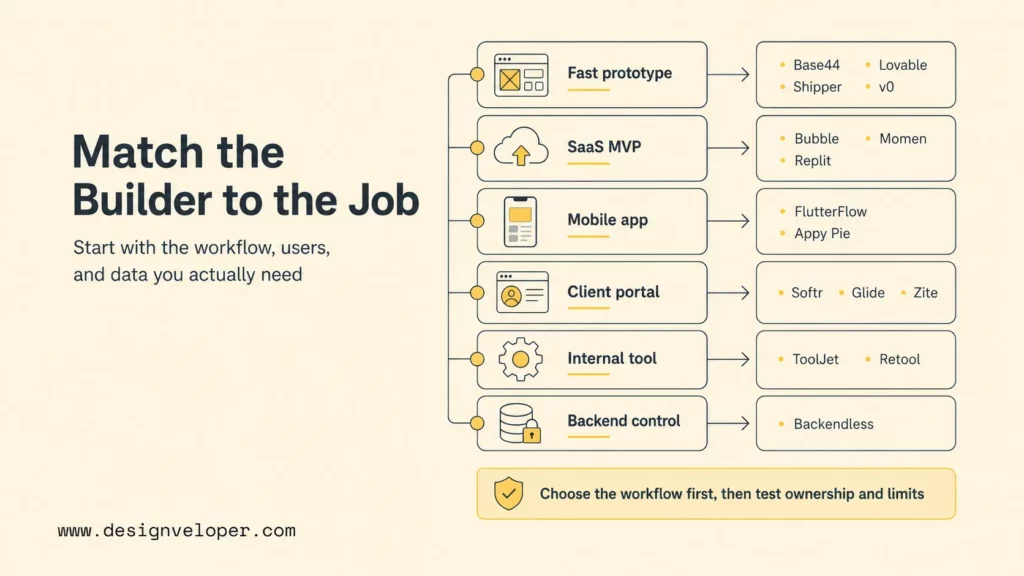
The right AI no-code app builder should match the project type, not only the builder’s popularity. A founder building a clickable SaaS prototype needs different defaults from an operations team replacing a spreadsheet process. Use the table below as a selection shortcut before committing to a platform.
| Project type | Best-fit builders | Why | Decision check |
|---|---|---|---|
| AI prototype | Lovable, Shipper, Base44, v0 | They create visible apps or interfaces quickly from prompts. | Can users test the core workflow in one week? |
| SaaS MVP | Bubble, Momen, Replit | They support richer logic, data, and product iteration. | Can the team maintain workflows and avoid lock-in risk? |
| Mobile app | FlutterFlow, Appy Pie | They fit iOS, Android, and mobile-first interfaces. | Does the builder support app-store, device, and push-notification needs? |
| Internal tool | ToolJet, Retool, Glide, Backendless | They connect data, APIs, dashboards, and operations. | Are permissions, audit logs, and owner responsibilities clear? |
| Client portal | Softr, Glide, Zite | They fit structured data, accounts, roles, and portals. | Can clients access only the right records? |
| Business workflow | Zite, Softr, ToolJet, Retool | They focus on operational apps and workflow handoffs. | Does the workflow include approval, exception, and monitoring paths? |
| Scalable web app | Bubble, Momen, Backendless, Replit | They give more control over data and logic. | Can the architecture grow without a rebuild? |
| Design prototype | Figma Make, v0 | They help teams turn design intent into interactive app directions. | Will engineering review the final implementation path? |
| Data-heavy app | Backendless, Retool, ToolJet, Glide | They support database or API-driven applications. | Are data model, access, and performance requirements understood? |
Fast selection flow
Start with Lovable, Shipper, Base44, v0, or Figma Make.
Start with Softr, Glide, Zite, ToolJet, or Retool.
Start with FlutterFlow or Appy Pie.
Start with Backendless, Momen, Bubble, or Replit.
Plan custom development before the MVP becomes mission-critical.
What AI No-Code App Builders Still Struggle With
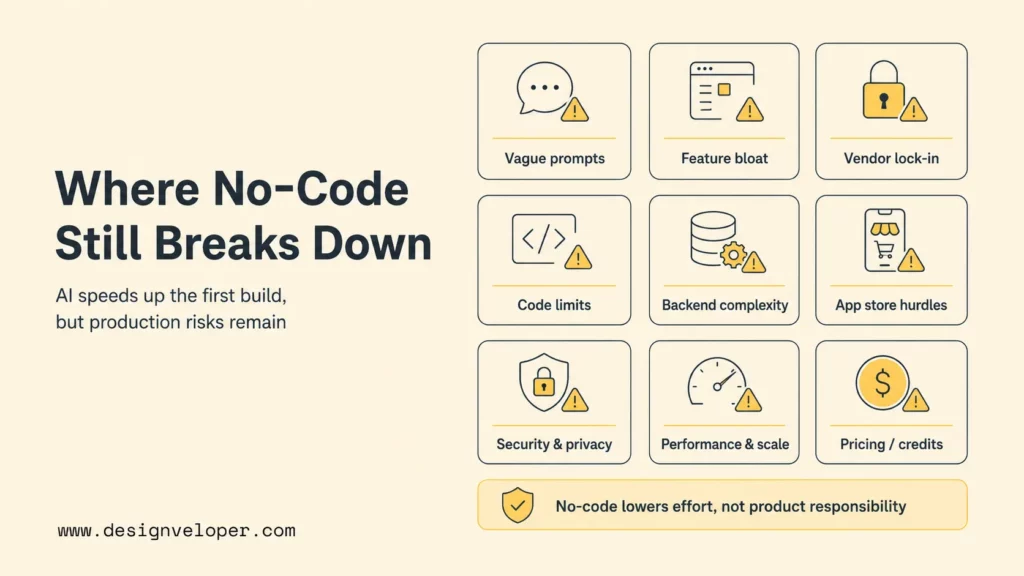
AI no-code app builders are getting stronger, but they still struggle with ambiguity, security, deep integrations, long-term maintainability, and product ownership. A prompt can create screens faster than a traditional sprint, yet the prompt may not capture edge cases, data rules, legal requirements, performance needs, or the messy reality of business operations.
- Vague prompts: AI builders work better when the user specifies roles, data, screens, actions, edge cases, and acceptance criteria. “Build a CRM” is too vague; “build a sales CRM with lead intake, pipeline stages, account notes, and manager approval” is more usable.
- AI overbuilding: some builders add extra pages, features, or logic because the prompt sounds broad. Users should remove anything that does not support the first workflow.
- Vendor lock-in: some platforms make export, migration, self-hosting, or custom code ownership difficult. Check export and ownership before investing months of work.
- Code export limits: no-code speed can come with limited ability to edit generated code. Tools with code access may be better when long-term engineering ownership matters.
- Backend complexity: data models, permissions, APIs, workflows, and integration errors can become hard even without code. Backend design is still design.
- App store publishing: mobile builders can speed app creation, but app-store review, signing, push notifications, privacy labels, and device QA still require care.
- Security and privacy: generated apps must be tested for authentication, authorization, data leakage, injection risks, exposed endpoints, and retention rules. OWASP’s LLM application risk guidance is a useful starting point for AI-enabled apps.
- Performance and scale: early prototypes may feel fine with a few users but struggle under real traffic, large datasets, background jobs, or complex permissions.
- Pricing and credits: AI builders often use usage credits, seats, app limits, hosting limits, or paid feature gates. Check pricing before the prototype becomes a daily workflow.
No-code lowers the barrier to building software. It does not lower the need to understand users, data, security, and the business process behind the app.
When To Use No-Code And When To Build Custom Software
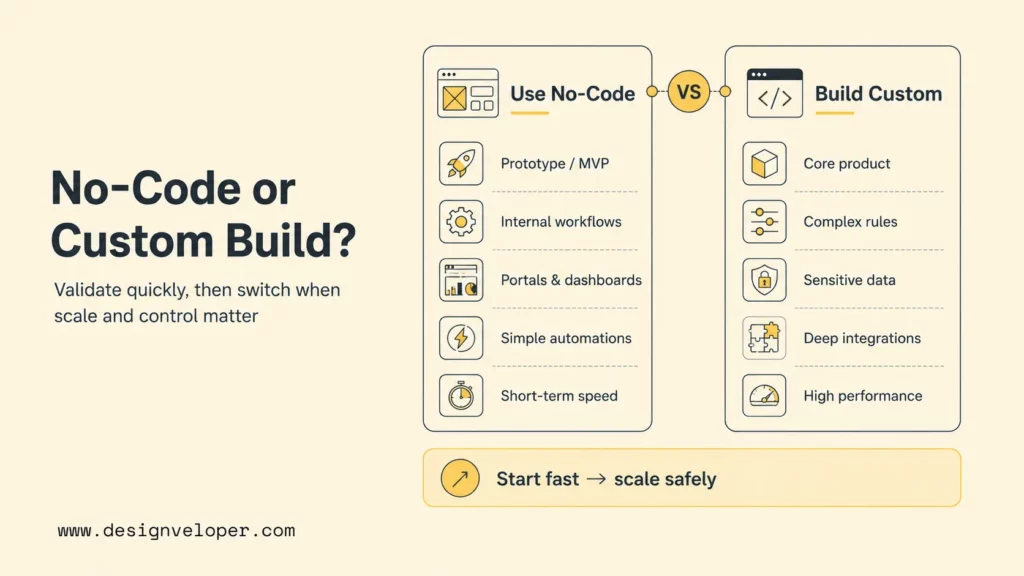
No-code fits validation, MVPs, internal workflows, portals, lightweight SaaS products, dashboards, and simple mobile apps. It is a smart starting point when the team needs to test demand, replace a manual process, or launch a low-risk workflow quickly. The best use cases have clear screens, simple roles, moderate data complexity, and limited integration risk.
Custom software becomes the better choice when the app needs complex logic, deep integrations, high security, strict compliance, heavy performance requirements, unusual user experience, proprietary workflows, or long-term product ownership. A no-code builder can prove the workflow, but custom development may be needed to scale the workflow safely.
| Use no-code when | Build custom software when |
|---|---|
| You need a prototype, MVP, portal, internal tool, or lightweight workflow quickly. | The app becomes a core product or operational system. |
| The app uses standard forms, dashboards, lists, roles, and simple automations. | The app needs complex business rules, custom UX, or proprietary algorithms. |
| Data is low-risk or already fits a supported data source. | Data is sensitive, regulated, large, or deeply connected to internal systems. |
| Platform limitations are acceptable for the next 3-12 months. | Vendor lock-in, export limits, or platform constraints would create business risk. |
| The team can live with platform pricing and feature limits. | Unit economics, performance, or ownership require a tailored architecture. |
Designveloper can help teams decide where no-code should stop and custom development should start. Our software development services and AI development services support teams that need product engineering, workflow automation, AI integration, dashboards, and maintainable business software. A practical path is to validate with no-code, then rebuild or extend the parts that need security, scale, performance, or deeper integrations.
For example, a team might start with Softr or Glide for a client portal, then move to a custom web app when the portal needs complex permissions, billing logic, audit trails, and enterprise integrations. A founder might start with Bubble or Lovable for an MVP, then bring in engineering when the product needs a stronger backend, testing pipeline, observability, and long-term roadmap ownership. The key is planning the transition before the no-code app becomes too hard to migrate.
Production readiness checklist
| Area | Question before launch |
|---|---|
| Data | Who owns each table, file, record, and permission rule? |
| Security | Can users access only their own records and approved actions? |
| Workflow | What happens when AI output, automation, or integration steps fail? |
| Performance | Has the app been tested with realistic users, records, and file sizes? |
| Ownership | Can the team export, maintain, migrate, or rebuild the app if needed? |
FAQs About The Best AI No-Code App Builders
What Is The Best AI No-Code App Builder For Beginners?
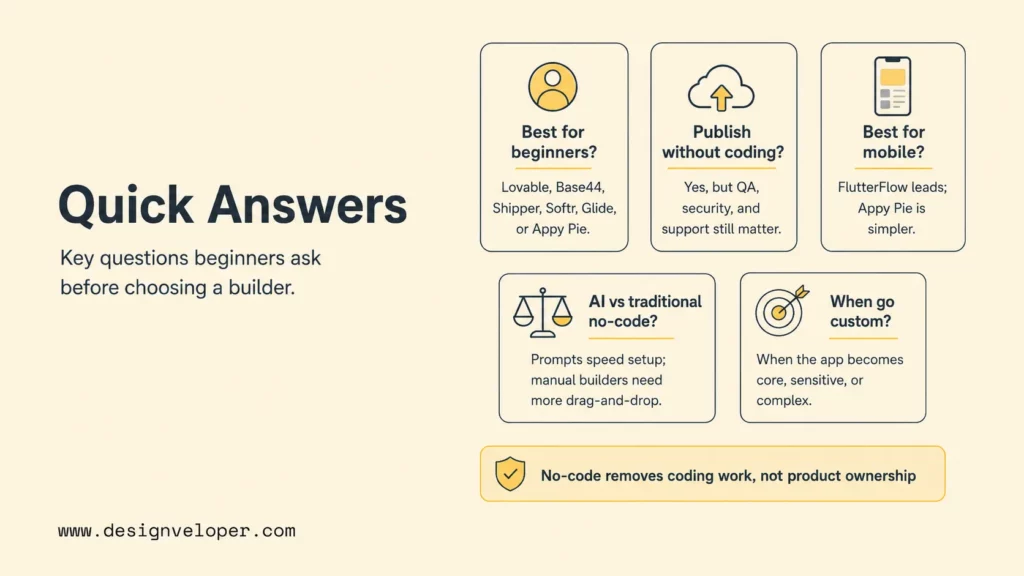
The best AI no-code app builder for beginners is usually Lovable, Base44, Shipper, Softr, Glide, or Appy Pie, depending on the app type. Lovable, Base44, and Shipper are good for prompt-to-app experiments. Softr and Glide are easier for structured business apps and portals. Appy Pie is beginner-friendly for simple mobile apps.
Can I Build And Publish A Real App Without Coding?
Yes, many users can build and publish a real app without coding, especially for simple business apps, internal tools, portals, directories, booking apps, and prototypes. Publishing a real app still requires QA, security checks, content review, data permissions, pricing review, and support planning. No-code removes much of the coding work, not the product responsibility.
Which No-Code App Builder Is Best For Mobile Apps?
FlutterFlow is one of the strongest choices for cross-platform mobile apps because it focuses on mobile, web, and desktop development with Flutter-based output and AI-assisted component generation. Appy Pie is a simpler option for small-business native apps. Glide can also work well for mobile-friendly internal apps and PWAs when the app is data-driven.
What Is The Difference Between Traditional No-Code And AI App Builders?
Traditional no-code builders rely more on manual drag-and-drop setup, visual workflows, templates, and database configuration. AI app builders let users describe what they want in natural language and generate screens, data structures, logic, or workflows faster. The difference is speed and interface, not magic. Users still need to define requirements, test outputs, and fix edge cases.
When Should I Move From A No-Code App Builder To Custom Development?
Move from a no-code app builder to custom development when the app becomes business-critical, handles sensitive data, needs complex integrations, requires high performance, outgrows platform limits, or needs stronger product ownership. The best no code app builder can validate an idea quickly, but custom development is often the better long-term path when the app becomes core infrastructure or a serious product.
Also published on

Share post on










Related Articles


15 Best AI No-Code App Builders In 2026 (No Coding Skills Required)
15 Best AI No-Code App Builders In 2026 (No Coding Skills Required) Published July 06, 2026
Best ChromaDB Alternatives For RAG And Vector Search
Best ChromaDB Alternatives For RAG And Vector Search Published July 06, 2026
Gemini Vs ChatGPT: Complete AI Assistant Comparison
Gemini Vs ChatGPT: Complete AI Assistant Comparison Published July 06, 2026



















