












How To Modernize Legacy Systems Without Losing Business Momentum

To modernize legacy systems without slowing the business, set measurable goals, map what the current system supports, and move one manageable workflow at a time when the architecture allows it. Test every change against live business needs before retiring the old component. Legacy system modernization should preserve the rules and records that still work, not replace everything simply because it is old.
A phased approach often limits the impact of a failed release, but it is not always possible. Systems with tightly coupled transactions or hidden dependencies may need a coordinated replacement. The right plan follows the system’s actual constraints and the amount of disruption the business can accept.
What Is Legacy System Modernization?
Legacy system modernization means updating or transforming existing software, infrastructure, data, or architecture so it can meet current business needs. The work may involve a small code change, a new integration, a different hosting platform, or a complete replacement. Google’s legacy modernization overview describes the same range, from infrastructure moves to rebuilding applications.
A system becomes legacy when its limitations make important work harder or riskier. Age alone is not the test. A decades-old application with reliable support and clear interfaces may still fit its job. A newer application can become a modernization priority if no one can change it safely or connect it to other systems.
Modernization is also broader than cloud migration. Moving unchanged code to cloud servers can improve hosting options while leaving difficult releases and fragile business rules untouched. Some teams need a hybrid setup while they untangle these problems. Our on-premises versus cloud guide explains how to judge that choice by latency, control, cost, and operating needs rather than by technology labels.
Choosing what to keep starts with an honest inventory. Our software migration readiness guide explains how software constraints, data quality, and team capacity shape a workable plan.
Assess The Legacy System And Build A Business Case
Begin with the business problem, not a preferred replacement technology. Ask which workflows are slow to change, where outages affect customers, and which support or security gaps are becoming hard to manage. If the system already meets its service and business goals, continued maintenance may be a better decision than a costly rewrite.
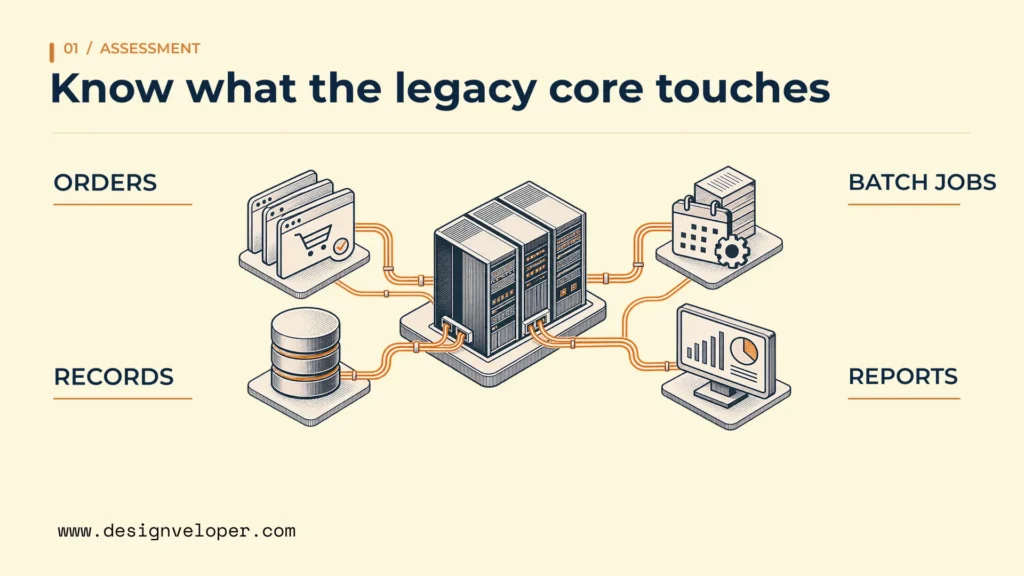
Next, trace the work the application actually performs. Identify the people who own each process and the teams that depend on its output. Map scheduled jobs, direct database connections, external services, batch files, reports, and manual workarounds. An old reporting job can be just as important to a cutover as the visible user interface.
Assess data before planning a legacy system migration. Check who owns each record, where the authoritative version lives, and whether IDs and business definitions are consistent. Profile missing values, duplicates, stale records, and unusual exceptions. If the new system interprets a cancelled order differently, a technically successful transfer can still produce the wrong business outcome.
Readiness includes people and knowledge. Record what the team knows about hidden business rules, whether source code and test environments are accessible, and who can support the old system during the transition. When documentation is thin, interviews and observed production behavior may be necessary. Treat every unresolved rule as a test or discovery task, not as permission to guess.
Finally, write a business case that can be checked after each release. For example, measure current engineering hours spent on maintenance, time from an approved change to release, failed order completion, and incident recovery time. Choose only measures linked to the original problem. Record the baseline period, data owner, target, and acceptable temporary disruption. Include the cost of parallel operation, training, data repair, and delayed feature work. This shows whether modernization creates value before the whole program is complete.
Compare Legacy Modernization Strategies
Choose a modernization strategy for each workload, not for the entire estate by default. Rehosting solves a different problem from changing code or replacing a business process. The following options describe the main changes, suitable conditions, and trade-offs. Their boundaries can overlap in practice. IBM’s legacy application modernization guide helps distinguish code refactoring, wider redesign, and replacement.
| Strategy | What changes | When it fits | Main trade-off |
|---|---|---|---|
| Rehosting | Move the application to different infrastructure with little code change. | Hosting is the pressing issue and current behavior must stay stable. | Old design and maintenance problems remain. |
| Replatforming | Change the runtime or supporting services without a major redesign. | A managed database or newer platform removes a clear operating burden. | Compatibility work and platform dependencies still need testing. |
| Refactoring | Improve internal code structure while preserving intended behavior. | Changes are risky because code is difficult to understand or maintain. | Requires tests and engineering time before benefits are visible. |
| Re-architecting | Redesign component boundaries, interfaces, or data flows. | Current coupling blocks independent changes or scaling. | Creates integration, ownership, and distributed-system complexity. |
| Rebuilding or replacing | Create a new application or adopt another product. | The existing design no longer fits, or a suitable product covers the need. | Business rules, data, and user workflows must be moved and validated. |
This is a decision guide, not a ranking from easiest to best. AWS migration strategy guidance distinguishes rehosting, replatforming, and refactoring for cloud moves. It also includes retaining and retiring applications. That matters because not every component needs to be modernized: a low-value service may be shut down, while a stable one may stay where it is.
Re-architecting does not automatically mean microservices. A well-structured single application may be easier to operate than several services that constantly call each other. Our web application architecture guide explains the differences between monolithic and microservices designs. Choose the simpler structure unless a clear need for separate ownership, deployment, or scaling justifies the extra connections.
Rewrite The System Or Modernize It In Phases?
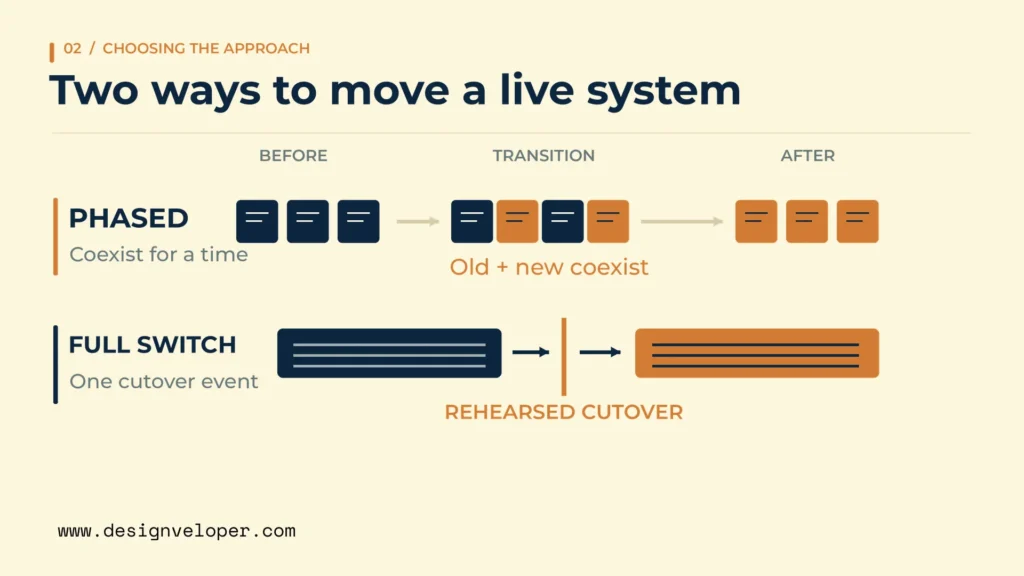
Modernize in phases when you can separate meaningful capabilities and keep the rest of the business running safely. Consider a full rewrite or replacement when the current system cannot support a safe split or when a new product fits a well-understood process better. Neither choice is automatically safer. The decision rests on dependencies, data behavior, and the cost of running two environments.
| Decision signal | Leans toward phased modernization | Leans toward rewrite or replacement |
|---|---|---|
| Business criticality | A live process cannot tolerate one broad cutover, but individual parts can be isolated. | A coordinated switch can be rehearsed within an acceptable outage window. |
| Dependency complexity | Capabilities have usable boundaries and requests can be routed separately. | Transactions and data are so intertwined that splitting adds greater risk. |
| Clarity of business rules | Rules can be captured and tested one workflow at a time. | Rules are documented enough to specify and verify a complete replacement. |
| Time to value | One painful workflow can improve well before the whole system changes. | Most value arrives only when the complete product is replaced. |
| Parallel operation | Teams can support two versions and control data ownership during coexistence. | Licensing, cost, staffing, or data constraints make coexistence impractical. |
| Rollback options | Traffic and data can be returned to a known safe state for each slice. | Only a coordinated restore or cutover can keep records consistent. |
These are signals rather than rules. A mission-critical system may still require one coordinated move when a single shared database cannot support a split. On the other hand, a complicated system may be a strong candidate for phased work if users can move through separate entry points. Test the proposed boundary before committing to either plan.
A common phased method is the strangler fig pattern. Teams route one function to a new component while the old application still handles the rest. AWS’s strangler fig guidance describes the stages as transform, coexist, and eliminate. Coexistence protects continuity, but it also introduces routing, monitoring, and data-sync work. A phased plan fails if these temporary parts become permanent without owners or an exit condition.
Build A Phased Legacy System Modernization Roadmap
A useful legacy system modernization roadmap moves from a defined business outcome to a small proof, then expands only after that proof holds under real conditions. Each phase needs an accountable owner and a review gate. The sequence below is a planning model, not a fixed schedule or a promise that every system supports gradual migration.
- Agree on outcomes. A business owner and technical lead select the workflow to improve, record baseline measures, and state the maximum acceptable interruption. The first gate is a signed-off problem and success definition.
- Map dependencies and data. Engineering, operations, and data owners identify callers, shared records, integrations, background jobs, and security constraints. Stop if a critical dependency or record owner is still unknown.
- Choose one bounded capability. Select work with a clear user outcome, limited dependencies, and a reversible entry point. Define which system will write each record. A small but representative workflow is better than a trivial demo that proves little.
- Build and pilot the new path. A delivery lead creates the interface or component and tests it with controlled users or traffic. Business users check the intended result, while operations checks logs, alerts, and recovery steps. Do not expand while severe defects remain open.
- Expand by business workflow. Move another compatible group of users, requests, or functions after the pilot meets its gate. Review capacity and support workload at each increase. If errors exceed the agreed limit, stop routing new work to the replacement.
- Validate cutover and rollback. The business owner approves workflow results; the data owner confirms record checks; and operations verifies recovery. Rehearse a return path before moving high-impact transactions. A rollback that loses new writes is not a safe rollback.
- Retire replaced components. Remove old routes and jobs only after downstream dependencies are gone, required records remain accessible, and support ownership has transferred. Keep any required archives under the organization’s retention rules.
Plan integration work as part of every phase rather than as a task after deployment. An application programming interface (API) defines how software requests information or actions from another system. Our API integration guide explains the extra work behind that connection, including permissions, data mapping, failure handling, and monitoring. Those details determine whether an old and a new component can operate together safely.
Example: Modernize One Order Workflow Before Replacing The Core
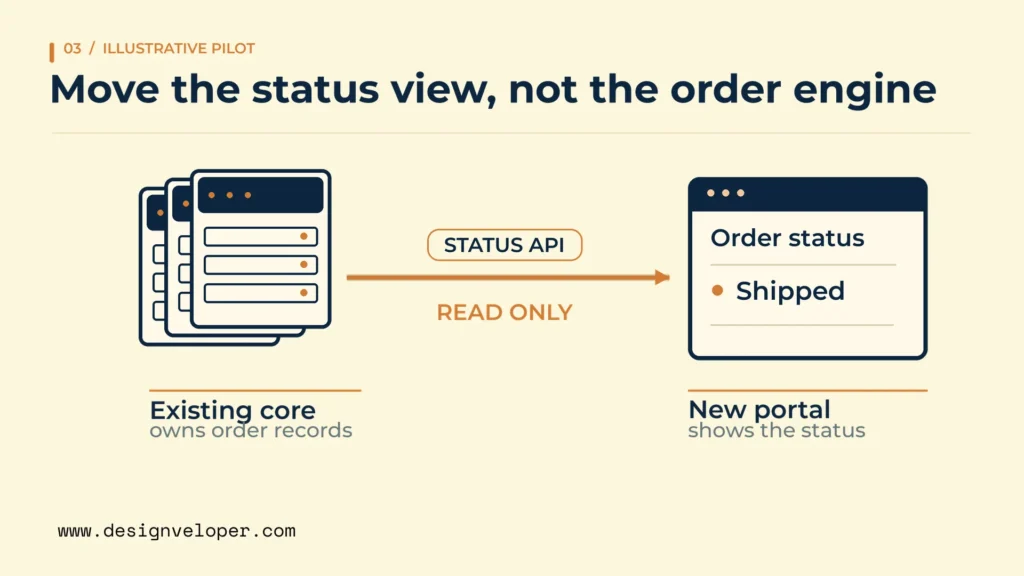
Consider an illustrative wholesaler whose older order system still calculates prices correctly but makes order-status updates difficult. Replacing the entire order platform would put pricing, inventory, invoices, and fulfillment at risk at once. The team instead chooses order-status lookup as its first slice because it can be read and checked without changing the transaction rules.
First, the team places an API around the existing order lookup and records the expected response for shipped, cancelled, and delayed orders. A new service reads that interface and shows the status in a newer customer portal. The legacy system remains the authoritative record during the pilot. The team compares returned statuses against the old screen and checks response time before sending more users to the portal.
If the next slice creates or changes orders, the plan becomes harder. The team must choose one writer for each business record, manage retries so an order is not created twice, and reconcile accepted orders and their amounts. It also needs a rollback gate: if status mismatches or failed updates pass the agreed limit, new writes stop until the records are reconciled. Simply redirecting users back to the old screen would not undo transactions already accepted by the new service.
This scenario favors phases because the read-only slice has a clear boundary and a way to compare results. A broader rewrite may be more suitable if every order action depends on undocumented shared database triggers, or if licensing prevents the two systems from running together. Discovery could change the plan; the first pilot is meant to test that assumption rather than confirm a decision already made.
Control Risk And Verify Outcomes At Each Cutover
Every cutover needs proof that the changed workflow works, the data remains correct, and the team can recover from failure. A new interface passing a few happy-path tests is not enough. Test normal work, exceptions, access controls, and the moments when old and new components disagree.
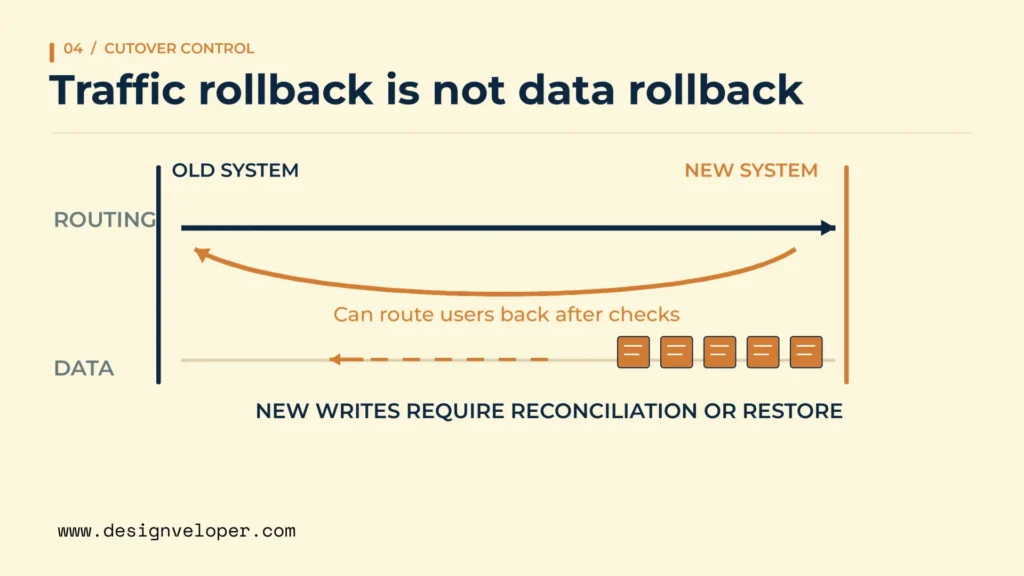
Start with data profiling and reconciliation. Compare record counts where they are meaningful, but also match identifiers, totals, status changes, and important business exceptions. Verify what happens to updates made during the migration window. For systems that accept transactions, define whether writes will pause, be replicated, or be handled by one authoritative system. Each choice affects downtime and recovery.
Test integrations and existing behavior as carefully as the new feature. Run checks for upstream callers, reports, scheduled jobs, permissions, and failures such as unavailable services or repeated requests. Regression testing asks whether a change broke a previously working behavior. Our guide to practical software testing explains how component, integration, system, and acceptance checks cover different risks.
Protect the transition environment too. Give services only the access they need, protect credentials, monitor unusual actions, and confirm backup restoration. Train support staff and users on the new workflow before switching their traffic. Put runbooks, escalation contacts, and known failure signals in the hands of the team that will operate the system after launch.
A rollback plan must cover data, not just servers. AWS’s cutover guidance calls for backup, synchronization, testing, and defined rollback checkpoints. It also warns that reversing a migration after new transactions arrive can require data recovery into the old environment. Rehearse that case before assuming a switch back is quick or safe.
After each release, return to the business case. Compare maintenance effort, release time, incidents, and successful workflow completion with the recorded baseline. Account for the extra work of operating two systems. If reliability improved but support effort doubled, the next phase may need a simpler integration or faster retirement plan rather than more features.
When hiring outside engineering support, we recommend four deliverables: a dependency map, testable acceptance criteria, a cutover owner, and a practiced recovery plan. These deliverables make progress visible even when the full replacement is years away. Our custom software development services are one way to discuss implementation support, but the first decision should still be whether a small, safe workflow change can prove the business case.
Also published on

Share post on









Related Articles


How To Modernize Legacy Systems Without Losing Business Momentum
How To Modernize Legacy Systems Without Losing Business Momentum Published November 19, 2026
CRM Integration: Types, Use Cases, And How To Connect Systems
CRM Integration: Types, Use Cases, And How To Connect Systems Published October 20, 2026
Integrating VoIP With CRM Systems: A Practical Integration Guide
Integrating VoIP With CRM Systems: A Practical Integration Guide Published October 16, 2026