














Prevent API Bottlenecks With A Mobile App Backend Architecture

Prevent API bottlenecks by keeping shared controls in a lean gateway and shaping mobile responses in a separate layer only when needed. A good mobile app backend architecture combines related service calls without moving core business rules into the gateway. It also supports older app versions and works on unreliable networks. Adding more services alone will not make an app faster.
The goal is a predictable path from a user’s action to a usable screen. Start with the simplest backend that meets that goal. Add a mobile backend for frontend (BFF) or an aggregation endpoint when actual request patterns justify the extra layer. Each new component has its own capacity, security, and maintenance costs.
Design A Stable API Edge For The Mobile Client
A stable mobile API edge gives the app one consistent entry point while keeping individual services free to change behind it. A request travels from the app to the gateway, then to a mobile-specific layer if one is needed, and finally to the service that owns the requested data or action. Responses return through the same path. This separates public access from application behavior.
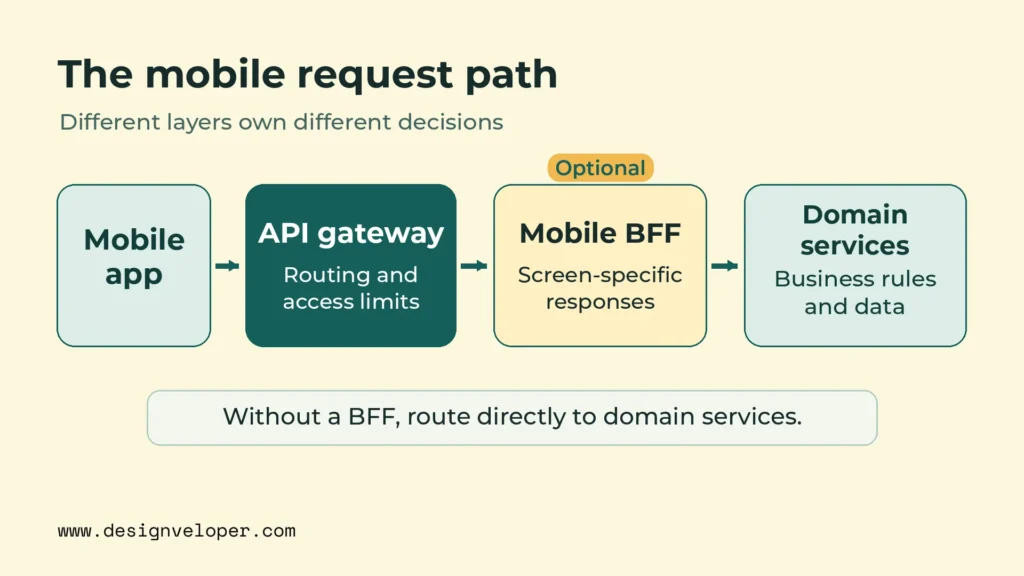
That separation matters even if the backend remains one deployable application. A gateway can sit in front of a modular backend just as it can sit in front of several services. Our guide to web application architecture explains the broader choices between application layers and service boundaries. The mobile-specific question is what the app must receive, not how many servers appear behind the endpoint.
Choose the entry design from the screen’s needs. Keep the existing API if it already sends the right data. Add a gateway when several endpoints need consistent routing and access controls. Use a mobile BFF when the app needs a different response contract from other clients. Add an aggregation endpoint when one screen must combine several sources. These are responsibilities, not a requirement to split the backend into microservices.
Keep Shared Policies In The API Gateway
A mobile API gateway should apply rules that are common to incoming requests. These typically include choosing the correct route, validating access tokens, enforcing suitable request limits, and recording request identifiers. A single policy location makes these checks easier to review. It also prevents each client-facing service from inventing a different entry rule.
Gateway authentication is not a replacement for service-level authorization. A valid token may establish who sent a request, but the order service must still decide whether that user may read a particular order. Limits also need careful scope: a shared rate limit can protect the public edge, while a service may need its own limit for a costly operation. AWS’s API Gateway and Lambda tutorial shows API-edge authorization and a separate execution role that controls access to backend data.
Keep the gateway’s operational role narrow. If it becomes responsible for pricing rules, order state, or long-running workflows, every domain change can affect the public entry point. The gateway then becomes harder to scale and release independently. Route a request to the correct owner instead of moving that owner’s business logic into a policy script.
Shape Mobile Responses In A Backend For Frontend
A mobile BFF adapts backend capabilities to the fields and actions that mobile screens need. For example, a compact account screen may need a name, an order status, and a short delivery message. It does not need a full customer record or all the fields used by an internal desktop dashboard. A BFF can give that screen a stable contract while underlying services evolve.
This layer should own presentation-related choices, such as mobile pagination, field selection, and response formatting. The domain service should still own decisions such as whether an order can be canceled. That division follows Microsoft’s Backends for Frontends guidance, which also warns that another service can add latency and operating work.
A separate BFF is useful when mobile and web clients regularly need different responses or release at different speeds. It may be unnecessary when both clients use nearly the same API. A well-designed existing endpoint, or a suitable GraphQL interface, may already let the app request the data it needs. Make the choice after examining real screen requirements, not because a diagram looks more complete with another box.
Aggregate Data Without Turning The Gateway Into A Monolith
Aggregate data when one mobile screen needs information from several services, but keep substantial aggregation logic behind the gateway. The mobile app then makes fewer separate network requests. Backend calls still happen; they are simply coordinated closer to the services. This API aggregation pattern must be judged by its effect on the screen, not by the number of backend calls.
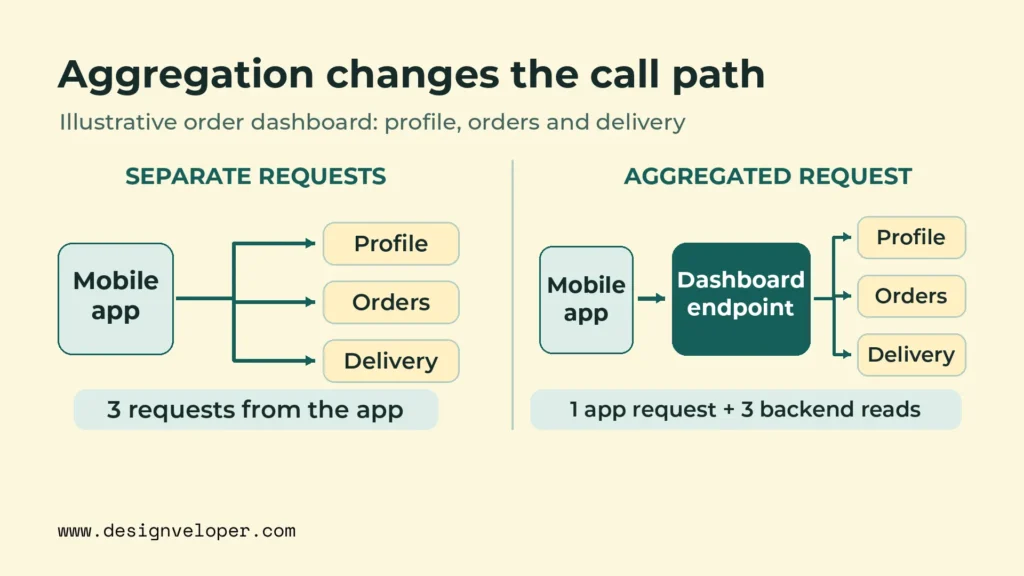
Consider an illustrative order dashboard. Its opening screen shows a customer profile, recent orders, and the latest delivery status. Without aggregation, the app might make three separate requests. With a dashboard endpoint, it makes one request, while the aggregation layer retrieves those three sets of data. This is a comparison of request paths, not a measured latency improvement. Actual speed depends on server work, response size, caching, and network conditions.
The aggregator should call independent read services in parallel when their results do not depend on one another. Sequential calls make the screen wait for one service before the next begins. Parallel work reduces that unnecessary waiting, but the response may still be delayed by the slowest required dependency. A smaller number of phone-to-server requests does not guarantee a faster response if the combined endpoint performs too much work.
Set an overall response deadline and shorter limits for each downstream call. If delivery tracking stalls, the dashboard should not wait without a bound. Microsoft describes timeouts, circuit breakers, and careful partial responses in its Gateway Aggregation pattern. These controls protect the aggregator’s capacity as well as the user waiting for the screen.
Failure behavior should follow the meaning of the data. The dashboard might still show a verified order with delivery information marked temporarily unavailable. It should not present an outdated delivery status as current. An account balance or payment result may need a complete response instead. Decide which fields are essential, which can be absent, and how the app will explain each state before implementing the endpoint.
Retries need similar restraint. Retrying a brief network failure can help, but repeated attempts across the app, gateway, and services may overload a struggling dependency. Give each call a bounded retry policy within the screen’s total deadline. Do not automatically retry a write that may have succeeded unless the operation is safe to repeat. Microsoft’s transient fault guidance explains why layered retries can make an outage worse.
Place the aggregator where its responsibility is clear. Lightweight response assembly may fit in gateway tooling. More complex fan-out, transformations, or changing screen contracts usually belong in a BFF or a dedicated aggregation service behind the gateway. Our guide to API integration patterns and failure handling offers a wider view of when direct calls, middleware, or asynchronous coordination fit. Aggregation should connect existing capabilities, not quietly become the place that owns every capability.
Check the resulting payload as well as the call count. A single response can be worse for a mobile connection if it sends large images, fields that are never shown, or data from several screens at once. Return only the necessary fields, use sensible page sizes, and make caching rules explicit for user-specific data. The useful target is less waiting and less wasted transfer, measured from the app.
Keep Older App Versions Compatible With Backend Changes
Protect older app versions by treating published API behavior as an active contract until a defined support policy and usage evidence allow a change. Backend releases can reach production quickly, while some phones continue to run older app builds. A change that works with the newest client may still prevent an older one from opening a screen or completing a purchase.
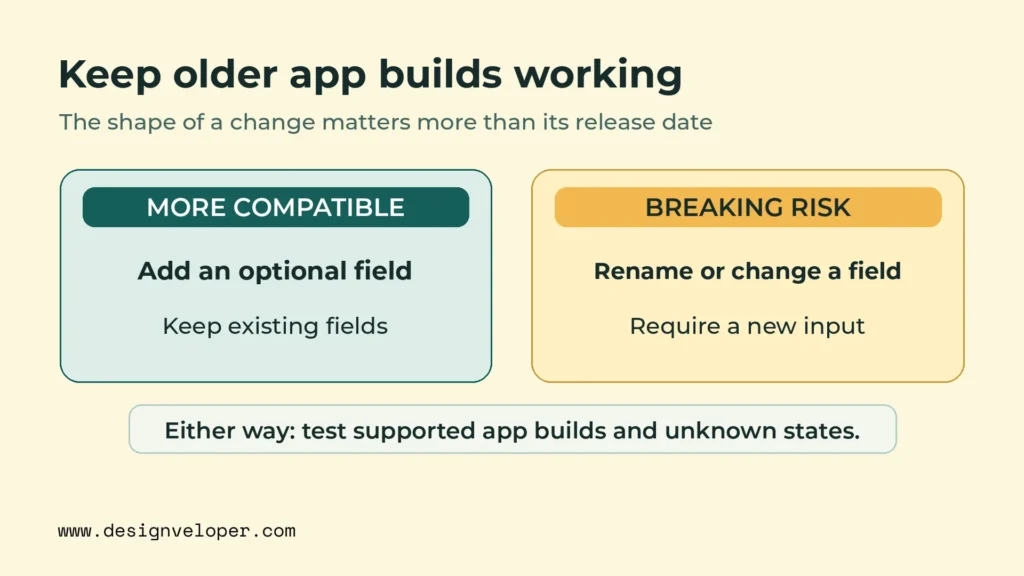
Prefer additive changes when possible. An API can introduce an optional response field while continuing to send the old fields in the same form. Do not rename an existing field, change its type, or make a previously optional request field mandatory without a compatible path. Google’s AIP-180 compatibility guidance also highlights semantic changes: a response can look structurally valid while behaving differently enough to break a client.
Even additive changes deserve testing. Suppose the order service adds a new delivery state. An older app that assumes its known states are exhaustive might show an error instead of a neutral fallback. Inspect how supported clients handle unknown fields, missing optional values, and unexpected state names. Compatibility depends on client behavior, not only on whether the server’s schema validator accepts the request.
Use explicit versioning when a breaking change cannot be avoided. Keep the old route or contract available during a documented transition and state what will replace it. A URL version, header version, or separate endpoint can work; the chosen mechanism matters less than consistent rules. Record who owns each version, what remains supported, and which tests must pass before an older path is retired.
Deprecation needs evidence about real usage. Record the app version and platform alongside endpoint requests where privacy rules permit. Compare this data with app release and adoption reports to find clients that still depend on an older contract. An app-provided version header is useful for analysis, but it can be missing or inaccurate. Do not treat it as a security credential or as perfect proof that no older client remains.
A practical retirement policy names a support window, communicates planned changes, and defines what happens when a client can no longer be supported. Review infrequently connected devices and regional release differences before choosing the cutoff. If a forced upgrade is necessary, the old app still needs a functioning response that explains the next action. Removing an endpoint first leaves those users without a route to recover.
Keep representative supported app builds in an automated contract and end-to-end test set. Run those tests against candidate backend releases, including changes to authentication, default values, and error formats. Our guide to agile testing practices explains how regression checks fit into release decisions. For mobile backends, the release question is specific: can each supported build still complete its critical user actions?
Migrate Backend Capabilities In Small, Reversible Steps
Migrate one valuable capability at a time behind a routing layer, and preserve a working route to the existing backend. This makes changes easier to compare and reverse than a full replacement launched at once. The approach is especially useful when a slow or tightly coupled legacy system serves mobile clients but cannot safely be rewritten in one release.
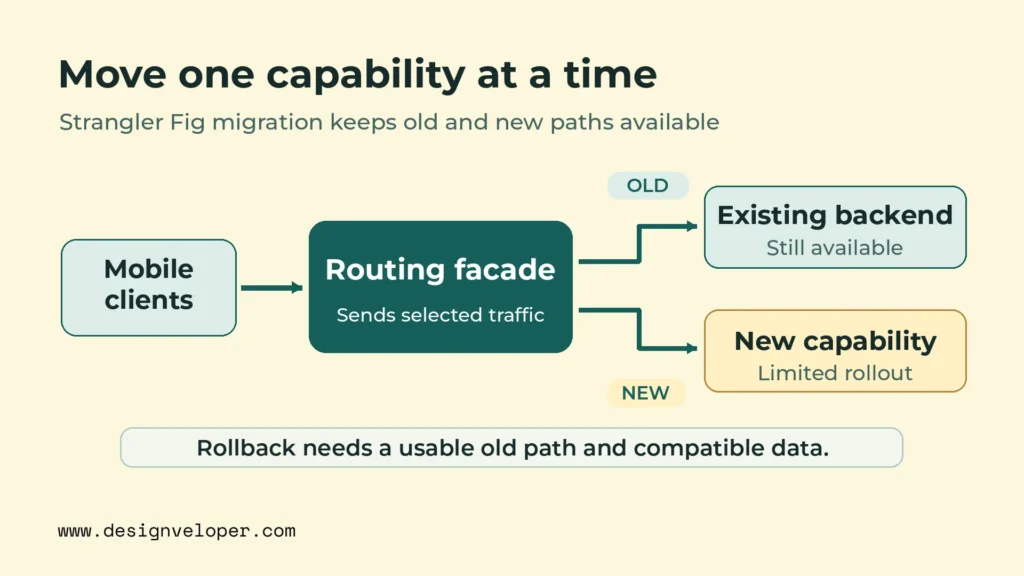
The Strangler Fig pattern is one way to do this. A façade directs selected requests to newly built capabilities while the older application continues serving the rest. As AWS explains in its Strangler Fig migration guidance, the old and new implementations can coexist during a gradual move. Coexistence is the important part; a move to microservices is not automatically required.
- Map one capability. Choose a visible pain point, such as retrieving delivery status. Identify its endpoint, data owner, callers, current failure modes, and success criteria.
- Add controlled routing. Put a gateway or façade in front of the existing path. Keep the current behavior available while requests are directed through the new entry point.
- Move a bounded responsibility. Implement the chosen capability without copying unrelated business rules into the façade. Define who owns its data and how it communicates with the remaining backend.
- Validate before shifting users. Compare responses and behavior with the old path using representative requests and supported app versions. For reads, shadow requests may help if they do not expose data or produce side effects.
- Shift traffic gradually. Route a controlled share of eligible requests to the new path. Watch user-facing errors, latency, capacity, and data consistency before widening the rollout.
- Keep a tested rollback. Confirm that routing can return traffic to the old path and that its data remains usable. Record the condition that triggers a rollback and who can perform it.
Rollback is not only a gateway switch. If the new path changes stored data or starts side effects, returning traffic to old code may no longer be safe. Plan schema compatibility, event handling, and reconciliation before cutting over writes. A read-only capability is often a simpler first candidate because it has fewer ways to create lasting differences between systems.
Use traffic routing rules that make results interpretable. Moving requests back and forth without regard to user state can produce inconsistent behavior. If a user journey depends on several calls, consider keeping that journey on a consistent implementation during a trial. Measure the complete mobile action, not only the isolated endpoint, before declaring the new path better.
Do not extract a service simply because one part of the backend is old. A well-structured module inside a single application may already have a clear owner and acceptable performance. Moving it into a separately deployed service adds network calls and operational duties. Our cloud application architecture guide explains why modular applications and independently deployed services fit different constraints. Keep the simplest boundary that meets the measured need.
Test The Full Request Path Under Mobile Conditions
Test the complete path from a screen action to its visible result, under realistic load and mobile network conditions. A fast gateway response does not prove that a user saw complete information. The app may still be waiting for another request, parsing an oversized payload, or showing an unclear error after a dependency fails.
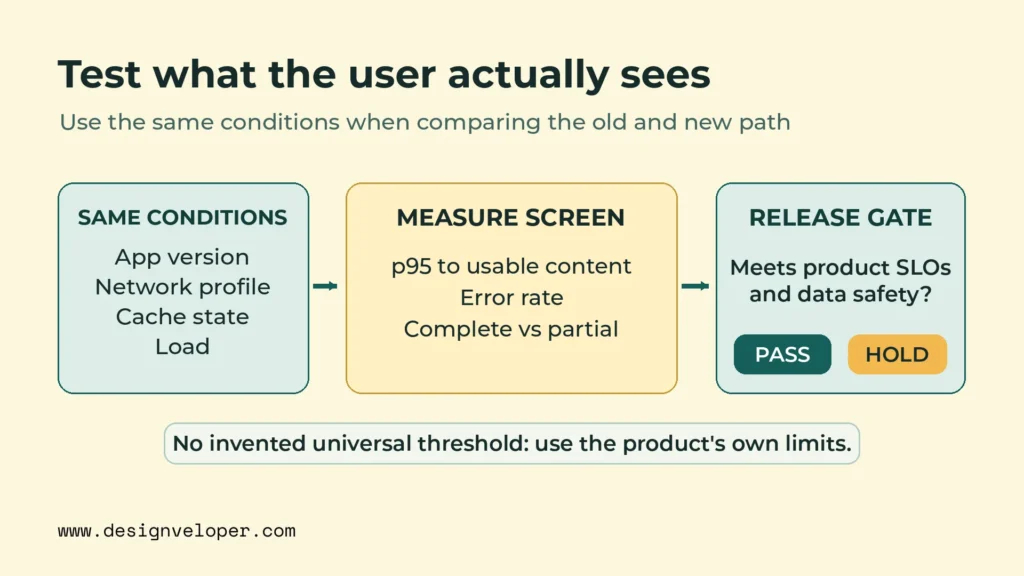
Define the outcome before running a load test. For an order dashboard, measure how long it takes until essential order details are usable. Also record whether the delivery section is complete, delayed, or clearly marked unavailable. These states need separate counts. A quick but incomplete screen should not be grouped with a successful full response, and an acceptable partial response should not be mistaken for an unexplained failure.
Before changing that screen’s request path, record a baseline under a representative load. Measure the 95th-percentile (p95) time until essential content is usable, the error rate, response size, and the share of complete versus partial results. Set pass/fail limits from the product’s existing service-level objectives (SLOs) and data-safety requirements, not a universal benchmark. Test the candidate with the same app version, network profile, cache state, and load. Block rollout if a required screen exceeds its agreed limit or returns unsafe data.
Test a normal connection, a slow connection, brief disconnections, and a reconnect after the app has been in the background. Include concurrent requests from many users and bursts from a single device. Repeat with large and small payloads, cold and warm caches, and at least one unavailable downstream service. The objective is to find where requests queue, time out, retry, or return data the screen cannot use.
Run the same critical journeys with older supported app versions. Check login, the main dashboard, order submission, and any screen that depends on the changed service. For writes, test a lost response after the server has accepted the operation. The app should not create a duplicate order just because it tries again. Server-side idempotency means a repeated request has only one intended effect. It prevents duplicate orders, while clear recovery messages help users understand what happened.
Track latency at more than one point. Client-side screen timing shows the user’s experience; gateway timing shows the public edge; dependency traces show where backend time was spent. Review high-percentile latency, error rate, response bytes, and the share of screens with missing required data. Firebase Performance Monitoring offers network-request and screen-rendering traces, with app and device details recorded as attributes. Screen-rendering traces measure frame behavior, not when essential content becomes usable. Measure that outcome separately. Firebase is one possible tool, not a requirement.
Connect the measurements through request identifiers or distributed tracing, while excluding secrets and unnecessary personal data from logs. If a screen is slow, the team should be able to tell whether the delay came from the device connection, gateway queue, BFF, or a downstream service. Track partial responses separately so that a low error rate cannot hide a screen that regularly lacks important information.
In our quality control guide, we describe testing mobile apps under weak-network conditions and using end-to-end and API tests. The lesson for this architecture is to make those checks release criteria, not optional demonstrations. Define which screens must work, what a safe partial response looks like, and which regressions block rollout. Those criteria make testing useful to both developers and product owners.
Begin with one high-use screen and record its full request path. Remove unnecessary mobile calls, set dependency deadlines, and test the same screen on the oldest supported app build. Then compare screen-level results before and after each backend change. A scalable mobile app backend architecture preserves a usable experience as traffic, services, and client versions change.
If your team is planning or improving a mobile app, our mobile app development services offer a starting point for a scoped discussion. Bring one high-use screen, its API request path, and the oldest client version you still support. Those details help define the problem before anyone recommends more infrastructure.
Also published on

Share post on










Related Articles



Prevent API Bottlenecks With A Mobile App Backend Architecture
Prevent API Bottlenecks With A Mobile App Backend Architecture Published November 16, 2026
DevOps Managed Services: What They Include & How To Choose A Provider
DevOps Managed Services: What They Include & How To Choose A Provider Published September 21, 2026
12 Best vLLM Alternatives For LLM Inference In 2026: Tools Compared
12 Best vLLM Alternatives For LLM Inference In 2026: Tools Compared Published July 06, 2026