
















How To Build And Use AI Business Process Automation Effectively

Enterprise AI automation use cases include support triage, invoice review, employee requests, IT incident analysis, quality inspection, and contract intake. Start with frequent work that involves information too variable for fixed rules alone and has a measurable outcome. AI can interpret the input, business rules can control routine actions, and employees can review decisions that affect customers, records, or money. This makes the workflow useful without giving AI unchecked authority.
What Is AI Business Process Automation?
AI business process automation combines AI with business rules and software steps inside a managed workflow. AI interprets variable information or detects patterns, then passes results to software or an accountable employee. An enterprise AI automation use case is one bounded application of this approach, with a trigger, a defined result, and a responsible owner. A standalone chatbot is not automatically process automation: its output needs a clear role in an approved business task.
Traditional automation still works better for predictable steps. A rule can check an approval limit or route a completed form. AI becomes useful when a message has unclear intent or a document has an unfamiliar layout. Teams can combine both: AI suggests a category, and rules determine the permitted next action. Our guide to AI business process automation explains the broader difference between fixed rules and AI-assisted work.
How AI Changes Enterprise Workflows
AI changes enterprise workflows most when work arrives as text, images, or signals that cannot be handled by a small set of fixed rules. It can turn those inputs into a proposed next step. The surrounding workflow still decides what may happen automatically and what requires review.
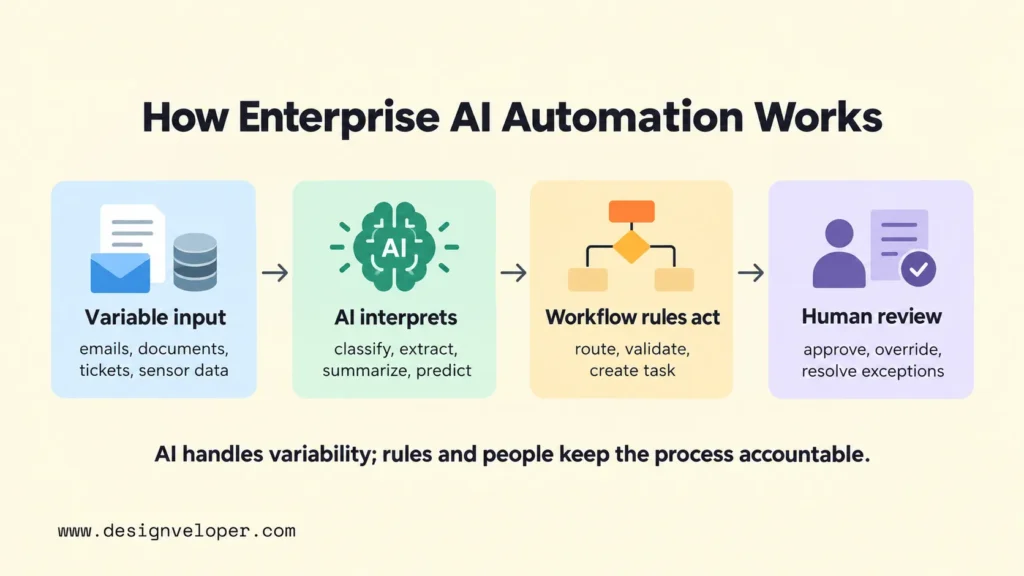
That creates three practical changes. First, teams can sort and summarize incoming work before a person opens every item. Next, software can send routine cases to the right system or queue. Finally, unusual cases can reach a reviewer with relevant evidence attached, rather than arriving as a vague alert. These changes matter more than the number of AI tools a company deploys.
The underlying system needs more than a model. It needs access to approved data, a way to trigger tasks, rules for allowed actions, and a record of what happened. Some workflows use an AI agent to select tools or coordinate several steps. Our enterprise AI agents guide explores that more flexible approach. It is not necessary when a simple sequence of extraction, validation, and approval will do.
Product documentation shows how teams can build this combination. Microsoft’s Power Automate guidance describes passing an AI prompt’s output into later workflow actions and adding a human approval step. The useful lesson is architectural: an AI answer should become an accountable process input, not an unchecked instruction to change records.
Enterprise AI Automation Use Cases By Business Function
The same automation pattern appears across departments, but the right measure and review point change with the work. This table presents representative AI automation examples for business. Its metrics are suggested pilot measures, not promised improvements or industry benchmarks.
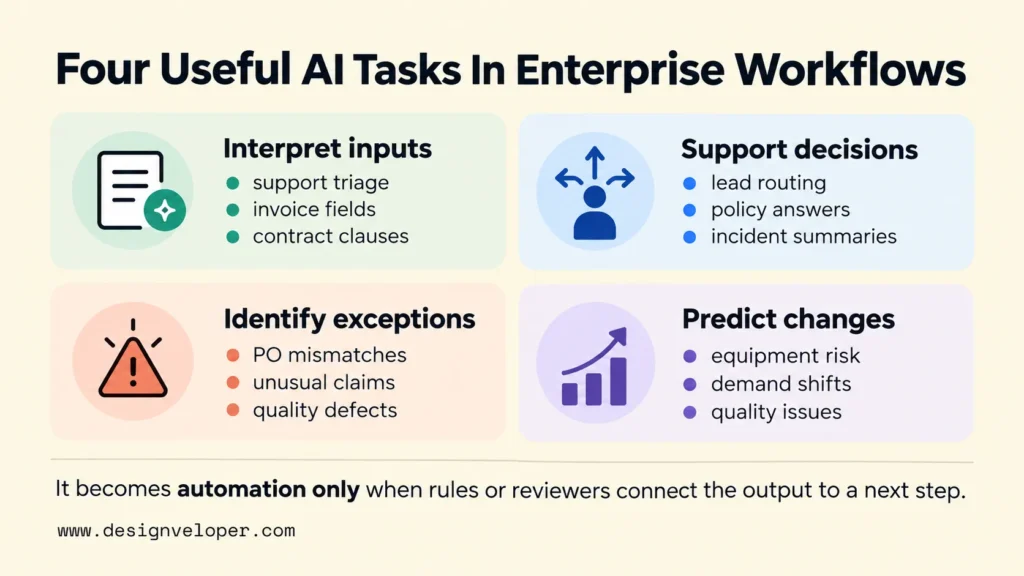
Across departments, AI may interpret unstructured inputs, support decisions, identify exceptions, or predict changes. These are different tasks, but they only become part of automation when rules or authorized people connect the output to a defined next step.
| Function | Workflow | AI’s role | Success metric | Human-review point |
|---|---|---|---|---|
| Customer service | Incoming support requests | Classify intent, retrieve approved policy, and draft a reply | Correct resolutions and review effort | Complaints, sensitive promises, and uncertain replies |
| Sales and marketing | Lead qualification and campaign analysis | Summarize inquiries and analyze approved campaign data | Correct lead routing and validated audience segments | Uncertain leads and significant audience changes |
| Finance and procurement | Invoice intake and purchase-order match | Extract fields and flag mismatches | Correctly processed invoices per hour | Unmatched amounts and payment approval |
| HR operations | Employee policy requests | Find approved guidance and draft an answer | Correct responses without rework | Sensitive cases and policy exceptions |
| IT and cybersecurity | Incident triage | Summarize alerts and suggest routing | Time to verified triage | Containment or access changes |
| Manufacturing and supply chain | Equipment or quality exception | Detect unusual signals or visual defects | Verified detection rate and false alarms | Maintenance or line-stop decision |
| Legal and compliance | Contract intake | Extract clauses and flag missing terms | Reviewer time and missed issues | Legal interpretation and final approval |
Industry context changes the review boundary even when the AI task is similar. In an illustrative insurance workflow, AI might flag an unusual claim for an analyst rather than authorize a payout. A healthcare team could extract fields from a prior-authorization request but restrict patient data and keep eligibility decisions with authorized staff. A retailer could match a return request to an order and store policy, then send disputed refunds for review. These are possible workflow designs, not verified deployments or measured results.
Customer Service, Sales, And Marketing Automation
Customer-facing automation is most useful when teams repeatedly interpret messages before they can act. A support system can classify incoming requests, retrieve an approved policy, and prepare a response. An agent should review sensitive promises or complaints. A useful test is not simply whether the first reply becomes faster, but whether the customer reaches a correct resolution without another handoff.
Sales teams can use a similar process for lead qualification. AI can summarize a prospect’s message and suggest a category. Rules then route that lead based on region, account ownership, or agreed criteria. The customer record should remain the source of truth. Our AI CRM guide explains why record permissions and clean handoffs matter when AI helps teams act on customer data.
Marketing teams can analyze campaign comments or segment audiences using approved data. They should validate segment quality before changing campaigns, especially when labels may be incomplete. A high click rate alone does not prove that automated targeting brought the right customers.
Finance, Procurement, And Risk Operations
Finance and procurement workflows are strong candidates for AI-assisted preparation, but they need firm approval boundaries. AI can extract invoice fields, classify expenses, and compare documents for review. For example, Google Cloud’s Document AI processor documentation describes an invoice parser that extracts supplier details, invoice dates, amounts, and line items. Extraction alone does not confirm that a payment is legitimate.
Consider an illustrative purchase-order check. A model reads the invoice; a rule compares it with the purchase order and receipt; and a buyer investigates a missing delivery. That division of work can reduce unnecessary manual reading without treating a model’s output as financial authorization. Reconciliation and unusual transaction alerts follow the same pattern: surface possible mismatches, then let the responsible team verify them.
We have also published our Song Nhi personal-finance assistant project. Its public description shows chat-based transaction logging and questions about spending or monthly reports. It illustrates how natural-language input can become a structured financial record. It is not evidence of an enterprise accounts-payable deployment, payment automation, or measured business savings.
HR And Employee Operations
HR automation works well for routine questions and coordination, provided employees can reach a person when their case does not fit the standard policy. An assistant can find an approved leave policy, draft a response with the relevant passage, or create onboarding tasks once a start date is confirmed.
Recruiting calls for a stricter boundary. AI may organize applications or identify missing documents, but candidate assessments can reflect errors or bias in the input data. Keep a recruiter responsible for judgments about applicants, and test whether the workflow treats comparable applications consistently. Time saved in screening is not a good outcome if the process becomes less fair or harder to explain.
IT, Cybersecurity, And Software Operations
IT service desks can use AI to interpret tickets and assign them to the correct queue. In security operations, it can bring related alerts together and draft an incident summary. Microsoft’s Defender documentation describes AI-generated incident summaries that give investigators a starting point for review. The summary helps an analyst work; it is not proof that the incident has been resolved.
Software operations teams can use AI to group error logs and summarize failed checks after a deployment. An engineer then investigates the cause and decides whether to pause the release or use a documented rollback plan. AI can also suggest code changes, but tests and peer review remain necessary before a change is merged. High-impact security actions, such as disabling accounts, still require explicit authorization because mistakes can interrupt legitimate work.
Supply Chain, Manufacturing, And Quality
Operations teams can apply AI when they have enough reliable signals to notice changing conditions. Demand models can suggest inventory adjustments, while equipment models can flag unusual sensor patterns. Camera-based models can help inspectors find visible defects. A forecast alone is analysis, not process automation. In an illustrative workflow, an approved equipment-risk threshold could create a maintenance ticket for a technician to review. AWS’s manufacturing guidance describes predictive maintenance and visual quality inspection as applications of machine learning.
These systems need careful evaluation because a missed defect and a false alarm have different costs. A quality team may tolerate extra review to avoid shipping faulty products. A maintenance team may need stronger evidence before stopping an expensive production line. Choose the alert threshold with that decision in mind, not from model accuracy alone.
Legal, Compliance, And Document Operations
Document-heavy teams can use AI to extract terms, compare a contract against an approved template, and prepare a summary for review. This is particularly useful when agreements use different wording for similar obligations. An analyst should be able to open the underlying clause and check the model’s interpretation before acting on it.
AI can also flag missing signatures or route a policy change to the correct reviewer. It should not make an unsupported legal judgment or quietly treat a generated summary as the official record. The practical benefit is a shorter path to informed review, with a clear trail back to the source material.
How To Prioritize Enterprise AI Automation Use Cases
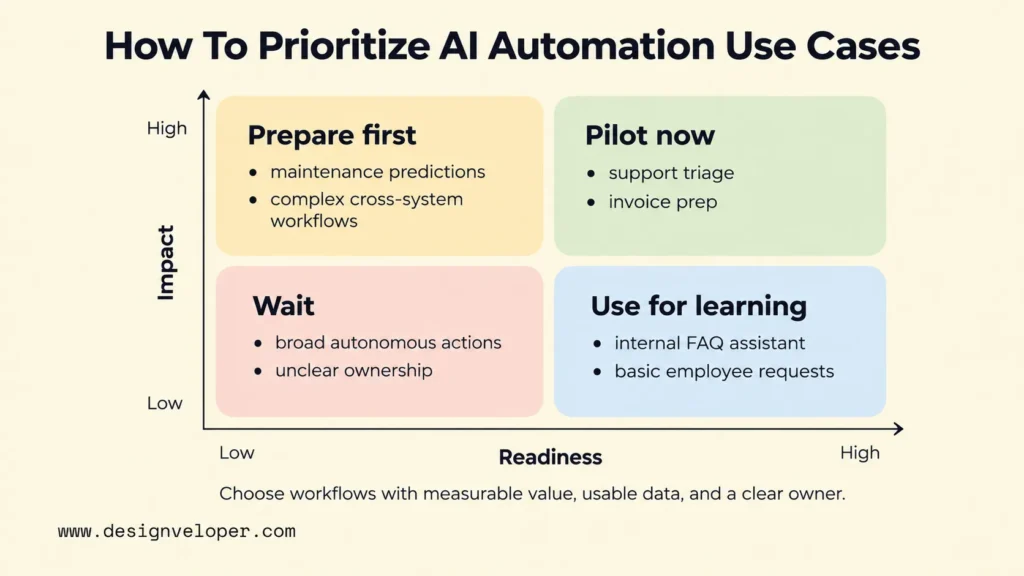
Prioritize enterprise AI automation use cases by combining potential process impact with delivery readiness. High-volume work is attractive only when the team can access suitable data, connect the relevant systems, and measure the outcome. A dramatic demo with no process owner is a weaker first project than a modest workflow that can be tested safely.
Start by recording current case volume, handling time, rework, and error types. Then look at what actually causes delay. A request queue may wait because nobody knows where to route items, while an invoice queue may wait because documents arrive incomplete. These need different AI capabilities even if both have a large backlog.
Next, check readiness. Confirm that sample data represents ordinary and difficult cases, that system access is possible, and that the person who owns the process can approve changes. Estimate integration work as well as model work. Finally, ask whether errors can be caught and corrected before they affect customers or financial records.
A simple impact-versus-readiness matrix gives teams four useful choices. High-impact, ready workflows are candidates for a pilot. High-impact workflows with weak data or difficult integrations need preparation first. Ready workflows with little impact are useful only when they teach a needed capability at low cost. Low-impact, low-readiness ideas can wait. These are planning categories, not universal numerical scores.
For example, a business might compare an internal help-desk queue with automatic payment release. Both could reduce manual handling. The help desk may be easier to pilot because mistakes can be corrected before customers or money are affected. Payment release has higher consequences and more controls to prove. Unless its expected value clearly justifies that effort, begin with invoice preparation and human approval instead.
How To Pilot And Scale Enterprise AI Automation
Pilot one bounded workflow before connecting AI to broad operational authority. A useful pilot tests whether people, rules, models, and systems can complete a real task together. It should compare results with the current process and make it easy to stop or reverse a faulty action.
- Map the existing process. Identify the trigger, each handoff, the system of record, common exceptions, and the final accountable owner.
- Choose AI only where it adds value. Use models for language, documents, prediction, or pattern recognition. Keep stable checks, routing rules, and approval thresholds in ordinary software.
- Connect the minimum required data. Prefer approved interfaces and limited permissions. Define which records the workflow may read and which, if any, it may change.
- Set review and fallback paths. Route uncertainty, failed connections, and high-impact actions to a named reviewer. Allow staff to complete work manually during an outage.
- Test against the baseline. Compare time to completion, correctly completed cases, rework, human review effort, operating cost, and the consequences of errors.
- Expand only after review. Check the results with process owners, then add more case types or systems in stages. Keep monitoring after each change.
For an illustrative support pilot, choose one request category and test it on a representative set of previous cases before allowing live drafting. Include incomplete requests, angry customers, and examples where escalation is necessary. Compare correct resolutions and review effort with the current process. The team should not claim success merely because AI produced a draft quickly.
Architecture choices affect how far that pilot can scale. The model may work well, yet the workflow can still fail through stale records, broken integrations, or an unclear approval path. Our enterprise AI architecture guide explains how models, business systems, permissions, and monitoring fit together. Before expanding, decide who maintains each connection and who responds when the output changes.
Enterprise AI Automation Risks And Controls
A mistaken AI draft may be inconvenient. The risk becomes more serious when an incorrect or unauthorized action changes a record, exposes sensitive data, moves money, or affects a person. Controls should therefore match the consequence of each workflow action, not just the sophistication of the AI model.
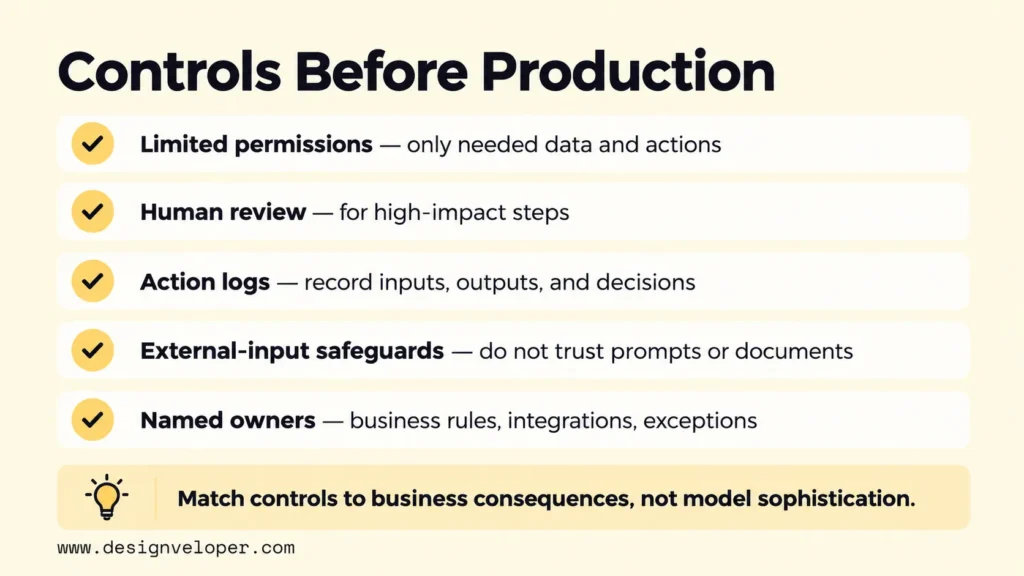
Limit access first. An assistant that summarizes support tickets should not automatically receive permission to change payment details. Keep sensitive fields out of model inputs when they are not needed. Check permissions again when the workflow calls another service, and log who or what requested each action.
Next, make mistakes visible and recoverable. Store the input reference, proposed output, approval decision, and resulting system action where policy permits. Monitor incorrect extractions, unsupported answers, false alerts, review overrides, failed integrations, and changes in case volume. Our guide to AI hallucinations explains why a fluent but unsupported answer needs verification before it reaches a consequential workflow.
Untrusted documents and messages create another risk. They can contain instructions that try to redirect the model. OWASP’s prompt-injection guidance recommends limited privileges and human approval for high-risk actions, among other safeguards. Treat external text as information to analyze, not as permission to bypass the workflow’s rules.
Governance also needs named owners. A process owner approves the business rules and outcomes. A technical owner maintains integrations and monitoring. An authorized reviewer handles exceptions. The NIST AI Risk Management Framework provides voluntary guidance for identifying, measuring, and managing AI risks. It is a framework for decisions, not a substitute for the organization’s legal and operational duties.
Before production, test whether the team can explain what the AI may read and change. The team should also define when a person intervenes and how it detects and corrects a bad action. If those answers are missing, narrow the automation until they are clear. That makes the first deployment easier to trust and the next one easier to evaluate.
Also published on

Share post on










Related Articles


How To Build And Use AI Business Process Automation Effectively
How To Build And Use AI Business Process Automation Effectively Published October 27, 2026
AI Agents Vs. RPA: How To Choose The Right Fit For Your Workflow
AI Agents Vs. RPA: How To Choose The Right Fit For Your Workflow Published October 23, 2026
AI Proof Of Concept Development: How To Test Before You Scale
AI Proof Of Concept Development: How To Test Before You Scale Published October 22, 2026


















