
















CRM Integration: Types, Use Cases, And How To Connect Systems

CRM integration connects a customer relationship management (CRM) system with other business applications so teams can exchange selected customer data and coordinate follow-up actions. The right setup depends on which records need to move, who owns each value, and how quickly updates matter. Start with one useful workflow, define its access and recovery rules, and expand only when that connection works reliably.
What Is CRM Integration?
CRM integration connects a customer relationship management (CRM) platform with other applications so selected customer data can be exchanged and related workflows coordinated. A CRM may hold contacts, companies, deals, and service history. Other systems hold campaign activity, orders, invoices, or support tickets. Integration makes selected information available where people need to act on it. For a foundation on the software itself, see our guide to customer relationship management.
Two functions are often grouped together but solve different problems. CRM data synchronization keeps selected records aligned across systems. For example, updating a contact’s business phone number in one approved system may update the corresponding CRM field. Workflow automation uses an event or changed record to start a task. For example, a new paid order could create a follow-up activity for the account manager. A connection can do either job or both.
Integration does not require one giant customer database. Systems can keep their own records and share only the fields needed for a defined workflow. This can reduce unnecessary data exposure when the connection also follows approved access, consent, and retention rules. IBM’s CRM integration overview describes connectors, APIs, middleware, and integration platforms as common ways to support this exchange.
Which Systems Can You Integrate With A CRM?
A CRM can connect to most business systems that expose a supported connector, API, or another approved exchange method. The useful question is which information a team needs for its next decision. The table shows common connections and the work they can support.
| System type | Data exchanged | Workflow supported |
|---|---|---|
| Marketing automation | Contact IDs, consent status, segments, campaign engagement | Send qualified leads to sales and return lead outcomes to marketing. |
| Email and calendars | Relevant messages, meeting dates, participants, activity status | Keep authorized sales activity and follow-up reminders in the CRM. |
| Social and collaboration tools | Permitted customer inquiries, conversation references, task alerts | Route relevant inquiries to sales or support and alert the owner, subject to consent and access rules. |
| Customer support | Account IDs, case status, ticket history, service priority | Give agents account context and alert sales to unresolved issues. |
| E-commerce and payments | Customer IDs, orders, refunds, payment status | Update purchase context and trigger service after a transaction. |
| ERP and accounting | Customer account references, orders, invoices, balances, stock status | Show fulfillment or payment state without treating the CRM as the finance ledger. |
| Analytics | Selected sales, service, and campaign events | Compare conversion and service performance across teams. |
For CRM integration with ERP, define which system owns each business fact. An ERP usually controls accounting and inventory transactions, while a CRM may control sales opportunities and relationship notes. Giving a salesperson read access to order status is different from allowing that person to edit the finance record. Our enterprise applications guide explains the separate roles of CRM, ERP, and analytics systems.
Telephony is another common connection. A call system can pass caller details or permitted call outcomes into the correct account record. For provider compatibility, call logging, and setup steps, use our guide to integrating VoIP with CRM systems. Call recordings need separate access and retention decisions; a call log does not automatically justify copying audio into the CRM.
What Are The Benefits Of CRM Integration?
CRM integration can make customer work faster and more consistent when it delivers trustworthy data at the right time. Its value comes from fixing a specific handoff, not from connecting the largest number of applications.
- Better customer context: A support agent can see an authorized order status beside a service ticket. This helps the agent answer a delivery question without requesting a separate finance or warehouse report.
- Less repeated entry: A confirmed change to a contact record can reach another system through a defined sync rule. Staff spend less time copying details, although someone still needs to correct bad source data.
- Clearer handoffs: Marketing can pass a qualified lead and its relevant engagement history to sales. The assigned seller can see why follow-up is needed rather than receiving a name alone.
- More useful reporting: Teams can compare campaign responses, sales outcomes, and support patterns with agreed definitions. Connected data improves the basis for analysis; it does not guarantee a correct forecast.
These benefits depend on data quality and ownership. If two systems treat the same contact as different people, synchronization may multiply the problem. If each system can overwrite an invoice status, teams may no longer know which value is trustworthy. Agree on matching rules and authoritative fields before promising a single customer view. Integration should expose useful context while leaving control of sensitive or regulated records with the responsible system.
CRM Integration Methods: Native Connectors, APIs, iPaaS, And Custom Builds
Choose a CRM integration method by matching the workflow to the available connectors, required business rules, and long-term support capacity. Native connections suit common pairs of applications. Direct APIs offer targeted control. An integration platform as a service (iPaaS) helps manage connections across several tools. Custom middleware is justified when standard options cannot enforce the required rules.
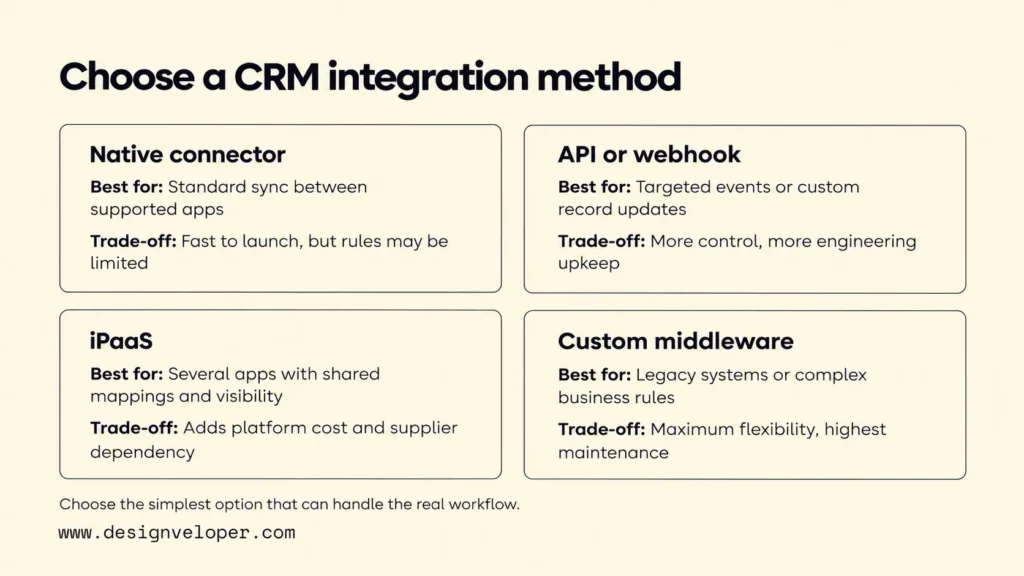
| Method | Best-fit scenario | Main trade-off |
|---|---|---|
| Native connector or marketplace app | Two supported products need a standard contact or activity sync. | Often quicker to configure, but available fields and rules may be limited. Check licensing and vendor support. |
| Direct API or webhook connection | A narrow workflow needs selected events or custom record updates. | Offers specific control, but developers must manage authentication, API changes, errors, and monitoring. |
| iPaaS | Several applications need reusable mappings, managed workflows, or shared visibility. | May simplify operations, but adds platform cost, configuration limits, and supplier dependency. |
| Custom middleware | Legacy systems, complex rules, or controlled transactions exceed standard connectors. | Offers the most design freedom while placing development, security, and maintenance on the owning team. |
An API is an interface through which software can request or change permitted data. A webhook is an event notification sent when a subscribed change happens. They are not competing product categories: a workflow may receive a webhook and then call an API to fetch the complete record. HubSpot’s webhook documentation shows this event-notification model. Our API integration architecture guide explains authentication, mapping, and recovery beyond the CRM context.
Compare the full cost of ownership, not just initial setup. Check subscription terms, API allowances, changes to field schemas, incident response, and who can repair a failed connection. A prebuilt option can become expensive if the team repeatedly works around missing rules. A custom build can also become expensive if only its original developer understands it. Test the simplest option against one real exception before committing.
CRM Integration Architecture: Data Flow, Sync, And Field Mapping
A practical CRM integration architecture moves a source event or record through authorization, validation, field mapping, and an approved CRM update. The receiving system can then run a workflow. The connection should also record the outcome so staff can investigate failed or repeated updates.
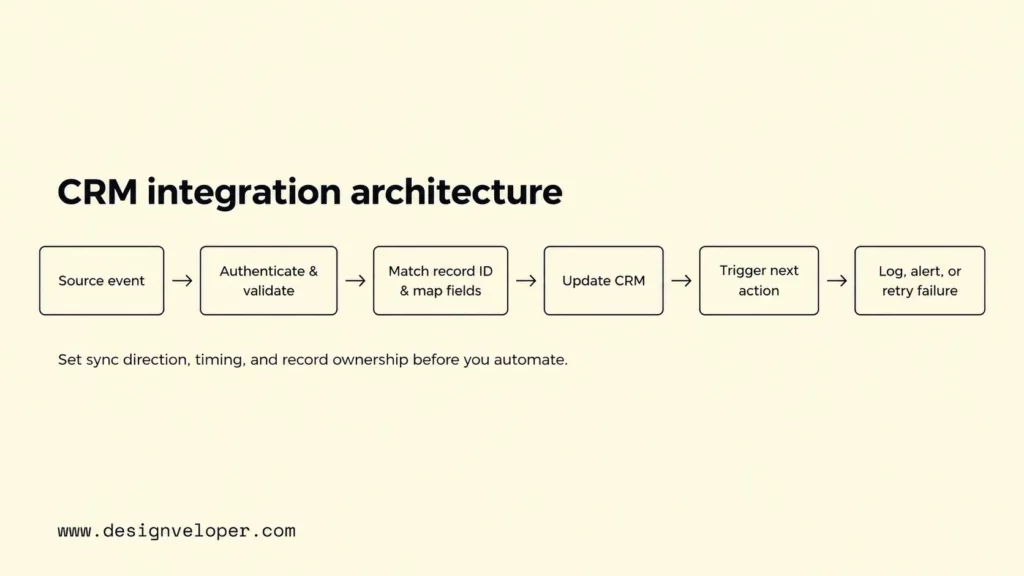
Consider an illustrative store order. The commerce platform sends an order ID and customer reference. The integration checks that the event is authentic and that required fields exist. It matches the customer to a CRM contact, maps the order status to an approved CRM field, and updates that record. A service task may follow only when the order meets a defined condition. The integration logs the event ID, result, and error details without exposing unnecessary personal information.
Field mapping states how a source value becomes a target value. A source field named buyer_id might map to a CRM external customer ID, not to a contact’s displayed name. Status codes may also differ: the store’s paid state should not automatically be treated as shipped. Maintain a mapping document with field types, required values, transformation rules, and behavior when a value is missing.
Next, choose the sync direction. One-way sync copies selected changes from the authoritative system to a consumer. Bidirectional sync allows approved updates in both directions, but needs stronger conflict rules. If the CRM and support platform both edit a phone number, decide whether one always wins or whether the change needs review. HubSpot’s data sync documentation confirms that supported connections can be configured for one-way or two-way synchronization.
Update timing is a separate choice. An event-driven update is useful when staff must act promptly after a payment or urgent support request. A scheduled job may be sufficient for overnight reporting or routine contact cleanup. Salesforce’s integration patterns guide distinguishes synchronous requests, asynchronous messages, and batch data synchronization. Real time adds more operating pressure and is not automatically better.
Give every record type an owner, and give every connection a recovery rule. The CRM might own lead assignment, the ERP might own invoices, and the store might own order creation. Match records using stable cross-system IDs. Also track processed event IDs so a repeated event does not create another task. If a destination is unavailable, preserve the failed event for controlled retry or review instead of silently dropping it.
CRM Integration Use Cases Across Sales, Marketing, And Service
The strongest CRM integration use cases connect a specific event to a record change and then to a responsible person’s next action. The following examples are illustrative workflows, not accounts of Designveloper client projects.
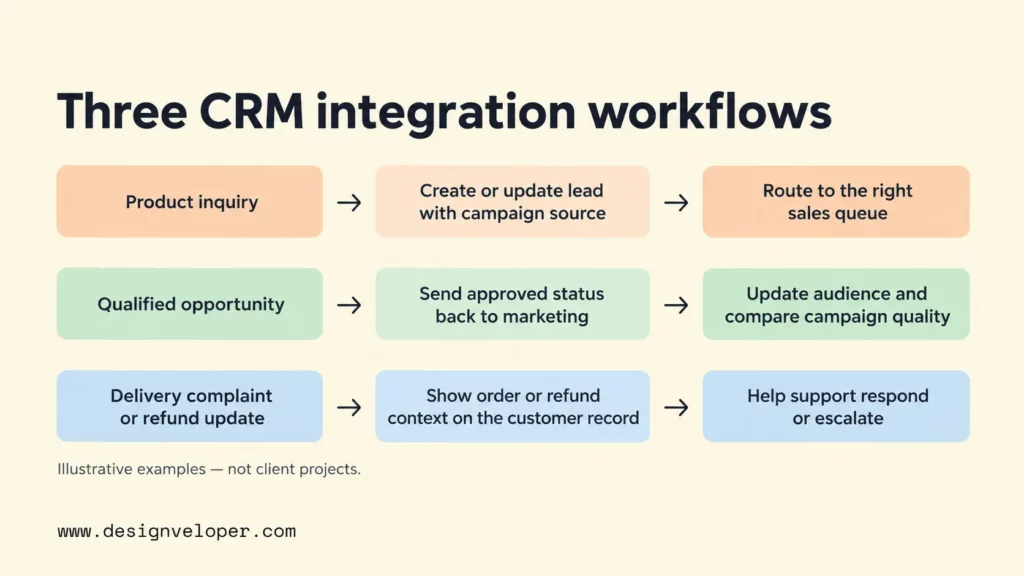
Sales lead follow-up: A visitor submits a product inquiry through a marketing form. The integration checks consent and matches the email or external ID before creating or updating a CRM lead. It attaches the permitted campaign source and routes the lead to the right sales queue. A seller then receives a task with enough context to respond. Without duplicate checks, the same person might appear as several leads and receive conflicting outreach.
Marketing feedback: A lead who received a campaign later becomes a qualified opportunity in the CRM. The integration returns the approved status to the marketing tool so the audience can be updated. This can help teams stop inappropriate prospecting messages and compare campaign quality. It requires agreement on what “qualified” means and which marketing contacts may receive the status.
Service and finance handoff: A buyer opens a delivery complaint. The support tool looks up the order using a stable account reference and displays the latest authorized fulfillment state. If accounting later records a refund, the CRM can show that status without changing the financial ledger. The agent can then answer with accurate context or escalate the case. An invoice or payment update should come from the finance system, not from a free-text sales note.
These examples also show why every event should not become an automatic action. A refund status may require human review before a customer receives a sensitive message. An engagement event may be useful for reporting but too weak to justify a sales call. Write the business condition first, then configure the trigger.
How To Plan And Implement CRM Integration
Implement CRM integration in six stages, beginning with a measurable business workflow and ending with an owned, monitored connection. The aim of the first release is to prove one useful handoff works, including its failure cases, before connecting more systems.
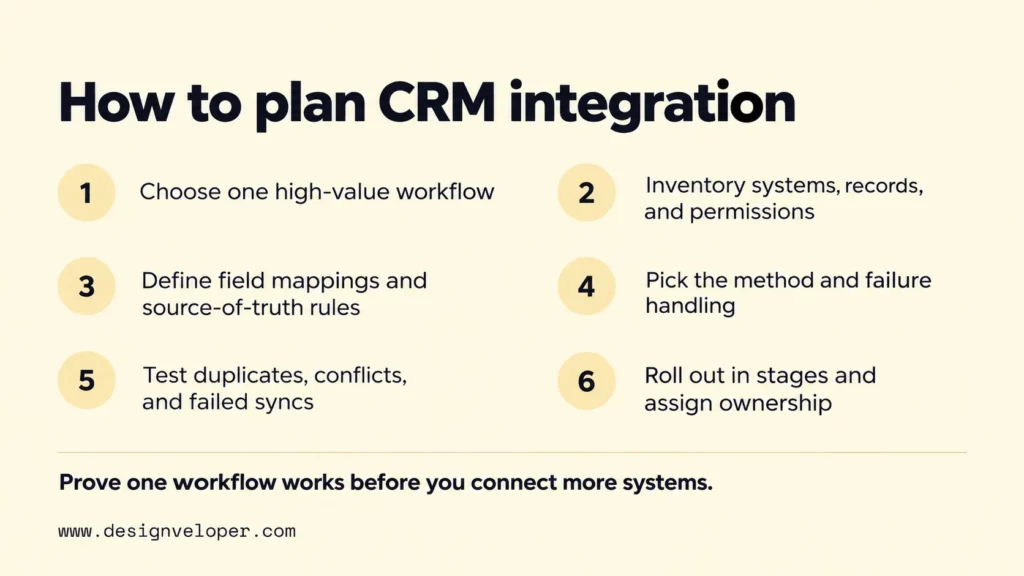
- Choose the workflow and outcome. Describe the event, required CRM change, and next action. For example, reduce the number of qualified inquiries that wait without an assigned owner. Measure current waiting time or missed assignments before making the change.
- Inventory systems and permissions. Identify applications, data owners, record types, existing duplicates, API or connector access, and personal data that must not be copied. Confirm that administrators can authorize the connection and revoke its access.
- Write the data contract. List source and target fields, stable IDs, allowed values, sync direction, timing, and which system wins a conflict. Decide what happens when a record is absent or fails validation.
- Select the method and recovery behavior. Test a native connector against the requirements before buying a platform or writing middleware. Set retry rules, logging, alerts, and a place where staff can review unresolved errors.
- Test realistic failure cases. Use test records to check repeated events, conflicting edits, missing permissions, expired credentials, API limits, and a temporary outage. Confirm that retrying does not duplicate a lead or send the same customer notification twice.
- Release gradually and assign ownership. Start with a limited group or record set, compare results with the existing process, and review error logs. Name a business owner for the workflow and a technical owner for ongoing changes and incidents.
A useful acceptance test follows one record from the source event to the final business action. It checks which fields changed, what the user sees, and whether a failed delivery can recover safely. Microsoft’s idempotent consumer pattern explains why processing the same message again should not create another business effect. That principle matters when webhooks or queued events are delivered more than once.
If a standard connector cannot meet a required data rule, document the gap before requesting custom development. When engineering help is needed, you can review our software development services with a narrow integration specification in hand. Include the systems involved, record owners, permitted fields, failure scenarios, and acceptance tests. That makes it easier to judge whether custom work is justified and compare proposals on the same basis.
CRM Integration Challenges And Best Practices
The hardest CRM integration problems usually involve inconsistent records, incompatible rules, access mistakes, or failures that nobody notices. Each risk needs a control and an owner, not just a more capable connector.
- Duplicate and conflicting records: Match stable identifiers before updates. Define authoritative fields and review ambiguous matches instead of merging customers automatically.
- Incompatible systems: Check supported objects, API access, field types, update limits, and version changes before selecting the tool. Where a legacy application cannot send events, consider a controlled scheduled export or adapter.
- Excessive access: Grant the integration only the permissions and data it needs. Keep credentials in an approved secret store, rotate them as required, and review access when staff or suppliers change.
- Silent sync failures: Track successful and failed events, time since the last update, and records awaiting retry. Send actionable alerts to an assigned owner rather than filling a shared inbox with noise.
- Low user adoption: Explain which CRM fields are automatic and which still need human review. Train users on corrections, exceptions, and where to report missing or surprising data.
Monitoring should reflect the business promise. For a lead-routing connection, watch unassigned qualified leads and time to assignment, not only API success rates. For order visibility, compare the CRM status with the authoritative store or ERP status during a sample review. Technical success means a message arrived. Operational success means the right person can act on a correct record.
Before expanding CRM integration, confirm that the first workflow has stable IDs, controlled permissions, recoverable failures, a named owner, and an outcome worth measuring. Only then add the next connection. This sequence keeps the system useful as more teams depend on it.
Also published on

Share post on










Related Articles


CRM Integration: Types, Use Cases, And How To Connect Systems
CRM Integration: Types, Use Cases, And How To Connect Systems Published October 20, 2026
Integrating VoIP With CRM Systems: A Practical Integration Guide
Integrating VoIP With CRM Systems: A Practical Integration Guide Published October 16, 2026
Low Code Vs Pro Code: Choosing The Right Fit For Your Product
Low Code Vs Pro Code: Choosing The Right Fit For Your Product Published October 15, 2026


















