
















Angular Vs React: The Trade-Off Is Structure Versus Flexibility

For an Angular vs React decision, Angular is often a stronger starting point when a product team wants one integrated framework and shared conventions. React is often a better fit when the team wants more freedom to choose the surrounding stack. The right choice depends less on a generic performance ranking and more on product scope, team skills, architecture ownership, and how the application will be maintained after launch.
That difference shapes routing, forms, state, rendering, testing, upgrades, and hiring. It also changes who must make and maintain those decisions: the framework, an application framework around React, or your own engineering team.
Angular Vs React: The Core Difference For A Product Team
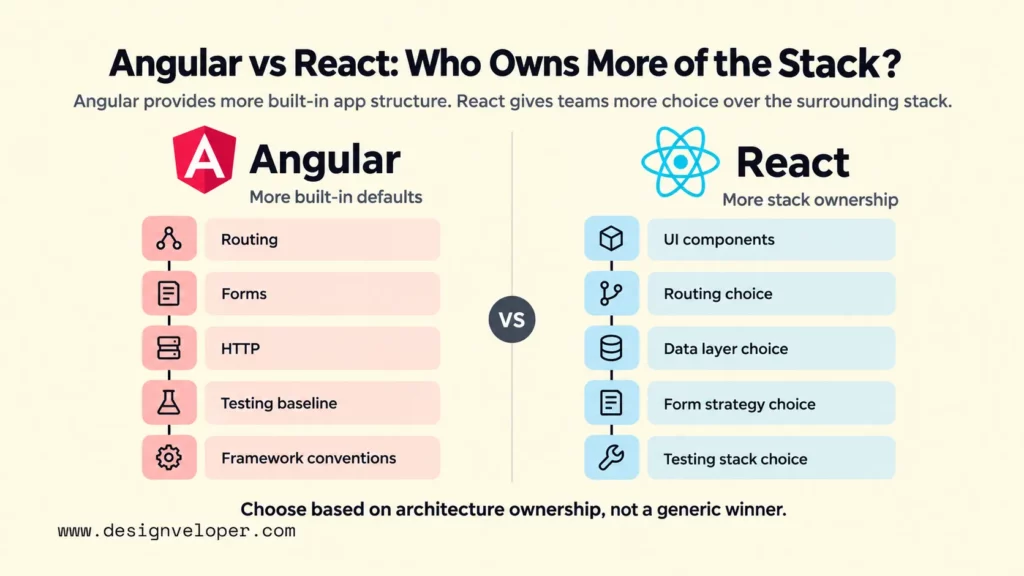
Angular supplies more application-level defaults, while React gives teams more ownership of the surrounding stack. The React library focuses on user interfaces, and React documentation recommends using a framework for most new applications. The table below shows how that difference affects team decisions. Our frontend frameworks comparison places both options in the wider frontend landscape.
| Dimension | Angular | React | What It Means For The Team |
|---|---|---|---|
| Framework scope | Integrated web framework | UI library; production apps commonly add a React framework | Angular makes more baseline choices for you. React gives you more ownership of the surrounding stack. |
| Language | TypeScript-first | JavaScript or TypeScript | Angular teams need TypeScript fluency from the start. React teams can adopt TypeScript according to project policy. |
| Component model | Components with templates, dependency injection, and framework conventions | Function components, JSX, props, Hooks, and composition | Both support reusable UI, but the surrounding mental model and conventions differ. |
| Routing | Official Angular Router | Handled by a React framework or routing library | React teams must decide which layer owns navigation and route data. |
| Forms | First-party Signal Forms, Reactive Forms, and Template-driven Forms | HTML form primitives plus React state and selected framework or library patterns | Form-heavy products may value Angular’s common first-party patterns. React teams can choose a lighter or more specialized approach. |
| State | Local state can use signals; teams may also use services, RxJS, or other patterns | Local state and context are built in; larger state/data choices depend on architecture | Neither framework removes the need to define ownership, lifetime, and server-versus-client state. |
| Rendering | Client, server, prerendered, or hybrid rendering | Client and server rendering; modern React frameworks add route-level delivery choices and Server Components | Choose rendering by route and product need, not by framework label alone. |
| Testing | Angular CLI provides a default unit-testing setup for new projects | Testing tools depend more on the selected React framework and stack | Angular starts with a more standardized baseline. React teams should standardize test tools early. |
| Ecosystem choice | More first-party decisions | Broader pick-your-stack model | Angular can reduce setup debate. React can fit unusual requirements but needs stronger dependency governance. |
| Upgrades | Published support windows, deprecation policy, update guide, and CLI migrations | React stable releases follow semantic versioning; surrounding frameworks and packages have their own cycles | React maintenance must account for more than the React package itself. |
| Hiring | Look for TypeScript plus Angular-specific framework experience | Look for React skills plus the exact framework, data, and testing stack you use | Validate the local talent pool and reviewer depth instead of assuming popularity equals fit. |
| Best-fit products | Structured, form-heavy, long-lived, multi-team applications | Products that benefit from flexible composition, specialized ecosystem tools, or gradual UI adoption | These are starting hypotheses, not universal rules. Prototype the hardest workflow before committing. |
This table is not a scorecard. Angular can support highly customized products, and React can support tightly governed enterprise systems. A JavaScript framework comparison that treats both options as equivalent packages can hide this difference in scope. The practical question is whether you want more architectural defaults from the platform or more freedom that your team must turn into durable standards.
Angular Brings Structure To Full Application Development
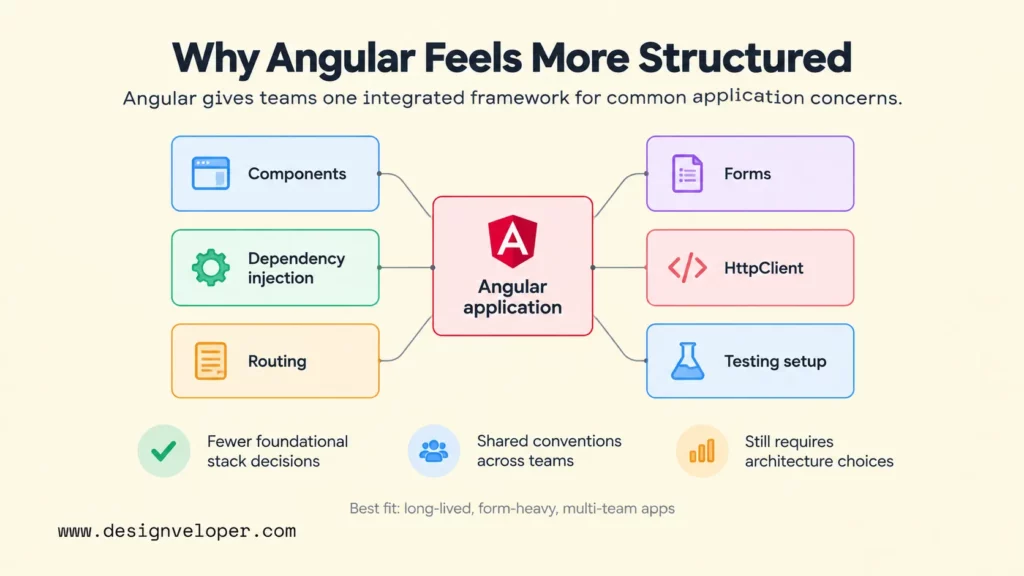
Angular is strongest when consistent application structure is itself a product requirement. It gives teams one framework for components, dependency injection, routing, forms, HTTP access, rendering, and other common concerns, so fewer foundational decisions need to be renegotiated project by project.
TypeScript, Dependency Injection, And Strong Conventions
Angular makes TypeScript and dependency injection central to the development model. TypeScript adds static type information to JavaScript, which can make shared contracts and refactoring easier to reason about in a large codebase. If your team needs a refresher on that language layer, our guide to TypeScript explains the basic model and trade-offs.
Dependency injection gives components and services a defined way to request shared dependencies rather than constructing everything themselves. Angular’s official dependency injection guide describes this as a way to organize and share code, improve reuse, and substitute dependencies during testing. For a product team, the larger benefit is consistency: API clients, authentication services, feature configuration, and shared state can follow common boundaries.
Those conventions do not make architecture automatic. Teams still decide feature boundaries, state ownership, API contracts, permissions, error handling, and which code belongs in shared services. Angular reduces the number of ways to express some decisions; it does not remove the decisions themselves.
Built-In Tools For Routing, Forms, HTTP, And Testing
Angular also provides first-party tools for several jobs that a production application almost always needs. The official router supports nested routes, route parameters, guards, and programmatic navigation. Current Angular forms guidance covers Signal Forms, Reactive Forms, and Template-driven Forms. Signal Forms fit newer signal-based applications, while Reactive Forms remain a solid choice when a team needs established production stability. HttpClient handles typed responses, interceptors, error handling, and testing utilities. The current Angular testing guide says new Angular CLI projects use Vitest by default.
This integrated tooling can reduce setup friction across a larger engineering group because teams start from the same documented primitives. It can also simplify onboarding when engineers move between related applications. The trade-off is that developers need to learn Angular’s model as a system, not only a small component API.
React Keeps The UI Layer Flexible And Composable
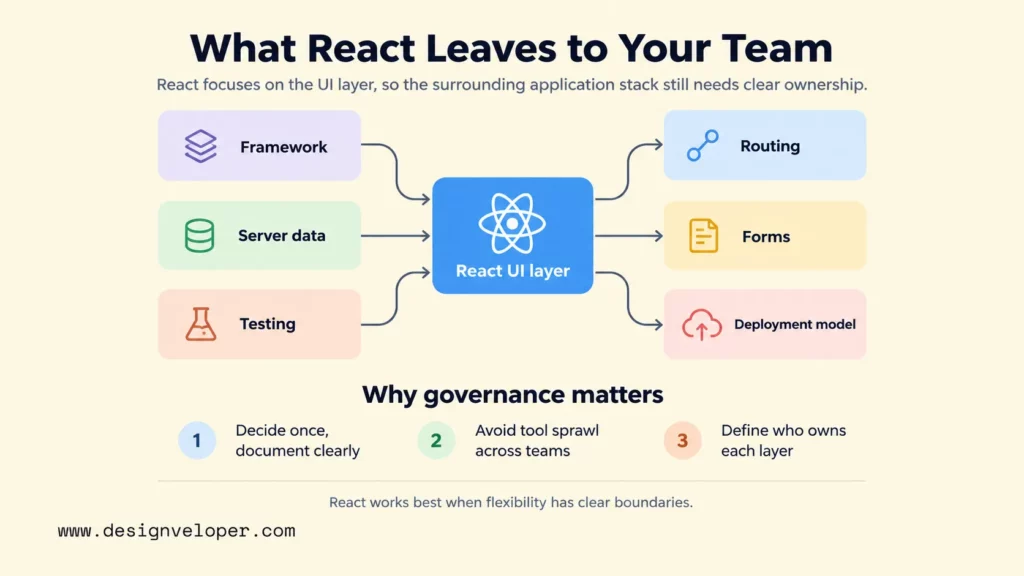
React is strongest when the product team wants a focused UI model and the freedom to choose the rest of the application architecture. React itself concentrates on components, rendering, state, and composition, while routing, data loading, server boundaries, and many production conventions are supplied by a React framework or other tools.
Components, State, And The React Development Model
React builds interfaces from components that receive data through props and can hold local state with Hooks. Its state guidance emphasizes keeping state minimal and avoiding duplicated data. Shared state should move to an appropriate common owner when several components need it. That encourages teams to model UI behavior explicitly instead of relying on a framework-wide application pattern.
The same flexibility makes component reuse practical across products with very different layouts and workflows. Yet reuse only works when teams agree on design tokens, accessibility behavior, data boundaries, and component ownership. A shared button library is easy to create; a stable design system that can evolve across several products needs governance.
Choosing The Rest Of The Application Stack
For a new production application, React’s own guidance now recommends starting with a framework. The React app creation guide lists full-stack options and explains that starting from scratch means choosing solutions for routing, data fetching, rendering, and other common patterns yourself.
This is the key maintenance question for React: flexibility is valuable only when ownership is clear. A team should document which tool owns routing, server data, client state, forms, validation, caching, testing, styling, and deployment. Our web application architecture guide is useful for mapping those frontend choices to APIs, servers, databases, security, and deployment concerns.
Without that governance, two React teams can make individually reasonable choices that become expensive when combined. Different state libraries, form patterns, data clients, and folder conventions create more upgrade paths and more ways for bugs to cross boundaries. The answer is not to remove choice; it is to make the important choices once and record why they exist.
Performance, Rendering, And Product Complexity
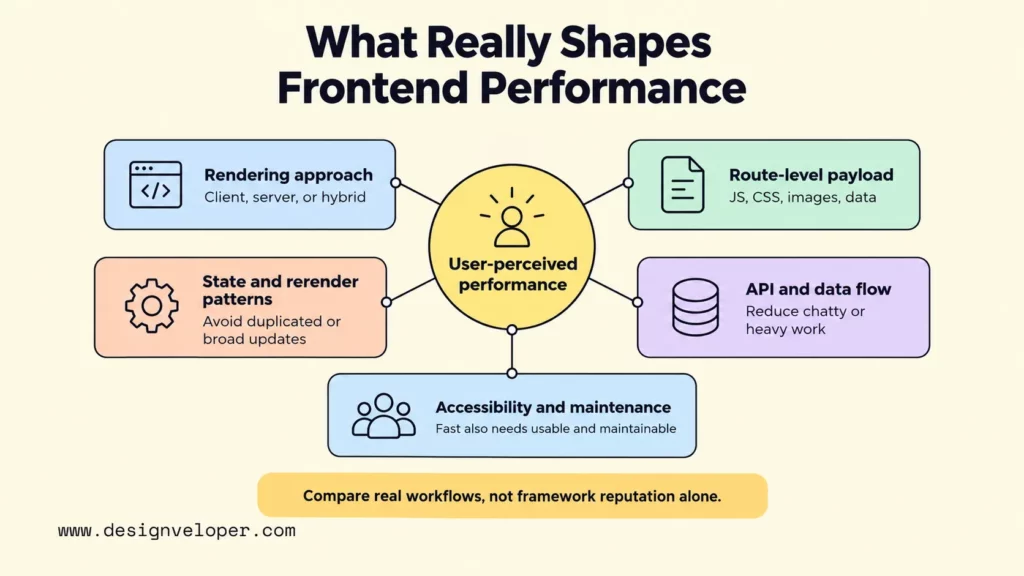
Neither Angular nor React is automatically faster in a real product. User-perceived performance depends on what you render, how much JavaScript and data you send, and when work runs on the server or client. Component update behavior and unnecessary network work can change the result again.
Both ecosystems support more than client-only rendering. Angular’s current server and hybrid rendering documentation covers client-side rendering, server-side rendering, prerendering, and route-level combinations. React can render on the server. React Server Components can also render before bundling in a server or build environment. In practice, a React framework usually coordinates those capabilities for a production application.
Bundle size should also be measured at the route level instead of reduced to the size of a core package. Angular includes more framework capability, while React applications commonly add a framework and other libraries. The meaningful comparison is the JavaScript, CSS, fonts, images, and data that a user actually downloads for the workflow you care about.
Data flow and component boundaries matter just as much. React encourages explicit state and prop relationships, while Angular teams may use signals, services, RxJS, and form models depending on the feature. In either case, duplicated state, broad rerenders, chatty APIs, and large client-side data transformations can hurt responsiveness.
Accessibility, testing, and security updates belong in the performance conversation because a fast interface that users cannot operate or safely maintain is not production-ready. Test keyboard navigation and focus behavior with the same representative routes used for speed checks. Keep framework and dependency updates current, and review third-party packages according to their actual role and risk rather than treating a smaller dependency count as a security guarantee.
Angular Vs React For Common Product Scenarios
Product shape is a better starting filter than a generic Angular vs React performance claim. The table below treats each recommendation as a starting fit, then names the constraint that could change the decision.
| Product Or Team Scenario | Strong Starting Fit | Reason | Constraint To Validate |
|---|---|---|---|
| Enterprise system with many forms and business rules | Angular | Integrated forms, routing, dependency injection, and conventions can support consistent implementation. | Confirm that the team is comfortable with Angular’s concepts and update policy. |
| Long-lived platform maintained by several frontend teams | Angular or governed React | Angular supplies more shared defaults; React can work well when the organization already enforces a common framework and architecture. | Review cross-team standards, ownership, design-system governance, and upgrade responsibility. |
| SaaS dashboard with specialized UI requirements | React or Angular | React offers broad ecosystem choice; Angular offers a consistent application platform. | Prototype the hardest table, editor, permissions flow, and data-loading path. Our SaaS application development guide explains the wider architecture decisions around identity, billing, integrations, and operations. |
| Content-led site with selective interaction | React through an appropriate framework, or a simpler content-first approach | Server rendering and static generation can support public content without making every route a client-heavy application. | Validate whether React is needed at all. A mostly static site may benefit from less client JavaScript. |
| Highly interactive interface | React or Angular | Both can support complex component state and rich interactions. | Measure the real workflow on target devices; do not choose from synthetic framework benchmarks alone. |
| Rapid MVP | The stack the team already knows well | Existing expertise usually shortens setup, review, and debugging more than switching for a theoretical advantage. | Make sure the MVP architecture can still support the next likely release, especially authentication, data, testing, and deployment. |
| Existing JavaScript team with a modular frontend culture | React | React can fit teams that already own architecture decisions and want to compose the stack. | Define TypeScript, routing, data, form, testing, and dependency standards before the codebase grows. |
| Existing TypeScript team that values shared application conventions | Angular | Angular makes TypeScript and framework-level structure part of the baseline. | Validate Angular-specific skills such as dependency injection, templates, signals, and the chosen state patterns. |
| Mobile-first product that needs deep native platform behavior | Native iOS/Android or a mobile-focused cross-platform stack | Angular and React web are frontend web choices, not automatic substitutes for a native mobile architecture. | Decide whether web, React Native, Flutter, or native apps best match device APIs, UX, offline needs, and release channels. |
The most useful prototype is not a polished home page. Build the route with the hardest data, permissions, forms, interaction, or rendering constraint. That slice reveals architecture friction that a feature checklist will miss.
Skills, Cost, And Maintenance Shape The Decision
Angular and React are both open-source technologies, so framework licensing is rarely the main cost difference. Delivery cost comes from scope, team familiarity, architecture work, integrations, QA, deployment, and the maintenance obligations created by the stack.
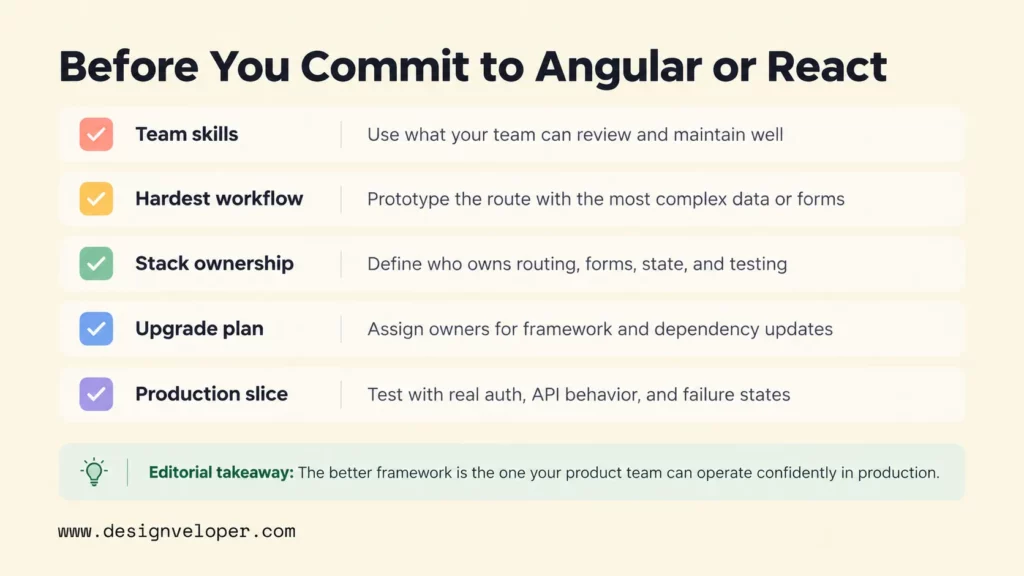
Start with the skills you already have. A React team that knows its framework, data layer, testing setup, and deployment model can often deliver faster than the same team learning Angular from scratch. The reverse is also true: an Angular team may lose time if it replaces familiar first-party patterns with a React stack that requires several new architectural decisions.
Hiring should be evaluated against the exact production stack. “React developer” can describe very different experience depending on whether the application uses a full-stack React framework, a separate API, a specific state library, or React Native. Angular hiring is more framework-specific, but teams should still check TypeScript depth, testing practices, accessibility, and knowledge of the current Angular model.
Maintenance is where the architecture difference becomes most visible. Angular publishes a formal support and deprecation policy, an update guide, and CLI-assisted migrations. As of September 2026, Angular’s release policy lists a major release about every 12 months and typical support for each major release for about 24 months. Because release dates are guidance and can change, teams should check the current policy when planning upgrades. React stable releases follow semantic versioning, but a React product also inherits the release schedules of its framework and other dependencies.
That does not make Angular upgrades cheap or React upgrades risky by default. It means the maintenance plan must match the stack. Assign owners for framework upgrades, third-party packages, browser support, security patches, test maintenance, documentation, and migration work. If those responsibilities are unclear at launch, they become unplanned cost later.
A Frontend Decision That Survives Production
A frontend decision survives production when it is connected to the rest of the product system. Before choosing Angular or React, define how the design system, APIs, authentication, analytics, performance targets, deployment, release workflow, monitoring, and support model will work together.
A useful decision record names both the chosen technology and the responsibilities around it. For React, that usually includes the application framework and core ecosystem choices. For Angular, it still includes state boundaries, feature architecture, integration patterns, and any third-party components. In both cases, record why the decision fits the product and what evidence would trigger a revisit.
A useful validation step is to build one representative production slice with real API behavior, authentication, failure states, responsive UI, testing, and a production-like deployment. That evidence can expose architecture and delivery problems before the stack becomes expensive to change.
The final choice is practical. Choose Angular when shared framework conventions reduce more risk than they add. Choose React when stack flexibility creates more product value than maintenance overhead. If neither condition is true, keep the shortlist open and test another approach against the same production constraints.
FAQs About Angular Vs React
Is Angular Better For Enterprise Applications?
For teams comparing React vs Angular for enterprise applications, Angular is often a strong starting point. It fits teams that need shared conventions, TypeScript, first-party routing and forms, and a formal upgrade policy. It is not automatically better. A well-governed React architecture can also support large enterprise products, especially when the organization already has strong React standards and platform ownership.
Is React Easier To Learn Than Angular?
React’s core component model is smaller, so the first steps can feel easier for developers who already know JavaScript. Production React adds more decisions around routing, data, rendering, forms, and testing. Angular teaches more framework concepts upfront, but those concepts also provide a more uniform application model once the team learns them.
Can Angular And React Coexist In One Organization?
Yes. Different products can use Angular and React without a problem if each has clear ownership, standards, and support. They can also coexist inside one broader platform, but mixing them within the same user-facing application adds integration, testing, bundle, design-system, and upgrade complexity. Use that approach only when the boundary solves a real migration or ownership problem.
Can An Existing Angular App Move To React Gradually?
Yes, if the application has boundaries that can be separated route by route or feature by feature. A gradual migration should define how navigation, authentication, shared state, design tokens, analytics, and APIs cross the old-new boundary. Running both stacks for a long period has a cost, so each migration stage should retire something rather than only adding React beside Angular.
Can React Web And React Native Share Code?
They can share some code, especially types, validation, API clients, business logic, and reusable Hooks that do not depend on browser or native APIs. UI code is less portable because React web renders browser elements while React Native uses native platform components. React Native’s platform-specific code guidance supports separate files when shared code needs different implementations. Our React vs React Native comparison explains the product-level distinction in more detail.
If your team needs support with product discovery, frontend architecture, integrations, QA, or ongoing maintenance, our web development services can connect those needs around the chosen stack. The goal is to validate the framework against the product’s real integration, release, and maintenance constraints instead of treating Angular or React as an isolated choice.
Also published on

Share post on










Related Articles



What Is Ext JS? Features, Components, And Frontend Use Cases
What Is Ext JS? Features, Components, And Frontend Use Cases Published September 25, 2026
Difference Between HTML And CSS: Key Comparisons And Examples
Difference Between HTML And CSS: Key Comparisons And Examples Published September 23, 2026
Best Frontend Frameworks In 2026 : 8 Options, Tradeoffs, And Tips
Best Frontend Frameworks In 2026 : 8 Options, Tradeoffs, And Tips Published September 22, 2026


















