
















What Is HR Automation? Benefits, Use Cases, And Best Practices

KEY TAKEAWAYS:
- HR automation uses software, workflow rules, and sometimes AI to reduce repetitive administrative work across onboarding, payroll, approvals, compliance, and employee support.
- Businesses often achieve the biggest value from automating high-volume workflows that are slow, repetitive, and expensive to manage manually.
- HR automation software works best when it connects HR, payroll, IT, and employee service workflows instead of acting as another isolated system.
- AI adds value when HR workflows involve unstructured inputs, such as emails, documents, policy questions, service requests.
- To implement HR automation effectively, businesses must map their processes, set governance rules, connect their systems, and know exactly where a human still needs to sign off.
HR teams lose too much time to repetitive administrative work, from routing onboarding tasks and updating records to answering employee questions and coordinating handoffs across different departments. Deloitte found that HR staff spend as much as 57% of their time on administrative tasks, leaving little time for more strategic work. That’s why many businesses now are shifting to HR automation to address that problem. So, what is HR automation, exactly?
In short, HR automation helps companies by using software, workflow rules, and sometimes AI to move recurring work forward automatically. This helps teams reduce delays, improve accuracy, and create a smoother employee experience.
This article covers what HR automation is, why it matters, and how it works. It also describes the most common HR processes to automate, the best tools available today, how to implement HR automation, and key challenges to avoid.
Recommended for you:
- How To Build And Use AI Business Process Automation Effectively
- What Is AI Automation? How It Works, Benefits, Tools, and Use Cases
- HR Workflow Automation: Benefits, Software, and AI Use Cases
What Is HR Automation?
HR automation is the use of software to trigger, route, complete, and track recurring HR tasks with minimal manual intervention. Such tasks are often repetitive, high-volume, and low-complexity, such as onboarding, approvals, payroll updates, leave requests, compliance steps, and employee support.
That definition sounds broad because it covers nearly every stage of the employee lifecycle. But in practice, HR process automation can be as simple as sending onboarding forms automatically after an offer is signed. At the more advanced end, AI-driven HR chatbots like watsonx HR agents can connect directly with systems (e.g., Workday or SAP) to pull employee data and push actions into the correct system, manage complex conversations, and automate multi-step workflows.
That said, both simple and advanced HR automation solutions share the same pattern: they detect an event, apply logic, and move the next step forward.
To understand HR automation better, let’s see how it differs from the traditional HR process:
| Area | Traditional HR | HR Automation |
|---|---|---|
| Primary approach | People manually track, follow up, and complete tasks. | Software triggers, routes, and completes tasks automatically. |
| How work moves | Someone has to act manually for the next step to happen. | An event or rule moves the next step forward. |
| Example | HR professionals manually save the new hire start date. | Start date triggers forms, account setup, payroll tasks, and manager reminders automatically. |
| Best fit | Flexible, judgment-based work | Repetitive, rules-based processes that run the same way every time |
Why HR Automation Matters Today
The pressure on HR is no longer just administrative. Teams now have to deliver faster service, cleaner data, better compliance, and a smoother employee experience at the same time. However, SHRM found that 57% of HR professionals are already working beyond their normal capacity to retain valued employees and recruit new candidates with skills their organizations are seeking. That gap explains why more businesses are turning to HR workflow automation to reduce burden and speed up workflows.
Beyond HR management, automation helps standardize hiring and onboarding. These days, HR automation is not only about predefined rules but also about AI integration. SQ Magazine stated that HR automation tools powered by AI reduce time-to-hire roughly 23% and compliance and payroll costs 19%, while increasing onboarding satisfaction around 24%. This way, HR teams shift from spending time on process management to focusing on the work that actually requires human judgment.
How HR Automation Works
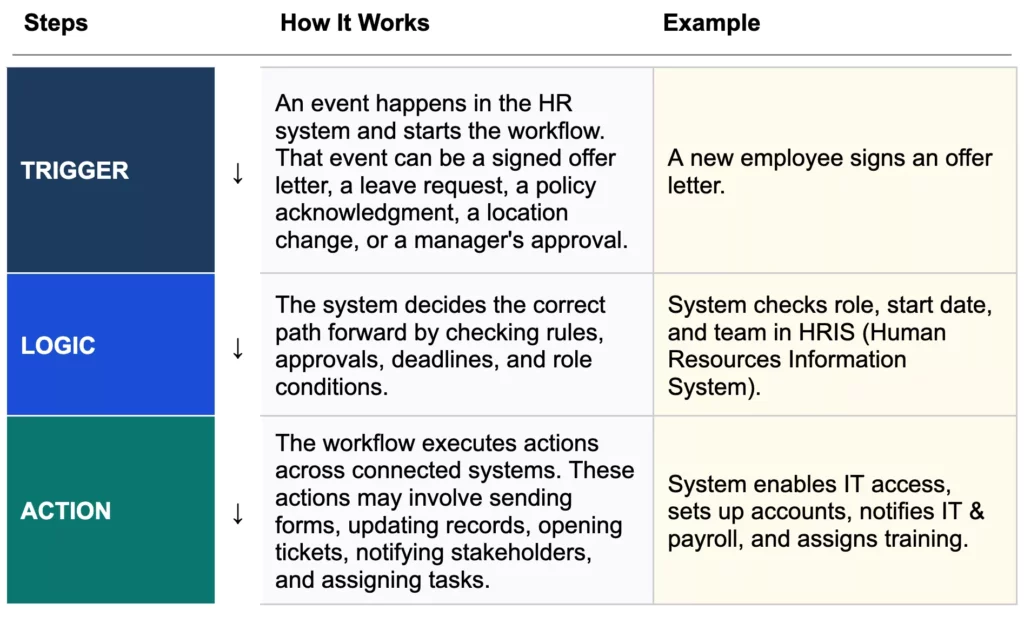
A useful HR automation workflow usually has three building blocks. If one of them is weak, the whole process possibly fails.
That structure turns static HR data into usable HR workflow automation. Instead of storing a request and waiting for someone to notice it, the system actively routes work across steps.
Rule-Based Automation vs. AI In HR Workflow Automation
For years, HR automation ran on predefined rules alone: “if this happens, do that.” That model works well for structured, repeatable processes. Today, AI integration extends what automation can handle, particularly when the input is unstructured, such as an email, a PDF, a free-text service request, or a policy question that doesn’t fit a fixed form. Understanding where rules end and AI begins is the clearest way to decide how to bring AI into HR operations.
| Approach | Best for | Example |
|---|---|---|
| Rule-based automation | Structured, repeatable workflows with clear conditions | If a leave request meets a predefined condition, route it to a second approver. |
| AI-assisted automation | Requests involving text, documents, summaries, or next-step recommendations | An AI-powered chatbot classifies an employee request, summarizes the issue, and suggests the right HR queue. |
Common HR Processes You Can Automate
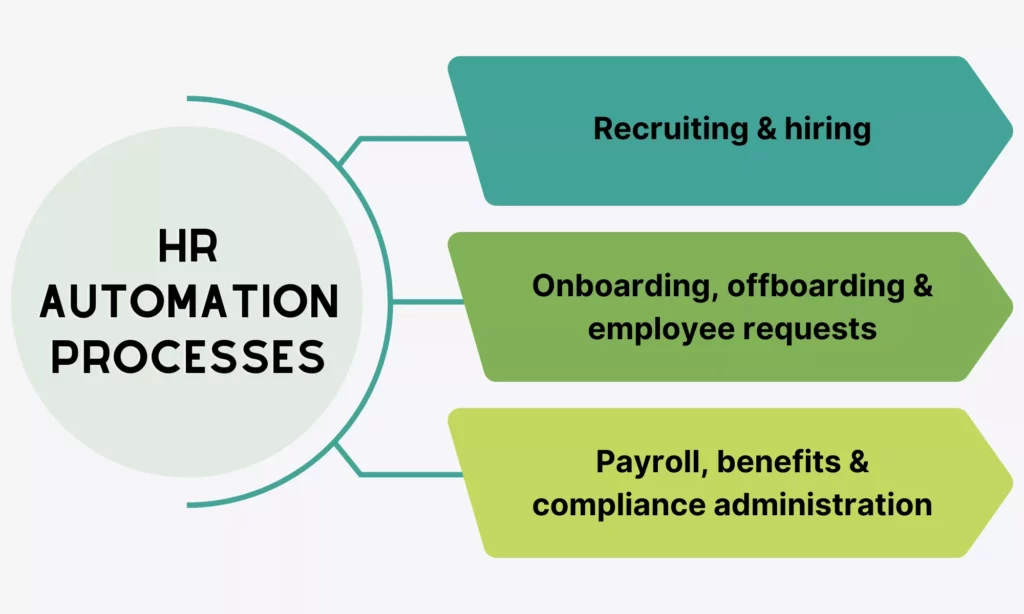
If you want to start HR automation, start with workflows that are high-volume, repetitive, and expensive to coordinate by hand. When handled manually, these processes often create delays and manual errors. But with automation, they quickly give visible gains to your business. Below are some common HR processes, plus its workflow example and when you should or should not automate it.
Recruiting And Hiring
Recruiting involves dozens of small coordination tasks that repeat with every candidate: confirmations, scheduling, follow-ups, scorecards, and offer steps. These tasks consume significant time when handled manually. So, automating the coordination layer frees recruiters to focus on the conversations and evaluations that actually require their attention.
Workflow example: A candidate applies → the system sends a confirmation → schedules interviews → routes scorecards to the hiring team → triggers offer steps once a candidate is marked as selected.
Best for: Interview scheduling, application status updates, candidate communications, and offer approval routing.
Watch out for: Automation handles coordination well. But human evaluation still matters for assessing experience, communication style, and team fit. That’s why recruiters should use automation to surface and sort candidates, not to make the final call.
Onboarding, Offboarding, And Employee Requests
Zendesk indicated that manual onboarding is time-wasting for both HR professionals and new hires due to multiple meetings. Besides, HR teams struggle to track how well the new employees learn company-related information.
Similarly, offboarding requires employees to go through many steps. But missing any one of them creates compliance gaps, security risks, or payroll errors that surface long after the employee has left. Employee requests (e.g., leave approvals and employment verifications) add to the same burden because they are frequent and repetitive. Therefore, HR teams need automation software to process these requests faster and more efficiently.
Workflow example: When a new hire sends a signed offer letter, this event triggers document collection, payroll setup, IT account requests, training assignments, and manager reminders. When the employee exits, the same logic runs in reverse. Accordingly, access is removed, asset returns are logged, exit forms are issued, and payroll is notified.
Best for: New hire readiness checklists, exit task coordination, policy acknowledgments, leave approvals, employment verifications, and recurring employee service requests.
Watch out for: Automating these HR processes requires coordination between many teams, like HR, IT, payroll, and sometimes legal. If the automation is not integrated across those systems, handoffs break silently.
Payroll, Benefits, And Compliance Administration
HR teams require accurate and updated HR data to keep payroll, benefits, and compliance running correctly. When an employee changes role or receives a compensation adjustment, that single change needs to flow into payroll calculations, benefits enrollment, and any applicable compliance requirements.
When that handoff happens manually, someone has to remember to update every system that depends on it. But the bigger the organization, the more often that step gets missed or delayed. That’s why HR professionals need automation to handle those connections automatically, so a change recorded once in HR triggers the right follow-up across every system.
Workflow example: An employee changes location or compensation → the record updates automatically → payroll receives a notification → benefits or compliance follow-up tasks are prompted.
Best for: Payroll handoffs triggered by status changes, benefits enrollment windows, tax form collection, policy renewals, and maintaining audit-ready document trails.
Watch out for: Payroll automation is only as accurate as the data feeding it. If employee records are inconsistent across systems, automation will move bad data faster, not fix it. So, cleaning source data before automating payroll handoffs is a must.
Recommended for you:
- How AI Automates Routine Tasks: What To Automate First?
- AI Chatbot Integration: How To Connect Chatbots With Business Systems
- How To Build An App For Your Business In 10 Steps?
Common HR Automation Tools and Software
Not every company needs a versatile software that can handle every HR process. Instead, they just require HR automation software that actually fits the process they want to improve. Here are the main categories of HR automation solutions available today:
| Software Type | Description | Best When |
|---|---|---|
| All-in-One HRIS / HCM Platforms | Store and manage employee records while supporting built-in workflows for approvals, onboarding, lifecycle changes, and reporting. | Companies require one reliable system of record with automation built in rather than connecting many separate tools. |
| Talent Acquisition & ATS Tools | Manage the full recruiting pipeline from job posting to offer letter. | Coordinating recruitment tasks is the biggest reason of delays. Accordingly, interview scheduling, candidate communication, and offer approvals take more time than they should. |
| Payroll & Benefits Administration Platforms | Automate recurring calculations, tax filings, enrollment windows, and compliance tasks. | Role changes or location updates in HR fails to reach payroll automatically or requires manual re-entry across systems. |
| Performance & Learning Management Systems | Handle review cycles, goal tracking, feedback collection, and training assignment in one connected layer. | Different managers run performance reviews differently or when compliance training and onboarding learning paths are still assigned and tracked manually. |
| Workforce Management Tools | Automate time tracking, attendance, scheduling, and leave management. | Shift-based or distributed teams create high volumes of manual entries, approvals, and payroll inputs that slow down HR and managers alike. |
| Employee Support & AI Assistant Tools | Handle incoming HR requests, answer policy questions, and route employees to the right resource without HR involvement. | HR teams are overwhelmed by repetitive service requests and response times are too slow. |
Choosing which tool depends on where your biggest bottlenecks actually stay. For example, a team buried in service requests and slow response times likely needs AI assistants for employee self-service.
Recommended for you:
- Best HR Automation Tools: Features, Use Cases, and Tips
- Top 10 Recruitment Automation Tools Compared For Hiring Teams
- Top 10 AI Workflow Automation Tools To Scale Smarter
Benefits Of HR Automation For Teams And Employees
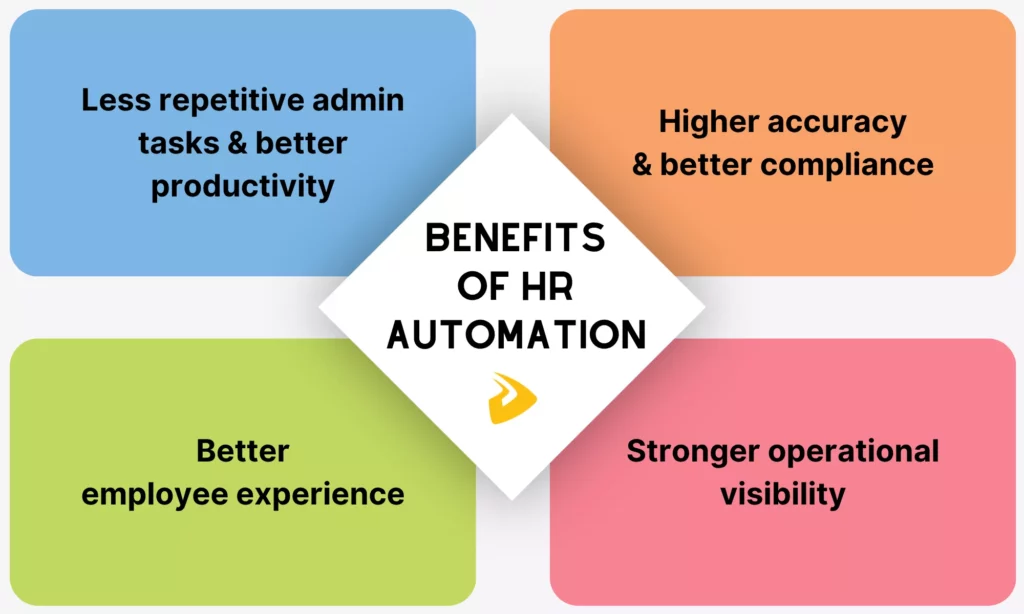
Businesses are adopting HR automation solutions due to their massive returns for both HR teams and employees. They include:
Less Repetitive Admin And Better Productivity
IBM explained that HR automation helps offload repetitive admin tasks and focus more on complex work, hence saving time and improving productivity.
Shifting to automation matters because the administrative burden on HR is not small. Tasks like manual data entry or repeat reminders consume significant time of every HR professional. So, automating those recurring tasks gives HR teams the capacity to focus on workforce planning, manager enablement, and employee support which actually require human involvement.
Higher Accuracy And Better Compliance
IBM stated that automation allows HR professionals to apply policies consistently, track compliance, and get accurate, audit-ready records, hence standardizing HR processes without the manual work. This matters because manual HR creates real accuracy risks, like employee records conflicting across systems or compliance documents failing audits. But with automation, HR professionals easily build standardized workflows by making every process run the same way, every time.
Better Employee Experience
Automation improves employee experiences throughout HR processes, from joining the company and updating personal information to asking for requesting time off.
According to McKinsey’s HR Monitor 2025, businesses that do not integrate automation and AI in core HR processes more likely fail to deliver personalized, human-centered experiences. Meanwhile, high-performing organizations are already using both to run more responsive HR functions. With automation, employees experience faster and consistent services.
Stronger Operational Visibility
Once HR work moves through systems instead of inboxes, teams can measure completion times, bottlenecks, request categories, and workflow health. Nearly half of HR professionals struggle to prove ROI through data or tie their initiatives to business outcomes, according to Leapsome’s 2024 trends report. This gap disappears when workflows generate real data automatically. That visibility turns a reactive HR team into a more strategic one.
How To Implement HR Automation Effectively
Getting HR automation right does not mean picking the right tool only. Instead, businesses should know clearly where to start. These four steps give HR teams a practical path forward to implement HR automation effectively:
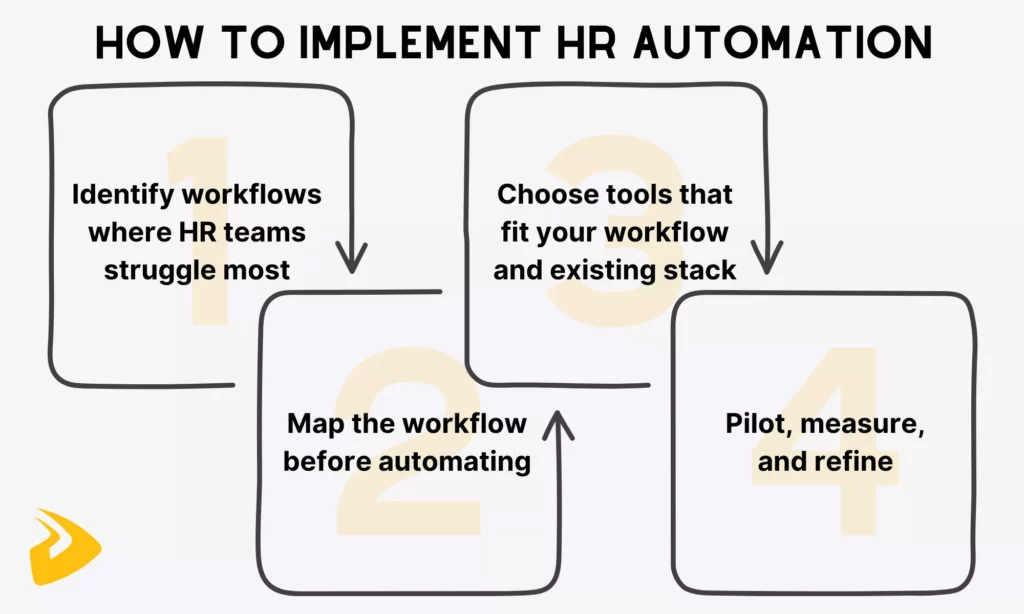
- Identify workflows where HR teams struggle most. Start with processes that are repetitive, slow, and easy to measure, such as onboarding, leave requests, or payroll handoffs. These deliver visible results quickly.
- Map the workflow before automating it. Define triggers, stakeholders, approvals, the systems involved, and expected outcomes before jumping into automation. Automating a process you do not fully understand will only make problems harder to find.
- Choose tools that fit your workflow and existing stack. The best platform is not the most advanced one. Instead, it must handle your defined bottlenecks and connect cleanly with the HRIS, payroll, and collaboration tools already in use.
- Pilot, measure, and refine. Test HR automation with real cases at a small scale. Track and measure where it breaks and why. Then, fix the logic, ownership, and handoffs before scaling.
Many teams skip step two and go straight to step three. The result is an automated version of a broken process which is faster, but still wrong. In practice, the fastest path to better HR automation is a cleaner workflow map, not a more complicated tool.
Challenges Of HR Automation
HR automation is not without challenges. To ensure HR automation creates real operational gains, businesses should learn what problems it can come with and how to manage those risks from the start. Below are three challenges teams often run into:
Privacy, Security, And Bias Risks
HR data is highly sensitive. Employee records, compensation details, and performance information all require strict access controls. When automation and especially AI are involved in such data to automate HR tasks (e.g., request classification or document summaries), bias and data misuse become real risks if HR teams do not define governance clearly from the start.
Solution: Set explicit rules for who can access what, how long data is retained, and where human review is required. These rules are specially important in any AI-assisted decision that affects hiring, pay, or performance.
Automating Weak Processes Too Early
If the original workflow is inconsistent or full of exceptions, automation does not fix it. Instead, it just makes the confusion move faster and harder to trace.
Solution: Clean up and stabilize the process first. Automate only the version that already works consistently, then scale from there.
Adoption And Change Management
Managers, employees, HR, payroll, and IT all need to understand where automation starts, where human escalation still belongs, and what changed in the new process. Without that clarity, even a technically sound workflow can fail in practice.
Solution: Communicate the new process clearly to every team it touches before go-live, not after problems surface.
How Designveloper Supports HR Automation Solutions
Off-the-shelf HR tools work well for standard HR workflows. But what if companies come with cross-system handoffs, custom employee journeys, AI support layers, or stricter governance needs? In this case, off-the-shelf HR automation platforms may not be a comprehensive solution for those companies to handle high customization. That is where many turn their attention to custom software development to get the most value.
And if you are looking for a reliable, experienced partner in this realm, Designveloper is worth cooperating with. As an AI-first software development and automation company in Vietnam, our experts have hands-on experience building HR-focused systems that integrate AI and automation to streamline repetitive HR processes, increase productivity, and improve employee self-service.
One of our successful projects is HRM, an AI-powered internal assistant built on Mattermost. The assistant connects well with internal systems and automates booking, leave requests, approvals, and policy lookup. We also help businesses across different domains build AI-powered document workflows, call systems, and assistants to handle repetitive internal or customer-facing tasks more effectively.
Is your team considering custom HR workflow automation, AI-powered employee support, or a more integrated HR operations platform? Designveloper’s AI development services help you explore the right implementation path and realize your idea. Talk to our team!
FAQs About HR Automation
What Is HR Automation Used For?
HR automation is commonly used for repetitive, high-volume, and low-complexity workflows that waste time and produce errors if managed manually. Some common processes include recruiting coordination, onboarding checklists, employee self-service, benefits administration, and HR support requests.
What Is The Difference Between HR Automation And HRIS?
The main difference is that HRIS stores HR data while HR automation moves it. An HRIS (Human Resource Information System) is a central database that holds employee records, contracts, payroll details, and compliance documents. Meanwhile, HR automation is the layer that acts on that data by triggering workflows and completing tasks across systems automatically. In practice, most businesses use both together because the HRIS provides the data foundation that automation needs to run reliably.
Can HR Automation Use AI?
Yes. Traditionally, HR automation ran on rule-based logic, and this works well for structured, predictable processes like payroll handoffs or leave approvals. AI extends what automation can handle by interpreting unstructured inputs (e.g., employee emails and policy questions) that do not fit a fixed workflow. Where rule-based automation needs a clear condition to act on, AI can read context, classify intent, and route the request to the right place.
What Are The Biggest Benefits Of HR Automation?
The biggest benefits of HR automation are to save time on repetitive manual work and deliver smoother employee experience. Besides, automation helps HR professionals monitor their operations more effectively and create standardized processes to reduce compliance risks.
What Should Companies Automate First in HR?
Companies should automate repetitive, measurable HR processes that consume significant time but deliver insignificant value. Such workflows often include employee onboarding, common employee support requests, payroll handoffs, and recurring approvals.
Final Thoughts
This guide has covered what HR automation is, why it matters, how it works, and where it creates the most value. Throughout the guide, you learned a consistent idea: automation works best on HR processes that are repetitive, high-volume, and currently dependent on someone remembering to act. When those workflows run automatically, HR teams gain time, accuracy, and the operational visibility needed to move from reactive administration to more strategic work.
The right starting point for HR automation is not a tool. Instead, you should first define a workflow problem worth solving, map the process clearly, identify what should always run the same way, and automate that first. The rest follows from there.
Also published on

Share post on










Related Articles


AI Agent Architecture Diagrams: Components, Patterns, and Design Steps
AI Agent Architecture Diagrams: Components, Patterns, and Design Steps Published September 29, 2026
Best Open-Source Vector Database In 2026: 10 Options Compared
Best Open-Source Vector Database In 2026: 10 Options Compared Published September 29, 2026
vLLM Tutorial: Install, Run Inference, and Serve an API
vLLM Tutorial: Install, Run Inference, and Serve an API Published September 29, 2026



















