
















Best ChatGPT Models in 2026: GPT-6 Astra and GPT-5.6 Guide

OpenAI’s current ChatGPT and Codex lineup gives teams different options for complex, multi-step projects, everyday professional workflows, and high-volume repeatable tasks. GPT-6 Astra, GPT-5.6 Sol, GPT-5.6 Terra, and GPT-5.6 Luna vary by capability, speed, supported surfaces, and available reasoning effort.
This guide explains where each model is available, how reasoning effort changes its output, and what separates the current lineup from earlier ChatGPT generations. Those distinctions help teams update workflows without assuming every new version is a like-for-like replacement.
Latest ChatGPT Models at a Glance
The table below compares the four recommended models in OpenAI’s ChatGPT Learn documentation. Availability depends on rollout, sign-in method, and client, so check the model picker in your account before committing a team workflow to one model.
| Model | Best for | Main strength | Main trade-off |
|---|---|---|---|
| GPT-6 Astra | Hardest end-to-end work across code, apps, and research | Advanced reasoning, computer use, and stronger judgment | More capability and reasoning time than routine work needs |
| GPT-5.6 Sol | Complex coding, computer use, research, and cybersecurity | Most capable GPT-5.6 model | Use Terra or Luna when the task does not need Sol’s depth |
| GPT-5.6 Terra | Everyday professional work with reasoning and tool use | Practical all-rounder with GPT-5.5-competitive performance at lower cost | May need Sol or Astra for the hardest tasks |
| GPT-5.6 Luna | Extraction, classification, transformation, and structured summaries | Fast, affordable, and lowest cost in the family | Less suitable for ambiguity and deep reasoning |
Quick answer: Choose GPT-6 Astra for the hardest tasks, GPT-5.6 Sol for advanced coding and reasoning, GPT-5.6 Terra for balanced day-to-day professional work, and GPT-5.6 Luna for fast, cost-sensitive workloads.
What Are the Best ChatGPT Models Right Now?
The best ChatGPT model depends on the specific task.
- GPT-6 Astra is the strongest model when a task is difficult, open-ended, or expensive to get wrong.
- GPT-5.6 Sol is the best choice for complex, high-value work that needs extra analysis, judgment, or polish.
- GPT-5.6 Terra is the pragmatic all-rounder for everyday work with strong reasoning and tool use.
- GPT-5.6 Luna is best when a clear task must run quickly and often.
The model picker is only one part of a reliable AI workflow. The quality of the prompt, source information, permissions, tools, and review process can change the final result as much as the model selection. For work that affects customers, money, security, or compliance, select the model and the verification process together. For practical prompt and feature guidance, see how to use ChatGPT.
1. GPT-6 Astra: Best for the Hardest End-to-End Work
GPT-6 Astra is the highest-capability model in this comparison. Choose it for work that needs strong reasoning across several steps, a broad view of a problem, and high-quality output when the requirements are incomplete or conflicting.
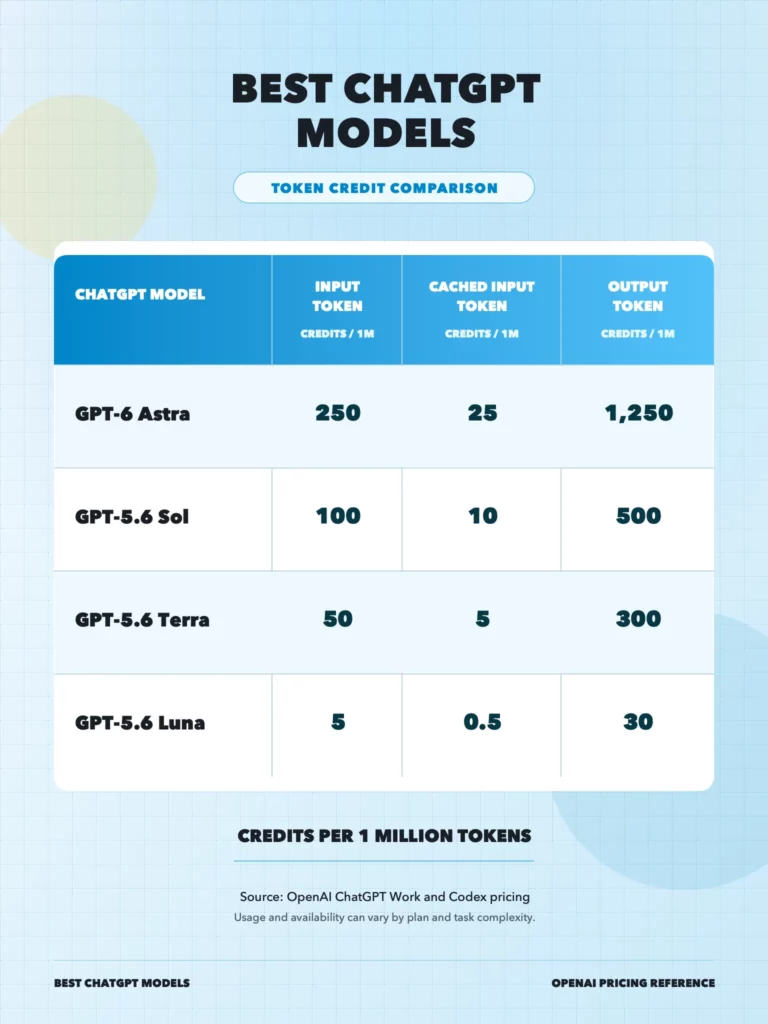
Cost and token use: According to OpenAI’s ChatGPT Work and Codex pricing, Astra uses the following rates on credit-based plans. The Plus estimate covers local messages in a five-hour period; actual usage changes with task complexity, context, reasoning, tool use, and caching.
| Metric | Astra usage |
|---|---|
| Input tokens | 250 credits per 1M tokens |
| Cached input tokens | 25 credits per 1M tokens |
| Output tokens | 1,250 credits per 1M tokens |
| ChatGPT Plus local messages | 5-45 per 5 hours |
Examples include:
- Planning a complex product or platform migration.
- Investigating a difficult technical issue with many possible causes.
- Designing an AI agent that has to reason across several tools and data sources.
- Analyzing a long set of documents to identify decisions, risks, and gaps.
- Producing a detailed first draft of a technical strategy, then checking it against evidence.
Astra is valuable when it helps a team reach a useful answer with fewer review cycles. It should not be used automatically for every prompt. A short rewrite, simple classification task, or repetitive extraction workflow rarely benefits enough from the highest-capability model to justify the extra time or cost.
For important work, give Astra a clear brief. Include the goal, available evidence, constraints, decision criteria, and required output format. Ask it to state assumptions and identify missing information. That makes the result easier for a human reviewer to assess.
For a foundation on the systems that can plan and act across tools, read what AI agents are and how they work.
2. GPT-5.6 Sol: Best for Advanced Reasoning and Coding
GPT-5.6 Sol is the most capable model in the GPT-5.6 family. It is built for complex coding, computer use, research, and cybersecurity. Sol is a strong choice for developers and technical teams working on tasks that go beyond a single code snippet or a short question.
Cost and token use: According to OpenAI’s ChatGPT Work and Codex pricing, Sol uses the following rates on credit-based plans. The Plus estimate covers local messages in a five-hour period; actual usage changes with task complexity, context, reasoning, tool use, and caching.
| Metric | Sol usage |
|---|---|
| Input tokens | 100 credits per 1M tokens |
| Cached input tokens | 10 credits per 1M tokens |
| Output tokens | 500 credits per 1M tokens |
| ChatGPT Plus local messages | 10-100 per 5 hours |
Use GPT-5.6 Sol for:
- Debugging a multi-file issue where the root cause is unclear.
- Reviewing an architecture proposal and comparing technical trade-offs.
- Planning a complex integration across systems, APIs, or data sources.
- Building and testing an AI-assisted workflow with tools and structured outputs.
- Analyzing a technical specification, finding ambiguity, and proposing decisions.
Sol can provide a capable first pass, but it should work inside an engineering process. Developers still need to inspect diffs, run tests, check dependencies, and review any security-sensitive change. A model can suggest a plausible fix that does not match the repository’s constraints.
Teams creating customer-facing AI products also need more than a model call. They need authentication, data access rules, source retrieval, logging, monitoring, and evaluation. Designveloper’s guide to building an application like ChatGPT explains the product and delivery work around the model.
For a deeper view of the components that connect a model, tools, memory, and data sources, see this AI agent architecture diagram.
3. GPT-5.6 Terra: Best Balance of Intelligence and Cost
GPT-5.6 Terra is the balanced choice. OpenAI describes it as competitive with GPT-5.5 at a lower cost. It fits professional work that needs reliable analysis and strong writing but does not require the maximum capability of GPT-6 Astra or GPT-5.6 Sol on every request.
Cost and token use: According to OpenAI’s ChatGPT Work and Codex pricing, Terra uses the following rates on credit-based plans. The Plus estimate covers local messages in a five-hour period; actual usage changes with task complexity, context, reasoning, tool use, and caching.
| Metric | Terra usage |
|---|---|
| Input tokens | 50 credits per 1M tokens |
| Cached input tokens | 5 credits per 1M tokens |
| Output tokens | 300 credits per 1M tokens |
| ChatGPT Plus local messages | 25-200 per 5 hours |
Terra is a good fit for:
- Writing and revising structured business content.
- Creating product briefs, user stories, project plans, and meeting summaries.
- Comparing options against defined criteria.
- Summarizing documents and extracting action items.
- Supporting product, operations, marketing, and customer-success teams.
The main advantage is workflow fit. Most business tasks are neither trivial nor deeply technical. They need a model that follows instructions, works with supplied context, and produces an answer good enough for a person to use or review quickly. Terra offers that balance without treating every task as a frontier reasoning problem.
An illustrative example is a product manager preparing a release brief. Terra can turn research notes, user feedback, and feature constraints into a first draft with goals, scope, risks, and open questions. The product manager should still validate the source notes and make the product decisions, but the model can reduce manual preparation time.
4. GPT-5.6 Luna: Best for Fast and Cost-Sensitive Workloads
GPT-5.6 Luna is the fast, affordable model with the lowest cost in the GPT-5.6 family. It is the right option when a task is frequent, well defined, and easy to evaluate. Teams can use it to automate useful work without routing every request through a larger model.
Cost and token use: According to OpenAI’s ChatGPT Work and Codex pricing, Luna uses the following rates on credit-based plans. The Plus estimate covers local messages in a five-hour period; actual usage changes with task complexity, context, reasoning, tool use, and caching.
| Metric | Luna usage |
|---|---|
| Input tokens | 5 credits per 1M tokens |
| Cached input tokens | 0.5 credits per 1M tokens |
| Output tokens | 30 credits per 1M tokens |
| ChatGPT Plus local messages | 250-2,000 per 5 hours |
Typical Luna tasks include:
- Classifying or routing incoming support tickets.
- Extracting defined fields from forms, invoices, or messages.
- Producing short summaries from a fixed template.
- Tagging content, feedback, or product records.
- Turning unstructured text into a controlled JSON or table format.
Luna needs a narrower task definition than Astra, Sol, or Terra. State the valid categories, show examples, define an output schema, and tell the workflow what to do when confidence is low. If a request is unclear or a decision has material impact, escalate it to Terra, Sol, Astra, or a human reviewer.
This routing model can deliver better economics than using one large model for every task. A team can reserve high-capability models for exceptional cases while Luna handles the repetitive first layer of work.
How to Choose Between GPT-6 Astra, Sol, Terra, and Luna
Use the following questions to select the right model for a task.
- How complex is the problem?
Choose Luna when the input is predictable and the answer follows a fixed pattern. Choose Terra for most business work with moderate judgment. Choose Sol when the task requires difficult technical reasoning or advanced coding. Choose Astra when the problem is open-ended, has several dependencies, or needs the highest available capability.
Do not judge complexity by prompt length alone. A short question about an architecture decision can be more difficult than a long document summary. The key factor is how many assumptions, dependencies, and possible failure modes the model must handle.
- What does a mistake cost?
Use a stronger model and stricter review when a wrong answer could affect a customer, a financial outcome, production software, security, or a regulated decision. For a low-impact task such as initial tagging, a fast model and sample-based quality check may be enough.
The model should never be the only approval layer for an irreversible or high-impact action. A clear escalation path turns uncertain output into a review task instead of an unnoticed error.
- What matters more: speed, quality, or cost?
Luna is the choice when speed and unit cost matter most. Terra is the balanced option when output quality and efficient review matter. Sol is for complex tasks where quality is worth more response time. Astra is for the hardest work where the team needs the strongest model available.
Set an acceptance target before testing. Measure task success, time to useful output, reviewer edits, latency, and cost per completed task. A model that produces a stronger answer but creates more review work is not always the best production model.
- Does the task need current or private information?
No model should be treated as a complete source of changing facts or private company knowledge. Supply the current source material, connect an approved retrieval system, or ask the model to identify what it cannot verify. For private documents, the team also needs access controls, source citations, audit logs, and a retention policy.
A retrieval-augmented generation (RAG) system can give the model the right evidence at response time. For complex knowledge bases, read Designveloper’s comparison of Vector RAG vs. Graph RAG to understand when semantic search and relationship-aware retrieval solve different problems.
Best ChatGPT Models by Use Case
The table below translates model capability into a direct recommendation.
| Use case | Recommended model | Reason |
|---|---|---|
| Difficult end-to-end analysis or advanced AI agent | GPT-6 Astra | Highest capability for broad, complex work |
| Complex codebase, integration, or technical investigation | GPT-5.6 Sol | Strong reasoning and coding capability |
| Product brief, business analysis, structured writing, team planning | GPT-5.6 Terra | Balanced quality and cost |
| Ticket classification, field extraction, routine summaries | GPT-5.6 Luna | Fast and economical for repeatable work |
| Mixed workflow with routine and difficult requests | Luna plus Terra, Sol, or Astra escalation | Matches model capability to task difficulty |
Previous ChatGPT Model Versions
ChatGPT has used several model generations before the current GPT-6 Astra and GPT-5.6 lineup. These earlier models matter when a team maintains an existing workflow, compares output quality over time, or updates a saved configuration. They should not automatically be treated as the best choice for a new task.
| Model generation | Why it matters today |
|---|---|
| GPT-3.5 | Powered the original public ChatGPT experience and remains a useful reference point for the earlier generation of large language models. |
| GPT-4 and GPT-4 Turbo | Introduced a stronger generation of reasoning and multimodal capability than GPT-3.5. |
| GPT-4o | Made fast, multimodal interactions a central ChatGPT use case, particularly for text, image, and audio work. |
| GPT-4.1 | Focused on coding, instruction following, and long-context work in developer workflows. |
| O-series models | Provided reasoning-focused options for difficult math, science, coding, and multi-step analysis. |
| GPT-5, GPT-5.1, GPT-5.2, and GPT-5.3 | Developed the GPT-5 generation before the current GPT-5.6 family. |
| GPT-5.4 and GPT-5.5 | Appear as earlier options in OpenAI’s model documentation; GPT-5.4 and GPT-5.4 mini retired from Codex on August 31, 2026. |
Model retirement does not always mean an API workflow stops immediately, and availability can differ by product surface. Before updating a saved agent, custom configuration, or scheduled task, check the current model picker and the applicable OpenAI documentation. For ChatGPT sign-in to Codex, OpenAI’s current guidance is to replace gpt-5.4 with gpt-5.6-terra and gpt-5.4-mini with gpt-5.6-luna.
ChatGPT Models vs. API Models
ChatGPT is a ready-to-use product for conversation, file work, research, and individual productivity. The API gives development teams the ability to build their own application, select models, connect tools, control data access, and measure performance.
The official model page confirms that Astra, Sol, Terra, and Luna are available in the ChatGPT desktop app, ChatGPT web, Codex CLI, Codex IDE extension, and through the API. Codex cloud currently supports Sol among these four models; it does not list Astra, Terra, or Luna. Model availability can change with rollout and account access.
The same model family can serve different purposes across these surfaces. A user may choose a model in the ChatGPT picker for a one-off task. A product team may use the API to route requests: Luna for routine classification, Terra for standard assistant responses, Sol for complex technical cases, and Astra for rare, difficult investigations.
An API implementation needs controls that the ChatGPT interface does not create for a business automatically. Teams should define authentication, user permissions, prompt templates, retrieval sources, evaluation cases, rate limits, failure handling, and human approval points before launch. Designveloper’s guide to AI agent governance explains the policies and oversight an organization should define around these systems.
Common Mistakes When Choosing a ChatGPT Model
Model selection fails when teams choose a model by name or perceived capability instead of matching it to a defined task, evidence, and review process. The following mistakes can increase cost, slow delivery, or make unreliable output harder to detect.
- Using Astra for every prompt
The strongest model can be unnecessary for routine work. Overusing it adds latency and cost without improving a simple answer. Use it where difficult reasoning creates real value.
- Using Luna for an ambiguous decision
Luna works best with clear rules and measurable output. It should not make a complex product, financial, policy, or security decision without a stronger model and human review.
- Treating ChatGPT output as final evidence
Ask the model to organize evidence, identify gaps, and draft an answer. Then verify material claims against the underlying sources. This is especially important for current facts, compliance, contracts, security, and financial decisions.
- Choosing a model before defining the workflow
The business goal should lead the decision. Define the user task, data sources, action to take, and quality target before selecting a model. A model name cannot solve an unclear process.
FAQs About the Latest ChatGPT Models
Is GPT-6 Astra better than GPT-5.6 Sol?
GPT-6 Astra is the higher-capability option for the most difficult end-to-end work. GPT-5.6 Sol remains a strong frontier choice for advanced reasoning and software engineering. Use Astra when the extra capability is necessary; use Sol when it provides the required quality with a better workflow fit.
Which GPT-5.6 model should a business use?
Most businesses should start with GPT-5.6 Terra for general professional work and GPT-5.6 Luna for repeatable, high-volume tasks. Add GPT-5.6 Sol for difficult technical work and GPT-6 Astra for the hardest cases that need the highest available capability.
Which ChatGPT model is best for coding?
GPT-5.6 Sol is a strong choice for complex coding, debugging, and technical investigation. GPT-6 Astra can help on the hardest end-to-end engineering tasks. Developers should still inspect generated changes, run tests, and review security-sensitive work.
Are all latest ChatGPT models available on every plan?
No. Access depends on rollout, sign-in method, and client. Confirm availability in the ChatGPT model picker before making an account-specific recommendation.
Conclusion
The best ChatGPT models in 2026 serve different jobs. GPT-6 Astra handles the hardest end-to-end tasks. GPT-5.6 Sol supports advanced reasoning and coding. GPT-5.6 Terra provides a practical quality-cost balance, while GPT-5.6 Luna handles fast, repeatable workloads.
Designveloper is an AI-first software and automation partner that helps businesses turn model capability into production-ready workflows. Talk to the Designveloper team about an AI assistant, document workflow, or AI-powered product built around your operating needs.
Model names, capabilities, and access can change. This draft was fact-checked against OpenAI’s official Models documentation, which covers the ChatGPT desktop app, ChatGPT web, and Codex. Before publishing, confirm the model picker for the relevant account because availability depends on rollout, sign-in method, and client. This article was reviewed on September 15, 2026.
Also published on

Share post on










Related Articles



AI Agent Architecture Diagrams: Components, Patterns, and Design Steps
AI Agent Architecture Diagrams: Components, Patterns, and Design Steps Published September 29, 2026
Best Open-Source Vector Database In 2026: 10 Options Compared
Best Open-Source Vector Database In 2026: 10 Options Compared Published September 29, 2026
vLLM Tutorial: Install, Run Inference, and Serve an API
vLLM Tutorial: Install, Run Inference, and Serve an API Published September 29, 2026



















