
















What Is a CI/CD Pipeline? How Modern Teams Turn Code Into Reliable Releases

KEY TAKEAWAYS:
- A CI/CD pipeline is the automated delivery path that moves code from commit to release through repeatable build, test, deployment, and feedback steps.
- Continuous integration helps teams merge and validate changes early, while continuous delivery helps keep software ready to release with less manual friction.
- Well-designed pipelines improve speed, quality, release confidence, and security by reducing fragile handoffs and catching problems sooner.
- The best pipelines are not just tool choices. They depend on clear trigger design, test strategy, deployment rules, and monitoring after release.
Software teams do not usually struggle because they write code too slowly. They struggle because code moves too slowly after it is written. Manual handoffs, late testing, and risky deployments create delays, which is why more teams now ask what a CI/CD pipeline actually is in practical terms.
The short answer is simple. A CI/CD pipeline is the delivery system that moves code from commit to release through repeatable automation. It helps teams test earlier, deploy with less drama, and learn faster from production. If your team is also mapping this into a broader release model, it helps to understand how Agile and DevOps work together around the same delivery loop.
The shift is not small. GitHub reported 11.5 billion total GitHub Actions minutes in public projects in 2025, while CircleCI based its 2025 delivery research on more than 14 million workflows. Modern delivery now depends on automation at scale, not on release-day heroics.
See more:
- Agile Vs Scrum: What’s the Difference and When to Use Each?
- What Is Agile Software Development? Methodologies and Benefits
- Agile Vs. Waterfall Vs. Scrum Vs. Kanban: Key Differences
What Is A CI/CD Pipeline?
A CI/CD pipeline is an automated workflow that moves code through build, test, release, deployment, and feedback steps in a repeatable way. Instead of waiting for a large manual release, teams let automation validate each change as it moves forward.
The pipeline often begins when a developer pushes code to a shared repository. From there, it can run linting, building, testing, packaging, deployment, and post-release checks. OWASP describes CI/CD as a largely automated set of processes used to build and deliver software, which matters because CI/CD is not one tool. It is a delivery system made of triggers, rules, environments, and feedback loops.
Good pipelines do three jobs at once. First, they reduce manual work. Second, they create a reliable path from code to production. Third, they make software delivery measurable. Teams can see where builds fail, where tests slow down, and where releases need stronger controls.

The visual path below summarizes those automated checkpoints from commit to release.
That is why the word pipeline fits so well. Code does not jump straight from a laptop to production. It flows through checkpoints, and each checkpoint protects quality, speed, and trust.
What Do CI And CD Mean?
To understand the full pipeline, it helps to separate the two ideas inside the acronym. Continuous integration and continuous delivery solve different parts of the same release problem.
1. What Is Continuous Integration (CI)?
Continuous integration means developers regularly merge code changes into a shared repository, then validate those changes with automated builds and tests. In simple terms, teams integrate early and often instead of saving work for a painful merge later. manage smaller changes with shared integration habits.
CI solves a common delivery problem. When people work in isolation for too long, code drifts apart, merge conflicts grow, and hidden bugs pile up. CI cuts that risk by forcing smaller changes through fast validation.
A healthy CI practice usually includes a few habits:
- Small and frequent commits.
- Automated builds on every push or pull request.
- Fast unit and integration tests.
- Clear failure signals when something breaks.
- A shared main branch that stays usable.
CI also shapes team behavior. Developers learn to break work into smaller units, reviewers get cleaner pull requests, and teams spot defects closer to the moment they were introduced.
2. What Is Continuous Delivery (CD)?
Continuous delivery takes the validated output from CI and pushes it toward release readiness through automated build, test, configuration, and deployment steps. The central idea is readiness. A team using continuous delivery keeps software in a state that can go live at any time.
Code passes through staging, approvals, environment checks, and release rules in a repeatable way. Humans may still decide when production deployment happens, but the deployment itself should not depend on scattered scripts or guesswork.
Continuous delivery reduces release friction. Instead of bundling many changes into one risky event, teams push smaller updates through the same release path over and over again. That makes problems easier to isolate and easier to reverse.
It also supports safer rollout patterns. Teams can deploy to staging first, test smoke checks, expose only a small user segment, and then expand the release if metrics stay healthy.
3. Continuous Delivery Vs Continuous Deployment
These two terms sound close because they are close, but they are not identical. The real difference sits at the last step of the flow.
| Practice | What Happens | Human Approval |
|---|---|---|
| Continuous Delivery | The pipeline builds, tests, and prepares a release for production. | Usually yes, before the final production step. |
| Continuous Deployment | The pipeline builds, tests, and deploys to production automatically. | No, unless a failed rule blocks the release. |
Delivery means the software stays ready to release. Deployment means the software goes live automatically after it passes the rules.
Many companies begin with continuous delivery because it gives them strong automation while still leaving room for business approvals, support coordination, or compliance review. Teams often move toward continuous deployment later, once their tests, controls, and monitoring become strong enough.
How CI/CD Pipelines Relate To DevOps
CI/CD is not the same thing as DevOps. It is one of the clearest ways to put DevOps into practice.
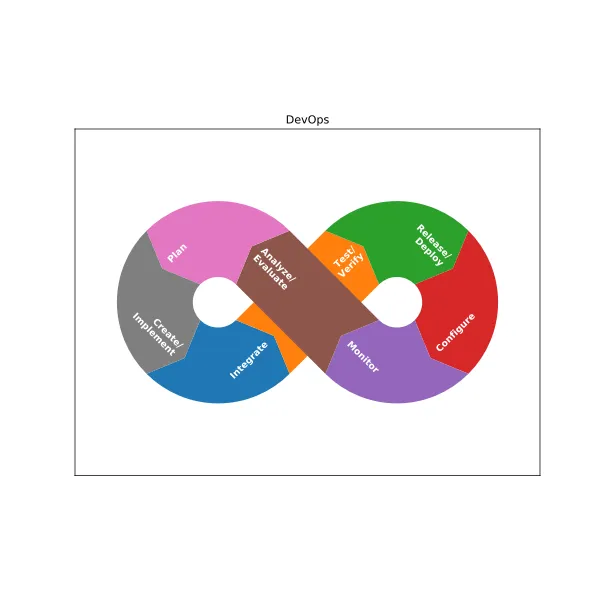
The diagram shows how collaboration, automation, and feedback connect rather than compete.
Further reading:
- What Is DevOps? The DevOps Lifecycle And How It Works
- DevOps Pipeline: A Complete Guide To Building One
- DevOps Best Practices: 10 Ways To Improve Speed And Reliability
DevOps is broader than automation. It changes how development, operations, security, and product teams work together. It promotes shared responsibility, faster feedback, and continuous improvement, while CI/CD gives those ideas a working delivery engine.
The relationship works like this:
- DevOps sets the operating model.
- CI/CD provides the delivery workflow.
- Infrastructure as code, observability, and policy controls support the pipeline.
- Monitoring closes the loop after release.
So when leaders ask whether they need DevOps or CI/CD, the better answer is usually both. DevOps shapes how the team collaborates. CI/CD shapes how the software moves.
How A CI/CD Pipeline Works
A pipeline works best when each stage has a clear job, a clean trigger, and a fast feedback path. The core idea is not complexity. It is dependable movement from change to release.
1. Code Changes Trigger The Pipeline
A pipeline usually begins with an event in version control. That event might be a push, a pull request, a tag, or a merge to the main branch.
This trigger matters because it removes delay. Teams do not wait for someone to remember the next step. The pipeline reacts right away, which gives developers quick feedback while the change still feels fresh.
Most teams use different triggers for different goals. A pull request may run linting, unit tests, and preview builds. A merge to main may build the release artifact and deploy to staging. A version tag may deploy to production.
Good trigger design keeps the pipeline fast and relevant. It does not run every expensive test on every minor event. Instead, it runs the right checks at the right stage.
2. Build And Test Steps Validate The Release
After the trigger fires, the pipeline builds the application and runs automated checks. This stage often includes dependency installation, compilation, packaging, unit tests, integration tests, code quality checks, and artifact creation.
Fast feedback is the goal. CircleCI’s 2025 research showed a median workflow duration of 2 minutes and 43 seconds, while many teams still ran much slower workflows than that benchmark. When feedback comes too late, developers lose context and defects cost more to fix.
Build and test steps should answer one simple question: can this change move forward safely? If the answer is no, the pipeline should fail fast and explain why.
That is also why test layering helps. Unit tests catch logic errors early. Integration tests check service boundaries. End-to-end tests confirm user journeys. Security and dependency scans add another quality gate before release.
3. Deployment Automation Moves Code Across Environments
Once the artifact passes validation, the pipeline promotes it across environments. A common path is development to staging to production. The same validated build should move forward with as little manual rework as possible.
Strong deployment automation reduces environment drift. Teams avoid the classic problem where code works in staging but fails in production because someone changed settings by hand. Instead, the pipeline applies the same deployment logic every time.
Modern teams also use safer rollout methods. They may push to a canary group first, route only part of the traffic to the new version, or use blue-green environments for quick cutover and rollback. These patterns help teams limit blast radius while still shipping often.
This is where continuous delivery becomes visible to the business. Releases stop feeling like special events and become normal, repeatable operations.
4. Monitoring And Feedback Improve Future Releases
A release is not the end of the pipeline. It is the start of feedback. Teams need logs, metrics, traces, alerts, and user signals to see whether the new version behaves as expected.
Monitoring turns production into a learning system. If latency rises, error rates spike, or business conversions fall, the team can respond fast. They can roll back, disable a feature flag, or tighten a weak test that failed to catch the issue earlier.
This feedback loop is one reason CI/CD improves over time. Every incident can refine the pipeline. Teams add new checks, shorten slow steps, and remove fragile manual handoffs.
That ongoing learning matters because software delivery is never static. Systems grow, teams change, requirements shift, and the pipeline has to evolve with them.
Key Stages Of A CI/CD Pipeline
Most pipelines share the same core stages even when the tools differ. The stages below turn source code into a monitored release.

The table maps each stage to the outcome teams should expect before promotion.
| Stage | Main Goal | Typical Output |
|---|---|---|
| Source | Capture versioned code and trigger rules | Commit, branch, pull request, or tag |
| Build | Turn source into a runnable artifact | Binary, package, or container image |
| Test | Validate quality, behavior, and security | Pass or fail results |
| Release | Version, sign, and approve the artifact | Release candidate |
| Deploy | Promote the artifact to target environments | Running application |
| Monitor | Track health and user impact | Metrics, logs, alerts, and insights |
Continue reading:
- Software Development Life Cycle (SDLC): Guide for Business
- What Is Software Development and the Software Development Process?
- 10 Agile Development Best Practices And Templates
Those guides show how pipeline stages fit the wider software lifecycle and delivery practices.
1. Source
The source stage starts with version control. Teams store code, pipeline files, and often infrastructure definitions in the same repository or in connected repositories. This stage creates traceability because every build should map back to a known commit, author, review, and change record.
Strong source practices keep the pipeline clean. Branch rules, pull request reviews, signed commits, and protected main branches all reduce chaos before automation even begins.
2. Build
The build stage converts source code into a package that environments can run. That may be a compiled binary, a Java archive, a Node package, or a container image. The build should stay reproducible so the same input creates the same output.
This stage often includes dependency resolution and artifact packaging. For cloud-native teams, it may also build and tag a container image and push it to a registry.
3. Test
The test stage checks whether the build deserves promotion. Teams usually combine several kinds of tests here. Unit tests verify functions, integration tests verify connections, end-to-end tests verify user flows, and security tests check dependencies, secrets, images, and infrastructure definitions.
The best pipelines balance depth and speed. Not every test belongs in the first minute, but every change should meet a clear quality bar before it moves ahead.
4. Release
The release stage prepares a version for controlled deployment. Teams may add version numbers, create changelogs, sign artifacts, store metadata, or apply an approval gate. This stage is useful because it separates build success from release readiness.
For regulated teams, release also creates an audit trail. Teams can show what changed, who approved it, and what artifact went live.
5. Deploy
The deploy stage places the release into a target environment. That may be a staging slot, a virtual machine, a serverless platform, or a Kubernetes cluster. Good deployment automation keeps the action predictable and reversible.
Deployment also includes environment rules. Teams may inject secrets at runtime, run database migrations, start smoke tests, or block rollout if health checks fail.
6. Monitor
The monitor stage tracks system health and business impact after release. Teams watch error rates, latency, resource use, and user behavior. If the release causes harm, the pipeline should support rollback or rapid remediation.
This stage often gets less attention than build and deploy, but that is a mistake. A pipeline without monitoring cannot tell the team whether a release actually succeeded.
Benefits Of CI/CD Pipeline
A strong pipeline does more than automate tasks. It changes delivery economics by lowering waiting time, shrinking batch size, and making quality checks repeatable.
Faster Release Rates. CI/CD removes the stop-and-start pattern of manual releases. When teams rely on one repeatable path, throughput improves without needing release-day heroics.
Improved Software Quality. Frequent integration and repeatable testing catch defects closer to the change that caused them. Main-branch success rates, recovery speed, and test stability become visible instead of hidden.
Lower Risk. Smaller changes are easier to review, test, deploy, and roll back. Teams no longer bet an entire release on one giant batch of mixed features and fixes.
Increased Productivity. Standardized pipelines reduce handoff friction because new developers do not need to learn a maze of manual release steps before they can contribute safely.
These benefits reinforce each other. Faster feedback improves quality. Better quality reduces rework. Lower rework creates more time for actual product work.
How CI/CD Pipelines Support Security
CI/CD can improve security, but only when teams design it that way. A fast pipeline without strong controls can move risk faster instead of reducing it.
Security checks work best when they become normal gates in that release path.
Related reading:
- Custom Software Development: How It Can Drive Your Business Growth
- 13 Different Types of Software Development Services
- What Is a Web Application (Web App)? Is It the Same as Website?
Automated security checks in the pipeline. Teams can run static analysis, dependency scanning, secret detection, container image scanning, and infrastructure-as-code checks before a release moves ahead. This catches common problems while developers still work in the same context.
Early detection of vulnerabilities. Security becomes stronger when checks happen on pull requests and builds, not only during a later audit. That shortens feedback loops and makes remediation easier to absorb.
Better policy enforcement before production release. Pipelines can require approvals, signed artifacts, branch protections, minimum test coverage, or environment-specific rules. They can also block deployments when permissions look unsafe or when a critical dependency issue remains unresolved.
Safer delivery through integrated testing and compliance checks. Security works best when it joins the normal release path. Teams should not bolt it on later. Secure credential handling, artifact integrity validation, least-privilege runners, and strong flow controls all belong inside the pipeline design itself.
In short, CI/CD supports security when teams treat the pipeline as production infrastructure, not as a helper script.
CI/CD Pipeline Tools And Configuration
No single tool stack fits every team. Some teams want tight integration with their source platform. Others need strong on-prem support, complex approvals, or cloud-native delivery patterns. The right choice depends on team size, compliance needs, hosting model, and existing skills.
1. Source Control Tools
Source control tools manage repositories, pull requests, branch rules, and event triggers. Common choices include GitHub, GitLab, Bitbucket, and Azure Repos. The key requirement is not the brand. It is the ability to support reviews, permissions, auditability, and reliable pipeline triggers.
Teams should keep pipeline files under version control too. That makes the delivery process reviewable and reproducible. When pipeline rules live beside code, change history becomes much easier to trace.
2. CI/CD Automation Tools
Automation tools run the workflow itself. Common options include GitHub Actions, GitLab CI/CD, Jenkins, CircleCI, and Azure Pipelines. These platforms differ in runner models, integrations, caching, secrets handling, governance features, and self-hosting support.
When choosing one, compare these factors:
- How close the tool sits to your repository and issue workflow.
- How easy it is to manage reusable pipeline templates.
- How well it handles secrets, permissions, and approvals.
- How much control you need over runners and infrastructure.
- How strong its reporting and debugging experience feels.
Configuration matters as much as product choice. Teams should define pipelines as code, keep steps modular, and make failures readable. A confusing pipeline slows delivery even when the platform is powerful.
3. Testing Tools
Testing tools validate different layers of the system. Unit test tools may include JUnit, pytest, or Jest. Browser and end-to-end testing may use Playwright or Cypress. API checks may use Postman or Newman. Security testing may add dependency, secret, infrastructure, and image scanners.
The main goal is coverage that matches risk. A simple web app does not need the same checks as a regulated platform, but every pipeline does need a clear test strategy.
4. Container And Deployment Tools
Modern teams often package applications with Docker and deploy them through tools such as Kubernetes, Helm, Argo CD, or cloud-native deployment services. These tools support image builds, environment promotion, rollout policies, and rollback logic.
For cloud-native systems, deployment tooling often decides whether releases stay safe under scale. Teams should also think about configuration drift. Using deployment manifests, templates, and GitOps-style promotion reduces surprise changes between environments.
5. Monitoring Tools
Monitoring tools close the release loop. Teams often combine logs, metrics, traces, dashboards, and alerting. Common choices include Prometheus, Grafana, Datadog, New Relic, CloudWatch, and OpenTelemetry-based stacks.
The pipeline should connect to these signals. A deployment without health visibility is only half a release. Good monitoring lets teams decide whether to continue rollout, pause, or roll back based on evidence instead of hope.
CI/CD Pipeline Example
The examples below show one web application flow and one cloud-native release path.

Real pipeline examples are useful because they show how automation moves through actual code, environments, and release decisions rather than staying at definition level.
1. Example For A Web Application
Imagine a team maintaining an ecommerce web app with a React frontend and a Node.js backend. The team stores code in Git, and every pull request triggers a CI workflow.
The flow may look like this:
- A developer opens a pull request.
- The pipeline installs dependencies, runs linting, and executes unit tests.
- If checks pass, it builds a preview version for review.
- After merge, the pipeline builds the production artifact and deploys it to staging.
- Smoke tests verify core paths such as login, cart, and checkout.
- A release manager approves the production deployment.
- The pipeline deploys the same artifact to production and watches error metrics.
This example shows why CI/CD reduces release stress. The team does not rebuild by hand for production. It promotes the same tested output forward. If checkout errors spike after release, the team can roll back quickly and inspect the exact build that caused the issue.
2. Example For A Cloud-Native Application
Now imagine a cloud-native payment service built with Go and deployed on Kubernetes. The team uses container images and Git-based deployment rules.
A practical pipeline may work like this:
- A commit to the main branch starts the build.
- The pipeline compiles the service and runs unit and integration tests.
- It builds a container image, scans it, and pushes it to a registry.
- It updates the deployment manifest for staging.
- Argo CD or a similar tool syncs the cluster to the new desired state.
- Health checks and service metrics decide whether rollout continues.
- If the release stays healthy, the pipeline promotes the version to production.
This setup fits distributed systems well because it keeps deployment logic declarative and supports progressive rollout, policy checks, and fast rollback when a new version degrades service health.
FAQs About CI/CD Pipelines
1. What Is The Difference Between CI And CD?
CI focuses on integrating code changes frequently and validating them with automated builds and tests. CD takes the validated output and moves it toward release or deployment through automated delivery steps. CI checks that code works together, while CD checks that it can move safely toward users.
2. What Is The Difference Between DevOps And CI/CD?
DevOps is the broader operating model. It covers culture, team collaboration, shared ownership, reliability, and feedback. CI/CD is one delivery practice inside that model. DevOps tells teams how to work together. CI/CD gives them an automated path to ship software.
3. What Are The Core Principles Of CI?
The core principles are simple:
- Integrate small changes often.
- Keep code in a shared repository.
- Run automated builds and tests on every change.
- Fix broken builds fast.
- Keep the main branch healthy and releasable.
These principles reduce integration pain and create faster feedback.
4. Is CI/CD Used In Frontend Or Backend Development?
Yes. Teams use CI/CD in frontend, backend, mobile, data, and infrastructure work. Frontend teams use it for linting, browser tests, preview deployments, and static builds. Backend teams use it for API tests, package builds, container images, and service deployments. The pattern stays the same even when the stack changes.
A CI/CD pipeline is not just a DevOps buzzword. It is the release path that lets modern teams turn code into dependable delivery. When teams design that path well, they ship smaller changes, catch problems sooner, protect production better, and learn faster after every release.
If a team still handles releases through manual checklists, scattered scripts, and last-minute approvals, that is usually the biggest improvement opportunity. Start with one repeatable pipeline, keep it visible, and improve it every sprint. That is how software delivery becomes reliable instead of stressful.
Conclusion
A strong answer to what a CI/CD pipeline is can stay simple. It is the delivery system that helps teams ship smaller changes, test earlier, and release with less risk. Speed matters, but confidence matters more. When teams build pipelines well, they reduce fragile handoffs, catch issues sooner, and turn releases into a repeatable process instead of a stressful event.
At Designveloper, we build that reliability into products from day one. Our team works across product engineering, release workflow design, web development, mobile delivery, and AI-oriented business software, so delivery is treated as part of the product system rather than an afterthought.
When a business needs faster and safer releases, the real goal is not simply to add one more automation tool. It is to design the right pipeline for the product, team, and infrastructure. If you are planning that next step, our software development services can help turn that delivery model into working software with stronger release control and fewer surprises.
Also published on

Share post on










Related Articles



Types of Agile Development Methodology: Key Approaches Compared
Types of Agile Development Methodology: Key Approaches Compared Published October 14, 2026
Agile Methodology Testing: Lifecycle, Quadrants & Team Practices
Agile Methodology Testing: Lifecycle, Quadrants & Team Practices Published October 13, 2026
What Is an Agile Team? Structure, Roles, and How to Build One
What Is an Agile Team? Structure, Roles, and How to Build One Published October 13, 2026


















