
















What Is DevOps? The DevOps Lifecycle And How It Works

KEY TAKEAWAYS:
- DevOps is a delivery model built around shared ownership between development and operations, with automation, feedback, and cross-functional collaboration running through the full software lifecycle.
- Its biggest practical strengths come from CI/CD, small releases, Infrastructure as Code, monitoring, and continuous feedback rather than from tooling alone.
- DevOps matters because it helps teams ship faster without giving up reliability, quality, or operational visibility.
- Successful adoption depends on culture, process standardization, and gradual automation, not just installing popular DevOps tools.
Software teams today are expected to build things, fix issues, and deploy fast. That’s why many adopt DevOps to accelerate feature testing and release workflows, often alongside Agile software development practices that keep iteration cycles short and responsive.
So, what is DevOps, exactly? How can DevOps help teams deploy faster while still maintaining quality? This guide breaks down the idea, the working model behind it, and the practical steps teams use to make it work in real software environments.
In this guide, we’ll provide you with the essentials of DevOps, including what it really means, why it matters in modern software development, the cultural philosophy behind it, how it works in practice, the core practices and tools involved, and how to adopt it effectively in your organization.
See more:
- What Is A DevOps Engineer? Skills And How To Become One
- Agile Vs DevOps: Key Differences And How Do They Interrelate
- DevOps Best Practices: 10 Ways To Improve Speed And Reliability
What Is DevOps?
DevOps is a way of building and delivering software where development and operations teams don’t work in isolation anymore but continuously work together. The operations side often includes the people responsible for running, deploying, and maintaining software after it’s built, such as system administrators or site reliability engineers.
In more traditional software models, development teams would write code and hand it off late to operations. If problems appeared near release time, both sides had to circle back, fix issues under pressure, and stretch the feedback loop even longer. That slows delivery and makes releases harder to trust.
DevOps addresses those issues by letting development and operations work alongside each other throughout the full lifecycle, from planning to monitoring. It encourages continuous integration, frequent releases, and fast feedback so teams can catch problems earlier and deliver better software faster.
Why DevOps Matters
The DevOps market has grown quickly. According to Research and Markets, it is expected to reach $18.77 billion by 2026, with a projected CAGR of 25.8% through 2030. That growth reflects how more companies are leaning into DevOps to meet constant pressure for speed without compromising stability, security, or user experience.

The growth is a response to a simple pressure: ship quickly without making production less predictable.
So, why is DevOps so popular and important in the first place? Here are some reasons:
Faster Software Delivery And Time To Market
Traditional release cycles can take weeks or even months, partly because everything happens in separate phases.
DevOps improves that by helping development and operations teams deliver smaller, more frequent releases together. It also relies on practices like continuous integration and continuous delivery to test and integrate code changes almost immediately after they are written. That helps teams spot issues sooner, gather feedback faster, and deploy with less delay.
Better Reliability, Quality, And Stability
DevOps supports faster software delivery without sacrificing quality. It allows teams to automate testing, monitor systems in real time, and gather feedback early, which helps identify issues before they grow into larger problems.
Instead of discovering bugs only at the end of a long cycle, teams use continuous testing and monitoring throughout development. That way, they notice when something drifts off track and can respond much faster.
Stronger Collaboration Across Teams
DevOps changes the way people work together. Traditionally, development and operations teams had different priorities. Developers focused on features, while operations focused on system stability, and both worked in separate phases.
DevOps encourages shared responsibility and open communication so teams work toward the same outcomes instead of pulling in different directions. Developers become more aware of how code behaves in production, while operations gets involved earlier in design and release planning.
Greater Agility In Modern Software Development
DevOps also increases the ability to adapt quickly without losing structure. It makes processes more flexible by helping teams release smaller, more frequent parts of software, test ideas faster, gather feedback earlier, and refine features without destabilizing the entire system.
That is one reason DevOps fits naturally with Agile delivery. If your team is still mapping the boundary between planning frameworks and release practices, the article on Agile and DevOps helps clarify how those two models support each other.
DevOps Cultural Philosophy
DevOps isn’t just about pipelines, methods, and tools. It’s also about how people think, communicate, and work together over time.
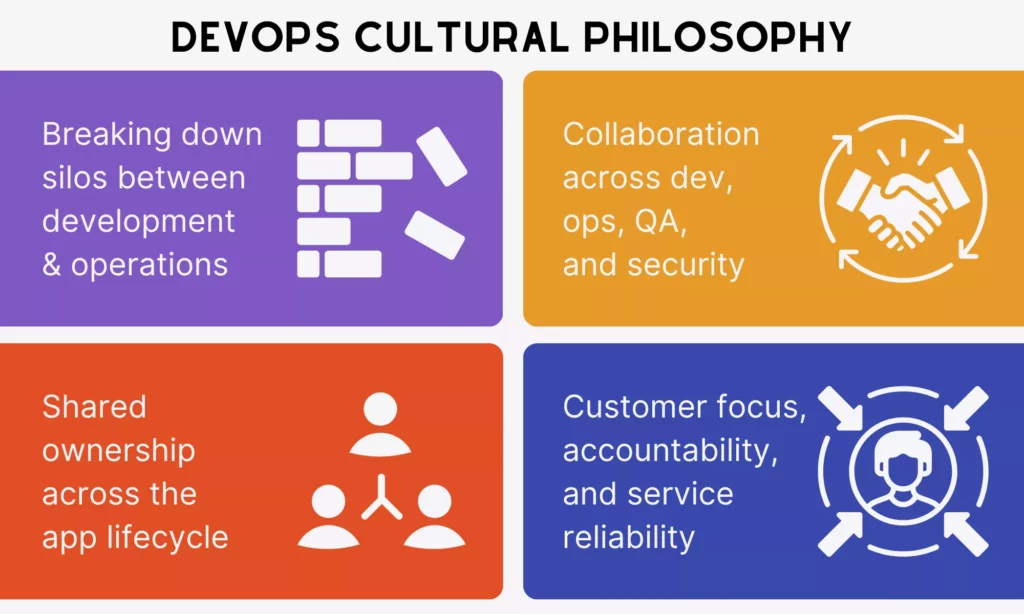
The practices below show how that culture changes ownership, collaboration, and accountability.
Further reading:
- Software Development Life Cycle (SDLC): Guide for Business
- Agile Vs Scrum: What’s the Difference and When to Use Each?
- Agile Vs. Waterfall Vs. Scrum Vs. Kanban: Key Differences
Those guides are useful when teams are aligning DevOps culture with a wider delivery model.
Breaking Down Silos Between Development And Operations
Traditionally, development and operations teams worked in separate phases. Developers wrote code, and operations deployed and maintained it. This often led to miscommunication, delays, and a late understanding of production risk.
DevOps tries to remove those silos by encouraging cross-functional teams, shared KPIs, common documentation, and unified workflows. In practice, teams often rely on shared planning and delivery tools such as Jira in Agile environments to make work visible from planning through release.
Shared Ownership Across The Application Lifecycle
Another key idea in DevOps is shared ownership. In older setups, responsibility was segmented. Developers owned the code, while operations owned the infrastructure. When something broke, blame often moved faster than the fix.
DevOps moves teams toward a common goal of delivering better quality faster. That shared ownership stretches from planning and testing to deployment, monitoring, and incident response.
Collaboration Across Development, Operations, QA, And Security
DevOps is not limited to developers and operations. It also expands to QA and security because modern software delivery is too complex for any one function to work in isolation.
QA gets involved early and continuously, while security practices move left into the development process instead of showing up only at the end. This creates a more cohesive workflow where teams communicate more often, share insights, and align on the same priorities.
Customer Focus, Accountability, And Service Reliability
DevOps ultimately aims to deliver value to users continuously. That is why its cultural philosophy centers on customer outcomes. Every change, update, or fix is measured by the impact it has on real user experience.
This also ties directly to accountability. When teams share ownership and collaborate closely, they become more responsible for whether a deployed feature works reliably in real conditions.
Continuous monitoring, quick incident response, and iterative improvement help keep services stable over time instead of treating operations as an afterthought.
How DevOps Works
So, how does DevOps work in practice? This is one of the most common questions for beginners who understand the idea but have not yet seen how all the moving parts connect. The easiest way to explain it is through the delivery pipeline and the feedback loop around it.
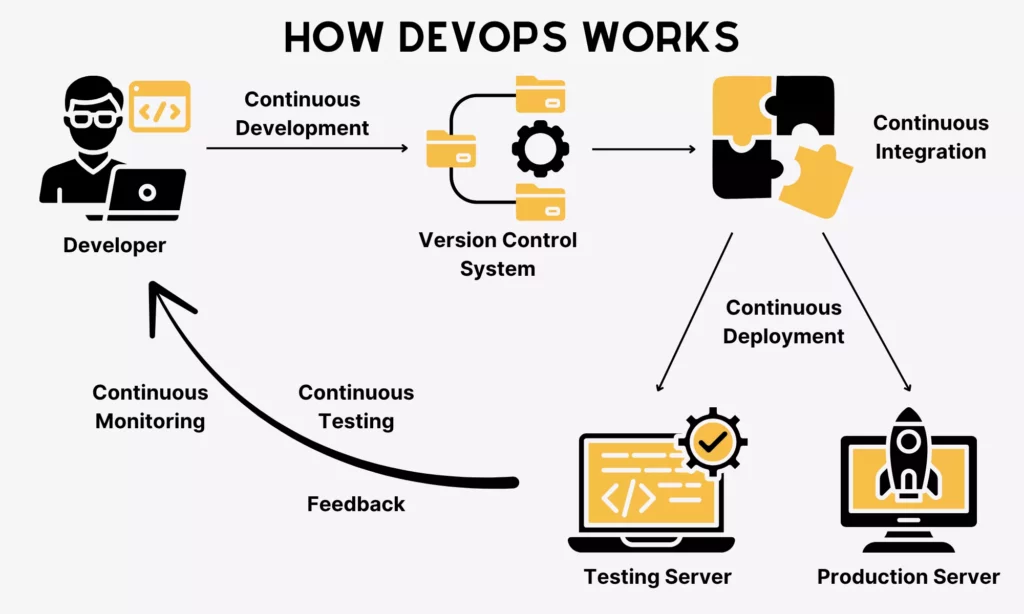
The lifecycle below connects each delivery stage to the feedback that improves the next cycle.
The DevOps Lifecycle Explained
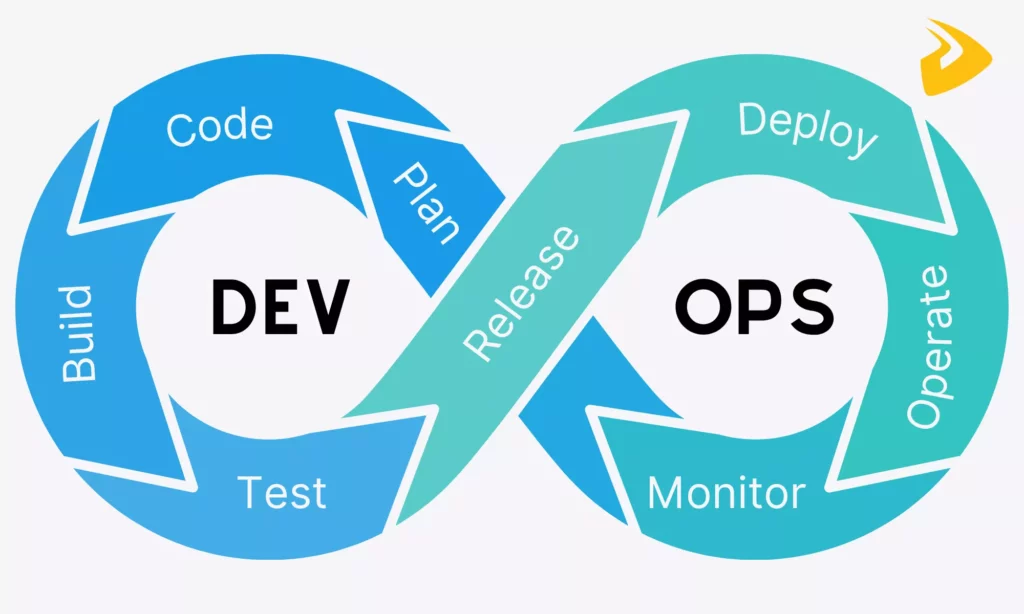
The DevOps lifecycle is a repeating loop that helps improve software products over time. Its core stages usually include planning, building, testing, releasing, deploying, operating, and monitoring.
- Plan: Product managers, developers, and operations define requirements, prioritize work, and clarify what must be built.
- Build: Developers write code and integrate it into shared repositories using version control systems.
- Test: QA engineers and automated tools validate functionality, performance, and security.
- Release: Teams prepare software for production and confirm it is stable enough to ship.
- Deploy: Operations or DevOps engineers move the software into production, often through automation.
- Operate: Once live, the team keeps the system running and maintains performance.
- Monitor: Monitoring tools capture system behavior, user activity, and possible issues, then feed that information back into future work.
How The DevOps Pipeline Connects These Stages
The DevOps pipeline connects these stages by automatically moving code from development into build, test, deployment, and monitoring workflows.
- Code → Build: When a developer commits code or opens a pull request, the pipeline can automatically trigger the build stage and compile the latest version into something usable.
- Build → Test: The build produces artifacts such as binaries or container images that move forward into testing instead of being rebuilt repeatedly.
- Test → Deploy: Automated and manual checks work as quality gates. If tests fail, the pipeline stops and alerts the team.
- Deploy → Monitor: After release, teams use monitoring and notifications to understand what is happening in production and feed that data back into the next cycle.
Continuous Feedback And Automation Across The Process
One of the biggest strengths of DevOps is that it combines automation with continuous feedback. Automation handles repetitive work such as integration, testing, and deployment, while feedback from monitoring, test results, and user behavior helps teams improve the next release.
- Continuous Integration/Continuous Delivery: Teams integrate, test, and deploy code continuously through automated pipelines.
- Continuous Testing: Automated tests run throughout the delivery process so problems surface early.
- Continuous Monitoring and Feedback: Real-time operational data helps teams understand performance, stability, and user impact after release.
Core DevOps Practices
Different teams may implement DevOps in different ways, but the workflow usually still centers on a few core practices that keep releases fast, observable, and reliable.

Together, these practices make delivery repeatable instead of dependent on release-day effort.
Frequent Small Releases
DevOps encourages small, frequent releases instead of large bundled updates. Smaller releases are easier to test, review, trace, and roll back if something goes wrong.
In real projects, teams may release daily, weekly, or even multiple times per day. That lowers the blast radius of each change and makes debugging far more manageable.
Continuous Integration And Continuous Delivery
Continuous Integration and Continuous Delivery are at the heart of modern DevOps. CI helps developers merge code into a shared repository regularly, while CD helps keep the codebase in a deployable state.
Every time code is committed, the pipeline can integrate it, run tests, and prepare a releasable version. This reduces late-stage merge problems and keeps the codebase closer to production readiness at all times.
Infrastructure As Code And Configuration Management
DevOps also relies heavily on Infrastructure as Code and configuration management. Instead of setting up servers and environments manually, teams define infrastructure through code or templates and let tools provision consistent environments automatically.
That consistency matters because it reduces configuration drift, lowers environment-specific errors, and makes scaling much easier.
Monitoring, Logging, And Observability
Once software is live, teams need to understand how it behaves in real conditions. Monitoring, logging, and observability practices help them track performance, analyze incidents, and understand why failures happen.
Dashboards, alerts, and logs help teams identify unusual behavior quickly, trace root causes more effectively, and improve reliability over time.
DevSecOps And Security Integration
The final core practice is security integration, often called DevSecOps. Instead of leaving security checks until the end, teams embed them directly into the delivery process.
That may include dependency checks, static analysis, compliance validation, and other automated security reviews that help teams identify issues early and treat security as a shared responsibility.
Benefits Of DevOps
With all of that in place, the practical benefits of DevOps become easier to see. Teams do not just move faster. They also work with better feedback, more repeatable delivery, and a clearer path from code to production.
- Speed: Automation helps teams release updates faster and respond more quickly to changing product needs.
- Reliability: Continuous testing, monitoring, and pipeline checks make systems more stable and easier to recover.
- Scalability: Infrastructure as Code helps teams replicate environments and manage growth more predictably.
- Collaboration: Developers, operations, QA, and security teams work more closely with shared responsibility.
- Efficiency: Automation reduces repetitive manual work so teams can focus more on product improvement and engineering quality.
DevOps Tools
To build, test, deploy, and run software more efficiently, teams need an infrastructure stack that combines platforms and technologies. Toolkits vary, but they usually center around a few core categories.

The categories below help teams choose tools by delivery stage rather than by brand popularity.
Explore more:
- DevOps Tools: Best Tools For Every Stage Of The DevOps Lifecycle
- DevOps Pipeline: A Complete Guide To Building One
- What Is Software Development and the Software Development Process?
Version Control Tools
Version control tools let teams track changes in code, collaborate safely, and keep a clear history of what changed and when.
In DevOps, developers use these tools to create branches, merge updates, and review code through pull requests. For a practical Git foundation, see what Git is and how it tracks a project. Web-based platforms like GitHub, GitLab, and Bitbucket then build collaboration, repository hosting, and pipeline integrations around that workflow.
CI/CD And Automation Tools
CI/CD and automation tools are the backbone of DevOps infrastructure. They handle repetitive tasks like building code, running tests, and deploying applications automatically.
Common examples include Jenkins, GitLab CI/CD, CircleCI, and Azure DevOps Pipelines. Their role is less about brand choice and more about turning manual release steps into reliable automated workflows.
Infrastructure As Code Tools
Infrastructure as Code tools help teams provision and manage environments through reusable configuration rather than manual setup. That supports consistency across development, testing, staging, and production.
Common choices include Terraform, AWS CloudFormation, and Pulumi for provisioning, along with tools like Ansible, Chef, and Puppet for configuration management.
Containerization And Orchestration Tools
Containerization tools package software and its dependencies into portable units so applications can run more consistently across environments.
Teams often use Docker, Kubernetes, Docker Swarm, or OpenShift to standardize runtime behavior and manage software at larger scale.
Monitoring And Observability Tools
Once software is deployed, teams rely on monitoring and observability tools to understand how it performs in real time. These tools collect metrics, logs, and traces, then surface them through dashboards, alerts, and analytics.
Popular options include Prometheus, Grafana, Elastic Stack, Datadog, and New Relic. Their shared purpose is to help teams understand what is happening inside systems and why.
How To Adopt A DevOps Model
Adopting DevOps is usually less about copying a tool stack and more about changing how work moves across teams. According to Harness, 69% of developers admit they waste time and even feel burned out because of slow or unreliable CI/CD pipelines. That shows how much delivery design still matters in practice.

The adoption steps below turn that intent into gradual culture, process, and automation changes.
There is no universal formula for adoption, but these steps are good starting points for teams building a more effective DevOps model.
Start With A Cultural Shift
Do not treat DevOps as just a process. It also has to become part of how the organization collaborates. Without a shift in mindset, even strong tools will struggle to fix deeper delivery problems.
Teams can automate deployments and build pipelines, but if they still work in silos or avoid shared responsibility, DevOps adoption usually stalls.
- Form cross-functional teams and align them on what DevOps means in practice.
- Promote shared responsibility between development and operations.
- Encourage open communication and regular cross-team planning.
- Involve operations earlier in delivery discussions.
- Support a blameless culture when incidents occur.
- Invest in continuous learning and upskilling.
Remove Barriers Between Teams
Closely related to culture is the idea of removing barriers between teams. In traditional setups, development, QA, and operations often work separately, with limited visibility into each other’s work.
When teams adopt DevOps, they need more shared visibility, shared goals, and direct collaboration. In many engineering teams, practices such as pair programming or joint debugging sessions also help tighten that feedback loop.
- Create cross-functional teams with shared goals.
- Use shared tools and dashboards for visibility.
- Align KPIs across teams instead of optimizing for individual roles.
- Encourage joint problem-solving sessions.
- Reduce approval bottlenecks where possible.
Automate Repetitive And High-Risk Work
Instead of doing everything manually, teams should automate repetitive and high-risk tasks such as builds, deployments, testing, and configuration changes. That helps reduce human error and speed up the workflow.
Still, it is usually better to start small, validate the results, and expand gradually. Good DevOps adoption leaves room for human review where judgment still matters.
Standardize Infrastructure And Delivery Processes
Standardization matters because inconsistent environments, ad hoc deployment steps, and manual configuration differences often create avoidable failures.
Teams that need deeper delivery consistency often end up treating DevOps as part of broader custom software development and operational design, not just as a tooling upgrade.
- Use Infrastructure as Code to define environments.
- Create reusable deployment templates and pipelines.
- Maintain consistent configurations across environments.
- Document processes clearly and keep them updated.
- Use version control for both code and infrastructure.
Measure Improvement Over Time
Measurement is a key part of DevOps. Without it, teams struggle to tell whether delivery is really improving or simply changing shape.
Teams should track deployment frequency, lead time for changes, change failure rate, mean time to recovery, and core service health signals. The real value comes from learning what those metrics say about bottlenecks, reliability, and release confidence.
- Track key delivery metrics through tools such as Jira, GitLab, or Azure DevOps.
- Monitor system performance with tools like Prometheus, Grafana, or Datadog.
- Use logging tools such as Elastic Stack to analyze incidents.
- Set up dashboards for real-time visibility.
- Review metrics regularly and improve processes accordingly.
FAQs About DevOps
What Does DevOps Stand For?
DevOps stands for Development and Operations. At a basic level, it refers to bringing these two traditionally separate functions into a more unified delivery workflow.
What Is DevOps In Simple Terms?
In simple terms, DevOps means building software faster and running it more reliably by letting development and operations teams work together instead of separately. Rather than handing software off late, both sides collaborate throughout the lifecycle.
Is DevOps Easy To Learn?
It depends. DevOps covers many ideas, tools, and disciplines, from coding and servers to networking, monitoring, automation, and team process design. That breadth makes it challenging for beginners, even if the core concepts are straightforward.
What Is DevSecOps?
DevSecOps is the practice of integrating security directly into the DevOps workflow. Instead of leaving security checks to the end, teams embed them into testing, infrastructure, release pipelines, and day-to-day engineering decisions.
What Is The Difference Between DevOps And Agile?
The core difference between Agile and DevOps is focus. Agile concentrates more on how teams plan and build software iteratively, while DevOps focuses on how software is integrated, delivered, operated, and improved through automation and feedback.
Conclusion
DevOps is a crucial operating model for modern software teams because it helps them build, deploy, run, and improve software faster without losing reliability. When it is combined with Agile thinking, DevOps makes software delivery smoother, more observable, and more responsive to changing business needs.
For companies that want to adopt DevOps well, the challenge is rarely just about choosing a tool. It is about aligning product goals, engineering practices, release workflows, and infrastructure decisions into one repeatable system. That is also why teams often need a partner with strong experience in software development services and delivery operations, not just implementation support for a single pipeline.
At Designveloper, we bring that practical mindset to product engineering and delivery work. If your team is modernizing its release process, improving reliability, or building a more scalable software platform, our experience across product delivery, workflow design, and engineering execution can help you turn that plan into working software. If you want to talk through the next step, you can always contact us.
Also published on

Share post on










Related Articles



Can ChatGPT Create an App? What It Can Build and What to Check
Can ChatGPT Create an App? What It Can Build and What to Check Published September 30, 2026
Best Open-Source Vector Database In 2026: 10 Options Compared
Best Open-Source Vector Database In 2026: 10 Options Compared Published September 29, 2026
Agile vs DevOps: Key Differences and How They Work Together
Agile vs DevOps: Key Differences and How They Work Together Published September 29, 2026



















