















Will Low-Code Replace Developers? Roles, Limits, And Trade-Offs

Low-code can shorten the path from an idea to a working workflow, but it does not remove the need for engineering judgment. The real question is which tasks a platform can safely automate and which responsibilities still need developers: architecture, integrations, security, testing, and production ownership.
This article maps that boundary and shows when low-code, custom development, or a hybrid approach makes sense.
Will Low-Code Replace Developers?
No, not in the sense that today’s low-code platforms can take over every responsibility in a developer’s role. They can reduce hand-written code for some applications, but complex logic, integrations, and production decisions may still need professional developers. Microsoft’s low-code guidance makes a similar distinction. This is a judgment about current platform capabilities, not a prediction that developer employment will remain unchanged.
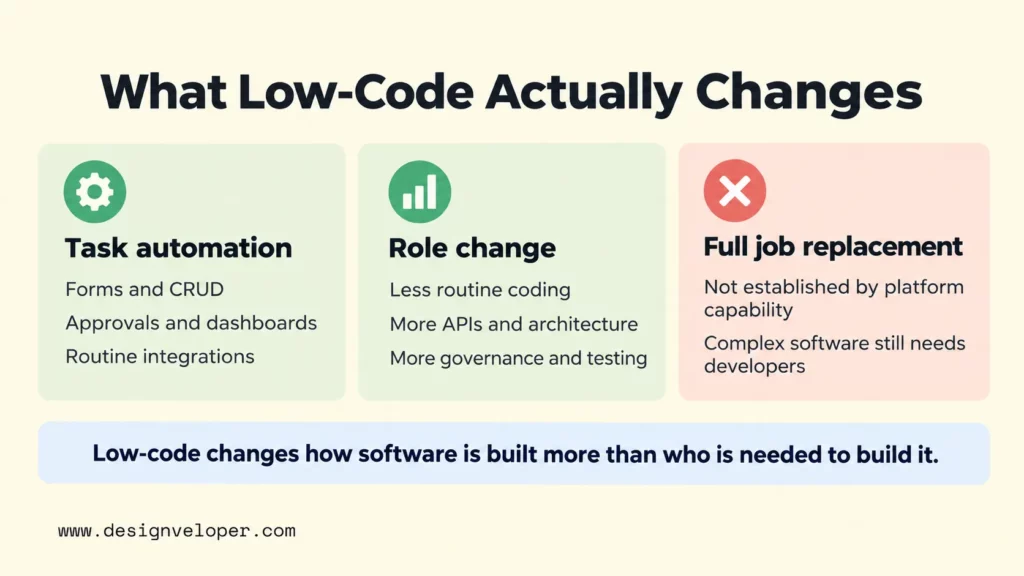
It helps to separate three effects. Task automation means a platform handles work that a developer once coded manually. Role change means developers spend less time on routine screens or workflow wiring and more time on architecture or specialized logic. Full job replacement would mean those higher-level responsibilities also disappear. Based on the capabilities and boundaries reviewed here, platform automation alone does not establish that those responsibilities will disappear.
This is also why a simple low-code-versus-code debate can be misleading. Some low-code platforms are aimed at lightweight departmental apps. Others support professional developers, custom extensions, enterprise integrations, and controlled deployment. Our low-code vs traditional development comparison is a useful next step when control is the real issue. It helps teams decide how much direct engineering control a project needs.
What Low-Code Development Can Automate
Low-code is strongest when the work follows repeatable patterns. A platform can often reduce manual effort for forms, dashboards, create-read-update-delete workflows, approval flows, data entry, notifications, and common integrations. The exact capability depends on the product, so teams should verify the platform rather than treat “low-code” as one fixed feature set.
A leave-request app is a useful example. A business team may be able to configure a form and route the request to a manager. The same workflow can update a record, notify the employee, and show request status without building every layer from scratch. Microsoft Power Apps, for example, supports low-code business applications and process automation, including workflows that connect data across systems.
The productivity gain comes from reusing platform abstractions. Instead of writing every screen, database operation, connector, and deployment step manually, the team configures a supported component. That can shorten the path to a prototype or internal tool. Our comparison of low-code development platforms shows why the right option still depends on integration fit, governance, developer control, and the operating model after launch.
Automation also has a boundary. Once the workflow needs unusual business rules, unsupported systems, strict latency targets, specialized user experiences, or controls that the platform cannot express cleanly, the team may need custom code. The important question is not whether a low-code tool can produce a screen. It is whether the complete workflow remains understandable, testable, secure, and maintainable.
Why Developers Still Matter For Complex Software
Developers still matter because complex software is more than a set of screens and workflows. Someone has to design how APIs, databases, identity, legacy systems, third-party services, and infrastructure fit together. Those decisions affect reliability, performance, security, and the cost of changing the product later.
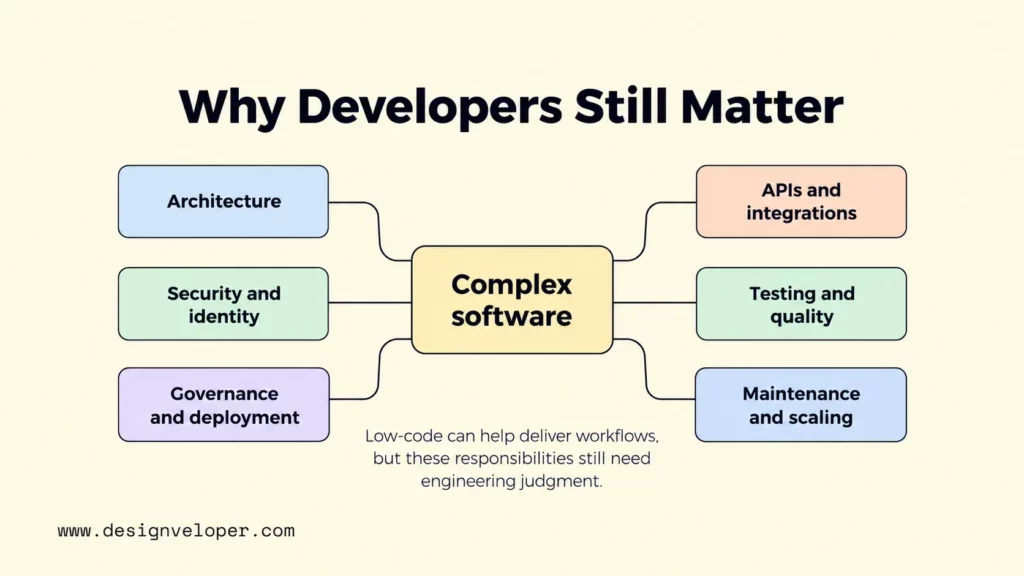
Custom business logic is another boundary. A platform may cover common approval rules, but a product can also need domain-specific calculations, real-time processing, or unusual data models. It may also need integrations with systems that have no safe prebuilt connector. Professional developers can create APIs, extensions, and services for those cases, or decide that a custom architecture gives the team better control.
Governance does not disappear either. Microsoft’s Power Platform governance guidance covers environments, access, data policies, auditing, and the relationship between citizen developers and managed IT services. Its application lifecycle management guidance also treats testing, deployment, maintenance, change management, support, and governance as part of the application lifecycle.
Low-code platforms can support some of these controls rather than avoiding them. OutSystems documents lifecycle management, governance, CI/CD, and monitoring as platform capabilities. That means complex work is not automatically outside low-code. Teams still have to prove that the chosen platform meets their requirements and gives developers enough room to handle exceptions.
Our HRM project shows why a familiar workflow can still be a complex software system. It brings together time-off and remote requests, employee self-service, timesheets, work logs, project resource allocation, and centralized employee information. We do not present HRM as a low-code build. We use it here to show that complexity often comes from connected roles, data, rules, and long-term ownership rather than from the visible form alone.
These responsibilities explain why developers remain necessary; the next question is how low-code changes the way they perform that work.
How Low-Code Changes Developer Roles
Low-code changes developer roles by moving some effort away from repetitive implementation and toward system design, reusable services, governance, and quality. The developer becomes less responsible for hand-building every routine component and more responsible for the boundaries that keep the whole system reliable.
That shift is visible in fusion teams. Microsoft describes fusion development as collaboration among citizen developers, professional developers, and IT or DevOps specialists. Business users can handle suitable low-code tasks, while professional developers focus on specialized problems and IT staff manage the application lifecycle.
Developers may also build the reusable pieces that make low-code safer and more useful. Those pieces can include APIs, custom connectors, shared components, identity integrations, validation services, and deployment automation. A well-designed reusable service lets several business workflows use the same governed capability instead of rebuilding the same sensitive logic in multiple apps.
Governance becomes a technical product in its own right. Developers and platform teams may define approved environments, data access rules, test paths, release controls, monitoring, and escalation points. This is one reason our guide to the future of low-code development focuses on fusion teams and enterprise governance rather than treating visual development as a developer-free process.
When To Choose Low-Code Or Custom Development
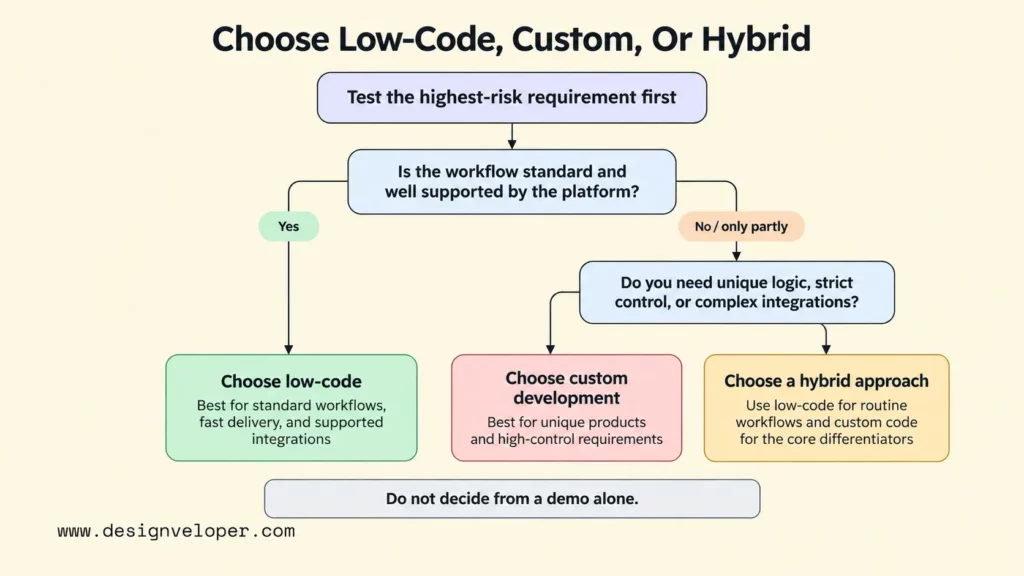
Choose low-code when the workflow is standard, the platform already supports the required integrations, and speed matters more than owning every layer of the stack. Choose custom development when the product depends on unique logic, deep integrations, strict performance or compliance constraints, or a highly specialized user experience. A hybrid approach works when routine workflows fit low-code but differentiating capabilities need custom services.
| Situation | Low-code | Custom development | Hybrid approach |
|---|---|---|---|
| Internal approvals, forms, or dashboards | Strong fit when supported connectors and permissions cover the workflow | Useful if the workflow has unusual rules or must avoid platform dependency | Use custom services only for the exceptions |
| Fast prototype or MVP | Useful for testing a workflow or product assumption quickly | Useful when the prototype must validate difficult technical constraints from day one | Keep the interface in low-code and validate risky services with custom code |
| Complex enterprise system | Possible on capable platforms if governance, integrations, scale, and lifecycle controls are proven | Strong fit when architecture and code ownership are central requirements | Use low-code for bounded workflows around a custom core |
| Regulated or sensitive data | Use only when the exact platform, configuration, and contract meet the requirements | Gives the team direct control, but still requires disciplined security and compliance work | Keep sensitive or specialized logic in controlled services when appropriate |
Use the leave-request workflow as a practical trial for low-code, custom development, and a hybrid build. Give each option the same employee, manager, HR, and administrator roles; the same HR-system connection; and the same sample requests. Then record a pass or fail for each condition:
- Access: An employee can see only their own requests, a manager can act only on requests assigned to them, and HR receives only the access its work requires. Fail if changing a URL or using a connector exposes another employee’s record.
- Integration failure: Disconnect the HR system during approval. Pass if the request is not silently marked complete, the error is visible, and a retry does not create a duplicate record. Fail if the two systems show conflicting status without an alert or recovery path.
- Audit: Submit, approve, reject, and edit a request. Pass if the team can identify who took each action, when it happened, and what changed. Fail if an administrator cannot reconstruct the sequence after a disputed approval.
- Data export: Export requests with their status and essential history in a documented format, then import a sample into a separate test system. Pass if records remain usable and can be matched to their owners. Fail if critical fields or approval history are trapped in the platform.
Choose low-code if the configured platform passes all four conditions without fragile workarounds. Choose custom development if essential controls or data portability require direct ownership of the workflow. And choose hybrid when the form and routing pass in low-code but a bounded custom service is needed for the failing integration or control; rerun the same tests across that boundary before release.
For an early product, our low-code MVP guide explains how to validate scope before expanding the build. A hybrid plan is especially useful when the team can keep data and business rules portable while deciding which parts deserve a custom architecture later.
How Developers Can Stay Relevant In A Low-Code Era
Developers can turn low-code knowledge into practical engineering work. Start by building a small leave-request flow on one platform, then test it against the same access, failure, audit, and export conditions used to assess a production app. Record which rules the platform handles directly and which need code or administrator controls.
Next, build one small API or custom connector for a requirement the platform cannot handle cleanly. Add an automated test for a failed request and a duplicate retry. This exercise shows where a reusable service helps without moving the entire application into custom code.
Finally, practice operating the workflow: move a change through a test environment, inspect its logs, roll it back, and explain the result to a business owner. Keep a short decision record showing why each part stayed in low-code or moved to custom code. That evidence is more useful than a list of tools on a résumé.
FAQs About Whether Low-Code Will Replace Developers
Is Low-Code The Same As No-Code?
No. Low-code usually leaves room for custom code, APIs, extensions, and professional developer oversight, while no-code is generally designed so business users can build within platform-provided components and rules. The line varies by product, so compare the actual controls rather than relying only on the label. Our low-code vs no-code guide breaks down the practical differences in flexibility, integrations, governance, and ownership.
Will Low-Code Reduce The Number Of Developers Needed?
Low-code can reduce developer-hours for standard workflows, but that does not automatically mean fewer developer jobs. Teams may use the saved effort to ship more applications or move developers to architecture, security, integration, and maintenance. Without independent workforce data, platform capability alone cannot establish how headcount will change.
Can Low-Code Build Enterprise Applications?
Yes, some low-code platforms can support enterprise applications. OutSystems positions its current platform for mission-critical applications and documents extensibility, integrations, governance, security, monitoring, and lifecycle tooling. Microsoft Power Platform also provides environment, governance, data policy, and application lifecycle controls for business applications.
Enterprise capability is still platform-specific. A team should verify the exact application’s performance, data residency, security, audit, integration, deployment, support, and recovery requirements. “Enterprise low-code” is not a reason to remove developers from the project; it is a reason to test whether the platform gives developers and administrators enough control.
Should Developers Learn Low-Code Platforms?
Yes, when low-code is relevant to the systems their organization builds. Learning one platform helps developers recognize which tasks can be standardized, where custom code adds value, and how governance should work. It also makes them better partners for business users who can safely own simpler workflows.
The useful career strategy is broader than learning one vendor. Keep improving architecture, APIs, cloud, DevOps, security, testing, debugging, and product thinking. Low-code can change the interface used to build software. Those skills still determine what should be built, how it should connect, and whether it is safe to run.
Also published on

Share post on










Related Articles



Low Code Vs Pro Code: Choosing The Right Fit For Your Product
Low Code Vs Pro Code: Choosing The Right Fit For Your Product Published October 15, 2026
Will Low-Code Replace Developers? Roles, Limits, And Trade-Offs
Will Low-Code Replace Developers? Roles, Limits, And Trade-Offs Published September 28, 2026
10 Low Code Development Platforms for Business Apps in 2026
10 Low Code Development Platforms for Business Apps in 2026 Published August 25, 2026