
















AI Agent Architecture Diagrams: Components, Patterns, and Design Steps

KEY TAKEAWAYS:
- Choose an agent pattern by workflow needs; reactive, deliberative, hybrid, and multi-agent describe control flow, while LLM-based describes a reasoning technology.
- Keep conversation or task state distinct from document stores and vector indexes used to retrieve context.
- Runtime feedback can change task state or the next action, but it does not automatically train or update a model.
- A useful diagram makes tool permissions, approval points, failure routes, evaluation, and operational ownership visible.
An architecture sketch that works for a demo can become hard to use once an agent must handle memory, permissions, retries, and human review. The problem is rarely a lack of boxes; it is that the sketch hides the decisions and boundaries that shape behavior. A useful AI agent architecture diagram gives product, engineering, security, and operations teams a shared view of the workflow before implementation. The sections below turn that view into a practical design, from choosing a control pattern to tracing failures and assigning production ownership.
What Is AI Agent Architecture?
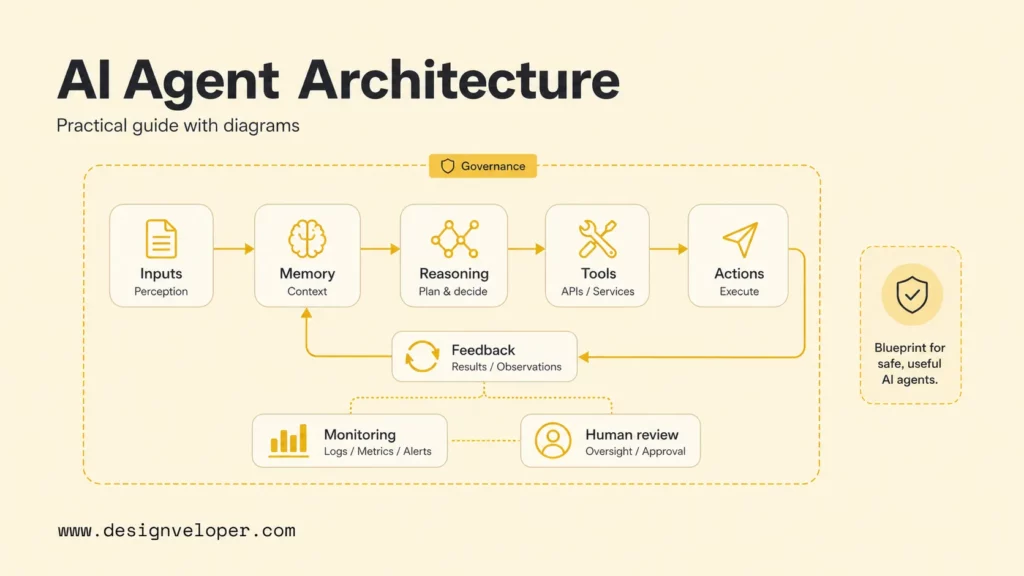
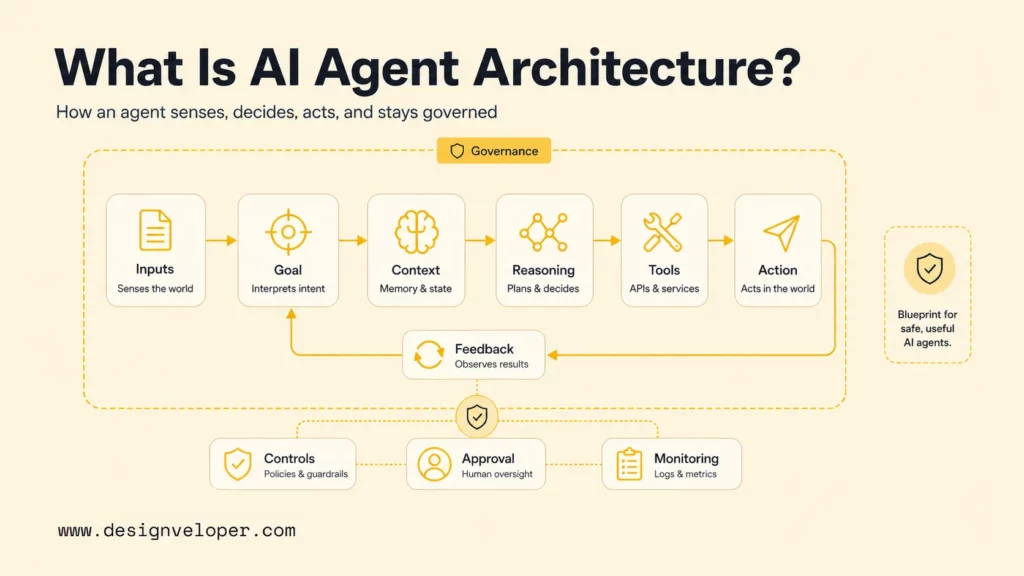
AI agent architecture is the structure of the software components and rules that let an agent receive input, interpret a goal, use context, choose an action, and check what happened. An architecture diagram shows those parts and the paths between them, including tools, data stores, permissions, feedback, and human review. Runtime feedback can update task state or guide the next action; it does not, by itself, change the model’s parameters. Model training or fine-tuning is a separate process with its own data, evaluation, and release controls.
The diagram is useful when it answers practical questions: What can the agent read? Which actions can change external systems? How does the system respond to a timeout or uncertain result? Where can a person review or stop the workflow? The level of detail depends on the audience. A product discussion may need the major steps and user handoffs, while an engineering review needs interfaces, data flows, access scopes, and failure behavior.
Keep the drawing focused on one named workflow. For example, a support assistant that drafts a reply needs a different boundary from one that can send the reply, refund an order, or edit a customer record. Label the chosen autonomy level instead of implying that every agent can act without approval. A conversational product is not automatically an agent: compare the system’s ability to act with the role of an AI agent versus a chatbot, then define whether an assistant or agent owns each action.
For broader context, agentic AI describes systems designed to pursue goals through actions; a particular architecture diagram still needs to show the limits and workflow for one use case.
Related reading:
- How to Build Agentic AI: Practical Guide with Examples
- Agentic AI Security: Risks, Core Architecture, Solutions
- Why AI Agents Need MCP: How AI Systems Connect To Tools And Data
Why Does AI Agent Architecture Matter?
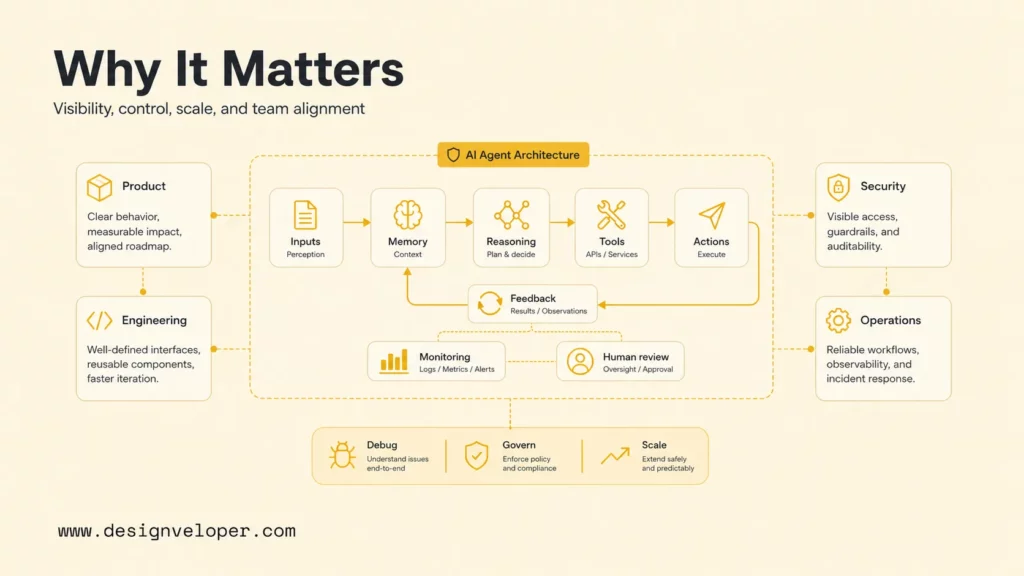
A clear architecture helps a team agree on what the agent is allowed to do and how the surrounding software responds when things go wrong. It is a planning and communication tool, not proof that the system is safe or reliable. Teams still need tests, access controls, monitoring, and review appropriate to the use case.
Without a shared diagram, different groups may make conflicting assumptions. Product may expect a draft for review, while engineering implements automatic sending. Security may assume tools are read-only, while the agent has access to write operations. Operations may not know who owns a failed run. Mapping the workflow exposes these mismatches before they become costly to change.
The drawing also supports focused technical decisions. A team can see whether a fixed workflow is enough, whether retrieval needs a separate service, whether an approval must happen before a write action, and which event should create an audit record. For multi-agent designs, a diagram helps make routing, shared state, handoffs, and stopping conditions explicit. More agents do not automatically make a system more capable; each one adds coordination and failure paths to manage.
Keep the diagram tied to one decision or review. A single overview rarely serves every audience well. Product, security, and implementation views can share the same component names while showing different levels of detail.
What Are The Core Components Of AI Agent Architecture?
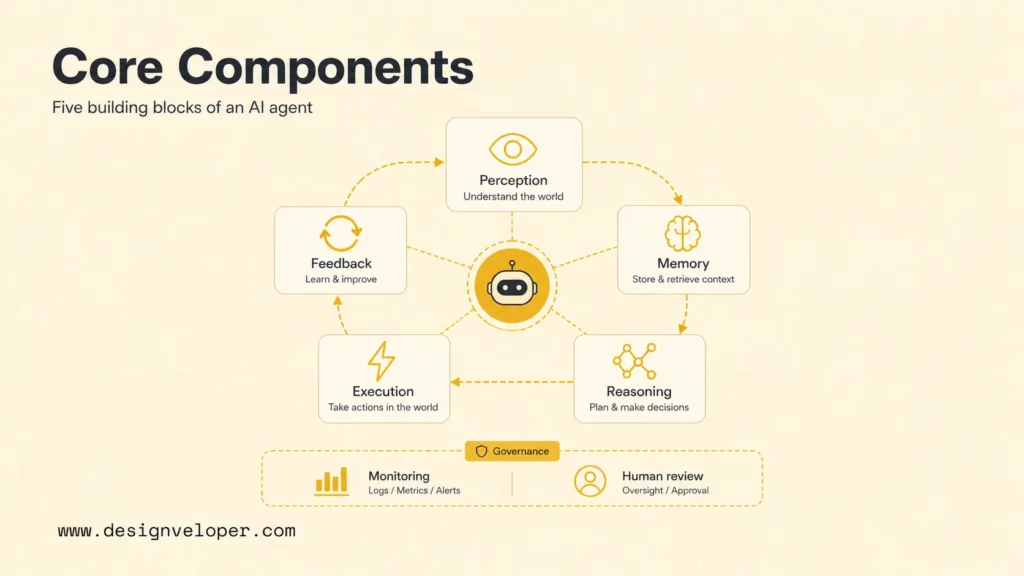
Most agent diagrams can start with five component groups: input and perception, state and context, reasoning and routing, tools and execution, and feedback and oversight. This is a working model, not a universal standard. Rename or combine components when that better reflects the actual software.
Input And Perception
Input and perception describe how a request or event enters the system and becomes usable data. Sources may include a chat message, an API request, a database event, an uploaded document, or a sensor. The diagram should show validation and trust boundaries where they matter: authentication, input limits, source checks, and treatment of untrusted content.
Do not treat all incoming information as equally reliable. A user request, retrieved policy document, and external tool result have different origins and risks. Label the source when downstream decisions depend on it.
Memory, Task State, And Retrieval
Memory describes information the agent retains to continue a task or personalize later interactions. Short-term memory may hold the current conversation, plan, tool results, or task status. Persistent memory may hold approved preferences or durable user state, subject to retention and consent rules.
Document stores and vector indexes are different: they provide information for retrieval, but they are not automatically the agent’s memory. A system may retrieve a policy passage for one answer without saving that passage as persistent state. Draw the retrieval service, source documents, filters, and citations separately from session or user memory. If the system writes selected facts into persistent memory, show that write path and the rule that permits it.
Reasoning And Decision-Making
This component interprets the goal and chooses what to do next. A simple agent may make one model call and select from a small set of tools. A more involved workflow may use a planner, router, executor, and evaluator. Some decisions can remain deterministic, such as checking a required field or enforcing a limit, while a model handles language or ambiguous input.
Show which decisions are model-driven and which are fixed rules. That boundary makes it easier to evaluate behavior and to change a prompt or model without weakening a control that should always apply.
Tools And Execution
Tools connect the agent to APIs, databases, search, code execution, or business systems. The diagram should distinguish read-only access from actions that create side effects. For each important tool, note its owner, permission scope, input and output shape, and error path.
Put approval before consequential actions such as sending an external message, issuing a payment, changing a production record, or taking an irreversible step. Approval after the action is only a notification. The system also needs a clear response to denied permission, malformed output, rate limits, and timeouts.
Feedback, Evaluation, And Oversight
Feedback can come from a tool result, a rule check, a user response, an evaluator, or a human reviewer. At runtime it may update the task state, trigger a retry, request clarification, route work to a person, or end the run. It does not automatically retrain the model.
Show offline evaluation and model updates as a separate lifecycle when they are in scope. That process may use reviewed examples, quality checks, and release approval; it should not be conflated with a live agent’s next-step loop. For production operation, trace model calls and tool calls with enough context to investigate failures while respecting privacy and retention requirements.
Azure’s agent design guidance and Databricks’ system design patterns describe patterns and system concerns that can help teams decide which boxes belong in their design. Use them as references, not as a requirement to copy one fixed diagram.
Related reading:
- RAG Pipeline Diagram: Components, Workflow, And Production Design
- How To Build A RAG System: Step-By-Step (New Guide)
- LangChain Vs MCP: What’s The Difference And When To Use Each?
Which AI Agent Architecture Pattern Fits The Workflow?
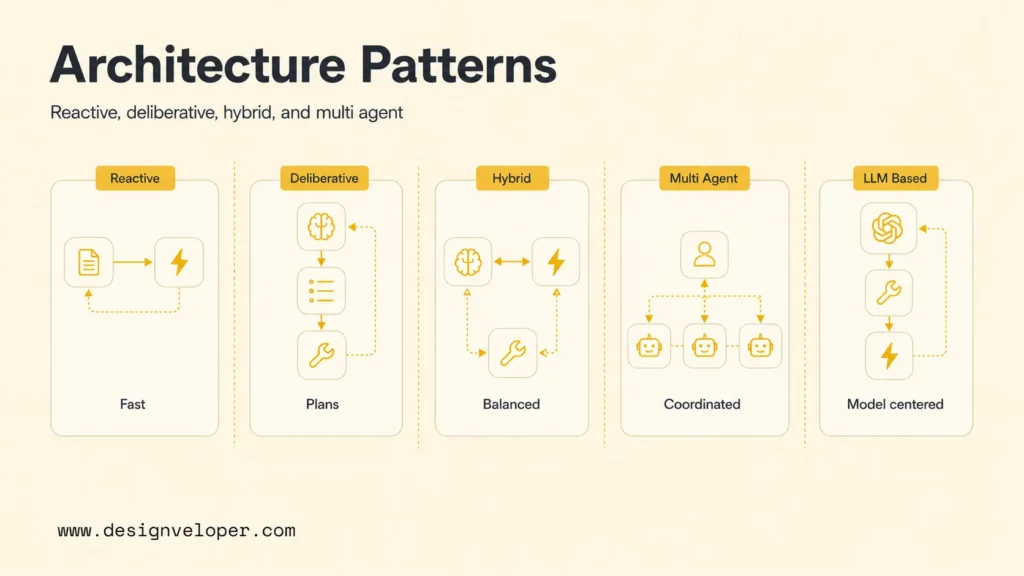
Reactive, deliberative, and hybrid describe control-flow behavior. Multi-agent describes how work is divided, so a multi-agent system can itself be reactive, deliberative, or hybrid. LLM-based describes a reasoning technology that can appear in any of those designs, not a mutually exclusive pattern. Microsoft and Databricks both document agent patterns, but a team should select an approach based on the workflow and its operating limits rather than a label alone.
The comparison below is a selection aid. It complements a visual diagram by showing fit and trade-offs in a compact form.
| Architecture choice | Fits when | Show in the diagram | Main trade-off |
|---|---|---|---|
| Reactive | The task can respond to current input with little planning. | Input, decision or model call, response, and fallback. | Simple and quick, but less suited to long multi-step work. |
| Deliberative | A goal needs a plan, tool use, or result checks. | Planner, state, executor, evaluator, and stopping rule. | More flexible, with higher latency and loop risk. |
| Hybrid | Fixed rules should control some steps while a model handles others. | Rule/model boundary, approval gates, and handoff conditions. | Clearer controls, but more integration and test work. |
| Multi-agent | Distinct roles, tools, or permissions justify delegation or parallel work. | Coordinator, agent roles, shared state, handoffs, and global stop. | Specialization can help, but routing and debugging get harder. |
Reactive Agents
A reactive agent responds to the current input with a short decision path and little explicit planning. It can fit a narrow workflow such as classifying a request, finding a relevant answer, or selecting one approved action. Show what happens when the input is incomplete or the action is not allowed. A simple path still needs a safe fallback.
Deliberative Agents
A deliberative agent forms or revises a plan before completing a multi-step goal. The diagram should show where the plan is stored, how tools are selected, what checks an evaluator performs, and when the run stops. Add limits for retries, tool calls, time, and cost so planning does not become an open-ended loop.
Hybrid Agents
A hybrid agent combines model flexibility with fixed workflow rules. For example, a model can extract details from a request, while deterministic checks enforce required fields and route high-risk actions to a reviewer. The design needs an explicit handoff between the model and the rules so teams can test each part.
Multi-Agent Systems
A multi-agent system assigns work to two or more agents with different roles, tools, or context. Use it when the roles are genuinely distinct or can work independently and their results can be reconciled. A coordinator may route tasks, collect results, resolve conflicts, and stop the run. This coordination problem is the focus of AI agent orchestration. Otherwise, a single agent or deterministic workflow is often easier to operate.
LLMs can support reasoning in any of these designs. Mark the model and its role separately from the control pattern. This avoids treating “LLM-based” as a fifth choice alongside reactive or multi-agent, and lets the diagram explain both how the workflow runs and what technology supports reasoning.
How To Design An AI Agent Architecture Diagram
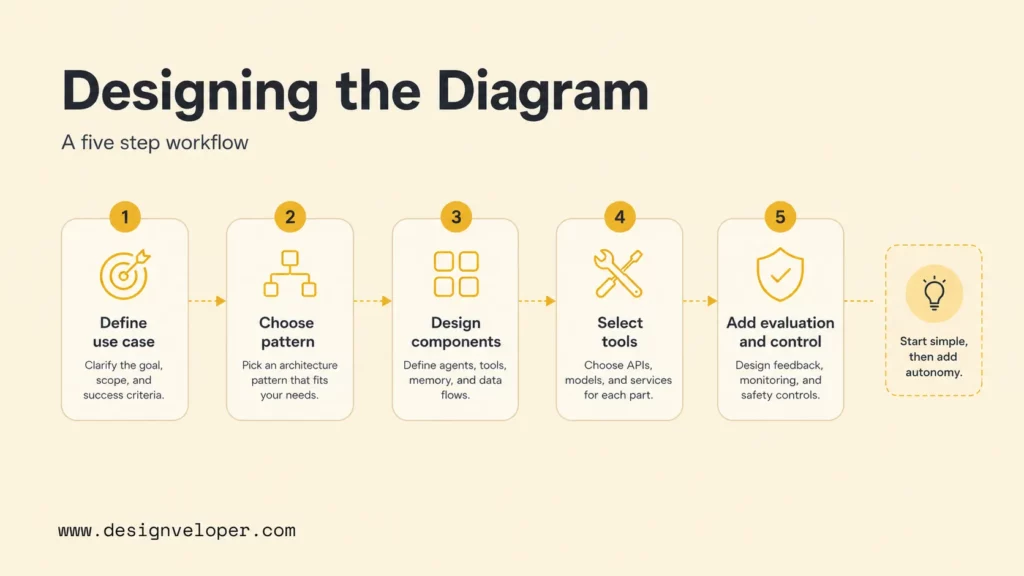
Design the diagram from the workflow outward. Start with the user or system event, then trace the data, decisions, actions, and controls that are needed to complete one useful task.
Step 1: Define The Use Case
Write a short use-case statement with a trigger, intended user, expected result, and boundary. Include what the agent must not do. “Help support staff resolve a delivery question” is more useful than “add an AI agent” because it points to the records, tools, and approval rules that may be needed.
List the inputs the task depends on and identify which ones may be incomplete or untrusted. Note the human owner when the agent cannot proceed or when a decision has a meaningful consequence.
Step 2: Choose The Agent Pattern
Use the simplest control pattern that can meet the use case. A short, stable sequence may need no autonomous planning. Add deliberation when the agent must adapt across steps. Choose a hybrid approach when fixed policy checks must constrain model decisions. Use multiple agents only when role separation, permission boundaries, or independent work brings a clear benefit.
Record the expected trade-off next to the decision: latency, operating cost, debugging effort, or flexibility. See agentic AI architecture and workflow patterns for another view of how workflow choices shape the system design.
Step 3: Design The Core Components
Draw only the components required for that task, then label the connections. Use different line styles or labels for data flow, control flow, and human handoffs. Show whether memory is temporary or persistent, whether a knowledge store is read-only, and which tools can change external state.
Add the component owner where it helps the team move from a concept map to an implementation plan. If a service, database, or identity system is outside the agent boundary, show it as an external dependency rather than hiding it inside a generic “AI” box.
Step 4: Select Frameworks And Tools
Choose tools after the workflow and boundaries are clear. A framework may help with orchestration, state, integrations, tracing, or evaluation, but it does not replace access control or product-specific checks. Compare options against your deployment environment, team skills, data requirements, and maintenance plan.
Protocols such as the current Model Context Protocol architecture can help standardize how an application connects to tools and context sources. Keep the protocol, agent runtime, and model as separate concepts in the drawing. MCP is a protocol for connecting applications to tools and context sources; it is not an agent or a model.
For model-driven workflows, document context limits as well as tool limits. An AI token budget affects how much conversation, retrieved content, and tool output can be passed into a model call. Make truncation or summarization behavior visible if it can change task quality.
Step 5: Add Evaluation And Control Loops
Define how the system knows whether a step succeeded. A tool returning HTTP 200 does not prove that the intended business change occurred. Add checks for expected output, policy rules, source quality, and user confirmation where needed. Set maximum retries and a clear stop or escalation route.
OpenAI’s Agents SDK guardrails documentation describes input and output checks and tool-related controls. Use an official implementation guide as a reference for control types, then map each control to your own product, threat model, and release process.
Related reading:
- AI Chatbot Development: Types, Process, Costs, And Use Cases
- AI Chatbot Integration: A Practical Guide to Connecting Your Systems
- What Is A Chatbot? Real Uses, How It Works, And What It Can Do
What Makes An AI Agent Diagram Effective?
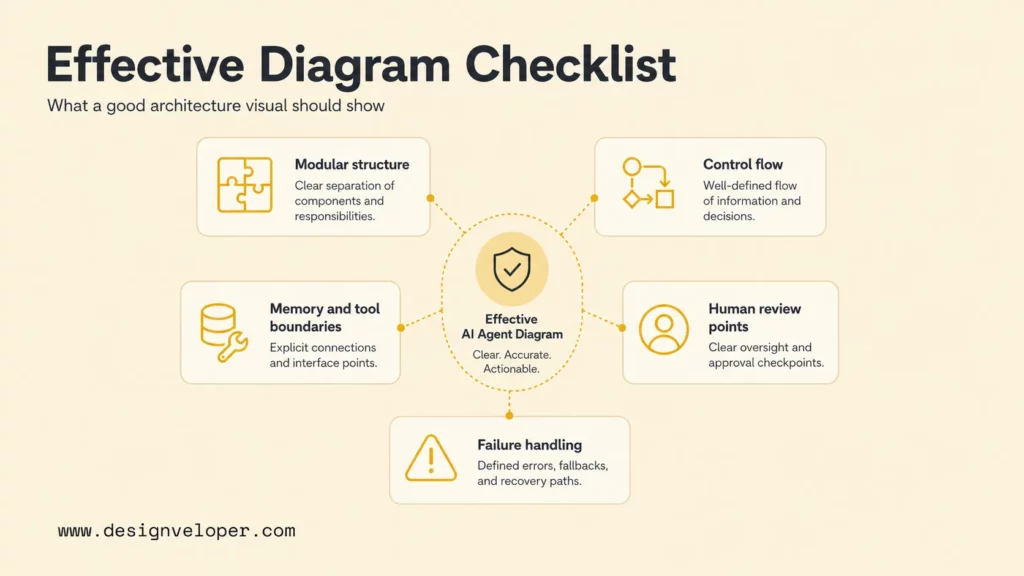
An effective diagram helps someone answer a real design or review question without guessing what a box means. Keep labels consistent, use arrows for clear relationships, and distinguish components from people, external systems, and control points.
Check that the diagram makes these details visible where they apply:
- Purpose and scope: the workflow, user, trigger, and intended outcome.
- Data movement: source, destination, trust level, and any transformation or retrieval step.
- Decision ownership: what is handled by fixed logic, a model, a tool, or a person.
- Permission boundaries: read-only access, write actions, consent, and approval gates.
- Failure paths: retries, timeouts, missing context, denied access, cancellation, and escalation.
- Operational ownership: who monitors each service and responds when it fails.
A diagram should also fit its audience. Use a high-level view to align stakeholders, then add a technical view for interfaces and operational controls. Avoid packing implementation details into a diagram meant to explain a product workflow.
NIST’s Generative AI Profile gives teams a risk-management reference for generative AI systems. It does not prescribe an agent diagram, but it can help identify where governance, measurement, and oversight should be considered.
A review works best when each team can see its responsibility in the same workflow. Product owners define the intended result, engineering owns interfaces and failure handling, security reviews access boundaries, and operations knows how to monitor and recover the service.
Common Challenges In AI Agent Architecture
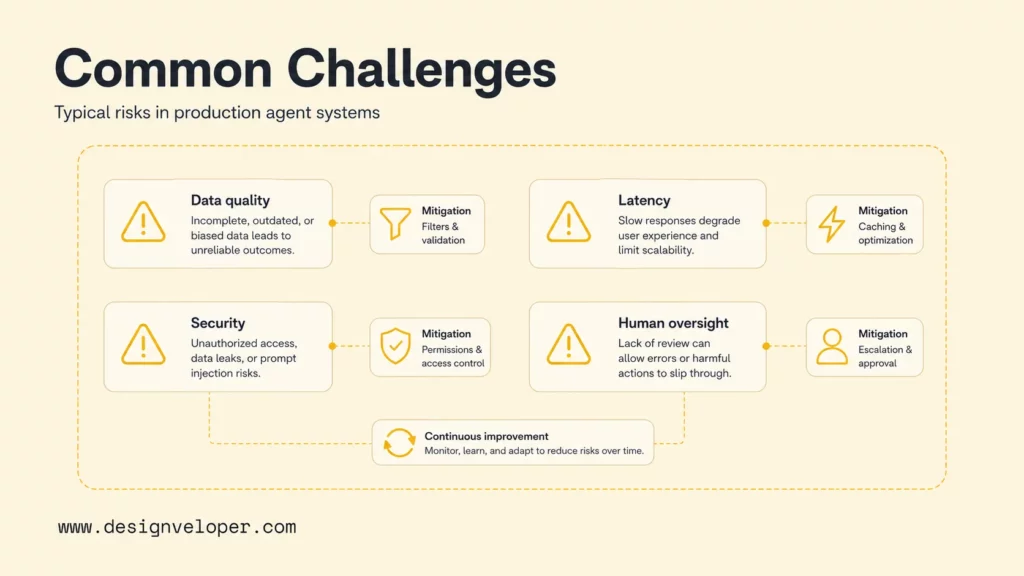
Agent systems become difficult to trust when the architecture hides uncertainty, permissions, or operational ownership. Use the diagram to locate the source of each risk and the control that addresses it.
Weak Or Conflicting Context
Old documents, incomplete records, conflicting policies, or untrusted user input can lead to a poor answer or action. Show where sources are selected, filtered, and checked for freshness. If the agent cannot support an answer with the permitted context, make its fallback explicit.
Unbounded Loops, Latency, And Cost
Repeated planning, retries, and tool calls can make a run slow or expensive. Add limits for time, tokens, number of steps, and retries. For parallel work, show which tasks are independent and how partial results are reconciled. If you compare deployment costs, use a separate estimate based on actual model and infrastructure usage rather than implying that a diagram predicts cost.
Broad Permissions And Unsafe Actions
An agent should not receive broad access simply because a tool is convenient. Use least-privilege scopes, separate read from write, and require approval before sensitive or irreversible actions. Keep an audit trail for actions that need investigation. Databricks’ practical advice on agent system design also highlights the need to constrain and observe coordinated workflows.
Unclear Human Oversight
“Human in the loop” is too vague to implement. Show who reviews what, what information they see, whether they can edit or reject the action, and what happens if they do not respond. For workflows that affect health, finance, hiring, legal outcomes, or customer treatment, determine the appropriate human and compliance controls before expanding autonomy. NIST’s AI Risk Management Framework can support a broader risk review.
Keep operational failure paths close to the component that can fail. A reviewer should be able to follow the diagram from a bad tool result to the retry, fallback, or escalation instead of inferring the route from a separate paragraph.
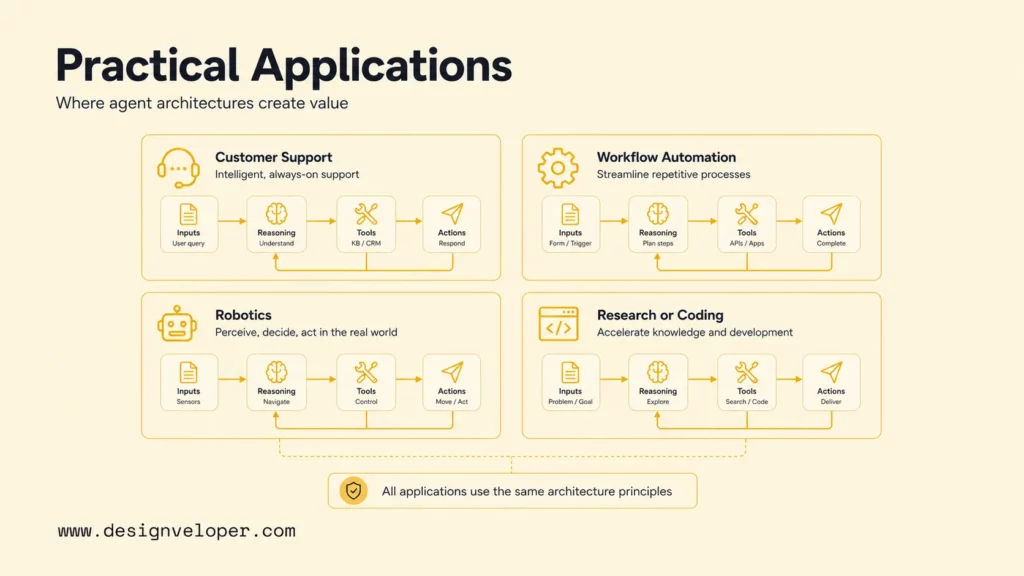
Where Is AI Agent Architecture Used In Practice?
The architecture changes with the work an agent performs. These examples are design scenarios, not claims that one pattern or product has proven results in every setting.
Conversational AI And Customer Support
A support assistant may receive a question, retrieve policy and order context, draft a reply, and route uncertain cases to a person. A diagram should distinguish drafting from sending and show which account fields are visible. If the system can issue refunds or change an order, show the authorization and review step before the action.
Choosing between a chatbot and an agent is a product decision about actions and control, not just model quality. The system may need a conversational interface, an agent that can act, or both; the workflow and risk boundary decide.
Enterprise Workflow Automation
A workflow agent might classify an invoice, collect missing information, and prepare an approval request. Its architecture needs the source system, business rules, approval owner, write boundary, and exception queue. A model can help interpret varied documents, while fixed rules check fields such as a required supplier ID or approval limit.
Designveloper’s public AI business process automation guidance covers the process context around these systems. The transferable design lesson is to map the existing workflow and exception ownership before automating individual steps.
Robotics And Autonomous Systems
A robotics architecture may connect sensors, state estimation, planning, safety checks, control systems, and monitoring. Unlike a text-only assistant, it can affect a physical environment. Response timing, sensor uncertainty, stop controls, and safe fallback behavior need to be explicit and tested by the responsible engineering team.
Research, Coding, And Decision Support
A research or coding agent may search approved sources, inspect files, run tests, and prepare a recommendation or change. Separate repository read access from write access, sandboxed execution from production systems, and draft output from a released change. For decision support, label which information is evidence and which part is a model-generated summary.
A public Song Nhi virtual assistant example illustrates conversational personal-finance management through chat-like interactions. Its published description supports an assistant and workflow example; it does not establish that the product uses MCP or a particular modern agent framework.
Related reading:
- Enterprise AI Agents: Use Cases, Platforms, And Safe Deployment
- AI Agent Pricing: Monthly Costs, Models, Hidden Fees, And ROI
- AI Agent Vs AI Assistant: Differences, Use Cases, And Choice
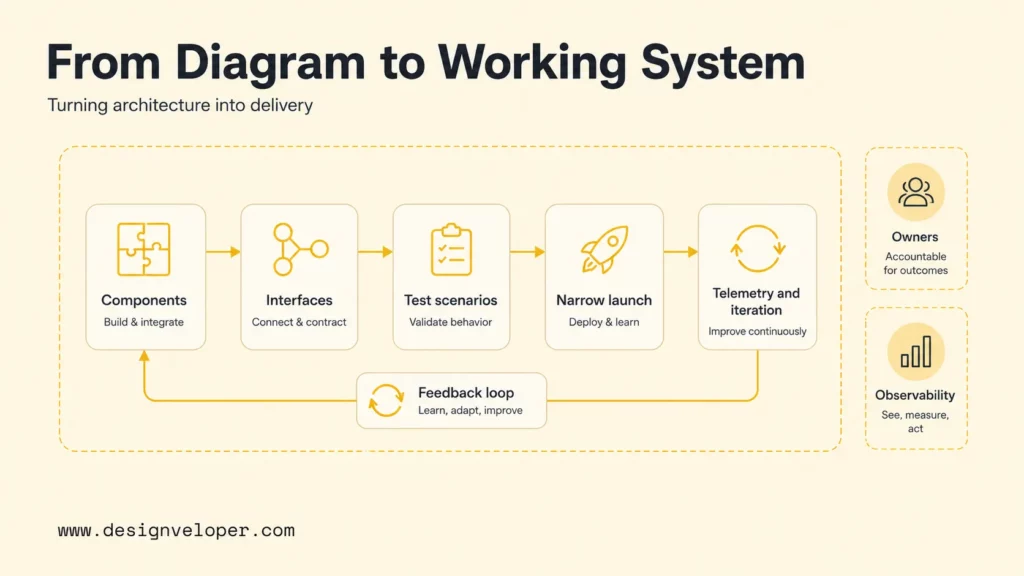
How Do You Turn The Diagram Into A Working System?
A diagram becomes useful when each component leads to an owned implementation or test task. Keep the first release narrow, then revise the drawing when evidence from testing or operation changes an assumption.
- Assign owners. Name the team or service responsible for the interface, context assembly, tools, monitoring, and review steps.
- Define contracts. Specify input and output formats, authentication, error responses, timeouts, and data retention at each boundary.
- Build tests from paths. Test normal completion, missing context, invalid tool output, denied permission, malicious input, cancellation, and human escalation.
- Release a bounded workflow. Start with the smallest useful action set and keep approval for consequential writes until the controls are demonstrated.
- Review runtime evidence. Inspect traces, tool results, user feedback, and incidents. Change prompts, rules, tools, or memory only through an owned process.
OpenAI’s practical guide to building agents discusses orchestration, tools, and guardrails. Treat runtime traces as evidence for evaluation and debugging; changing a deployed model’s weights requires a separate training and release workflow.
This implementation path depends on coordinating components, tools, and people without losing the stop and review conditions.
FAQs About AI Agent Architecture Diagrams
What Should An AI Agent Architecture Diagram Include?
Show the input, context and state, reasoning or routing, tools, feedback, and oversight needed for the workflow. Label data boundaries, read and write permissions, approval points, failure paths, and operational owners when they apply.
What Is The Difference Between Reactive And Deliberative Agents?
A reactive agent responds to the current input with little planning. A deliberative agent creates or revises a plan for a multi-step goal. The second approach can handle more complex tasks but needs limits, evaluation, and a stopping rule.
Is LLM-Based An AI Agent Architecture Pattern?
LLM-based describes the reasoning technology, not a control-flow pattern parallel to reactive or deliberative. An LLM can be used within reactive, deliberative, or hybrid systems, so diagram the model choice separately from orchestration.
Does Agent Feedback Automatically Train The Model?
No. Runtime feedback may update task state, trigger another step, or send work for review. Training or fine-tuning changes model parameters through a separate data, evaluation, and deployment process.
Teams translating an approved architecture into a product can review Designveloper’s AI development services for custom AI software and integration support. Keep any partner evaluation grounded in ownership, testing, permission boundaries, and the maintenance plan for the actual system.
Also published on

Share post on










Related Articles


Top Agentic AI Companies: 18 Vendors By Product Layer And Fit
Top Agentic AI Companies: 18 Vendors By Product Layer And Fit Published October 07, 2026
Agentic AI Architecture: Components, Patterns, And Workflows
Agentic AI Architecture: Components, Patterns, And Workflows Published October 07, 2026
AI Advantages and Disadvantages for Businesses: 5 of Each Explained
AI Advantages and Disadvantages for Businesses: 5 of Each Explained Published October 05, 2026



















