
















RAG Status In Project Management: Colors, Criteria, And Example

KEY TAKEAWAYS:
- Green means the work is within agreed tolerances; Amber needs a recoverable plan; Red signals a breached commitment or a blocker requiring a decision.
- Define a roll-up rule in advance. In the worked example, any unresolved release-critical Red makes the overall project Red.
- Report both current status and forecast for each area, with an evidence record, next action, decision owner, due date, and recovery test.
- A schedule percentage is meaningful only when its baseline, denominator, review period, and critical-milestone exception are stated.
A sponsor sees an Amber schedule, a Green budget, and a Red migration risk. What color should the project be? RAG status helps project teams make that judgment visible, but the traffic-light summary is only as useful as the rule and evidence behind it. A color alone cannot tell a steering group whether to approve a release, protect a milestone, or assign an owner. Project managers and PMOs need consistent definitions for each workstream, a stated overall-status policy, and a next decision when an item turns Red. The example below shows how to turn a status report into a decision record without treating one percentage or an average of colors as a universal formula.
What Does RAG Status Mean In Project Management?
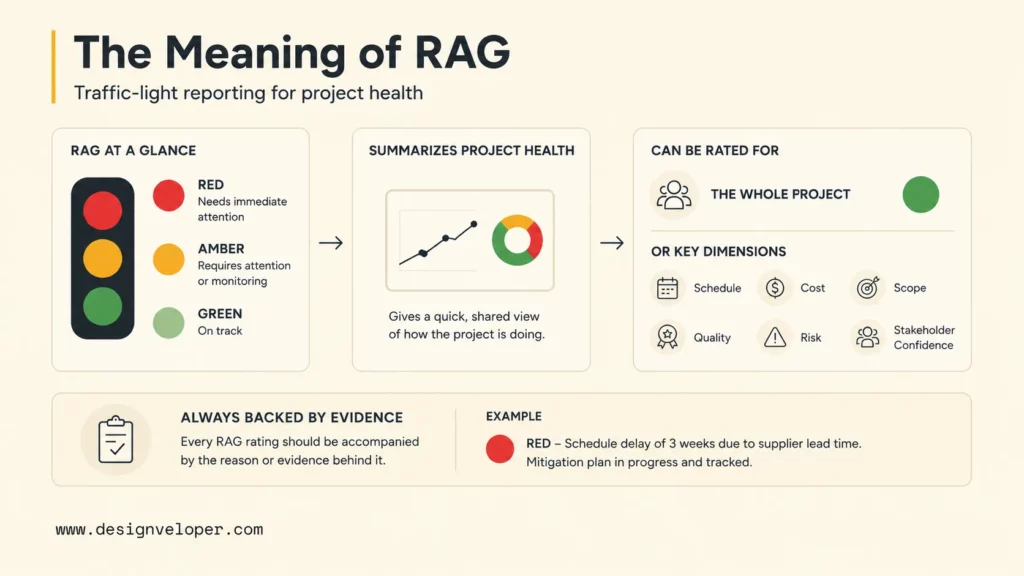
RAG stands for Red, Amber, and Green: a project-management reporting method that summarizes the health of an entire project or a specific area against agreed tolerances. A project manager can rate schedule, budget, scope, quality, risk, dependencies, and readiness separately, then derive an overall signal using a documented rule. Red calls for intervention, Amber for active recovery, and Green for continued monitoring. This project-status meaning is different from Retrieval-Augmented Generation in AI.
The color is a summary, not the evidence itself. A useful status points to the milestone, forecast, test result, budget tracker, risk record, dependency, or decision that supports the rating. Stakeholders can then see both the current signal and the reason behind it.
RAG reporting should also separate current health from forecast confidence. A release may be Green today because the current milestone is protected, but Amber for the next phase because a vendor dependency remains unconfirmed. The two signals answer different questions and should not be merged without explanation.
There is no universal RAG scoring formula. Each organization defines thresholds against its phase, approved tolerances, commitments, and governance model. The Institute of Project Management’s RAG status guide describes RAG as a quick health signal that still needs clear reporting rules.
RAG status works best when it connects to a wider project risk management process and a reliable project management system. The color tells a stakeholder where to look. The supporting record explains what to do.
Related reading:
- 11 Best Agile Project Management Tools For Teams
- Agile Vs Traditional Project Management: Key Points
- Agile Vs. Waterfall Vs. Scrum Vs. Kanban: Key Differences
Why Is RAG Status Important?
RAG status is important because it turns detailed project data into a shared signal that decision-makers can scan quickly. A consistent color gives stakeholders a starting point for the discussion without replacing the evidence behind the rating.
- Prioritizes attention: leaders can focus on Amber and Red areas instead of reviewing every project detail first.
- Shows early warning: an honest Amber rating creates time to recover before a risk becomes a delivery failure.
- Supports portfolio decisions: PMOs can compare project health and identify shared resource, supplier, or dependency problems.
- Creates reporting consistency: agreed definitions make status updates easier to compare across teams and reporting periods.
RAG status is most useful when every non-Green rating leads to a clear next step. A color without an owner, evidence, and review date can create the appearance of control while leaving the underlying problem unchanged.
What Do Red, Amber, And Green Mean?
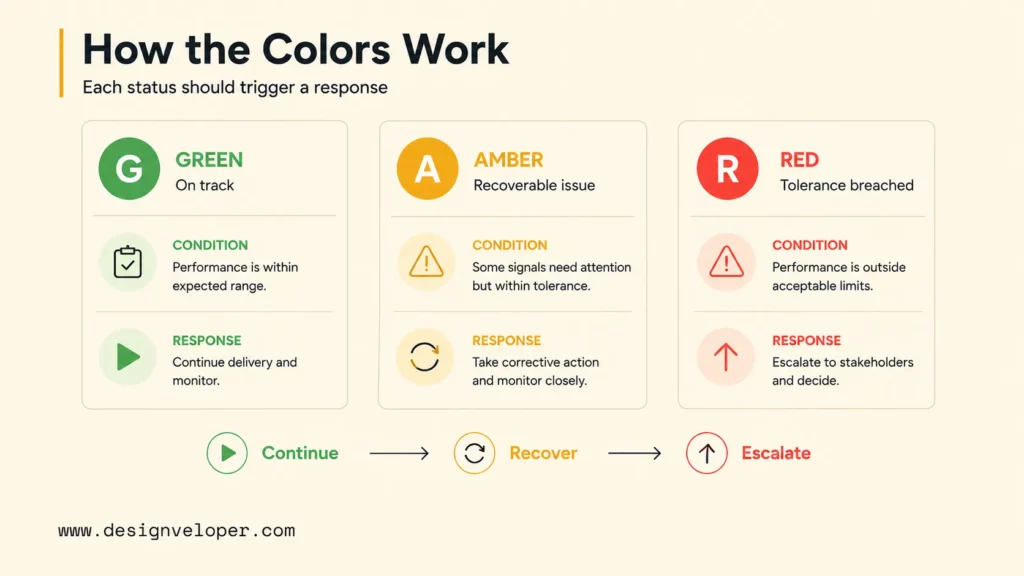
Each RAG color should describe a project condition and the response that condition requires. The following framework is a practical starting point. Teams should agree on the exact thresholds before the first formal reporting cycle.
| Color | Project Condition | Expected Response | Typical Evidence |
|---|---|---|---|
| Green | Work is inside agreed tolerances and no known issue threatens the current plan. | Continue delivery, monitor assumptions, and keep normal governance. | Stable milestones, spend, scope, quality, and dependencies. |
| Amber | A risk, issue, trend, or dependency needs active attention, but recovery is still realistic. | Assign an owner, execute a recovery action, and set a review date. | Forecast drift, unresolved decisions, test delays, resource gaps, or rising risk. |
| Red | An agreed tolerance is breached, or the team cannot protect the outcome without intervention. | Escalate options, approve a tradeoff, add support, or replan delivery. | Release blockers, major forecast breaches, critical defects, missing approvals, or blocked dependencies. |
Green: Within Agreed Tolerances
Green means the project or project area is operating within its agreed boundaries. The team can continue normal delivery because no known issue currently threatens the committed outcome.
Green does not mean that the project has no risks. It means the risks have owners, responses, and enough control for the current phase. A strong Green update also states the assumptions that must remain true, such as a confirmed integration, accepted priority flows, or stable test coverage.
Amber: Recoverable With Active Attention
Amber means a risk, issue, trend, or dependency needs active attention, but the team can still protect the outcome with a realistic recovery plan. Examples include a slipping milestone, unresolved requirement, rising defect trend, delayed approval, or missing vendor access.
Every Amber item should name the trigger, impact, recovery action, accountable owner, and review date. “Monitor the issue” is too vague when the issue can affect delivery. A useful update says what will change and what evidence will show that recovery is working.
Red: Requires Intervention Or Escalation
Red means an agreed tolerance has been breached, or the current team cannot protect the outcome without a change in conditions. The required change may involve scope, funding, capacity, timing, risk acceptance, technical direction, or stakeholder approval.
A Red update should be decision-ready. It should explain the impact, list realistic options, identify the recommended tradeoff, name the decision owner, and set a deadline. Red is a management signal, not a label for team performance.
For example, a release may be Red when a security review finds a release-blocking issue. The team can then present options such as delaying the release, reducing scope, adding mitigation work, or obtaining documented risk acceptance.
What Should A RAG Status Report Include?
A RAG status report should be quick to scan but detailed enough to support a decision. The report does not need to reproduce the entire project plan. It needs to show the current signal, the reason behind it, the action that follows, and the record where stakeholders can verify the detail.
- Reporting period: the date or period covered by the update.
- Project area: the workstream or dimension being rated.
- Current status: the color based on present evidence.
- Forecast: the expected direction if no action changes the situation.
- Reason and impact: what changed and which outcome may be affected.
- Evidence source: the milestone, budget record, test report, risk, issue, dependency, or decision record behind the rating.
- Next action: the recovery, escalation, monitoring, or approval step.
- Owner and due date: the person accountable for the next move.
- Decision needed: the tradeoff, funding, scope, resource, or risk decision required from leadership.
Who Sets And Reviews RAG Status?
The project manager usually prepares the rating because that role has the clearest view of delivery evidence, dependencies, risks, and actions. Workstream leads should provide the facts for their areas, while the project manager explains how the evidence supports the color.
A PMO or program manager may standardize criteria and consolidate several projects. A sponsor or steering group reviews Red items and approves changes to scope, funding, timing, or risk acceptance. The role that sets the status should not be the only role allowed to challenge the evidence.
RAG Status Report Template And Example
This hypothetical weekly report uses one explicit roll-up rule: any unresolved Red condition that blocks a committed release makes the overall project Red. The example’s color, owner, and action are illustrations, not an account of a real project. Replace the placeholders with your approved baseline, record IDs, dates, and tolerance policy before using the template.
| Area | Current RAG | Forecast | Reason And Impact | Next Action | Owner |
|---|---|---|---|---|---|
| Schedule | Amber | Amber | Integration testing is behind because the vendor sandbox was unavailable. | Confirm access, resequence QA work, and review the release date. | Delivery lead |
| Budget | Green | Green | Spend and forecast remain inside the approved tolerance. | Update the forecast after integration testing confirms support effort. | Project manager |
| Scope | Green | Amber | Priority features are accepted, but new requests may affect the next release. | Keep lower-priority requests in the backlog until product review. | Product owner |
| Quality | Amber | Amber | Regression testing found medium-severity defects in the payment flow. | Fix, retest, and confirm release confidence before approval. | QA lead |
| Risk | Red | Red | Data migration sign-off is blocked because source ownership is unclear; release approval cannot proceed. | Assign the source-data owner and approve migration acceptance criteria by [decision date]. | Sponsor |
Overall status: Red. Schedule and quality remain Amber with recovery plans, but escalation alone has not cleared the migration blocker. The sponsor’s decision record should link to the migration sign-off item [record ID/date] and name the next review [review date]. Red can become Amber only after a source-data owner is assigned, acceptance criteria are approved, and the release-blocking condition is lifted with evidence such as a signed migration test and approved rollback plan. Green requires the remaining workstreams to meet their own agreed tolerances; no color changes merely because an issue was raised in a meeting.
Road to Green: record the sponsor’s decision, migration-test owner, acceptance evidence, dependency, and next review together. If the deadline passes without a viable recovery, the sponsor must choose a release delay, scope change, or other documented tradeoff. A project may move from Red to Green without an intermediate Amber only when the blocker is resolved and all remaining dimensions satisfy the approved Green criteria; color transitions follow evidence, not a required sequence.
How To Set Objective RAG Status Criteria
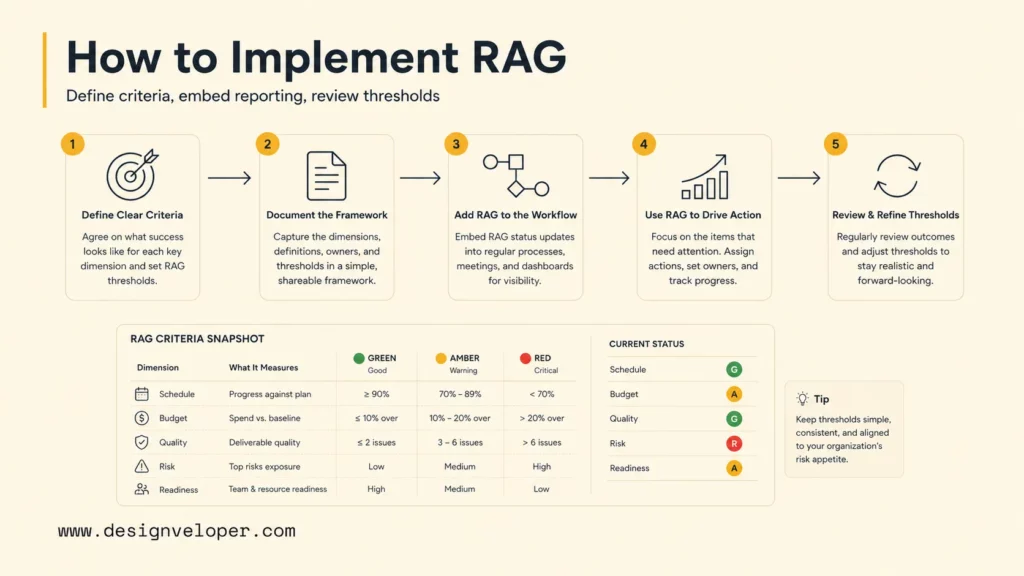
Set the criteria before the first formal report. Start with the project outcome, approved tolerances, key dependencies, and risks that could change the delivery decision. The criteria should help two people reviewing the same evidence reach a similar rating.
| Dimension | Green | Amber | Red |
|---|---|---|---|
| Schedule | Forecast milestones remain inside the approved tolerance. | Slippage needs recovery, but the committed outcome may still be protected. | Forecast breach affects a launch, contract, dependency, or business commitment. |
| Budget | Actual and forecast spend remain inside the approved tolerance. | Forecast is approaching the boundary and needs cost-control action. | Forecast exceeds the boundary or needs a funding decision. |
| Scope | Priority requirements are understood and accepted. | Open requirements or changes threaten sequencing or acceptance. | Uncontrolled change threatens the project objective or commitment. |
| Quality | Testing and acceptance are on plan with no release blocker. | Defects, test delays, or review gaps need active recovery. | Critical defects, failed acceptance, or unresolved security issues block release. |
| Risk And Dependency | Material risks have owners and workable responses. | A risk or dependency has increased and may affect delivery. | A risk has become an issue or needs intervention outside the team. |
| Readiness | Operations, support, training, and stakeholders are prepared. | Readiness work is late but recovery is still realistic. | Go-live creates unacceptable operational, customer, or compliance risk. |
Before reporting, write down the aggregation rule, exception policy, evidence owner, and review cycle. The worked report above uses a release-blocker override: a Red issue that prevents sign-off makes the overall status Red even if other areas are Green or Amber. An organization may use another rule, but it must show how serious exceptions are surfaced rather than averaging them away.
An illustrative schedule rule can use forecast total duration minus approved baseline duration, divided by approved baseline duration at each weekly review. For a 100-day approved baseline, a 106-day forecast is a 6% variance. Under a locally approved 5% tolerance, that is Amber only if a realistic recovery plan protects the committed milestone. If the forecast cannot protect the launch date, mark schedule Red regardless of the percentage. Green is within the local threshold with no threatened commitment. This 5% value is an example, not a standard across projects; teams that manage by dated milestones should use days of slippage instead.
Keep status and forecast separate when they tell different stories. Guidance from the Association for Project Management is useful here because a current rating does not automatically predict the next phase. Project tolerances also provide a helpful governance frame for deciding when a team can manage an issue and when it must escalate.
Review the criteria after delivery. Compare the historical colors with what actually happened. If projects move from Green to Red without an Amber warning, add better leading indicators. If nearly every item remains Amber, sharpen the thresholds or require stronger recovery evidence.
RAG Status Vs. RAID Logs And KPI Dashboards
RAG status works with other project controls, but it does not replace them. RAG provides the short health signal. The project plan, RAID log, and KPI dashboard provide the baseline, evidence, and detailed records needed to understand and act on that signal.
| Tool | Main Question | Typical Content | How It Relates To RAG |
|---|---|---|---|
| RAG status | How healthy is this area, and what response is needed? | Color, reason, trend, owner, and action. | Summarizes the signal for fast review. |
| RAID log | What risks, assumptions, issues, and dependencies are being managed? | Description, impact, response, owner, and due date. | Provides detailed evidence behind many Amber or Red ratings. |
| KPI dashboard | What measurable performance is the project or product showing? | Metrics, targets, actuals, trends, and segments. | Can supply evidence, but a metric alone may not explain the decision. |
| Project plan | What work is planned, when will it happen, and who is responsible? | Tasks, milestones, dependencies, resources, and dates. | Provides the baseline used to judge schedule and delivery status. |
A Red schedule status may link to the affected milestone and dependency. An Amber quality status may link to the test summary and defect list. A project manager can use the RAG report as the entry point, then direct the stakeholder to the record that supports the next decision.
Is RAG Status Reliable? Limitations And Controls
RAG status is reliable only when the underlying data, thresholds, and reporting behavior are reliable. The color is a summary of project evidence, so it cannot correct missing data or unclear ownership by itself.
- Oversimplification: three colors cannot show every dependency, tradeoff, or cause of a problem.
- Subjectivity: different managers may choose different colors when criteria are not agreed in advance.
- Delayed signals: a status may remain Green until a late dependency or quality issue becomes visible.
- False confidence: a Green overall status can hide a Red dimension when teams report only one project-level color.
- Weak follow-through: Amber and Red lose value when actions, owners, and decision dates are not tracked.
Reduce these limits by setting criteria during planning, showing dimension-level status, linking each rating to current evidence, and recording the trend over time. A Green overall label hiding a Red dimension is sometimes called watermelon reporting. Show the roll-up rule and allow reviewers to challenge the summary. Use the RAG report with a project plan, RAID log, KPI data, quality records, and decision history rather than treating it as a complete project dashboard.
How To Implement RAG Status Reporting
A lightweight RAG process can work in software delivery, internal operations, SaaS implementation, and business change projects. The process should fit existing governance rather than create a second meeting.
Public Designveloper project pages illustrate the value of traceable operational evidence, not proof that those teams used RAG. The WorkPacks construction platform describes a large work-package PDF generation problem and a page-by-page processing solution; a useful status would connect the affected deliverable to a test record and an owner. The HRM workflow platform documents digitized time-off requests and centralized employee information; a status in that setting would need the workflow record and acceptance decision, not a color alone. Teams building such systems can discuss evidence and reporting requirements with Designveloper’s software development services.
A Six-Step RAG Reporting Workflow
- Choose the reporting dimensions. Select only the areas that can change a project decision. Start with schedule, budget, scope, quality, risk, dependencies, and readiness when they are relevant.
- Define thresholds and evidence. Write down what Green, Amber, and Red mean for each dimension. Name the evidence source, owner, expected response, and escalation route.
- Communicate the framework. Explain the colors to the delivery team, sponsor, PMO, and other reviewers. Make clear that Amber and Red are valid reporting outcomes, not automatic evidence of poor performance.
- Add RAG to existing reviews. Use project reviews, sprint reviews, release reviews, steering committees, or portfolio meetings that already discuss delivery health.
- Connect every non-Green item to action. Assign a decision, resource request, scope tradeoff, vendor escalation, risk response, technical investigation, quality gate, or schedule replan.
- Review the framework against outcomes. Compare status history with what happened. Improve indicators and thresholds when the reporting system repeatedly misses early warning signs.
Applying RAG Status To Agile And Software Projects
Software projects have several moving parts that a single delivery metric cannot capture. A release can be on schedule while being Red for security, Amber for operational readiness, or Green for scope acceptance.
- Backlog and scope: priority stories, acceptance criteria, and change requests are understood.
- Dependencies: APIs, vendors, environments, data, and approvals are available when needed.
- Quality: test progress, defect severity, regression results, and acceptance confidence are visible.
- Security: reviews, vulnerabilities, access controls, and release decisions are tracked.
- Release readiness: deployment, rollback, monitoring, documentation, training, and support are prepared.
- Technical health: maintainability, performance, reliability, and technical debt are considered when they affect release confidence.
Do not calculate a software RAG status from sprint velocity alone. Stable velocity can coexist with unclear scope, poor quality, blocked integration, or weak user acceptance. In an Agile project management workflow, combine delivery metrics with qualitative evidence and a human explanation of the risk.
Shared Agile acceptance criteria can support scope and quality ratings because they give the team a common basis for deciding whether work is complete. The same principle applies to release readiness: the report should show the condition that protects the outcome, not only a color selected from a dashboard.
FAQs About RAG Status
How Is RAG Status Calculated?
RAG status is calculated by comparing project evidence with agreed criteria for Green, Amber, and Red. There is no universal formula. Teams may use tolerances, thresholds, weighted dimensions, or the most serious active condition, but they should document the method and apply it consistently.
How Is RAG Status Used In A PMO?
A PMO uses RAG status to standardize reporting, compare trends across projects, focus governance attention, and escalate shared risks or dependencies. The PMO should not replace project-level evidence with a color alone.
What If A Project Stays Amber For Several Reviews?
Repeated Amber ratings call for a review of whether recovery is working. Compare the forecast and evidence with the agreed deadline, assign a decision owner, and escalate to Red if the committed outcome can no longer be protected. Do not leave the same action and date unchanged week after week.
Is Project Management RAG The Same As AI RAG?
No. Project-management RAG means Red, Amber, and Green status reporting. AI RAG means Retrieval-Augmented Generation, where an AI system retrieves relevant information before producing an answer. Define the acronym early when both meanings may appear in the same context.
Conclusion: Make RAG Status Actionable
RAG status gives stakeholders a quick way to understand project health and progress, but the color is only useful when it leads to the right management response. Green supports continued delivery, Amber creates time for recovery, and Red frames the intervention or tradeoff that the project needs.
For teams building software products or business systems, effective RAG reporting depends on connected plans, risk records, quality evidence, ownership, and decisions. A delivery workflow that brings those records together can make status reporting easier to review and easier to act on. Contact Designveloper if you need help shaping that kind of project workflow into a software system.
Also published on

Share post on










Related Articles



ERP AI Chatbot: Turn Operational Data Into Safe Actions At Scale
ERP AI Chatbot: Turn Operational Data Into Safe Actions At Scale Published October 14, 2026
13 Best Agentic AI Tools For Building And Operating Agents
13 Best Agentic AI Tools For Building And Operating Agents Published October 12, 2026
Top Agentic AI Companies: 18 Vendors By Product Layer And Fit
Top Agentic AI Companies: 18 Vendors By Product Layer And Fit Published October 07, 2026


















