
















Best AI Trading Bots For Crypto & Stocks In 2026 (We Tested Them All)

KEY TAKEWAYS:
- The best AI trading bot depends on fit: market type, automation depth, broker or exchange support, risk controls, and user skill level matter more than hype.
- AI trading bots are automation software, not guaranteed profit engines; traders still need paper trading, API permission limits, loss rules, monitoring, and fraud checks.
- Stock-focused tools are stronger for screening, alerts, technical analysis, and backtesting, while crypto tools often emphasize grid bots, DCA, copy trading, and exchange automation.
- Developer-friendly workflows need logs, secure key storage, webhook controls, duplicate-signal protection, and kill switches before real capital is exposed.
- A custom build makes sense when teams need private strategy rules, multi-broker workflows, approval controls, compliance logging, or fintech-grade security that off-the-shelf tools cannot provide.
The best AI trading bot is the one that fits the market, strategy, broker or exchange connection, risk controls, and user skill level. In 2026, retail traders should treat AI trading bots as automation software, not profit machines. A useful bot can scan markets, trigger alerts, execute predefined strategies, copy signals, or run backtests, but it cannot remove market risk. This guide compares stock, crypto, and multi-asset tools using official product pages, current pricing or documentation, and risk guidance from regulators such as the SEC investor alert on AI investment fraud and the CFTC advisory on AI trading bot scams.
For readers who want the short answer: Trade Ideas and TrendSpider are stronger stock-market research and automation platforms; Pionex, Cryptohopper, Coinrule, Mizar, and Hummingbot are better fits for crypto automation; Capitalise.ai and TradingView are useful when the trader wants to express strategies, alerts, and webhooks across a broader workflow. Before using any automated system with real capital, start with paper trading, review API permissions, set maximum loss rules, and verify that the platform is legitimate.
Quick decision guide: choose the bot by market first, then by automation depth and risk controls. The table below gives a faster buyer-style answer before the detailed reviews.
| Reader goal | Best starting options | Why it fits | First safety check |
|---|---|---|---|
| Active stock scanning | Trade Ideas, TrendSpider | Stronger research, alerts, technical analysis, and backtesting workflows | Compare subscription cost with account size and trading frequency |
| Beginner crypto automation | Pionex, Coinrule | Built-in or no-code bot setup with simpler strategy templates | Start with demo mode or small capital and avoid high leverage |
| Copy trading or signal workflows | Cryptohopper, Mizar | Marketplace, signal, DEX, or automation workflows for crypto traders | Review live performance, fees, slippage, API permissions, and wallet risk |
| Developer-controlled bots | Hummingbot, TradingView webhooks | More control over strategy logic, connectors, payloads, and monitoring | Plan logs, key storage, duplicate-signal protection, and kill switches |
| Business or fintech product build | Custom AI trading bot | Private dashboards, proprietary rules, multi-broker flows, and approval controls | Build a paper-trading proof of concept before live execution |
Recommended for you:
- What Is AI Integration? How to integrate AI successfully?
- AI In Product Development: From Concept To Market Faster
- From AI MVP To Product: Why Great Demos Are Not Enough
What Is An AI Trading Bot?
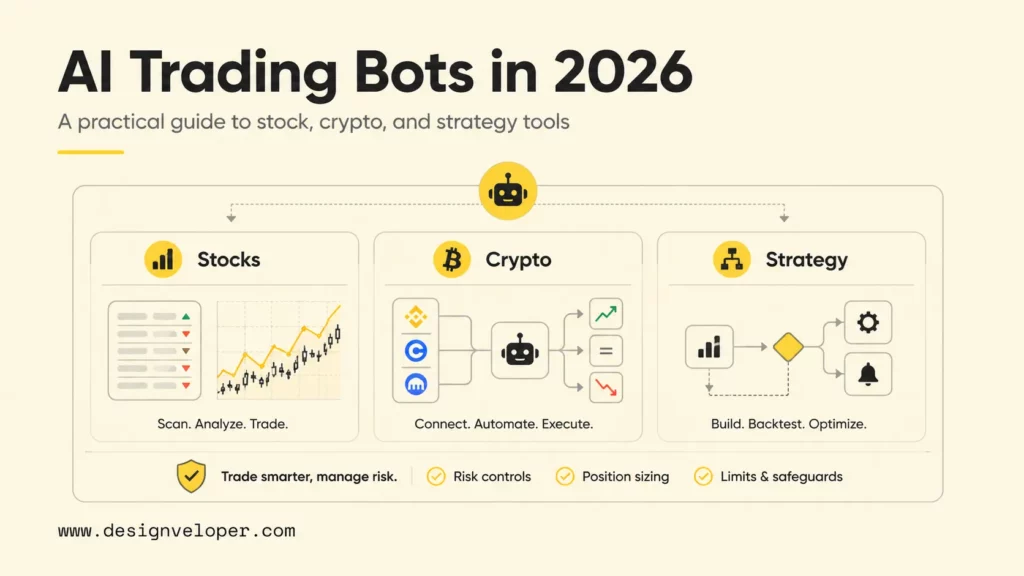
An AI trading bot is software that uses automation, market data, predefined rules, machine learning, or signal models to help a trader find, test, or execute trades. The phrase “AI” is broad. Some tools use machine learning for pattern recognition or signal scoring, while many retail products are closer to rule-based automation with smart templates, alerts, and backtesting.
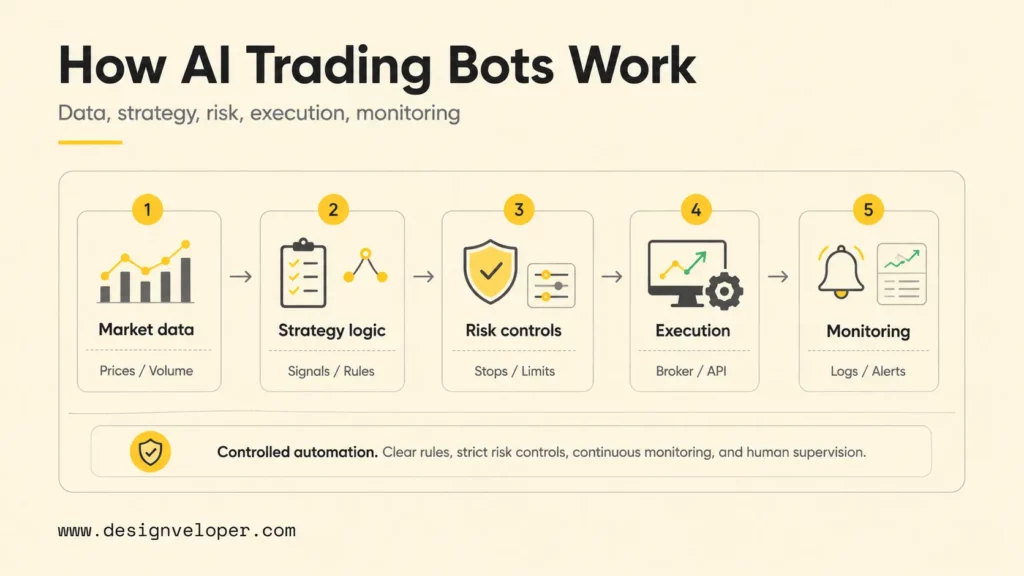
A practical AI trading bot usually has five parts: a data feed, a strategy engine, a risk-control layer, a broker or exchange connection, and a monitoring interface. The data feed supplies prices, volume, order-book signals, indicators, or news inputs. The strategy engine turns conditions into actions. The risk layer limits position size, drawdown, leverage, stop loss, or trade frequency. The broker or exchange connection sends orders through API keys or supported integrations. The dashboard helps the trader pause, edit, or audit behavior.
The workflow below shows why an AI trading bot should be judged as a controlled software system. Each layer needs a clear owner before real capital is exposed.
Prices, volume, order book, news, indicators
Signals, rules, ML scores, templates
Position size, stops, leverage, kill switch
Broker, exchange, API keys, webhooks
Logs, alerts, pause rules, reconciliation
The important distinction is control. A signal tool may only recommend trades. A semi-automated bot may send alerts that require approval. A fully automated bot can place orders without manual confirmation. Traders should match automation depth to the risk they can supervise. The TradingView webhook documentation is a useful example: a webhook can send an HTTP POST to an external app after an alert triggers, but the execution layer and safety checks still need to be designed carefully.
Trading bots are most useful when they reduce repetitive work. A crypto trader may use a grid or DCA bot to automate recurring entries and exits. A stock trader may use AI scanning to find unusual momentum or chart patterns faster. A developer may use an open-source framework to build custom market-making or arbitrage logic. None of those workflows guarantees profit, because markets change, liquidity disappears, spreads widen, and backtests can fail when real conditions differ from historical data.
Further reading:
- Agentic AI Architecture: Components, Workflow, Design Patterns
- What Is Agentic AI? Benefits, Architecture and How It Works
- Enterprise AI Agents: Use Cases, Tools, And Implementation Guide
Best AI Stock Trading Bots
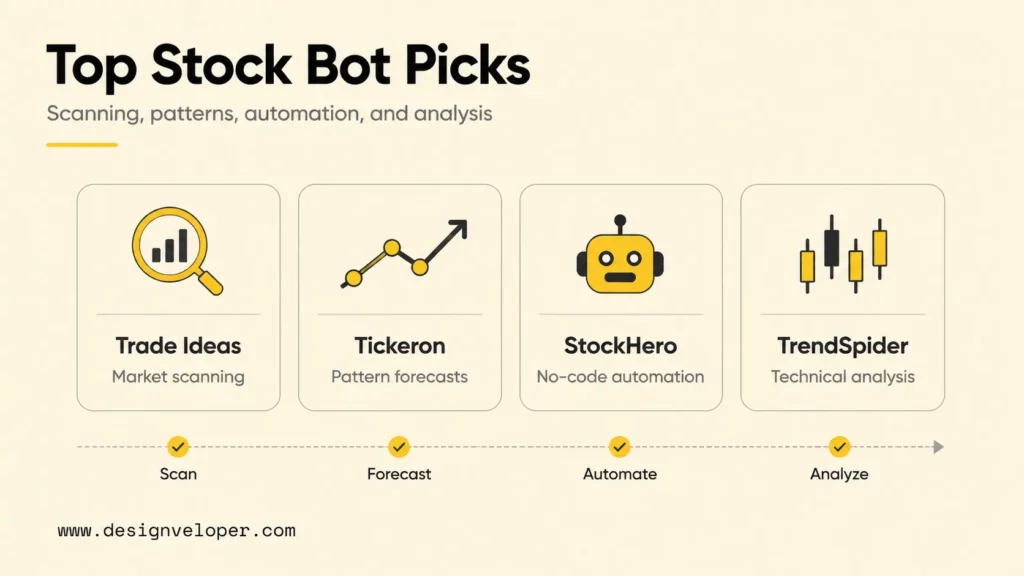
Stock trading bots usually focus on scanning, alerts, strategy testing, pattern recognition, and broker-connected execution. The best choice depends on whether the trader wants AI-generated ideas, visual technical analysis, marketplace strategies, or deeper automation. The table below gives a fast comparison before the individual notes.
| Tool | Best fit | Key limitation to review |
|---|---|---|
| Trade Ideas | Active stock scanning and AI trade ideas | Higher subscription cost and learning curve |
| Tickeron AI trading bots | Pattern recognition, forecasts, and AI agents | Performance claims need careful independent review |
| StockHero stock trading bot | No-code stock bot setup and broker automation | Broker support and strategy quality vary by user need |
| TrendSpider market research platform | Technical analysis, alerts, backtesting, and automation | Not a simple “set and forget” beginner bot |
The stock-bot comparison is easier to read as a use-case chart: Trade Ideas and Tickeron lean toward idea discovery, while StockHero and TrendSpider lean toward workflow automation and technical research.
1. Trade Ideas: AI Stock Trading Bot For Market Scanning
Trade Ideas is strongest for active traders who want real-time stock scanning and AI-assisted ideas. The platform’s AI trading signals feature describes real-time symbol entry and exit ideas from scans that adjust based on simulated backtesting. That makes Trade Ideas more useful for market discovery than for passive investing.
The tradeoff is cost and complexity. The current Trade Ideas pricing page lists premium-style plans that can be expensive for beginners, so users should compare the subscription fee with expected trading frequency, account size, and time saved. Trade Ideas makes the most sense when a trader already has a disciplined review process and wants stronger scanning infrastructure.
2. Tickeron: AI Trading Tool For Pattern Recognition And Forecasting
Tickeron offers AI tools for stock forecasts, price predictions, screeners, robots, and virtual agents. Its official Tickeron AI tools page presents multiple categories such as AI Virtual Agents, AI Trading Bots, AI Stock Screener, and AI Real Time Patterns. The platform is best for traders who want machine-learning-style pattern discovery and structured idea generation.
Because Tickeron promotes performance metrics and model outcomes, traders should read the methodology behind any robot before following it. Strong-looking backtests can still overfit past market conditions. A cautious setup would start with paper trading, small trade size, and a written rule for when to disable a robot after drawdowns or market regime changes.
3. StockHero: AI Stock Trading Bot For Automated Strategies
StockHero focuses on no-code stock trading automation. The official StockHero platform page positions the product as a stock trading bot that can connect with brokerages such as Webull, E*Trade, TradeStation, Tradier, and Alpaca. Its StockHero setup documentation emphasizes a simple flow for creating bots and automating trades.
StockHero is a good fit for users who want an approachable interface rather than a developer framework. The main review point is not whether automation exists, but whether the chosen strategy, broker connection, and risk settings match the trader’s capital and market style. StockHero’s own stock trading bot FAQ also frames the product as software-as-a-service rather than an investment product, which is the right mental model for users.
4. TrendSpider: AI Trading Software For Technical Analysis
TrendSpider is best for traders who want advanced charting, automated technical analysis, alerts, backtesting, and strategy tools in one workspace. The official TrendSpider product page says users can create custom AI-powered trading strategies and choose prediction training data, market, and risk-reward settings.
TrendSpider is not the simplest beginner bot, but it is valuable for technical traders who want to test hypotheses before execution. Its Strategy Bots and alert tools help traders monitor conditions and automate execution paths. Before paying, users should review the TrendSpider pricing and data-fee notes, especially if futures or professional market data fees apply.
Best AI Crypto Trading Bots
Crypto trading bots often provide more direct automation than stock tools because many exchanges expose retail-friendly APIs and the crypto market runs continuously. That 24/7 environment is exactly why risk controls matter. A bot can trade while the user sleeps, but it can also continue trading through liquidity shocks, exchange outages, API errors, or sudden volatility.
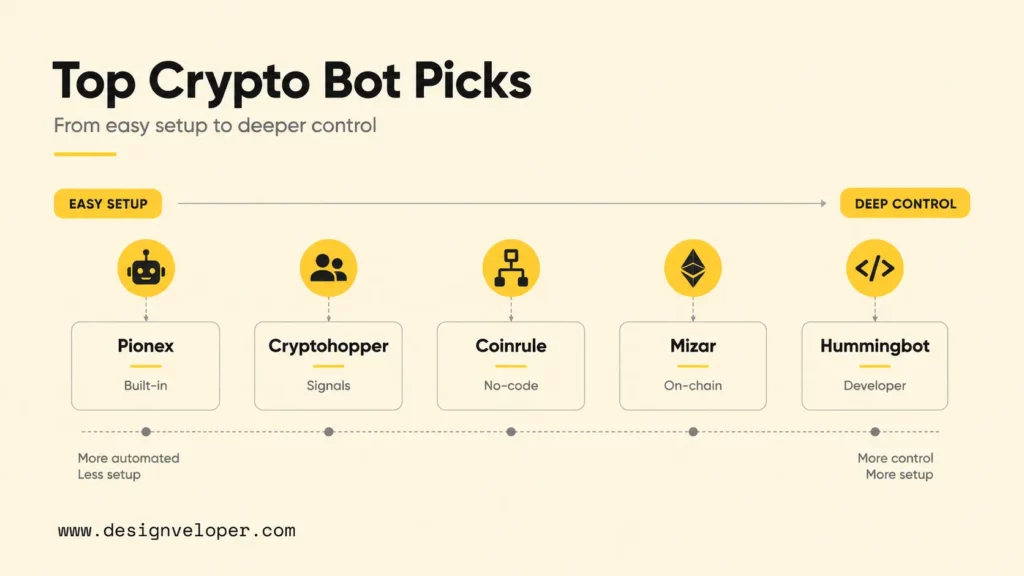
| Tool | Best fit | Useful starting check |
|---|---|---|
| Pionex crypto trading bots | Built-in exchange automation | Review trading fees and supported regions |
| Cryptohopper automated crypto trading | Copy trading, AI features, and exchange connections | Check plan limits and marketplace quality |
| Coinrule crypto trading bot | No-code strategy rules | Confirm free-plan limits and exchange support |
| Mizar on-chain trading platform | DEX automation and on-chain orders | Understand smart-contract and wallet risk |
| Hummingbot open-source framework | Developer-built crypto bots | Plan hosting, monitoring, and connector maintenance |
The crypto options differ most by custody, setup complexity, and how much infrastructure the user must operate. The chart below summarizes the practical tradeoff before the individual reviews.
1. Pionex: Free Crypto Trading Bot With Built-In Exchange Automation
Pionex is a crypto exchange with built-in trading bots, which makes it attractive for beginners who do not want to connect a separate bot to an external exchange. The official Pionex crypto trading bot page emphasizes cloud-based 24/7 automation, while the Pionex fee page lists a 0.05% spot-market trading fee.
Pionex is easiest to understand when the strategy is simple, such as grid trading, DCA, or rebalancing. The risk is that a simple bot can still perform badly in a strong trend, a thin market, or a leveraged setup. Beginners should avoid high leverage, test with small capital, and define when the bot should stop rather than letting automation run indefinitely.
2. Cryptohopper: AI Crypto Trading Bot For Copy Trading And Signals
Cryptohopper is a broad crypto automation platform for trading bots, DCA, trailing features, copy trading, and exchange connections. Its official Cryptohopper automated trading page highlights AI, copy trading, and portfolio management, while the Cryptohopper exchange-support page lists supported crypto exchanges.
Cryptohopper is useful when a trader wants more strategy flexibility than a built-in exchange bot. The caution is marketplace quality. Copying another trader or buying a signal does not transfer the trader’s discipline, drawdown tolerance, or capital base. Review strategy history, live forward performance, fees, and stop rules before connecting real exchange API keys.
3. Coinrule: No-Code Crypto Trading Bot For Beginners
Coinrule is a no-code crypto automation tool built around rule creation. The official Coinrule crypto trading bot page says the platform supports free testing with limited rules and demo trading, while the Coinrule pricing page explains plan limits for rules, exchange connections, indicators, and support.
Coinrule fits beginners who can describe a rule but do not want to write code. For example, a user might automate a simple condition such as buying a small position after a price drop and selling after a recovery. The weakness is that no-code tools can make weak strategies feel deceptively easy. Traders should write down the market condition where each rule should work and stop using it when those assumptions fail.
4. Mizar: AI Crypto Trading Bot For Automation And Copy Trading
Mizar is now positioned around on-chain trading, DEX automation, advanced orders, volatility bots, and copy-style workflows. The official Mizar on-chain trading page highlights Solana, Ethereum, Base, BNB, and DEX integrations such as Raydium, Uniswap, and PancakeSwap.
Mizar is most relevant for traders who are comfortable with wallets, decentralized exchanges, and fast-moving token markets. That market style brings extra risks: slippage, smart-contract exposure, wallet permissions, MEV-style execution issues, and volatile liquidity. Mizar should be evaluated less like a passive bot and more like an execution layer for users who already understand on-chain trading mechanics.
5. Hummingbot: Open-Source Crypto Trading Bot For Developers
Hummingbot is the best fit for developers and technical teams that want control over bot logic, connectors, deployment, and monitoring. The official Hummingbot open-source framework describes itself as a Python framework for automated trading strategies on centralized and decentralized exchanges, and the Hummingbot documentation explains its modular design for algorithmic trading bots.
Hummingbot is powerful because it can be customized. Hummingbot is also demanding because the user becomes responsible for infrastructure. A serious setup needs secrets management for exchange keys, server monitoring, failover behavior, logging, trade reconciliation, and a way to stop the bot quickly. Hummingbot is not the easiest path for casual traders, but it is one of the most flexible paths for builders.
Best AI Trading Bots For Multi-Asset And Strategy Building
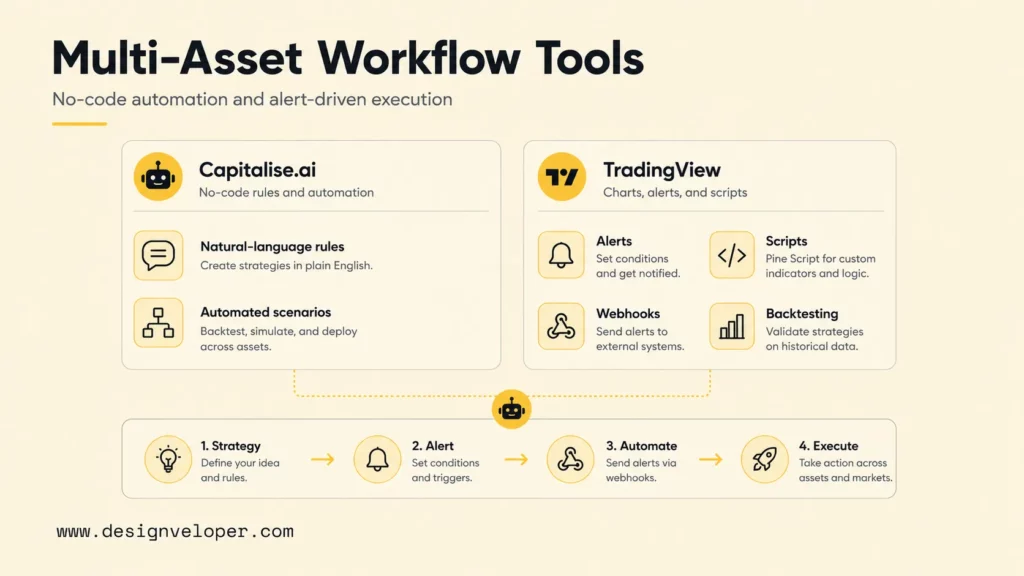
Some traders do not want a single stock or crypto bot. They want a strategy-building workflow that can send alerts, automate scenarios, or connect chart logic to another execution system. Capitalise.ai and TradingView are useful in that middle layer because they support human-readable strategy creation, alerts, scripts, webhooks, and integrations.
1. Capitalise.ai: No-Code AI Trading Bot For Strategy Automation
Capitalise.ai lets traders automate strategy conditions without writing code. The official Capitalise.ai trading automation page presents a code-free workflow for building automated systems, and the Capitalise.ai features page emphasizes 24/7 market monitoring, advanced conditions, and automation for predefined strategies.
The best use case is translating a clear rule into an automated scenario. A trader might write a natural-language condition for entry, exit, and risk control, then test how the platform handles the logic. Capitalise.ai is less appropriate when the trader does not yet have a strategy. Automation should execute a thought-through plan, not replace the planning process.
2. TradingView: Trading Automation Tool For Alerts, Scripts, And Backtesting
TradingView is not a broker-native “AI bot” in the same way as some tools above, but it is central to many automated trading workflows. The TradingView alerts documentation explains alerts for prices, indicators, strategies, drawing tools, watchlists, and Pine Script. The Pine Script alerts documentation shows how scripts can create alert events.
TradingView becomes automation infrastructure when alerts are routed to webhooks, broker bridges, or custom middleware. That flexibility is useful, but it increases engineering responsibility. Traders should use clear JSON payloads, duplicate-signal protection, order-size limits, authentication, and logs so that one alert does not become an uncontrolled live order.
Related reading:
- AI Agent Orchestration: How Multi-Agent Workflows Work In Practice
- A Practical Guide To AI Agent Architecture With Diagrams
- Agentic AI Security: Risks, Core Architecture, Solutions
How To Choose The Right AI Trading Bot
The right bot should match the trading workflow before it matches a marketing claim. A beginner who wants simple crypto DCA automation needs a different tool from a stock day trader using real-time scanners or a developer building a market-making bot. The checklist below keeps the decision practical.
The decision path below matches the checklist: choose the market first, then automation depth, skill level, risk testing, and security requirements.
- 1. Market
Crypto, stocks, forex, or multi-asset - 2. Automation
Signals, approval flow, or live execution - 3. Skill fit
Beginner, no-code, or developer-led - 4. Risk test
Backtest, paper trade, loss limits - 5. Security
API permissions, logs, 2FA, pause rules
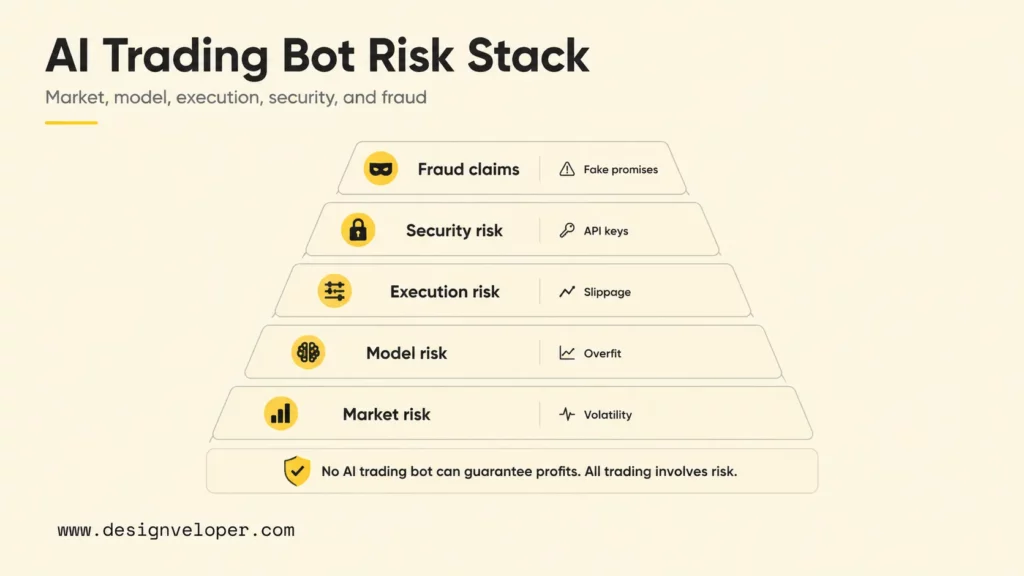
- Losing Trades Still Happen. A bot can follow rules perfectly and still lose money when the strategy is wrong for current conditions.
- Backtests Can Overfit Past Market Conditions. A strategy that looks strong in historical data may fail when spreads, liquidity, volatility, or participant behavior changes.
- Bots Can Fail During Volatile Markets. APIs can lag, exchanges can throttle orders, market orders can slip, and stop losses can fill worse than expected.
- Blind Trust In AI Can Lead To Major Losses. The SEC investor alert warns that AI-generated information can be false, outdated, incomplete, or made up, so traders should verify claims before acting.
- Scams Often Promise Guaranteed Passive Returns. The FBI 2025 Internet Crime Report announcement reported nearly $21 billion in cyber-enabled crime losses, with cryptocurrency and AI-related complaints among the costliest categories.
A practical safety rule is simple: no legitimate bot can guarantee returns. Any platform that pressures a user to deposit quickly, hides the company behind anonymous social accounts, asks for withdrawal-enabled API keys, or refuses to explain strategy logic should be treated as high risk.
When A Custom AI Trading Bot Makes Sense
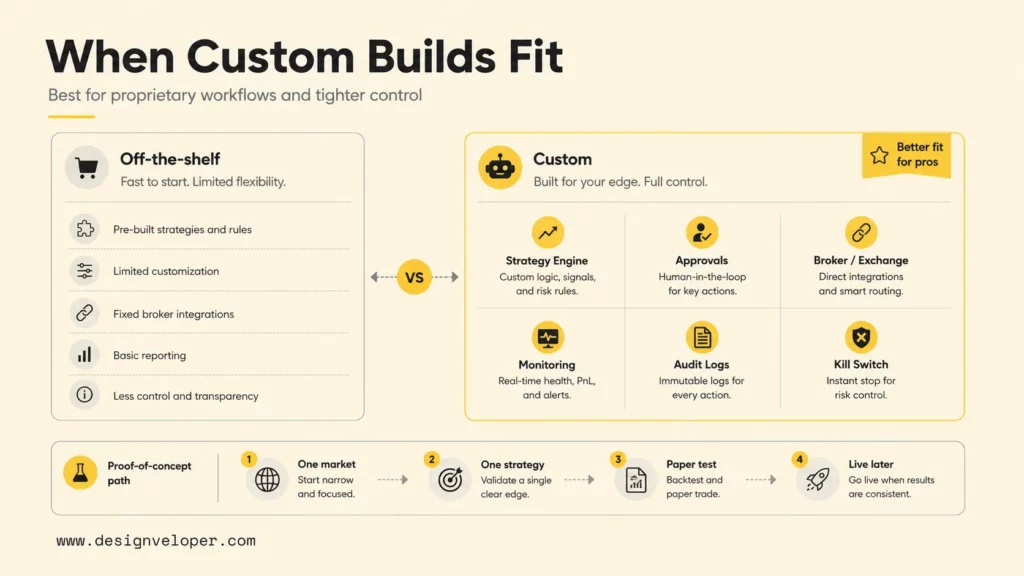
A custom AI trading bot makes sense when off-the-shelf tools cannot support the strategy, risk rules, broker workflow, compliance needs, or dashboard experience the team needs. Most individual traders should start with existing tools because building a bot from scratch is expensive and operationally demanding. Custom development becomes more reasonable for fintech teams, trading communities, broker platforms, research teams, or businesses that need proprietary workflow control.
Off-the-shelf tools may not support proprietary strategies, private dashboards, multi-broker routing, custom risk checks, user approval flows, portfolio-level exposure limits, or internal reporting. A custom system can combine paper trading, backtesting, broker integrations, monitoring, alerts, and controlled automation in one environment. A production-ready build should include audit logs, alert routing, role permissions, key management, observability, kill switches, and manual override controls.
Designveloper can support trading automation as a software engineering partner, not as a profit-promising signal seller. Our work in custom software development services, AI software development, and fintech-related product delivery helps teams turn a trading workflow into maintainable software with clear guardrails. For finance-adjacent products, Designveloper’s experience with financial application development and fintech app development is especially relevant.
A custom bot project should begin with a narrow proof of concept. Define one market, one strategy, one broker or exchange, one risk model, and one paper-trading acceptance test. A useful acceptance test might require the bot to process live data, generate expected signals, reject trades above the position limit, log every decision, pause after a maximum loss, and produce a daily reconciliation report. Only after that test is stable should the team consider limited live trading.
For practical examples, check out:
- Chatbots Powered by Generative AI: Transforming the Banking Experience
- What Is Software Development Outsourcing?
- 13 Different Types of Software Development Services
The final decision is not “AI bot or no bot.” The better question is how much automation a trader or business can supervise responsibly. For most readers, the best first step is to choose a reputable platform, paper trade, document risk rules, and avoid any tool promising guaranteed passive income. For teams that need proprietary automation, a custom build should be treated as financial software: scoped, engineered, tested, monitored, reviewed, and improved before real capital is exposed. The best ai trading bot is ultimately the safest bot a user can understand, supervise, and shut down when market conditions change.
Also published on

Share post on










Related Articles


13 Best Vibe Coding Tools for Building Apps and Editing Codebases
13 Best Vibe Coding Tools for Building Apps and Editing Codebases Published September 30, 2026
Can ChatGPT Create an App? What It Can Build and What to Check
Can ChatGPT Create an App? What It Can Build and What to Check Published September 30, 2026
Is LangChain Bad? Developer Complaints, Pros, And When To Use It
Is LangChain Bad? Developer Complaints, Pros, And When To Use It Published September 30, 2026



















