
















What Is A Minimum Viable Product (MVP)? A Practical Guide

Building a product starts with an assumption: someone has a problem worth solving. A minimum viable product (MVP) helps a business test that assumption through a small, usable release before committing to a larger investment.
For founders and product teams asking “what is an MVP?”, the practical question is how much to build before learning from customers. This guide explains the essential components, common formats, and steps to plan a first release that produces useful evidence.
What Is A Minimum Viable Product (MVP)?
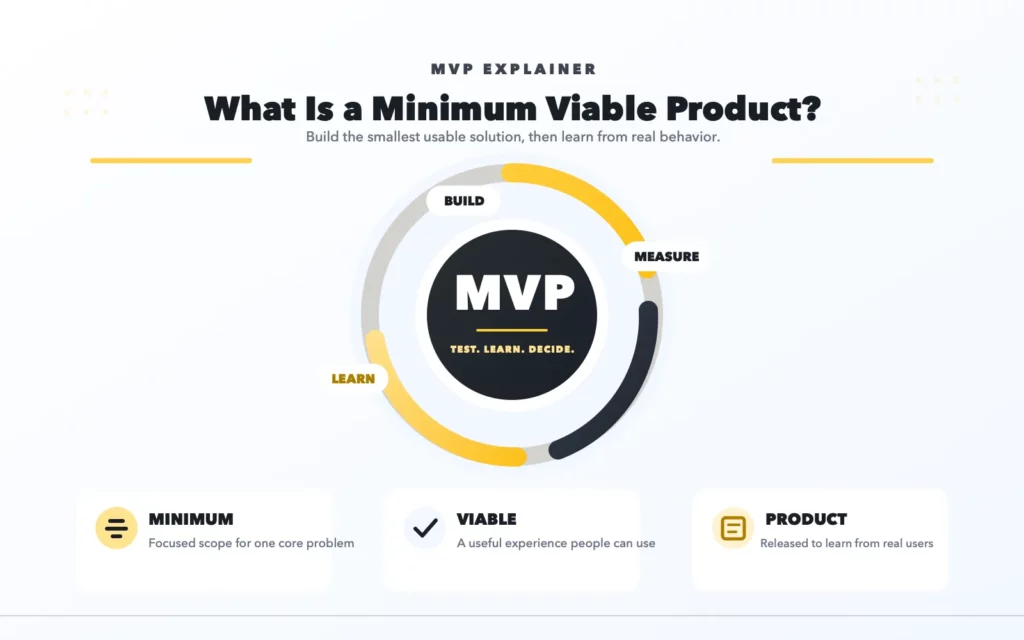
A minimum viable product (MVP) is the smallest usable version of a product that helps a team test real user demand, collect feedback, and decide what to improve before investing in a full build.
Each part of the term has a purpose:
- Minimum: The scope includes only what is necessary to test the main assumption.
- Viable: Users can complete the intended task and receive meaningful value.
- Product: People can experience the solution in a real context.
An MVP might serve one customer group, support one workflow, or operate on one platform. Some work behind the scenes may remain manual while the team learns what deserves automation.
For example, a retail ordering MVP could let customers browse a limited catalog, place an order, and receive confirmation. Staff could manage stock updates and fulfillment manually during the initial trial. Loyalty programs and personalized recommendations could wait.
An MVP creates value by turning a product idea into a testable experiment. The Lean Startup methodology describes this process as the build-measure-learn feedback loop: build the smallest usable version, measure how real users respond, and use the results to decide what to improve or whether to change direction.
An MVP produces useful evidence only when the team defines a testable assumption. The team also needs a metric to evaluate the result. Without this focus and a clear success metric, the release is simply a limited product rather than an effective validation tool.
Why Businesses Use MVPs For Product Validation
Businesses use MVPs to replace assumptions with observations before expanding their investment. The value comes from what the team learns and how those findings change product decisions.
- Validate demand. Interviews can reveal problems, but an MVP shows whether people take action. Completing a workflow, returning to the product, or paying for access provides different evidence from saying an idea sounds useful.
- Reduce product and development risk. Early use can expose a weak value proposition, confusing workflow, or costly integration. Discovering these issues within a narrow release gives the team a chance to adjust before adding more dependencies.
- Launch faster with essential MVP features. A focused scope reduces the work required to reach early users. Speed still depends on the product: a simple booking service and a financial application may have very different integration and data requirements.
- Collect real user feedback. Users often struggle with details that planning sessions miss. Watching where they stop, ask for help, or create workarounds can reveal more than a general satisfaction score.
- Guide roadmap, budget, and investment decisions. Usage patterns help teams prioritize improvements. If customers repeatedly use one workflow and ignore another, the next development budget can reflect that behavior.
An MVP does not guarantee market success. It helps a team make the next investment decision with better information.
Key MVP Features And Components
A useful MVP combines a narrow product scope with a clear plan for learning. The following components keep development connected to the question the business needs to answer.
- Core User Problem
Define a specific problem for a specific audience. “Help small retailers sell online” leaves many possible directions. “Let existing customers reorder household essentials for local pickup” gives the team a clearer workflow to test.
Understand how users solve the problem today, what causes difficulty, and why they might change their behavior.
- Minimum Feature Set
Essential MVP features support the path from the user’s starting point to a useful outcome. For a pickup-ordering product, that could include product selection, order submission, pickup details, and confirmation.
A feature belongs in the first release when removing it would prevent the core task, make the experience unsuitable for real use, or undermine the experiment.
- Usable Product Experience
Users need enough clarity and reliability to experience the intended value. Broken forms, unclear instructions, and missing confirmations can make a useful idea appear unsuccessful.
The required quality level depends on the workflow. Account access, payment handling, and protection of personal data may be essential even when the feature set is small.
- Early Users Or Target Testers
Recruit people who experience the problem and resemble the intended customer. Convenient volunteers may offer feedback, but their behavior may not represent the target market.
For business software, include the person doing the work and, where relevant, the person approving the purchase.
- Clear Success Metric
Choose a primary measure that reflects the assumption being tested. Examples include completed orders, repeated weekly use, or conversion from a trial to a paid subscription.
Define the measurement period and target before launch. Supporting measures, such as error rates and support time, help explain the result.
- Fast Feedback And Iteration Loop
Combine product analytics with conversations and observation. Analytics show where users leave; interviews can help explain why.
Assign responsibility for reviewing feedback and deciding what changes next. A growing feedback folder has little value unless someone acts on it.
Common MVP Types And Examples
Choose an MVP approach based on what remains uncertain: demand, workflow, user value, or the ability to deliver the service. The examples below are illustrative scenarios, not client case studies.
| MVP Type | Best For | Example Use Case |
|---|---|---|
| Landing page MVP | Testing interest in an offer before building the service | A SaaS landing page explains a stock-alert service and invites retailers to request a pilot. |
| Concierge MVP | Learning how to deliver value through direct manual service | A team manually prepares weekly spending summaries for users testing a personal finance assistant concept. |
| Wizard-of-Oz MVP | Testing a product interface while people perform selected operations behind it | Users submit products through a retail catalog interface while staff prepare and return the listings. |
| Single-feature MVP | Testing one central product capability | A mobile app lets customers book an available appointment and receive confirmation. |
| No-code or low-code MVP | Testing a workflow using visual builders and existing services | A retailer combines a storefront, order form, payment service, and simple operations database. |
A landing page is commonly called an MVP, although it usually tests interest rather than delivering the product’s core value. Email signups can justify further investigation; they do not establish that customers will use, retain, or pay for the finished service.
Concierge and Wizard-of-Oz approaches both involve manual work. In a concierge test, the human service is visible. In a Wizard-of-Oz test, users interact mainly with an interface while operators handle selected tasks behind it. Teams should explain relevant data access and service limitations, particularly when people review personal information.
Software, mobile apps, SaaS, ecommerce, and AI describe product categories. Each can use several of the approaches above:
- Software MVP: An internal tool accepts requests and lets staff update their status.
- Mobile app MVP: An app supports appointment selection, booking, and confirmation.
- SaaS MVP: A subscription service monitors one inventory source and sends low-stock alerts.
- Ecommerce MVP: A retail workflow supports a limited catalog, checkout, and manual fulfillment.
- AI MVP: A document productivity tool summarizes one document type and lets users inspect the source and correct the output.
For the AI example, measure whether users complete the document task faster, how much correction the output needs, and what each completed task costs. A fluent response alone does not establish product value.
Teams that confirm demand for an AI MVP can then plan how to scale a reliable AI product without losing the controls that made the first release useful.
For more real-world patterns, see these MVP examples for founders.
MVP Vs POC, Prototype, And Beta Version
A proof of concept, prototype, MVP, and beta version answer different questions. The comparison helps teams choose the next validation activity without building more than the current uncertainty requires.
| Validation Type | Main Purpose | User Access | Typical Output |
|---|---|---|---|
| Proof of concept (POC) | Test technical feasibility | Usually internal teams or selected stakeholders | A technical experiment demonstrating that a difficult capability or integration can work |
| Prototype | Test a concept, layout, or user flow | Selected research participants or stakeholders | Wireframes, an interactive mockup, or a simulated experience |
| MVP | Test real-user demand and product value | Early users from the target audience | A narrow, usable product or service with a measurement plan |
| Beta version | Test a near-complete intended release before wider launch | Invited users in a private beta or broader users in a public beta | Working software undergoing further reliability, usability, and operational improvements |
Consider a document productivity product. A POC might test whether text can be extracted from the intended files. A prototype could test how users review a summary. An MVP would let early users complete that task with their documents. A beta could broaden access while the team improves the release.
The terms can overlap. An MVP may launch as a private beta, and beta products can still change substantially. The GOV.UK Service Manual, for example, describes beta as a period of real-user testing, measurement, and continued iteration.
Teams do not need to complete every stage in a fixed sequence. Choose the activity that addresses the most important unanswered question.
For a more detailed decision framework, see POC vs MVP vs prototype.
How To Build An MVP Step By Step
Building an MVP starts with deciding what to learn. The following process connects that question to product scope, launch, and the next investment decision.
1. Define The Problem And Target Users
Describe who has the problem, when it occurs, and how people handle it today. Speak with potential users and, where possible, observe the existing workflow.
For a retail ecommerce MVP, the problem might be that repeat customers must message staff to check availability and arrange pickup. The initial audience could be existing local customers who already reorder regularly.
2. Identify The Riskiest Assumption
List what must be true for the idea to work. Customers may need to prefer self-service ordering, staff may need to fulfill orders accurately, and the business may need enough margin to support the service.
Choose the assumption whose failure would most change the plan. Write it as a testable statement: “Existing customers will complete repeat orders through a simple online catalog without staff assistance.”
3. Choose The Smallest Usable Feature Set
Map the steps required to test that statement. Include the features needed to complete those steps and the controls needed for real use.
For the ordering example, the first release might need a limited catalog, availability information, order submission, pickup selection, and confirmation. Staff could update order status manually.
Keep optional additions in a separate backlog. A feature should enter the launch scope because the experiment needs it, rather than because a competitor offers it.
4. Build The First Version
Select a delivery approach that fits the uncertainty, budget, and expected users. Existing services or no-code tools may be sufficient. Custom development may be needed when the core workflow depends on unusual behavior or integrations.
Add measurement during the build. Record meaningful events such as order submission and successful completion, and test the full user journey before inviting customers.
Give users a way to report problems. For AI features, include a way to inspect and correct results where the task requires it.
For a step-by-step approach to this delivery model, see how to develop a low-code MVP.
5. Launch To Early Users
Start with a group that closely matches the target audience and that the team can support.
Explain what the product does, any relevant limitations, and how to provide feedback. Observe initial sessions to distinguish product confusion from a lack of interest.
Record any help users receive. A workflow completed with extensive staff assistance provides different evidence from one completed independently.
6. Measure Behavior And Feedback
Compare actual behavior with the success criteria established before launch. Review completion, repeat use, willingness to pay, and operational effort as relevant to the business model.
For illustration, a retailer might aim for 20 of 30 invited customers to complete an order within two weeks, with at least eight ordering again within a month. Those numbers are hypothetical planning targets, not industry benchmarks.
Ask what prevented unsuccessful users from reaching the outcome. Small samples provide early direction, but usually cannot establish broader market demand on their own.
7. Decide Whether To Iterate, Pivot, Scale, Or Stop
Use the evidence to choose a specific next action:
- Iterate: Users value the outcome, but identifiable problems block completion or repeat use.
- Pivot: Evidence suggests changing the audience, problem, offer, or delivery approach.
- Scale: Demand and delivery results justify cautiously expanding access or investment.
- Stop: The findings do not support further investment under the current assumptions.
Document the decision and its reasoning. A decision to stop can be a useful result when it prevents a larger unsupported investment.
Shaping An MVP Scope For A Successful First Launch
A successful first launch starts with agreement on the question it must answer. Without that agreement, design requests, integration needs, and stakeholder preferences can gradually expand the release.
Create a short scope document that defines:
- The target user and core problem.
- The assumption the release will test.
- The complete user journey included at launch.
- Essential features, integrations, and quality requirements.
- Tasks handled manually and features deferred.
- Success measures, review date, and decision owner.
Pay particular attention to integrations. A single feature may depend on payment processing, inventory data, permissions, or an external service. Identify those dependencies before committing to a delivery plan.
For software products, SaaS platforms, mobile apps, ecommerce systems, or AI features, Designveloper can help turn a broad idea into a focused MVP scope. As an AI-first software and automation partner, Designveloper can help define the user flow, architecture, integrations, and feedback loop needed for an informative first release.
Bring the core problem, target users, and current assumptions to a discussion with the Designveloper team. The aim is a launch scope that tests the business case and gives the team clear evidence for what to build next.
For additional planning context, review the main factors in MVP development cost and timeline planning.
FAQs About Minimum Viable Products
What Is The Difference Between MVP And Proof Of Concept?
A proof of concept tests whether a technical approach can work. An MVP tests whether a usable solution provides value to real users. A successful POC can reduce technical uncertainty, but it does not establish customer demand.
Can An MVP Be Built Without Code?
Yes. An MVP can use no-code tools, existing platforms, or a manually delivered service. The approach needs to support the assumption being tested and handle user data appropriately. Some technical assumptions still require a coded experiment.
How Do You Choose MVP Features?
Start with the core user problem and map the shortest complete path to solving it. Include features required to deliver the outcome, support suitable quality, and measure the result. Defer features that do not affect the first validation decision.
How Do You Know If An MVP Is Successful?
An MVP is successful when it produces enough relevant evidence to guide the next decision. Assess results against predefined measures such as task completion, repeat use, payment, or time saved. Positive feedback and signup totals alone rarely establish sustained demand.
What Happens After An MVP Is Launched?
The team reviews behavior, gathers feedback, and decides whether to improve the product, change direction, expand access, or stop. Further development should follow the findings. Launching an MVP does not automatically justify building every feature on the original roadmap.
Conclusion
If you are asking what is a MVP, the most useful answer is that it is a focused way to learn before committing to a full product build. A well-scoped MVP solves one meaningful user problem, gives early users a usable path to an outcome, and produces evidence for the next decision.
Start with the riskiest assumption, build only what is needed to test it, and define the measures that will determine whether to iterate, pivot, scale, or stop. If your team needs help turning an early idea into a testable software, ecommerce, mobile, SaaS, or AI product, talk to Designveloper about defining an MVP scope that fits the business case.
Also published on

Share post on










Related Articles


Cloud Application Development: Architecture, Process, And Cost
Cloud Application Development: Architecture, Process, And Cost Published September 25, 2026
Android App Development: Stack, Process, Cost, And Best Practices
Android App Development: Stack, Process, Cost, And Best Practices Published September 17, 2026
How Gitignore Works: Rules, Patterns, Examples, And Debugging Tips
How Gitignore Works: Rules, Patterns, Examples, And Debugging Tips Published August 05, 2026



















