
















11 Web Server Software Options and Related Platforms Compared

KEY TAKEAWAYS:
- There is no single best web server software for every workload. Choose by application stack, traffic pattern, hosting model, security needs, and the team’s ability to operate it.
- Nginx and Apache are general-purpose origin servers; LiteSpeed and OpenLiteSpeed fit some WordPress stacks; IIS serves Windows-centered environments; Caddy simplifies common HTTPS setups.
- Tomcat and Node.js are application-serving layers, Envoy and Traefik are cloud-native proxies, and Cloudflare is usually an edge layer. They are related options, not identical substitutes.
- Compare shortlisted options with production-like traffic, failure tests, observability, and total operating cost. Popularity data is an ecosystem signal, not a performance ranking.
Choosing web server software is less like picking a faster engine and more like deciding who owns each step between a visitor and an application. A WordPress publisher, a Java platform team, and a company routing traffic across containers may all search for the same “best” option but need different layers. The shortlist below compares 11 groups covering 12 names, explains where each fits, and highlights the operational trade-offs that matter after deployment.
What Does Web Server Software Do?
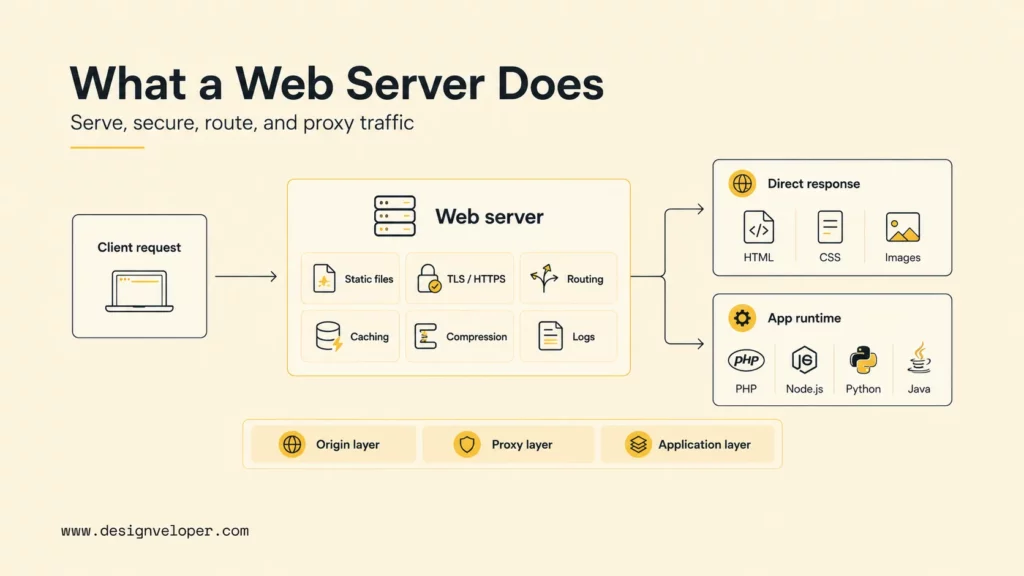
Web server software accepts HTTP or HTTPS requests and either returns content or passes the request to an application that can. It may serve files, terminate TLS, route requests, apply redirects, cache or compress responses, enforce limits, and record access logs. Which of those jobs it performs depends on the product and its place in the architecture.
The term can refer to different layers. Nginx and Apache HTTP Server commonly serve as origin web servers. Tomcat hosts Java web applications, while Node.js provides a runtime and HTTP APIs for JavaScript services. Envoy and Traefik route traffic between services. Cloudflare usually acts as a reverse proxy and edge platform in front of an origin.
These layers can work together rather than compete. For example, Cloudflare may handle edge security and caching, Nginx may route traffic at the origin, and a Node.js service may generate an API response. That distinction matters when comparing a web server with a complete What Is a Web Application (Web App)? Is It the Same as Website? or evaluating which component should own TLS, caching, and application routing.
A useful selection starts by assigning responsibilities. Decide which layer serves static files, forwards dynamic requests, manages certificates, applies security rules, and exposes operational signals. A product that appears simple in a feature list can still be a poor fit if the team cannot safely configure, monitor, and update it.
How A Web Server Handles A Request
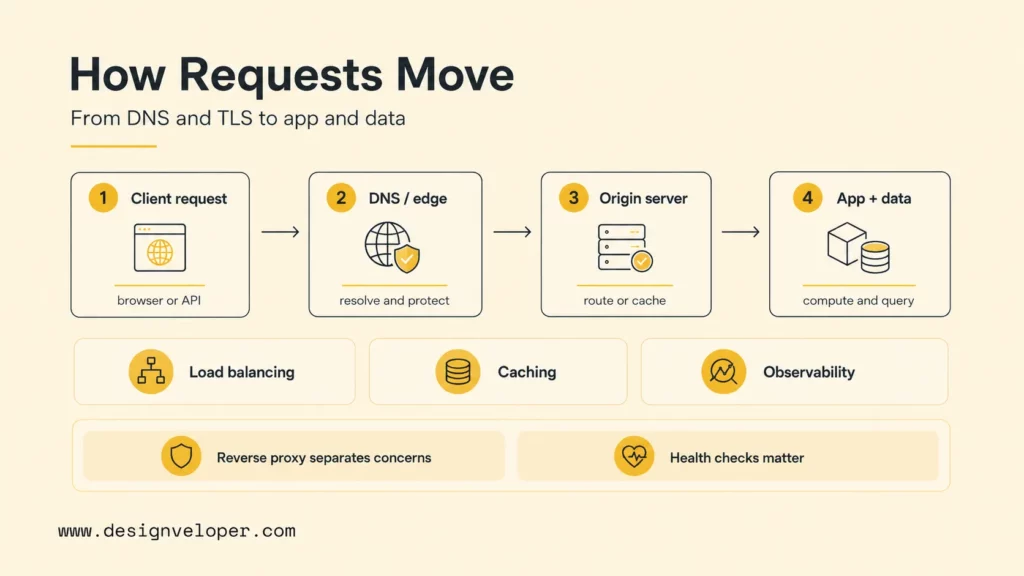
A browser or API client first resolves a hostname, opens a connection, negotiates TLS when HTTPS is used, and sends an HTTP request. The first server or proxy checks details such as the hostname, path, method, headers, and connection state. It can answer directly, redirect, reject, serve a cached response, or forward the request.
Static files such as images, stylesheets, and downloads can often be returned without running application code. A dynamic route is usually sent to an application runtime through HTTP, FastCGI, a Unix socket, or another protocol. The application may call a database or external service before returning a response through the same request path.
A reverse proxy separates public traffic handling from application logic. It can terminate TLS, normalize headers, set request limits, route by hostname or path, and distribute requests across application instances. Teams still need to define health checks, timeouts, retry rules, session behavior, and failure boundaries. Retrying a payment or order request without an idempotency design, for example, can create duplicate work.
Caching may happen in a browser, CDN, edge proxy, origin server, or application. Each cache needs a clear key, freshness policy, invalidation method, and privacy boundary. A wrong cache rule can expose one user’s response to another or serve outdated content.
Operations complete the request path. Access logs, metrics, traces, TLS status, error rates, saturation, dependency timing, and deployment versions help teams locate failures. A fast server with poor telemetry can be harder to run than a slightly slower option with clear diagnostics.
Best Web Server Software Compared
This is an editorial shortlist by role, not a lab ranking or a claim that all 12 technologies are equivalent. Envoy and Traefik share one entry because both address dynamic service routing, though their configuration models and strengths differ. Use the table to narrow the field; the notes below explain what each option asks a team to operate.
| Option or group | Good starting point | Main decision to validate |
|---|---|---|
| Nginx | General reverse proxying and static delivery | Configuration ownership, cache rules, and observability |
| Apache HTTP Server | Flexible hosting and compatibility-heavy sites | Module inventory and dependence on .htaccess |
| LiteSpeed Web Server | Managed WordPress hosting with server-level caching | License, hosting support, and cache behavior |
| OpenLiteSpeed | Self-managed, open-source LiteSpeed-based hosting | Feature differences and control-panel compatibility |
| Microsoft IIS | Windows Server and Microsoft application estates | Platform, licensing, and team fit |
| Caddy | Smaller deployments that want simpler HTTPS operations | Certificate policy and multi-instance requirements |
| Lighttpd | Lean or resource-constrained deployments | Current module and operator ecosystem needs |
| Apache Tomcat | Java Servlet and Jakarta web applications | Which front proxy handles edge responsibilities |
| Node.js | JavaScript APIs, streaming, and real-time applications | Production HTTP limits and process management |
| Envoy or Traefik | Dynamic routing for containers and services | Policy ownership and platform complexity |
| Cloudflare | Global edge delivery and security in front of an origin | Origin protection, cache correctness, and vendor boundaries |
1. Nginx For Reverse Proxying And Static Content
Nginx is a common shortlist choice for Linux-based applications that need a public reverse proxy, static file server, or load balancer. Its event-driven worker model and mature routing ecosystem fit websites and APIs that serve many concurrent connections. The official Nginx beginner’s guide covers static content, proxying, and FastCGI.
- Best for: Static assets and public routing for PHP-FPM, Python, Go, Java, or Node.js services.
- Trade-off: Includes, rewrites, headers, and cache rules can become difficult to govern when no team owns the configuration.
- Check before choosing: Test health checks, cache invalidation, upstream timeouts, and configuration rollback with the application’s actual routes.
2. Apache HTTP Server For Flexible Hosting
Apache HTTP Server remains useful when applications rely on its modules, virtual-host behavior, or per-directory .htaccess rules. It supports a broad range of hosting patterns and can serve as an origin server or reverse proxy. The Apache HTTP Server 2.4 documentation describes its modules, processing models, TLS, caching, and proxy features.
- Best for: Compatibility-heavy hosting, shared hosting, and established sites whose rules already depend on Apache behavior.
- Trade-off: Distributed
.htaccessrules can make performance and security harder to review; central configuration is easier to govern when the team controls the host. - Check before choosing: Inventory required modules and rewrite rules before migrating or changing the process model.
3. LiteSpeed Web Server For WordPress Hosting
LiteSpeed Web Server is a commercial option used in hosting environments that combine Apache-compatible configuration with server-level caching. Its WordPress cache documentation explains that full-page caching depends on the LiteSpeed cache engine; installing the plugin alone does not make every host behave the same way. Review the LiteSpeed Cache for WordPress documentation alongside the host’s plan and configuration.
- Best for: WordPress publishers and hosting providers that can manage the server cache and its integration with WordPress.
- Trade-off: Licensing, vendor-specific behavior, and cache invalidation add operational considerations.
- Check before choosing: Confirm which cache features the host enables, how logged-in and personalized pages are handled, and how purges work after content changes.
4. OpenLiteSpeed For Open-Source Deployments
OpenLiteSpeed is the open-source server in the LiteSpeed family and offers a self-managed route for teams interested in that ecosystem. Its installation documentation covers Linux distributions, cloud images, scripts, and Docker. It can be a fit where a team wants to own deployment and configuration rather than rely on a managed hosting provider.
- Best for: Self-managed Linux hosting where an open-source server and compatible cache workflow are priorities.
- Trade-off: OpenLiteSpeed and LiteSpeed Enterprise are not feature-for-feature equivalents; support expectations and control-panel integrations may differ.
- Check before choosing: Validate rewrite compatibility, cache behavior, upgrade procedures, and the exact features available in the intended deployment.
5. Microsoft IIS For Windows Server And .NET
Internet Information Services (IIS) is Microsoft’s web server role for Windows Server. It fits organizations with Windows-focused operations, identity management, and .NET applications. Microsoft’s IIS overview describes web-farm management, delegated administration, caching, compression, and extensibility.
- Best for: Windows Server estates and applications whose hosting, administration, or identity model is built around Microsoft tooling.
- Trade-off: Windows licensing and platform-specific operations can make it a poor fit for Linux-first standardization.
- Check before choosing: Confirm patch ownership, deployment automation, hosting requirements, and the team’s ability to troubleshoot IIS in production.
6. Caddy For Straightforward HTTPS
Caddy is designed to make common web-serving and reverse-proxy configurations concise. Its automatic HTTPS behavior can reduce routine certificate work for qualifying public hostnames, and its reverse proxy supports load balancing and health checks. Read the official Caddy automatic HTTPS documentation before relying on defaults in a larger or regulated environment.
- Best for: Smaller service estates, internal tools, and teams that want a readable configuration with automated certificate management.
- Trade-off: Automatic behavior still needs policy for internal PKI, wildcard certificates, upstream TLS, clustered certificate state, and audit requirements.
- Check before choosing: Test certificate storage and renewal across restarts and multiple instances, not only on a single development host.
7. Lighttpd For Lean Deployments
Lighttpd is a focused option for lightweight sites, appliances, or constrained environments. It can serve static content and connect application processes through interfaces such as FastCGI, SCGI, or CGI. The Lighttpd documentation is the place to verify current modules and platform support for a specific deployment.
- Best for: Workloads where a lean server footprint and a narrow set of serving tasks matter more than a broad ecosystem.
- Trade-off: Teams may find fewer current tutorials, integrations, and available operators than with more widely adopted servers.
- Check before choosing: Confirm that required modules are maintained for the target operating system and that someone can support the configuration.
8. Apache Tomcat For Java Web Applications
Apache Tomcat is primarily a Java Servlet and Jakarta web application container, rather than a direct replacement for every origin server or edge proxy. The Tomcat documentation covers connectors, deployments, security, monitoring, clustering, and virtual hosting. The right version and Java compatibility depend on the application’s requirements.
- Best for: Java applications built for Servlet, Jakarta Server Pages, or related specifications.
- Trade-off: Teams often still need a front proxy or managed load balancer for public TLS, caching, and broader traffic controls.
- Check before choosing: Review the application’s Java and Jakarta requirements, connector settings, session behavior, and upgrade path.
9. Node.js For JavaScript APIs And Real-Time Work
Node.js is a JavaScript runtime with an HTTP API for building servers and handling streaming requests. Its HTTP API documentation describes request timeouts, header limits, keep-alive behavior, and low-level events that frameworks use. It can be a natural fit when teams share JavaScript or TypeScript across client and server development.
- Best for: JavaScript APIs, streaming, real-time applications, and services that benefit from a shared language ecosystem.
- Trade-off: Node.js is an application runtime, not a turnkey edge proxy; teams remain responsible for process lifecycle, connection limits, graceful shutdown, and protection from slow clients.
- Check before choosing: Set explicit request and header limits, define restart behavior, and decide which upstream layer owns TLS, static files, and load balancing.
For teams unfamiliar with the runtime, What Is Node JS and How Does It Work? provides additional context. The same architecture question applies to PHP services: the What is PHP: Definitions, Strengths & Usages guide explains the language layer, while the web server and PHP-FPM deployment determine how requests reach application code.
10. Envoy Or Traefik For Cloud-Native Routing
Envoy and Traefik address traffic routing in environments where services and backends change frequently. Envoy provides detailed traffic controls and telemetry as an edge or service proxy. Traefik can derive routes from providers such as orchestrators, registries, or files. Their official references cover Envoy edge proxy practices and Traefik’s configuration model.
- Best for: Container platforms, Kubernetes, service discovery, gateways, and systems that need dynamic routing or traffic policy.
- Trade-off: Their configuration surface and policy ownership add complexity that a conventional website may not need.
- Check before choosing: Map who owns routes, certificates, telemetry, upgrades, and incident response across the platform team and application teams.
11. Cloudflare For Edge Delivery And Security
Cloudflare is usually best understood as a reverse-proxy edge and security platform, not as a substitute for the origin that runs an application. Its overview of how Cloudflare works explains how proxied traffic can pass through its network for caching, TLS, and security services.
- Best for: Global content delivery, edge caching, DDoS protection, web application security, and routing across origins.
- Trade-off: The origin still needs protection and monitoring; cache correctness, origin authentication, failover, cost, and vendor concentration remain the customer’s concerns.
- Check before choosing: Test origin access controls and cache behavior, and document what happens if traffic bypasses the proxy or the service is unavailable.
How Popular Are Web Server Technologies?
Popularity can help estimate ecosystem visibility, but it does not show which server is fastest or best for a particular application. In W3Techs’ September 30, 2026 snapshot, the reported shares among websites where a server could be identified were:
- Cloudflare Server: 31.1%.
- Nginx: 30.8%.
- Apache: 21.9%.
These figures come from the W3Techs web server survey, checked on September 30, 2026. W3Techs identifies technologies it can detect; Cloudflare may be the visible edge proxy while the origin remains hidden. The percentages therefore describe observed technology use, not a like-for-like ranking of origin servers, market-wide installations, performance, or quality. Treat them as a dated ecosystem signal and recheck the source before publication.
How To Choose A Web Server For Your Application
Start with the application stack and the work your team needs the server to do. Then compare only options that fit your operating environment, deployment model, and support capacity. The broader Cloud Application Development: Architecture, Process, And Cost guide covers how infrastructure, security, deployment automation, observability, and cost fit around the web tier.
Evaluate These Decision Factors
- Application stack: Identify whether the application is static, PHP, Java, .NET, Node.js, Python, or a mix. Verify the interface between the web tier and each runtime.
- Traffic shape: Account for long-lived connections, uploads, bursts, streaming, APIs, cache hits, and dynamic requests instead of relying on a single average request rate.
- Operating environment: Match the option to Linux or Windows standards, patching, identity, containers, control panels, and the team’s existing skills.
- Security and TLS: Decide who owns certificates, renewal, upstream encryption, request limits, origin access, and security updates.
- Operations and cost: Include license or hosting fees, engineering time, monitoring, support, incident risk, and migration effort. An open-source license does not make a stack free to operate.
- Growth path: Check whether the configuration can be tested, versioned, rolled back, and extended if traffic or service count changes.
The right choice also depends on the product stage. A small API may need one well-configured proxy rather than a service mesh. A regulated enterprise may prefer a managed gateway with defined support even when open-source software has no license fee. A WordPress publisher may gain more from reliable cache purges and experienced hosting support than from a synthetic benchmark win.
A Practical Shortlisting Workflow
- List public hostnames, protocols, route families, and application backends.
- Assign ownership for TLS, redirects, authentication, caching, compression, rate limits, retries, logs, and alerts.
- Write down availability, recovery, deployment, security, and traffic requirements that can be checked.
- Shortlist two realistic stacks the team can support, including a managed option when appropriate.
- Test application behavior, security controls, failure handling, and performance using representative traffic.
- Choose the option that meets the requirements with the lowest sustainable operational risk, and record what would trigger a future review.
How To Benchmark Web Server Performance
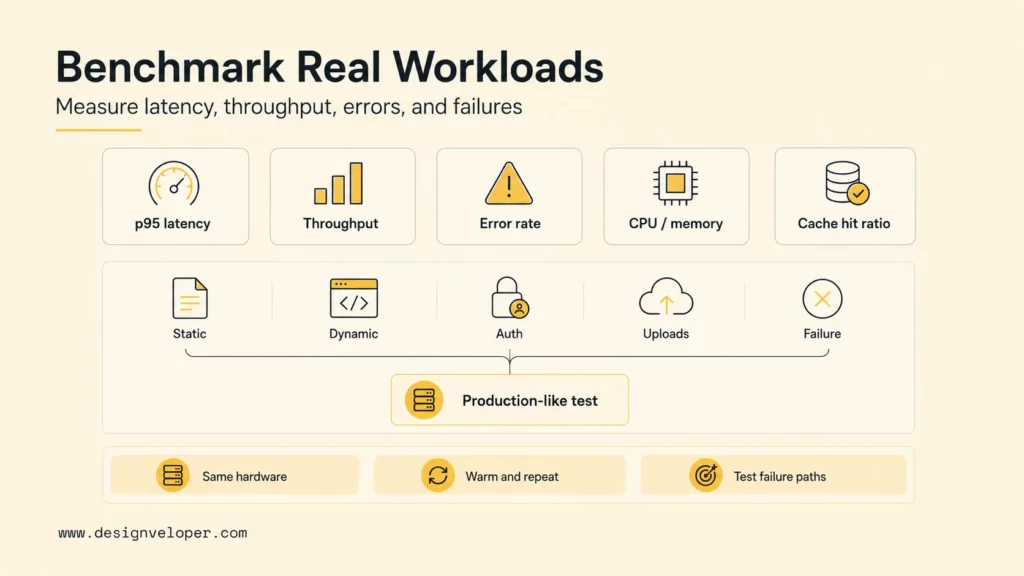
A benchmark only helps when it resembles the application’s real request path. A static “hello world” test mainly measures basic connection and response handling; it does not predict a WordPress page that queries a database, a Java API waiting on services, or a site served through an edge cache.
Choose a load tool such as k6, wrk, autocannon, JMeter, or a managed service based on the protocol and workload. Include static files, cache hits and misses, dynamic reads, authenticated routes, writes, uploads, streaming, and failure cases. Use realistic payloads, TLS, headers, compression, connection reuse, and network latency.
Track user-facing results such as median, p95, and p99 latency, time to first byte, error rate, successful task throughput, and relevant real-user experience metrics. Also track CPU, memory, network, open connections, upstream queues, cache hit ratio, disk activity, container limits, and cost at a sustained workload.
Keep comparisons fair: use the same resource limits, operating system, application, network, TLS policy, cache state, and logging level. Warm the system, ramp traffic, hold a steady load, test a spike, and run a soak period. Repeat the test and report variation rather than treating one maximum as a dependable result.
Test failure behavior as well as speed. In a safe test environment, remove an upstream, delay a dependency, perform a rolling deployment, and check health detection, retry limits, graceful shutdown, and returned status codes. Retries must not repeat non-idempotent actions such as a payment unless the application explicitly protects against duplication.
This is a measurement plan, not a report of independent tests of the products above. A team publishing benchmark results should include product versions, hardware, configuration, workload, number of runs, latency percentiles, errors, resource use, and limitations.
How Web Server Infrastructure Can Scale With A Product
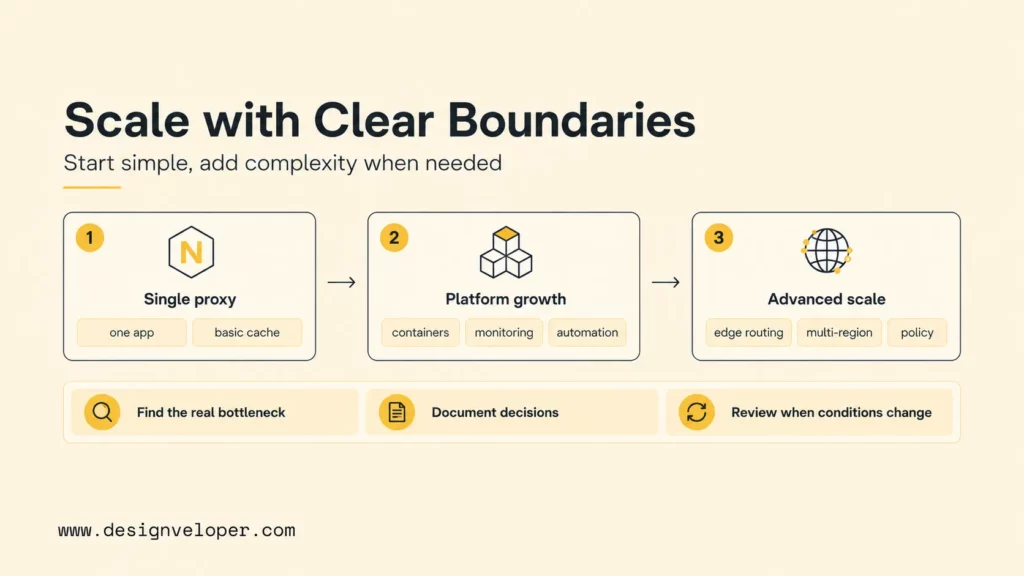
Infrastructure should grow in response to observed constraints, not because a larger architecture looks more advanced. A modular application behind one well-configured reverse proxy may be enough for an early product. Containers, multiple regions, edge routing, and service-level traffic policies become relevant when availability, deployment, or traffic requirements justify their operating cost.
Before adding another layer, locate the bottleneck. Slow database queries, blocking application code, oversized assets, missing cache headers, and unreliable dependencies cannot be fixed by changing the web server alone. Use traces, logs, metrics, and representative tests to identify which part of the request path needs attention.
Teams planning a wider delivery model can connect the web tier to their What is ASP.NET? or other application stack, deployment workflow, data services, security controls, and monitoring. At Designveloper, our Software Development Services support product teams with application architecture and delivery decisions; any infrastructure recommendation should still be based on the client’s documented workload and operational constraints.
Keep a short decision record: why the stack was selected, which alternatives were considered, what measurements support it, who owns the configuration, how changes are tested, and which signals trigger a review. Revisit it when traffic, architecture, regulations, team skills, or hosting economics change.
FAQs About Web Server Software
Which Web Server Is Most Popular In 2026?
In W3Techs’ September 30, 2026 snapshot, Cloudflare Server had the highest observed share at 31.1%, followed closely by Nginx at 30.8% and Apache at 21.9%. This reflects technologies W3Techs could identify; Cloudflare may be the visible edge layer rather than the origin server.
Is Nginx Better Than Apache?
Neither is better for every application. Nginx is often shortlisted for reverse proxying and static delivery, while Apache can be a stronger fit when a site depends on its modules or .htaccess behavior. Test the application’s routes, configuration, and operations before migrating.
What Is The Best Web Server For WordPress?
LiteSpeed or OpenLiteSpeed can suit WordPress sites when the host supports their server-level cache and the team can manage cache rules. Apache and Nginx are also common choices. Hosting quality, PHP workers, database performance, plugin behavior, and cache invalidation can matter more than the server name.
Is Cloudflare A Web Server?
Cloudflare operates HTTP servers at its edge, but customers commonly use it as a reverse proxy, CDN, and security layer in front of an origin. The origin still needs a web server or application platform to produce content that Cloudflare does not serve from cache or the edge.
Can I Change Web Servers Without Downtime?
A low-disruption migration is possible with parallel deployment, synchronized content, route and authentication tests, cache warming, and gradual traffic switching. DNS changes may require a lower TTL in advance. Keep rollback available and verify errors, latency, logs, and business transactions before retiring the old stack; zero downtime is not guaranteed.
Further Reading
Also published on

Share post on










Related Articles



Responsive Web Design Principles: 10 Practical Rules For Better UX
Responsive Web Design Principles: 10 Practical Rules For Better UX Published October 07, 2026
Animated Website Templates In 2026: 9 Sources to Explore & Compare
Animated Website Templates In 2026: 9 Sources to Explore & Compare Published September 30, 2026
11 Web Server Software Options and Related Platforms Compared
11 Web Server Software Options and Related Platforms Compared Published September 30, 2026


















