
















Future of Frontend Web Development: 2026 Guide

KEY TAKEWAYS:
- The future of frontend web development is a mix of performance, accessibility, AI assistance, and full-stack collaboration rather than one framework or tooling trend.
- Frontend teams will need stronger foundations in HTML, CSS, JavaScript, TypeScript, browser APIs, security, and UX as applications become more interactive and distributed.
- AI will speed up coding, testing, documentation, and review, but developers still need to own architecture, product fit, accessibility, maintainability, and release quality.
- Modern frontend work increasingly connects to backend APIs, design systems, edge delivery, observability, and business workflows, so isolated UI skills are no longer enough.
- The practical path is to build durable fundamentals, then adopt new tools only when they improve user experience, delivery speed, reliability, or product outcomes.
The future of frontend web development is not a single new framework or a race to automate every interface. It is a shift in responsibility. Frontend teams are combining AI-assisted delivery, typed code, server-aware rendering, reusable design systems, measurable performance, accessible interaction, and API-connected product experiences. The browser remains the final execution environment, but the work that produces a reliable experience now spans design, servers, data, deployment, analytics, security, and continuous improvement.
For businesses, the practical question is not which trend sounds newest. It is which changes reduce delivery risk, improve customer outcomes, and support the product’s real complexity. A content site, ecommerce marketplace, collaborative document platform, and internal operations portal need different rendering, state, integration, and governance choices. The best frontend strategy makes those differences explicit before a team commits to tools.
Quick decision guide: Use AI to accelerate bounded tasks while keeping human review; adopt a meta-framework when routing, data loading, and rendering need shared conventions; select rendering per route; make TypeScript, components, performance, and accessibility part of quality control; and choose headless or composable architecture only when its flexibility is worth the integration and operating cost.
| Decision area | Direction for 2026 | Question to answer first |
|---|---|---|
| Delivery workflow | AI-assisted implementation with verification | Which tasks can be delegated without weakening review? |
| Application architecture | Meta-frameworks and explicit server/client boundaries | Where should data, rendering, and interaction execute? |
| Code reliability | TypeScript-first contracts and automated checks | How will UI, API, and content schemas stay aligned? |
| Experience quality | Design systems, Core Web Vitals, and WCAG 2.2 | Which measurable standards block a release? |
| Platform integration | API-first and composable services | Does replaceability justify more integration ownership? |
Recommended for you:
- 11 Best Web Development Languages for Front-End and Back-End
- Front-End vs Back-End: Which Suits You Best?
- Typescript and JavaScript: A Complete Comparison
Quick Answer: What Is The Future Of Frontend Web Development?
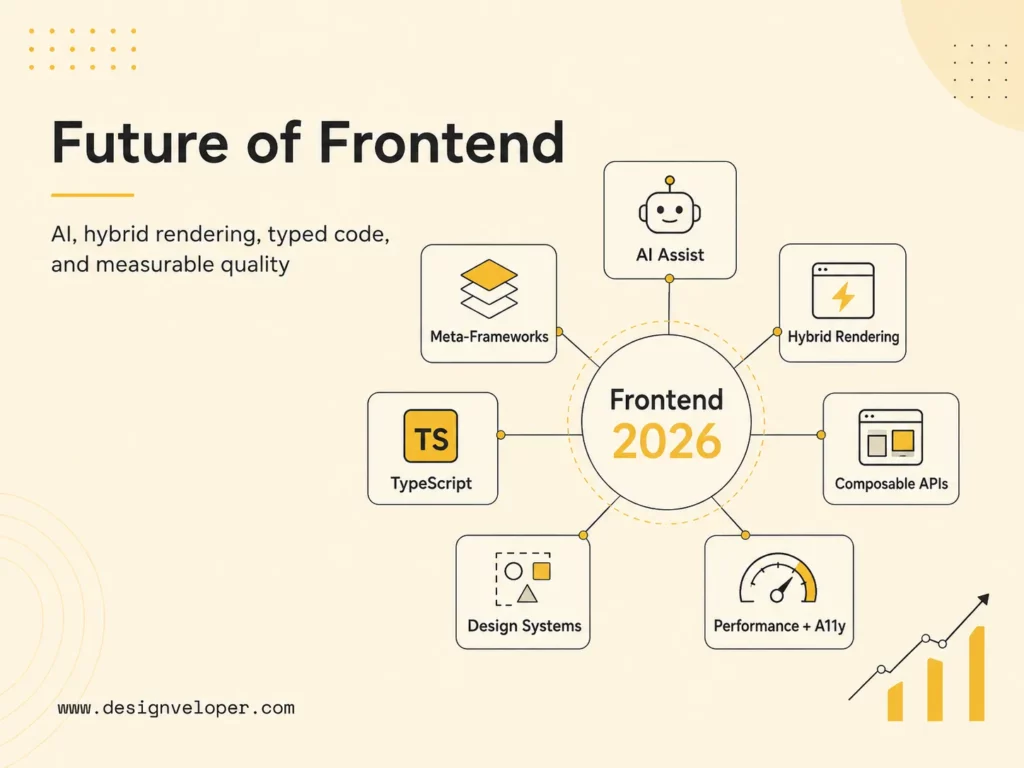
Frontend development is moving toward AI-assisted workflows, meta-frameworks, server-first rendering, stronger performance standards, accessible design systems, and more complex product interfaces. It is becoming less useful to describe the frontend as only the visual layer. Modern teams decide how content is rendered, where data is fetched, how components behave across states, how the interface meets accessibility requirements, and how the experience performs for real users.
The future is also hybrid. Static generation is excellent for stable public content, server rendering helps with dynamic or personalized pages, and client-side code remains necessary for rich interaction. React’s Server Components documentation explains that they can render before bundling in a separate server environment, while client components retain browser interactivity. The important trend is not “server replaces client.” It is that teams can place work on the side that best fits data sensitivity, freshness, performance, and user experience.
AI will change the amount and shape of code humans write, but it does not remove product judgment. Generated UI still needs correct requirements, secure data handling, accessible behavior, maintainable component boundaries, reliable tests, visual review, and production monitoring. Teams that treat AI output as a draft inside an engineering system will gain more than teams that treat it as an automatic release pipeline.
The frontend of the future is not thinner. It is more deliberate about what runs where, what gets reused, and what must be verified.
Further reading:
- 30 Best Web Development Blogs To Follow
- What Is Web Application Security? OWASP 10 Web App Vulnerabilities
- Web App vs Website: Similarities, Differences and Misconceptions
Frontend Web Development Is Moving Beyond Page UI
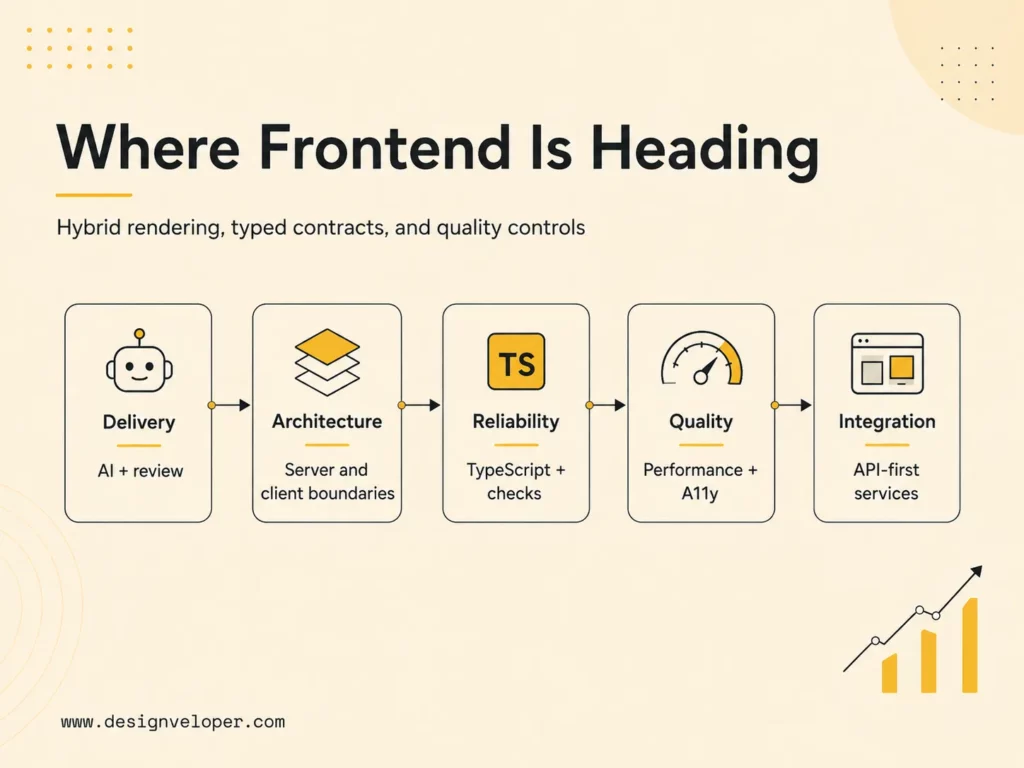
Frontend teams now work on application architecture, performance, accessibility, design systems, API integration, state management, analytics, and AI-assisted delivery. A screen is the visible result of those systems. Behind it are authentication states, permissions, loading and failure conditions, cache rules, validation, event tracking, localization, responsive layouts, keyboard paths, content models, and release controls. Product quality depends on how those concerns meet, not only on polished pixels.
This wider scope of the future of frontend web development changes collaboration. Designers need component states and token rules that can be implemented consistently. Backend developers need explicit API contracts and error semantics. Content teams need CMS models that map cleanly to reusable presentation. Product managers need acceptance criteria for slow networks, empty data, assistive technology, and small screens. Operations teams need logs, performance telemetry, and rollback paths. Frontend developers often connect these disciplines in the experience users actually touch.
Complex interfaces make these boundaries especially important. A collaborative editor must reconcile local and remote state, preserve document integrity, and communicate conflicts. A marketplace must combine discovery, inventory, pricing, checkout, seller tools, and analytics. A dashboard needs dense information without sacrificing clarity or keyboard access. The future of frontend web development therefore favors engineers who can reason about systems while still caring about interaction details.
Teams should define frontend architecture as a set of decisions, not a framework name. Record the rendering model, state ownership, API boundary, component governance, accessibility target, performance budget, test layers, observability, deployment model, and upgrade policy. This makes tradeoffs visible and prevents a tool from becoming an accidental answer to every problem.
Related reading:
- Web App Development Cost: Breakdown
- How Long Does It Take To Build A Web App? Timeline And AI Impact
- 15 Best AI Coding Assistant Tools For Developers
Key Frontend Development Trends In 2026
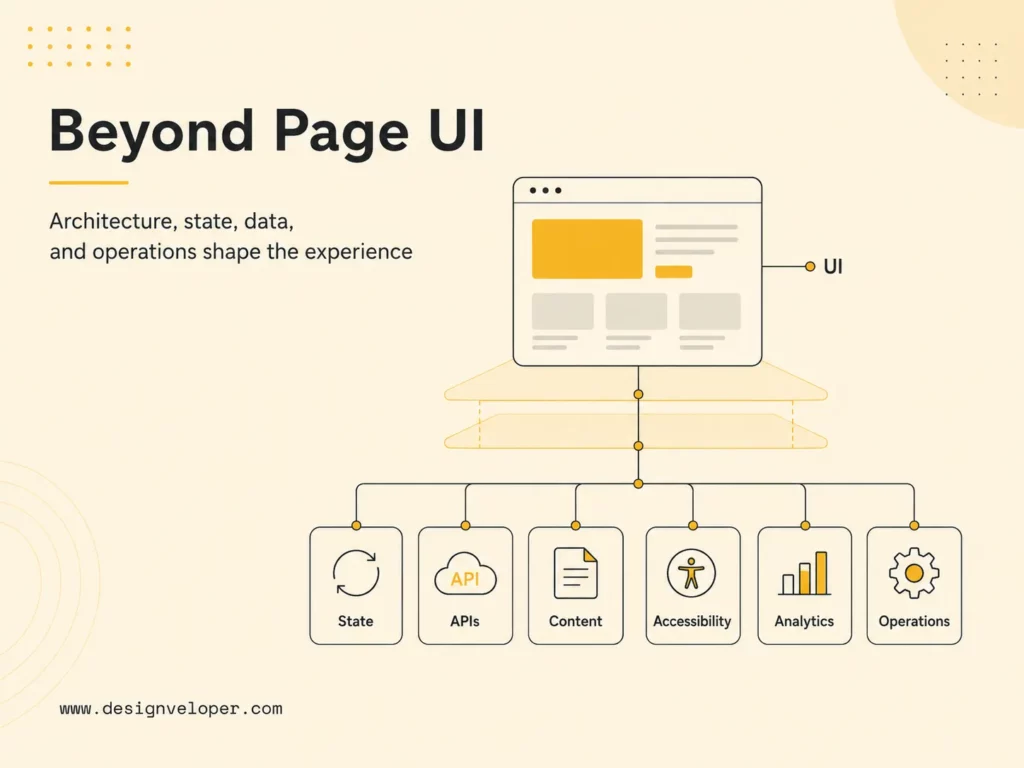
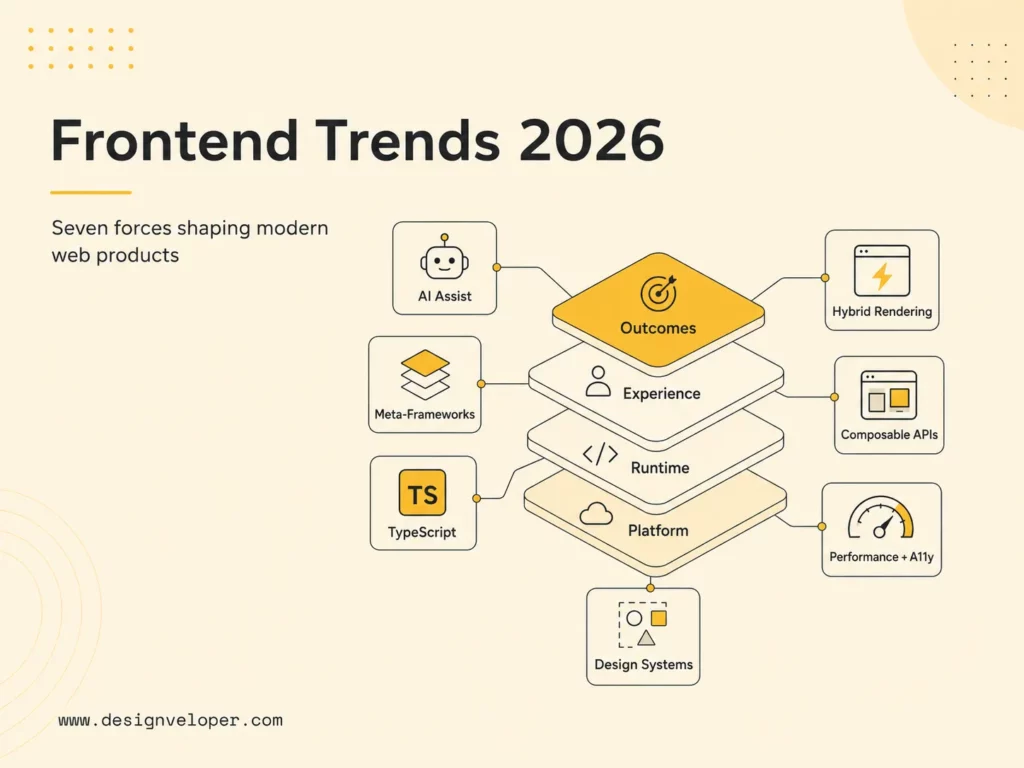
The seven trends below reinforce one another in the future of frontend web development. AI increases delivery speed, which makes types and automated checks more valuable. Meta-frameworks make server rendering easier, which makes server/client boundaries more important. Component systems accelerate reuse, which raises the need for governance and accessibility. Composable platforms increase flexibility, which creates more contracts to monitor. Teams should assess the combined operating model rather than adopt each trend independently.
Tasks, journeys, conversion, trust, and retention.
Components, content, accessibility, and responsive behavior.
Static, server, edge, client, and streaming boundaries.
APIs, CMS, identity, analytics, AI, and observability.
1. AI-Assisted Frontend Development
AI assistants can draft components, translate a design into a starting layout, explain unfamiliar code, generate tests, propose refactors, create mock data, and help investigate defects. This is crucial for the future of frontend web development. GitHub’s 2025 Octoverse reported more than 1.1 million public repositories using an LLM SDK and described generative AI as standard in development. That is strong evidence that AI is becoming part of normal toolchains rather than a separate experiment.
The productivity benefit is largest when a task has clear context and a verifiable outcome. A developer can provide component conventions, design tokens, API types, browser targets, accessibility expectations, and test commands, then review a bounded change. Vague prompts produce plausible but inconsistent code. Good teams therefore improve repository instructions, examples, automated checks, and review discipline alongside model access.
Frontend work is visually deceptive: code can compile while the interface clips at a narrow width, loses focus visibility, mislabels a control, leaks private data into the client bundle, or shifts during loading. AI-generated output needs the same or stronger review as human output. Require type checking, unit and integration tests, automated accessibility checks, responsive browser inspection, performance measurement, dependency review, and human confirmation of the product behavior.
Teams should also protect sensitive information. Define which source code, customer data, screenshots, credentials, and production logs may be sent to external tools. Record provenance for important generated changes and keep a responsible engineer accountable for the result. AI can reduce repetitive UI coding, but ownership cannot be delegated to a model.
2. Meta-Frameworks And Full-Stack Frontend Architecture
Meta-frameworks package decisions that component libraries intentionally leave open. Next.js, Nuxt, SvelteKit, Astro, and similar tools provide routing, data loading, rendering, bundling, asset handling, deployment adapters, and server capabilities. They allow frontend teams to build public pages and application features inside a coordinated structure rather than assembling every layer independently.
This convergence is useful, but it changes team boundaries. A frontend repository may now include server functions, cache rules, authentication middleware, database access, and deployment configuration. Developers must understand which code can reach the browser, where secrets live, how requests are authorized, and how server errors are observed. Calling the stack “frontend” does not make these backend responsibilities disappear.
React’s official documentation describes Server Components as components rendered before bundling in a separate environment, possibly at build time or per request. They can access a data layer and pass results to interactive client components. This model can reduce browser-side work, but it requires careful server/client boundaries and framework support. Teams should follow stable framework conventions instead of building low-level Server Component infrastructure themselves.
Choose a meta-framework when its conventions match the product’s rendering and deployment needs. Validate authentication, caching, background work, file uploads, real-time connections, regional deployment, observability, and hosting portability. A framework that makes the first page easy can still become expensive if its production model conflicts with the platform.
3. Server-Side Rendering, Static Generation, And Edge Rendering
Rendering is becoming a route-level or component-level decision. Static generation can deliver stable pages from a content delivery network with minimal runtime work. Server-side rendering creates HTML for each request and fits frequently changing or personalized content. Incremental regeneration refreshes selected static output. Edge execution can move some request logic closer to users. Client rendering remains valuable after load for interactive state and long-lived sessions.
No rendering mode automatically guarantees SEO or speed. A server-rendered page can be slow if it waits on many services. A static page can ship excessive JavaScript and hydrate poorly. An edge function can be constrained by runtime compatibility or costly data access across regions. A client application can perform well when its shell is small and its workflow justifies persistent interaction. Measure the complete path from request to usable experience.
Next.js documentation illustrates the hybrid direction: pages without blocking data requirements can be prerendered to static HTML, while server-side rendered pages generate HTML on each request. Modern application routers extend those choices with server components, streaming, and finer cache behavior. Teams should document freshness requirements per route and test invalidation, fallbacks, error states, and authenticated behavior before launch.
A useful decision sequence starts with the data. Ask whether the content is public, how often it changes, whether the result differs by user, how quickly stale data becomes harmful, and which services must respond. Then select the simplest rendering model that meets those constraints. Do not begin with a desire to use the edge and search for a problem afterward.
4. TypeScript-First Development
TypeScript is increasingly the default language for production frontend code. GitHub reported that it became the most-used language on GitHub by monthly contributors in August 2025, overtaking Python and JavaScript. The same Octoverse analysis connected its rise with typed contracts, major frontend framework defaults, and the need for clearer guardrails in AI-assisted development.
Types are most valuable at boundaries: API requests and responses, component properties, form values, events, content schemas, route parameters, feature flags, analytics events, and shared domain models. They make assumptions visible and allow tools to catch mismatches before a browser session. They also give human and AI contributors a more precise description of what code is allowed to do.
TypeScript does not prove runtime data is trustworthy. An API, CMS, local storage value, or third-party script can still return something different from the declared type. Use runtime validation at external boundaries, generate types from authoritative schemas when practical, and treat unchecked casts or broad any types as review signals. The goal is reliable contracts, not a type badge.
Migration can be gradual. Start with shared interfaces and risky integration points, enable stricter compiler settings in planned stages, and track escape hatches. Combine type checking with tests that cover user behavior. A strict codebase with poor component design is still hard to maintain, but a well-governed typed codebase gives teams faster feedback as the product grows.
5. Component-Driven Design Systems
Component-driven development is moving from local code reuse to a product-wide operating system. A mature design system joins design tokens, reusable components, content guidance, accessibility behavior, responsive rules, documentation, testing, versioning, and contribution governance. It helps teams produce consistent experiences without rediscovering every interaction on every screen.
The highest-value components encode difficult behavior, not just colors and spacing. A dialog should manage focus, keyboard dismissal, labels, scrolling, and nested states. A form field should connect labels, help text, validation, and errors. A data table needs reading order, responsive behavior, sorting semantics, loading states, and empty states. Reusing that quality saves more than reusing a border radius.
Web Components remain relevant for cross-framework reuse. MDN describes the platform as custom elements, Shadow DOM, and templates or slots that create reusable encapsulated functionality. They can support widgets or shared primitives across different stacks, but teams still need to consider accessibility, server rendering, form participation, styling APIs, and browser behavior. Native encapsulation is a tool, not automatic design-system governance.
Measure a design system by adoption and outcomes. Track duplicated UI, accessibility defects, implementation time, upgrade success, contribution turnaround, visual inconsistency, and how often teams bypass components. Keep escape paths for genuine product needs, then feed proven variations back into the system. A rigid library that blocks delivery will be forked; an ungoverned library will fragment.
6. Performance, Core Web Vitals, And Accessibility
Performance and accessibility are becoming release criteria rather than final audits. Core Web Vitals measure loading, responsiveness, and visual stability through Largest Contentful Paint, Interaction to Next Paint, and Cumulative Layout Shift. Google’s current “good” thresholds are LCP at or below 2.5 seconds, INP at or below 200 milliseconds, and CLS at or below 0.1, assessed at the 75th percentile of page views.
Those field metrics should guide engineering priorities, but they are not the whole experience. Track route-specific JavaScript, image and font behavior, server response time, long tasks, memory use, and important product interactions. Test on representative mobile hardware and networks. A fast landing page does not compensate for a slow search, editor, checkout, or dashboard that users depend on.
Accessibility needs equally explicit standards. W3C advises using WCAG 2.2 to maximize future applicability. Its guidance covers perceivable content, keyboard and alternative input, understandable interaction, and robust compatibility with assistive technologies. Automated tools find only part of the problem, so teams also need keyboard review, screen-reader checks for critical flows, zoom and reflow testing, contrast review, and research with people who have disabilities when possible.
Performance and accessibility often improve the same architecture. Semantic HTML reduces unnecessary scripting. Predictable focus and stable layouts help all users. Smaller bundles reduce input delay on constrained devices. Clear labels improve usability and automation. Build budgets and component tests into continuous integration, then monitor real-user data after release so regressions become visible before they spread.
7. Headless, API-First, And Composable Architecture
Headless and composable architectures separate the presentation layer from content, commerce, search, identity, payments, and other capabilities exposed through APIs. This lets teams create different experiences for web, mobile, kiosks, partner portals, or emerging channels without forcing every interface through one template system. It can also let specialized services evolve independently.
The flexibility creates integration ownership. The frontend must handle API latency, partial failure, rate limits, authentication, schema changes, preview content, localization, caching, and observability across vendors. Editors may lose an accurate page preview if content models and components are not coordinated. A composable stack can reduce vendor lock-in at one layer while increasing operational dependence on many contracts.
Adopt composability where independent change has business value. A company serving many channels, markets, or brands may benefit from reusable content and services. A small website with one publishing team may be better served by an integrated platform. Calculate total ownership, including integration development, vendor management, incident diagnosis, content operations, and future migrations.
Use contract testing, versioned schemas, timeouts, graceful fallbacks, centralized monitoring, and clear service ownership. Keep critical journeys resilient when a recommendation, analytics, or secondary content service fails. The future is more connected, but a user should not experience every internal dependency as a broken page.
Modern frontend speed comes from clear constraints: typed contracts, owned boundaries, reusable behavior, and evidence from real users.
What This Means For Frontend Developers And Teams
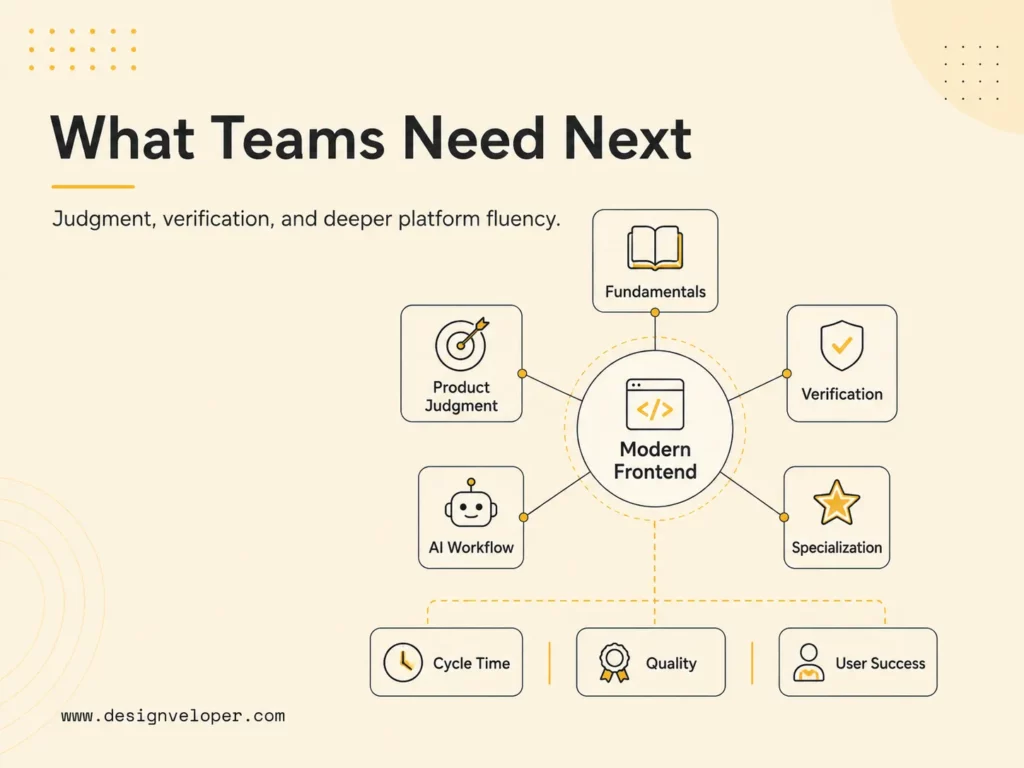
AI will reduce repetitive UI coding. Developers need stronger product, architecture, accessibility, performance, and integration judgment. The future of frontend web development will connect more closely with backend APIs, analytics, security, and AI features. The valuable skill is no longer memorizing every library API; it is selecting appropriate abstractions, identifying risk, and verifying that the complete experience works.
Individual developers should deepen fundamentals that survive framework cycles: semantic HTML, CSS layout, JavaScript execution, browser rendering, HTTP and caching, accessibility, security, testing, and performance analysis. Add TypeScript and at least one modern application framework, but learn the platform beneath them. This makes it easier to evaluate generated code and move between tools.
Teams need a shared review model for AI-assisted work. Define what can be generated, what evidence a change must include, who approves sensitive areas, and how prompts or model-specific artifacts are handled. Strengthen code ownership rather than allowing a flood of unreviewed changes. Faster implementation should create more room for product discovery and quality, not simply a larger backlog of fragile code.
Career paths will also broaden. Frontend specialists may focus on design systems, performance, accessibility, visualization, developer experience, web platform engineering, product architecture, or AI interaction. Generalists may own full vertical slices through APIs and deployment. Healthy organizations allow both paths and clarify where deep expertise is required.
Managers should evaluate outcomes instead of code volume. Useful measures include cycle time, change failure rate, escaped defects, accessibility conformance, Core Web Vitals, component adoption, test reliability, user task success, and incident recovery. AI-generated lines and framework adoption are inputs, not proof that a team is delivering better software.
Preparing A Frontend Strategy For Real Product Complexity
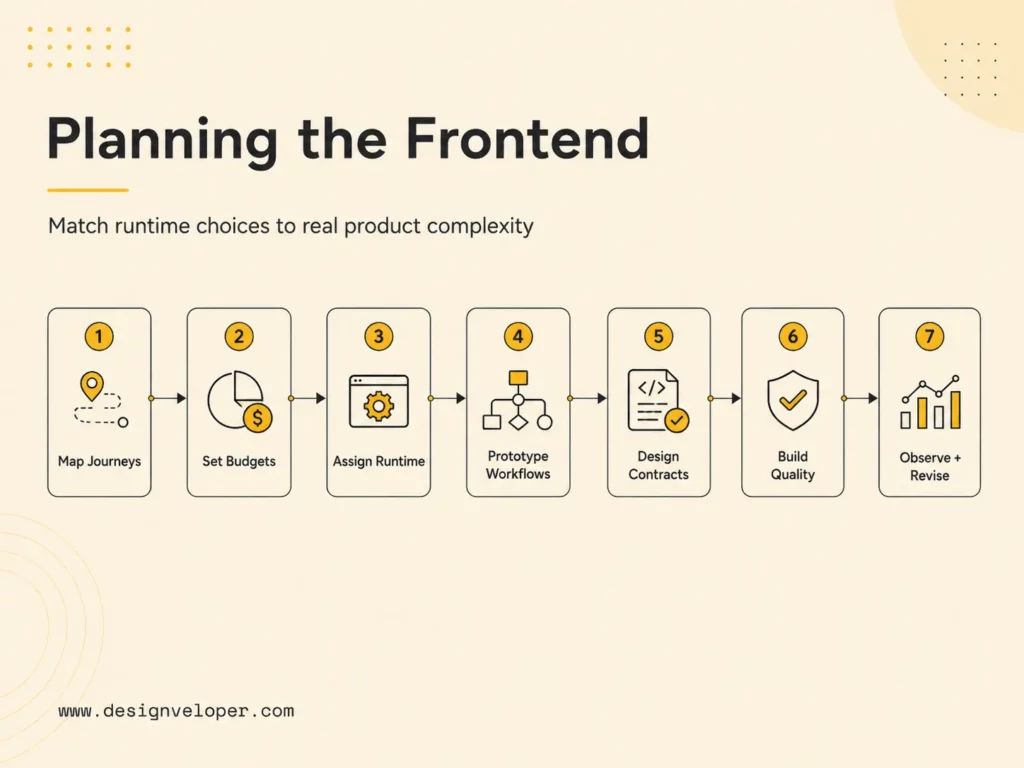
Choose frameworks by product needs, not hype. Invest in reusable components and design systems. Plan SSR, SEO, performance, and accessibility early. Connect frontend architecture with APIs, CMS, analytics, and AI workflows. A strategy should be specific enough to guide delivery but flexible enough to change when evidence contradicts an assumption.
- Map the product journeys. Identify public and authenticated routes, critical tasks, data sensitivity, personalization, content ownership, offline expectations, and the devices users actually have.
- Define measurable constraints. Set performance budgets, accessibility targets, browser support, availability goals, security controls, SEO requirements, and acceptable content freshness.
- Assign runtime boundaries. Decide which routes are static, server-rendered, streamed, edge-assisted, or client-heavy. Document cache and invalidation behavior.
- Prototype the hardest workflow. Test the dense, stateful, integrated screen rather than proving the stack on a homepage.
- Design contracts and components. Align API schemas, CMS models, analytics events, design tokens, and reusable interaction patterns.
- Build quality into delivery. Automate types, tests, accessibility checks, bundle budgets, previews, and deployment safety while retaining human visual review.
- Observe and revise. Use real-user performance, product analytics, support feedback, and incident evidence to update the architecture.
Frontend modernization fails when teams adopt trends without deciding which product constraint each change should improve. In our software development work, the roadmap begins with a route inventory, component ownership map, performance and accessibility budgets, and an upgrade policy. Those artifacts help teams choose where server rendering, design systems, AI-assisted interfaces, or a framework migration will create measurable value and where the existing approach should remain.
Our projects can show why fit matters. Aha demonstrates ecommerce UX and marketplace workflows, where content, discovery, transactions, and frontend performance meet. Lumin demonstrates document collaboration, digital signatures, and complex web application UI. These products require different interface states and integration boundaries even when they share modern frontend practices.
A practical discovery engagement should end with decisions a team can execute: a route and rendering map, component strategy, API and content boundaries, performance and accessibility budgets, release checks, observability requirements, and a staged modernization plan. If the roadmap includes AI features, add model latency, failure behavior, privacy, evaluation, and human-override requirements before designing the interface around a successful response.
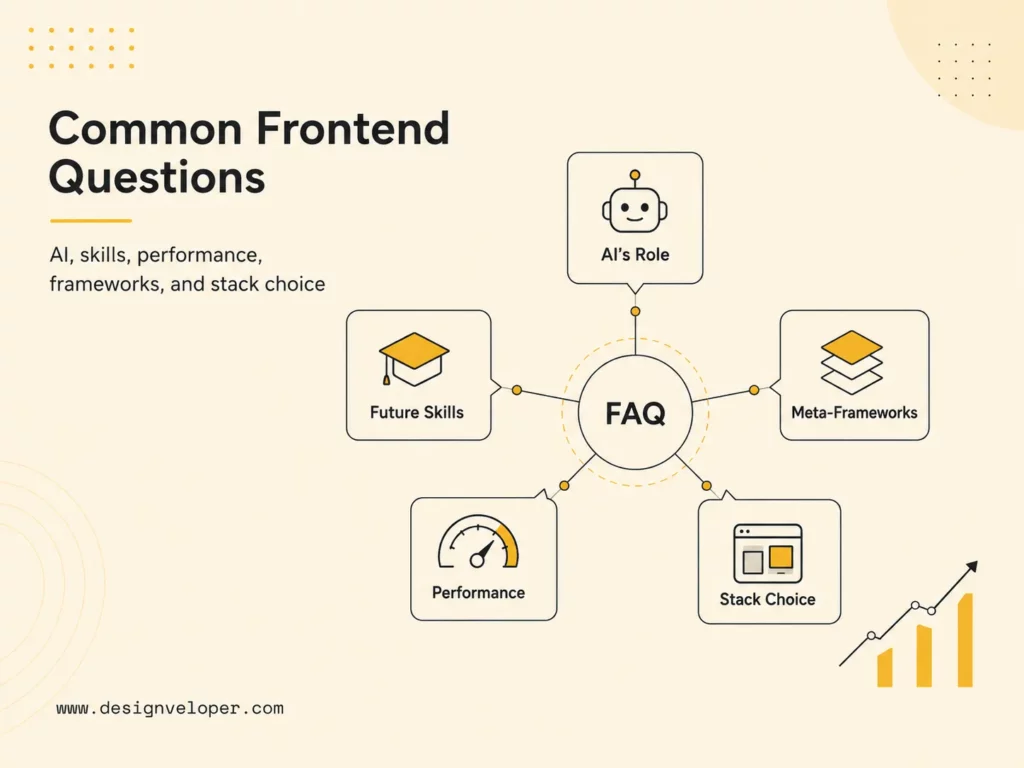
FAQs About The Future Of Frontend Web Development
Will AI Replace Frontend Developers?
AI is more likely to change frontend jobs than eliminate the discipline. It can generate routine components, tests, explanations, and refactoring suggestions, but production work still requires requirement discovery, architecture, secure data handling, accessible interaction, performance decisions, integration, visual judgment, and accountability. As implementation becomes faster, verification and product reasoning become more important.
Developers who use AI well will provide clear context, constrain tasks, inspect output, run evidence-producing checks, and know when a model is uncertain. Teams should expect roles to shift toward orchestration and review while keeping hands-on platform knowledge. Without that knowledge, plausible generated code is difficult to challenge.
Which Frontend Skills Will Matter Most In The Future?
Durable skills include semantic HTML, modern CSS, JavaScript and TypeScript, browser behavior, HTTP, accessibility, performance, security, testing, API integration, and component architecture. Product thinking, communication, debugging, and data-informed decision-making will distinguish developers who can turn a specification into a reliable experience.
Learn one ecosystem deeply enough to ship and operate a real product, then study the concepts shared by other frameworks. Add AI-assisted workflow skills, but pair them with source control, tests, browser inspection, and observability. Tool fluency changes quickly; the ability to reason about user and system behavior transfers.
Are Meta-Frameworks The Future Of Frontend Web Development?
Meta-frameworks are a major part of the future because they coordinate routing, data, rendering, builds, and deployment around component ecosystems. They are especially useful for products that combine indexable public content with interactive application areas. Server Components and hybrid rendering make that coordination more valuable.
They are not mandatory for every site. A static generator, traditional server framework, CMS theme, or small client application can be simpler. Choose a meta-framework when its lifecycle, hosting model, security boundaries, and conventions reduce total complexity. Avoid adopting one only because it is the default in tutorials.
Why Is Performance Important In Modern Frontend Development?
Performance affects whether users can see content, interact without delay, complete tasks, and trust the product. Slow experiences disproportionately affect people on constrained devices or networks. Core Web Vitals provide field-oriented measures for loading, responsiveness, and visual stability, while route and workflow monitoring reveals problems beyond the landing page.
Performance also limits architecture. Excessive client JavaScript, serial server calls, unstable layouts, and poorly controlled third-party scripts create costs that new hardware does not erase. Set budgets early, test representative devices, and monitor real-user data. Optimize critical journeys before chasing small benchmark wins.
How Should Businesses Choose A Frontend Technology Stack?
Start with product journeys, data, content, interaction complexity, performance targets, accessibility, security, team capability, deployment constraints, and maintenance horizon. Compare a small number of stacks against those criteria. Prototype the hardest workflow and test integrations, rendering, observability, and operations, not just developer setup.
Consider total ownership: hiring, training, upgrades, hosting, testing, vendor dependencies, design-system work, incident response, and migration options. The strongest stack is the one the organization can operate responsibly while meeting user needs. A less fashionable tool with clear ownership often outperforms an impressive architecture nobody can maintain.
The future of frontend web development rewards teams that connect speed with discipline. AI, server-aware frameworks, TypeScript, design systems, performance standards, accessibility, and composable services can all improve delivery. Their value appears when they are tied to real outcomes, clear boundaries, and continuous evidence from the people using the product.
KEY TAKEWAYS:
- The future of frontend web development is a mix of performance, accessibility, AI assistance, and full-stack collaboration rather than one framework or tooling trend.
- Frontend teams will need stronger foundations in HTML, CSS, JavaScript, TypeScript, browser APIs, security, and UX as applications become more interactive and distributed.
- AI will speed up coding, testing, documentation, and review, but developers still need to own architecture, product fit, accessibility, maintainability, and release quality.
- Modern frontend work increasingly connects to backend APIs, design systems, edge delivery, observability, and business workflows, so isolated UI skills are no longer enough.
- The practical path is to build durable fundamentals, then adopt new tools only when they improve user experience, delivery speed, reliability, or product outcomes.
The future of frontend web development is not a single new framework or a race to automate every interface. It is a shift in responsibility. Frontend teams are combining AI-assisted delivery, typed code, server-aware rendering, reusable design systems, measurable performance, accessible interaction, and API-connected product experiences. The browser remains the final execution environment, but the work that produces a reliable experience now spans design, servers, data, deployment, analytics, security, and continuous improvement.
For businesses, the practical question is not which trend sounds newest. It is which changes reduce delivery risk, improve customer outcomes, and support the product’s real complexity. A content site, ecommerce marketplace, collaborative document platform, and internal operations portal need different rendering, state, integration, and governance choices. The best frontend strategy makes those differences explicit before a team commits to tools.
Quick decision guide: Use AI to accelerate bounded tasks while keeping human review; adopt a meta-framework when routing, data loading, and rendering need shared conventions; select rendering per route; make TypeScript, components, performance, and accessibility part of quality control; and choose headless or composable architecture only when its flexibility is worth the integration and operating cost.
| Decision area | Direction for 2026 | Question to answer first |
|---|---|---|
| Delivery workflow | AI-assisted implementation with verification | Which tasks can be delegated without weakening review? |
| Application architecture | Meta-frameworks and explicit server/client boundaries | Where should data, rendering, and interaction execute? |
| Code reliability | TypeScript-first contracts and automated checks | How will UI, API, and content schemas stay aligned? |
| Experience quality | Design systems, Core Web Vitals, and WCAG 2.2 | Which measurable standards block a release? |
| Platform integration | API-first and composable services | Does replaceability justify more integration ownership? |
Recommended for you:
- Web Development Languages: How To Choose The Right Stack
- Frontend Vs Backend: Key Differences For Web Development
- TypeScript Vs JavaScript: Key Differences And When To Use Each
Quick Answer: What Is The Future Of Frontend Web Development?
Frontend development is moving toward AI-assisted workflows, meta-frameworks, server-first rendering, stronger performance standards, accessible design systems, and more complex product interfaces. It is becoming less useful to describe the frontend as only the visual layer. Modern teams decide how content is rendered, where data is fetched, how components behave across states, how the interface meets accessibility requirements, and how the experience performs for real users.
The future is also hybrid. Static generation is excellent for stable public content, server rendering helps with dynamic or personalized pages, and client-side code remains necessary for rich interaction. React’s Server Components documentation explains that they can render before bundling in a separate server environment, while client components retain browser interactivity. The important trend is not “server replaces client.” It is that teams can place work on the side that best fits data sensitivity, freshness, performance, and user experience.
AI will change the amount and shape of code humans write, but it does not remove product judgment. Generated UI still needs correct requirements, secure data handling, accessible behavior, maintainable component boundaries, reliable tests, visual review, and production monitoring. Teams that treat AI output as a draft inside an engineering system will gain more than teams that treat it as an automatic release pipeline.
The frontend of the future is not thinner. It is more deliberate about what runs where, what gets reused, and what must be verified.
Further reading:
- Web Development Blogs: Best Sources For Developers To Follow
- Web Application Security: Risks, Best Practices, And Checklist
- Web App Vs Website: Key Differences, Use Cases, And Examples
Frontend Web Development Is Moving Beyond Page UI
Frontend teams now work on application architecture, performance, accessibility, design systems, API integration, state management, analytics, and AI-assisted delivery. A screen is the visible result of those systems. Behind it are authentication states, permissions, loading and failure conditions, cache rules, validation, event tracking, localization, responsive layouts, keyboard paths, content models, and release controls. Product quality depends on how those concerns meet, not only on polished pixels.
This wider scope of the future of frontend web development changes collaboration. Designers need component states and token rules that can be implemented consistently. Backend developers need explicit API contracts and error semantics. Content teams need CMS models that map cleanly to reusable presentation. Product managers need acceptance criteria for slow networks, empty data, assistive technology, and small screens. Operations teams need logs, performance telemetry, and rollback paths. Frontend developers often connect these disciplines in the experience users actually touch.
Complex interfaces make these boundaries especially important. A collaborative editor must reconcile local and remote state, preserve document integrity, and communicate conflicts. A marketplace must combine discovery, inventory, pricing, checkout, seller tools, and analytics. A dashboard needs dense information without sacrificing clarity or keyboard access. The future of frontend web development therefore favors engineers who can reason about systems while still caring about interaction details.
Teams should define frontend architecture as a set of decisions, not a framework name. Record the rendering model, state ownership, API boundary, component governance, accessibility target, performance budget, test layers, observability, deployment model, and upgrade policy. This makes tradeoffs visible and prevents a tool from becoming an accidental answer to every problem.
Related reading:
- Web Application Development Cost: Key Factors And Estimates
- How Long Does It Take To Build A Web App?
- AI Tools For Developers: Practical Options For Modern Software Teams
Key Frontend Development Trends In 2026
The seven trends below reinforce one another in the future of frontend web development. AI increases delivery speed, which makes types and automated checks more valuable. Meta-frameworks make server rendering easier, which makes server/client boundaries more important. Component systems accelerate reuse, which raises the need for governance and accessibility. Composable platforms increase flexibility, which creates more contracts to monitor. Teams should assess the combined operating model rather than adopt each trend independently.
Tasks, journeys, conversion, trust, and retention.
Components, content, accessibility, and responsive behavior.
Static, server, edge, client, and streaming boundaries.
APIs, CMS, identity, analytics, AI, and observability.
1. AI-Assisted Frontend Development
AI assistants can draft components, translate a design into a starting layout, explain unfamiliar code, generate tests, propose refactors, create mock data, and help investigate defects. This is crucial for the future of frontend web development. GitHub’s 2025 Octoverse reported more than 1.1 million public repositories using an LLM SDK and described generative AI as standard in development. That is strong evidence that AI is becoming part of normal toolchains rather than a separate experiment.
The productivity benefit is largest when a task has clear context and a verifiable outcome. A developer can provide component conventions, design tokens, API types, browser targets, accessibility expectations, and test commands, then review a bounded change. Vague prompts produce plausible but inconsistent code. Good teams therefore improve repository instructions, examples, automated checks, and review discipline alongside model access.
Frontend work is visually deceptive: code can compile while the interface clips at a narrow width, loses focus visibility, mislabels a control, leaks private data into the client bundle, or shifts during loading. AI-generated output needs the same or stronger review as human output. Require type checking, unit and integration tests, automated accessibility checks, responsive browser inspection, performance measurement, dependency review, and human confirmation of the product behavior.
Teams should also protect sensitive information. Define which source code, customer data, screenshots, credentials, and production logs may be sent to external tools. Record provenance for important generated changes and keep a responsible engineer accountable for the result. AI can reduce repetitive UI coding, but ownership cannot be delegated to a model.
2. Meta-Frameworks And Full-Stack Frontend Architecture
Meta-frameworks package decisions that component libraries intentionally leave open. Next.js, Nuxt, SvelteKit, Astro, and similar tools provide routing, data loading, rendering, bundling, asset handling, deployment adapters, and server capabilities. They allow frontend teams to build public pages and application features inside a coordinated structure rather than assembling every layer independently.
This convergence is useful, but it changes team boundaries. A frontend repository may now include server functions, cache rules, authentication middleware, database access, and deployment configuration. Developers must understand which code can reach the browser, where secrets live, how requests are authorized, and how server errors are observed. Calling the stack “frontend” does not make these backend responsibilities disappear.
React’s official documentation describes Server Components as components rendered before bundling in a separate environment, possibly at build time or per request. They can access a data layer and pass results to interactive client components. This model can reduce browser-side work, but it requires careful server/client boundaries and framework support. Teams should follow stable framework conventions instead of building low-level Server Component infrastructure themselves.
Choose a meta-framework when its conventions match the product’s rendering and deployment needs. Validate authentication, caching, background work, file uploads, real-time connections, regional deployment, observability, and hosting portability. A framework that makes the first page easy can still become expensive if its production model conflicts with the platform.
3. Server-Side Rendering, Static Generation, And Edge Rendering
Rendering is becoming a route-level or component-level decision. Static generation can deliver stable pages from a content delivery network with minimal runtime work. Server-side rendering creates HTML for each request and fits frequently changing or personalized content. Incremental regeneration refreshes selected static output. Edge execution can move some request logic closer to users. Client rendering remains valuable after load for interactive state and long-lived sessions.
No rendering mode automatically guarantees SEO or speed. A server-rendered page can be slow if it waits on many services. A static page can ship excessive JavaScript and hydrate poorly. An edge function can be constrained by runtime compatibility or costly data access across regions. A client application can perform well when its shell is small and its workflow justifies persistent interaction. Measure the complete path from request to usable experience.
Next.js documentation illustrates the hybrid direction: pages without blocking data requirements can be prerendered to static HTML, while server-side rendered pages generate HTML on each request. Modern application routers extend those choices with server components, streaming, and finer cache behavior. Teams should document freshness requirements per route and test invalidation, fallbacks, error states, and authenticated behavior before launch.
A useful decision sequence starts with the data. Ask whether the content is public, how often it changes, whether the result differs by user, how quickly stale data becomes harmful, and which services must respond. Then select the simplest rendering model that meets those constraints. Do not begin with a desire to use the edge and search for a problem afterward.
4. TypeScript-First Development
TypeScript is increasingly the default language for production frontend code. GitHub reported that it became the most-used language on GitHub by monthly contributors in August 2025, overtaking Python and JavaScript. The same Octoverse analysis connected its rise with typed contracts, major frontend framework defaults, and the need for clearer guardrails in AI-assisted development.
Types are most valuable at boundaries: API requests and responses, component properties, form values, events, content schemas, route parameters, feature flags, analytics events, and shared domain models. They make assumptions visible and allow tools to catch mismatches before a browser session. They also give human and AI contributors a more precise description of what code is allowed to do.
TypeScript does not prove runtime data is trustworthy. An API, CMS, local storage value, or third-party script can still return something different from the declared type. Use runtime validation at external boundaries, generate types from authoritative schemas when practical, and treat unchecked casts or broad any types as review signals. The goal is reliable contracts, not a type badge.
Migration can be gradual. Start with shared interfaces and risky integration points, enable stricter compiler settings in planned stages, and track escape hatches. Combine type checking with tests that cover user behavior. A strict codebase with poor component design is still hard to maintain, but a well-governed typed codebase gives teams faster feedback as the product grows.
5. Component-Driven Design Systems
Component-driven development is moving from local code reuse to a product-wide operating system. A mature design system joins design tokens, reusable components, content guidance, accessibility behavior, responsive rules, documentation, testing, versioning, and contribution governance. It helps teams produce consistent experiences without rediscovering every interaction on every screen.
The highest-value components encode difficult behavior, not just colors and spacing. A dialog should manage focus, keyboard dismissal, labels, scrolling, and nested states. A form field should connect labels, help text, validation, and errors. A data table needs reading order, responsive behavior, sorting semantics, loading states, and empty states. Reusing that quality saves more than reusing a border radius.
Web Components remain relevant for cross-framework reuse. MDN describes the platform as custom elements, Shadow DOM, and templates or slots that create reusable encapsulated functionality. They can support widgets or shared primitives across different stacks, but teams still need to consider accessibility, server rendering, form participation, styling APIs, and browser behavior. Native encapsulation is a tool, not automatic design-system governance.
Measure a design system by adoption and outcomes. Track duplicated UI, accessibility defects, implementation time, upgrade success, contribution turnaround, visual inconsistency, and how often teams bypass components. Keep escape paths for genuine product needs, then feed proven variations back into the system. A rigid library that blocks delivery will be forked; an ungoverned library will fragment.
6. Performance, Core Web Vitals, And Accessibility
Performance and accessibility are becoming release criteria rather than final audits. Core Web Vitals measure loading, responsiveness, and visual stability through Largest Contentful Paint, Interaction to Next Paint, and Cumulative Layout Shift. Google’s current “good” thresholds are LCP at or below 2.5 seconds, INP at or below 200 milliseconds, and CLS at or below 0.1, assessed at the 75th percentile of page views.
Those field metrics should guide engineering priorities, but they are not the whole experience. Track route-specific JavaScript, image and font behavior, server response time, long tasks, memory use, and important product interactions. Test on representative mobile hardware and networks. A fast landing page does not compensate for a slow search, editor, checkout, or dashboard that users depend on.
Accessibility needs equally explicit standards. W3C advises using WCAG 2.2 to maximize future applicability. Its guidance covers perceivable content, keyboard and alternative input, understandable interaction, and robust compatibility with assistive technologies. Automated tools find only part of the problem, so teams also need keyboard review, screen-reader checks for critical flows, zoom and reflow testing, contrast review, and research with people who have disabilities when possible.
Performance and accessibility often improve the same architecture. Semantic HTML reduces unnecessary scripting. Predictable focus and stable layouts help all users. Smaller bundles reduce input delay on constrained devices. Clear labels improve usability and automation. Build budgets and component tests into continuous integration, then monitor real-user data after release so regressions become visible before they spread.
7. Headless, API-First, And Composable Architecture
Headless and composable architectures separate the presentation layer from content, commerce, search, identity, payments, and other capabilities exposed through APIs. This lets teams create different experiences for web, mobile, kiosks, partner portals, or emerging channels without forcing every interface through one template system. It can also let specialized services evolve independently.
The flexibility creates integration ownership. The frontend must handle API latency, partial failure, rate limits, authentication, schema changes, preview content, localization, caching, and observability across vendors. Editors may lose an accurate page preview if content models and components are not coordinated. A composable stack can reduce vendor lock-in at one layer while increasing operational dependence on many contracts.
Adopt composability where independent change has business value. A company serving many channels, markets, or brands may benefit from reusable content and services. A small website with one publishing team may be better served by an integrated platform. Calculate total ownership, including integration development, vendor management, incident diagnosis, content operations, and future migrations.
Use contract testing, versioned schemas, timeouts, graceful fallbacks, centralized monitoring, and clear service ownership. Keep critical journeys resilient when a recommendation, analytics, or secondary content service fails. The future is more connected, but a user should not experience every internal dependency as a broken page.
Modern frontend speed comes from clear constraints: typed contracts, owned boundaries, reusable behavior, and evidence from real users.
What This Means For Frontend Developers And Teams
AI will reduce repetitive UI coding. Developers need stronger product, architecture, accessibility, performance, and integration judgment. The future of frontend web development will connect more closely with backend APIs, analytics, security, and AI features. The valuable skill is no longer memorizing every library API; it is selecting appropriate abstractions, identifying risk, and verifying that the complete experience works.
Individual developers should deepen fundamentals that survive framework cycles: semantic HTML, CSS layout, JavaScript execution, browser rendering, HTTP and caching, accessibility, security, testing, and performance analysis. Add TypeScript and at least one modern application framework, but learn the platform beneath them. This makes it easier to evaluate generated code and move between tools.
Teams need a shared review model for AI-assisted work. Define what can be generated, what evidence a change must include, who approves sensitive areas, and how prompts or model-specific artifacts are handled. Strengthen code ownership rather than allowing a flood of unreviewed changes. Faster implementation should create more room for product discovery and quality, not simply a larger backlog of fragile code.
Career paths will also broaden. Frontend specialists may focus on design systems, performance, accessibility, visualization, developer experience, web platform engineering, product architecture, or AI interaction. Generalists may own full vertical slices through APIs and deployment. Healthy organizations allow both paths and clarify where deep expertise is required.
Managers should evaluate outcomes instead of code volume. Useful measures include cycle time, change failure rate, escaped defects, accessibility conformance, Core Web Vitals, component adoption, test reliability, user task success, and incident recovery. AI-generated lines and framework adoption are inputs, not proof that a team is delivering better software.
Preparing A Frontend Strategy For Real Product Complexity
Choose frameworks by product needs, not hype. Invest in reusable components and design systems. Plan SSR, SEO, performance, and accessibility early. Connect frontend architecture with APIs, CMS, analytics, and AI workflows. A strategy should be specific enough to guide delivery but flexible enough to change when evidence contradicts an assumption.
- Map the product journeys. Identify public and authenticated routes, critical tasks, data sensitivity, personalization, content ownership, offline expectations, and the devices users actually have.
- Define measurable constraints. Set performance budgets, accessibility targets, browser support, availability goals, security controls, SEO requirements, and acceptable content freshness.
- Assign runtime boundaries. Decide which routes are static, server-rendered, streamed, edge-assisted, or client-heavy. Document cache and invalidation behavior.
- Prototype the hardest workflow. Test the dense, stateful, integrated screen rather than proving the stack on a homepage.
- Design contracts and components. Align API schemas, CMS models, analytics events, design tokens, and reusable interaction patterns.
- Build quality into delivery. Automate types, tests, accessibility checks, bundle budgets, previews, and deployment safety while retaining human visual review.
- Observe and revise. Use real-user performance, product analytics, support feedback, and incident evidence to update the architecture.
Frontend modernization fails when teams adopt trends without deciding which product constraint each change should improve. In our software development work, the roadmap begins with a route inventory, component ownership map, performance and accessibility budgets, and an upgrade policy. Those artifacts help teams choose where server rendering, design systems, AI-assisted interfaces, or a framework migration will create measurable value and where the existing approach should remain.
Our projects can show why fit matters. Aha demonstrates ecommerce UX and marketplace workflows, where content, discovery, transactions, and frontend performance meet. Lumin demonstrates document collaboration, digital signatures, and complex web application UI. These products require different interface states and integration boundaries even when they share modern frontend practices.
A practical discovery engagement should end with decisions a team can execute: a route and rendering map, component strategy, API and content boundaries, performance and accessibility budgets, release checks, observability requirements, and a staged modernization plan. If the roadmap includes AI features, add model latency, failure behavior, privacy, evaluation, and human-override requirements before designing the interface around a successful response.
FAQs About The Future Of Frontend Web Development
Will AI Replace Frontend Developers?
AI is more likely to change frontend jobs than eliminate the discipline. It can generate routine components, tests, explanations, and refactoring suggestions, but production work still requires requirement discovery, architecture, secure data handling, accessible interaction, performance decisions, integration, visual judgment, and accountability. As implementation becomes faster, verification and product reasoning become more important.
Developers who use AI well will provide clear context, constrain tasks, inspect output, run evidence-producing checks, and know when a model is uncertain. Teams should expect roles to shift toward orchestration and review while keeping hands-on platform knowledge. Without that knowledge, plausible generated code is difficult to challenge.
Which Frontend Skills Will Matter Most In The Future?
Durable skills include semantic HTML, modern CSS, JavaScript and TypeScript, browser behavior, HTTP, accessibility, performance, security, testing, API integration, and component architecture. Product thinking, communication, debugging, and data-informed decision-making will distinguish developers who can turn a specification into a reliable experience.
Learn one ecosystem deeply enough to ship and operate a real product, then study the concepts shared by other frameworks. Add AI-assisted workflow skills, but pair them with source control, tests, browser inspection, and observability. Tool fluency changes quickly; the ability to reason about user and system behavior transfers.
Are Meta-Frameworks The Future Of Frontend Web Development?
Meta-frameworks are a major part of the future because they coordinate routing, data, rendering, builds, and deployment around component ecosystems. They are especially useful for products that combine indexable public content with interactive application areas. Server Components and hybrid rendering make that coordination more valuable.
They are not mandatory for every site. A static generator, traditional server framework, CMS theme, or small client application can be simpler. Choose a meta-framework when its lifecycle, hosting model, security boundaries, and conventions reduce total complexity. Avoid adopting one only because it is the default in tutorials.
Why Is Performance Important In Modern Frontend Development?
Performance affects whether users can see content, interact without delay, complete tasks, and trust the product. Slow experiences disproportionately affect people on constrained devices or networks. Core Web Vitals provide field-oriented measures for loading, responsiveness, and visual stability, while route and workflow monitoring reveals problems beyond the landing page.
Performance also limits architecture. Excessive client JavaScript, serial server calls, unstable layouts, and poorly controlled third-party scripts create costs that new hardware does not erase. Set budgets early, test representative devices, and monitor real-user data. Optimize critical journeys before chasing small benchmark wins.
How Should Businesses Choose A Frontend Technology Stack?
Start with product journeys, data, content, interaction complexity, performance targets, accessibility, security, team capability, deployment constraints, and maintenance horizon. Compare a small number of stacks against those criteria. Prototype the hardest workflow and test integrations, rendering, observability, and operations, not just developer setup.
Consider total ownership: hiring, training, upgrades, hosting, testing, vendor dependencies, design-system work, incident response, and migration options. The strongest stack is the one the organization can operate responsibly while meeting user needs. A less fashionable tool with clear ownership often outperforms an impressive architecture nobody can maintain.
The future of frontend web development rewards teams that connect speed with discipline. AI, server-aware frameworks, TypeScript, design systems, performance standards, accessibility, and composable services can all improve delivery. Their value appears when they are tied to real outcomes, clear boundaries, and continuous evidence from the people using the product.
Also published on

Share post on










Related Articles


Future of Frontend Web Development: 2026 Guide
Future of Frontend Web Development: 2026 Guide Published August 03, 2026
Best Frontend Frameworks: 8 Options, Tradeoffs, And Tips
Best Frontend Frameworks: 8 Options, Tradeoffs, And Tips Published August 03, 2026
How to Future-Proof Your Website’s Front-End Without Constant Redesigns
How to Future-Proof Your Website’s Front-End Without Constant Redesigns Published May 23, 2025



















